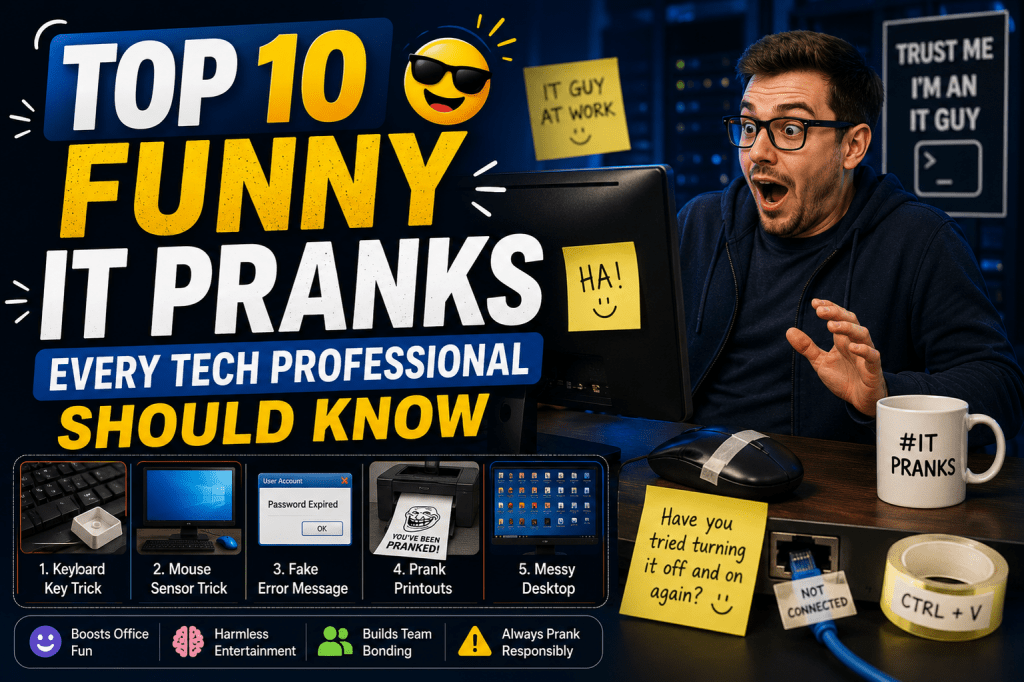
The IT industry is known for problem-solving, critical thinking, and long hours spent troubleshooting complex systems. Because of the stressful nature of technical work, many IT professionals develop a strong sense of humor to balance the pressure. Across offices, data centers, help desks, and networking departments, harmless pranks have become part of workplace culture. These practical jokes are usually lighthearted and designed to create laughter rather than frustration.
A well-executed IT prank often relies on technical knowledge, creativity, and perfect timing. Some pranks are simple enough for beginners, while others require deeper understanding of operating systems, peripherals, networking behavior, or office routines. The best ones create confusion for a few moments before everyone realizes they have been tricked.
In many organizations, these harmless jokes help teams bond. IT professionals often spend countless hours together during maintenance windows, server migrations, outages, and emergency troubleshooting sessions. Humor can reduce tension and improve teamwork. However, experienced professionals understand the importance of keeping pranks safe, respectful, and non-destructive. The goal is always laughter, never damage or embarrassment.
Among the many legendary office pranks shared within the tech community, several stand out because of their simplicity and effectiveness. These stories have circulated among IT teams for years and continue to inspire new generations of technical workers.
The Infamous Mouse That Refuses to Work
One of the oldest and most effective IT pranks involves something incredibly simple: a computer mouse. The prank works because people immediately assume the computer or operating system is malfunctioning when the cursor suddenly stops moving.
A small piece of clear tape placed over the optical sensor underneath the mouse completely prevents movement tracking. At first glance, the mouse appears perfectly normal. The victim begins moving it across the desk repeatedly, wondering why the cursor refuses to respond. What makes the prank especially funny is the escalating confusion that follows. Most people unplug and reconnect the mouse several times before noticing the tiny piece of tape.
In older offices, this prank became famous because support technicians would sometimes spend several minutes troubleshooting before discovering the cause. Some pranksters even elevated the joke further by switching mouse buttons in the operating system settings. A right-handed user suddenly finds left-click behaving like right-click, creating even more confusion.
The prank demonstrates an important truth about IT troubleshooting: people often assume complicated problems before checking the simplest explanation. Many experienced administrators even use this story as an example when training junior technicians about the importance of basic diagnostics.
The beauty of this prank lies in its harmless nature. No files are damaged, no settings are permanently changed, and the problem can be fixed within seconds. Yet the temporary confusion creates memorable reactions throughout the office.
When the Office Suddenly Goes Dark
Data centers and server rooms can be intimidating environments filled with expensive equipment, loud cooling systems, and blinking hardware. This atmosphere makes lighting pranks particularly effective. One famous example involves a technician replacing hardware while another coworker secretly switches off the room lights.
Imagine carefully inserting a critical drive into a server while concentrating intensely on avoiding mistakes. Suddenly, the entire room goes dark. For a brief moment, panic takes over. The technician may believe they caused a catastrophic electrical failure or accidentally shut down important systems.
The emotional roller coaster is what makes this prank legendary. The victim experiences shock, fear, and relief within seconds once the lights return. In many offices, stories like these become part of company folklore, retold for years during team lunches and late-night maintenance shifts.
Of course, experienced IT workers understand the importance of safety. Modern workplaces should avoid interfering with real electrical infrastructure or creating dangerous conditions. The humor comes from temporary confusion, not genuine risk.
This prank also reflects how stressful IT environments can become during critical tasks. Even skilled professionals sometimes fear making mistakes when working with sensitive systems. A harmless joke can remind everyone that occasional tension is normal and that humor helps maintain perspective.
The Unexpected Operating System Switch
Technology users often develop strong loyalty toward their preferred operating systems. Some people are passionate about certain ecosystems and dislike using alternatives. This emotional attachment makes operating system pranks extremely effective.
One memorable prank involved configuring a computer to boot into a completely different operating system than the user expected. Imagine a dedicated user turning on their familiar workstation only to discover an unfamiliar desktop environment loading instead. The confusion begins instantly.
For someone deeply comfortable with a particular interface, even small differences in menus, startup sounds, or icons feel disorienting. The victim may wonder whether the machine was hacked, reset, or somehow corrupted. The prank becomes even more entertaining when coworkers pretend nothing unusual has happened.
Part of the humor comes from watching how quickly users realize how dependent they are on familiar workflows. Many people instinctively move their cursor toward locations where buttons normally appear, only to discover the interface behaves differently.
This type of prank highlights how personal technology preferences can become. Operating systems are not merely tools for many users; they become part of daily routine and professional identity. Even temporary disruption creates surprisingly strong reactions.
The prank also serves as a reminder that adaptability is important in technology careers. IT professionals frequently work across multiple platforms, environments, and interfaces. Being flexible and maintaining a sense of humor helps reduce frustration when unexpected changes occur.
The Danger of Leaving Email Unlocked
Among IT workers, one unwritten rule exists almost everywhere: never leave your computer unlocked when walking away from your desk. Failing to lock a workstation invites coworkers to take advantage of the opportunity.
Email pranks have become legendary in offices because they exploit this exact mistake. A coworker steps away for coffee while their inbox remains open. Within moments, humorous messages begin appearing from their account. Some pranksters send harmless announcements declaring the victim is bringing donuts for the entire team. Others create bizarre meeting invitations or funny status updates.
The effectiveness of this prank depends on subtlety. The best fake emails are believable enough to confuse recipients briefly before everyone realizes something unusual is happening. Overly extreme messages ruin the joke because the victim immediately recognizes the prank.
Many workplaces eventually turn these incidents into security lessons. Locking a workstation protects sensitive information and prevents unauthorized access. In that sense, the prank indirectly reinforces good cybersecurity habits.
Some offices even develop traditions surrounding unlocked computers. Coworkers may compete to create the funniest harmless email whenever someone forgets proper security etiquette. Over time, employees learn quickly because nobody wants to become the next target.
The prank succeeds because it combines humor with a genuine workplace reminder. IT departments constantly emphasize account security, password protection, and responsible computer use. A funny incident often teaches the lesson more effectively than formal lectures.
The Upside-Down Screen Confusion
Few things create immediate confusion like a computer display suddenly appearing upside down. Many users encountering this situation believe the graphics driver has failed or the monitor itself is malfunctioning.
In reality, certain keyboard shortcuts can rotate the display orientation instantly. Unsuspecting users suddenly find their entire desktop inverted. The mouse moves in unexpected directions, text appears flipped, and basic navigation becomes strangely difficult.
What makes this prank so effective is how disorienting it feels. Even experienced computer users struggle temporarily because their brain expects everything to appear normally. Simple tasks become surprisingly challenging.
Coworkers watching nearby often struggle to contain laughter while the victim attempts to understand what happened. Some users even tilt their heads sideways while trying to navigate menus. Others restart the computer repeatedly, assuming the problem must be hardware-related.
The prank demonstrates how dependent people are on visual familiarity. Even though the system remains fully functional, changing screen orientation disrupts muscle memory and workflow. Small interface changes can dramatically affect user confidence.
Because the fix is usually simple, the joke remains harmless. Once the shortcut is reversed or display settings are corrected, everything returns to normal instantly. Yet the memory of temporary confusion often becomes a lasting office story.
IT teams especially appreciate this prank because it highlights how seemingly catastrophic technical problems sometimes have extremely simple solutions. Many troubleshooting scenarios follow the same pattern: users assume disaster while technicians identify a minor configuration issue.
The Mystery of Phantom Emails
Some IT pranks become legendary because they continue for weeks or even months before anyone discovers the source. Phantom email pranks fall into this category. Unlike quick jokes that last a few minutes, these pranks create ongoing office mysteries.
The concept is simple but brilliant. Someone creates an anonymous or hidden account capable of sending strange messages to coworkers periodically. The emails might contain cryptic jokes, odd observations, or humorous warnings signed by an invented persona.
As the messages continue appearing, curiosity spreads throughout the office. Employees begin speculating about the sender’s identity. Conversations emerge during lunch breaks as coworkers analyze clues and develop theories.
The prank evolves into a shared experience rather than a one-time joke. People start anticipating the next mysterious message. Some even reply in character, unknowingly contributing to the growing office mythology.
What makes this prank especially memorable is the storytelling element. The anonymous sender becomes a fictional character within the workplace. Over time, the prank transforms into entertainment that breaks routine and creates shared memories among team members.
Successful long-term pranks require creativity and restraint. The messages must remain funny without becoming disruptive or inappropriate. Skilled pranksters understand the importance of timing and moderation.
These stories often survive long after employees move on to different jobs. Years later, former coworkers still remember the mysterious emails and speculate about who orchestrated them. Few office jokes achieve that level of lasting impact.
Keyboard Chaos and Rearranged Keys
A keyboard represents familiarity and muscle memory. Most people rarely look directly at the keys while typing because years of practice train fingers automatically. That is precisely why keyboard-related pranks are so effective.
One classic joke involves rearranging a few keys on a coworker’s keyboard. The changes are usually subtle enough to avoid immediate detection. Swapping nearby letters creates confusion as typing suddenly produces unexpected results.
The victim initially blames themselves for making mistakes. Gradually, suspicion grows as repeated typing errors appear impossible to explain. Eventually, closer inspection reveals the altered keyboard layout.
The funniest versions involve changing only a handful of keys rather than completely rearranging the board. Small modifications maximize confusion while keeping the keyboard visually believable. Too many changes make the prank obvious immediately.
Some pranksters pair this trick with fake helpfulness, offering typing advice while secretly knowing the keyboard itself is responsible for the errors. The combination of confusion and mock assistance often creates hilarious office moments.
Keyboard pranks became especially popular because they require minimal effort yet produce strong reactions. However, experienced pranksters also understand the importance of caution. Modern keyboards can be fragile, and forcing keys incorrectly may damage hardware.
The prank highlights how much technology users rely on consistency. Tiny physical changes can disrupt tasks people normally perform automatically. Even skilled typists suddenly feel inexperienced when familiar patterns no longer work as expected.
Bubble Wrap Takeovers That Shock Entire Offices
One of the most creative workplace pranks in IT culture involves transforming a coworker’s desk into a wrapped masterpiece. Unlike quick digital tricks that last a few seconds, this prank requires planning, patience, and teamwork. The results, however, are unforgettable.
The concept is simple: cover everything on a coworker’s desk with cling wrap, aluminum foil, wrapping paper, or bubble wrap. Monitors, keyboards, mice, desk lamps, phones, chairs, notebooks, coffee mugs, and even tiny office supplies become carefully wrapped objects. Some pranksters go even further by individually wrapping every item before placing it back exactly where it belongs.
When the victim arrives at work, the sight alone creates instant laughter throughout the office. Imagine walking toward your desk only to discover it resembles a giant birthday present. Every object reflects light differently, crinkles when touched, and requires careful unwrapping before any work can begin.
Bubble wrap versions of the prank are especially entertaining because they add sound effects to the experience. Every movement produces popping noises that attract attention from nearby coworkers. The victim becomes the center of office entertainment while attempting to reclaim their workspace.
This prank became extremely popular among IT departments because technical workers often personalize their desks with gadgets, cables, accessories, and unusual devices. Wrapping all those items takes dedication and creates an impressive visual result.
The prank also encourages teamwork among pranksters themselves. Large wrapping operations often involve multiple coworkers staying late after work or arriving early in the morning to prepare the scene. The shared effort becomes part of the fun.
Despite the inconvenience, victims usually appreciate the creativity afterward because the prank avoids actual damage. Once everything is unwrapped, the workspace returns to normal. The biggest consequence is temporary annoyance mixed with laughter.
Experienced office pranksters sometimes add small surprises inside the wrapping. Hidden sticky notes, funny messages, or toy gadgets make the unwrapping process even more entertaining. Some people hide rubber ducks or tiny plastic dinosaurs throughout the desk for the victim to discover over several days.
The best versions remain respectful and avoid interfering with urgent responsibilities. Timing matters significantly. Launching a massive desk-wrapping prank during a stressful project deadline may not produce the desired humor. Skilled pranksters understand office dynamics and choose moments carefully.
This prank reflects an important aspect of IT culture: creativity. Technical professionals enjoy solving problems and building unusual solutions. Even harmless jokes often showcase impressive planning and execution skills.
The Legendary Frozen Desktop Screenshot Trick
Among all workplace technology pranks, few are as iconic as the desktop screenshot trick. IT professionals around the world consider it a classic because it perfectly combines simplicity, confusion, and harmless fun.
The prank begins by taking a screenshot of someone’s desktop exactly as it appears. After capturing the image, the prankster hides all real desktop icons and sets the screenshot as the wallpaper background. To the victim, everything appears completely normal at first glance.
The confusion starts the moment they try clicking an icon. Nothing happens.
The victim clicks again. Still nothing.
Soon frustration begins building as the computer appears unresponsive even though everything looks correct. People often double-click repeatedly, restart applications, or even blame the operating system before realizing the truth.
What makes this prank brilliant is the psychological effect. Humans trust visual information strongly. Since the desktop appears normal, users naturally assume the icons themselves should function. It takes time for the brain to recognize that the icons are actually part of a static image.
Mac and Windows systems both allow variations of this prank. Some pranksters hide the taskbar or dock to make the illusion even more convincing. Others include fake error messages or arrange windows strategically before taking the screenshot.
Advanced versions involve multiple monitors, carefully staged application windows, or fake system notifications. The more realistic the desktop appears, the longer the confusion lasts.
IT professionals especially enjoy this prank because it exposes how much users rely on interface assumptions. Even technically skilled people can fall for it momentarily because the brain expects visual consistency.
The prank also demonstrates how powerful perception can be in troubleshooting situations. Many real-world technical issues become harder to solve because users focus on appearances instead of underlying functionality.
Some offices elevate the joke by pretending to help troubleshoot the issue while secretly enjoying the victim’s growing confusion. Suggestions like “Try clicking harder” or “Maybe the computer is tired today” add to the humor.
Unlike destructive pranks, the screenshot trick causes no lasting problems. Restoring normal settings takes seconds. That balance between harmlessness and effectiveness explains why the prank remains popular after many years.
The Never-Ending Annoying Song Experiment
Music can dramatically influence workplace mood. A good playlist energizes teams and improves focus, while repetitive or irritating audio can slowly drive people insane. Clever IT pranksters discovered this psychological reality long ago.
One legendary office prank involves selecting an extremely catchy or annoying song and placing it on endless repeat through the office audio system. At first, coworkers may laugh or casually ignore it. But as the same tune continues playing repeatedly, reactions begin changing.
The prank works best with songs that become mentally exhausting after repeated exposure. Novelty songs, overly cheerful pop tracks, or repetitive jingles are common choices. The key is selecting something memorable enough to remain stuck in everyone’s head long after the music stops.
As time passes, office reactions become increasingly entertaining. Some employees start singing along unwillingly. Others attempt unsuccessfully to ignore the music while working. Eventually, frustration and laughter merge together into shared absurdity.
In offices with centralized sound systems, pranksters sometimes lock controls or hide access methods temporarily, forcing coworkers to endure additional repetitions before regaining control. The growing desperation creates much of the comedy.
This prank became particularly famous in IT environments because technical workers often spend long periods concentrating intensely. Repetitive distractions disrupt focus dramatically, making the prank highly noticeable without causing permanent harm.
The funniest moments usually occur when employees believe the song has finally stopped, only for it to begin again unexpectedly. Groans spread across the office while pranksters struggle not to laugh openly.
Interestingly, this prank reveals how shared suffering can unite teams humorously. Coworkers collectively reacting to the same ridiculous situation often creates memorable bonding experiences.
However, moderation remains essential. Experienced pranksters understand limits. A joke lasting too long may shift from funny to genuinely irritating. The goal is temporary absurdity, not real disruption.
Music-related pranks also showcase how environmental factors influence productivity and emotion. IT professionals frequently work in high-pressure conditions, so even silly moments of chaos can provide emotional release.
AutoCorrect Sabotage and Typing Confusion
Modern software includes countless automated features designed to improve efficiency. AutoCorrect systems silently replace misspelled words, fix capitalization, and predict intended text. While useful normally, these systems also create opportunities for harmless office pranks.
A classic trick involves changing AutoCorrect settings so common words transform into ridiculous alternatives. Imagine typing “hello” only to see it become “banana spaceship” automatically. Initially, the victim assumes accidental typing errors caused the strange text.
As more replacements occur, confusion grows rapidly.
Everyday sentences suddenly become absurd collections of random words. Professional emails appear nonsensical. Documents fill with bizarre phrases. The victim may begin questioning keyboard functionality, software stability, or even personal sanity.
What makes this prank particularly effective is subtlety. Small changes often produce stronger reactions than extreme ones. Replacing a manager’s name with a superhero title or changing ordinary technical terms into food names creates ongoing amusement without immediate detection.
Some pranksters target commonly used abbreviations or industry phrases. IT professionals relying heavily on technical vocabulary become especially vulnerable because they repeat specific terms constantly throughout the day.
The prank succeeds because AutoCorrect normally operates invisibly. Users trust it without thinking consciously about its behavior. When automation suddenly becomes unpredictable, people struggle to understand the source of the problem.
Advanced pranksters sometimes synchronize changes across multiple applications, making the issue appear system-wide. Others configure replacements that activate only occasionally, extending confusion longer.
Victims often attempt increasingly complicated troubleshooting steps before checking AutoCorrect settings themselves. Restarting programs, scanning for malware, and testing keyboards are common reactions.
This prank highlights an important lesson about automation dependence. Modern workers rely heavily on invisible software assistance. Small hidden configuration changes can create surprisingly large effects on productivity and communication.
Once discovered, the prank usually produces laughter because the solution proves simple. Restoring default settings resolves everything immediately. Yet the bizarre messages generated during the confusion often become memorable office stories.
Fake System Updates and Endless Loading Screens
Few things frustrate office workers more than unexpected system updates. Long installation processes, endless loading circles, and delayed restarts already create irritation naturally. IT pranksters recognized this and transformed ordinary update anxiety into comedy.
The prank involves creating fake update screens or simulated loading windows designed to look authentic. Victims arrive expecting to start work immediately but instead encounter what appears to be a major operating system update.
Some pranksters use full-screen images showing progress bars frozen at percentages like ninety-nine percent. Others create looping animations suggesting installation processes never finish. The victim waits impatiently while nothing actually happens.
The humor comes from realism. Modern operating systems frequently display update notifications and long installation messages, so people instinctively believe what they see. The victim may spend several minutes waiting politely before realizing something feels suspicious.
Advanced versions include fake technical warnings, simulated restart countdowns, or humorous update notes claiming ridiculous new features are being installed. Creative pranksters sometimes personalize messages using inside office jokes.
IT departments particularly appreciate this prank because update-related frustration is universally understood among technical workers. Everyone has experienced inconvenient software patches disrupting schedules unexpectedly.
The prank also reflects broader technology culture. Users often feel powerless during automated update processes because they cannot control timing or speed. Fake update screens exaggerate that helplessness humorously.
Some pranksters pair the visual effect with sound effects from old dial-up connections or exaggerated system alerts to increase realism further. Others deliberately make the fake updates appear slightly absurd, encouraging victims to question authenticity eventually.
Unlike malicious fake alerts designed to deceive permanently, harmless office versions focus entirely on temporary confusion and laughter. Once revealed, the prank becomes a shared joke about everyday technology frustrations.
This prank demonstrates how deeply technology influences workplace emotions. Simple visual elements like loading bars and spinning circles trigger immediate psychological responses because people associate them with lost productivity and waiting time.
The Wireless Mouse Invasion
Wireless technology introduced countless conveniences into modern offices, but it also created new prank opportunities. One of the funniest involves secretly connecting an additional wireless mouse receiver to someone’s computer.
The prankster waits nearby with a second mouse while the victim works normally. At random moments, the cursor begins moving mysteriously across the screen. Applications open unexpectedly. Text becomes highlighted without explanation.
Initially, victims usually suspect hardware problems. Perhaps the mouse sensor malfunctioned or the operating system froze temporarily. But as strange cursor movements continue, confusion quickly escalates.
The prank becomes especially entertaining when movements remain subtle. Aggressive cursor interference reveals the joke too quickly. Gentle unexpected movements create uncertainty and paranoia instead. The victim begins questioning whether they accidentally touched the mouse themselves.
Some pranksters coordinate movements carefully to mimic ghostly behavior. The cursor drifts slowly toward buttons without clicking them. Windows open slightly before stopping. Small actions maximize psychological confusion.
IT workers often appreciate the technical cleverness behind the prank because it exploits legitimate wireless functionality creatively. The computer itself behaves normally; the user simply does not realize another input device exists.
Victims sometimes restart computers repeatedly before discovering the hidden receiver. Others blame operating system bugs or failing drivers. Watching increasingly complicated troubleshooting attempts adds to the comedy.
This prank also reflects broader cybersecurity lessons about unauthorized device access. Even harmless jokes demonstrate how unnoticed hardware connections can influence systems unexpectedly.
The best versions remain controlled and temporary. Excessive interference could disrupt important work or create genuine frustration. Skilled pranksters understand pacing and timing, ensuring the humor outweighs inconvenience.
Once discovered, the hidden receiver usually becomes a trophy proudly displayed by the prankster while coworkers laugh about the confusion it caused.
Voice Assistant Chaos in the Workplace
Modern offices are filled with smart devices, voice assistants, and connected technology designed to make life easier. Ironically, those same conveniences have created entirely new categories of IT pranks. One of the funniest involves secretly activating voice assistants near unsuspecting coworkers.
Imagine someone deeply focused on writing documentation, troubleshooting servers, or attending an online meeting when suddenly a nearby smart speaker loudly responds to a command nobody intentionally gave. Music starts playing unexpectedly, alarms activate, weather reports begin speaking, or random trivia answers fill the room.
The prank becomes even funnier when coworkers intentionally say trigger phrases during conversations. A casual sentence suddenly wakes multiple smart devices across the office simultaneously. The room erupts into confusion as different assistants attempt to respond at the same time.
Some pranksters carefully rename devices with ridiculous names that appear during Bluetooth pairing or network discovery. Instead of seeing ordinary device names, employees discover strange labels appearing on screens and mobile phones throughout the day.
Voice assistants create ideal prank opportunities because they blur the line between intentional interaction and accidental activation. Victims often cannot determine whether technology malfunctioned or someone deliberately caused the disruption.
IT professionals particularly enjoy these pranks because they highlight the unpredictable nature of modern connected environments. Smart devices constantly listen for activation phrases, interpret speech differently, and occasionally misunderstand conversations in hilarious ways.
The best office versions remain harmless and brief. Short interruptions create laughter without genuinely interfering with meetings or productivity. Timing remains important, especially in shared workspaces.
Some legendary pranks involve changing assistant voices, accents, or languages temporarily. A familiar device suddenly responding in a completely different voice can surprise even experienced users. Others program funny reminders or scheduled announcements that activate unexpectedly later in the day.
These pranks also reveal how dependent workplaces have become on automation and connected technology. Devices once considered futuristic now blend invisibly into daily office routines. When those systems behave unexpectedly, even temporarily, people react immediately.
Many offices eventually develop unofficial rules regarding smart device pranks because the temptation becomes difficult to resist. Yet the shared humor often strengthens team relationships and creates memorable moments during stressful projects.
The Fake Cracked Screen Panic
Few sights trigger instant panic faster than a shattered computer monitor or broken smartphone display. IT professionals know how expensive damaged hardware can become, which makes fake cracked screen pranks incredibly effective.
The prank usually involves setting a realistic cracked-screen image as wallpaper or screensaver. From a distance, the display appears genuinely damaged. Victims often freeze in horror before moving closer for inspection.
What makes the prank so powerful is emotional immediacy. People instinctively react before thinking logically. The fear of expensive repairs, lost productivity, or damaged company equipment creates instant stress.
Some pranksters use high-resolution crack images that align perfectly with monitor edges, making the illusion extremely convincing. Others add fake glitch effects, distorted colors, or simulated dead pixels for additional realism.
The prank works especially well in environments where employees frequently transport laptops or work around crowded desks. Victims immediately begin mentally replaying recent events, trying to remember whether they dropped something accidentally.
Coworkers nearby often struggle to hide laughter while watching the victim inspect the display carefully. The moment of realization usually shifts instantly from panic to relief and embarrassment.
IT departments appreciate this prank because it exploits common technical anxieties without causing actual harm. Broken screens represent one of the most universally feared workplace accidents involving technology.
Some advanced pranksters synchronize the fake wallpaper with fake system error messages or unusual sound effects. Others use browser windows positioned strategically to enhance the illusion further.
The prank also reflects broader workplace realities. Technology equipment represents valuable investments, and employees often feel responsible for maintaining it properly. Even temporary fear about damage creates strong reactions.
Of course, skilled pranksters avoid using the joke repeatedly on highly anxious coworkers or during already stressful situations. Timing and audience awareness remain essential for maintaining humor rather than causing genuine distress.
Despite its simplicity, the fake cracked screen prank remains popular because it produces immediate emotional impact while remaining completely reversible.
The Endless Reboot Nightmare
Every IT professional understands the frustration of restarting a computer repeatedly while troubleshooting mysterious problems. That shared experience inspired one of the most infamous office pranks: the endless reboot illusion.
The prank usually begins with harmless scripting or carefully timed commands that simulate repeated system restarts. Just when the victim believes the computer has finally finished rebooting, another restart suddenly begins.
At first, the victim assumes routine updates or operating system maintenance caused the delay. But as additional reboots continue occurring unexpectedly, suspicion and confusion grow rapidly.
Some pranksters create fake update messages between reboots, suggesting increasingly absurd reasons for restarting. Others display humorous notifications claiming the system requires “additional optimization” or “enhanced recalibration.”
What makes the prank effective is realism. Modern operating systems genuinely restart multiple times during updates occasionally, so users initially trust the process. The repetition gradually transforms ordinary annoyance into comedic absurdity.
Coworkers observing nearby often enjoy watching the victim cycle through emotional stages: patience, irritation, confusion, disbelief, and eventual realization. The escalating reactions create much of the humor.
IT workers appreciate this prank because it exaggerates familiar experiences dramatically. Everyone in technology has encountered systems that seemed trapped in update loops or reboot cycles at inconvenient moments.
Advanced pranksters sometimes incorporate fake progress percentages that move painfully slowly or reset unexpectedly. Others add exaggerated startup sounds to increase theatrical effect.
The prank also highlights how much control users surrender during automated system processes. When computers decide to restart repeatedly, people often feel powerless to intervene effectively.
Successful versions remain temporary and carefully controlled. Genuine data loss or interrupted work would destroy the humor entirely. Skilled pranksters ensure the illusion can end instantly without affecting real functionality.
The endless reboot prank became legendary partly because it transforms an already frustrating real-world experience into exaggerated comedy. By amplifying common technical annoyances, pranksters create situations everyone in IT immediately understands.
The Mysterious Missing Cursor Trick
Computer users rely heavily on visual cues, especially the mouse cursor. Without realizing it consciously, people track cursor movement constantly while navigating applications and operating systems. That dependency inspired one of the sneakiest IT pranks ever created.
The prank involves changing cursor settings so the pointer becomes nearly invisible. Sometimes pranksters select transparent cursor themes. Other times they shrink the cursor dramatically or alter colors to blend into the background.
At first, victims assume the cursor simply disappeared temporarily. They move the mouse repeatedly, expecting it to reappear. As confusion grows, troubleshooting begins.
People close applications, restart programs, reconnect mice, and adjust monitors while searching desperately for the missing pointer. Some wave the mouse wildly across the desk hoping to locate movement accidentally.
What makes this prank especially entertaining is how helpless users suddenly feel without a visible cursor. Even experienced technical professionals struggle surprisingly hard once basic visual guidance disappears.
Some pranksters combine the trick with additional subtle changes like reduced cursor speed or altered click sensitivity. Small adjustments create even greater confusion while preserving system functionality.
The prank works because cursor visibility normally feels automatic and permanent. Most users never think consciously about cursor settings until something changes unexpectedly.
IT teams often laugh particularly hard at this prank because troubleshooting invisible issues represents a major part of technical work. Administrators regularly diagnose hidden configuration problems, making the prank feel strangely familiar.
Advanced versions involve animated cursors replaced with unusual objects like bananas, tiny dinosaurs, or miniature spaceships. Victims attempting serious work suddenly discover ridiculous graphics following their movements everywhere.
Despite its simplicity, the prank remains highly effective because it disrupts one of the most fundamental aspects of computer interaction. Tiny visual changes produce disproportionately large psychological effects.
As always, moderation matters. Extended interference with usability quickly stops being funny. The best pranks create temporary confusion followed by immediate relief once the secret becomes obvious.
Bluetooth Speaker Ambushes
Portable Bluetooth speakers transformed office audio pranks completely. Small wireless speakers hidden strategically around workspaces allow pranksters to create mysterious sounds that confuse entire teams simultaneously.
The prank begins by concealing a speaker beneath desks, inside cabinets, behind monitors, or near conference rooms. At random intervals, strange sounds begin playing quietly through the office.
Sometimes pranksters use faint notification sounds identical to common operating system alerts. Employees hear the noise repeatedly but cannot determine which computer produced it. Confusion spreads as everyone checks devices unsuccessfully.
Other versions involve subtle animal noises, distant laughter, keyboard sounds, or random voice clips. The quieter and less obvious the sound, the more effective the prank becomes. People begin questioning whether they imagined hearing something at all.
As the mysterious noises continue throughout the day, paranoia grows hilariously. Coworkers inspect equipment, search drawers, and debate possible explanations while the hidden speaker remains undiscovered.
The prank succeeds because modern offices already contain countless electronic sounds. Distinguishing real notifications from fake ones becomes surprisingly difficult.
Some legendary versions lasted for days before anyone discovered the hidden speaker location. Entire teams participated unknowingly in the investigation, turning the prank into an office-wide mystery.
IT professionals enjoy these pranks because they exploit environmental familiarity creatively. Technical workers constantly hear alerts, startup tones, incoming messages, and system sounds during daily routines. Subtle audio disruptions blend naturally into that environment.
Advanced pranksters synchronize sounds with specific events. For example, mysterious error noises might occur whenever someone prints documents or enters meeting rooms. Carefully timed effects increase realism dramatically.
The prank also demonstrates how sensitive humans become to unexplained sensory input. Repeated unidentified sounds create distraction far beyond their actual volume or importance.
However, experienced pranksters avoid excessively loud or disruptive audio. The goal remains lighthearted confusion, not workplace chaos. Subtlety usually produces stronger reactions anyway.
Eventually, discovering the hidden speaker becomes a moment of celebration for the entire office. Coworkers laugh together about the investigation while pranksters finally reveal themselves proudly.
The Fake Hacker Scare
Few things grab an IT professional’s attention faster than signs of a potential security breach. That urgency inspired one of the boldest workplace pranks: the fake hacker simulation.
This prank involves creating harmless fake terminal windows, simulated command prompts, or scripted screens designed to look like unauthorized hacking activity. Victims walking past a workstation suddenly see mysterious code scrolling rapidly across the display.
Messages may include phrases like “Access Granted,” “Decrypting Files,” or “Connecting to Remote Server.” The victim’s immediate reaction is usually panic mixed with confusion.
Coworkers nearby often join the act, pretending concern while secretly enjoying the unfolding chaos. The victim may rush toward the keyboard attempting to stop the supposed intrusion before realizing something feels suspicious.
The prank works especially well because cybersecurity threats represent genuine workplace fears. IT professionals train constantly to identify unusual system behavior, making realistic simulations psychologically effective.
Some pranksters enhance realism using harmless scripts that imitate movie-style hacking visuals with green text, rapid scrolling commands, and fake network activity. Others incorporate humorous details hidden within the code for observant viewers.
The funniest versions balance realism with absurdity carefully. Too realistic, and the prank risks causing genuine alarm. Too exaggerated, and victims recognize the joke immediately.
IT teams often appreciate this prank because it playfully references common Hollywood misconceptions about hacking. Real cybersecurity incidents rarely resemble dramatic movie scenes filled with rapidly scrolling code.
The prank also highlights how visual presentation influences emotional response. Even harmless text displayed convincingly can trigger strong reactions because people associate certain visuals with danger.
Experienced pranksters understand the importance of boundaries. Security-related jokes should never interfere with actual monitoring systems, create false reports, or disrupt operations. Responsible humor remains essential.
Once revealed, the prank usually produces laughter and relief simultaneously. Victims often admit the fake intrusion looked surprisingly believable, which only increases the prankster’s reputation within the office.
These stories persist because they combine technical creativity with universal workplace anxieties in ways only IT culture truly understands.
The Locked Keyboard Surprise
One of the simplest yet funniest IT pranks involves locking a coworker’s keyboard without them realizing it. Many keyboards have shortcut combinations or function keys that temporarily disable typing input. The prank works because everything on the computer appears normal except the keyboard suddenly refuses to respond.
The victim usually begins pressing keys harder while wondering why nothing is typing on the screen. Some people unplug and reconnect the keyboard repeatedly, believing the hardware has failed. Others restart applications or even reboot the entire system before discovering the issue.
What makes this prank entertaining is the confusion created by such a small change. The monitor works perfectly, the mouse responds normally, and programs continue functioning, yet typing becomes impossible. Watching someone troubleshoot a problem caused by a single shortcut often creates laughter across the office.
Experienced pranksters keep this joke brief because the humor comes from temporary confusion rather than prolonged frustration. Once the keyboard is unlocked, everything immediately returns to normal.
The Tiny Desktop Icons Disaster
Another classic office prank involves changing desktop icon sizes to extremely small dimensions. At first glance, the desktop appears almost empty because the icons become nearly impossible to see.
Victims often believe important files disappeared or that their operating system reset unexpectedly. They search folders frantically, check recycle bins, and panic briefly before noticing the miniature icons hiding on the screen.
Some pranksters combine this trick with rearranged taskbars or hidden shortcuts for additional confusion. The desktop suddenly feels unfamiliar even though nothing important actually changed.
This prank became popular because it demonstrates how small interface adjustments can completely alter user perception. Tiny visual changes often create surprisingly large reactions.
The Fake Frozen Computer Trick
One legendary prank involves pretending a computer completely froze while actually functioning normally. A prankster may place a sticky note beneath the optical mouse sensor or disconnect a wireless receiver briefly. The victim moves the mouse repeatedly while the cursor remains motionless.
Coworkers nearby usually pretend to investigate seriously, offering exaggerated troubleshooting advice while secretly enjoying the confusion. The victim may begin worrying about operating system crashes, hardware failures, or lost work.
The prank works because users naturally assume the worst when technology stops responding unexpectedly. Even experienced professionals sometimes overlook extremely simple explanations during stressful moments.
Once discovered, the prank usually produces immediate laughter because the solution turns out to be embarrassingly simple.
Why IT Pranks Remain Popular in Tech Culture
Harmless office pranks have remained part of IT culture for decades because they help balance the stress of technical work. System outages, tight deadlines, overnight maintenance, cybersecurity threats, and constant troubleshooting can create intense pressure within technology environments. Humor provides relief and strengthens team relationships.
The best IT pranks share several important qualities. They are temporary, non-destructive, respectful, and designed to create laughter rather than embarrassment. Skilled pranksters understand boundaries and avoid interfering with critical work or causing genuine problems.
Many legendary office stories survive for years because they become shared memories among coworkers. Teams often remember funny prank incidents long after projects, meetings, and technical challenges fade away. These moments create stronger workplace connections and remind people not to take every situation too seriously.
IT professionals especially appreciate clever pranks because they often involve creativity, technical knowledge, and psychological insight. Simple tricks exploiting everyday technology habits can create unforgettable reactions without causing harm.
In the end, the popularity of IT pranks comes down to one important truth: technology may power the workplace, but humor keeps the people behind it connected.
Conclusion
IT pranks have become a memorable part of workplace culture because they bring humor into environments that are often fast-paced and stressful. From frozen desktop tricks and upside-down screens to hidden speakers and fake system errors, these harmless jokes showcase the creativity and technical knowledge of IT professionals. While the pranks themselves may only last a few minutes, the laughter and stories they create can stay with teams for years.
The best office pranks are always lighthearted, respectful, and non-destructive. Their purpose is not to embarrass coworkers or interrupt important work, but to create moments of fun that help people relax and connect with one another. In many IT departments, shared humor strengthens teamwork, improves morale, and helps coworkers handle pressure more effectively.
Technology professionals spend countless hours solving serious problems, maintaining systems, and responding to urgent issues. A well-timed harmless prank can provide a welcome break from routine responsibilities and remind everyone that enjoying the workplace matters too. As long as boundaries are respected and the focus stays on good-natured fun, IT pranks will continue to be an entertaining tradition within the tech world for years to come.