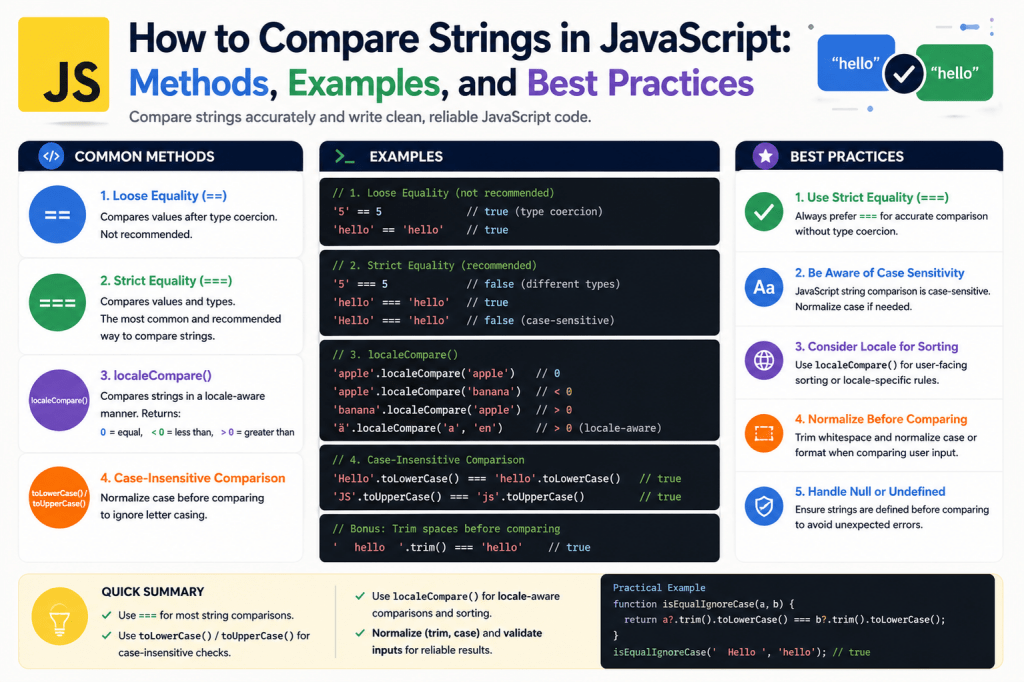
JavaScript is one of the most widely used programming languages for web development, and strings play a major role in almost every application. Whether developers are building login systems, search functions, chat applications, form validations, or content filters, comparing strings is an essential part of the process. Even though comparing text may appear simple at first glance, JavaScript handles strings in a very strict and literal way. Because of this behavior, developers need to understand how string comparison works internally to avoid unexpected results and bugs in applications.
Humans naturally understand meaning, context, punctuation, and capitalization. People can easily identify that two sentences may carry the same meaning even if the formatting differs slightly. JavaScript, however, does not interpret meaning. It compares exact character values one by one. A tiny difference such as an extra space, a comma, or a capital letter can completely change the comparison result. Understanding these rules is important for writing accurate and reliable JavaScript code.
Introduction to Strings in JavaScript
A string in JavaScript is a sequence of characters used to represent text. Strings are placed inside quotation marks and can contain letters, numbers, symbols, punctuation marks, and spaces. Developers use strings in countless scenarios, including usernames, passwords, messages, search queries, URLs, and API responses.
JavaScript supports three different ways to create strings. Single quotes, double quotes, and template literals can all be used depending on the situation. Regardless of the syntax style, JavaScript treats all strings as ordered collections of characters.
For example, a word like “JavaScript” is stored as a sequence of individual characters. Every character has a specific position within the string, starting from zero. This indexing system allows developers to access characters directly using bracket notation.
Strings are immutable in JavaScript. This means that once a string is created, its original value cannot be changed directly. Whenever developers perform operations such as converting text to uppercase or replacing characters, JavaScript creates a new string instead of modifying the original one.
This immutability is one of the reasons string comparison behaves consistently. Since strings cannot change unexpectedly, JavaScript can compare them safely and predictably.
Why String Comparison Matters in JavaScript
String comparison is one of the most common operations in programming. Developers constantly need to check whether two pieces of text are equal, similar, or ordered alphabetically. Without proper comparison methods, applications may fail to validate user input correctly or produce inaccurate search results.
Consider a login form where a user enters a username. If the system compares strings incorrectly, users may not be able to log in simply because they typed uppercase letters instead of lowercase ones. Similarly, search engines often ignore punctuation and capitalization when comparing search terms with stored data. Achieving this flexibility requires proper string comparison techniques.
Another common example appears in form validation systems. A registration form may ask users to confirm their email address by typing it twice. The application must compare both values accurately to ensure they match before submitting the form.
Sorting algorithms also rely heavily on string comparison. Whenever names, products, or categories are displayed alphabetically, JavaScript compares strings behind the scenes to determine their order.
Because strings are involved in nearly every user interaction, mastering comparison methods is an important skill for developers.
How JavaScript Stores Strings Internally
To understand string comparison deeply, it helps to know how JavaScript stores strings internally. Every character inside a string corresponds to a numerical Unicode value. Unicode is a universal encoding standard that assigns a numeric value to every character across different languages and symbols.
For example, uppercase and lowercase letters have different Unicode values. The letter “A” has a different numeric representation than “a”. Because of this distinction, JavaScript treats them as completely different characters during comparisons.
When JavaScript compares two strings, it evaluates characters one at a time from left to right. If it encounters different Unicode values at any position, the comparison result changes immediately.
This internal comparison mechanism explains why capitalization affects equality checks. Even though humans recognize “hello” and “Hello” as similar words, JavaScript sees them as different because the first characters have different Unicode values.
Understanding Unicode behavior is essential because it directly impacts sorting, searching, filtering, and text matching operations.
Using the Equality Operator for String Comparison
The simplest way to compare strings in JavaScript is by using the equality operator. Developers commonly use === to check whether two strings contain identical characters in the exact same order.
When JavaScript evaluates string equality, it checks every character carefully. If even one character differs, the comparison returns false.
For example, the strings “apple” and “apple” are equal because every character matches perfectly. However, “apple” and “Apple” are not equal because the first letters have different capitalization.
The strict equality operator is preferred over loose equality because it avoids automatic type conversion. Strict comparison ensures that both values are strings and contain identical content.
This method works well when exact matching is required, such as password validation or token verification. However, strict equality becomes problematic when developers want more flexible comparisons.
Real-world user input often contains accidental capitalization differences, trailing spaces, or punctuation marks. Relying solely on strict equality may lead to poor user experiences.
Case Sensitivity in JavaScript String Comparison
Case sensitivity is one of the biggest challenges developers face while comparing strings. JavaScript distinguishes between uppercase and lowercase letters because they have different Unicode values.
This means that words such as “JavaScript” and “javascript” are treated as separate strings. Even though the textual meaning remains the same, JavaScript considers them unequal.
Case sensitivity affects many applications. Search engines, login systems, and filtering tools often need to ignore capitalization differences to provide better usability.
Developers commonly solve this issue by converting both strings to the same case before comparing them. The most common approach is converting everything to lowercase using the .toLowerCase() method.
By transforming both values into lowercase versions, developers can ensure consistent comparisons regardless of how users type their input.
Similarly, .toUpperCase() can also be used to normalize strings before comparison. Both methods achieve the same goal, though lowercase conversion is generally more common in modern applications.
Case normalization is especially important when handling international users because people may use different capitalization styles across languages and devices.
Whitespace and Hidden Character Problems
Whitespace characters create another major challenge during string comparison. Extra spaces before, after, or between words can cause equality checks to fail unexpectedly.
Humans often ignore accidental spaces while reading text. JavaScript, however, treats every space as a valid character. This means that “hello” and “hello “ are considered completely different strings.
Leading and trailing spaces commonly appear in user input fields. Users may accidentally press the spacebar before submitting forms, causing validation issues if whitespace is not handled properly.
Developers frequently use the .trim() method to remove unnecessary spaces from the beginning and end of strings before comparison.
Internal spaces can also create inconsistencies. For example, “Java Script” differs from “JavaScript” because the first string contains an additional space character.
Hidden characters such as tabs and line breaks can introduce even more complexity. These invisible characters may appear when copying and pasting content from external sources.
Proper preprocessing is important before comparing strings in production applications. Cleaning whitespace improves accuracy and reduces unexpected behavior.
Comparing Strings Alphabetically in JavaScript
JavaScript can also compare strings alphabetically using relational operators such as greater than and less than. These comparisons rely on Unicode values rather than dictionary meanings.
For example, JavaScript determines whether one string comes before or after another based on character codes. The comparison begins from the first character and continues sequentially until a difference is found.
Alphabetical comparison is useful for sorting arrays of names, products, or categories. Whenever developers call sorting methods on arrays containing strings, JavaScript internally compares character values to determine order.
However, Unicode-based sorting may produce results that appear unusual to humans. Uppercase letters often appear before lowercase letters because of their Unicode positions.
International characters can also create sorting inconsistencies. Languages with accented characters or unique alphabets may not sort correctly using simple relational operators.
Because of these limitations, developers often rely on specialized comparison methods designed for localization and language-aware sorting.
Understanding Locale-Aware String Comparison
Locale-aware comparison is an advanced technique that helps JavaScript compare strings according to language-specific rules. Different languages have unique sorting conventions, accent handling, and capitalization rules.
JavaScript provides the .localeCompare() method for this purpose. This method compares strings while considering regional language settings.
Unlike strict equality checks, locale-aware comparison can ignore certain differences such as capitalization depending on configuration options.
This approach is especially useful in multilingual applications where alphabetical order varies across cultures. For example, accented characters may be treated differently in English, French, German, or Spanish.
The .localeCompare() method returns numeric values indicating whether strings are equal, greater, or smaller. Developers can use these values for sorting algorithms and comparison logic.
Locale-aware comparison improves user experiences significantly because it aligns application behavior with human linguistic expectations.
Handling Punctuation During String Comparison
Punctuation marks can dramatically affect string comparison results. JavaScript treats commas, periods, apostrophes, question marks, and other symbols as regular characters.
This means that sentences differing only by punctuation are considered unequal. For example, “Hello world” and “Hello, world” are not identical because the second string contains a comma.
In many applications, punctuation differences should be ignored. Search engines and chat systems often focus on textual meaning rather than exact punctuation placement.
Developers typically remove punctuation before comparison using string replacement methods or regular expressions. By cleaning unnecessary symbols, comparisons become more flexible and user-friendly.
However, punctuation removal should be used carefully. In some situations, punctuation changes meaning significantly. Financial systems, coding platforms, and legal applications may require precise punctuation matching.
Understanding when to ignore punctuation and when to preserve it is an important design decision in software development.
Using String Methods for Better Comparisons
JavaScript includes many built-in string methods that simplify comparison tasks. These methods help developers normalize and process text before performing equality checks.
Methods such as .toLowerCase(), .toUpperCase(), .trim(), and .replace() are commonly combined to clean and standardize strings.
Normalization ensures that formatting differences do not affect comparison outcomes unnecessarily. This preprocessing step is especially important for user-generated content.
Developers often chain multiple methods together for efficient text preparation. For example, a string may first be trimmed, converted to lowercase, and stripped of punctuation before comparison occurs.
Modern JavaScript applications rely heavily on preprocessing because real-world text input is unpredictable. Users may type inconsistent capitalization, extra spaces, or special symbols.
String methods provide developers with flexible tools for handling these variations while maintaining accurate comparison logic.
The Difference Between Human Language and Machine Logic
One of the most fascinating aspects of string comparison is the gap between human understanding and machine interpretation. Humans naturally recognize meaning even when formatting changes. Machines, however, operate purely on exact instructions.
A person reading two slightly different sentences can easily determine whether they communicate the same idea. JavaScript lacks this contextual understanding unless developers explicitly program comparison rules.
Because of this limitation, developers must carefully define how flexible or strict comparisons should be. Applications handling natural language often require extensive preprocessing and normalization.
This challenge becomes even greater in systems involving multiple languages, emojis, slang, abbreviations, or user-generated content. Human language is naturally messy, while programming languages demand precision.
String comparison techniques bridge the gap between these two worlds by helping JavaScript process text in ways that feel more natural to users.
Advanced Techniques for Comparing Strings in JavaScript
String comparison in JavaScript becomes more interesting when developers move beyond simple equality checks. Real-world applications often require flexible comparison logic that can handle user mistakes, formatting inconsistencies, localization differences, and complex search behavior. While basic operators work for exact matches, advanced techniques allow developers to build smarter and more reliable systems.
Modern applications process huge amounts of textual data every second. Search engines compare keywords with millions of records, messaging platforms analyze conversations instantly, and authentication systems validate user credentials continuously. Because text is everywhere in software development, understanding advanced comparison methods is essential for creating high-quality applications.
Comparing Strings with Different Capitalization Styles
Capitalization differences are among the most common reasons string comparisons fail. Users frequently type words in uppercase, lowercase, or mixed case depending on their habits, keyboards, or devices. JavaScript treats every capitalization variation as a separate value because character codes differ internally.
For example, the words “developer”, “Developer”, and “DEVELOPER” all represent the same concept to humans. JavaScript, however, sees three completely different strings. This strict behavior can create problems in search systems, login forms, and filtering functions.
To solve this issue, developers usually normalize capitalization before comparison. Converting all text to lowercase ensures that comparison results remain consistent regardless of user input style.
This normalization process is widely used in web applications. Search bars often ignore capitalization so users can find information quickly without worrying about typing exact letter cases. Email validation systems also rely heavily on lowercase conversion because users may type addresses inconsistently.
Capitalization normalization improves usability and creates smoother interactions for users across different devices and languages.
Understanding Unicode and Character Encoding
Unicode plays a major role in how JavaScript compares strings. Every character in a string has a unique Unicode value assigned to it. These numeric codes determine how characters are stored, displayed, and compared internally.
Basic English letters occupy only a small portion of the Unicode system. Unicode also supports accented characters, symbols, emojis, mathematical signs, and thousands of characters from languages around the world.
Because Unicode values differ, visually similar characters may not compare equally. For example, accented letters such as “é” and regular letters such as “e” have different Unicode representations. JavaScript treats them as separate characters during comparison.
This distinction becomes important in international applications. Multilingual systems must handle language-specific rules carefully to ensure accurate comparisons.
Unicode normalization helps standardize character representations. Without normalization, identical-looking strings may produce unequal results because their internal encoding differs.
Developers working with global audiences must understand Unicode behavior to avoid inconsistencies in search, sorting, and validation systems.
Working with Locale-Sensitive Comparisons
Language differences introduce another level of complexity into string comparison. Alphabetical order varies between regions and cultures, meaning that standard Unicode comparisons may not always produce natural results.
JavaScript addresses this issue through locale-sensitive comparison methods. These methods compare strings according to language-specific conventions instead of relying solely on raw Unicode values.
Locale-sensitive comparison is especially useful when sorting names, cities, or products for international audiences. Certain characters may appear in different positions depending on regional language rules.
For example, accented characters may be treated as separate letters in some languages while being considered variations of existing letters in others. Locale-aware methods account for these cultural differences automatically.
This approach creates a more natural user experience because sorted lists appear according to local linguistic expectations rather than technical encoding order.
Applications designed for global users often rely heavily on locale-sensitive comparison to maintain consistency and professionalism.
Removing Unwanted Characters Before Comparison
User-generated content often contains unnecessary characters that interfere with accurate comparisons. Extra punctuation, tabs, spaces, line breaks, and symbols can cause strings to appear different even when their meaning is identical.
Cleaning text before comparison is therefore a common practice in JavaScript development. Developers frequently preprocess strings to remove unwanted formatting and improve matching accuracy.
Whitespace is one of the biggest challenges. Users may accidentally insert extra spaces while typing. Hidden line breaks copied from documents can also create unexpected comparison failures.
Punctuation marks create additional complications. Search systems usually ignore commas, periods, apostrophes, and question marks because users rarely type them consistently.
Developers often build sanitization functions that remove unnecessary characters automatically before comparison occurs. This process makes applications more forgiving and user-friendly.
Careful text cleaning also improves data consistency within databases, reducing duplicate records caused by formatting differences.
Using Regular Expressions for Flexible Comparisons
Regular expressions provide one of the most powerful tools for handling complex string comparison tasks. They allow developers to search, match, replace, and validate text patterns efficiently.
Instead of removing characters manually one by one, regular expressions can target entire categories of symbols in a single operation. This makes preprocessing faster and more scalable.
For example, developers can remove all punctuation marks, spaces, or special symbols simultaneously using pattern matching rules. This approach greatly simplifies text normalization.
Regular expressions are especially useful in applications involving large datasets or unpredictable user input. Search engines, text editors, and validation systems rely heavily on pattern matching to process content efficiently.
However, regular expressions require careful design. Poorly written patterns may unintentionally remove important characters or create performance issues.
Despite their complexity, regular expressions remain one of the most valuable tools for advanced string handling in JavaScript.
Comparing Partial Strings in JavaScript
Exact equality checks are not always necessary. Many applications need to determine whether one string contains another string partially.
Search bars are a perfect example. Users often type incomplete phrases while expecting relevant results immediately. Applications therefore need partial comparison methods instead of strict equality checks.
JavaScript provides several built-in methods for partial matching. These methods allow developers to check whether strings start with, end with, or include specific sequences of characters.
Partial comparison improves usability significantly. Autocomplete systems, live search suggestions, and filtering interfaces all depend on partial matching behavior.
For instance, an online store may display products dynamically as users type search keywords. The system compares partial text continuously to generate matching suggestions instantly.
Partial string comparison creates more interactive and responsive user experiences across modern applications.
Handling User Input Safely During Comparisons
User input should never be trusted blindly. Before comparing strings, developers must ensure that input data is clean, safe, and properly formatted.
Unexpected characters, malicious scripts, or invalid data can interfere with application logic. Secure preprocessing helps prevent vulnerabilities and improves reliability.
Trimming whitespace is often the first step in handling user input safely. Developers may also remove unsupported symbols or convert text into standardized formats before comparison occurs.
Input sanitization becomes especially important in authentication systems. Login credentials must be processed carefully to avoid accidental mismatches or security flaws.
Search systems also require proper sanitization to prevent inconsistent results caused by hidden formatting characters.
Careful input handling improves both application security and overall user experience.
The Importance of Normalization in String Comparison
Normalization refers to the process of transforming strings into a consistent format before comparison. This process helps eliminate variations caused by capitalization, spacing, punctuation, or encoding differences.
Without normalization, applications become fragile and difficult to use. Small formatting inconsistencies may cause search failures, duplicate records, or incorrect validation results.
Normalization is commonly applied in database systems, search engines, content management platforms, and messaging applications.
Developers often create reusable normalization functions that standardize text automatically. These functions may include multiple preprocessing steps combined together.
For example, a normalization function might trim whitespace, convert text to lowercase, remove punctuation, and normalize Unicode characters simultaneously.
This standardized approach ensures that comparisons behave predictably across the entire application.
Sorting Arrays of Strings Efficiently
String comparison is closely connected to sorting operations. Whenever arrays containing text values are sorted, JavaScript performs repeated string comparisons internally.
Sorting names alphabetically may seem simple, but it introduces many hidden complexities. Capitalization differences, accented characters, and language-specific ordering rules can affect results significantly.
JavaScript provides built-in sorting methods that compare strings automatically. However, default sorting behavior may not always match human expectations.
Locale-aware sorting improves accuracy by considering regional language conventions. This approach produces more natural alphabetical ordering for international users.
Efficient sorting is particularly important in applications handling large datasets. Poor sorting logic can negatively impact performance and user experience.
Optimized comparison methods help maintain fast and accurate sorting even when processing thousands of records simultaneously.
Comparing Strings in Search Engines
Search functionality depends heavily on advanced string comparison techniques. Modern search engines rarely rely on exact matching alone because users often make spelling mistakes, capitalization errors, or punctuation inconsistencies.
Instead, search systems preprocess both search queries and stored content before comparison. This normalization process allows flexible matching and improves search accuracy.
Many search engines also implement fuzzy matching techniques. These methods identify similar strings even when characters differ slightly.
For example, a search system may still recognize intended keywords despite missing letters or typographical errors. This flexibility creates a more forgiving user experience.
Autocomplete suggestions, spell correction, and synonym recognition all rely on sophisticated string comparison algorithms behind the scenes.
Advanced comparison logic transforms simple keyword searches into intelligent and responsive search experiences.
Performance Considerations in String Comparison
Performance becomes increasingly important when comparing large numbers of strings. Small applications may handle comparisons instantly, but enterprise systems processing millions of records require optimized algorithms.
Repeated normalization operations can become expensive if performed unnecessarily. Developers often preprocess data once instead of repeating transformations during every comparison.
Efficient memory usage also matters because strings are immutable in JavaScript. Every modification creates a new string object, potentially increasing memory consumption.
Large-scale applications therefore need carefully designed comparison workflows that balance flexibility with performance.
Caching normalized values can significantly improve efficiency in systems involving repeated comparisons. Database indexing strategies may also optimize search performance.
Understanding performance considerations helps developers build scalable applications capable of handling high volumes of textual data smoothly.
Challenges of Comparing Human Language Programmatically
Human language is incredibly complex. Slang, abbreviations, emojis, accents, punctuation, and cultural differences all affect how text should be interpreted.
JavaScript itself does not understand meaning. It simply compares characters according to defined rules. Developers must therefore build additional logic to simulate more natural language behavior.
This challenge becomes even greater in applications involving artificial intelligence, translation systems, or social media analysis.
Natural language processing technologies attempt to bridge this gap by analyzing context and semantics rather than relying solely on direct character comparison.
Even with advanced algorithms, perfectly understanding human language remains difficult because communication is inherently flexible and ambiguous.
String comparison techniques represent the foundation upon which more sophisticated language-processing systems are built.
Building Reliable Applications with Proper String Comparison
Reliable applications depend on accurate text handling. Poor comparison logic can create frustrating user experiences, inconsistent search results, and validation errors.
Developers must carefully choose comparison strategies based on application requirements. Some situations require strict equality, while others demand flexible normalization and fuzzy matching.
Understanding the strengths and limitations of each comparison technique allows developers to build systems that behave predictably under real-world conditions.
From login forms and search engines to multilingual platforms and messaging applications, string comparison affects nearly every aspect of modern software development.
Mastering these techniques helps developers create applications that feel intuitive, responsive, and user-friendly while maintaining technical accuracy behind the scenes.
Deep Dive Into JavaScript String Comparison Methods
String comparison in JavaScript becomes more advanced when developers start working with large applications, dynamic user input, multilingual systems, and real-time data processing. While basic comparison techniques solve simple problems, professional software development often requires much deeper control over how text is analyzed and matched.
Applications today process enormous amounts of text every second. Social media platforms compare comments instantly, eCommerce websites analyze search queries continuously, and communication systems process messages in real time. Because of this constant flow of textual data, developers need efficient and reliable ways to compare strings under many different conditions.
Understanding advanced string comparison concepts helps developers build systems that are accurate, scalable, and easier for users to interact with naturally.
Why Exact String Matching Is Not Always Enough
Exact string matching works well when developers expect perfectly formatted input. However, real-world data is rarely perfect. Users make spelling mistakes, insert unnecessary spaces, forget punctuation, and use inconsistent capitalization.
For example, someone searching for “javascript tutorial” may type “JavaScript Tutorial”, “javascript-tutorial”, or ” java script tutorial “. Humans can easily recognize that these phrases refer to the same topic, but JavaScript sees them as different values unless preprocessing occurs.
This limitation creates major usability problems in applications that depend solely on strict equality checks. Search systems may fail to return relevant results, form validation may reject acceptable input, and duplicate records may appear inside databases.
Developers solve these issues by implementing normalization strategies and flexible comparison logic. Instead of checking raw strings directly, applications clean and standardize text before comparison begins.
This preprocessing stage is one of the most important parts of professional string handling in JavaScript.
Understanding Lexicographical String Comparison
JavaScript compares strings lexicographically when using relational operators. Lexicographical comparison means that characters are evaluated sequentially according to their Unicode values.
The comparison starts from the first character in both strings. If the characters differ, JavaScript determines which string is greater or smaller immediately. If they match, comparison continues with the next character.
For example, “apple” comes before “banana” because the Unicode value of “a” is smaller than “b”. However, uppercase letters behave differently because their Unicode values are separate from lowercase letters.
This behavior explains why sorting results sometimes appear unusual. Uppercase words may appear before lowercase words even if humans expect a different order.
Lexicographical comparison forms the foundation of sorting algorithms, filtering systems, and many search operations within JavaScript applications.
Understanding how this process works internally helps developers predict comparison behavior more accurately.
The Impact of Capital Letters on Sorting Results
Capitalization significantly affects sorting behavior in JavaScript. Since uppercase and lowercase letters have different Unicode values, sorting operations may produce unexpected outcomes.
For example, a list containing “Apple” and “banana” may place “Apple” first because uppercase “A” has a smaller Unicode value than lowercase “b”.
Humans generally expect alphabetical order to ignore capitalization differences. Because of this expectation, developers often normalize strings before sorting them.
Converting all values to lowercase creates more natural sorting behavior. Locale-aware sorting methods can also help produce culturally appropriate ordering.
Sorting becomes even more complicated in multilingual applications where accented characters and regional alphabets follow unique ordering rules.
Professional applications therefore rely heavily on normalization and locale-sensitive comparison techniques to create intuitive sorting experiences.
Using Locale-Aware Methods for Better Accuracy
Locale-aware comparison methods provide much more accurate results when working with international content. Different languages treat characters differently, meaning that Unicode-based comparisons alone are often insufficient.
For example, accented letters may be grouped with their base letters in some languages while being treated as entirely separate characters in others.
Locale-aware methods account for these cultural differences automatically. They allow developers to compare and sort text according to regional language conventions instead of relying purely on raw character codes.
This capability is extremely important in global applications involving multilingual users. Online stores, social networks, and content platforms all benefit from proper localization support.
Without locale-aware comparison, sorted lists may appear confusing or unnatural to international users.
By respecting local language rules, applications become more accessible and user-friendly across different regions.
Comparing Strings in Search Functionality
Search systems represent one of the most important uses of string comparison in JavaScript. Every search engine relies heavily on text matching algorithms to deliver relevant results quickly.
Users rarely type search queries perfectly. They may use abbreviations, omit punctuation, change capitalization, or make spelling mistakes. Flexible comparison methods are therefore essential for effective search functionality.
Search engines typically preprocess both user queries and stored content before comparison. This process may include converting text to lowercase, removing punctuation, trimming spaces, and normalizing Unicode characters.
Some advanced systems also remove common filler words to improve matching accuracy. Others implement synonym recognition or fuzzy matching techniques.
The goal is to make search behavior feel natural and forgiving. Users expect systems to understand their intent even when input formatting is inconsistent.
Efficient string comparison is therefore central to creating fast and intelligent search experiences.
Understanding Fuzzy String Matching
Fuzzy matching is a more advanced comparison technique that identifies strings that are similar but not necessarily identical. This approach is extremely useful in applications involving search, spelling correction, and recommendation systems.
Unlike strict comparison methods, fuzzy matching allows small differences between strings. These differences may include missing characters, swapped letters, or typographical mistakes.
For example, a search engine using fuzzy matching may still recognize “javscript” as an intended match for “javascript” despite the missing letter.
Fuzzy comparison algorithms calculate similarity scores between strings rather than checking for exact equality. Applications then determine whether the similarity level is high enough to treat the strings as matches.
This technology greatly improves user experience because systems become more tolerant of human mistakes.
Many modern applications rely on fuzzy matching to provide smarter and more intuitive interactions.
Handling Accented Characters and International Text
International text introduces unique comparison challenges. Many languages include accented characters, special symbols, and alphabets that differ significantly from standard English.
Characters that appear visually similar may have entirely different Unicode values internally. For example, “é” and “e” are distinct characters even though they resemble each other closely.
Without proper normalization, comparisons involving accented characters may produce inconsistent results.
Unicode normalization helps standardize character representations by converting different encoding forms into consistent structures.
International applications often need to determine whether accented characters should be treated as unique or equivalent to their base letters. The correct approach depends on the language and application requirements.
Careful handling of international text is essential for creating inclusive software that works reliably across different cultures and writing systems.
Comparing Usernames and Authentication Data
Authentication systems depend heavily on accurate string comparison. Usernames, passwords, security tokens, and verification codes must all be handled carefully to maintain both security and usability.
Case sensitivity plays a critical role in authentication logic. Some systems treat usernames as case-insensitive while requiring passwords to remain case-sensitive for security reasons.
Whitespace handling is equally important. Leading or trailing spaces accidentally copied into login fields can prevent users from accessing their accounts.
Developers therefore preprocess certain authentication fields carefully before comparison while preserving strict matching where security requires it.
Secure comparison methods are also necessary to protect against timing attacks and other vulnerabilities.
Authentication systems demonstrate how string comparison affects both technical functionality and cybersecurity.
Using Regular Expressions for Advanced Text Processing
Regular expressions provide unmatched flexibility for analyzing and transforming strings before comparison.
Developers can use patterns to remove unwanted characters, validate formats, identify keywords, or extract specific sections of text.
For example, a regular expression can remove all punctuation marks from a sentence instantly rather than replacing characters individually.
Pattern matching is especially useful in applications dealing with unpredictable user input. Chat systems, search engines, and content filters rely heavily on regular expressions to process text efficiently.
Regular expressions also support validation tasks such as checking email formats, phone numbers, and password requirements.
Despite their complexity, regular expressions remain one of the most powerful tools for advanced string comparison workflows in JavaScript.
Comparing Strings in Real-Time Applications
Real-time applications require extremely fast string comparison operations. Messaging platforms, collaborative editors, and live search systems constantly process user input as it changes.
Performance becomes critical in these environments because comparisons may occur thousands of times per second.
Developers often optimize comparison logic by reducing unnecessary transformations and caching normalized values.
For example, instead of repeatedly converting strings to lowercase during every comparison, applications may store preprocessed versions in memory.
Efficient algorithms are essential for maintaining smooth responsiveness under heavy workloads.
Real-time systems highlight the importance of balancing comparison accuracy with processing speed.
Memory Management and Immutable Strings
Strings in JavaScript are immutable, meaning their values cannot be changed directly after creation. Whenever developers modify strings, JavaScript creates entirely new string objects.
This behavior ensures consistency but can also increase memory usage during large-scale processing operations.
Applications performing heavy text manipulation must therefore consider memory efficiency carefully.
Repeated transformations, replacements, and concatenations can create many temporary string objects behind the scenes.
Developers often optimize performance by minimizing unnecessary string operations and reusing processed values whenever possible.
Understanding immutability helps developers write more efficient and scalable applications.
Comparing Strings in Database Operations
Databases frequently rely on string comparison for searching, filtering, and sorting records.
Inconsistent formatting can create major problems within stored data. For example, “John Doe” and “john doe” may appear as separate entries unless normalization occurs.
Database systems often implement case-insensitive comparison rules to improve consistency.
Search indexing also depends heavily on string preprocessing. Indexed values are typically normalized before storage to improve query performance and matching accuracy.
Applications handling customer data, product catalogs, or content libraries must carefully design their comparison strategies to avoid duplicates and inaccurate search results.
Proper string handling is therefore critical for maintaining reliable database operations.
Challenges of Comparing Natural Human Language
Human language is incredibly flexible and context-dependent. Slang, abbreviations, sarcasm, emojis, and cultural references all complicate text comparison.
JavaScript itself does not understand meaning. It compares characters mechanically according to predefined rules.
Natural language processing technologies attempt to overcome this limitation by analyzing semantics, grammar, and contextual relationships.
Even advanced artificial intelligence systems struggle with certain language ambiguities because communication is inherently nuanced.
String comparison techniques provide the foundational layer for more advanced language analysis systems.
Understanding these fundamentals is essential before exploring higher-level text processing technologies.
Building User-Friendly Applications with Smarter Comparisons
Modern users expect applications to behave intelligently. They assume search engines will recognize intended keywords, login systems will handle formatting mistakes gracefully, and sorting systems will display natural ordering.
Meeting these expectations requires thoughtful comparison strategies.
Developers must balance strict accuracy with flexible usability depending on the application context. Some scenarios demand exact matching, while others benefit from forgiving normalization and fuzzy comparison techniques.
The best applications combine multiple comparison approaches together to create smooth and intuitive experiences.
Mastering JavaScript string comparison allows developers to build systems that feel more human-friendly while remaining technically reliable behind the scenes.
Practical Applications of String Comparison in JavaScript
String comparison becomes truly important when developers start applying it in real-world projects. Almost every modern web application depends on text processing in some form. From login systems and search engines to messaging platforms and content management systems, comparing strings accurately is essential for creating reliable and user-friendly experiences.
While learning theory is important, understanding how string comparison works in practical development scenarios helps developers build stronger applications. Real-world projects involve unpredictable user input, multilingual data, formatting inconsistencies, and performance challenges. JavaScript provides many tools to handle these situations effectively when developers understand the right comparison strategies.
Using String Comparison in Login Systems
Authentication systems are one of the most common places where string comparison is used. Whenever users enter usernames, passwords, or verification codes, JavaScript compares the provided input with stored data.
Usernames are often treated as case-insensitive because people may type uppercase or lowercase letters differently on different devices. Passwords, however, usually remain case-sensitive for security reasons.
This means developers must apply different comparison rules depending on the field being processed. If the comparison logic is incorrect, users may experience failed login attempts even when entering valid credentials.
Whitespace handling is another important consideration. Users sometimes accidentally insert spaces before or after their usernames while copying and pasting information. Trimming input values before comparison helps avoid unnecessary login errors.
Secure applications also sanitize user input carefully before comparison to reduce security risks and improve consistency.
Search Bars and Dynamic Filtering
Search functionality relies heavily on advanced string comparison techniques. Users expect search systems to return accurate results even when queries are incomplete or formatted inconsistently.
For example, someone searching for “javascript course” may type “JavaScript Course” or “javascript-course”. A well-designed search engine normalizes these values before comparison so relevant results still appear.
Dynamic filtering systems work similarly. As users type into search boxes, JavaScript continuously compares input text with available content to display matching items instantly.
This real-time comparison process must be optimized carefully for performance. Large applications may process thousands of comparisons every second while maintaining smooth responsiveness.
Search systems often combine multiple comparison methods together, including lowercase conversion, punctuation removal, partial matching, and fuzzy comparison algorithms.
Comparing Strings in Form Validation
Form validation is another major use case for string comparison in JavaScript.
Applications frequently ask users to confirm information such as email addresses or passwords by entering the same value twice. JavaScript compares both inputs to ensure they match before allowing submission.
Validation systems also compare strings against predefined rules or patterns. For example, developers may check whether an email contains required characters or whether a password meets minimum complexity requirements.
Whitespace normalization is extremely important in forms because users often insert accidental spaces while typing.
Validation logic should provide flexibility where appropriate while remaining strict enough to preserve data accuracy and security.
Proper string comparison improves the overall user experience by reducing frustration and preventing unnecessary form submission errors.
Autocomplete and Suggestion Systems
Autocomplete systems depend entirely on fast and intelligent string comparison.
As users type into search bars or input fields, JavaScript compares partial text continuously against stored datasets to generate suggestions instantly.
These systems rarely rely on exact matches alone. Instead, they use partial comparison techniques to identify strings containing similar sequences of characters.
Autocomplete improves usability significantly because users can find information more quickly with fewer keystrokes.
Modern applications often combine autocomplete with fuzzy matching so suggestions remain accurate even when users make spelling mistakes.
Efficient comparison algorithms are essential in these systems because suggestions must appear immediately without noticeable delays.
String Comparison in Chat Applications
Messaging platforms process enormous amounts of textual data constantly. Chat applications use string comparison for filtering, moderation, search functionality, and user interaction features.
Profanity filters compare messages against lists of blocked words. Mention systems identify usernames inside messages using pattern matching techniques.
Search functionality within chats also relies heavily on normalized string comparison so users can locate older messages quickly.
Emoji handling introduces additional complexity because emojis are represented internally using Unicode values. Applications must compare these values accurately to process reactions and symbols correctly.
Real-time communication systems require optimized comparison logic to maintain performance under heavy user activity.
Handling Duplicate Data with String Comparison
Duplicate records are a common problem in databases and user-generated systems.
For example, one user may register using “John Smith” while another enters “john smith” or ” John Smith “. Without normalization, databases may treat these as entirely separate entries.
Developers use string comparison techniques to identify and prevent duplicates before data is stored.
Normalization typically includes converting text to lowercase, trimming spaces, and removing unnecessary punctuation.
This process improves database consistency and reduces storage problems caused by inconsistent formatting.
Duplicate detection is especially important in customer management systems, product catalogs, and registration platforms.
Sorting Text Data Efficiently
Sorting is one of the most visible applications of string comparison.
Whenever lists of names, products, categories, or messages appear alphabetically, JavaScript performs repeated string comparisons behind the scenes.
Default sorting behavior relies on Unicode values, which may not always produce results that feel natural to users.
Locale-aware comparison methods improve sorting accuracy by considering regional language conventions and accented characters.
Large datasets require optimized sorting algorithms because repeated comparisons can become computationally expensive.
Efficient sorting improves both performance and user experience, especially in applications displaying large amounts of content.
Comparing URLs and Routing Paths
Web applications frequently compare strings when handling routing and navigation.
URLs, API endpoints, and page paths are all represented as strings. JavaScript compares these values to determine which content should be displayed.
Case sensitivity can become important in routing systems because some servers treat uppercase and lowercase paths differently.
Whitespace and formatting inconsistencies may also create navigation errors if comparison logic is not implemented carefully.
Developers often normalize routes and sanitize URL values before processing them.
Reliable string comparison ensures smooth navigation and accurate page rendering across web applications.
Content Moderation and Text Filtering
Content moderation systems rely heavily on advanced string comparison methods.
Social media platforms, forums, and messaging applications analyze text continuously to identify harmful, offensive, or restricted content.
Simple equality checks are rarely sufficient because users often attempt to bypass filters using altered spellings, symbols, or spacing tricks.
Moderation systems therefore combine normalization, pattern matching, and fuzzy comparison techniques together.
For example, blocked words may still be detected even if users insert extra symbols or replace letters with numbers.
These systems require constant refinement because human language evolves rapidly and users frequently invent new variations of restricted terms.
Performance Optimization in Large Applications
Performance becomes increasingly important as applications grow larger.
Small projects can compare strings without significant overhead, but enterprise systems handling millions of comparisons per second require careful optimization.
Repeated transformations such as lowercase conversion or punctuation removal can become expensive when performed unnecessarily.
Developers often preprocess and cache normalized values instead of recalculating them repeatedly.
Efficient memory management is also important because strings are immutable in JavaScript, meaning every modification creates a new string object.
Optimized comparison workflows help maintain fast response times and smooth application performance.
The Role of String Comparison in Modern Development
String comparison is much more than a basic programming concept. It influences nearly every aspect of modern software development.
Applications depend on accurate text handling for authentication, search functionality, filtering, sorting, validation, moderation, routing, and communication.
Even small formatting differences can affect user experiences dramatically if comparison logic is not designed properly.
Developers who understand advanced string comparison techniques can build applications that feel more intuitive, reliable, and responsive.
Mastering these concepts is an important step toward becoming a skilled JavaScript developer capable of handling real-world text processing challenges effectively.
Conclusion
String comparison in JavaScript is an essential skill for developers because text handling is used in almost every application. JavaScript compares strings exactly, meaning differences in capitalization, spaces, punctuation, or special characters can affect results. Developers use techniques such as lowercase conversion, trimming, normalization, and locale-aware comparison to create more accurate and user-friendly applications. String comparison is important in search systems, login forms, validation, sorting, filtering, and messaging platforms. Understanding how JavaScript processes strings helps developers avoid errors and improve performance. Mastering these concepts allows developers to build smarter, faster, and more reliable web applications with better user experiences.