
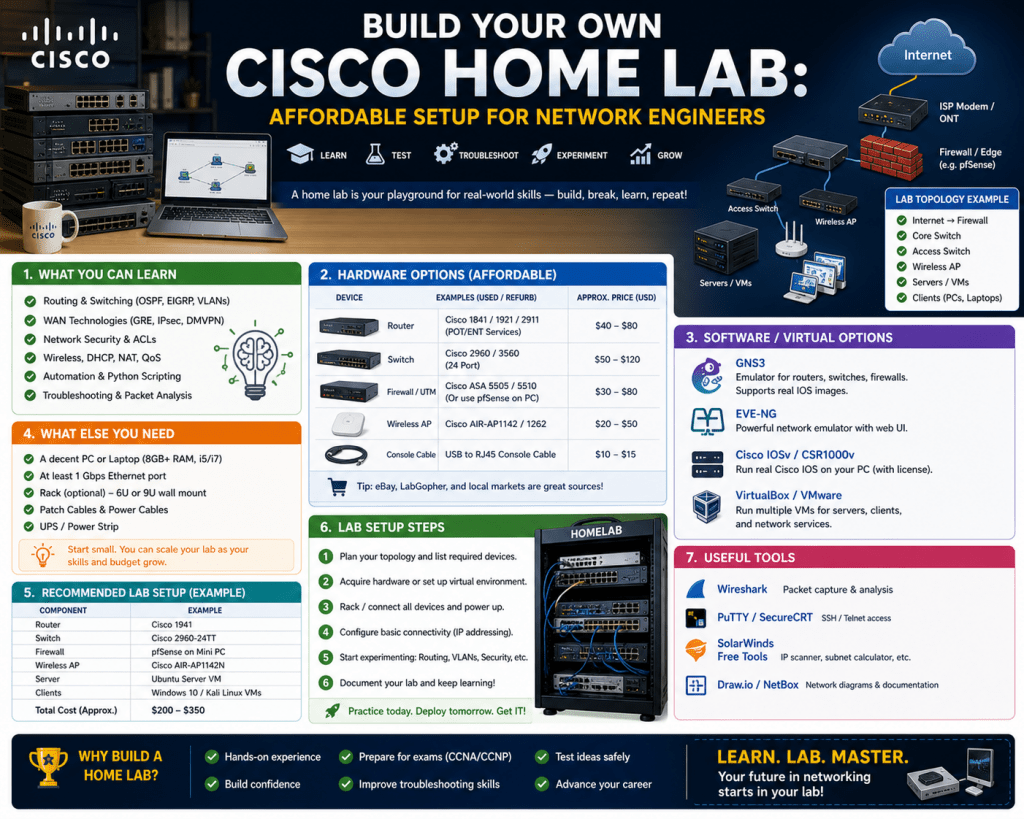
A Cisco home lab is a personal networking environment designed to simulate real-world network scenarios using routers, switches, and related technologies. It allows individuals to practice configuration, troubleshooting, and network design in a controlled setting. For beginners, the idea of building such a lab may seem complex, but at its core, it is simply a space where theory meets practical application.
Instead of relying only on reading or watching tutorials, a home lab allows you to apply networking concepts directly. This hands-on exposure is essential because networking is a skill that develops through doing rather than just observing. When you configure a router, assign IP addresses, or troubleshoot connectivity issues, you gain a deeper understanding of how networks function.
A well-structured home lab does not need to be large or expensive. Even a small setup can provide significant learning value if it is aligned with your goals. The key is not the size of the lab but how effectively it is used. By focusing on learning outcomes rather than equipment quantity, you can build a lab that supports continuous improvement.
Overcoming the Initial Fear of Complexity
Many individuals hesitate to build a Cisco home lab because they assume it requires advanced knowledge or expensive hardware. This misconception often prevents people from starting. In reality, every expert in networking began with basic setups and gradually expanded their knowledge and equipment.
The initial complexity can be reduced by breaking the process into manageable steps. Instead of trying to understand everything at once, focus on one concept at a time. Begin with simple tasks such as connecting devices and assigning IP addresses. Once you are comfortable with these basics, you can move on to more advanced configurations.
It is also important to accept that mistakes are part of the learning process. Misconfigurations, connectivity issues, and unexpected errors are common in a lab environment. These challenges are not setbacks but opportunities to learn. Each problem you solve strengthens your understanding and prepares you for real-world scenarios.
Building confidence takes time, and a home lab provides the perfect environment to develop it. Since there are no real-world consequences, you can experiment freely and learn at your own pace. This freedom is one of the most valuable aspects of having a personal lab.
Defining a Clear Purpose Before You Begin
Before purchasing any equipment or setting up configurations, it is essential to define the purpose of your home lab. Without a clear objective, it is easy to become overwhelmed or invest in unnecessary resources. A well-defined purpose acts as a guide for every decision you make during the setup process.
Your purpose could be to learn basic networking concepts, prepare for certifications, or simulate enterprise-level environments. Whatever your goal, it should be specific enough to influence your lab design. For example, a beginner focusing on fundamentals will require a simpler setup compared to someone preparing for advanced networking scenarios.
Having a purpose also helps maintain motivation. When you know why you are building the lab, it becomes easier to stay committed and consistent. The lab transforms from a collection of devices into a meaningful learning tool that supports your personal or professional growth.
It is also helpful to think long-term. Your goals may evolve as you gain experience, and your lab should be able to adapt accordingly. Starting with a clear purpose ensures that your initial setup is flexible enough to accommodate future expansion.
Adopting a Practical and Realistic Mindset
A successful home lab is built on a practical mindset. Instead of aiming for perfection, focus on creating a functional environment that meets your current needs. Trying to replicate a large enterprise network from the beginning can lead to unnecessary complexity and frustration.
A realistic approach involves starting small and expanding gradually. Begin with a basic setup that allows you to practice essential skills. As your knowledge grows, you can add more devices, explore advanced configurations, and increase the complexity of your network.
Budget considerations are also part of a practical mindset. It is easy to spend money on equipment that may not be necessary for your current level of learning. By prioritizing essential components and avoiding unnecessary purchases, you can build an effective lab without overspending.
Time management is another important factor. Consistent practice is more valuable than occasional long sessions. By dedicating regular time to your lab, you can steadily improve your skills and maintain momentum in your learning journey.
Building a Mission-Driven Home Network
One of the most effective ways to approach a Cisco home lab is to give it a mission. Instead of building a lab solely for practice, create a network that serves a real purpose in your daily life. This approach transforms your lab into a functional system that you actively use and maintain.
For example, you can design your home network to handle internet connectivity, file sharing, and device communication. By integrating your lab into everyday use, you gain practical experience in managing a live network. This includes monitoring performance, resolving issues, and implementing improvements.
A mission-driven lab also increases engagement. When your network supports real activities, you are more likely to interact with it regularly. This continuous interaction reinforces learning and helps you develop practical skills that are directly applicable to real-world environments.
Additionally, having a mission encourages creativity. You can experiment with different network designs, test new configurations, and explore various solutions to common problems. This hands-on experimentation deepens your understanding and builds confidence.
Understanding Certification Paths and Their Influence
Networking certifications play a significant role in shaping the structure and purpose of a home lab. Different certification levels focus on different aspects of networking, and understanding these requirements helps in designing an appropriate lab environment.
At the beginner level, the focus is on foundational concepts such as IP addressing, basic routing, and switching. A simple lab with a few devices is sufficient to practice these skills. The goal at this stage is to build a strong understanding of core concepts.
As you progress to intermediate levels, the complexity increases. You may need to work with advanced routing protocols, network security features, and troubleshooting techniques. This requires a more sophisticated lab setup with additional devices or virtual environments.
At advanced levels, the lab becomes more comprehensive. It may include multiple network segments, redundancy configurations, and complex scenarios that simulate real-world networks. This level of detail helps in mastering advanced concepts and preparing for professional challenges.
By aligning your lab with your certification goals, you ensure that your setup remains relevant and effective. This approach prevents unnecessary complexity and keeps your learning focused.
Choosing Between Physical and Virtual Labs
When building a Cisco home lab, one of the key decisions is whether to use physical hardware, virtual environments, or a combination of both. Each option has its advantages, and the choice depends on your learning preferences and resources.
Physical labs provide hands-on experience with real devices. This includes connecting cables, managing hardware, and understanding the physical aspects of networking. For many learners, this tactile experience enhances understanding and builds confidence.
Virtual labs, on the other hand, offer flexibility and cost efficiency. They allow you to simulate networks using software, making it possible to create complex scenarios without the need for multiple physical devices. Virtual environments can be easily modified and reset, making them ideal for experimentation.
A hybrid approach often provides the best results. By combining physical and virtual components, you can benefit from both methods. Physical devices help in understanding hardware interactions, while virtual environments allow for advanced configurations and scalability.
Planning Your Initial Lab Setup
Starting with a well-planned setup is essential for building an effective home lab. Instead of aiming for a complex network, focus on creating a simple and organized environment that supports your learning goals.
Begin with a basic topology that includes a few routers and switches. This setup allows you to practice essential tasks such as configuring interfaces, setting up routing protocols, and managing network traffic. Keeping the setup simple makes it easier to understand how each component functions.
Organization is also important. Labeling devices and cables, documenting configurations, and maintaining a clear structure help in managing the lab as it grows. These practices reduce confusion and make troubleshooting more efficient.
Power and space considerations should also be taken into account. Ensuring that your devices are properly arranged and powered contributes to a safe and comfortable working environment. These practical aspects are often overlooked but play a significant role in maintaining a functional lab.
Developing Hands-On Networking Skills
The primary purpose of a home lab is to develop practical networking skills. Hands-on experience allows you to apply theoretical knowledge and understand how different components interact in a network.
Configuring devices manually helps in learning the details of networking commands and protocols. Troubleshooting issues provides insight into network behavior and improves problem-solving abilities. These experiences are essential for building confidence and competence.
Repetition is an important part of skill development. Performing configurations multiple times helps in reinforcing concepts and improving efficiency. Over time, tasks that once seemed complex become easier to handle.
Experimentation also plays a key role. Trying different configurations, testing scenarios, and exploring alternative solutions encourages critical thinking. This approach not only enhances technical skills but also fosters creativity.
Maintaining Consistency and Growth
Consistency is crucial for making progress in networking. Regular interaction with your home lab helps in reinforcing concepts and building confidence. Instead of irregular practice, aim for consistent sessions that keep you engaged with your learning.
As your knowledge grows, your lab should evolve as well. Adding new devices, exploring advanced configurations, and expanding your network keep the learning process dynamic. This continuous growth ensures that your skills remain relevant.
A home lab is not a one-time project but an ongoing journey. By maintaining a clear purpose, adopting a practical mindset, and engaging in regular practice, you can create a powerful learning environment that supports your development in networking.
Transitioning from Basic Setup to Structured Lab Design
Once the foundational lab is in place, the next step is transforming it into a structured and scalable environment. A basic setup helps in understanding core networking concepts, but a structured lab introduces organization, efficiency, and the ability to simulate more realistic scenarios. This transition is important because real-world networks are not random collections of devices; they are carefully designed systems that follow logical patterns and best practices.
Structured lab design begins with defining network segments and roles for each device. Instead of connecting devices randomly, each router and switch should serve a purpose within the topology. For example, one device can act as a core router, while others function as access or distribution layers. This layered approach mirrors how modern networks are designed and makes it easier to understand traffic flow and network behavior.
Documentation becomes increasingly important at this stage. Keeping track of IP addressing schemes, device roles, and configurations ensures that the lab remains organized as it grows. Without proper documentation, even a moderately sized lab can become difficult to manage and troubleshoot. Clear records allow you to revisit configurations, identify issues quickly, and build upon previous work.
Designing Realistic Network Topologies
A well-designed topology is the backbone of an effective home lab. Moving beyond simple connections, you should aim to replicate real-world network designs as closely as possible. This involves creating multiple network segments, implementing routing between them, and simulating different types of traffic.
One approach is to design a small enterprise-style network. This can include separate segments for users, servers, and management systems. Each segment can be connected through routers or layer-based switching, allowing you to practice inter-network communication and policy implementation. By dividing the network into logical sections, you gain a better understanding of how large-scale networks operate.
Redundancy is another important concept to introduce. Real networks are designed to remain operational even when failures occur. You can simulate this by adding backup links or alternative paths between devices. Testing how traffic behaves during failures helps in understanding failover mechanisms and network resilience.
Topology design should also consider scalability. As your skills improve, you may want to add more devices or simulate larger networks. A flexible design allows for easy expansion without requiring a complete rebuild. This forward-thinking approach saves time and ensures that your lab remains relevant as your learning progresses.
Selecting the Right Hardware for Growth
Choosing appropriate hardware becomes more critical as the lab evolves. While entry-level setups can rely on minimal equipment, advanced configurations often require additional devices or more capable hardware. The key is to select components that support your learning goals without unnecessary complexity.
Routers and switches form the core of any Cisco home lab. As you move into more advanced topics, you may need devices that support additional features such as advanced routing protocols, security configurations, and traffic management. It is important to research the capabilities of each device before adding it to your lab to ensure it aligns with your objectives.
Secondhand equipment can be a cost-effective option, but it should be chosen carefully. Devices should be reliable and capable of running the configurations you intend to practice. Investing in a few versatile devices is often more beneficial than acquiring a large number of limited ones.
Cabling and connectivity also play a role in hardware selection. Proper connections ensure stable communication between devices and reduce the likelihood of physical issues affecting your lab. Organizing cables and maintaining a clean setup contribute to efficiency and ease of troubleshooting.
Integrating Virtualization into Your Lab
As your lab grows, integrating virtual environments becomes increasingly valuable. Virtualization allows you to simulate complex networks without the need for extensive physical hardware. This flexibility makes it possible to experiment with advanced configurations and large-scale scenarios.
Virtual labs can replicate multiple devices within a single system, enabling you to create intricate topologies that would be difficult to achieve physically. This is particularly useful for practicing advanced routing, network segmentation, and security configurations. Virtual environments also allow for quick resets, making it easier to test different scenarios without permanent changes.
Combining physical and virtual components creates a hybrid lab environment. Physical devices provide hands-on experience, while virtual systems offer scalability and flexibility. This combination allows you to explore a wide range of networking concepts and adapt your lab to different learning needs.
Resource management is important when using virtualization. Ensuring that your system has sufficient processing power and memory helps maintain performance and prevents interruptions during practice sessions. Proper planning ensures that your virtual lab runs smoothly and supports your learning objectives.
Implementing Advanced Routing Concepts
As you progress in your networking journey, advanced routing becomes a central focus of your lab. Routing protocols determine how data travels between networks, and understanding them is essential for building efficient and reliable systems.
Dynamic routing protocols introduce automation into network communication. Instead of manually configuring routes, these protocols allow devices to exchange information and determine the best paths for data transmission. Practicing with these protocols in your lab helps you understand how networks adapt to changes and maintain connectivity.
Route redistribution is another concept to explore. This involves sharing routing information between different protocols, allowing multiple systems to communicate effectively. Implementing this in your lab provides insight into how complex networks integrate diverse technologies.
Traffic control and optimization are also important aspects of routing. By configuring policies that influence how data is routed, you can simulate real-world scenarios where network performance and efficiency are critical. These exercises enhance your ability to design and manage sophisticated networks.
Exploring Switching and Network Segmentation
Switching plays a vital role in network design, particularly in local area networks. As your lab evolves, you should explore advanced switching concepts that go beyond basic connectivity.
Virtual local area networks allow you to segment a network into multiple logical groups. This segmentation improves security and efficiency by controlling how devices communicate with each other. Practicing with these configurations helps you understand how large networks are organized and managed.
Inter-network communication between segments introduces additional complexity. Configuring routing between segments allows devices in different groups to communicate while maintaining separation. This balance between connectivity and isolation is a key aspect of network design.
Spanning tree mechanisms are also important for preventing loops in network topologies. By understanding how these mechanisms work, you can design stable networks that avoid common issues associated with redundant connections. Practicing these configurations in your lab reinforces your understanding of network stability and reliability.
Incorporating Network Security Practices
Security is an essential component of any network, and your home lab provides an ideal environment for exploring it. As your lab becomes more advanced, integrating security measures helps you understand how networks are protected from threats.
Basic security practices include controlling access to devices and restricting unauthorized connections. Configuring secure access methods ensures that only authorized users can interact with your network. This is a fundamental step in protecting network resources.
Firewalls and access control mechanisms allow you to define rules that govern traffic flow. By implementing these controls in your lab, you can simulate real-world scenarios where network security is a priority. Testing different configurations helps you understand how to balance accessibility and protection.
Monitoring and logging are also important aspects of security. Tracking network activity allows you to identify unusual behavior and respond to potential issues. Practicing these techniques in your lab prepares you for managing secure networks in professional environments.
Developing Troubleshooting and Diagnostic Skills
Troubleshooting is one of the most valuable skills you can develop in networking. A home lab provides a safe environment to practice diagnosing and resolving issues without real-world consequences.
Introducing intentional errors into your lab is an effective way to build troubleshooting skills. Misconfiguring devices, disconnecting links, or altering settings creates scenarios that require analysis and problem-solving. By working through these issues, you learn how to identify root causes and implement solutions.
Using diagnostic tools and commands helps in understanding network behavior. Observing how data flows through the network and identifying where problems occur provides valuable insights. These skills are essential for maintaining network performance and reliability.
Patience and persistence are important when troubleshooting. Some issues may be complex and require multiple steps to resolve. Developing a systematic approach to problem-solving ensures that you can handle challenges effectively and efficiently.
Scaling Your Lab for Advanced Scenarios
As your expertise grows, your lab should evolve to support more advanced scenarios. Scaling your lab involves adding complexity, increasing the number of devices, and exploring new technologies.
Large-scale topologies allow you to simulate enterprise environments. This includes multiple network segments, redundant connections, and diverse configurations. Practicing in such environments prepares you for real-world challenges where networks are complex and dynamic.
Automation can also be introduced at this stage. Automating repetitive tasks improves efficiency and allows you to focus on higher-level concepts. Exploring automation techniques in your lab enhances your ability to manage modern networks.
Cloud integration is another area to consider. Combining your home lab with cloud-based resources allows you to explore hybrid network environments. This expands your understanding of how traditional and modern networking approaches interact.
Maintaining and Optimizing Your Lab Environment
Maintaining your lab is essential for ensuring consistent performance and usability. Regular updates, organization, and optimization keep your environment functional and efficient.
Keeping configurations organized and documented helps in managing changes and tracking progress. Clear records allow you to revisit previous setups and build upon them. This practice is particularly important as your lab becomes more complex.
Performance optimization involves ensuring that devices and systems operate efficiently. Monitoring resource usage and addressing bottlenecks helps maintain a smooth experience. This is especially important when working with virtual environments.
Cleaning and organizing the physical setup also contribute to efficiency. Proper cable management and device arrangement reduce clutter and make it easier to work within the lab. These practical considerations enhance the overall experience.
Strengthening Practical Expertise Through Continuous Practice
The value of a Cisco home lab lies in consistent and purposeful practice. As your lab becomes more advanced, the opportunities for learning increase. Regular interaction with your lab reinforces concepts and builds confidence.
Practicing different scenarios helps in developing versatility. By exploring various configurations and solving different types of problems, you gain a comprehensive understanding of networking. This adaptability is essential for handling diverse challenges in professional environments.
Continuous learning ensures that your skills remain relevant. Networking technologies evolve, and your lab should reflect these changes. By updating your setup and exploring new concepts, you maintain a dynamic and effective learning environment.
A well-developed home lab becomes more than just a practice space. It transforms into a powerful tool for mastering networking concepts, building practical skills, and preparing for real-world challenges.
Evolving from Practice to Professional-Level Simulation
As your Cisco home lab matures, it should begin to resemble a real-world production environment rather than a simple practice setup. At this stage, the focus shifts from learning individual commands to understanding how entire systems operate together. The goal is to simulate realistic network conditions that mirror what is encountered in professional environments.
This evolution requires a shift in thinking. Instead of viewing each device as an isolated component, you begin to see the network as an interconnected system where every configuration impacts overall performance. This perspective helps you understand dependencies, traffic flow, and how different technologies interact under various conditions.
Creating professional-level simulations involves designing scenarios that include multiple users, services, and network demands. These scenarios should reflect common challenges such as high traffic loads, device failures, and security threats. By working through these situations, you gain the experience needed to manage complex networks effectively.
Designing Enterprise-Style Network Architectures
To reach an advanced level, your home lab should incorporate enterprise-style network architecture. This includes dividing the network into layers such as core, distribution, and access. Each layer has a specific role, contributing to efficiency, scalability, and manageability.
The core layer focuses on fast and reliable data transport across the network. It is designed for high performance and minimal latency. The distribution layer acts as an intermediary, applying policies and controlling traffic between different segments. The access layer connects end devices, providing them with network access.
By implementing this layered approach in your lab, you gain insight into how large organizations structure their networks. You also learn how to optimize performance and maintain stability across different parts of the system. This understanding is essential for designing scalable and efficient networks.
Incorporating multiple subnets and routing paths further enhances realism. This allows you to practice managing complex addressing schemes and ensuring seamless communication between different parts of the network. These skills are critical for handling large-scale deployments.
Simulating Real-World Network Services
An advanced home lab should include services that are commonly found in real networks. These services provide additional functionality and create opportunities for deeper learning. Examples include dynamic host configuration, domain name resolution, and network authentication systems.
Integrating these services into your lab allows you to understand how networks support user activities. For instance, automatic IP assignment simplifies device connectivity, while name resolution enables easy access to resources. Configuring and managing these services helps you develop a comprehensive understanding of network operations.
You can also simulate application traffic such as file transfers, video streaming, and voice communication. This adds another layer of complexity, as different types of traffic have varying requirements. Managing these demands helps you learn how to prioritize and optimize network performance.
Testing how services behave under different conditions is equally important. Introducing delays, congestion, or failures allows you to observe how the network responds. These experiments provide valuable insights into system behavior and resilience.
Implementing Redundancy and High Availability
High availability is a critical requirement in modern networks. Systems must remain operational even when failures occur. Your home lab is the perfect place to practice implementing redundancy and ensuring continuous operation.
Redundancy involves creating multiple paths or backup systems that can take over in case of failure. This can include duplicate links, additional devices, or alternative routing paths. By configuring these elements, you learn how to maintain connectivity during disruptions.
Failover mechanisms are another important aspect. These mechanisms detect failures and automatically switch to backup resources. Practicing failover scenarios in your lab helps you understand how networks recover from issues and maintain service continuity.
Load balancing is also worth exploring. Distributing traffic across multiple paths improves performance and prevents any single device from becoming overwhelmed. Implementing these techniques in your lab prepares you for managing high-demand environments.
Deepening Knowledge of Network Security
As your lab becomes more advanced, security should be a central focus. Protecting network resources is a fundamental responsibility, and your lab provides a safe environment to explore various security measures.
Access control is one of the first areas to strengthen. This involves defining who can access the network and what actions they are allowed to perform. By implementing strict access policies, you learn how to prevent unauthorized activities.
Encryption is another key component. Securing data as it travels across the network ensures that sensitive information remains protected. Practicing encryption techniques helps you understand how to safeguard communications.
You can also simulate attacks to test your defenses. Introducing scenarios such as unauthorized access attempts or traffic floods allows you to evaluate the effectiveness of your security measures. This hands-on experience is invaluable for developing strong defensive strategies.
Monitoring and alerting systems play a crucial role in security. By tracking network activity and identifying unusual patterns, you can respond quickly to potential threats. Practicing these techniques in your lab enhances your ability to maintain secure environments.
Mastering Network Troubleshooting at an Advanced Level
Troubleshooting becomes more complex as your lab grows, but it also becomes more rewarding. Advanced troubleshooting involves analyzing multiple layers of the network and identifying issues that may not be immediately obvious.
Developing a systematic approach is essential. This includes isolating the problem, gathering information, and testing possible solutions. By following a structured process, you can resolve issues more efficiently and avoid unnecessary changes.
Working with layered architectures introduces new challenges. Problems may occur at different levels, from physical connections to application services. Understanding how these layers interact helps you pinpoint the source of issues more accurately.
Using diagnostic tools and commands effectively is a key skill. These tools provide insights into network behavior, allowing you to identify anomalies and track down problems. Regular practice ensures that you become proficient in using these resources.
Creating complex failure scenarios in your lab further enhances your troubleshooting abilities. By intentionally introducing multiple issues, you can challenge yourself to identify and resolve them systematically. This prepares you for real-world situations where problems are rarely straightforward.
Exploring Automation and Efficiency Techniques
Modern networking increasingly relies on automation to manage complex environments. Introducing automation into your home lab allows you to streamline tasks and focus on higher-level concepts.
Automation involves using scripts or tools to perform repetitive tasks. This can include configuring devices, updating settings, or monitoring network performance. By automating these processes, you save time and reduce the risk of errors.
Learning how to structure and manage automated workflows is an important skill. This includes organizing tasks, handling exceptions, and ensuring consistency across the network. Practicing these techniques in your lab prepares you for managing large-scale systems.
Automation also enables rapid testing of different scenarios. You can quickly apply changes, observe results, and refine configurations. This flexibility enhances your ability to experiment and learn efficiently.
Integrating Cloud and Hybrid Networking Concepts
As networking evolves, the integration of cloud-based systems becomes increasingly important. Expanding your home lab to include hybrid environments helps you understand how traditional networks interact with cloud infrastructure.
Hybrid networking involves connecting on-premises systems with remote resources. This requires careful configuration to ensure secure and reliable communication. Practicing these setups in your lab provides insight into modern network architectures.
You can simulate remote connections and explore how data flows between different environments. This includes managing access, optimizing performance, and ensuring security. These skills are essential for working with contemporary network systems.
Understanding how to balance local and remote resources is another key aspect. By experimenting with different configurations, you learn how to create efficient and flexible networks that meet diverse requirements.
Building Documentation and Professional Practices
At an advanced stage, documentation becomes a critical part of your lab. Keeping detailed records of configurations, changes, and experiments ensures that your work remains organized and reproducible.
Documentation should include network diagrams, addressing schemes, and configuration notes. These records help you understand the structure of your lab and make it easier to troubleshoot issues. They also allow you to share your work or revisit previous setups.
Adopting professional practices in your lab prepares you for real-world environments. This includes following standardized procedures, maintaining consistency, and implementing best practices. These habits enhance your efficiency and reliability as a network professional.
Version control is another useful concept. Tracking changes over time allows you to identify what works and what does not. This systematic approach improves your ability to manage complex configurations.
Conclusion
Building a Cisco home lab begins as a simple idea but gradually transforms into a powerful and personal learning environment that supports long-term growth in networking. What initially feels like a challenging and technical process becomes more intuitive as you spend time working with devices, experimenting with configurations, and solving problems. The journey from a beginner setup to a fully developed lab is not defined by how much equipment you own, but by how effectively you use the resources available to you. Over time, the lab becomes less about hardware and more about the skills, understanding, and confidence you develop through consistent practice.
A home lab creates a unique space where theoretical knowledge turns into practical ability. Reading about networking concepts can provide a foundation, but it is only through hands-on work that these concepts become meaningful. When you configure routing, segment networks, or troubleshoot connectivity issues, you begin to understand how networks truly function. Each small task contributes to a larger picture, helping you connect ideas and see how different components interact. This type of learning is difficult to achieve through passive study alone, making the lab an essential tool for anyone serious about networking.
One of the most important aspects of building and maintaining a lab is having a clear sense of purpose. Without direction, it is easy to lose focus or become overwhelmed by the many possibilities available. A well-defined goal helps guide decisions, from choosing equipment to designing network topologies. It also keeps motivation strong, especially during moments when progress feels slow or challenges arise. When your lab reflects your goals, it becomes a meaningful part of your learning journey rather than just a collection of devices.
As your experience grows, so does the complexity of your lab. What starts as a small and simple setup gradually expands into a more advanced and structured environment. This progression mirrors real-world networking, where systems are designed to handle increasing demands and adapt to new technologies. By continuously improving your lab, you develop the ability to think critically, plan effectively, and manage complex systems. These skills are essential not only for certifications but also for real-world applications.
Consistency plays a major role in how much you gain from your lab. Regular interaction, even in short sessions, helps reinforce knowledge and build confidence. Networking is a skill that improves with repetition, and the more you practice, the more comfortable you become with different tasks. Over time, actions that once required careful thought become second nature, allowing you to focus on more advanced challenges. This steady progression builds a strong foundation that supports further learning.
Another key benefit of a home lab is the freedom to experiment. Unlike production environments, where mistakes can have serious consequences, a lab allows you to try new ideas without risk. You can test configurations, break things intentionally, and explore different solutions to problems. This freedom encourages curiosity and creativity, which are important qualities for anyone working in technology. By learning through experimentation, you develop a deeper understanding of networking concepts and gain the confidence to apply them in real situations.
Troubleshooting is one of the most valuable skills you develop through your lab. Every issue you encounter provides an opportunity to learn how networks behave and how problems can be resolved. Instead of viewing errors as setbacks, they become essential parts of the learning process. By working through these challenges, you build resilience and improve your ability to analyze and solve problems. These skills are highly valuable in professional environments, where quick and effective troubleshooting is often required.
As your lab evolves, it also becomes a reflection of your growth. Each new configuration, device, or scenario represents a step forward in your understanding. The lab is not just a tool for learning but also a record of your progress. Looking back at earlier setups can highlight how much you have improved and provide motivation to continue developing your skills. This sense of progress is important for maintaining long-term engagement and commitment.
The integration of advanced concepts such as security, automation, and hybrid networking further enhances the value of your lab. These areas represent the direction in which modern networking is evolving, and gaining experience with them prepares you for future challenges. By incorporating these elements into your lab, you ensure that your skills remain relevant and aligned with current industry practices. This adaptability is essential in a field that continues to change rapidly.
A well-maintained lab also encourages discipline and organization. Keeping track of configurations, documenting changes, and managing resources effectively are all important habits that translate directly into professional work. These practices help you stay organized and make it easier to manage complex systems. Over time, they become second nature, improving both your efficiency and reliability.
The long-term value of a Cisco home lab extends beyond certifications or specific learning goals. It provides a foundation for continuous improvement and lifelong learning. Networking is not a field where knowledge remains static, and the ability to adapt and learn new technologies is essential. Your lab supports this ongoing process by providing a space where you can explore, experiment, and grow at your own pace.
Ultimately, the success of your home lab depends on how you use it. Expensive equipment or complex setups are not necessary to achieve meaningful results. What matters most is your commitment to learning, your willingness to experiment, and your ability to stay consistent. By focusing on these aspects, you can create a lab that not only supports your current goals but also prepares you for future opportunities.
The journey of building and using a Cisco home lab is both challenging and rewarding. It requires effort, patience, and a willingness to learn from mistakes. However, the skills and confidence you gain make it a worthwhile investment. Over time, the lab becomes more than just a learning tool; it becomes an essential part of your development as a networking professional, helping you build the knowledge and experience needed to succeed in a constantly evolving field.