
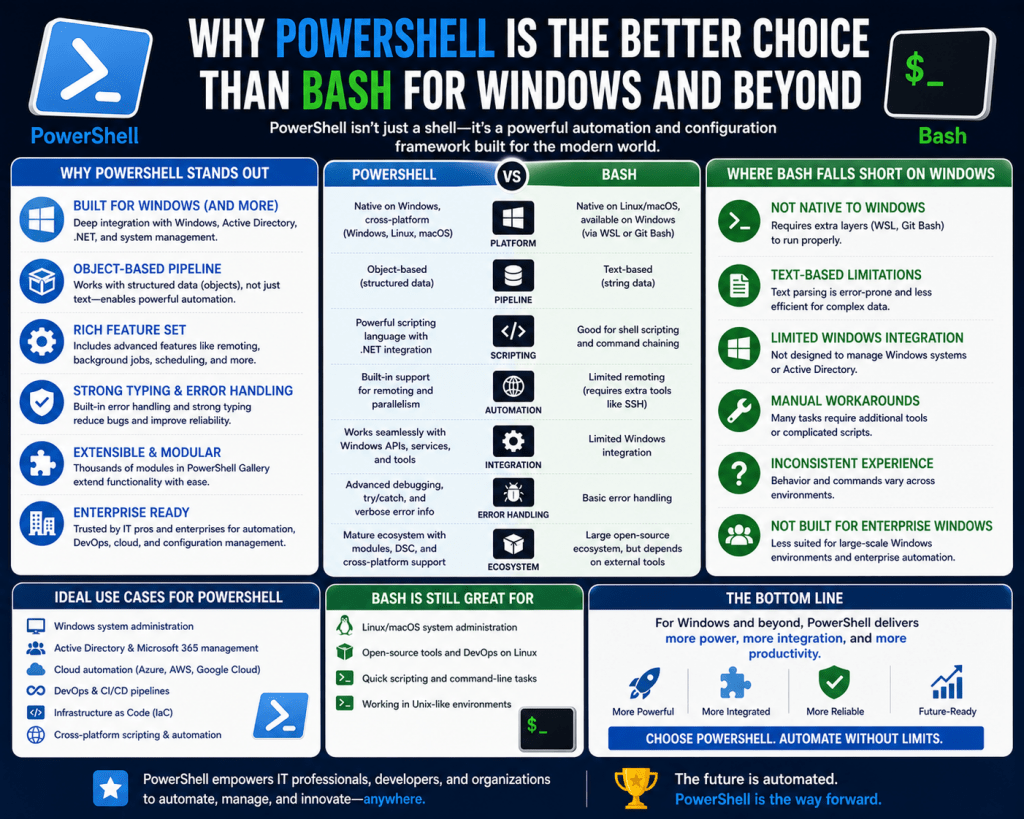
Command-line interfaces remain one of the most powerful mechanisms for interacting with operating systems, especially in environments where automation, precision, and scalability are required. Unlike graphical interfaces that rely on visual navigation, command-line environments allow users to execute tasks directly through commands, enabling faster execution and deeper system control. Both PowerShell and Bash belong to this category, yet they were designed in different technological eras with different goals. Bash emerged from Unix and Linux ecosystems, where simplicity and modularity were key design principles. PowerShell was created much later to address limitations in Windows administrative tools and to provide a more structured automation framework. These contrasting origins influence not only how each tool behaves but also how system administrators design workflows around them. Understanding the role of command-line interfaces helps clarify why both tools continue to exist and why comparisons between them often lead to misunderstandings.
Historical Background of Bash and Its Unix Roots
Bash developed as an evolution of earlier Unix shells, particularly the Bourne Shell, and became widely adopted as the default shell in many Linux distributions. Its primary goal was to provide a lightweight, flexible interface for executing system commands and automating tasks using simple scripting. The Unix philosophy behind Bash emphasizes doing one thing well and combining small utilities to achieve complex operations. This led to a design where many independent tools work together through pipelines. Over time, Bash became deeply embedded in server environments, development workflows, and networking systems. Its longevity is partly due to its simplicity and consistency across Unix-like systems. Even as modern computing environments have evolved, Bash remains a foundational tool for system administrators and developers working in Linux-based infrastructures. Its reliance on text streams and external utilities defines both its strengths and its limitations in handling complex structured data operations.
Origins and Development of PowerShell in Windows Ecosystems
PowerShell was introduced as a response to the limitations of traditional Windows command-line tools, particularly the Command Prompt, which inherited constraints from earlier DOS systems. These older tools were limited in functionality, especially when compared to the scripting capabilities available in Unix environments. PowerShell was designed with a completely different philosophy, built on top of the .NET framework to provide deep integration with Windows operating systems. This allowed administrators to access system components, registry settings, services, and configuration layers in a unified way. Over time, PowerShell evolved from a Windows-only tool into a cross-platform automation environment, expanding its reach into Linux and macOS systems. Despite this expansion, its strongest capabilities remain tightly connected to Windows infrastructure. The design of PowerShell reflects a shift toward structured system administration, where automation, consistency, and object-based processing replace traditional text-based workflows.
Core Design Philosophy Behind PowerShell and Bash
The fundamental difference between PowerShell and Bash lies in how they interpret and process data. Bash is built around the concept of text streams, where every command produces plain text output that can be passed to another command. This design is simple and highly flexible, but it requires additional parsing when dealing with structured information. PowerShell, in contrast, is built around objects, meaning that data is passed between commands as structured entities containing properties and methods. This object-oriented approach allows commands to interact with data directly without needing manual parsing. As a result, workflows in PowerShell tend to be more structured and less error-prone when handling complex operations. This difference in design philosophy is one of the main reasons why PowerShell is often considered more suitable for large-scale system administration tasks, while Bash remains popular for lightweight scripting and quick command execution in Unix-based environments.
How Data Handling Defines System Behavior
Data handling is one of the most important differences between Bash and PowerShell. In Bash, data is treated as plain text, which means every output must be interpreted manually if additional processing is required. This can lead to complex command chaining and reliance on external utilities for parsing and transformation. While this approach offers flexibility, it can become difficult to manage in larger scripts where structured data is involved. PowerShell addresses this limitation by treating all outputs as structured objects. Each object contains defined properties, making it possible to access specific information directly without parsing text. This is particularly useful when working with system configurations, APIs, or cloud services, where data is inherently structured. By eliminating the need for manual text processing, PowerShell simplifies automation tasks and reduces the likelihood of scripting errors caused by inconsistent formatting or unexpected output structures.
System Integration and Native Operating System Access
System integration plays a major role in distinguishing PowerShell from Bash. Bash relies heavily on external programs and utilities to perform tasks, especially in Linux environments where modular tools are combined to achieve complex operations. Each command typically invokes a separate executable, and these tools communicate through text-based pipelines. PowerShell, on the other hand, integrates directly with the operating system through the .NET framework, providing access to internal system components, APIs, and administrative functions. This allows PowerShell to perform advanced system management tasks without relying on external utilities. In Windows environments, this deep integration provides significant advantages for tasks such as service management, registry editing, and system configuration. While Bash can also manage system-level tasks in Linux, it does so through separate tools rather than unified internal access, which creates a different operational model.
Command Pipelines and Data Flow Differences
Pipelines are a core feature in both Bash and PowerShell, but they function in fundamentally different ways. In Bash, pipelines transfer text output from one command to another, requiring each command in the sequence to interpret and process the text. This can introduce inefficiencies when handling structured data, as each stage may require parsing or transformation. PowerShell pipelines, however, transfer objects instead of text. This means that each command receives fully structured data, allowing it to directly access properties without additional processing. This object-based pipeline system significantly improves efficiency in complex workflows, especially when filtering system processes, managing configurations, or interacting with external services. It also enhances readability and maintainability of scripts, since data transformations are handled through object manipulation rather than string processing.
Scripting Structure and Automation Capabilities
Scripting is a key area where PowerShell and Bash diverge significantly. Bash scripting is essentially a sequence of command-line instructions that execute in order, often relying on external utilities and text manipulation to achieve automation. While effective for simple tasks, Bash scripts can become difficult to maintain as complexity increases. PowerShell scripting is more structured and resembles modern programming languages. It supports variables, functions, loops, conditional logic, and object manipulation, enabling the creation of modular and reusable scripts. This structure makes it easier to build large-scale automation systems that require consistency and maintainability. PowerShell’s scripting model is particularly well-suited for enterprise environments where automation must handle complex system interactions and dynamic configurations across multiple machines.
Error Handling and Execution Control Differences
Error handling in Bash is primarily based on exit codes, where each command returns a status indicating success or failure. Scripts must manually check these codes to determine whether to proceed or handle errors. This approach is simple but can become cumbersome in complex scripts where multiple steps depend on previous outcomes. PowerShell provides a more advanced error-handling system based on structured exceptions. It allows the use of try and catch mechanisms, enabling scripts to respond dynamically to errors and continue execution when appropriate. This structured approach improves reliability in automation workflows, especially in environments where failure recovery and logging are important. PowerShell also provides more detailed error information, making it easier to diagnose and resolve issues during script execution.
Cross-Platform Development and Modern Adaptation
Both Bash and PowerShell have evolved to support cross-platform environments, but their origins influence how they function outside their native systems. Bash, originally designed for Unix-like systems, has been adapted to run on Windows through compatibility layers that allow Linux environments to operate within Windows. PowerShell, initially built for Windows, has been extended to run on Linux and macOS through open-source development. Despite this convergence, differences remain in functionality and system integration. Bash operates more naturally in Linux environments, while PowerShell retains deeper integration with Windows systems. On non-Windows platforms, PowerShell may not have access to all system-specific features available in its native environment. This cross-platform expansion reflects the growing need for unified scripting tools in modern IT infrastructure while still preserving the strengths of each environment.
Practical Differences in Real-World Usage
In real-world scenarios, the choice between PowerShell and Bash depends heavily on the operating environment and the complexity of tasks being performed. Bash is widely used in Linux server management, development pipelines, and lightweight automation tasks where simplicity and speed are important. Its text-based design makes it ideal for chaining simple utilities together. PowerShell is commonly used in enterprise environments, particularly where Windows systems, cloud services, and complex automation workflows are involved. Its object-based architecture makes it more suitable for managing structured data and large-scale system configurations. In mixed environments, both tools are often used together, with Bash handling Linux-specific tasks and PowerShell managing Windows-based or structured automation processes.
PowerShell and Bash in Modern System Administration Environments
System administration today involves managing complex infrastructures that span local machines, servers, cloud platforms, and hybrid environments. Both PowerShell and Bash play important roles in this ecosystem, but they are applied differently depending on the operating system and administrative requirements. Bash continues to dominate Linux and Unix-based systems because of its simplicity, reliability, and deep integration with system utilities. It is often used in server environments, containerized applications, and development pipelines where lightweight scripting is essential. PowerShell, however, is widely used in enterprise environments, especially those centered around Windows infrastructure and cloud-based management systems. Its ability to interact directly with system components and structured data makes it particularly effective for managing large-scale deployments. These differences shape how administrators choose between the two tools depending on the complexity and scale of their tasks.
Architectural Differences Between Text-Based and Object-Based Processing
One of the most significant differences between Bash and PowerShell lies in their architectural approach to data processing. Bash relies on a text-based model where all outputs are treated as strings. This means that every command produces plain text, which must be parsed if further processing is required. While this approach is flexible, it often introduces complexity when working with structured or hierarchical data. PowerShell, in contrast, is built on an object-based architecture. Each command produces objects that contain structured information, including properties and methods that can be directly accessed. This eliminates the need for manual parsing and allows data to flow seamlessly between commands. For example, when retrieving system processes or services, PowerShell returns structured objects that can be filtered, sorted, and manipulated without converting them into text. This architectural difference fundamentally changes how automation workflows are designed and executed.
Pipeline Behavior and Data Flow Efficiency
Pipelines are a central feature in both Bash and PowerShell, but their internal behavior differs significantly. In Bash, pipelines pass text output from one command to another, requiring each command in the sequence to interpret and process the text independently. This can lead to inefficiencies, especially when dealing with large datasets or complex transformations. PowerShell pipelines, on the other hand, pass objects instead of text. Each command receives structured data, allowing it to directly access specific properties without additional processing. This results in more efficient data handling and reduces the likelihood of errors caused by inconsistent text formatting. The object-based pipeline system also allows for more advanced filtering and transformation operations, making it easier to build complex automation workflows that remain readable and maintainable.
Scripting Language Depth and Programming Capabilities
Bash scripting is primarily designed as a sequence of command executions, where each line represents an instruction or utility call. While Bash does support variables, loops, and conditional statements, its scripting capabilities are relatively limited compared to modern programming languages. Scripts often rely on external tools for advanced processing, which can increase complexity. PowerShell, however, functions as a full scripting language built on object-oriented principles. It supports advanced programming constructs such as functions, modules, classes, and exception handling. This allows users to create reusable, modular scripts that can handle complex automation scenarios. PowerShell scripts can also interact directly with system APIs and .NET libraries, enabling deeper integration with the operating system. This makes PowerShell more suitable for large-scale automation projects where maintainability and structure are important.
System Automation and Task Management Differences
Automation is one of the primary use cases for both Bash and PowerShell, but they approach it differently. Bash automation relies heavily on chaining commands and using external utilities to perform specific tasks. This makes it highly effective for simple operations such as file manipulation, process management, and system monitoring. However, as automation tasks become more complex, Bash scripts can become difficult to manage due to their reliance on text parsing and external dependencies. PowerShell, on the other hand, provides a more unified automation environment. Because it operates with structured objects, it can perform complex tasks without relying on multiple external utilities. This allows administrators to automate system configuration, user management, network settings, and application deployment using consistent scripting patterns. The ability to handle complex workflows within a single environment makes PowerShell particularly powerful in enterprise settings.
Integration with Operating System Components
Operating system integration is another area where PowerShell and Bash differ significantly. Bash interacts with the system primarily through external commands and utilities, which are executed independently and communicate through text streams. This modular approach is a core part of Unix philosophy, but it can introduce fragmentation when managing complex systems. PowerShell integrates directly with operating system components through the .NET framework, allowing it to access system APIs, services, and configuration settings natively. This deep integration enables PowerShell to perform administrative tasks such as managing services, modifying registry settings, and controlling system processes without relying on external tools. In Windows environments, this level of integration provides a significant advantage in terms of control and efficiency. While Bash remains highly effective in Linux systems, its reliance on external utilities creates a different operational model compared to PowerShell’s unified approach.
Cross-Platform Adaptation and Modern Computing Needs
The modern computing landscape increasingly requires tools that can operate across multiple operating systems. Historically, Bash was native to Unix and Linux systems, while PowerShell was exclusive to Windows. However, changes in technology trends and cloud computing have driven both tools toward cross-platform compatibility. Bash became accessible on Windows through compatibility layers and Linux subsystems, allowing users to run Unix-like environments within Windows systems. PowerShell, on the other hand, was open-sourced and extended to support Linux and macOS environments. Despite this convergence, differences remain in how each tool performs across platforms. Bash operates most naturally in Linux environments, where it was originally designed, while PowerShell retains its strongest capabilities in Windows systems. On Linux, PowerShell provides useful functionality but may lack some native system-level features available in its Windows version. This reflects the challenges of adapting deeply integrated tools across fundamentally different operating systems.
Security Models and Access Control Mechanisms
Security is a critical consideration in system administration, and both Bash and PowerShell handle it differently. Bash relies on the underlying Linux permission system, where access control is managed through file permissions, user roles, and group assignments. Scripts execute based on the privileges of the user running them, and additional security measures are often implemented at the system level. PowerShell integrates with Windows security models, including role-based access control and advanced authentication systems. It also supports execution policies that determine how scripts are run, providing an additional layer of control over automation processes. These policies help prevent unauthorized script execution and improve system security. PowerShell’s integration with enterprise security frameworks allows it to be used in environments where strict compliance and auditing are required. While Bash also supports secure operations, its security model is more dependent on system configuration rather than built-in scripting controls.
Error Handling Mechanisms and Script Reliability
Error handling is another area where PowerShell and Bash differ significantly. In Bash, error handling is primarily based on exit codes returned by commands. Scripts must manually check these codes to determine whether a command succeeded or failed. This approach is simple but can become difficult to manage in complex scripts where multiple steps depend on previous outcomes. PowerShell provides structured error handling using exceptions, allowing scripts to handle errors in a more controlled and predictable way. Developers can use structured blocks to catch errors, log them, or take corrective action without interrupting the entire script. This improves script reliability and makes PowerShell more suitable for mission-critical automation tasks. Additionally, PowerShell provides detailed error messages that include contextual information, making debugging easier compared to Bash’s more limited error reporting system.
Performance Considerations in Large-Scale Environments
Performance is an important factor when comparing Bash and PowerShell, especially in large-scale environments. Bash is lightweight and highly efficient for simple tasks, making it ideal for quick operations and resource-constrained systems. Its reliance on compiled Unix utilities also contributes to its speed in many scenarios. PowerShell, while more resource-intensive due to its object-based architecture and .NET foundation, provides advantages in complex operations where structured data processing is required. The overhead introduced by PowerShell is often offset by its ability to reduce the number of steps required to complete complex tasks. In enterprise environments, where automation and consistency are more important than minimal resource usage, PowerShell’s performance is generally acceptable and often preferable due to its efficiency in handling complex workflows.
Role in Cloud Computing and Distributed Systems
Cloud computing has significantly influenced how both Bash and PowerShell are used. Bash is widely used in cloud-based Linux servers, containerized environments, and DevOps pipelines where automation scripts manage deployment and configuration tasks. Its simplicity and portability make it suitable for distributed systems where lightweight execution is important. PowerShell plays a major role in managing cloud services, particularly in environments that rely on structured configuration and automation. Its ability to interact with APIs, manage virtual machines, and automate cloud resources makes it a powerful tool for cloud administration. In distributed systems, PowerShell’s object-based approach simplifies the management of complex infrastructure components, while Bash remains valuable for lightweight automation and system-level operations.
Developer Experience and Learning Curve Differences
The learning curve for Bash and PowerShell varies depending on the user’s background and the complexity of tasks being performed. Bash is relatively straightforward for simple command execution and scripting, but mastering its advanced features requires understanding various Unix utilities and text processing techniques. PowerShell has a steeper initial learning curve due to its object-based nature and structured syntax. However, once understood, it provides a more consistent and predictable environment for scripting and automation. Developers familiar with object-oriented programming languages may find PowerShell more intuitive, while those experienced in Unix environments may prefer Bash’s simplicity. The choice between the two often depends on the user’s existing skill set and the requirements of the environment they are working in.
Enterprise Adoption and Industry Usage Trends
In enterprise environments, PowerShell has seen significant adoption due to its integration with Windows infrastructure, cloud platforms, and automation frameworks. It is commonly used for system administration, configuration management, and large-scale deployment automation. Bash continues to dominate Linux-based infrastructure, especially in web servers, DevOps pipelines, and open-source environments. Many organizations use both tools simultaneously, leveraging Bash for Linux systems and PowerShell for Windows and hybrid environments. This dual usage reflects the reality of modern IT infrastructure, where multiple operating systems coexist and require specialized tools for management and automation.
Hybrid IT Environments and the Coexistence of PowerShell and Bash
Modern IT infrastructures are rarely built on a single operating system. Instead, they are typically hybrid environments combining Windows servers, Linux distributions, cloud services, and containerized applications. In such ecosystems, both PowerShell and Bash play essential roles. Bash continues to dominate Linux-based systems, especially in web hosting, networking, and DevOps pipelines. Its lightweight nature and strong integration with Unix utilities make it ideal for system-level automation. PowerShell, meanwhile, is widely used in Windows-centric environments and increasingly in cloud orchestration and enterprise automation. The coexistence of both tools reflects the reality that no single command-line interface can fully address the diverse requirements of modern computing. Administrators often need to switch between both depending on the system they are managing, which has led to a growing emphasis on cross-platform scripting knowledge and hybrid automation strategies.
Differences in System Architecture and Execution Models
The execution model of Bash is based on spawning processes that execute external binaries, each performing a specific task and returning text output. This design is rooted in Unix philosophy, where small, specialized tools are combined to perform complex operations. While this approach is highly modular and flexible, it can introduce overhead due to frequent process creation and text parsing. PowerShell, in contrast, operates within a managed runtime environment built on .NET. Commands, known as cmdlets, execute within the same process space and exchange structured objects rather than text. This reduces the overhead associated with process creation and allows for more efficient data handling. The object-based execution model also enables richer interactions between commands, as each object carries not only data but also methods that can be invoked directly. This fundamental difference in execution architecture shapes performance, scalability, and complexity in automation workflows.
Data Transformation and Pipeline Optimization in Complex Workflows
In advanced automation scenarios, data transformation becomes a critical factor in determining efficiency and maintainability. Bash pipelines rely on sequential text processing, where each stage in the pipeline interprets and modifies strings. This can lead to complex chains of commands that are difficult to debug and maintain, especially when dealing with structured data. PowerShell pipelines, however, operate on objects that preserve structure throughout the pipeline. This allows each stage to work with well-defined properties rather than raw text, significantly simplifying transformation logic. For example, filtering system logs, managing user accounts, or processing API responses can be done directly using object properties. This reduces the need for intermediate parsing tools and improves overall script clarity. In large-scale environments, this optimization becomes particularly important as it reduces both development time and operational complexity.
Advanced Automation Strategies in Enterprise Environments
Enterprise automation often involves managing thousands of systems, services, and configurations simultaneously. Bash is commonly used in distributed Linux environments where automation scripts are deployed across servers to perform repetitive tasks such as backups, updates, and monitoring. However, as environments scale, managing script consistency and error handling becomes increasingly complex. PowerShell addresses these challenges by providing a more structured automation framework. It supports modules, reusable functions, and centralized management capabilities that allow administrators to build scalable automation systems. PowerShell’s integration with enterprise tools also enables it to manage identity systems, cloud resources, and configuration states in a unified manner. This makes it particularly effective for organizations that require consistent automation across diverse infrastructure components.
Configuration Management and Infrastructure Control
Configuration management is a key aspect of system administration, and both Bash and PowerShell approach it differently. Bash typically relies on editing configuration files directly or using external tools to modify system settings. This approach is flexible but can lead to inconsistencies across systems if not carefully managed. PowerShell provides a more structured approach to configuration management by allowing administrators to interact with system settings as objects. This enables precise control over system states and reduces the risk of configuration drift. In Windows environments, PowerShell can manage registry settings, services, and system policies directly, providing a centralized method for system configuration. In cloud and hybrid environments, this capability extends to virtual machines and distributed services, making PowerShell a powerful tool for infrastructure control.
Logging, Monitoring, and Diagnostic Capabilities
Effective system administration requires robust logging and monitoring capabilities. Bash typically relies on system logs and external monitoring tools to track system behavior. Log files are often plain text, requiring parsing and analysis using command-line utilities. While this approach is effective, it can become cumbersome when dealing with large volumes of data. PowerShell offers more advanced logging and diagnostic capabilities through structured data handling and integration with system events. It can access event logs, performance counters, and system diagnostics directly as objects, enabling more detailed analysis. This structured approach simplifies monitoring workflows and allows administrators to build automated diagnostic systems that can detect and respond to issues in real time. The ability to manipulate log data as objects also improves the accuracy and efficiency of system analysis.
Security Automation and Policy Enforcement
Security automation is increasingly important in modern IT environments, where compliance and threat detection require continuous monitoring and enforcement. Bash relies on underlying operating system security mechanisms, such as file permissions and user privileges, to control access. Scripts execute based on the permissions of the user running them, and additional security measures are implemented at the system level. PowerShell integrates more deeply with security frameworks, especially in Windows environments. It supports execution policies that control how scripts are run, helping prevent unauthorized or malicious execution. It also integrates with authentication systems, allowing scripts to operate under specific security contexts. This makes PowerShell particularly useful in environments where strict compliance, auditing, and security governance are required. Automation of security policies becomes more streamlined due to its structured and controlled execution model.
Scalability in Distributed Systems and Cloud Architectures
As organizations move toward distributed systems and cloud-based infrastructures, scalability becomes a critical requirement. Bash is widely used in containerized environments and lightweight virtual machines where scripts are deployed across multiple nodes. Its simplicity and low resource usage make it ideal for scaling across large numbers of systems. However, managing complex orchestration logic in Bash can become difficult due to its text-based nature. PowerShell provides stronger support for scalable automation through structured data handling and integration with orchestration platforms. It can manage distributed resources, virtual machines, and cloud services in a coordinated manner. This makes it suitable for environments where infrastructure must scale dynamically based on demand. The ability to manage complex systems through consistent scripting logic enhances operational efficiency in large-scale deployments.
Interoperability Between Bash and PowerShell in Modern Workflows
In many modern environments, Bash and PowerShell are used together rather than as competing tools. Interoperability between the two is often achieved through shared systems, APIs, or cross-platform execution layers. For example, Linux systems may be managed using Bash scripts while Windows systems are controlled using PowerShell, with both interacting through centralized automation platforms. This hybrid approach allows organizations to leverage the strengths of both tools while minimizing their weaknesses. Bash handles lightweight system-level operations efficiently, while PowerShell manages structured automation and enterprise-level tasks. Understanding how to integrate both tools effectively is becoming an essential skill in modern system administration.
Performance Trade-Offs in Real-World Scenarios
Performance considerations often influence whether Bash or PowerShell is used for a particular task. Bash is highly efficient for simple operations due to its lightweight design and direct execution of system utilities. It consumes minimal resources and executes quickly in most Linux environments. PowerShell, while more resource-intensive due to its .NET runtime, provides significant advantages in complex operations where structured data processing is required. In many cases, the additional overhead of PowerShell is offset by reduced script complexity and improved maintainability. For large-scale automation tasks, the efficiency gained from object-based processing often outweighs the performance cost. This makes PowerShell particularly suitable for enterprise environments where reliability and scalability are more important than minimal execution overhead.
Role of PowerShell and Bash in DevOps and Automation Pipelines
DevOps practices rely heavily on automation, continuous integration, and infrastructure as code. Bash is commonly used in Linux-based DevOps pipelines for tasks such as deployment, testing, and environment configuration. Its simplicity and widespread availability make it a natural choice for scripting in containerized environments. PowerShell is increasingly used in DevOps workflows that involve Windows systems, cloud services, and hybrid infrastructures. Its ability to manage complex configurations and interact with APIs makes it suitable for automation pipelines that require structured data processing. In many organizations, both tools are integrated into DevOps workflows, with Bash handling Linux components and PowerShell managing Windows and cloud-based resources. This dual-tool approach enhances flexibility and ensures compatibility across diverse environments.
Long-Term Evolution of Command-Line Interfaces
The evolution of command-line interfaces reflects broader changes in computing technology. Bash represents a mature and stable model rooted in Unix philosophy, emphasizing simplicity, modularity, and text-based processing. PowerShell represents a more modern approach focused on structured data, automation, and deep system integration. As computing environments continue to evolve toward cloud-native architectures and distributed systems, both tools are adapting to meet new demands. Bash continues to remain relevant due to its simplicity and widespread adoption, while PowerShell expands its capabilities across platforms and environments. The long-term coexistence of both tools highlights the diversity of system administration needs and the importance of selecting the right tool for each specific context.
Conclusion
Both PowerShell and Bash represent mature, powerful command-line environments, but they are built on fundamentally different ideas about how systems should be managed and automated. Bash comes from the Unix tradition, where simplicity, modularity, and text-based processing define the core philosophy of system interaction. PowerShell, in contrast, was designed for a more modern administrative landscape, where structured data, automation, and deep system integration are essential. Understanding this difference is key to making sense of why each tool feels the way it does in real-world use.
Bash continues to remain highly relevant because of its efficiency and minimalism. It is lightweight, fast, and available on virtually every Linux and Unix-like system. For tasks such as file manipulation, process control, system navigation, and quick automation scripts, Bash remains extremely effective. Its reliance on small utilities that can be chained together allows experienced users to perform complex operations with relatively short commands. This design has made it a foundational tool in server environments, DevOps workflows, and embedded systems. However, the same simplicity that makes Bash powerful in many situations also becomes a limitation when dealing with more complex, structured, or enterprise-level automation requirements.
PowerShell addresses these limitations by shifting away from plain text processing and toward object-based automation. Instead of treating everything as a string, PowerShell treats outputs as structured objects that contain properties and methods. This allows administrators to work with data more directly and reduces the need for manual parsing or external utilities. In practice, this means that tasks like filtering system processes, managing services, interacting with APIs, or handling cloud resources can be performed in a more predictable and structured way. This object-oriented approach is one of the main reasons PowerShell is often seen as more suitable for complex administrative environments.
Another major factor that distinguishes the two tools is how they integrate with their respective operating systems. Bash operates within the Unix philosophy of using independent tools that perform specific functions and communicate through text streams. While this approach is flexible and proven over decades, it relies heavily on external binaries and utilities. PowerShell, on the other hand, is deeply integrated with the system through the .NET framework, giving it direct access to operating system components, services, and APIs. This integration allows PowerShell to perform administrative tasks in a more unified way, especially in Windows environments where system management often requires interaction with multiple internal subsystems.
The scripting capabilities of both tools also highlight their differences. Bash scripting is essentially an extension of command-line usage, where scripts consist of sequential commands combined with control structures. It is effective for straightforward automation but can become difficult to maintain as complexity increases. PowerShell, in contrast, is a fully developed scripting language with support for functions, modules, classes, and advanced error handling. This makes it more suitable for building large-scale automation frameworks that require modularity and reusability. The ability to structure scripts like software programs rather than command sequences gives PowerShell a significant advantage in enterprise environments.
Error handling further emphasizes the contrast between the two systems. Bash relies on exit codes and manual checks, which require the script writer to explicitly handle success or failure conditions at each step. While this method is simple, it can lead to fragile scripts if not carefully managed. PowerShell uses structured exception handling, allowing errors to be caught, processed, and responded to in a controlled manner. This improves reliability and makes automation workflows more resilient, particularly in environments where failure recovery is important.
Cross-platform development has also influenced both tools in recent years. Bash, originally designed for Unix systems, has been made available on Windows through compatibility layers, allowing users to run Linux environments within Windows systems. PowerShell, initially Windows-only, has been open-sourced and extended to run on Linux and macOS. Despite this convergence, each tool still performs best in its native environment. Bash remains most efficient in Linux systems, while PowerShell retains its strongest capabilities in Windows ecosystems. This reflects the fact that cross-platform support does not eliminate architectural differences between tools designed with distinct philosophies.
In real-world usage, the choice between PowerShell and Bash often depends on the environment and task complexity rather than any inherent superiority. Bash is frequently used in server administration, containerized environments, and lightweight automation tasks where simplicity and speed are important. PowerShell is commonly used in enterprise IT environments, cloud infrastructure management, and large-scale automation scenarios where structured data handling and system integration are critical. Many organizations use both tools simultaneously, leveraging Bash for Linux systems and PowerShell for Windows and hybrid environments. This coexistence is not a contradiction but a reflection of modern infrastructure diversity.
Performance considerations also play a role in how each tool is used. Bash is generally faster for simple tasks due to its lightweight nature and direct execution model. It is ideal for quick operations and environments with limited resources. PowerShell, while heavier due to its runtime environment, provides greater efficiency in complex workflows because it reduces the number of steps required to process structured data. In many cases, the reduced complexity and improved maintainability of PowerShell scripts outweigh the overhead associated with its execution model.
Security and administrative control further differentiate the two environments. Bash relies primarily on operating system-level permissions, which are well-established in Unix systems. PowerShell adds additional layers of control through execution policies and integration with enterprise authentication systems. This makes it more suitable for environments where strict governance, auditing, and compliance are required. The ability to control script execution and manage security contexts directly within the scripting environment provides administrators with more granular control over automation processes.
Ultimately, PowerShell and Bash should not be viewed as competing technologies but as complementary tools designed for different environments and needs. Bash excels in simplicity, speed, and universality within Unix-like systems. PowerShell excels in structure, integration, and automation depth within modern enterprise and hybrid infrastructures. The decision to use one over the other depends on system architecture, operational requirements, and the complexity of the tasks being performed. In many cases, professionals benefit most from understanding both tools, as modern IT environments rarely exist within a single operating system or platform.