
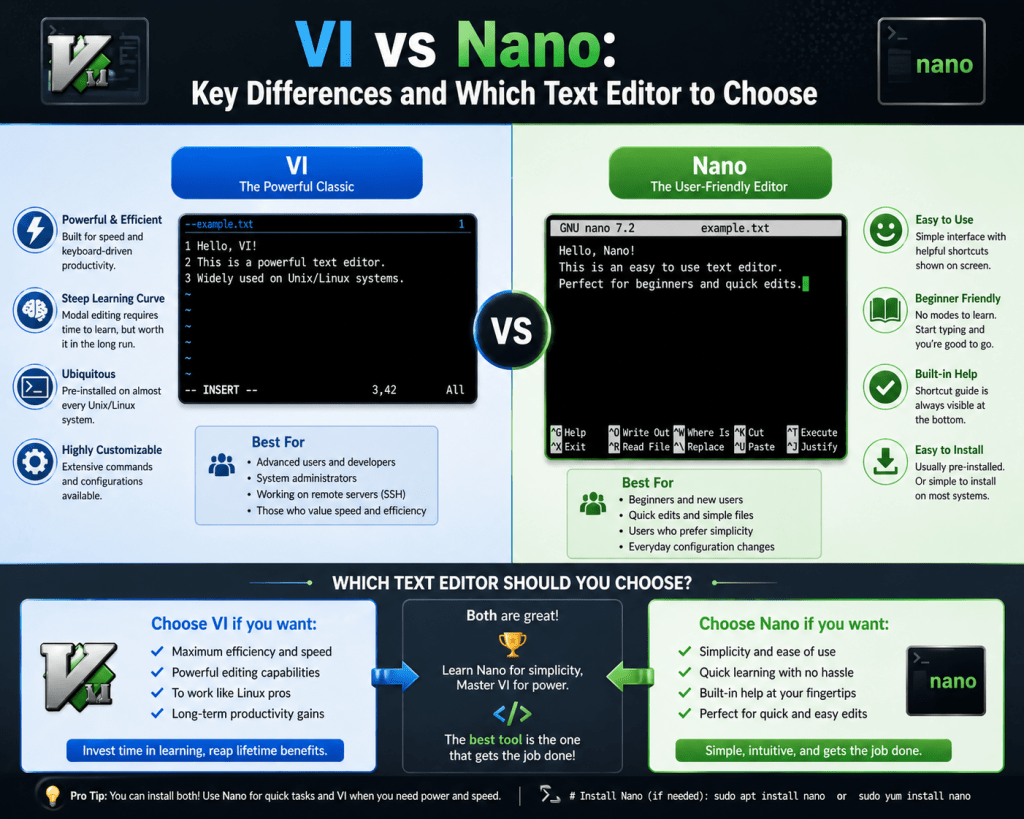
Linux systems are built around flexibility, modular design, and direct control over system behavior. One of the core ways this control is achieved is through text files that define configurations, services, scripts, and system policies. Because of this structure, editing text efficiently becomes a fundamental skill in Linux environments. Unlike graphical operating systems where settings are adjusted through visual interfaces, Linux often relies on direct file modification. This is where terminal-based text editors become essential tools.
Among the many editors available, Vi and Nano are two of the most widely used in professional and system-level environments. They are included in almost every Linux distribution and are frequently used in server administration, network configuration, and development workflows. Although both tools serve the same general purpose of editing text files, they operate on very different design principles, which affects how users interact with them and how quickly they can perform tasks.
Why Terminal Editors Remain Essential in Modern Linux Usage
Even with the availability of advanced graphical editors and integrated development environments, terminal-based editing tools continue to be a core part of Linux usage. The reason for this is not tradition alone, but practicality. Many Linux systems operate in environments where graphical interfaces are not installed or not desirable due to performance constraints. Servers, cloud instances, embedded systems, and remote machines often run in minimal configurations to conserve resources and improve stability.
In these environments, administrators connect remotely and manage systems through text-based interfaces. A lightweight editing tool becomes necessary for modifying configuration files, fixing service issues, or adjusting system behavior. Terminal editors are also important during system recovery situations where graphical environments may not load properly. In such cases, having reliable text editing capabilities ensures that critical system changes can still be made.
Vi and Nano are especially important because they are almost always available by default. This ensures that users can depend on them regardless of system setup or distribution choice.
Origins and Early Development of Vi
Vi has one of the longest histories among modern text editors still in active use. Its development traces back to early Unix systems in the 1970s, a period when computing resources were extremely limited and user interaction with machines was entirely text-based. During this time, efficiency was a primary concern, and tools needed to function with minimal memory usage and processing overhead.
Vi evolved from earlier line-based editors that required users to interact with text files one line at a time. These early tools were functional but restrictive, especially as computing needs grew more complex. The development of Vi introduced a screen-based editing experience within a terminal environment, allowing users to view and modify multiple lines of text simultaneously. This was a significant improvement in usability at the time and helped establish Vi as a powerful editing tool in Unix systems.
Over time, Vi became widely adopted across Unix-like operating systems, including Linux. Its presence in modern systems is a direct result of its efficiency, reliability, and adaptability in environments where graphical tools are not guaranteed.
Evolution of Vi and Its Modern Variants
Vi has not remained a single static program throughout its history. Instead, it has evolved into multiple implementations and variants, each improving or extending its functionality while maintaining compatibility with the original behavior. Some versions are lightweight and closely aligned with the original design, while others introduce advanced features such as syntax highlighting, scripting support, and enhanced navigation capabilities.
Despite these variations, the fundamental structure remains consistent. Users who understand one version of Vi can typically operate other versions with minimal adjustment. This consistency is one of the reasons Vi continues to be widely used in system administration and development environments.
Different Linux distributions may include different implementations, but the user experience remains largely similar. This uniformity ensures that knowledge of Vi is transferable across systems, which is particularly valuable in professional environments where multiple systems must be managed.
Design Philosophy Behind Vi
Vi is built around a design philosophy that prioritizes efficiency, precision, and minimal system overhead. Instead of combining all interactions into a single input mode, it separates editing into distinct operational states. This structure allows the system to interpret keyboard input differently depending on context, enabling powerful control over text manipulation.
The goal of this design is to reduce ambiguity in user interactions. By separating text insertion from operational input, Vi allows users to perform complex editing tasks without confusion between typing and executing actions. This structure also enables faster workflows once the user becomes familiar with the system.
Although this approach can initially feel complex, it is highly efficient in practice. Experienced users are able to navigate and modify large files quickly using compact key sequences. This efficiency is one of the key reasons Vi has remained relevant for decades despite the evolution of modern editing tools.
Modal Interaction Model in Vi
The defining characteristic of Vi is its modal interaction system. In this model, the editor operates in different states, each with a specific purpose. One state is used for inserting and modifying text, while another is used for performing operations on the document.
When the editor is in text entry state, user input is directly inserted into the file. When it switches to operational state, the same keyboard inputs are interpreted as instructions for editing, navigation, or file management. This separation allows for a wide range of actions to be performed without relying on graphical menus or external controls.
The transition between these states is a central part of using Vi effectively. Understanding when the editor is in each state is essential for avoiding unintended behavior and maintaining control over the editing process. While this system introduces a learning requirement, it also enables a high level of precision and efficiency once mastered.
Text Buffer System and File Handling in Vi
Vi operates using an internal memory structure known as a buffer. When a file is opened, its contents are loaded into this buffer, where all editing takes place. Changes are not immediately written to disk, allowing users to modify content safely before saving.
This buffer-based approach provides flexibility and reduces the risk of accidental file corruption. Users can navigate, modify, and reorganize content freely within the editing session before finalizing changes. It also allows for operations such as copying and relocating text segments within the same file or between different files during a session.
The buffer system is an important part of Vi’s efficiency, as it enables fast in-memory editing without constant disk access. This contributes to its performance advantages, especially in environments where system resources are limited.
Navigation and Text Manipulation Efficiency in Vi
Navigation in Vi is designed for speed and precision. Instead of relying on graphical controls, users move through text using structured input patterns that allow rapid movement across lines, words, and entire sections of a document. This system is particularly effective when working with large configuration files or codebases.
Text manipulation in Vi is also highly efficient. Users can perform actions such as copying, deleting, and rearranging text using compact input sequences. These operations are designed to minimize keystrokes while maximizing control over document structure.
The combination of fast navigation and precise manipulation makes Vi especially useful for experienced users who regularly work with complex text files in system administration or development environments.
Historical Context of Terminal Editing in Unix Systems
The development of Vi must be understood within the broader context of early Unix computing. During the formative years of Unix, computing systems operated under strict resource limitations. Memory was scarce, processing power was limited, and user interfaces were entirely text-based.
In this environment, efficiency was not optional but necessary. Tools had to be designed to perform complex tasks without consuming excessive system resources. Text editors were especially important because they were used to configure nearly every aspect of the system.
Vi emerged as a solution to these constraints by offering a powerful yet efficient editing environment. Its design reflects the priorities of early computing systems, where speed, reliability, and minimal resource usage were essential.
Vi’s Continued Relevance in Modern Systems
Despite significant advances in computing technology, Vi continues to be widely used. Its relevance is maintained by its efficiency, consistency, and availability across virtually all Unix-like systems. System administrators, developers, and engineers continue to rely on it for tasks that require direct file manipulation in terminal environments.
Its presence in modern systems is not simply historical but functional. Many workflows still depend on terminal-based editing, especially in remote and server-based environments where graphical tools are not practical. Vi’s ability to operate efficiently in these conditions ensures its continued importance in professional computing.
The combination of historical significance, technical efficiency, and system-wide availability makes Vi one of the most enduring tools in Linux environments.
Nano Text Editor and Its Place in Linux Environments
Nano is one of the most widely used terminal-based text editors in Linux systems, primarily due to its simplicity and direct usability. Unlike more complex editors that require users to learn multiple operational states or advanced command structures, Nano is designed to function in a single, consistent interaction mode. This makes it especially accessible for users who need to quickly edit configuration files, scripts, or system settings without investing significant time in learning editor-specific workflows.
In modern Linux environments, Nano is commonly found alongside other text editors, ensuring that users always have a reliable and easy-to-use tool available. Its design philosophy is centered on clarity, minimal learning curve, and immediate usability, which makes it a practical choice for both beginners and experienced system administrators who prioritize speed and efficiency in routine tasks.
Design Philosophy Behind Nano
The core philosophy behind Nano is simplicity without sacrificing essential functionality. It was created to address the need for a lightweight editor that could be used immediately without extensive training or prior experience with modal editing systems. Instead of introducing complex interaction models, Nano focuses on straightforward text input combined with clearly defined control-based actions.
This design choice reflects a shift in computing environments where usability became increasingly important. As Linux adoption expanded beyond expert users into educational institutions, development environments, and general-purpose server management, there was a growing demand for tools that could be used effectively without deep technical knowledge. Nano fulfills this role by providing a predictable and intuitive editing experience.
The emphasis on simplicity does not mean that Nano lacks capability. Instead, it prioritizes essential editing functions and presents them in a way that is easy to access and understand. This balance between functionality and usability is what defines Nano’s role in modern systems.
Single-Mode Interaction Model in Nano
One of the most important distinctions between Nano and other terminal editors is its single-mode interaction system. In this model, all keyboard input is interpreted as text unless it is combined with specific control inputs. This eliminates the need to switch between different operational states, reducing complexity and making the editor more predictable in behavior.
This approach allows users to focus entirely on the content they are editing rather than managing different modes of operation. Every action, whether it involves writing text, navigating through a file, or executing a file operation, occurs within the same consistent environment. This reduces the cognitive load on the user and makes Nano particularly suitable for quick editing tasks.
Because there is no separation between editing and operational states, users do not need to track which mode they are currently in. This eliminates one of the most common sources of confusion found in more complex terminal editors and contributes to Nano’s reputation as an easy-to-use tool.
Keyboard-Based Operations and Control Mechanisms in Nano
Instead of relying on modal commands, Nano uses control key combinations to perform operations. These combinations are consistent and displayed within the interface itself, allowing users to reference available actions without memorization. This design significantly improves usability, especially for users who are not familiar with terminal-based workflows.
Common editing operations such as saving files, searching content, and moving through text are all performed using simple key combinations. This approach ensures that users can perform essential tasks quickly without navigating complex command structures. The consistency of control inputs also reduces the learning curve, making Nano accessible to a wide range of users.
The presence of visible shortcuts within the interface further enhances usability. Users are always aware of available actions, which reduces uncertainty and improves efficiency during editing sessions.
Interface Structure and User Guidance in Nano
Nano provides a minimal but informative interface that displays available operations directly within the editing window. This design ensures that users do not need to memorize commands or refer to external documentation while working. The interface typically includes a reference section that lists available control inputs and their corresponding actions.
This built-in guidance system makes Nano particularly useful in environments where users may not be familiar with command line tools. It reduces dependency on prior experience and allows users to become productive quickly. The interface is designed to be unobtrusive, ensuring that the focus remains on the text being edited rather than on tool complexity.
The layout is intentionally simple, avoiding unnecessary visual elements or complex menus. This minimalism contributes to performance efficiency and ensures that the editor remains responsive even in resource-constrained environments.
Text Editing Workflow in Nano
The editing workflow in Nano is designed to be straightforward and linear. Users open a file, make modifications directly within the text area, and then execute file operations as needed. There is no requirement to switch modes or manage different interaction states, which simplifies the overall editing process.
Text input is handled directly, with all characters immediately inserted into the file unless modified by control inputs. This allows users to focus entirely on content creation and modification without needing to adjust their interaction method. The workflow is particularly effective for tasks that require quick changes to configuration files or scripts.
Because all operations occur within a single environment, users can maintain a continuous editing flow. This reduces interruptions and improves efficiency when performing routine system administration tasks.
File Navigation and Editing Simplicity in Nano
Navigation in Nano is designed to be intuitive and consistent. Users can move through text using directional inputs or simple control combinations. This allows for easy movement across lines, words, and sections of a file without requiring complex command sequences.
The simplicity of navigation is one of Nano’s key advantages in quick editing scenarios. Users can locate and modify specific sections of text without needing to learn advanced navigation techniques. This makes Nano particularly effective for small to medium-sized files where rapid adjustments are required.
The absence of complex navigation commands ensures that users can focus on content editing rather than tool mechanics. This contributes to a smoother and more efficient editing experience overall.
Use Cases in System Administration Environments
Nano is frequently used in system administration contexts where quick and reliable file editing is required. These tasks often include modifying configuration files, adjusting service parameters, and updating system settings. In such scenarios, speed and simplicity are more important than advanced editing capabilities.
System administrators often prefer tools that allow them to make changes quickly without spending time navigating complex interfaces. Nano fulfills this requirement by providing a direct and uncomplicated editing environment. Its predictable behavior ensures that users can perform necessary modifications without unexpected interactions.
In remote server environments, where efficiency and reliability are critical, Nano serves as a practical tool for handling routine configuration tasks.
Role of Nano in Remote and Server-Based Environments
Remote system management is a core aspect of modern IT infrastructure. Administrators frequently connect to systems located in different environments using secure terminal access. In these situations, lightweight tools are essential for maintaining performance and responsiveness.
Nano performs effectively in these environments due to its minimal resource usage and simple interaction model. It does not require graphical support, making it suitable for remote sessions where only terminal access is available. This ensures that users can edit files efficiently even when working over limited or unstable network connections.
Its lightweight nature also contributes to faster session responsiveness, which is important when managing multiple remote systems simultaneously.
Performance Characteristics of Nano in Linux Systems
Nano is designed to operate with minimal system overhead, making it suitable for both modern and older hardware systems. Its lightweight architecture ensures fast startup times and efficient memory usage. While it may include additional usability features compared to minimal editors, it remains highly efficient in terms of resource consumption.
In most environments, the performance difference between Nano and other terminal editors is negligible. However, its simplicity contributes to consistent responsiveness, especially when editing small or medium-sized files. This makes it a reliable choice for routine administrative tasks where performance stability is more important than advanced functionality.
Accessibility and Learning Curve Considerations
One of Nano’s strongest advantages is its accessibility. It is designed to be immediately usable without prior training in terminal-based editing systems. Users can begin editing files as soon as they open the editor, without needing to learn different modes or complex command structures.
This accessibility makes Nano particularly valuable in educational environments and entry-level system administration training. It allows users to focus on understanding system concepts rather than spending time learning editor mechanics.
The reduced learning curve also makes Nano a preferred choice for quick tasks where efficiency and simplicity are prioritized over advanced features.
Integration with Linux Distributions and Default Availability
Nano is included in most Linux distributions as a default or optional text editor. This ensures that users always have access to a basic editing tool regardless of system configuration. Its widespread availability makes it a reliable option for system recovery, maintenance, and configuration tasks.
Package management systems allow users to install or update Nano easily, ensuring compatibility across different environments. This consistent availability contributes to its popularity among users who require a dependable editing tool that works across multiple systems without variation.
Practical Advantages in Everyday Linux Usage
In everyday Linux usage, Nano provides a practical solution for users who need to make quick modifications to files without engaging in complex workflows. Its straightforward design allows users to focus on completing tasks efficiently rather than managing editor-specific behavior.
This makes it especially useful for tasks such as editing startup scripts, adjusting configuration parameters, and making temporary changes during system troubleshooting. Its simplicity ensures that users can complete these tasks with minimal friction.
Nano’s role in Linux environments is defined by its ability to provide immediate, reliable access to file editing capabilities in a simple and predictable manner.
Practical Comparison Between Vi and Nano in Real Linux Workflows
In real Linux environments, Vi and Nano are not just theoretical tools; they are actively used in system administration, development, and infrastructure maintenance. Their differences become most visible when applied to real tasks such as editing configuration files, modifying scripts, or troubleshooting system services. While both editors can technically perform the same fundamental operations, the experience of using them differs significantly depending on workflow complexity, user familiarity, and operational environment.
Vi is often associated with high-efficiency workflows where experienced users handle large files, repetitive editing patterns, and structured navigation. Its modal design allows rapid switching between different types of operations, which becomes extremely powerful in skilled hands. Nano, on the other hand, is typically used for quick edits, direct modifications, and situations where speed of access is more important than advanced editing capability.
The practical difference is not in capability but in interaction style. Vi prioritizes structured efficiency, while Nano prioritizes immediacy and simplicity.
Editing Configuration Files in System Administration
One of the most common use cases for both Vi and Nano is editing system configuration files. These files control how services behave, how networks are configured, and how system components interact. Because these files are often critical to system stability, editing them requires precision and clarity.
Vi is frequently used in environments where administrators need to perform multiple changes across large configuration files. Its navigation efficiency allows users to move quickly between sections, identify patterns, and make structured modifications. This is particularly useful in systems with complex configurations or when working across multiple related files.
Nano is often preferred when changes are small, targeted, or time-sensitive. For example, adjusting a single parameter or correcting a minor configuration error can be done quickly without engaging in complex navigation. Its straightforward interface reduces the chance of confusion during urgent system maintenance tasks.
Both editors are fully capable in this context, but the choice depends on the scale and complexity of the task rather than functional limitations.
Workflow Efficiency and User Interaction Patterns
Workflow efficiency in text editing is determined by how quickly a user can complete tasks with minimal cognitive overhead. Vi achieves efficiency through mastery of its modal system. Once users become familiar with its structure, they can perform complex editing tasks using compact input sequences. This reduces the number of actions required for advanced operations and enables rapid editing workflows.
However, this efficiency comes with an initial learning requirement. Users must understand how different interaction states work and how to transition between them. This creates a barrier for new users but rewards experienced users with high-speed editing capabilities.
Nano achieves efficiency through simplicity. Since it does not require mode switching or command memorization, users can immediately begin editing files. This reduces setup time and makes it highly effective for quick tasks. While it may require more manual navigation for complex operations, its predictability ensures consistent behavior across all interactions.
In practice, Vi is more efficient for advanced workflows, while Nano is more efficient for quick tasks.
Learning Curve and Skill Development in Linux Editing Tools
The learning curve associated with Vi is often described as steep due to its modal structure and command-based interaction model. New users must invest time in understanding how the editor behaves before becoming productive. This includes learning how to switch modes, navigate efficiently, and perform editing operations using structured inputs.
Once this foundation is established, users gain access to a highly efficient editing system capable of handling complex tasks with minimal effort. This makes Vi a long-term investment in skill development rather than a short-term convenience tool.
Nano, in contrast, has a minimal learning curve. Users can begin editing immediately without prior knowledge of its structure. Most essential functions are displayed within the interface, reducing the need for memorization. This makes it ideal for users who require immediate productivity without extensive training.
The difference in learning curve often determines which editor users adopt initially, especially in educational or beginner environments.
System Resource Usage and Performance Considerations
Both Vi and Nano are designed to operate efficiently within terminal environments, but their performance characteristics differ slightly based on design priorities.
Vi is highly optimized for minimal resource usage. It was originally developed in environments where memory and processing power were extremely limited, and this influence remains visible in its modern implementations. It launches quickly and operates efficiently even on older hardware or minimal system configurations.
Nano also maintains a lightweight footprint but includes additional usability features that slightly increase its resource consumption. These differences are generally negligible on modern systems but may become relevant in extremely constrained environments such as embedded systems or minimal server installations.
In practical terms, both editors perform efficiently in most Linux environments, and performance is rarely a deciding factor in choosing between them.
Remote System Administration and Terminal Editing
Remote system administration is a core component of modern IT infrastructure management. Administrators often access servers through secure terminal connections rather than graphical interfaces. In these environments, text editors must be reliable, fast, and compatible with minimal system configurations.
Vi is often favored in remote environments due to its efficiency and availability across virtually all Unix-like systems. Its powerful navigation and editing capabilities make it suitable for managing complex configurations over remote connections.
Nano is equally valuable in remote environments where quick modifications are required. Its simplicity allows administrators to make fast adjustments without needing to recall complex interaction patterns. This can be especially useful during troubleshooting scenarios where speed is critical.
Both tools are widely used in remote administration, and the choice often depends on personal preference and task complexity.
File Navigation Strategies and Editing Precision
Navigation within text editors plays a critical role in determining editing efficiency. Vi provides advanced navigation capabilities that allow users to move through text with high precision. This includes movement by words, lines, patterns, and structural elements within a document. These capabilities make it highly effective for working with large or complex files.
Nano provides simpler navigation mechanisms that rely on directional movement and basic control inputs. While less advanced than Vi, this simplicity makes it easier to use and reduces the chance of navigation errors. It is particularly effective for small to medium-sized files where complex navigation is unnecessary.
Precision in editing is achieved differently in each tool. Vi achieves precision through structured commands and navigation efficiency, while Nano achieves it through simplicity and reduced interaction complexity.
Extensibility and Customization Capabilities
Vi is highly extensible through configuration options and external enhancements. Users can modify its behavior, add functionality, and integrate additional tools to expand its capabilities. This makes it suitable for users who require a highly customizable editing environment tailored to specific workflows.
Customization in Vi often involves configuring key mappings, enabling additional features, and integrating external enhancements that extend functionality beyond basic editing.
Nano, in contrast, offers limited customization options. Its design prioritizes consistency and simplicity over extensibility. While this reduces flexibility, it ensures that behavior remains predictable across different systems and user environments.
This difference reflects the broader design philosophy of each tool: Vi emphasizes adaptability, while Nano emphasizes stability and simplicity.
Use in Development and Scripting Environments
In development environments, text editors play a crucial role in writing and maintaining code and scripts. Vi is often used by developers who prefer terminal-based workflows or who require fast editing capabilities within remote systems. Its efficiency in handling structured text makes it suitable for code editing and script modification.
Nano is less commonly used for large-scale development but remains useful for quick script edits or configuration adjustments. Its simplicity makes it ideal for minor changes or debugging tasks performed directly on remote systems.
Many developers prefer graphical code editors for complex development work, but terminal editors remain essential for system-level scripting and server-side modifications.
Stability, Availability, and Cross-System Consistency
Both Vi and Nano are highly stable and widely available across Linux distributions. Their inclusion in default system installations ensures that users can rely on them regardless of environment. This consistency is particularly important in enterprise and server environments where tool availability must be guaranteed.
Vi’s long history contributes to its stability and cross-system consistency. Different implementations maintain compatibility with its core behavior, ensuring that users can transfer skills across systems without difficulty.
Nano also maintains consistency across distributions, providing a uniform editing experience regardless of system configuration.
Long-Term Relevance of Terminal Editors in Linux Ecosystems
Despite advances in modern software development tools, terminal-based editors remain relevant due to their reliability, efficiency, and independence from graphical environments. They are essential in environments where direct system access is required, and graphical interfaces are not available or practical.
Vi continues to be valued for its efficiency and depth of functionality, while Nano remains important for its accessibility and simplicity. Together, they represent two complementary approaches to text editing in Linux systems.
Their continued presence in modern distributions reflects their importance in maintaining system flexibility and operational reliability across a wide range of computing environments.
Conclusion
Vi and Nano represent two fundamentally different philosophies of interaction within Linux-based systems, and the comparison between them is less about superiority and more about suitability for specific use cases. Both tools exist because Linux environments demand reliable, fast, and universally available text editing capabilities, especially in contexts where graphical interfaces are either unavailable or inefficient. Over time, both editors have become deeply embedded in system administration, development workflows, and infrastructure management, not because they compete directly, but because they solve the same problem in different ways.
Vi is built around the idea of structured efficiency. Its modal architecture separates editing from operational control, which allows experienced users to perform complex text manipulations with remarkable speed and precision. This design is rooted in early Unix computing constraints, where memory and processing power were limited, and every keystroke needed to be meaningful. That historical foundation still influences how Vi behaves today. Even in modern systems with abundant resources, Vi remains extremely lightweight, fast to load, and capable of handling large files with minimal overhead. Its strength lies in scalability of skill: the more time a user invests in learning it, the more powerful it becomes in practice.
Nano, on the other hand, reflects a different era and a different set of priorities. It was designed in a world where usability and accessibility had become more important than strict efficiency through memorization. Instead of requiring users to learn multiple operational states or complex interaction patterns, Nano provides a direct and predictable editing experience. Every action is accessible through simple control inputs, and most essential functions are visible on-screen. This reduces cognitive load and makes it significantly easier for new users or occasional administrators to perform essential tasks without confusion.
The practical difference between these two tools becomes most visible in real-world workflows. In system administration, for example, editing a configuration file quickly and accurately is often more important than the sophistication of the editing environment. Nano excels in situations where the task is straightforward: adjusting a parameter, fixing a service setting, or making a small correction during troubleshooting. Its simplicity ensures that users can act quickly without needing to recall complex interaction rules.
Vi, however, becomes more valuable when tasks scale in complexity. When dealing with large configuration files, repetitive modifications, or structured editing across multiple sections of text, Vi’s navigation efficiency and command-driven structure allow experienced users to work significantly faster. The ability to combine movements and actions into compact sequences reduces repetitive effort and enables a more fluid editing experience once mastery is achieved.
Another important dimension of comparison is learning curve versus long-term efficiency. Nano offers immediate productivity. A user can open a file and begin editing without prior knowledge of its structure. This makes it particularly suitable for environments where users may only occasionally interact with the terminal or where speed of access is more important than deep tool mastery. Vi requires a learning investment, but that investment pays off in long-term efficiency, especially for users who regularly work within terminal environments. This creates a natural separation in usage patterns: Nano is often chosen for convenience, while Vi is chosen for capability depth.
In terms of system design philosophy, Vi reflects minimalism and control at a low level, while Nano reflects accessibility and guided interaction. Vi assumes that the user is willing to learn its structure in exchange for greater power. Nano assumes that the user prioritizes clarity and immediate usability over advanced functionality. Neither assumption is incorrect; they simply target different user expectations and operational contexts.
From a performance perspective, both editors are extremely lightweight compared to modern graphical editors. They are designed to function in environments where resources may be limited, such as remote servers, recovery systems, or embedded devices. Vi has a slight edge in absolute minimalism due to its historical design constraints, but in modern systems, the difference is practically negligible. Both load quickly and operate efficiently even under constrained conditions, which is one of the reasons they continue to be included in virtually every Linux distribution.
Remote administration further highlights their importance. When connecting to servers over secure terminal sessions, administrators rely on tools that are stable, predictable, and independent of graphical systems. Vi and Nano both fulfill this requirement effectively. Vi is often preferred by experienced administrators who value speed and advanced navigation. Nano is frequently chosen in urgent situations or by users who prioritize simplicity during remote troubleshooting. In both cases, the availability of a dependable terminal editor is essential for maintaining system control.
It is also important to recognize that modern workflows often combine multiple tools rather than relying on a single editor for all tasks. Developers may use advanced graphical environments for large-scale coding while still relying on Vi or Nano for quick system-level edits. This hybrid approach reflects the practical reality of Linux ecosystems, where flexibility is more important than strict adherence to a single toolset.
Ultimately, the comparison between Vi and Nano is not a competition with a single winner. Instead, it is a reflection of how different design philosophies serve different needs within the same operating system environment. Vi represents depth, efficiency, and long-term mastery. Nano represents simplicity, accessibility, and immediate usability. Both remain relevant because Linux itself supports a wide range of users, from beginners to highly experienced system engineers.
The continued presence of both editors in modern Linux distributions demonstrates their enduring value. As long as systems require direct text manipulation at the terminal level, tools like Vi and Nano will remain essential components of the computing landscape. Their differences ensure that users always have a choice between complexity and simplicity, between power and immediacy, and between mastery and accessibility.