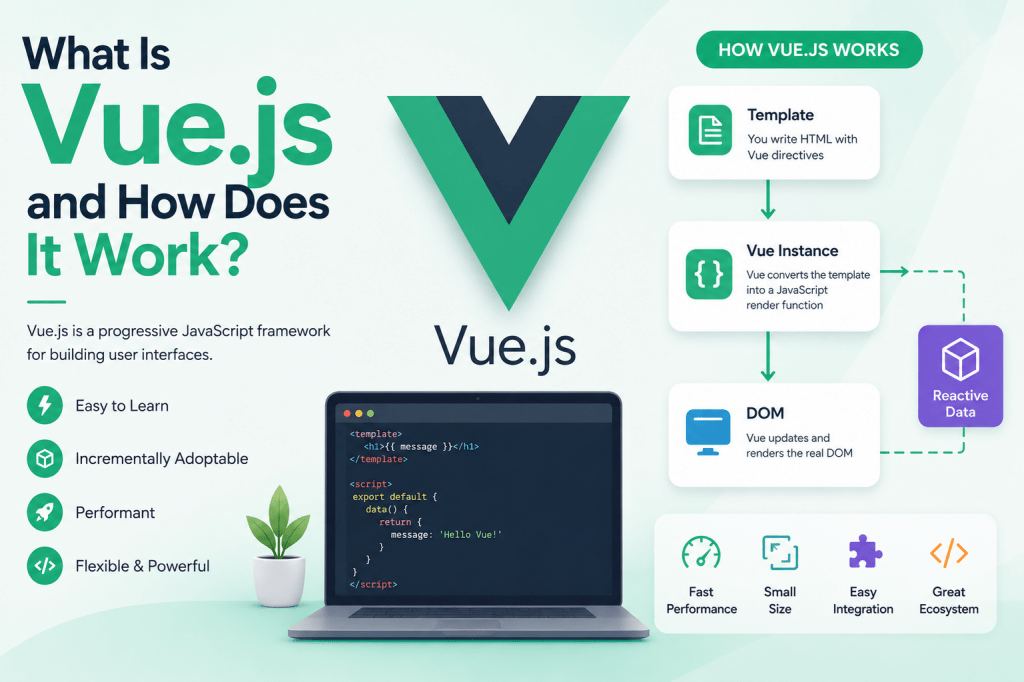
Vue.js is a progressive JavaScript framework designed to help developers build interactive and modern web applications. It focuses heavily on simplicity, flexibility, and performance, making it one of the most approachable frontend technologies available. Developers use Vue.js to create user interfaces that react instantly to user actions without constantly refreshing entire webpages. Instead of rebuilding a page from scratch whenever something changes, Vue intelligently updates only the specific sections that need modification.
Modern users expect websites to feel smooth and responsive. Traditional websites reload an entire page whenever a user clicks a button, submits a form, or navigates between sections. Vue.js changes that experience completely by allowing developers to create dynamic applications where updates happen instantly within the browser. This creates faster interactions and a more app-like experience for users.
One reason developers are attracted to Vue.js is its lightweight structure. Unlike some larger frameworks that require extensive configuration before development can begin, Vue offers a streamlined experience that allows projects to start quickly. Developers can either use Vue for small interface enhancements or scale it into large applications with advanced architecture.
Vue.js also emphasizes readability. The structure of Vue files is designed so developers can clearly separate visual layouts, logic, and styling. This organized approach helps projects remain manageable even as applications grow more complex over time.
The Meaning Behind Progressive Frameworks
Vue.js is often described as a progressive framework because it allows developers to adopt features gradually instead of forcing them into a rigid structure immediately. This flexibility is one of the framework’s strongest characteristics. A developer can begin by using Vue in a single portion of a webpage and later expand its usage across an entire application.
The word progressive refers to adaptability. Some frameworks require developers to fully commit to a particular architecture before development can even start. Vue works differently. It allows integration step by step. Existing projects can slowly adopt Vue components without rebuilding the entire system from the ground up.
This gradual adoption makes Vue especially attractive for businesses and teams maintaining older applications. Instead of discarding years of work, developers can modernize interfaces incrementally. They might start with one interactive widget, then replace more sections over time until most of the application uses Vue.
Vue’s progressive nature also benefits learning. Beginners can focus on mastering core concepts first before diving into advanced patterns like routing, centralized state management, or server-side rendering. This layered learning process makes Vue feel less intimidating compared to many alternatives.
Another important aspect of the progressive philosophy is modularity. Developers only include the features their applications actually need. This prevents unnecessary code from bloating projects and helps maintain performance across devices.
Why Vue.js Became Popular Among Developers
Vue.js gained popularity because it balances simplicity with power. Some frameworks prioritize flexibility but become difficult to organize in large projects. Others enforce strict structures that can slow down development. Vue sits comfortably between these extremes.
Many developers appreciate how quickly they can become productive with Vue. The syntax feels familiar because it relies heavily on standard HTML, CSS, and JavaScript concepts. Developers do not need to learn entirely new programming paradigms before building useful applications.
Vue also provides excellent documentation and a clean learning curve. Beginners can create simple projects rapidly, while experienced developers can use advanced features to build enterprise-level applications. This versatility allows Vue to appeal to a wide range of developers with different experience levels.
Performance is another major reason for Vue’s success. Applications built with Vue often feel fast because the framework updates only necessary elements instead of re-rendering entire pages. This efficient rendering system helps reduce unnecessary browser workload.
Community support has also contributed heavily to Vue’s growth. A large ecosystem of plugins, libraries, and tools makes it easier to solve common development challenges. Developers can find resources for routing, animations, testing, authentication, and countless other features without reinventing solutions themselves.
How Single-Page Applications Work
Vue.js is frequently used to create single-page applications, commonly called SPAs. In a traditional website, navigating between pages causes the browser to request entirely new HTML documents from the server. This process creates noticeable loading delays and repeated page refreshes.
A single-page application works differently. The browser loads the core application once, and afterward only specific content areas update dynamically as users interact with the interface. This creates a smoother and more seamless browsing experience.
For example, imagine navigating from a homepage to a contact form within a Vue application. Instead of reloading headers, navigation menus, footers, and every other element, Vue changes only the content section that needs updating. Everything else remains intact.
This architecture dramatically improves responsiveness. Since the browser avoids repeatedly downloading identical layouts, interactions become significantly faster. Applications feel closer to native desktop or mobile software rather than traditional websites.
Single-page applications also enable advanced interactive experiences. Features like live notifications, instant filtering, real-time dashboards, and dynamic forms become easier to implement because Vue maintains direct control over the page’s state.
However, SPAs require careful architecture. Since much of the application logic executes in the browser, developers must manage routing, data handling, and state updates efficiently. Vue provides tools that simplify these responsibilities while maintaining performance.
The Core Architecture of Vue.js
At its core, Vue.js revolves around components. Components are reusable building blocks that represent portions of the user interface. Instead of writing one massive file containing an entire application, developers break interfaces into smaller independent pieces.
Each component handles its own structure, logic, and styling. This modular design improves maintainability because developers can focus on isolated features without affecting unrelated sections of the application.
For example, a navigation bar might exist as one component, while a user profile card exists as another. These components can communicate with one another while remaining independently manageable.
Vue applications often resemble trees of interconnected components. A root component sits at the top, containing child components beneath it. Those child components may contain additional nested components, forming a structured hierarchy.
This component-based system offers major advantages. Reusable components reduce repetitive code, accelerate development, and create consistent user interfaces. Teams can reuse the same button styles, form layouts, or navigation elements throughout an application without duplicating effort.
Component architecture also simplifies debugging. If a problem occurs in one part of the application, developers can isolate the issue within the affected component instead of searching through an enormous monolithic codebase.
How Vue Handles Reactive Data
One of Vue.js’s defining features is its reactivity system. Reactivity allows the user interface to automatically update whenever underlying data changes. Developers do not need to manually manipulate the page every time new information appears.
Suppose an application displays a user’s name on screen. If the underlying data changes from “John” to “Sarah,” Vue immediately updates the visible interface automatically. Developers only change the data itself, and Vue handles the visual update behind the scenes.
This reactive behavior significantly reduces complexity. Traditional JavaScript often required manually selecting elements, updating text content, and ensuring all related sections stayed synchronized. Vue automates these responsibilities through data binding.
Reactivity works because Vue tracks dependencies between data and interface elements. Whenever a value changes, Vue identifies which portions of the interface rely on that value and updates only those specific areas.
This targeted updating improves efficiency. Instead of re-rendering an entire page, Vue performs precise modifications. Applications remain responsive even when handling large amounts of dynamic content.
Reactive systems also improve developer productivity. Developers can think more about application behavior and less about low-level DOM manipulation. Vue handles much of the repetitive interface synchronization automatically.
The Role of the Virtual DOM in Vue.js
Vue.js uses a concept called the Virtual DOM to optimize rendering performance. The DOM, or Document Object Model, represents webpage elements inside the browser. Directly manipulating the DOM repeatedly can become expensive and slow, especially in large applications.
The Virtual DOM acts as an intermediate representation of the actual interface. Instead of immediately updating the browser’s real DOM whenever data changes, Vue first creates an updated virtual representation in memory.
Vue then compares the new virtual version against the previous one to determine exactly what changed. This comparison process is often called diffing. After identifying differences, Vue updates only the necessary elements in the real DOM.
This strategy improves efficiency because unnecessary updates are avoided. Browsers perform better when modifications remain minimal and targeted.
For developers, the Virtual DOM removes much of the complexity associated with performance optimization. Vue automatically handles intelligent rendering decisions, allowing developers to focus on building features rather than manually optimizing updates.
Although users never directly interact with the Virtual DOM, it plays a major role in creating fast and responsive interfaces. It allows Vue applications to maintain smooth performance even during frequent data changes.
How Vue Templates Work
Vue templates define the visual structure of components. Templates are usually written using HTML-like syntax, making them approachable for developers already familiar with standard web technologies.
Inside templates, developers can embed dynamic data using special syntax. Vue replaces these placeholders with actual values from the application’s data model. This process creates a direct connection between the interface and underlying application state.
Templates also support conditional rendering. Developers can display or hide elements depending on certain conditions. For example, a login button may disappear after a user successfully signs in.
Loops are another essential feature within templates. Developers can generate lists dynamically by iterating through arrays of data. This becomes useful for displaying products, messages, notifications, or search results.
Event handling is deeply integrated into Vue templates as well. Buttons, forms, and interactive elements can trigger functions directly through template syntax. This creates a clean relationship between user interactions and application behavior.
Vue templates are powerful because they combine simplicity with flexibility. Developers can create highly dynamic interfaces without sacrificing readability or maintainability.
The Importance of Directives in Vue.js
Vue.js includes special template features known as directives. Directives are attributes added to HTML elements that provide dynamic behavior.
These directives allow developers to control rendering, manage events, bind attributes, and manipulate interface behavior declaratively. Instead of writing extensive manual JavaScript code, developers can express logic directly inside templates.
One common directive handles conditional rendering, allowing elements to appear only when certain conditions are true. Another directive repeats elements across arrays of data, simplifying dynamic list generation.
Vue directives also simplify two-way data binding. This means form inputs automatically stay synchronized with application data. If a user types into an input field, the underlying data updates instantly. Likewise, if the application changes the value programmatically, the input reflects the change immediately.
Event directives connect user interactions with application methods. Clicking buttons, submitting forms, or hovering over elements can trigger specific functions seamlessly.
Directives contribute heavily to Vue’s readability. Instead of scattering interface logic across multiple files, developers can express behavior close to the elements it affects.
Component Communication in Vue.js
As Vue.js applications grow larger, components need ways to communicate with one another. A simple application may contain only a few independent components, but more advanced systems often require constant interaction between different sections of the interface. Vue provides several methods that allow components to share information efficiently while maintaining organized architecture.
The most common communication pattern involves parent and child components. A parent component passes information down to child components through properties commonly called props. Props allow data to flow in a predictable direction, helping applications remain easier to understand and debug.
For example, an online store application may have a product list component acting as a parent. Each product card displayed on screen can exist as a child component receiving product information through props. Instead of duplicating logic repeatedly, the parent controls the data while child components focus on presentation.
Child components can also communicate back to parents using custom events. When a user interacts with a child component, such as clicking an “Add to Cart” button, the child can emit an event informing the parent about the action. The parent then decides how to respond.
This separation of responsibilities improves maintainability. Parent components manage broader application behavior while child components remain focused on isolated interface tasks. Such architecture becomes especially valuable in large projects with many developers working simultaneously.
Vue also supports more advanced communication patterns for deeply nested applications. Developers can use centralized state management systems when passing data through many component layers becomes cumbersome. This creates cleaner relationships between distant sections of an application.
Understanding Vue’s Data Binding System
Data binding is one of the most important concepts within Vue.js. It refers to the synchronization between application data and the user interface. Vue automatically ensures that both remain connected, reducing the need for repetitive manual updates.
One-way data binding allows developers to display data inside templates dynamically. Whenever the underlying data changes, the interface updates immediately without additional code. This creates highly reactive applications where information remains current automatically.
Two-way data binding extends this idea further by allowing user input to modify application data instantly. Form fields become directly connected to data variables. As users type, select options, or interact with controls, the application state updates in real time.
This feature dramatically simplifies form handling. Traditional JavaScript often required manually listening for input events and updating values individually. Vue streamlines the entire process through built-in bindings.
Data binding also helps reduce errors caused by inconsistent states. Since Vue manages synchronization automatically, developers spend less time worrying about whether interface elements correctly reflect the latest data.
Reactive data flow is especially useful in interactive applications such as dashboards, messaging systems, booking platforms, and e-commerce websites. Information can change rapidly while the interface remains smooth and synchronized.
Vue’s data binding system also contributes heavily to cleaner code organization. Instead of scattering update logic throughout the application, developers can focus on defining relationships between data and templates clearly.
How Vue Handles User Events
Interactive applications rely heavily on user events. Clicking buttons, submitting forms, scrolling pages, and typing into fields all generate events that applications must respond to quickly. Vue.js provides a clean system for handling these interactions efficiently.
Vue allows developers to attach event listeners directly inside templates. Instead of manually selecting elements with JavaScript and attaching handlers separately, developers can define interactions declaratively within component markup.
When a user performs an action, Vue triggers associated methods inside the component. These methods contain the logic responsible for updating data, communicating with servers, or changing interface behavior.
For example, a login form may trigger a submission method when users press a button. That method might validate input fields, send authentication requests, and update the interface based on the response.
Vue also includes event modifiers that simplify common interaction patterns. Developers can prevent default browser behaviors, stop event propagation, or listen for specific keyboard keys without writing extra boilerplate code.
This streamlined approach improves readability significantly. User interactions remain closely connected to the interface elements they affect, making code easier to understand and maintain.
Handling events efficiently is essential for responsive user experiences. Vue’s reactive system ensures that interface updates happen smoothly after interactions occur, creating fluid application behavior.
Computed Properties and Their Importance
Vue.js includes a feature called computed properties that helps developers manage dynamic calculations more efficiently. Computed properties generate values derived from existing data while remaining automatically reactive.
Suppose an application stores a user’s first and last name separately. A computed property can combine those values into a full name dynamically. Whenever either underlying value changes, the computed result updates automatically.
Computed properties improve organization by keeping templates clean. Instead of placing complex calculations directly inside HTML markup, developers move logic into dedicated computed sections.
Performance optimization is another major advantage. Vue caches computed property results until their dependencies change. This prevents unnecessary recalculations during repeated renders.
Without computed properties, developers might use methods for every dynamic value. However, methods execute repeatedly whenever rendering occurs, potentially causing performance issues in large applications. Computed properties avoid this inefficiency through intelligent caching.
Complex applications often rely heavily on computed values for filtering, sorting, formatting, and aggregating data. For example, product listings may use computed properties to display filtered search results instantly as users type.
The ability to create reactive derived data simplifies many common development tasks. Developers can build sophisticated interfaces while maintaining organized and readable code structures.
Methods and Application Logic in Vue.js
Methods in Vue.js contain executable logic responsible for handling actions and behaviors within components. While templates define visual structure, methods control how applications respond to interactions and data changes.
A Vue component can include multiple methods handling different responsibilities. One method might fetch information from an external server, while another validates form input or updates component state.
Methods become especially important when handling user events. Clicking buttons, submitting forms, or interacting with menus typically triggers component methods that execute corresponding logic.
Vue methods have direct access to component data, computed properties, and other internal features. This close integration allows developers to manage component behavior cohesively within a single structure.
For example, an online shopping application may include methods for adding products to a cart, calculating totals, applying discounts, and processing checkout steps. Each action remains organized within the component responsible for that functionality.
Methods also support asynchronous operations. Applications frequently need to retrieve information from APIs or databases, and Vue methods can handle these requests efficiently using modern JavaScript features.
Proper organization of methods improves maintainability significantly. Developers can separate concerns clearly and keep complex logic manageable as projects grow larger.
The Lifecycle of a Vue Component
Every Vue component goes through a lifecycle consisting of multiple stages from creation to destruction. Understanding this lifecycle is essential because different tasks should occur at different moments during a component’s existence.
When a component first initializes, Vue prepares its internal data structures and reactive systems. At this stage, developers can perform setup tasks before the component becomes visible on screen.
Once the component mounts into the DOM, developers often execute operations requiring access to rendered elements. This may include fetching external data, initializing animations, or integrating third-party libraries.
As application data changes, components enter update phases. Vue recalculates templates, updates reactive values, and modifies the interface efficiently through the Virtual DOM system.
Eventually, components may be removed from the application. Before destruction occurs, Vue provides hooks allowing developers to clean up timers, event listeners, or external subscriptions to prevent memory leaks.
Lifecycle hooks give developers precise control over component behavior at different stages. This becomes extremely valuable when building complex applications involving asynchronous operations and dynamic rendering.
For example, a dashboard widget may retrieve live data when mounted and stop polling the server when destroyed. Lifecycle hooks ensure such operations occur at the correct times automatically.
Understanding component lifecycles helps developers build more stable and efficient applications while avoiding common performance and memory issues.
Vue Routing and Navigation Systems
Single-page applications require navigation systems that allow users to move between views without reloading entire pages. Vue handles this functionality through routing systems that map URLs to specific components.
A router acts as a traffic controller for the application. When users navigate to different paths, the router determines which components should appear on screen.
For example, visiting a profile page might load user-related components, while navigating to settings displays entirely different sections. All of this happens dynamically without refreshing the browser window.
Vue routing creates smoother navigation experiences because only relevant portions of the interface update. Headers, menus, and persistent layouts remain intact during transitions.
Modern Vue applications often use nested routes as well. This allows sections within pages to contain their own sub-navigation systems. Complex dashboards, administration panels, and multi-level applications benefit greatly from this flexibility.
Routers also support features like navigation guards. These guards control access to certain routes based on conditions such as authentication status. An application may prevent unauthorized users from accessing private dashboards or account settings.
Dynamic routing further enhances flexibility by allowing URLs to contain parameters. For example, product pages can load different information based on identifiers embedded within the route.
Efficient routing architecture contributes heavily to application usability. Vue’s routing ecosystem helps developers build navigation systems that feel fast, responsive, and intuitive.
State Management in Vue.js Applications
As applications become more advanced, managing shared data across multiple components becomes increasingly difficult. Passing information through long chains of props and events can create confusing structures commonly referred to as prop drilling.
State management systems solve this problem by creating centralized locations where shared application data can live. Instead of components constantly passing information back and forth, they access shared state directly when needed.
Centralized state management improves consistency because all components rely on the same source of truth. If one part of the application updates shared data, every related component automatically reflects the changes.
This approach becomes especially valuable in large applications involving user authentication, shopping carts, notifications, dashboards, and real-time updates.
Vue’s reactive architecture integrates naturally with state management systems. Changes propagate efficiently throughout the interface without requiring manual synchronization.
Organizing state centrally also improves debugging. Developers can track how data changes over time more easily because updates occur through predictable patterns rather than scattered interactions.
Scalable applications often separate local component state from global shared state carefully. Small temporary values may remain inside individual components, while critical application-wide information resides in centralized stores.
Proper state management architecture contributes heavily to maintainability, especially when teams collaborate on complex long-term projects.
How Vue Improves Developer Productivity
One reason Vue.js continues gaining popularity is its focus on developer experience. The framework reduces repetitive tasks and provides tools that streamline development workflows significantly.
Vue’s structure encourages organized code separation. Templates handle presentation, scripts manage logic, and styles control appearance. This clear separation makes components easier to understand and maintain.
Hot module replacement improves productivity further during development. When developers modify code, Vue can update the application instantly without requiring full browser refreshes. This speeds up experimentation and debugging dramatically.
Vue’s tooling ecosystem also contributes heavily to efficiency. Developers can scaffold projects quickly, manage dependencies easily, and integrate advanced features with minimal configuration.
Error handling and debugging tools simplify troubleshooting. Vue developer extensions provide visibility into component hierarchies, state values, and reactive updates directly within browsers.
The framework’s flexibility allows teams to adopt preferred architectural styles while still benefiting from Vue’s core features. Smaller projects can remain lightweight, while larger systems can implement advanced organizational patterns.
Because Vue uses familiar web technologies, onboarding new developers often becomes easier compared to more rigid ecosystems. Teams can become productive rapidly without extensive retraining.
Developer productivity ultimately influences project timelines, maintainability, and scalability. Vue’s design philosophy prioritizes reducing friction so developers can focus more on building features and less on wrestling with unnecessary complexity.
Vue.js File Structure and Organization
A well-structured application is easier to manage, debug, and expand over time. Vue.js encourages organized project architecture through its component-based design and predictable file structure. Developers can separate responsibilities clearly while keeping applications scalable even as features grow more complex.
Most Vue projects contain folders dedicated to components, views, assets, routing, state management, and utilities. Components usually represent reusable interface pieces, while views often represent larger page-level sections connected to routes.
This separation allows developers to locate functionality quickly. Instead of searching through massive files containing unrelated code, teams can isolate specific features efficiently. For example, authentication components may exist inside their own directory while dashboard widgets live elsewhere.
Vue single-file components also contribute heavily to organization. Each component combines template, logic, and styling inside one file. This structure keeps related functionality together rather than spreading it across multiple disconnected locations.
Large applications benefit greatly from modular architecture. Developers can split features into smaller domains responsible for isolated business logic. These modules become easier to test, maintain, and reuse across projects.
Organized structures also improve collaboration among teams. Multiple developers can work simultaneously on different parts of an application without interfering with one another constantly. Clear boundaries reduce confusion and help maintain consistent coding practices.
Scalable organization becomes increasingly important as applications evolve. Vue’s flexibility allows teams to adopt structures that match project complexity while maintaining readability throughout the development lifecycle.
Understanding Vue Single-File Components
Single-file components are one of Vue.js’s most recognizable features. These files combine HTML templates, JavaScript logic, and CSS styling into unified component structures. This approach simplifies development by grouping everything related to a component together.
A single-file component typically contains three major sections. The template section defines visual layout and interface elements. The script section contains application logic, reactive data, methods, and component configuration. The style section controls visual appearance using CSS.
Keeping all related functionality inside one file improves maintainability. Developers no longer need to jump between separate HTML, JavaScript, and CSS files to understand how a component works.
For example, a user profile component may contain its interface structure, data retrieval logic, and styling rules together in one organized location. This creates a cohesive development experience and reduces mental overhead.
Single-file components also support scoped styling. Styles can remain isolated to individual components, preventing accidental interference with unrelated sections of the application. This reduces CSS conflicts significantly in large projects.
Modern tooling processes these component files efficiently during development and production builds. Vue compiles templates into optimized JavaScript render functions while handling styles automatically.
This structure contributes heavily to Vue’s beginner-friendly reputation. Developers can understand component relationships quickly because visual layouts, logic, and styling remain tightly connected.
How Vue Handles Conditional Rendering
Dynamic interfaces often need to display or hide elements depending on changing conditions. Vue.js provides powerful conditional rendering features that allow developers to control visibility efficiently.
Conditional rendering enables applications to respond intelligently to user behavior and data changes. For example, a login form may disappear after authentication succeeds, while dashboard content becomes visible automatically.
Vue handles these scenarios through specialized template directives. Developers can define conditions directly inside templates, allowing Vue to decide whether elements should appear in the DOM.
This approach simplifies interface management considerably. Instead of manually creating and removing elements through traditional JavaScript, developers describe desired behavior declaratively.
Conditional rendering also improves performance because Vue avoids unnecessary interface updates. Elements only exist when required, reducing browser workload and memory usage.
Applications frequently rely on conditional rendering for loading states, authentication screens, notifications, modal windows, permissions, and responsive layouts. Complex interfaces become far easier to manage when visibility logic remains integrated directly within templates.
Vue also supports toggling visibility without fully removing elements from the DOM. This becomes useful for animations and frequently changing sections where repeated creation and destruction would be inefficient.
The flexibility of Vue’s rendering system allows developers to create highly interactive applications while maintaining clean and readable codebases.
Dynamic Rendering and Real-Time Updates
Modern users expect applications to react instantly to changes. Vue.js excels at dynamic rendering because of its reactive architecture and efficient update mechanisms.
Whenever underlying data changes, Vue automatically recalculates affected interface sections and updates the display accordingly. Developers do not need to manually refresh pages or manipulate elements repeatedly.
Real-time updates create highly interactive experiences. Messaging applications can display incoming conversations instantly, dashboards can update live statistics continuously, and e-commerce platforms can refresh inventory information dynamically.
Vue tracks dependencies between data and templates intelligently. When data changes, only affected portions of the interface update rather than entire pages. This selective rendering improves performance dramatically.
Dynamic rendering also supports highly responsive filtering and searching systems. As users type into search boxes, Vue can update displayed results immediately without requiring page reloads.
Interactive forms benefit heavily from real-time feedback as well. Validation messages, previews, and calculated values can update continuously while users interact with inputs.
This reactive behavior contributes to smoother user experiences because interfaces remain synchronized with application state automatically. Users see changes instantly without delays caused by manual rendering processes.
The efficiency of Vue’s rendering engine helps applications remain fast even when handling large amounts of frequently changing data.
Vue.js and API Communication
Most modern applications need to communicate with external servers and services. Vue.js integrates seamlessly with APIs, allowing applications to retrieve, send, and update data dynamically.
APIs act as bridges between frontend interfaces and backend systems. Vue applications commonly use APIs to load user accounts, retrieve products, submit forms, authenticate users, and manage databases.
Vue itself focuses primarily on interface rendering, but it works extremely well with modern JavaScript networking techniques. Developers often use asynchronous requests to fetch information without blocking the interface.
For example, an online shopping application may request product data from a server when users open a category page. Vue receives the data and automatically updates the interface reactively.
Asynchronous operations are especially important because server communication takes time. Vue applications can display loading indicators while waiting for responses, improving user experience significantly.
Error handling also becomes easier through reactive state management. Applications can display friendly error messages whenever requests fail or connections become unstable.
Vue’s component architecture helps organize API logic effectively. Data retrieval methods can remain isolated within relevant components, improving readability and maintainability.
Efficient API communication is essential for interactive web applications. Vue’s reactive nature ensures that incoming data integrates smoothly into the interface without requiring extensive manual updates.
How Vue Supports Reusable Components
Reusability is one of the most important principles in modern frontend development. Vue.js encourages reusable architecture by allowing developers to create independent components that can appear throughout applications repeatedly.
Reusable components reduce duplication significantly. Instead of rewriting identical interface structures multiple times, developers create components once and reuse them wherever needed.
Buttons, navigation menus, cards, form inputs, modal windows, and notification systems are common examples of reusable elements. Once created, these components can maintain consistent behavior and styling across the application.
Reusability improves efficiency because developers spend less time rewriting code. Updates also become easier since modifications made to a shared component automatically affect every location where it appears.
Vue components support customization through props and slots. Props allow parents to pass dynamic data into reusable components, while slots enable flexible content insertion within predefined structures.
For example, a reusable card component may display different images, titles, and descriptions depending on the data it receives. The core structure remains identical while content changes dynamically.
Reusable architecture also improves consistency across interfaces. Shared components ensure uniform behavior, spacing, typography, and interactions throughout applications.
Large development teams benefit enormously from reusable systems because multiple developers can rely on established interface patterns instead of creating inconsistent solutions independently.
The Role of Watchers in Vue.js
Vue.js provides watchers as a mechanism for observing changes in reactive data and executing logic whenever those changes occur. Watchers become useful when developers need to perform side effects in response to state updates.
Unlike computed properties, which focus on generating derived values, watchers are designed for actions. These actions might include sending API requests, validating data, storing information locally, or triggering animations.
For example, a search application may watch user input values and automatically request filtered results whenever the search query changes. This creates responsive experiences without requiring manual event handling for every interaction.
Watchers also help manage asynchronous workflows. Developers can react to changing values by executing delayed operations or synchronizing external systems.
Vue allows developers to observe both simple and deeply nested data structures. This flexibility becomes valuable in applications containing complex forms or large reactive objects.
However, watchers should be used thoughtfully. Excessive reliance on watchers can create overly complex relationships between data and behavior. Vue encourages developers to prefer computed properties whenever possible for simpler derived logic.
When used appropriately, watchers provide powerful reactive capabilities that enhance interactivity and automate dynamic behaviors effectively.
Vue.js Performance Optimization Techniques
Performance plays a major role in user satisfaction. Slow applications frustrate users and reduce engagement. Vue.js includes several optimization strategies that help maintain fast and responsive interfaces.
One of Vue’s biggest performance strengths comes from its efficient rendering system. By updating only necessary elements, Vue minimizes expensive browser operations.
Component-based architecture also contributes to optimization. Smaller isolated components reduce unnecessary re-rendering because updates remain localized to affected areas.
Lazy loading is another important technique commonly used with Vue applications. Instead of downloading the entire application immediately, certain sections load only when users access them. This reduces initial loading times significantly.
Code splitting further improves efficiency by dividing applications into smaller bundles. Users download only the resources needed for current interactions rather than massive monolithic files.
Vue’s production build tools optimize templates, compress assets, and remove unnecessary development features automatically. These optimizations help applications load faster across different devices and network conditions.
Efficient state management also influences performance. Centralized stores should avoid unnecessary reactive complexity that could trigger excessive updates.
Caching strategies improve responsiveness further by reducing repeated server requests. Frequently accessed data can remain stored temporarily for faster retrieval.
Performance optimization requires balancing functionality with efficiency. Vue provides developers with tools that simplify this process while maintaining smooth user experiences.
Vue.js and Modern Frontend Development
Frontend development has evolved dramatically over time. Users now expect applications to behave more like native software than traditional websites. Vue.js fits naturally into this modern development landscape because it prioritizes responsiveness, modularity, and scalability.
Modern frontend applications often involve complex interactions, real-time updates, animations, authentication systems, and dynamic data management. Vue provides an ecosystem capable of supporting these advanced requirements efficiently.
Developers frequently combine Vue with additional technologies such as build tools, testing libraries, server frameworks, and deployment platforms. This flexibility allows Vue to integrate into many different workflows and architectures.
Vue also supports progressive enhancement strategies. Businesses can modernize existing websites gradually instead of rebuilding everything at once. This adaptability makes Vue attractive for both startups and enterprise organizations.
The framework’s approachable learning curve contributes heavily to its widespread adoption. Developers transitioning from traditional web development often find Vue easier to understand compared to more rigid or abstract frameworks.
Community-driven innovation continues expanding Vue’s capabilities. Plugins, libraries, and ecosystem tools provide solutions for routing, animations, forms, internationalization, testing, and countless other development needs.
Modern frontend development increasingly emphasizes maintainability and developer productivity. Vue’s architecture addresses both by promoting reusable components, reactive systems, and organized project structures.
As web applications continue becoming more sophisticated, frameworks like Vue.js remain central to creating fast, scalable, and engaging user experiences.
Why Vue.js Is Considered Beginner Friendly
One of the biggest reasons Vue.js continues to attract developers is its beginner-friendly design. Many frontend frameworks introduce complicated concepts immediately, making the learning process overwhelming for newcomers. Vue approaches development differently by focusing on simplicity and gradual learning.
Developers with basic knowledge of HTML, CSS, and JavaScript can begin building Vue applications quickly. Since Vue templates closely resemble standard HTML, the transition feels natural rather than confusing. This reduces the barrier to entry and helps beginners gain confidence faster.
Vue documentation is another major advantage. Clear explanations, structured examples, and practical demonstrations make it easier for developers to understand core concepts. Instead of struggling through overly technical explanations, learners can build functional applications while learning step by step.
The framework also allows flexibility in adoption. Beginners can start with small interactive elements before moving into larger application architecture. This progressive structure prevents developers from feeling forced into advanced patterns too early.
Vue’s clean syntax improves readability as well. Templates remain easy to understand, component structures stay organized, and reactive features reduce repetitive code. Developers spend less time dealing with unnecessary complexity and more time focusing on application functionality.
Debugging is also relatively straightforward in Vue.js. Browser developer tools designed for Vue help developers inspect components, monitor state changes, and identify problems efficiently. This improves the learning experience significantly because developers can understand how applications behave internally.
Because of these qualities, Vue is often recommended for developers entering modern frontend development for the first time.
Vue.js in Real-World Applications
Vue.js is used in many types of real-world applications because of its flexibility and scalability. Small businesses may use Vue to enhance individual website sections, while large organizations can build complete enterprise platforms with advanced functionality.
E-commerce platforms frequently rely on Vue for dynamic product filtering, shopping carts, and responsive interfaces. Real-time updates allow customers to interact with products smoothly without waiting for full page reloads.
Dashboard applications also benefit heavily from Vue’s reactive system. Data visualizations, analytics panels, and monitoring tools can update continuously while maintaining strong performance. Users receive live information instantly as conditions change.
Social platforms and messaging systems use Vue to handle real-time communication features efficiently. Notifications, chat updates, and user interactions can appear dynamically without disrupting the browsing experience.
Educational platforms, booking systems, healthcare portals, and financial applications also take advantage of Vue’s component-based architecture. Reusable structures simplify long-term maintenance while reactive interfaces improve usability.
Mobile development has expanded Vue’s reach even further. Developers can use Vue-related technologies to create cross-platform mobile applications while reusing much of their frontend knowledge.
The ability to scale from small widgets to large enterprise systems demonstrates Vue’s versatility. Organizations appreciate frameworks that can grow alongside business requirements without forcing major architectural changes later.
Conclusion
Vue.js works by combining reactive data handling, component-based architecture, and efficient rendering systems into a framework designed for building modern interactive applications. Instead of constantly reloading webpages, Vue updates only the necessary sections of the interface, creating fast and responsive user experiences.
Its progressive design allows developers to adopt features gradually, making it suitable for both beginners and experienced professionals. Small projects can remain lightweight and simple, while large applications can scale using advanced routing, state management, and modular architecture.
Vue’s emphasis on readability and organization helps developers maintain applications more effectively over time. Components separate concerns clearly, reusable structures reduce duplication, and reactive systems automate interface synchronization.
The framework’s flexibility is one of its greatest strengths. Vue can integrate into existing projects, power single-page applications, support real-time interfaces, and handle complex frontend requirements efficiently.
As modern web development continues evolving, Vue.js remains a popular choice because it balances simplicity, performance, scalability, and developer productivity. Its approachable learning curve and powerful ecosystem make it valuable for developers building everything from small business websites to large-scale interactive platforms.