
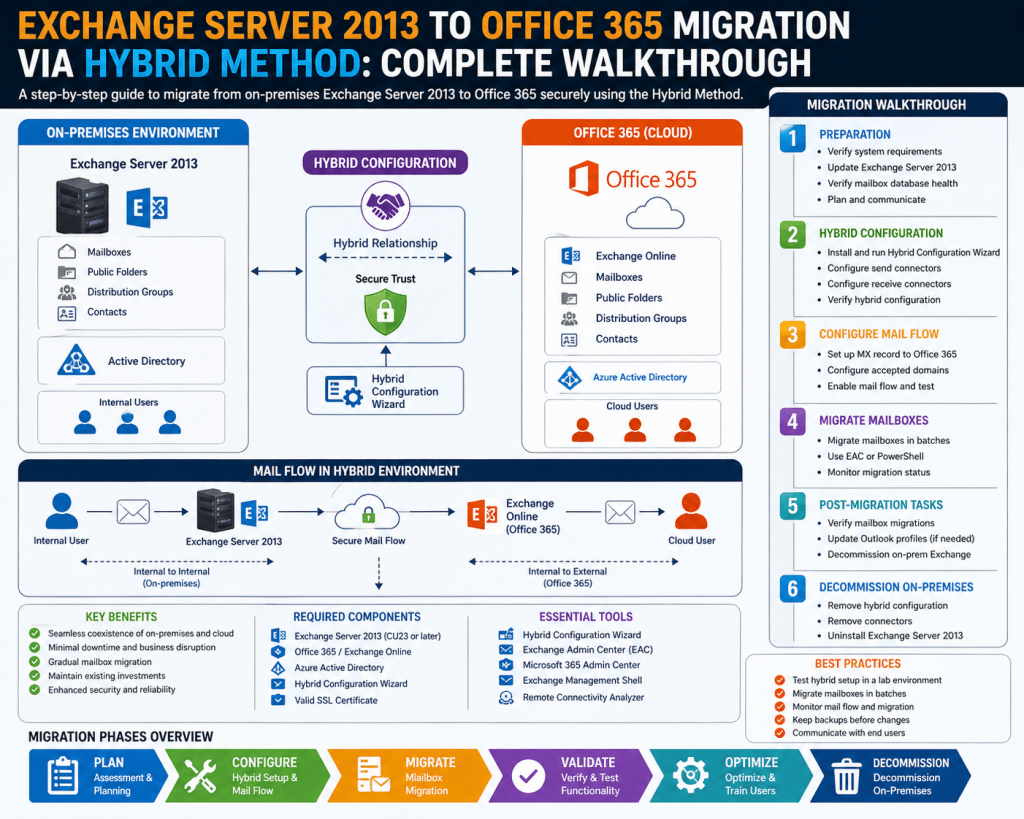
Migrating from an on-premises Exchange Server 2013 environment to a cloud-based messaging platform is fundamentally an architectural transformation rather than a simple mailbox transfer process. In a hybrid migration model, both environments are integrated so that they behave as a unified messaging system from the user perspective while remaining technically distinct in the backend. The core principle of this architecture is coexistence, where mailboxes can exist in both environments simultaneously, and communication between them remains seamless. This requires synchronization of identities, mail routing configuration, and secure communication channels between on-premises servers and cloud services. The hybrid architecture introduces a bridge between legacy infrastructure and modern cloud services, ensuring continuity of operations while enabling gradual workload transition instead of disruptive cutover events.
Core Components Involved in Hybrid Migration Design
A hybrid migration setup relies on several critical components working together. The on-premises Active Directory acts as the primary identity source, storing user accounts, groups, and organizational data. Exchange Server 2013 provides messaging services, mailbox databases, and transport roles that manage internal and external mail flow. In the cloud environment, a cloud-based directory service mirrors on-premises identities, allowing users to authenticate and access services. A synchronization engine is responsible for maintaining consistency between both directories. Additionally, secure mail flow connectors are established to ensure messages can be routed between environments without interruption. Autodiscover services also play a significant role in ensuring that client applications can locate mailbox endpoints regardless of their location. These components collectively create a hybrid ecosystem where both systems function as a single logical messaging platform.
Importance of Pre-Migration Assessment and Infrastructure Evaluation
Before any migration activity begins, a detailed evaluation of the existing messaging infrastructure is necessary. Exchange Server 2013 environments often contain a mixture of active mailboxes, inactive accounts, shared mailboxes, and distribution groups that must be identified and categorized. Each mailbox type may require a different migration approach depending on its usage and dependency. Storage utilization across mailbox databases must be analyzed to ensure sufficient capacity for migration operations and to identify potential bottlenecks. Server performance metrics such as CPU usage, memory allocation, and disk I/O should also be reviewed to confirm that the environment can handle synchronization and migration workloads. Network bandwidth availability is another critical factor because hybrid migration relies on continuous data transfer between on-premises systems and cloud endpoints. Without adequate bandwidth, migration performance may degrade significantly, leading to delays and synchronization issues.
Directory Structure Optimization Before Synchronization
The on-premises directory environment must be clean, consistent, and well-structured before enabling synchronization with the cloud. This includes ensuring that user accounts follow standardized naming conventions and that attributes such as email addresses, display names, and organizational details are properly populated. Redundant or inactive accounts should be disabled or removed to prevent unnecessary synchronization overhead. Organizational units should be logically structured to allow efficient filtering and policy application during synchronization. Any inconsistencies in directory data can lead to duplication errors or identity mismatches once synchronization begins. It is also important to ensure that security groups and distribution lists are properly configured, as these objects are also synchronized and used for access control and communication routing in the cloud environment.
Identity Synchronization and Object Matching Behavior
Identity synchronization is the foundation of hybrid migration because it ensures that user identities remain consistent across both environments. When synchronization is enabled, user objects from the on-premises directory are replicated into the cloud directory with matching attributes. This allows users to maintain a single identity even when their mailbox location changes. Object matching mechanisms are used to ensure that existing cloud accounts are correctly linked to on-premises accounts, preventing duplication. Synchronization is typically bidirectional in terms of attribute visibility but remains controlled from the on-premises environment in most configurations. This means that changes made on-premises are reflected in the cloud, but direct modifications in the cloud may be restricted depending on synchronization rules. This design ensures centralized identity management and reduces administrative complexity.
Exchange Server 2013 Hybrid Readiness Configuration
Preparing Exchange Server 2013 for hybrid operation requires specific configuration adjustments. The server must be updated to a supported cumulative update level to ensure compatibility with hybrid features. Secure communication between on-premises servers and cloud services is established using digital certificates that must be trusted externally. These certificates are used to encrypt traffic and validate server identity during migration and coexistence operations. Exchange services such as Autodiscover, Mailbox, and Client Access must be properly configured to allow external connectivity. A hybrid configuration also requires the establishment of federation trust, which enables secure communication between environments without requiring repeated authentication prompts. Mail routing connectors must be configured to allow messages to flow between on-premises and cloud mailboxes without interruption.
Mail Flow Design During Hybrid Coexistence
Mail flow in a hybrid environment is more complex than in a single-system deployment because messages may need to travel between on-premises and cloud mailboxes. During coexistence, intelligent routing ensures that emails are delivered to the correct destination regardless of mailbox location. If a user in the cloud sends an email to an on-premises user, the message is routed through secure connectors that maintain delivery integrity. Similarly, messages originating from on-premises users destined for cloud mailboxes are redirected appropriately. This routing mechanism ensures that users experience no disruption during migration. Transport rules and message hygiene policies must be evaluated to ensure they function correctly across both environments. Any inconsistency in mail flow configuration can result in delayed delivery or message routing failures.
Role of Autodiscover and Client Connectivity
Autodiscover plays a critical role in ensuring that email clients, such as desktop applications and mobile devices,s can locate mailbox services regardless of whether the mailbox resides on-premises or in the cloud. In a hybrid environment, Autodiscover responses are dynamically adjusted based on mailbox location. If a mailbox is migrated to the cloud, Autodiscover directs the client to the appropriate cloud endpoint. This seamless redirection ensures that users do not need to manually reconfigure their email clients after migration. Client connectivity is also influenced by authentication mechanisms, which may include single sign-on configurations or synchronized credentials. Ensuring proper Autodiscover functionality is essential for maintaining a smooth user experience during and after migration.
Security and Certificate Management in Hybrid Environments
Security is a fundamental consideration in hybrid migration because data is transferred between two distinct environments. Certificates are used to establish encrypted communication channels between on-premises servers and cloud services. These certificates must be valid, trusted, and properly installed on Exchange servers. Improper certificate configuration can result in communication failures or authentication issues during migration. In addition to certificates, authentication protocols must be configured to ensure secure identity validation. This may include federation trust or password synchronization, depending on the chosen identity model. Security policies should also be reviewed to ensure compliance with organizational standards throughout the migration process.
Pilot Migration Strategy and Controlled Deployment Approach
A pilot migration is typically conducted before full-scale migration begins. This involves selecting a small group of users and migrating their mailboxes to the cloud environment as a test phase. The purpose of the pilot is to validate configuration settings, verify mail flow, and identify any potential issues before impacting a larger user base. Pilot users are usually selected from different departments to ensure diverse testing conditions. During this phase, administrators closely monitor synchronization status, mailbox accessibility, and client connectivity. Any issues identified during the pilot phase are resolved before proceeding to broader migration waves. This controlled approach reduces risk and ensures that configuration errors do not affect the entire organization.
Staging Migration and Batch Processing Methodology
After successful pilot testing, migration proceeds in stages using batch processing. Mailboxes are grouped into batches based on organizational units, departments, or usage patterns. Each batch is migrated independently to minimize disruption and allow monitoring of performance and synchronization accuracy. Batch migration also enables rollback strategies in case of unexpected issues. During staging, administrators track migration progress, verify data integrity, and ensure that mail flow remains stable between environments. This phased approach is essential for large organizations because it prevents system overload and allows gradual adaptation to the new environment.
Operational Readiness for Full Hybrid Transition
Operational readiness involves ensuring that all systems, processes, and users are prepared for full hybrid operation. This includes confirming that directory synchronization is stable, mail flow is consistent, and identity mapping is accurate. Monitoring tools should be in place to track synchronization status and detect anomalies. Administrative processes must also be updated to reflect the hybrid environment, including user provisioning, mailbox management, and access control procedures. Once operational readiness is confirmed, the environment can support full-scale migration activities without significant risk to business continuity.
Deploying Hybrid Configuration and Establishing Secure Connectivity
Once the foundational readiness work is complete, the next critical phase in Exchange Server 2013 to Microsoft 365 hybrid migration is establishing a secure hybrid configuration that binds both environments into a single operational framework. This configuration defines how identities, mail flow, and service endpoints interact across on-premises infrastructure and cloud-based services. The hybrid configuration process introduces a structured relationship between the two systems, enabling controlled coexistence. During this stage, secure communication channels are established using encrypted protocols, and trust relationships are formed to allow seamless interaction between directory services and messaging components. The hybrid configuration also determines how administrative control is distributed, ensuring that core identity management remains centralized while mailbox operations transition gradually to the cloud.
Role of Hybrid Configuration Engine in Environment Alignment
The hybrid configuration engine is responsible for evaluating both environments and applying a standardized set of interoperability settings. It analyzes the current Exchange topology, verifies server capabilities, and applies necessary configuration changes to enable coexistence. This includes defining organizational relationships between on-premises and cloud systems, configuring secure mail routing paths, and establishing authentication trust boundaries. The engine also ensures that Autodiscover behavior is aligned across both environments so that clients can locate mailbox services regardless of their location. This alignment is essential for maintaining a consistent user experience during migration. The configuration process also adjusts transport settings to ensure that message delivery is not disrupted during mailbox movement between environments.
Azure AD Synchronization Engine Configuration and Identity Lifecycle Management
A key component of hybrid migration is identity lifecycle management through directory synchronization. The synchronization engine continuously replicates user identities, groups, and organizational data from the on-premises directory to the cloud directory. This ensures that both environments maintain a consistent identity framework. During configuration, synchronization rules are defined to determine which attributes are replicated and how conflicts are resolved. Identity matching logic ensures that existing cloud accounts are correctly associated with on-premises identities to prevent duplication. Lifecycle management also defines how new users are provisioned, how modifications are handled, and how deprovisioning occurs when accounts are disabled or removed. This continuous synchronization process ensures that identity consistency is maintained throughout the migration lifecycle.
Authentication Models and Access Control Strategies
Hybrid migration supports multiple authentication models depending on organizational security requirements. One approach is password synchronization, where hashed credentials are replicated to the cloud environment, allowing users to authenticate using the same credentials across both systems. Another approach is federated authentication, where authentication requests are redirected to on-premises identity providers for validation. This model enables centralized authentication control and supports advanced security policies such as multi-factor authentication. Access control strategies must be carefully designed to ensure that users retain appropriate permissions during and after migration. Role-based access control is typically used to manage administrative privileges, while group-based permissions are used to control mailbox and resource access.
Mail Flow Transition and Transport Route Optimization
During hybrid coexistence, mail flow becomes a dynamic system where messages are routed between on-premises and cloud environments based on mailbox location. Transport routes are configured to ensure that messages are delivered efficiently without unnecessary delays. When a mailbox is migrated to the cloud, mail destined for that mailbox is automatically redirected to the cloud transport system. Similarly, messages originating from cloud mailboxes destined for on-premises users are routed through secure connectors. These connectors maintain message integrity and ensure encryption during transit. Transport rules are evaluated in both environments to ensure consistency in message handling policies. Optimization of mail flow routes is essential to prevent bottlenecks and ensure reliable delivery across hybrid boundaries.
Secure Mail Connectors and Message Encryption Framework
Mail connectors play a central role in hybrid communication by establishing secure pathways between on-premises and cloud systems. These connectors are configured to use encrypted communication channels to protect message content during transit. Authentication mechanisms ensure that only authorized systems can participate in mail exchange. Encryption frameworks are implemented to protect data confidentiality and integrity, preventing unauthorized interception or modification of messages. Connector configuration also defines routing priorities and fallback mechanisms in case of connectivity issues. Proper configuration of mail connectors ensures that hybrid mail flow remains stable and secure throughout the migration process.
Autodiscover Redirection and Client Experience Management
Autodiscover services are responsible for directing email clients to the correct mailbox location. In a hybrid environment, Autodiscover responses are dynamically adjusted based on whether a mailbox resides on-premises or in the cloud. When a mailbox is migrated, Autodiscover updates client configuration automatically, ensuring uninterrupted access. This redirection process eliminates the need for manual reconfiguration of email clients. Client experience management also includes ensuring that mobile devices, desktop applications, and web-based access methods function consistently across both environments. The goal is to provide a seamless transition experience where users are unaware of backend migration activities.
Certificate Lifecycle Management and Trust Establishment
Certificates are essential for establishing trust between on-premises and cloud environments. They are used to encrypt communication channels and validate server identity. Certificate lifecycle management involves issuing, installing, validating, and renewing certificates used in hybrid communication. Certificates must be issued by trusted authorities and properly installed on Exchange servers to ensure compatibility. Expired or misconfigured certificates can disrupt mail flow and authentication processes. Trust establishment also involves configuring federation relationships that allow secure identity validation across environments. This ensures that both systems recognize each other as trusted entities during communication.
Mailbox Migration Batch Processing and Scheduling Strategy
Mailbox migration is executed in controlled batches to minimize operational risk and ensure system stability. Each batch contains a defined set of user mailboxes that are migrated together based on organizational structure, workload distribution, or priority level. Scheduling strategies are used to determine when migration batches are executed, often aligning with periods of low system usage to reduce impact on users. Migration batches are monitored closely to track progress, detect errors, and ensure successful completion. If issues arise during a batch migration, the process can be paused or adjusted without affecting other batches. This structured approach allows administrators to maintain control over the migration process while minimizing disruption.
Data Synchronization, Consistency, and Conflict Resolution
During migration, data synchronization must remain consistent across both environments. Conflicts may arise when changes occur simultaneously in on-premises and cloud systems. Conflict resolution rules determine which changes take precedence based on predefined synchronization policies. Attribute-level synchronization ensures that only relevant data fields are updated, reducing the risk of overwriting critical information. Consistency checks are performed regularly to validate that directory objects remain aligned across environments. Any discrepancies are flagged for administrative review. Maintaining synchronization consistency is essential for ensuring that users experience uninterrupted access to services during migration.
Public Folder Handling in Hybrid Migration Scenarios
Public folders represent a specialized data structure that may exist in legacy Exchange environments. During hybrid migration, public folders must be carefully evaluated to determine their role and usage within the organization. Depending on the migration strategy, public folders may be migrated to cloud-based equivalents or maintained in a synchronized state between environments. This requires careful planning to ensure that user access remains consistent and that data integrity is preserved. Public folder migration often involves restructuring data hierarchies and reassigning permissions to align with cloud-based access models. Proper handling of public folders ensures that shared resources remain accessible throughout the migration process.
Monitoring, Logging, and Migration Telemetry Analysis
Monitoring plays a crucial role in hybrid migration by providing real-time visibility into system performance and migration progress. Logging mechanisms capture detailed information about synchronization activities, mail flow behavior, and mailbox migration status. Telemetry data is analyzed to identify performance bottlenecks, synchronization delays, and potential configuration issues. This data-driven approach allows administrators to make informed decisions and adjust migration strategies as needed. Monitoring tools also provide alerts for critical events, enabling rapid response to issues before they impact users. Continuous analysis of migration telemetry ensures that the process remains stable and efficient.
Error Handling Mechanisms and Recovery Procedures
During migration, errors may occur due to network interruptions, configuration mismatches, or data inconsistencies. Error handling mechanisms are designed to detect, log, and respond to such issues automatically or through administrative intervention. Recovery procedures may involve retrying failed migrations, rolling back changes, or re-synchronizing affected data sets. These mechanisms ensure that migration can continue without significant disruption even when unexpected issues arise. Proper error handling design is essential for maintaining system reliability and ensuring the successful completion of migration activities.
Governance Policies and Administrative Control Framework
Governance policies define how migration activities are controlled, monitored, and enforced within the organization. These policies establish rules for user provisioning, mailbox management, data access, and security compliance. Administrative control frameworks ensure that only authorized personnel can perform migration-related tasks. Role-based access controls are implemented to restrict sensitive operations and maintain operational security. Governance also includes auditing mechanisms that track changes made during migration, providing accountability and traceability. These controls ensure that migration activities remain aligned with organizational policies and compliance requirements.
Finalizing Mailbox Migration and Completing User Transition to Cloud Environment
The final phase of Exchange Server 2013 to Microsoft 365 hybrid migration focuses on completing mailbox transitions and ensuring that all user data has been successfully moved to the cloud environment without disruption. At this stage, most of the foundational hybrid configuration work has already been completed, including identity synchronization, mail flow coexistence, and secure connectivity between environments. The emphasis now shifts toward executing controlled mailbox moves, validating data integrity, and ensuring that user experiences remain consistent after migration. Mailbox finalization is not simply a transfer process; it involves continuous verification of mailbox content, folder structures, permissions, and client accessibility to ensure that no data inconsistencies occur during or after migration. Each mailbox is carefully monitored during the final move stage to confirm successful completion before it is fully activated in the cloud environment.
Mailbox Move Requests and Transition Workflow Execution
Mailbox migration is executed through structured move requests that define how data is transferred from on-premises Exchange databases to cloud-based mailbox storage. These requests are processed in a controlled manner, allowing administrators to track progress and identify any issues in real time. Each mailbox move follows a lifecycle that includes initiation, synchronization, finalization, and completion. During the initial synchronization phase, mailbox data is replicated to the cloud while the original mailbox remains active on-premises. Once synchronization reaches a stable state, a final cutover occurs where the mailbox becomes active in the cloud environment. This staged approach ensures minimal disruption to users, as they continue to access their email during most of the migration process. Move requests also include validation checks to confirm that all mailbox items, including emails, calendar entries, contacts, and attachments, are accurately transferred.
Delta Synchronization and Data Consistency Validation
Before final mailbox cutover, delta synchronization plays a critical role in ensuring that any changes made to the mailbox during migration are captured and replicated to the cloud. Since users continue to send and receive emails during migration, mailbox data is constantly changing. Delta synchronization ensures that only the modified data since the last synchronization cycle is transferred, improving efficiency and reducing migration time. Data consistency validation is performed to ensure that no discrepancies exist between on-premises and cloud mailbox versions. This includes verifying item counts, folder structures, and metadata integrity. Any inconsistencies detected during validation are flagged for correction before final mailbox activation. This process ensures that users experience a seamless transition without missing or duplicated data.
Client Profile Updates and Seamless Reconfiguration Process
Once a mailbox is fully migrated to the cloud, client applications must be updated to reflect the new mailbox location. This process is handled automatically through Autodiscover redirection, which updates client profiles without requiring manual intervention. Email clients such as desktop applications, mobile devices, and web interfaces are reconfigured to connect directly to the cloud mailbox endpoint. This seamless reconfiguration ensures that users do not need to modify settings or reinstall applications after migration. Cached profiles are updated in the background, and authentication is redirected to cloud-based services. This automated process is essential for maintaining a consistent user experience and reducing administrative overhead during large-scale migrations.
Decommissioning On-Premises Mailbox Dependencies
After successful migration of mailboxes to the cloud, certain dependencies on the on-premises environment can be gradually reduced or removed. However, decommissioning must be performed carefully to avoid disrupting hybrid functionality that may still be required for remaining services. Mailbox databases that no longer contain active user data can be taken offline after verification. Transport dependencies must also be evaluated to ensure that no residual mail flow relies on on-premises systems. Directory synchronization may remain active depending on organizational requirements, especially if hybrid identity management is still in place. Decommissioning is a phased process that ensures system stability is maintained while reducing reliance on legacy infrastructure.
Post-Migration Identity Stabilization and Directory Cleanup
Once mailbox migration is complete, identity stabilization becomes an important task. This involves ensuring that all user accounts are properly aligned with their cloud-based identities and that no duplicate or orphaned objects exist in the directory. Directory cleanup includes removing obsolete accounts, correcting attribute mismatches, and verifying group memberships. Identity stabilization ensures that access control policies function correctly in the cloud environment. It also ensures that users retain appropriate permissions and access rights after migration. This phase is critical for maintaining long-term directory health and preventing authentication issues or access conflicts in the future.
Security Reinforcement in a Fully Migrated Environment
After migration, security configurations must be reviewed and reinforced to align with cloud-based security models. This includes reviewing authentication policies, enforcing multi-factor authentication where applicable, and ensuring that conditional access policies are properly configured. Security auditing is enhanced in the cloud environment, allowing administrators to monitor login activity, mailbox access, and administrative actions. Data loss prevention policies may also be implemented to protect sensitive information within email communications. Security reinforcement ensures that the migrated environment is not only functional but also aligned with modern security standards and organizational compliance requirements.
Mail Flow Stabilization and Connector Optimization
Even after migration is complete, mail flow between external systems and internal users must remain stable and efficient. Mail connectors that were used during hybrid coexistence are reviewed and optimized based on the final system architecture. If all mailboxes have been migrated to the cloud, some connectors may be simplified or removed. Mail routing paths are optimized to reduce latency and ensure efficient message delivery. Message hygiene systems continue to operate in the background to filter spam and malicious content. Mail flow stabilization ensures that email communication remains reliable and consistent after migration completion.
Performance Monitoring in Cloud Messaging Environment
Once the migration is complete, continuous performance monitoring becomes essential to ensure that the cloud messaging environment operates efficiently. Performance metrics such as mailbox latency, message delivery times, and authentication response times are tracked regularly. Monitoring systems provide insights into system health and help identify potential performance bottlenecks. This data is used to optimize resource allocation and improve overall system responsiveness. Performance monitoring also helps detect unusual activity patterns that may indicate security issues or system inefficiencies. Ongoing monitoring ensures that the environment remains stable and responsive after migration.
User Experience Validation and Functional Testing
After migration, user experience validation is conducted to ensure that all services function as expected. This includes testing email sending and receiving, calendar synchronization, contact availability, and shared mailbox access. Functional testing ensures that all migrated services behave consistently across different devices and platforms. Users are often selected from different departments to participate in validation testing, ensuring that a wide range of usage scenarios are covered. Any issues identified during testing are addressed promptly to ensure a smooth transition for all users. User experience validation is essential for confirming that migration objectives have been successfully achieved.
Hybrid Configuration Cleanup and Residual Service Management
After full migration, hybrid configuration elements that are no longer required can be gradually cleaned up. This includes removing unnecessary connectors, disabling unused synchronization components, and decommissioning hybrid-specific configuration settings. However, cleanup must be performed carefully to ensure that no remaining dependencies are disrupted. Some organizations may choose to retain a partial hybrid configuration for long-term identity management or future integration needs. Residual service management ensures that the environment remains clean, efficient, and free from unnecessary legacy configurations.
Data Integrity Verification and Long-Term Archival Strategy
Ensuring long-term data integrity is a key consideration after migration. This involves verifying that all mailbox data has been successfully transferred and remains accessible in the cloud environment. Archival strategies may also be implemented to manage long-term storage of email data, including retention policies and compliance requirements. Data integrity verification ensures that no information has been lost or corrupted during migration. Archival strategies help optimize storage usage while maintaining access to historical data when needed. This phase ensures that organizational data remains secure, accessible, and compliant with regulatory requirements.
Operational Transition to Cloud-Centric Messaging Model
After migration completion, the organization transitions to a cloud-centric messaging model where email services are fully managed in the cloud environment. This transition shifts operational responsibilities away from on-premises infrastructure to cloud-based administration. Administrative tasks such as user provisioning, mailbox management, and policy enforcement are now handled through cloud-based tools. This operational shift simplifies infrastructure management and improves scalability. It also enables organizations to take advantage of advanced cloud features such as automated updates, enhanced security controls, and integrated collaboration tools.
Legacy System Retirement Planning and Infrastructure Optimization
Once the migration is fully complete and validated, planning for legacy system retirement begins. This involves identifying on-premises systems that are no longer required and developing a structured decommissioning plan. Infrastructure optimization includes repurposing or decommissioning hardware, reducing maintenance overhead, and streamlining network dependencies. Retirement planning ensures that legacy systems are safely removed without impacting ongoing operations. This phase marks the final step in transitioning from traditional messaging infrastructure to a fully cloud-based communication environment.
Post-Migration Governance and Continuous Improvement Framework
After migration, governance does not end; instead, it evolves into a continuous improvement framework. Policies are regularly reviewed to ensure alignment with organizational goals and security standards. Continuous improvement involves optimizing configurations, enhancing performance, and adapting to new cloud capabilities. Governance frameworks ensure that the environment remains compliant, secure, and efficient over time. Feedback loops from monitoring systems and user experience reports are used to guide ongoing improvements. This ensures that the migrated environment continues to deliver value long after the initial migration has been completed.
Conclusion
The transition from Exchange Server 2013 to a cloud-based messaging environment represents far more than a technical upgrade; it reflects a broader shift in how organizations manage communication systems, identity infrastructure, and operational resilience. Throughout the migration lifecycle, the primary objective remains consistent: ensuring continuity of service while progressively modernizing the underlying architecture. When executed through a hybrid model, this transformation becomes more controlled and predictable, allowing organizations to maintain operational stability while gradually adopting cloud capabilities. The entire process is built around coexistence, where legacy systems and modern platforms operate in parallel until the transition is fully complete.
One of the most significant outcomes of a well-executed migration is the unification of identity and messaging systems. In traditional on-premises environments, identity management and email services are tightly coupled with physical infrastructure, which introduces limitations in scalability and flexibility. By transitioning to a hybrid model, identity synchronization becomes the bridge that connects both environments. This ensures that users maintain a consistent identity regardless of where their mailboxes reside. The long-term benefit of this approach is reduced administrative complexity, as identity changes propagate automatically across systems without requiring manual duplication or intervention. Over time, this centralized identity model becomes the foundation for broader digital transformation initiatives.
Another key aspect of the migration process is the evolution of mail flow architecture. In legacy environments, mail routing is often constrained by internal infrastructure dependencies, requiring complex configurations to manage external communication. During hybrid coexistence, mail flow is re-engineered to support dynamic routing between on-premises and cloud mailboxes. This ensures that communication remains uninterrupted regardless of mailbox location. Once migration is complete, mail flow becomes more streamlined, with cloud-based routing handling the majority of message delivery scenarios. This shift not only improves efficiency but also reduces the operational burden associated with maintaining multiple routing layers.
User experience continuity is another critical measure of migration success. One of the primary concerns during any large-scale transition is ensuring that end users do not experience disruption in their daily workflows. The hybrid approach addresses this by maintaining consistent access methods across both environments. Email clients, mobile devices, and web access platforms are automatically redirected to the appropriate mailbox location without requiring manual configuration. This seamless transition is achieved through underlying service discovery mechanisms that dynamically adjust based on mailbox placement. As a result, users continue to interact with familiar interfaces even as backend systems evolve.
Security considerations also play a central role in the long-term success of the migration. Moving to a cloud-centric environment introduces new security paradigms that must be carefully implemented and managed. Authentication mechanisms become more advanced, often incorporating multi-factor authentication and conditional access policies. These enhancements strengthen identity protection while reducing the risk of unauthorized access. In addition, encrypted communication channels ensure that data remains protected during transmission between systems. Over time, the cloud environment enables more granular security controls than traditional on-premises systems, allowing organizations to respond more effectively to emerging threats.
Operational efficiency is another major benefit realized after migration completion. In legacy environments, system maintenance often requires significant manual effort, including server patching, hardware management, and capacity planning. Once the transition to a cloud-based model is complete, many of these responsibilities are abstracted away from internal teams. Infrastructure management becomes more service-oriented, allowing administrators to focus on configuration, policy enforcement, and user experience optimization rather than hardware maintenance. This shift in operational focus leads to improved productivity and reduced overhead costs associated with infrastructure management.
Scalability also improves significantly after migration. On-premises systems are inherently limited by physical hardware capacity, which requires careful planning for growth. In contrast, cloud-based messaging environments can scale dynamically based on demand. This means that storage, compute resources, and service availability can expand without requiring physical upgrades or infrastructure redesign. This elasticity allows organizations to adapt more quickly to changing business requirements, seasonal workloads, and long-term growth without experiencing service degradation.
Data integrity and continuity remain central concerns throughout the migration lifecycle, and their preservation is a key indicator of success. A properly executed hybrid migration ensures that no data is lost during transition, and that all mailbox content is accurately replicated in the destination environment. This includes not only emails but also calendar data, contacts, attachments, and metadata. Maintaining data consistency across environments ensures that users retain full access to their historical information regardless of mailbox location. Once migration is complete, cloud-based retention policies further enhance data protection by enabling long-term archival and compliance management.
From an administrative perspective, the migration process introduces a shift in operational responsibilities. Instead of managing physical servers and localized infrastructure, administrators transition to managing cloud-based services and policies. This includes user provisioning, access control, compliance configuration, and service monitoring. The abstraction of infrastructure complexity allows administrative teams to focus more on governance and optimization rather than hardware-level maintenance. Over time, this leads to more efficient resource utilization and improved service delivery.
Another important outcome of the migration process is improved business continuity and disaster recovery capability. Cloud-based messaging systems are designed with built-in redundancy and failover mechanisms that significantly reduce the risk of downtime. Unlike traditional environments where disaster recovery requires separate infrastructure and manual intervention, cloud platforms provide distributed resilience by default. This ensures that communication services remain available even in the event of localized failures or infrastructure disruptions. As a result, organizations achieve a higher level of operational reliability.
The transition also creates opportunities for integration with broader cloud ecosystems. Once email services are fully migrated, they can be integrated with collaboration platforms, identity services, and productivity tools that enhance organizational workflows. This integration enables more efficient communication, improved collaboration, and better alignment between business processes and digital tools. Over time, this creates a more unified digital workplace environment where services are interconnected rather than isolated.
Ultimately, the migration from Exchange Server 2013 to a cloud-based messaging platform through a hybrid model represents a structured evolution rather than a disruptive change. It allows organizations to modernize at a controlled pace while maintaining operational stability throughout the transition. Each phase of the process, from initial preparation to final mailbox migration and system optimization, contributes to a larger transformation in how communication systems are managed and delivered. The result is a more flexible, scalable, and resilient messaging environment that supports both current operational needs and future growth requirements.