
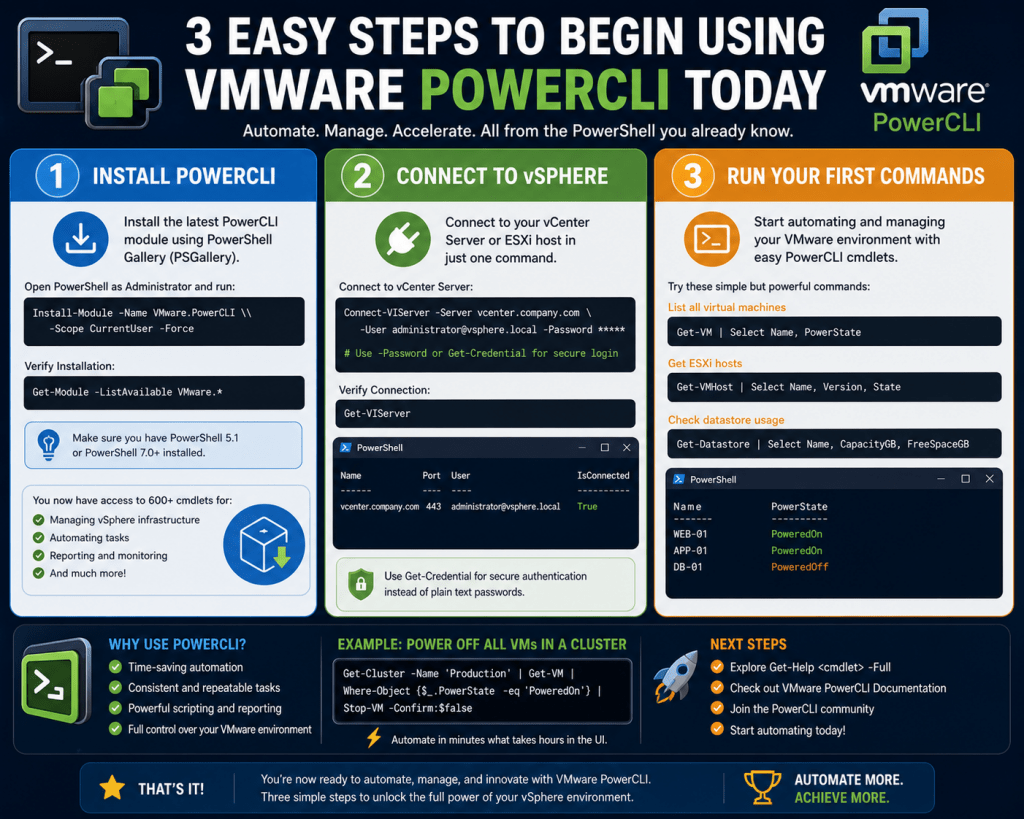
PowerCLI is a specialized automation framework built on top of PowerShell that is designed specifically for managing VMware-based infrastructure. At a fundamental level, it acts as a bridge between traditional system administration and modern infrastructure automation by exposing VMware platform functions through a consistent, scriptable command structure. Instead of relying on graphical management interfaces that require repetitive manual navigation, PowerCLI enables administrators to execute operations across virtual environments using structured commands that can be reused, scaled, and integrated into larger automation workflows. Its primary purpose is to simplify the management of virtualized infrastructure such as vSphere environments by providing programmatic access to virtual machines, hosts, clusters, storage systems, and network configurations. This approach aligns with modern infrastructure practices where automation, repeatability, and consistency are critical for maintaining operational stability across complex environments.
Why System Administrators Rely on PowerCLI for Daily Operations
In enterprise environments, system administrators are responsible for managing a wide range of services, including identity systems, messaging platforms, virtual machines, and cloud-connected workloads. As infrastructure scales, manual management becomes increasingly inefficient and prone to configuration drift. PowerCLI provides a method to unify these management tasks under a single automation framework. Administrators who already use PowerShell for tasks such as Active Directory management or scheduled task configuration can extend those skills into virtualization management without learning an entirely new toolset. This continuity is one of the reasons PowerCLI is widely adopted in environments that rely heavily on VMware virtualization. It allows administrators to perform bulk operations such as querying virtual machine states, modifying configurations, and extracting system-level data across entire clusters with minimal effort. This reduces operational workload while improving accuracy and consistency across infrastructure operations.
How PowerCLI Extends the PowerShell Ecosystem for VMware Management
PowerCLI is not a standalone system but rather an extension of PowerShell that introduces VMware-specific modules and cmdlets. These cmdlets follow the same verb-noun structure used throughout PowerShell, making them intuitive for administrators already familiar with scripting conventions. For example, commands related to virtual machines, hosts, and clusters follow predictable patterns that align with PowerShell design philosophy. This consistency allows administrators to integrate VMware management tasks into existing scripts without requiring separate tooling or syntax structures. The integration also means that PowerCLI can leverage all native PowerShell features,s such as piping, filtering, variables, loops, and conditional logic. As a result, VMware infrastructure becomes part of a broader automation ecosystem rather than a standalone management domain, enabling end-to-end operational workflows across hybrid environments.
Installing PowerCLI and Preparing the Management Environment
Before PowerCLI can be used effectively, it must be installed in the PowerShell environment on a management system or server. This installation typically involves retrieving the module from a centralized repository and ensuring that all dependencies are correctly resolved. During installation, PowerShell may prompt for additional package providers that are required to download and manage modules. Once installation is complete, the system gains access to a wide range of VMware-specific cmdlets that enable interaction with virtual infrastructure. In environments where older versions of PowerCLI exist, it is important to remove or update them to avoid compatibility issues. Maintaining a consistent version ensures that cmdlets behave as expected and that newer VMware features are supported. Additionally, environments running older operating systems may require updated management frameworks to ensure compatibility with modern PowerShell modules.
Configuring PowerShell for PowerCLI Operations
After installation, certain configuration adjustments may be necessary to ensure that PowerCLI operates smoothly. One of the most important configuration elements is the script execution policy, which determines how PowerShell handles script execution on the system. In many enterprise environments, execution policies are set to restrictive defaults for security reasons, so administrators may need to adjust them to allow signed scripts or remote execution. Another important configuration area involves handling certificate validation when connecting to VMware environments. Since many enterprise environments use internal certificate authorities, PowerCLI provides options to control how certificate warnings are handled. Administrators can choose to ignore invalid certificate warnings or enforce stricter validation depending on organizational security requirements. Additional configuration settings may include participation in telemetry programs and default behavior for session management, both of which can be customized to align with enterprise policies.
Connecting PowerCLI to VMware Infrastructure
Once PowerCLI is installed and configured, the next step is establishing a connection to a VMware environment. This is typically done by connecting to a central management endpoint such as a vCenter Server. Authentication can be performed using credentials entered interactively or through stored credential objects for automated scripts. Once the connection is established, the session provides access to all virtual infrastructure components managed by that endpoint. This includes virtual machines, resource pools, datastores, clusters, and host systems. The connection process is a critical step because it defines the scope of all subsequent operations. In automated environments, connection logic is often embedded within scripts so that workflows can execute without manual intervention. This enables scheduled tasks, reporting scripts, and maintenance operations to run consistently across environments.
Understanding the Object-Based Architecture of PowerCLI
One of the most important concepts in PowerCLI is its object-based architecture. Unlike traditional command-line tools that return plain text output, PowerCLI returns structured objects that contain properties and methods. Each virtual machine, host, or cluster is represented as an object with associated attributes such as name, state, configuration details, and performance metrics. This structure allows administrators to interact with infrastructure in a more meaningful way by accessing specific properties rather than parsing text output. For example, instead of manually reading a list of virtual machines, administrators can directly access attributes like operating system type, power state, or resource allocation. This object-oriented approach enables more advanced automation scenarios where data can be filtered, sorted, and transformed dynamically based on operational requirements.
Working with the PowerCLI Pipeline for Efficient Data Handling
PowerCLI heavily relies on the PowerShell pipeline, which allows the output of one command to be passed directly into another command for further processing. This pipeline mechanism is essential for building efficient automation workflows because it eliminates the need for intermediate storage or manual processing. For example, a command that retrieves a list of virtual machines can be piped into another command that filters results based on specific conditions, such as power state or operating system type. The pipeline also enables data transformation, allowing administrators to format results for reporting or export them into structured files for analysis. This chaining of commands creates highly flexible workflows that can be adapted to different operational needs without modifying core logic structures.
Core Inventory Management Using PowerCLI
One of the most common use cases for PowerCLI is infrastructure inventory management. In large virtual environments, administrators often need to maintain accurate records of all deployed virtual machines, including their configurations and operating systems. PowerCLI enables this by allowing administrators to query all virtual machines within a cluster or datacenter and retrieve detailed information about each system. This information can then be filtered to identify specific workloads, such as legacy operating systems or inactive systems. Inventory data is essential for tasks such as compliance reporting, capacity planning, and migration projects. By automating inventory collection, organizations can ensure that they always have up-to-date visibility into their virtual infrastructure without relying on manual documentation processes.
Filtering and Structuring Virtual Machine Data for Operational Insight
Filtering is a core capability within PowerCLI that allows administrators to refine large datasets into meaningful subsets. This is achieved using PowerShell filtering techniques that evaluate object properties against defined conditions. For example, administrators may filter virtual machines based on power state to identify only running systems or isolate machines using specific operating systems for upgrade planning. Once filtered, the data can be structured into readable formats that support reporting and analysis. This ability to refine and structure data is particularly important in environments where large volumes of virtual machines exist, as it enables targeted operational decision-making without manual inspection of individual systems.
Foundational Understanding of Virtual Machine Properties and Guest Data
Virtual machines in PowerCLI contain a wide range of properties that describe both the virtual hardware and the guest operating system. These properties include system names, resource allocations, power states, and guest-level information such as operating system version and installed tools. Understanding these properties is essential for building effective automation scripts because they form the basis of most operational queries. Guest-level data is particularly useful for identifying system configurations and ensuring consistency across environments. By accessing these properties programmatically, administrators can create detailed reports that provide insight into system health, configuration drift, and compliance status across virtual infrastructure.
Establishing the Foundation for Scalable Automation Workflows
The initial use of PowerCLI focuses on understanding connectivity, object structures, and basic inventory operations. However, these foundational elements form the basis for more advanced automation workflows. Once administrators are comfortable retrieving and filtering data, they can begin building scripts that automate repetitive tasks such as system updates, configuration checks, and scheduled reporting. These workflows reduce manual effort while improving consistency across environments. Over time, PowerCLI becomes an integral part of infrastructure management strategy, enabling scalable operations that adapt to growing infrastructure demands without increasing administrative overhead.
Expanding PowerCLI Beyond Basic Connectivity and Querying
Once the foundational elements of PowerCLI are in place, the real operational value begins to emerge when administrators move beyond simple connection and basic command execution into structured data extraction and infrastructure-wide querying. At this stage, PowerCLI becomes less about learning syntax and more about shaping operational intelligence from virtual environments. Instead of merely retrieving virtual machines or host lists, administrators start building contextual views of the entire infrastructure. This includes grouping systems by operational state, identifying configuration inconsistencies, and extracting guest-level attributes that are otherwise difficult to collect through graphical interfaces alone. The transition from basic command execution to structured data manipulation is what transforms PowerCLI from a management tool into an automation engine.
Understanding the Importance of Structured Inventory in Virtual Environments
Inventory management in virtualized infrastructure is fundamentally different from traditional physical environments because virtual machines are dynamic, rapidly deployed, and frequently modified. This fluidity creates challenges in maintaining accurate documentation. PowerCLI addresses this by enabling real-time inventory extraction that reflects the current state of the environment. Administrators can retrieve detailed information about virtual machines, including operating system versions, power states, host assignments, and resource allocations. This structured inventory is essential for operational visibility, especially in environments where workloads span multiple clusters or data centers. By maintaining accurate inventory data, organizations can make informed decisions regarding capacity planning, migration strategies, and compliance enforcement.
Using PowerCLI to Extract Operating System Intelligence from Virtual Machines
One of the most valuable capabilities in PowerCLI is the ability to extract guest operating system information from virtual machines. This data is stored as part of the guest-level properties exposed through VMware tools integration. By querying these properties, administrators can determine what operating systems are running across the environment without logging into individual systems. This becomes especially useful in environments undergoing modernization efforts, where legacy systems must be identified and replaced. For example, administrators can isolate systems running outdated operating systems and generate structured reports that assist in migration planning. This level of visibility is difficult to achieve through manual processes, particularly in large-scale environments.
Applying Filtering Logic to Refine Infrastructure Data
Filtering is a critical capability in PowerCLI because raw inventory data is often too large to interpret without refinement. PowerShell filtering mechanisms allow administrators to apply conditional logic to object properties, enabling precise extraction of relevant systems. For instance, filtering can be used to identify only running virtual machines, isolate systems with specific guest operating systems, or detect machines that meet certain configuration criteria. This ability to refine data is essential for operational efficiency because it allows administrators to focus only on relevant systems rather than analyzing entire datasets manually. Filtering also enables the creation of targeted reports that serve specific operational purposes such as security auditing or compliance validation.
Building Operational Reports from Virtual Infrastructure Data
Once data has been filtered and structured, it can be transformed into operational reports that provide actionable insight. These reports are often exported into structured formats that can be consumed by other systems or analyzed further. For example, administrators may generate reports listing all virtual machines running specific operating systems or identify systems that require updates or patches. These reports are not static documents but dynamic outputs generated from real-time infrastructure data. This ensures that decision-making is based on current system states rather than outdated documentation. Reporting through PowerCLI also enables automation of compliance checks, reducing the need for manual auditing processes.
Identifying Legacy Systems in Virtual Environments Using PowerCLI
Legacy system identification is a common operational requirement in virtualized environments. Many organizations continue to run older operating systems for compatibility reasons, but these systems often pose security and maintenance challenges. PowerCLI enables administrators to quickly identify such systems by querying guest operating system properties across all virtual machines. Once identified, these systems can be categorized based on their operational state, such as powered-on or powered-off. This classification is important because it helps prioritize remediation efforts. Running legacy systems may require immediate attention, while powered-off systems may be candidates for archival or decommissioning. This structured approach ensures that infrastructure modernization efforts are both efficient and controlled.
Understanding Virtual Machine State Management Through PowerCLI
Virtual machine state is a key operational attribute that determines whether a system is active, inactive, or suspended. PowerCLI provides direct access to these states, enabling administrators to filter and manage systems based on their operational condition. This is particularly useful in environments where resource optimization is critical. For example, administrators may want to identify all powered-off systems to reclaim resources or analyze usage patterns. Similarly, identifying running systems helps in understanding workload distribution across clusters. State-based filtering also plays a role in maintenance operations, where certain tasks must only be performed on active or inactive systems depending on operational requirements.
Enhancing Infrastructure Visibility Through Multi-Level Data Access
PowerCLI enables access to multiple layers of infrastructure data, including host-level, cluster-level, and guest-level information. This hierarchical data structure allows administrators to build comprehensive views of their environment. For example, a single query can be structured to retrieve all virtual machines within a specific datacenter, grouped by cluster, and filtered by operating system type. This multi-level access is essential for environments where infrastructure spans multiple geographic locations or organizational units. By combining these data layers, administrators gain a holistic understanding of system distribution, resource allocation, and workload balancing across the environment.
Using Export Mechanisms to Support External Analysis Workflows
Data extracted through PowerCLI can be exported into external formats for further analysis or integration with other systems. This is particularly useful for reporting, auditing, and compliance workflows. Exported data can be consumed by spreadsheet tools, reporting dashboards, or other analytics platforms. The ability to export structured infrastructure data ensures that PowerCLI is not limited to command-line interaction but extends into broader data analysis ecosystems. This integration capability is essential in modern IT environments where infrastructure data must be shared across teams and tools for effective decision-making.
Understanding VMware Tools as a Data Collection Layer
VMware Tools plays an important role in enabling PowerCLI to access guest-level information. It acts as a communication bridge between the hypervisor and the virtual machine operating system, allowing the collection of detailed system data. Without VMware Tools, many guest-level properties would not be available through PowerCLI. This includes operating system information, system state details, and other runtime attributes. Understanding this dependency is critical for administrators because it directly impacts the completeness of inventory data. Ensuring that VMware Tools is installed and up to date across all virtual machines is therefore an essential part of maintaining accurate infrastructure visibility.
Identifying VMware Tools Status Across Virtual Machines
PowerCLI can be used to identify the status and version of VMware Tools installed on virtual machines. This information is essential for maintaining consistency across environments, as outdated tools can lead to performance issues or limited functionality. By querying virtual machines for their tool status, administrators can identify systems that require updates. This process is particularly important in large environments where manual tracking is impractical. Once identified, systems can be grouped based on update requirements, enabling structured maintenance planning. This ensures that all virtual machines remain aligned with the latest supported tool versions, improving overall system performance and compatibility.
Creating Targeted Maintenance Groups Using PowerCLI Queries
Maintenance operations in virtual environments often require grouping systems based on specific criteria. PowerCLI enables the creation of such groups through dynamic querying. For example, administrators can create groups of virtual machines that require updates, belong to specific clusters, or match certain operating system criteria. These groups can then be used to execute batch operations, reducing the need for individual system management. This approach significantly improves operational efficiency by allowing administrators to apply changes consistently across multiple systems simultaneously. It also reduces the risk of configuration inconsistencies that can occur when systems are managed individually.
Understanding the Role of Automation in Infrastructure Consistency
One of the primary advantages of PowerCLI is its ability to enforce consistency across virtual environments through automation. Manual configuration often leads to drift, where systems gradually diverge from standardized configurations. PowerCLI mitigates this by enabling scripted operations that apply uniform changes across all relevant systems. This includes configuration updates, software installations, and system modifications. Automation ensures that changes are applied consistently and repeatably, reducing the likelihood of human error. Over time, this leads to more stable and predictable infrastructure behavior, which is critical in enterprise environments.
Preparing for Advanced Operational Automation Workflows
The intermediate use of PowerCLI sets the stage for advanced automation workflows that extend beyond simple querying and reporting. Once administrators are comfortable with data extraction and filtering, they can begin building scripts that perform automated remediation, scheduled updates, and system optimization tasks. These workflows represent the next stage in infrastructure maturity, where systems are not only monitored but actively managed through automation. This shift reduces operational overhead and allows IT teams to focus on strategic initiatives rather than routine maintenance tasks.
Transitioning from Operational Scripting to Full Infrastructure Automation
At the advanced stage of PowerCLI usage, the focus shifts away from simple querying and reporting toward fully automated infrastructure operations. This is where PowerCLI becomes a true orchestration layer for VMware environments rather than just a management tool. Administrators begin designing workflows that not only retrieve data but also act on it across multiple systems in a coordinated manner. These workflows are typically built around repeatable operational patterns such as patching cycles, resource optimization, compliance enforcement, and lifecycle management. The key difference at this level is intent: instead of manually triggering actions, scripts are designed to execute autonomously based on predefined conditions or schedules. This transforms infrastructure management from reactive administration into proactive automation.
Designing Scalable Automation Workflows for Virtual Environments
Scalability is one of the most important considerations in advanced PowerCLI usage. Enterprise environments often consist of hundreds or thousands of virtual machines distributed across multiple clusters and data centers. Managing these systems individually is inefficient and unsustainable. PowerCLI allows administrators to design workflows that operate across the entire environment simultaneously. These workflows typically begin with data collection, followed by filtering logic, and then execution of actions on selected systems. For example, a workflow might identify all virtual machines that require updates, verify their power state, and then apply changes in controlled batches. This structured approach ensures that operations remain predictable and manageable even at a large scale.
Automating VMware Tools Lifecycle Management Across Clusters
One of the most common advanced use cases for PowerCLI is the automation of VMware Tools lifecycle management. VMware Tools is critical for maintaining communication between guest operating systems and the hypervisor, and outdated versions can lead to performance degradation or feature limitations. In large environments, manually updating VMware Tools is impractical. PowerCLI enables administrators to automate the entire lifecycle process, from identification of outdated systems to execution of updates across multiple virtual machines. This process typically involves querying virtual machines for their tools’ status, grouping systems that require updates, and executing update commands in a controlled sequence. Automation ensures consistency and reduces the risk of missed updates, which is essential for maintaining infrastructure stability.
Implementing Controlled Update Strategies for Virtual Machines
In enterprise environments, updates cannot be applied indiscriminately. Controlled update strategies are required to minimize disruption and ensure system availability. PowerCLI supports this by allowing administrators to implement staged execution models. For example, updates can be applied in batches based on cluster membership, workload classification, or operational priority. Critical systems may be excluded from initial update cycles and scheduled for maintenance windows, while non-critical systems can be updated immediately. This approach ensures that infrastructure remains stable while still benefiting from timely updates. It also allows administrators to monitor update behavior in smaller segments before expanding execution across the entire environment.
Using Scheduling Mechanisms for Continuous Infrastructure Maintenance
Advanced PowerCLI workflows often rely on scheduling mechanisms to automate recurring tasks. These tasks may include system inventory collection, compliance checks, performance reporting, or software updates. By scheduling these operations, administrators ensure that infrastructure maintenance is continuous rather than reactive. Scheduled scripts can run at defined intervals, such as daily, weekly, or monthly, depending on operational requirements. This eliminates the need for manual intervention and ensures that infrastructure data is always current. Scheduling also enables predictive maintenance strategies, where potential issues are identified before they impact system performance.
Building Compliance and Governance Workflows with PowerCLI
Compliance is a critical aspect of enterprise infrastructure management, particularly in regulated industries. PowerCLI can be used to enforce governance policies by continuously validating system configurations against predefined standards. For example, administrators can create scripts that check for outdated operating systems, missing updates, or unauthorized configurations. These scripts can generate reports that highlight non-compliant systems, enabling corrective actions to be taken quickly. In more advanced implementations, compliance checks can be integrated into automated remediation workflows, where systems are automatically adjusted to meet compliance requirements. This reduces the need for manual auditing and ensures that infrastructure remains aligned with organizational policies at all times.
Automating Resource Optimization Across Virtual Infrastructure
Resource optimization is another key area where advanced PowerCLI workflows provide significant value. Virtual environments often experience fluctuations in resource usage, leading to imbalances in CPU, memory, and storage allocation. PowerCLI allows administrators to monitor resource utilization across clusters and identify inefficiencies. For example, scripts can detect underutilized virtual machines and suggest consolidation opportunities or identify over-provisioned systems that can be resized. These optimizations can then be automated through scripted adjustments, improving overall infrastructure efficiency. This level of control ensures that resources are used effectively, reducing operational costs and improving system performance.
Advanced Virtual Machine Lifecycle Management Strategies
Lifecycle management in virtual environments involves managing systems from creation to decommissioning. PowerCLI enables automation of each stage in this lifecycle. During provisioning, scripts can automatically deploy virtual machines with predefined configurations. During operation, systems can be monitored for performance and compliance. During decommissioning, unused or obsolete systems can be identified and safely removed. Automating these stages ensures consistency and reduces administrative overhead. It also minimizes the risk of orphaned or unused virtual machines consuming resources unnecessarily. Lifecycle automation is particularly important in dynamic environments where workloads are frequently created and removed.
Integrating PowerCLI with Broader Automation Ecosystems
At an advanced level, PowerCLI is often integrated into broader automation ecosystems that include configuration management tools, orchestration platforms, and monitoring systems. This integration allows VMware infrastructure to participate in end-to-end automation workflows that span multiple layers of IT operations. For example, a provisioning workflow might involve triggering virtual machine creation through PowerCLI, configuring applications through external tools, and validating deployment through monitoring systems. This interconnected approach ensures that infrastructure operations are fully automated and aligned with broader organizational processes. PowerCLI serves as the VMware-specific execution layer within this larger automation framework.
Handling Large-Scale Data Operations in Virtual Environments
As infrastructure scales, data volume becomes a significant consideration. PowerCLI is capable of handling large-scale data operations by leveraging PowerShell’s pipeline architecture and object-based processing model. However, efficient script design becomes critical at this stage. Administrators must ensure that queries are optimized to avoid unnecessary performance overhead. This includes filtering data as early as possible in the pipeline and minimizing redundant operations. Large-scale environments may also require batch processing techniques to prevent system overload during execution. By designing efficient workflows, administrators can ensure that automation processes remain responsive even in highly dense virtual environments.
Implementing Fault-Tolerant Automation Workflows
In enterprise environments, automation workflows must be resilient to failures. PowerCLI scripts at the advanced level often include error-handling mechanisms that ensure operations continue even when individual components fail. For example, if a virtual machine fails to respond during an update process, the script can log the failure and continue processing other systems. This fault-tolerant design is essential for maintaining operational continuity in large environments. It ensures that automation does not halt due to isolated issues and that administrators receive detailed logs for troubleshooting purposes. Robust error handling is a key characteristic of mature automation frameworks.
Monitoring and Logging in Automated PowerCLI Operations
Effective automation requires visibility into script execution and system behavior. PowerCLI workflows often include logging mechanisms that record operational details such as execution time, success status, and error conditions. These logs provide valuable insight into infrastructure behavior and help administrators diagnose issues when they occur. Monitoring can also be integrated into automation workflows to provide real-time feedback on system state. For example, scripts can generate alerts when specific conditions are detected, such as failed updates or resource exhaustion. This combination of logging and monitoring ensures that automation remains transparent and controllable.
Security Considerations in Advanced PowerCLI Usage
As automation becomes more extensive, security becomes increasingly important. PowerCLI operates with elevated privileges in many environments, making it essential to implement proper access controls and credential management practices. Scripts should avoid hard-coded credentials and instead use secure credential storage mechanisms. Additionally, execution environments should be restricted to authorized systems to prevent unauthorized access to infrastructure. Certificate validation settings must also be carefully managed to balance security and operational flexibility. By implementing strong security practices, organizations can ensure that automation does not introduce vulnerabilities into the infrastructure.
Optimizing Performance of PowerCLI Automation Scripts
Performance optimization is a critical aspect of advanced PowerCLI usage. Inefficient scripts can lead to delays, resource contention, or system overload. Optimization techniques include minimizing pipeline complexity, reducing unnecessary data retrieval, and executing operations in parallel where appropriate. In large environments, even small inefficiencies can scale into significant performance issues. Therefore, administrators must carefully design scripts to ensure they operate efficiently across all systems. Performance optimization also involves monitoring execution times and refining scripts based on observed behavior.
Evolving Toward Fully Autonomous VMware Infrastructure Management
At the highest level of PowerCLI usage, infrastructure management becomes increasingly autonomous. Systems are no longer managed through manual intervention but through continuous automation workflows that operate based on predefined logic and environmental conditions. PowerCLI serves as the execution engine for these workflows, enabling dynamic responses to infrastructure changes. This includes automatic scaling, self-healing processes, and continuous compliance enforcement. In such environments, administrators shift from direct system management to oversight roles, focusing on strategy, optimization, and governance rather than manual execution.
Conclusion
PowerCLI ultimately represents a shift in how VMware environments are managed, moving system administration away from manual interaction and toward structured, repeatable, and scalable automation. What begins as a simple extension of PowerShell quickly evolves into a foundational component of enterprise infrastructure operations. The value is not only in the commands themselves but in the operational model they enable. Instead of treating virtual machines, hosts, and clusters as isolated resources requiring individual attention, PowerCLI allows them to be managed as a unified, programmable system. This change in perspective is what makes it so impactful in modern IT environments.
At its core, PowerCLI reinforces a broader trend in system administration: infrastructure as code. Once administrators begin expressing operational intent through scripts rather than interfaces, the environment becomes significantly more predictable and controllable. Every action can be repeated, audited, and scaled. This consistency is especially important in VMware environments where virtual machines are frequently created, modified, and removed as workloads evolve. Without automation, maintaining alignment between systems becomes increasingly difficult. With PowerCLI, however, infrastructure state can be continuously monitored and adjusted through defined logic rather than manual oversight.
One of the most important long-term benefits of PowerCLI is operational visibility. In many organizations, one of the biggest challenges is not a lack of data but a lack of usable data. Virtual environments generate a large amount of information, but without proper tooling, it remains fragmented and difficult to interpret. PowerCLI addresses this by allowing administrators to extract structured, meaningful datasets directly from the environment. These datasets can be used for inventory management, compliance reporting, capacity planning, and performance analysis. Over time, this leads to a much clearer understanding of infrastructure behavior, making it easier to identify trends, inefficiencies, and risks.
Another key advantage is consistency. Manual processes inevitably introduce variation, even when administrators follow the same procedures. Small differences in execution can lead to configuration drift, where systems gradually diverge from expected standards. PowerCLI eliminates much of this variability by ensuring that operations are executed in a consistent and repeatable manner. Whether deploying updates, retrieving system information, or applying configuration changes, the same script produces the same outcome every time. This consistency is essential for maintaining stable and predictable infrastructure, especially at scale.
Automation through PowerCLI also significantly improves efficiency. Tasks that would normally require hours of manual effort can be reduced to a few seconds of script execution. This is particularly evident in operations such as inventory collection or bulk updates. Instead of logging into multiple systems or navigating through graphical interfaces, administrators can execute a single command that applies changes across hundreds of virtual machines. This reduction in manual workload frees up time for more strategic responsibilities, such as architecture design, performance optimization, and long-term infrastructure planning.
As environments grow, scalability becomes a critical concern. PowerCLI is inherently suited for large-scale operations because it operates on object-based pipelines and supports batch processing of infrastructure components. This means that scripts designed for small environments can often be extended to larger environments with minimal modification. The ability to scale operations without redesigning processes is a major advantage in dynamic enterprise environments where infrastructure size and complexity are constantly increasing.
Another important aspect is lifecycle management. Virtual infrastructure is not static; it evolves continuously as systems are created, updated, and decommissioned. PowerCLI supports this entire lifecycle by enabling automation at each stage. From provisioning new virtual machines to updating existing systems and eventually removing unused resources, the entire lifecycle can be managed through structured workflows. This ensures that infrastructure remains clean, efficient, and aligned with organizational needs over time.
Security and governance also benefit from PowerCLI-driven automation. In environments where compliance requirements are strict, maintaining consistent configuration standards is essential. PowerCLI enables continuous validation of infrastructure against defined policies. This allows organizations to detect deviations quickly and take corrective action before they become larger issues. When combined with automation, these checks can even trigger remediation workflows that automatically bring systems back into compliance. This reduces reliance on manual audits and improves overall governance effectiveness.
Despite its advantages, PowerCLI requires disciplined usage. Poorly designed scripts can introduce inefficiencies or unintended consequences, especially in large environments. As a result, careful planning is essential when building automation workflows. Administrators must consider factors such as error handling, performance optimization, and operational safety. Well-structured scripts include safeguards that prevent unintended disruptions and ensure that failures are handled gracefully. Logging and monitoring also play a key role, providing visibility into execution outcomes and enabling troubleshooting when necessary.
Over time, organizations that adopt PowerCLI deeply tend to experience a shift in how IT operations are structured. Traditional reactive administration models are replaced with proactive and predictive approaches. Instead of responding to issues after they occur, systems are continuously monitored and adjusted to prevent problems from arising. This proactive model is one of the most significant benefits of automation in virtualization environments.
Ultimately, PowerCLI is not just a tool for managing VMware infrastructure. It is a framework for transforming how infrastructure is controlled, monitored, and optimized. It bridges the gap between manual administration and fully automated operations, allowing organizations to gradually evolve toward more advanced infrastructure models. As automation maturity increases, the role of system administrators also evolves. They move away from repetitive operational tasks and toward higher-level responsibilities such as automation design, infrastructure strategy, and system optimization.
In the broader context of modern IT, PowerCLI represents a step toward fully integrated infrastructure ecosystems where compute, storage, networking, and virtualization are managed through unified automation frameworks. This direction is increasingly aligned with industry trends such as infrastructure as code, hybrid cloud integration, and autonomous operations. PowerCLI remains a key component in this transition because it provides direct, programmable access to one of the most widely used virtualization platforms.
As organizations continue to expand their reliance on virtualized and cloud-integrated systems, tools like PowerCLI will remain essential for maintaining control and visibility. Its strength lies not only in what it can do today but in how it enables future scalability and operational maturity. By building structured, automated, and repeatable workflows, organizations establish a foundation that supports long-term growth and resilience in increasingly complex IT environments.