
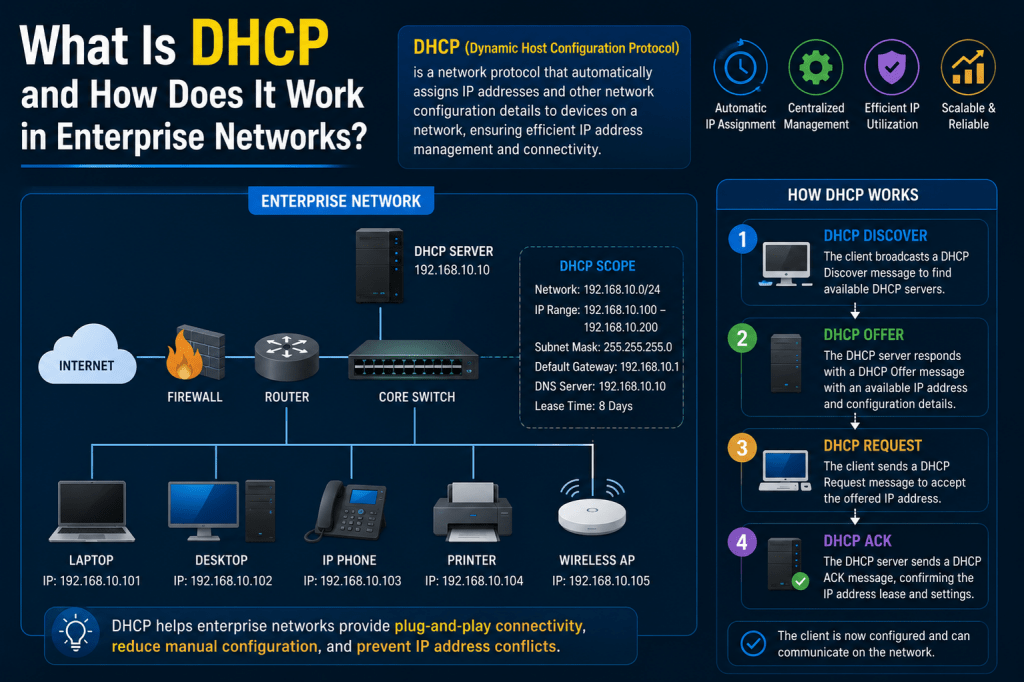
Managing devices inside a modern enterprise network is a major responsibility for system administrators and network engineers. Large organizations often operate hundreds or even thousands of connected devices every single day. These devices include laptops, desktop computers, printers, IP phones, wireless access points, tablets, servers, and mobile devices. Every one of these systems requires an IP address to communicate properly on the network. Assigning addresses manually would create confusion, consume valuable time, and increase the possibility of configuration mistakes. This is why enterprises rely heavily on DHCP to automate network configuration and simplify device connectivity across the organization.
Dynamic Host Configuration Protocol, commonly known as DHCP, is a network management protocol responsible for automatically assigning IP addresses and other network settings to devices connected to a network. Instead of requiring administrators to configure every system manually, DHCP allows devices to obtain their network settings automatically the moment they connect. This automation is one of the key reasons enterprise networks can scale efficiently while maintaining reliability and consistency across thousands of devices.
Understanding the Purpose of DHCP
The primary purpose of DHCP is to simplify the process of network configuration. In the early days of networking, administrators often assigned IP addresses manually to each computer. While this method worked for smaller environments, it quickly became impractical as businesses expanded and network infrastructures became more complex. Tracking every assigned address manually introduced the risk of duplicate configurations, incorrect subnet assignments, and network conflicts that could interrupt communication between systems.
DHCP eliminates these problems by automating address distribution. When a device joins the network, the DHCP server automatically provides the device with an available IP address along with additional configuration settings needed for communication. This process reduces administrative overhead while improving accuracy and efficiency. Enterprise organizations depend on DHCP because it allows networks to operate smoothly even as devices constantly connect, disconnect, move locations, or change departments.
Another important benefit of DHCP is flexibility. Employees often move throughout office buildings with laptops and mobile devices. Wireless users may connect from meeting rooms, remote offices, or guest networks. DHCP ensures these devices can receive valid network configurations automatically regardless of where they connect within the organization. Without DHCP, maintaining connectivity for mobile users would become extremely difficult.
What Happens When a Device Connects
Whenever a device connects to an enterprise network, it must first obtain network configuration information before communication can begin. Since the device initially has no IP address, it cannot directly communicate with other systems. To solve this problem, the device sends a broadcast message across the local network requesting assistance from any available DHCP server.
This broadcast message is often called a DHCP discovery request. Network switches forward the broadcast traffic throughout the local network segment so that DHCP servers can receive the request. Because the device does not yet know the location of the DHCP server, broadcasting is the only method available during this initial communication phase.
Once the DHCP server receives the discovery request, it searches its available address pool and selects an unused IP address for the device. The server then responds with a DHCP offer message containing the proposed IP address and additional configuration details. At this point, the address is only being offered and has not yet been permanently assigned.
The device reviews the offered information and responds with a DHCP request message indicating that it accepts the proposed address. After receiving this confirmation, the DHCP server finalizes the assignment and sends an acknowledgment back to the device. The device can now begin communicating on the network using its assigned configuration settings.
The Importance of IP Addresses
An IP address is one of the most important components of any networked device. It serves as a unique identifier that allows devices to send and receive information correctly. Without an IP address, systems cannot communicate effectively because network traffic would have no destination.
Enterprise networks contain many different types of IP addressing structures depending on organizational size and design requirements. Most internal enterprise networks use private IP address ranges because they are reserved for local communication within organizations. These private ranges help conserve public IP addresses while improving security and internal network organization.
DHCP servers manage these address ranges carefully to prevent duplicate assignments. Every time a device requests configuration, the DHCP server checks whether the address is already in use before assigning it. This prevents IP conflicts that could disrupt communication across the network.
Administrators also design IP ranges strategically to separate departments, offices, or device categories into different subnets. This organization improves security, simplifies troubleshooting, and reduces unnecessary network traffic throughout the enterprise environment.
Understanding DHCP Scopes
A DHCP scope defines the range of IP addresses that the server is allowed to distribute within a specific subnet. Enterprise networks often contain multiple scopes because different departments or locations operate on separate network segments.
For example, a company may create one scope for employee workstations, another for wireless guest devices, and another for IP phones. Each scope contains its own address range along with specific configuration settings appropriate for the devices using that network.
Scopes help administrators organize network resources efficiently while maintaining proper segmentation. Devices connecting to a particular subnet receive addresses only from the scope associated with that network segment. This ensures systems receive the correct gateway information, DNS settings, and other required parameters for communication.
Enterprise DHCP scopes also allow administrators to reserve certain address ranges for servers or infrastructure devices that require static configurations. Proper scope management is essential for maintaining reliable enterprise connectivity and avoiding address exhaustion problems.
How DHCP Simplifies Network Administration
Without DHCP, administrators would need to manually configure every connected device individually. This would involve assigning an IP address, subnet mask, default gateway, and DNS server settings for each system. In large enterprises with thousands of devices, this process would consume enormous amounts of time and dramatically increase the risk of human error.
DHCP simplifies administration by automating all of these tasks. Devices receive their configurations automatically without requiring manual input from administrators or users. This automation improves deployment speed and reduces operational complexity throughout the organization.
For example, when a new employee receives a company laptop, the device can connect to the network immediately without requiring IT staff to configure network settings manually. The DHCP server automatically provides the correct configuration the moment the device connects.
This efficiency becomes especially important in environments with frequent employee onboarding, office relocations, or temporary users. DHCP allows enterprise networks to adapt quickly without constant administrative involvement.
The Role of Lease Times in DHCP
DHCP does not permanently assign IP addresses to devices in most situations. Instead, addresses are leased for a specified amount of time. A lease represents a temporary assignment allowing the device to use the address for a defined period before renewal becomes necessary.
Lease durations vary depending on organizational requirements. Some networks use short lease times for guest wireless networks where users frequently connect and disconnect. Other networks use longer lease periods for employee workstations that remain connected consistently.
The lease system improves address utilization efficiency. When a device disconnects from the network and no longer requires its address, the lease eventually expires. The DHCP server can then return the address to the available pool for reassignment to another device.
Before the lease expires completely, the device attempts to renew the lease automatically. If the DHCP server approves the renewal request, the device continues using the same IP address without interruption. This renewal process occurs transparently in the background without affecting user productivity.
Additional Configuration Information Provided by DHCP
DHCP provides more than just IP addresses. Enterprise DHCP servers also distribute additional network settings required for proper communication and functionality.
One important setting is the default gateway address. The gateway acts as the path devices use to communicate with systems outside their local subnet, including internet resources and remote office networks. Without a valid gateway configuration, devices would only be able to communicate locally.
Another critical setting involves DNS server addresses. DNS converts domain names into IP addresses so users can access websites and services using readable names instead of numerical addresses. Without DNS configuration, devices would struggle to locate resources across the network or internet.
DHCP servers may also distribute additional information such as time server settings, domain names, network boot instructions, and specialized parameters for voice or wireless systems. This centralized configuration approach improves consistency while reducing manual configuration requirements.
Enterprise DHCP and Network Segmentation
Enterprise networks are typically divided into multiple segments to improve security, organization, and performance. These segments are often implemented using VLANs and subnets that separate traffic according to device type or department.
For example, employee computers may operate on one subnet while wireless guest devices use another. IP phones, surveillance systems, and servers may each have dedicated network segments with separate policies and configurations.
DHCP supports this segmentation by maintaining different scopes for each subnet. When devices connect to a specific VLAN, they receive addresses and settings appropriate for that network segment. This structure helps organizations enforce security policies and manage network resources more effectively.
Segmentation also reduces broadcast traffic and limits the spread of network problems. If an issue occurs within one subnet, it is less likely to impact other areas of the enterprise infrastructure.
DHCP Relay Agents in Enterprise Environments
One challenge in enterprise networking is that DHCP broadcast traffic does not naturally cross routers. Since enterprise environments often contain many routed subnets, organizations require a method for forwarding DHCP requests between network segments.
This is where DHCP relay agents become important. A relay agent receives DHCP broadcast requests from devices within a subnet and forwards them directly to the centralized DHCP server using unicast communication.
The DHCP server processes the request and sends its response back through the relay agent to the requesting device. This process allows centralized DHCP infrastructure to support many different network segments across the organization.
Without relay agents, enterprises would need separate DHCP servers on every subnet, greatly increasing administrative complexity and infrastructure costs. Relay functionality simplifies management while maintaining scalability and efficiency.
DHCP Reservations for Consistent Addressing
Some enterprise devices require predictable IP addresses that do not change over time. Examples include printers, network appliances, surveillance systems, and specialized servers.
DHCP reservations solve this problem by associating a specific IP address with a device’s MAC address. Whenever the device requests configuration, the DHCP server always provides the same reserved address.
This approach combines the convenience of centralized DHCP management with the consistency of static addressing. Administrators can manage device configurations centrally without manually configuring settings directly on the device itself.
Reservations also simplify troubleshooting because administrators always know the address associated with important infrastructure systems. This consistency becomes especially valuable in large environments with many shared devices.
DHCP and Wireless Enterprise Networks
Wireless networking relies heavily on DHCP because mobile devices connect and disconnect frequently throughout the day. Employees move between meeting rooms, office floors, and remote locations while expecting seamless connectivity.
When a device joins a wireless network, it immediately requests configuration from the DHCP server. The server responds with the necessary network settings, allowing the device to access internal resources and internet services quickly.
Large enterprise wireless environments may support thousands of simultaneous DHCP clients. Efficient DHCP performance is therefore critical for maintaining smooth wireless operations and minimizing connection delays.
Guest wireless networks also depend heavily on DHCP because visitors require temporary access without manual administrator involvement. DHCP automates the entire process while maintaining separation between guest traffic and internal corporate systems.
Security Challenges in DHCP Environments
Although DHCP simplifies networking, it also introduces potential security risks if not managed properly. One common threat involves rogue DHCP servers operating without authorization inside the network.
A rogue DHCP server can distribute incorrect configurations to connected devices. This may redirect traffic through malicious systems, disrupt connectivity, or create network instability.
To prevent these issues, enterprises often implement security features such as DHCP snooping. DHCP snooping allows network switches to identify trusted DHCP servers and block unauthorized responses from rogue devices.
Administrators also monitor DHCP activity logs regularly to detect suspicious behavior, unauthorized systems, or abnormal address usage patterns. Strong monitoring and security policies are essential for maintaining reliable enterprise network operations.
The Growing Importance of DHCP in Modern Enterprises
As enterprise environments continue evolving, DHCP remains one of the foundational services supporting connectivity, mobility, and scalability. Cloud computing, wireless expansion, remote work, and IoT adoption have dramatically increased the number of connected devices organizations must manage.
DHCP allows enterprises to adapt to these changes efficiently by automating network configuration and simplifying address management across large infrastructures. Without DHCP, modern enterprise networking would become far more complex, expensive, and difficult to maintain.
From employee laptops to wireless devices and automated deployment systems, DHCP continues to play a central role in enabling seamless communication throughout enterprise environments.
Advanced DHCP Operations in Enterprise Networks
Enterprise networks are constantly growing as organizations expand their infrastructure, add new employees, deploy wireless systems, and introduce cloud-connected services. Managing this growth requires efficient network automation, and DHCP plays a major role in making enterprise communication possible. While DHCP may appear simple on the surface, enterprise implementations involve advanced planning, structured design, security controls, and high-availability architecture to support large-scale operations without interruption.
In a small environment, DHCP may only assign addresses to a handful of computers and smartphones. In enterprise environments, however, DHCP servers can support thousands of devices spread across multiple offices, branches, and data centers. Every employee laptop, wireless phone, printer, access point, and workstation depends on DHCP to receive proper network settings automatically.
As enterprise infrastructure becomes more complex, DHCP evolves into a critical service responsible not only for IP assignment but also for improving scalability, security, mobility, and centralized network administration.
The Difference Between Home and Enterprise DHCP
Most people experience DHCP through home internet routers without even realizing it. A home router automatically provides network settings to devices such as phones, tablets, gaming consoles, and smart televisions. These environments are simple because the number of devices is small and the network structure rarely changes.
Enterprise environments operate on a completely different scale. Instead of supporting a few devices, organizations may manage tens of thousands of connected systems operating simultaneously across multiple locations. This level of complexity requires more advanced DHCP infrastructure and careful network planning.
Enterprise DHCP servers support multiple scopes, relay agents, failover systems, security policies, and centralized management tools. Administrators must carefully design address ranges, monitor utilization, and ensure reliable communication throughout the organization.
Unlike home networks, enterprise infrastructures also separate devices into different subnets and VLANs based on department, function, or security requirements. DHCP servers must understand these network divisions and provide the correct configurations to devices depending on where they connect.
Why Enterprise Networks Use Subnets
Subnets are one of the most important design elements in enterprise networking. A subnet divides a large network into smaller logical segments that improve organization, performance, and security.
Without subnetting, every device in the organization would exist within a single large broadcast domain. This would create excessive network traffic and make troubleshooting extremely difficult. Subnets solve this problem by grouping devices into smaller, more manageable sections.
For example, an enterprise may create separate subnets for accounting, engineering, management, wireless users, and guest devices. Each subnet receives its own IP address range and configuration settings.
DHCP supports subnetting by maintaining individual scopes for each network segment. Devices connecting to a particular subnet receive addresses only from the corresponding scope assigned to that section of the network.
This separation improves network performance because broadcasts remain limited within smaller segments. It also enhances security because administrators can apply policies controlling communication between departments and device categories.
Understanding DHCP Scopes in Large Environments
A DHCP scope defines the pool of IP addresses that the server can distribute within a specific subnet. Enterprise DHCP servers often maintain many scopes simultaneously because organizations operate multiple network segments.
Each scope contains more than just IP addresses. It also includes subnet masks, default gateways, DNS servers, lease durations, and optional advanced settings required for communication.
For example, one scope may support employee computers using a specific DNS configuration, while another scope supports wireless guests with restricted internet-only access. Voice systems may use another dedicated scope optimized for IP phones and communication services.
Proper scope management is extremely important in enterprise environments. Poorly configured scopes can create address conflicts, routing problems, or connectivity failures that affect users across the organization.
Administrators regularly monitor scope utilization to ensure sufficient addresses remain available as device counts increase. If a scope becomes exhausted, new devices may fail to obtain network connectivity until additional addresses are added.
How DHCP Relay Agents Support Enterprise Networks
One challenge in enterprise networking is that DHCP broadcasts do not naturally travel across routers. Since organizations use multiple routed subnets, devices in one subnet cannot directly communicate with centralized DHCP servers located elsewhere.
To solve this problem, enterprise networks use DHCP relay agents. Relay agents are typically configured on routers or Layer 3 switches responsible for routing traffic between VLANs and subnets.
When a device sends a DHCP broadcast request, the relay agent intercepts the message and forwards it directly to the DHCP server using unicast communication. The server processes the request and sends its response back through the relay agent to the requesting device.
This process allows enterprises to centralize DHCP services within data centers instead of deploying separate DHCP servers on every subnet. Centralization simplifies management, reduces infrastructure costs, and improves scalability.
Without relay agents, enterprise DHCP architecture would become much more complicated and difficult to maintain.
The Role of VLANs in DHCP Design
Virtual LANs, commonly called VLANs, are heavily used in enterprise environments to separate traffic logically. VLANs allow administrators to divide a physical network into multiple isolated broadcast domains.
Each VLAN usually corresponds to a specific subnet and DHCP scope. Devices connected to a VLAN receive configurations appropriate for that network segment.
For example, VLAN assignments may include:
Employee computers
Wireless guest devices
Voice over IP phones
Security cameras
Server infrastructure
Management systems
Separating devices into VLANs improves both security and performance. Sensitive business systems remain isolated from guest traffic, while voice communications operate independently from general user activity.
DHCP integrates closely with VLAN design because devices connecting to different VLANs require different network configurations. Relay agents help ensure requests are forwarded to the correct DHCP server scopes based on VLAN location.
DHCP Lease Management in Enterprise Environments
Lease management is one of the most important responsibilities of a DHCP server. Instead of assigning addresses permanently, DHCP leases addresses temporarily for a specific amount of time.
The lease system improves address efficiency because unused addresses eventually return to the available pool. This is especially important in enterprise wireless environments where devices connect and disconnect constantly throughout the day.
For example, guest users visiting an office may only need temporary network access for a few hours. Short lease durations allow addresses to become available quickly after guests disconnect.
Employee workstations, on the other hand, may use longer lease durations because those devices remain connected consistently. Longer leases reduce renewal traffic and improve stability.
Before a lease expires, devices automatically attempt to renew their assignments. If the DHCP server approves the renewal request, the device continues using the same address without interruption.
Administrators carefully balance lease durations based on network size, mobility patterns, and address availability requirements.
Dynamic DNS Integration with DHCP
Enterprise DHCP servers often integrate directly with DNS services to automate hostname registration. DNS converts readable domain names into IP addresses so devices can locate resources across the network.
When DHCP assigns an IP address to a device, it can automatically update DNS records with the device’s hostname and assigned address. This process is called dynamic DNS registration.
Dynamic DNS integration simplifies administration significantly. Without automation, administrators would need to update DNS records manually whenever device addresses changed.
Enterprise environments contain many mobile devices and dynamically assigned systems, making manual DNS maintenance impractical. Automated updates ensure name resolution remains accurate and current throughout the network.
This integration also improves troubleshooting because administrators can quickly identify systems using hostnames instead of memorizing numerical addresses.
DHCP Reservations for Critical Systems
Some enterprise devices require predictable IP addresses that remain consistent over time. Examples include printers, network appliances, surveillance systems, and specialized business equipment.
DHCP reservations solve this requirement by linking a device’s MAC address to a specific IP address. Whenever the device requests configuration, the DHCP server always provides the same reserved address.
Reservations simplify management because administrators maintain centralized control through the DHCP server instead of manually configuring each device individually.
This approach also reduces configuration errors. If network settings change, administrators can update the DHCP server centrally rather than visiting every device separately.
Reserved addresses help ensure critical devices remain accessible consistently across the enterprise environment.
High Availability and DHCP Failover
Enterprise businesses depend heavily on network connectivity. If DHCP services fail, new devices may be unable to connect, causing operational disruptions throughout the organization.
To prevent outages, enterprises implement DHCP redundancy and failover solutions. Multiple DHCP servers share responsibility for managing scopes and distributing addresses.
If one server becomes unavailable because of hardware failure or maintenance, another server continues handling requests automatically. This redundancy improves reliability and supports continuous business operations.
Some organizations use load balancing between DHCP servers to distribute traffic more evenly. Others configure standby failover servers prepared to take over if the primary system fails.
Redundant DHCP infrastructure is especially important in large wireless deployments, hospitals, financial institutions, and data centers where uninterrupted connectivity is critical.
Security Risks Associated with DHCP
Although DHCP simplifies network management, it also introduces security concerns that enterprises must address carefully.
One major threat involves rogue DHCP servers. A rogue server is an unauthorized device distributing incorrect network configurations to clients. Attackers may use rogue servers to redirect traffic, intercept communications, or disrupt network operations.
For example, a rogue DHCP server could provide malicious DNS settings causing users to connect to fraudulent systems instead of legitimate services.
Enterprises protect against rogue servers using security technologies such as DHCP snooping. DHCP snooping allows switches to identify trusted DHCP servers and block unauthorized responses from suspicious devices.
Another security risk involves DHCP starvation attacks. In these attacks, malicious systems repeatedly request addresses until the DHCP scope becomes exhausted. Once no addresses remain available, legitimate devices cannot connect to the network.
Administrators mitigate these risks through monitoring, access controls, switch security policies, and proper scope management.
DHCP and Enterprise Wireless Infrastructure
Wireless networking depends heavily on DHCP because mobile devices frequently join and leave the network throughout the day. Employees move between meeting rooms, offices, and remote workspaces while expecting seamless connectivity.
When a device connects to enterprise Wi-Fi, it immediately requests network configuration from the DHCP server. The speed and reliability of DHCP responses directly affect user experience.
Large organizations may support thousands of simultaneous wireless clients across multiple buildings and campuses. DHCP infrastructure must therefore handle high request volumes efficiently without delays.
Wireless guest networks especially rely on DHCP because temporary users require fast automated connectivity without administrator involvement. DHCP allows visitors to connect quickly while remaining separated from sensitive internal systems.
Reliable DHCP performance is essential for maintaining stable wireless operations across enterprise environments.
How DHCP Supports Device Deployment
Enterprise IT teams often deploy large numbers of computers and devices simultaneously. DHCP plays a major role in automating this deployment process through support for PXE boot environments.
PXE, or Preboot Execution Environment, allows devices to boot from the network instead of local storage. During startup, DHCP provides information directing the device to a deployment server containing operating system images or installation files.
This capability allows administrators to deploy operating systems, software packages, and security configurations automatically across hundreds of systems at once.
Automated deployment reduces manual labor, improves consistency, and accelerates device provisioning throughout the organization.
Without DHCP-supported deployment systems, enterprise device management would require much more time and effort.
The Future of DHCP in Enterprise Networking
As enterprise networks continue evolving, DHCP remains one of the foundational technologies supporting automation and scalability. The growth of wireless infrastructure, cloud services, IoT devices, and remote work continues increasing the demand for efficient IP address management.
Modern enterprises require flexible networking solutions capable of adapting quickly to changing business requirements. DHCP provides the automation necessary to support this growth while reducing administrative complexity.
Even as technologies evolve, DHCP continues serving as one of the most important services enabling communication across enterprise environments.
DHCP Troubleshooting in Enterprise Networks
Even though DHCP is designed to automate network configuration and simplify connectivity, problems can still occur in enterprise environments. Because so many devices depend on DHCP for communication, even a small issue can affect users across an entire organization. Network administrators must therefore understand how to troubleshoot DHCP problems quickly and efficiently to minimize downtime and maintain stable operations.
One of the most common DHCP problems occurs when devices fail to obtain an IP address. When this happens, the system may assign itself an automatic private address instead of receiving a valid enterprise configuration. Devices using these fallback addresses usually cannot communicate with important network resources or access the internet properly.
Administrators typically begin troubleshooting by verifying whether the DHCP server is online and reachable from the affected subnet. They also check whether scopes still contain available addresses. If a scope becomes exhausted, new devices will be unable to receive valid configurations until additional addresses become available or the scope size is expanded.
Network teams also inspect relay agent configurations because incorrect relay settings can prevent DHCP requests from reaching centralized servers. Since enterprise environments rely heavily on relay communication across multiple VLANs and routed networks, relay problems are a common source of DHCP failures.
Understanding DHCP Scope Exhaustion
Scope exhaustion occurs when all available IP addresses within a DHCP scope have already been assigned. This problem is especially common in fast-growing environments where administrators underestimate the number of devices connecting to the network.
For example, a wireless guest network designed for fifty devices may suddenly need to support hundreds of conference attendees. If the scope lacks sufficient addresses, users attempting to connect will fail to receive valid network configurations.
Administrators prevent exhaustion problems by monitoring address utilization regularly. Most enterprise DHCP systems provide statistics showing how many addresses are currently leased and how many remain available.
In some cases, shortening lease durations can help free addresses more quickly in high-turnover environments. Expanding the subnet or adding additional scopes may also be necessary as organizations continue growing.
Proper capacity planning is essential because address exhaustion can quickly affect employee productivity and disrupt business operations.
How Administrators Monitor DHCP Activity
Enterprise DHCP servers generate extensive logs that record client requests, lease assignments, renewals, and errors. These logs provide valuable information for troubleshooting network issues and identifying abnormal behavior.
Administrators use monitoring systems to track DHCP server health, scope utilization, response times, and address consumption trends. Proactive monitoring helps IT teams identify potential problems before users begin experiencing connectivity issues.
For example, if a DHCP scope suddenly begins assigning addresses much faster than expected, administrators may investigate whether unauthorized devices or malicious activity are consuming resources.
Monitoring also helps organizations identify outdated configurations, abandoned scopes, or inefficient lease settings that waste address space unnecessarily.
In large enterprise environments, automated alerts notify administrators immediately if DHCP services become unavailable or utilization thresholds exceed safe operating levels.
The Impact of DHCP on Business Operations
Many users never realize how heavily organizations depend on DHCP until something fails. Since nearly every connected device relies on DHCP during startup, outages can affect productivity across entire departments.
If DHCP services become unavailable, newly connected devices cannot obtain valid configurations. Employees may lose access to internal applications, internet services, file shares, communication platforms, and cloud systems.
Wireless networks are especially vulnerable because mobile devices frequently disconnect and reconnect throughout the day. Without DHCP, users moving between offices or reconnecting after sleep mode may suddenly lose connectivity.
Business operations such as customer support, online transactions, collaboration systems, and remote access services all depend on reliable network communication. Because DHCP sits at the foundation of connectivity, organizations treat it as a mission-critical service requiring constant availability.
This is why enterprise IT departments invest heavily in redundancy, monitoring, and failover systems to protect DHCP infrastructure from outages.
DHCP Failover and Redundancy Strategies
Enterprise environments cannot rely on a single DHCP server because hardware failures, maintenance operations, or software problems could interrupt service availability. To ensure reliability, organizations deploy redundant DHCP infrastructure using failover technologies.
DHCP failover allows multiple servers to share lease information and coordinate address assignments. If one server becomes unavailable, another server automatically continues handling requests without interrupting network operations.
Some enterprises use active-active configurations where both servers distribute addresses simultaneously. Others use active-passive designs where the backup server remains on standby until failure occurs.
Failover systems improve resilience and reduce the risk of widespread outages caused by single points of failure. Large organizations often distribute DHCP infrastructure across multiple data centers for additional protection.
This redundancy becomes especially important in hospitals, financial institutions, government agencies, and enterprise campuses where uninterrupted connectivity is essential for daily operations.
How DHCP Supports Remote Offices
Many organizations operate branch offices located far from central headquarters. These remote locations still require reliable network connectivity and automated address management.
Enterprises often centralize DHCP services within primary data centers while using relay agents to support branch office devices. Relay agents forward requests across wide area networks to centralized DHCP servers responsible for managing enterprise-wide address assignments.
Centralized management simplifies administration because IT teams maintain configurations from a single location instead of managing separate DHCP servers at every office.
However, some organizations deploy local DHCP servers at remote branches to improve performance and maintain connectivity during WAN outages. If communication with headquarters fails, the local DHCP server can continue distributing addresses within the branch office.
The design choice depends on organizational size, network reliability requirements, and infrastructure complexity.
The Relationship Between DHCP and IPv6
As modern networking evolves, organizations are gradually adopting IPv6 alongside traditional IPv4 addressing. IPv6 provides a vastly larger address space capable of supporting the growing number of connected devices worldwide.
DHCP remains important in IPv6 environments, although the protocol operates somewhat differently compared to IPv4 implementations.
IPv6 networks can use Stateless Address Autoconfiguration, which allows devices to generate their own addresses automatically. However, enterprises still commonly use DHCPv6 because it provides centralized control and additional configuration options similar to traditional DHCP environments.
DHCPv6 distributes important information such as DNS server settings, domain information, and advanced configuration parameters required by enterprise devices.
Organizations transitioning toward IPv6 often operate dual-stack environments where both IPv4 and IPv6 services function simultaneously. DHCP infrastructure must therefore support both addressing systems efficiently.
DHCP and Cloud Integration
Modern enterprises increasingly integrate cloud services into their infrastructure. Cloud platforms, virtualized environments, and software-defined networking systems all rely heavily on automated IP address management.
Virtual machines created dynamically within cloud environments often obtain their network settings through DHCP services integrated with virtualization platforms.
Cloud-based DHCP management allows organizations to extend centralized address control beyond traditional office environments. Administrators can monitor and manage configurations across physical data centers, branch offices, and cloud deployments using unified management systems.
As enterprises adopt hybrid infrastructure models combining on-premises systems with cloud resources, DHCP continues playing a critical role in maintaining seamless communication across all environments.
Automation becomes even more important in cloud infrastructures because virtual systems are frequently created, modified, and removed dynamically based on workload demands.
The Importance of DHCP Security Policies
Enterprise security teams implement strict policies to protect DHCP infrastructure from misuse and attacks. Since DHCP controls fundamental network communication settings, attackers often target it to disrupt operations or intercept traffic.
One common protection mechanism is DHCP snooping. DHCP snooping allows switches to inspect DHCP traffic and permit responses only from trusted servers. Unauthorized DHCP messages from rogue devices are blocked automatically.
Enterprises may also implement network access control systems that verify device identity before allowing DHCP communication. This prevents unauthorized systems from connecting to the network and consuming address resources.
Security teams monitor DHCP logs carefully to detect suspicious behavior such as excessive address requests, unusual lease activity, or unauthorized devices attempting to distribute configurations.
Strong segmentation policies also limit the impact of potential attacks by isolating critical infrastructure from guest or untrusted systems.
How DHCP Supports Large Wireless Deployments
Enterprise wireless networks depend heavily on DHCP because mobile devices constantly move throughout office environments. Employees connect laptops, smartphones, and tablets from conference rooms, shared workspaces, and remote branches throughout the day.
Wireless devices frequently disconnect and reconnect due to roaming, sleep states, or signal transitions between access points. Each reconnection may require DHCP communication to confirm or renew address assignments.
Large enterprise campuses may support thousands of wireless clients simultaneously. DHCP infrastructure must therefore respond rapidly and reliably to avoid connection delays and poor user experiences.
Wireless guest networks place additional pressure on DHCP systems because visitors require temporary connectivity without administrator involvement. Short lease durations are often used in guest environments to recycle addresses efficiently as users come and go.
Reliable DHCP performance is essential for maintaining smooth wireless communication across large organizations.
The Role of DHCP in Device Provisioning
Enterprise IT departments regularly deploy new computers, phones, and infrastructure systems. DHCP supports automated provisioning technologies that simplify large-scale deployments.
PXE boot environments rely on DHCP to direct devices toward deployment servers containing operating system images and installation files. When a new device powers on, DHCP provides the information needed to contact the appropriate boot server.
Administrators can then deploy standardized operating systems, security settings, and software packages automatically without manual configuration.
This automation significantly reduces deployment time and improves consistency across enterprise devices. Instead of configuring systems individually, administrators can provision entire fleets simultaneously through centralized management platforms.
Automated provisioning is especially valuable in large organizations where hundreds of devices may require deployment during hardware refresh projects or office expansions.
The Future of DHCP in Enterprise Networking
Enterprise networking continues evolving rapidly as organizations adopt cloud computing, remote work models, IoT infrastructure, and software-defined networking technologies. Despite these changes, DHCP remains one of the most important foundational services supporting enterprise connectivity.
The number of connected devices continues growing every year, increasing the importance of scalable and automated address management solutions. DHCP allows organizations to support this growth efficiently while minimizing manual administrative effort.
Modern enterprises require networking systems capable of adapting quickly to changing business needs. DHCP provides the flexibility and automation necessary to maintain reliable communication across increasingly complex environments.
From wireless connectivity and cloud integration to device provisioning and centralized management, DHCP continues serving as a critical component of enterprise infrastructure.
Conclusion
Dynamic Host Configuration Protocol is one of the most essential technologies in modern enterprise networking. Although many users never notice it operating in the background, DHCP plays a major role in enabling seamless communication across organizational infrastructures.
By automatically assigning IP addresses and delivering important network configuration settings, DHCP eliminates the complexity of manual device configuration and allows enterprise environments to scale efficiently. Organizations rely on DHCP to support employee devices, wireless systems, guest networks, cloud services, and automated deployment platforms.
Enterprise DHCP infrastructure goes far beyond simple address assignment. It includes advanced features such as relay agents, failover systems, security protections, centralized management tools, VLAN integration, and automated provisioning support.
As businesses continue expanding their digital infrastructure, DHCP will remain a foundational service supporting connectivity, mobility, scalability, and operational efficiency across enterprise environments.