
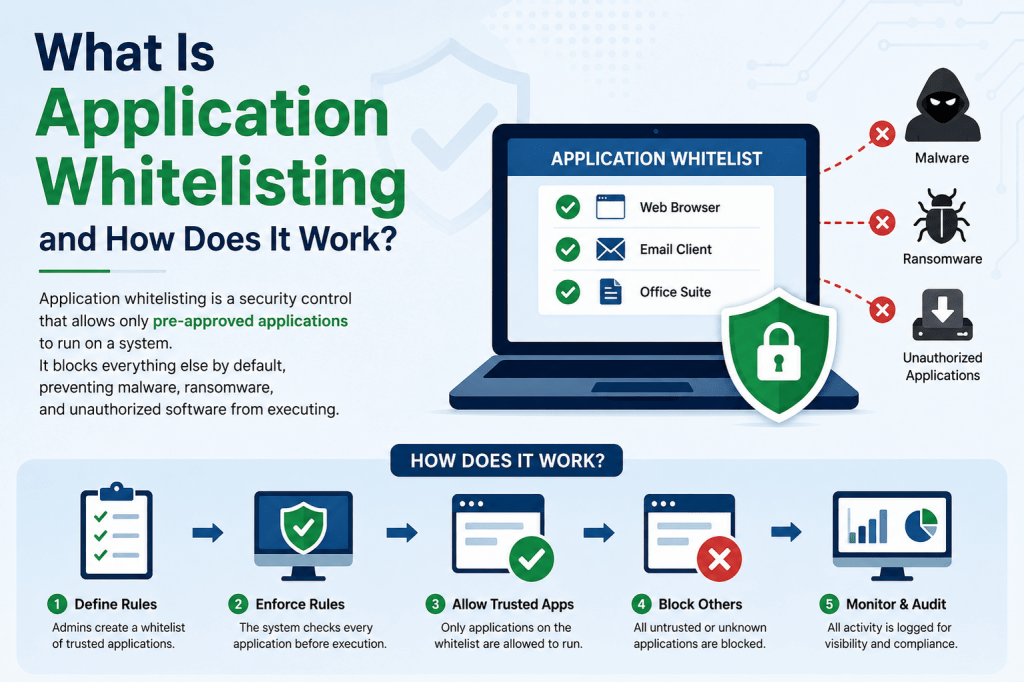
Application whitelisting is a cybersecurity method that allows only approved software to run on a system or network. Instead of trusting every application automatically, organizations create a list of programs that are verified and authorized for use. Any software outside this approved list is blocked from running. This approach creates a stronger level of security because it limits opportunities for malicious or unauthorized software to execute within the environment.
How Application Whitelisting Strengthens Security
Modern application whitelisting solutions provide far more than simple software approval lists. Advanced systems can identify trusted programs through file paths, executable names, digital signatures, cryptographic hashes, and publisher authentication. Some tools also combine multiple verification methods with behavioral analysis to determine whether an application should be trusted or denied access.
Why Large Organizations Use Whitelisting
Large businesses and enterprise environments often use application whitelisting to maintain tighter control over their systems. Unauthorized software installations can create serious security risks, compatibility issues, and management challenges. By restricting devices to approved applications only, organizations reduce the chances of malware infections, accidental downloads, and unsupported software usage.
Application Whitelisting in High Security Environments
Highly secure industries rely heavily on application whitelisting because they handle sensitive information and must meet strict compliance requirements. Financial institutions, healthcare providers, government agencies, and data centers often use whitelisting to prevent unauthorized programs from accessing protected systems or confidential information.
Protection Against Malware and Unsafe Software
One of the strongest advantages of application whitelisting is its ability to block malware before it runs. Since only approved software is allowed to execute, suspicious or unknown applications cannot operate on the system. This protection helps defend against spyware, ransomware, trojans, and many other forms of malicious code.
Application Whitelisting for Shared Systems
Public and shared computer systems are especially vulnerable to misuse and software infections. Schools, libraries, hospitals, and customer service kiosks often use application whitelisting to prevent users from installing unsafe applications. Restricting software execution helps maintain system stability and reduces the risk of compromise.
The Core Principle of Zero Trust
Application whitelisting follows the Zero Trust security model. Under this concept, no application is trusted automatically. Every program must be verified and explicitly approved before it is allowed to run. This approach reduces the attack surface and limits opportunities for cybercriminals to exploit unknown software vulnerabilities.
How Whitelisting Differs From Blacklisting
Whitelisting and blacklisting represent two different security philosophies. Whitelisting allows only approved applications, while blacklisting blocks only software known to be harmful. Blacklisting assumes most applications are safe unless proven dangerous, while whitelisting assumes all applications are untrusted until verified.
The Security Advantage of Whitelisting
Because whitelisting blocks unknown applications automatically, it often provides stronger protection than traditional blacklist-based security systems. Even if new malware has never been seen before, it still cannot run unless it has been specifically approved. This makes whitelisting highly effective against modern cyber threats.
Challenges of Managing Whitelists
Although application whitelisting improves security, it also requires ongoing maintenance. IT administrators must regularly review, approve, and update software lists. If applications receive updates or employees require new software, the whitelist must be modified quickly to avoid productivity disruptions.
How Blacklisting Works
Blacklisting focuses on identifying known malicious applications and preventing them from running. Antivirus software commonly uses this method by maintaining databases of harmful files, suspicious signatures, and dangerous behaviors. When malware is detected, it is added to the blacklist to prevent future infections.
The Limitations of Blacklisting
Blacklisting can struggle against new or previously unknown threats. Since security systems must first identify malware before blocking it, attackers may exploit vulnerabilities before the blacklist is updated. This reactive approach creates security gaps that sophisticated cybercriminals can target.
Why Organizations Use Hybrid Security Models
Many organizations combine whitelisting and blacklisting into a hybrid security approach. In these environments, trusted applications are approved, known threats are blocked, and advanced security tools monitor software behavior for suspicious activity. This layered strategy balances security with operational flexibility.
Behavioral Analysis and Risk Scoring
Modern security platforms often include heuristics and behavioral analysis to evaluate software activity. Applications that attempt unusual actions such as modifying system files, communicating with suspicious servers, or accessing protected data may receive higher risk scores. Security systems can then block or monitor these applications automatically.
How Application Whitelisting Identifies Software
Whitelisting systems use multiple methods to identify approved applications. Some solutions rely on executable names or installation paths, while others use digital fingerprints known as hashes. More advanced systems verify software authenticity through cryptographic signatures and publisher certificates.
Path-Based Whitelisting Explained
Path-based whitelisting approves software based on where it is installed. For example, applications located in approved directories may be allowed to run automatically. While this method is simple to configure, it can be vulnerable if malicious software copies itself into trusted locations.
The Role of File Hashes in Whitelisting
Hash-based whitelisting provides stronger security by creating a unique digital fingerprint for each approved application. If the file changes in any way, its hash value also changes. This allows security systems to detect tampered or modified software immediately.
Why Digital Signatures Matter
Digital signatures verify that software comes from a trusted publisher and has not been altered. Many software vendors sign their applications using cryptographic certificates. Whitelisting systems can validate these signatures to ensure applications are authentic and safe to run.
Publisher-Based Application Approval
Publisher-based whitelisting simplifies software management by allowing organizations to trust applications from specific verified vendors. Instead of approving every individual file, administrators can allow software signed by trusted publishers, reducing maintenance efforts during software updates.
How Software Updates Affect Whitelisting
Software updates can create challenges for whitelisting systems. When applications change, their signatures or hashes may also change. Administrators must ensure that updated versions are approved quickly to avoid blocking legitimate business applications.
The Importance of Timely Administrative Response
Effective application whitelisting depends heavily on responsive IT management. Employees may need new software or urgent updates to perform their work. Delays in approval processes can frustrate users and slow business operations, making efficient administration essential.
Whitelisting and Endpoint Protection
Application whitelisting plays a major role in endpoint security strategies. By controlling which applications can execute on desktops, laptops, and servers, organizations reduce the likelihood of malware infections and unauthorized software installations across their infrastructure.
Supporting Regulatory Compliance
Many industries require strict controls over endpoint systems to comply with regulatory standards. Application whitelisting helps organizations meet compliance requirements by ensuring only approved software handles sensitive information such as medical records, financial data, and customer payment details.
Reducing Vulnerabilities Through Standardization
When organizations maintain approved software lists, IT departments gain better visibility into the applications operating across their environment. This makes patch management easier and reduces vulnerabilities caused by outdated or unsupported software versions.
The Relationship Between Whitelisting and Patch Management
Unmanaged applications often become security risks because they may not receive regular updates. With application whitelisting, administrators know which programs are installed and can include them in centralized patch management processes to maintain security and stability.
The Risk of Unsupported Applications
Unsupported applications may contain vulnerabilities that attackers can exploit. If employees install unauthorized software without IT approval, those applications may remain unpatched and insecure. Application whitelisting reduces this risk by blocking unapproved installations entirely.
How Whitelisting Improves Operational Stability
Restricting systems to approved applications creates more consistent computing environments. Standardized software reduces compatibility issues, simplifies troubleshooting, and improves overall system reliability for both users and IT administrators.
Balancing Security and User Experience
A successful whitelisting strategy must balance strong security with usability. If restrictions are too strict or approval processes are too slow, employees may struggle to complete essential tasks. Organizations must design policies that protect systems without disrupting productivity.
The Administrative Overhead of Whitelisting
Application whitelisting requires dedicated administrative effort. IT teams must continuously review software requests, validate updates, manage exceptions, and monitor security events. Businesses without sufficient staffing may find whitelist management challenging.
Self-Updating Applications and Security Challenges
Some applications update themselves frequently, which can complicate whitelist management. If software changes often, administrators may need to update approval rules regularly to prevent legitimate applications from being blocked after updates.
Applications That Modify Their Own Code
Certain applications dynamically modify their files during normal operations. Although less common today, these applications can create challenges for signature-based whitelisting because their digital fingerprints change frequently.
The Weakness of Filename-Based Whitelisting
Whitelisting systems that rely only on filenames can be bypassed more easily. Attackers may rename malicious files to match approved applications, allowing harmful software to evade simple security checks.
The Risks of Path-Based Approvals
Path-based whitelisting assumes applications are always installed in the same locations. However, users may install software in alternate directories due to storage limitations or operational needs. This inconsistency can create management difficulties and security gaps.
Removable Media and Whitelisting Problems
Applications installed on removable devices such as USB drives may appear under different drive letters on different systems. This variation can complicate whitelist configurations and create exceptions that administrators must manage carefully.
How Whitelisting Helps Against Zero-Day Threats
Zero-day attacks exploit vulnerabilities before security vendors develop protections. Since whitelisting blocks unknown applications automatically, it can help defend against zero-day threats even when traditional antivirus systems have no existing signatures for the attack.
How Application Whitelisting Supports Cybersecurity Strategies
Application whitelisting is often considered one of the strongest endpoint security techniques because it prevents unknown applications from running before they can cause damage. Traditional security systems usually react after malware is identified, but whitelisting creates a proactive defense model. Instead of searching for harmful behavior after execution begins, it blocks unauthorized software immediately. This preventive approach significantly reduces the chances of a successful cyberattack.
The Growing Importance of Endpoint Security
Modern organizations rely heavily on endpoint devices such as laptops, desktops, servers, and mobile systems. Every endpoint connected to a network creates another potential entry point for attackers. As businesses expand remote work environments and cloud connectivity, endpoint security becomes even more critical. Application whitelisting helps reduce risks by controlling exactly which software can operate on these systems.
Reducing the Attack Surface
Cybersecurity professionals often focus on reducing the attack surface within an organization. The attack surface includes all possible ways attackers might gain access to systems or data. Every unauthorized application installed on a computer increases this surface area. By limiting systems to approved applications only, whitelisting minimizes opportunities for exploitation and strengthens overall security posture.
Preventing Unauthorized Software Installations
Employees sometimes install software without approval because they believe it will improve productivity or solve a temporary problem. Unfortunately, these unauthorized applications can introduce vulnerabilities, licensing issues, or malware infections. Application whitelisting prevents such installations by restricting execution to verified applications that have already been reviewed by IT administrators.
The Role of Application Control Policies
Application whitelisting relies on carefully designed control policies. These policies determine which applications are approved, how software is verified, and what actions occur when unauthorized applications attempt to execute. Organizations often customize policies based on department requirements, user roles, or security classifications to balance operational flexibility with strong protection.
Centralized Management and Visibility
Modern whitelisting platforms usually include centralized management consoles that allow administrators to control policies across thousands of devices. These systems provide visibility into application usage, blocked software attempts, policy violations, and system health. Centralized oversight simplifies management and improves the organization’s ability to respond quickly to emerging security concerns.
Application Whitelisting in Enterprise Networks
Large enterprise environments often contain thousands of devices running hundreds of applications. Managing such environments without strict software controls can become extremely difficult. Application whitelisting creates standardization across departments and locations, helping organizations maintain consistency while reducing the risks associated with uncontrolled software environments.
The Value of Software Standardization
Software standardization improves both security and operational efficiency. When employees use approved applications consistently, IT departments can provide better technical support, streamline updates, and reduce compatibility issues. Standardized environments also simplify troubleshooting because administrators know exactly which applications should exist on each system.
How Whitelisting Improves Incident Response
Security incidents become easier to investigate when organizations maintain strict application control. Since only approved software is allowed to run, investigators can identify suspicious activity more quickly. Unauthorized applications attempting execution immediately stand out as potential threats, allowing faster detection and response.
The Relationship Between Whitelisting and Least Privilege
Application whitelisting works effectively alongside the principle of least privilege. Least privilege means users receive only the access and permissions necessary to perform their jobs. Combining restricted software execution with limited user permissions creates a layered defense model that significantly reduces the impact of security incidents.
How Malware Attempts to Bypass Security
Cybercriminals continuously develop methods to evade traditional security systems. Malware may disguise itself as legitimate software, inject malicious code into approved applications, or exploit trusted processes. Advanced application whitelisting solutions combat these tactics through behavioral analysis, memory protection, and publisher verification techniques.
Memory-Based Attacks and Security Challenges
Some modern attacks operate entirely within system memory without creating traditional executable files. These fileless attacks can bypass basic whitelist systems if they rely only on executable monitoring. Advanced whitelisting platforms address this challenge by monitoring scripts, command-line activity, and suspicious memory behavior.
Script Control in Application Whitelisting
Scripts written in languages such as PowerShell, JavaScript, or Python can create serious security risks when abused by attackers. Many application whitelisting tools include script control capabilities that restrict unauthorized scripts from executing. This helps prevent attackers from using scripting engines to download malware or manipulate systems.
The Role of Macros in Cyberattacks
Document macros are another common attack vector used in phishing and malware campaigns. Malicious macros embedded in office documents can execute harmful commands when opened by users. Application whitelisting systems may restrict macro execution or allow only trusted macros from approved sources.
Protecting Against Ransomware Attacks
Ransomware remains one of the most damaging cyber threats facing organizations today. Attackers encrypt company files and demand payment for decryption keys. Application whitelisting can reduce ransomware risks by blocking unauthorized encryption tools and suspicious executables before they begin encrypting data.
How Whitelisting Limits Lateral Movement
Once attackers compromise a single system, they often attempt lateral movement to spread across the network. Application whitelisting makes this process more difficult because unauthorized tools cannot execute freely on additional systems. Restricting software execution limits the attacker’s ability to expand access within the environment.
Whitelisting in Remote Work Environments
Remote work introduces additional cybersecurity challenges because employees often connect from various locations and networks. Application whitelisting helps secure remote endpoints by ensuring only approved applications operate on company devices regardless of where employees work.
The Importance of Policy Flexibility
Different departments within an organization may require different software tools. Developers, designers, engineers, and accountants often use specialized applications unique to their roles. Effective whitelisting systems support flexible policy structures that allow organizations to customize permissions while maintaining centralized security control.
Testing Before Full Deployment
Organizations rarely deploy application whitelisting across all systems immediately. Most businesses begin with testing phases to identify compatibility issues and minimize operational disruptions. Pilot groups help administrators understand application requirements, user workflows, and policy adjustments before organization-wide implementation.
Audit Mode and Monitoring Features
Many application whitelisting platforms include audit modes that monitor application activity without blocking execution initially. Audit mode allows administrators to observe which applications users rely on before enforcing strict restrictions. This process helps build accurate whitelists and reduces the likelihood of blocking essential software.
Employee Training and User Awareness
Successful application whitelisting deployments require employee awareness and cooperation. Users must understand why restrictions exist and how to request approval for new software when necessary. Proper communication reduces frustration and encourages compliance with security policies.
Managing Software Requests Efficiently
Employees occasionally need new applications to perform their work effectively. Organizations should establish clear approval processes that allow software requests to be reviewed and approved quickly. Efficient workflows prevent unnecessary delays while maintaining proper security oversight.
Balancing Productivity With Security Controls
Excessively restrictive security measures can negatively affect productivity. If employees constantly encounter blocked applications or approval delays, frustration may increase. Organizations must carefully balance security requirements with operational efficiency to maintain a positive user experience.
The Role of Automation in Whitelisting
Automation helps reduce the administrative workload associated with application whitelisting. Automated approval workflows, software inventories, and policy updates simplify management tasks and improve scalability. Automation becomes especially valuable in large environments with thousands of applications and devices.
Using Machine Learning in Modern Security Platforms
Some advanced security solutions incorporate machine learning algorithms to identify suspicious behavior patterns automatically. These systems analyze software activity continuously and help administrators make informed decisions about application trustworthiness.
Cloud-Based Application Whitelisting Solutions
Cloud-managed security platforms have become increasingly popular because they simplify deployment and management. Cloud-based whitelisting allows administrators to manage policies remotely, monitor devices across multiple locations, and deploy updates quickly without relying entirely on on-premises infrastructure.
Whitelisting in Hybrid IT Environments
Many organizations operate hybrid environments that combine traditional data centers with cloud services and remote endpoints. Application whitelisting solutions must adapt to these complex infrastructures while maintaining consistent security controls across all systems.
The Importance of Software Inventories
Maintaining accurate software inventories is essential for effective whitelisting. Organizations need visibility into all installed applications to identify approved software, outdated versions, and unauthorized tools. Comprehensive inventories improve both security management and compliance reporting.
Managing Legacy Applications
Older legacy applications can create challenges for whitelisting systems. Some outdated programs lack digital signatures, modern authentication methods, or compatibility with newer security technologies. Organizations must carefully evaluate these applications and determine whether they should remain operational.
Whitelisting and Third-Party Software Risks
Third-party applications often introduce additional security concerns because organizations have less control over their development and maintenance. Application whitelisting helps reduce these risks by ensuring third-party software undergoes proper review before deployment.
The Impact of Shadow IT
Shadow IT refers to unauthorized technology solutions used by employees without official approval. These tools may include file-sharing applications, messaging platforms, or productivity software. Shadow IT increases security risks because IT teams cannot properly monitor or secure these applications. Whitelisting helps eliminate shadow IT by blocking unauthorized software execution.
Reducing Insider Threat Risks
Not all security threats originate externally. Insider threats involving employees, contractors, or partners can also create serious risks. Application whitelisting limits the ability of insiders to install unauthorized tools or execute malicious software within the environment.
Whitelisting and Compliance Audits
Regulatory audits often require organizations to demonstrate strong endpoint controls and software management practices. Application whitelisting supports compliance efforts by providing detailed logs, application records, and policy enforcement documentation.
The Financial Benefits of Preventing Security Incidents
Cyberattacks can result in major financial losses through downtime, recovery costs, legal penalties, and reputational damage. Although application whitelisting requires investment and administrative effort, preventing even a single major security breach can justify the cost significantly.
Improving Long-Term Security Maturity
Application whitelisting contributes to long-term cybersecurity maturity by encouraging organizations to maintain structured software management processes. Businesses that implement strong application controls often develop better visibility, stronger governance, and improved operational discipline across their IT environments.
Building a Security-First Culture
Organizations that successfully implement application whitelisting often promote broader security awareness among employees. Users become more conscious of software risks, approval procedures, and cybersecurity best practices, helping create a stronger overall security culture throughout the business.
Planning an Application Whitelisting Deployment
Implementing application whitelisting successfully requires careful planning before enforcement begins. Organizations must first understand their existing software environment, business requirements, and operational workflows. Without proper preparation, strict software restrictions can create productivity problems and disrupt critical business operations. A structured deployment strategy helps organizations strengthen security while minimizing user frustration.
Conducting a Complete Software Inventory
One of the first steps in deploying application whitelisting is creating a complete inventory of all applications currently used within the organization. Administrators need visibility into operating systems, productivity tools, background services, scripts, utilities, and specialized applications running on employee devices. This inventory forms the foundation for building accurate whitelist policies.
Identifying Business-Critical Applications
Not every application used within an organization is equally important. Some programs are essential for daily operations, while others may be optional or outdated. During the planning process, IT teams should identify mission-critical applications that must remain available at all times. This helps prioritize approvals and reduce the risk of blocking software necessary for productivity.
Evaluating Existing Security Infrastructure
Application whitelisting works best when integrated with existing security systems. Organizations should evaluate how whitelist policies will interact with antivirus software, endpoint detection systems, firewalls, identity management platforms, and patch management tools. Proper integration creates a more unified and efficient security environment.
Defining Security Objectives
Different organizations implement application whitelisting for different reasons. Some focus primarily on malware prevention, while others emphasize compliance, software control, or operational standardization. Clearly defining security objectives helps administrators design policies that align with business priorities and long-term cybersecurity goals.
Understanding User Workflows
Employees in different departments often use software in unique ways. Developers may require scripting tools and testing platforms, while marketing teams rely on design applications and media software. Understanding these workflows is essential for creating whitelist policies that support productivity while maintaining strong security protections.
Creating Department-Specific Policies
Many organizations create separate whitelist policies for different departments or job roles. This approach allows employees to access the applications they need without granting unnecessary permissions across the entire company. Role-based policies improve security by limiting software access according to business requirements.
The Importance of Pilot Testing
Before deploying application whitelisting company-wide, organizations usually begin with pilot testing. A small group of users tests whitelist policies in real-world conditions, allowing administrators to identify issues and adjust configurations before broader implementation. Pilot programs help reduce disruptions and improve deployment success rates.
Monitoring Systems During Testing
Testing phases should include detailed monitoring of blocked applications, user activity, and system performance. Administrators need to identify applications that were unintentionally restricted and determine whether they should be approved. Careful monitoring ensures that essential business functions continue operating smoothly after enforcement begins.
Using Audit Mode Before Enforcement
Many application whitelisting platforms include audit modes that log software activity without blocking execution. Audit mode provides valuable insight into how systems are used and which applications employees rely on most frequently. This information helps administrators build more accurate whitelist rules before enabling strict enforcement.
Building Accurate Approval Lists
Creating an effective whitelist requires balancing security with operational needs. Approval lists should include all necessary applications while avoiding unnecessary software that increases security risks. Administrators often review software usage patterns, vendor reputations, and update histories before approving applications for organization-wide use.
Evaluating Software Trustworthiness
Before approving applications, organizations should evaluate their trustworthiness carefully. Factors such as publisher reputation, security history, patch frequency, and software integrity all play important roles in determining whether an application should be trusted within the environment.
The Role of Digital Certificates
Digital certificates help verify software authenticity and publisher identity. Applications signed with trusted certificates provide greater assurance that they have not been altered or tampered with. Organizations often prioritize digitally signed applications because they improve both security and management efficiency.
Managing Unsanctioned Applications
During deployment, organizations frequently discover unauthorized applications already installed on employee devices. Some may be harmless productivity tools, while others could introduce serious security vulnerabilities. Administrators must decide whether these applications should be approved, replaced, or removed entirely.
Addressing Legacy Software Challenges
Legacy applications can complicate whitelisting deployments because older software may lack modern security features such as digital signatures or regular updates. Businesses that rely on outdated systems must carefully assess the risks associated with continuing to use these applications.
Balancing Compatibility and Security
Security controls should not interfere with critical business operations. Organizations must ensure that whitelist policies remain compatible with existing systems, workflows, and business applications. Compatibility testing helps prevent unexpected outages and operational disruptions during deployment.
Managing Application Updates Efficiently
Applications receive updates frequently to fix bugs, improve functionality, and address security vulnerabilities. Whitelisting systems must handle these updates efficiently to avoid blocking legitimate software changes. Automated update approval mechanisms can simplify this process while maintaining security oversight.
The Benefits of Publisher-Based Rules
Publisher-based rules reduce administrative complexity by allowing applications signed by trusted vendors automatically. Instead of approving every software version individually, administrators can trust applications from approved publishers, simplifying management for frequently updated software.
Hash-Based Whitelisting for Stronger Security
Hash-based whitelisting creates unique digital fingerprints for approved applications. If files change unexpectedly, the system detects the modification immediately. This approach provides strong protection against tampered software but may require more frequent updates when legitimate applications change.
The Risks of Path-Based Rules
Path-based whitelisting relies on software installation locations rather than file integrity. Although easier to configure, this method can be vulnerable if attackers place malicious files within approved directories. Organizations using path-based rules should combine them with additional security controls.
Script Management in Modern Environments
Many organizations rely heavily on scripts for automation and administration. However, scripts can also be abused by attackers. Effective application whitelisting strategies include policies that control which scripts are allowed to execute and under what conditions.
Controlling PowerShell and Command-Line Tools
PowerShell and command-line tools are valuable administrative resources but also common targets for cybercriminals. Advanced whitelisting solutions can restrict unauthorized command execution, monitor suspicious behavior, and limit scripting access to approved users only.
Managing Temporary and Portable Applications
Portable applications that run without installation can bypass traditional software management controls. Organizations should include portable software policies within their whitelisting strategy to prevent unauthorized applications from executing through removable media or temporary directories.
Handling Software Exceptions Carefully
Some situations require temporary software exceptions for troubleshooting, development, or specialized tasks. Organizations should establish formal approval processes for exceptions and ensure they are monitored closely to prevent abuse or security gaps.
Reducing Administrative Complexity
Application whitelisting can become difficult to manage in large environments without proper planning. Automation, centralized management platforms, and standardized approval processes help reduce complexity and improve scalability across thousands of devices.
The Value of Centralized Policy Management
Centralized policy management allows administrators to apply whitelist rules consistently across the organization. Changes can be deployed quickly, monitored effectively, and adjusted as business needs evolve. Centralized systems also improve reporting and compliance visibility.
Using Automation for Faster Approvals
Automation tools can streamline software approval processes by automatically validating trusted applications, distributing policy updates, and managing software inventories. Faster approvals improve user experience while reducing administrative workload.
Maintaining Continuous Visibility
Application environments constantly change as employees install updates, adopt new tools, and modify workflows. Continuous monitoring helps organizations maintain visibility into software activity and identify unauthorized changes before they create security problems.
The Importance of Logging and Reporting
Detailed logging is essential for both security investigations and compliance requirements. Application whitelisting systems typically record blocked applications, policy violations, approval changes, and user activity. These logs provide valuable insights into system behavior and potential security threats.
Detecting Suspicious Activity Quickly
Whitelist violations often indicate either unauthorized software use or potential malicious activity. Rapid detection allows administrators to investigate suspicious behavior immediately and take corrective action before security incidents escalate.
Application Whitelisting and Insider Threats
Employees and contractors sometimes introduce risks intentionally or accidentally. Whitelisting limits their ability to install unauthorized applications or run harmful tools. This helps reduce insider threat risks while improving oversight of software usage across the organization.
Improving Endpoint Stability
Restricting systems to approved software improves endpoint stability by reducing conflicts, unsupported applications, and accidental configuration changes. Stable systems experience fewer crashes, better performance, and more predictable behavior.
The Role of Employee Communication
Clear communication is critical during whitelisting deployments. Employees should understand why restrictions are being implemented, how software approvals work, and what procedures to follow when requesting new applications. Transparency helps improve user cooperation and reduce resistance.
Training Users on Security Best Practices
User education strengthens application whitelisting effectiveness. Employees who understand cybersecurity risks are less likely to attempt unauthorized software installations or bypass security controls. Training programs should explain the importance of software restrictions and safe computing practices.
Handling Resistance to Security Controls
Some employees may view whitelisting as restrictive or inconvenient, especially if approval processes are slow. Organizations should address these concerns proactively by simplifying request procedures, providing timely responses, and demonstrating the security benefits of application control.
Measuring Deployment Success
Organizations should evaluate the success of application whitelisting deployments using measurable metrics such as reduced malware incidents, fewer unauthorized applications, improved compliance scores, and faster incident response times. Continuous evaluation helps refine policies and improve long-term effectiveness.
Adapting Policies as Business Needs Change
Business environments evolve continuously, and whitelist policies must evolve as well. New applications, cloud services, remote work tools, and operational requirements may require policy adjustments over time. Flexible management processes help organizations maintain security while adapting to changing business needs.
Creating a Long-Term Whitelisting Strategy
Application whitelisting should not be viewed as a one-time project. Long-term success requires ongoing monitoring, policy updates, employee training, and regular security reviews. Organizations that maintain active management processes gain the greatest value from application control technologies.
Building Stronger Cybersecurity Foundations
When implemented correctly, application whitelisting becomes a foundational component of enterprise cybersecurity. It improves software visibility, reduces attack surfaces, strengthens endpoint protection, and supports compliance requirements. Combined with other security measures, it helps organizations build more resilient and secure IT environments.
Common Challenges in Application Whitelisting Deployments
Although application whitelisting provides strong security advantages, organizations often face several challenges during deployment and long-term management. One of the biggest difficulties is maintaining accurate and updated approval lists. Modern business environments change constantly, with employees requiring new tools, software updates occurring frequently, and cloud applications becoming more common. Without continuous oversight, whitelist policies can quickly become outdated and ineffective.
Managing Frequent Software Updates
Software vendors release updates regularly to improve functionality, fix bugs, and patch vulnerabilities. Every update may alter application files, signatures, or hashes, which can cause legitimate software to be blocked if whitelist policies are not updated promptly. Organizations must establish efficient processes for approving updates quickly while maintaining security standards.
The Operational Impact of Delayed Approvals
Slow software approval processes can frustrate employees and disrupt productivity. When workers cannot access the tools they need to complete tasks, business operations may slow down significantly. IT teams must balance careful security reviews with fast response times to avoid creating unnecessary obstacles for users.
How Poor Planning Can Cause Deployment Failures
Application whitelisting projects sometimes fail because organizations underestimate the planning and management required. Deploying strict controls without understanding user workflows or software dependencies can result in blocked applications, operational downtime, and widespread employee dissatisfaction. Careful preparation and phased implementation are essential for long-term success.
The Complexity of Large Enterprise Environments
Large organizations often operate thousands of devices running numerous applications across multiple departments and geographic locations. Managing whitelist policies at this scale can become highly complex. Differences in operating systems, software requirements, and business processes require flexible management strategies and centralized oversight.
Managing Diverse User Requirements
Not all employees use the same software tools. Developers may require testing environments and scripting tools, while designers use graphics software and finance teams rely on accounting applications. Creating whitelist policies that support these diverse requirements without compromising security can be challenging.
The Risks of Overly Restrictive Policies
Security policies that are too restrictive can negatively impact user experience and business efficiency. Blocking legitimate applications too aggressively may encourage employees to seek workarounds or unauthorized solutions. Organizations must design whitelist rules carefully to maintain productivity while enforcing strong security controls.
Avoiding Excessive Software Permissions
While overly restrictive policies create problems, excessively permissive rules also weaken security. Approving unnecessary applications increases the attack surface and creates more opportunities for exploitation. Effective whitelisting requires striking the right balance between usability and protection.
Handling Bring Your Own Device Environments
Many businesses allow employees to use personal devices for work activities. These Bring Your Own Device environments create additional challenges because organizations have less control over installed software and device configurations. Application whitelisting in such environments often requires mobile device management solutions and carefully designed policies.
The Rise of Cloud Applications and SaaS Platforms
Modern organizations increasingly rely on cloud-based applications and Software as a Service platforms. Traditional whitelisting approaches focused mainly on executable files installed locally, but cloud applications introduce new considerations involving browsers, extensions, authentication systems, and web-based workflows.
Browser Extensions and Security Risks
Browser extensions can improve productivity, but they may also introduce vulnerabilities or malicious functionality. Some extensions collect user data, inject advertisements, or execute harmful scripts. Organizations implementing application whitelisting often include policies for controlling browser extensions and limiting unapproved add-ons.
Managing Third-Party Integrations
Many business applications rely on integrations with external services and plugins. These integrations can create hidden security risks if not properly reviewed and controlled. Whitelisting strategies should account for connected applications and third-party components that interact with approved software.
Protecting Against Supply Chain Attacks
Supply chain attacks occur when attackers compromise trusted software vendors or update mechanisms. Even legitimate applications may become dangerous if attackers insert malicious code into official updates. Organizations should combine whitelisting with integrity verification, threat monitoring, and vendor security assessments to reduce these risks.
The Importance of Continuous Monitoring
Application whitelisting is not a set-it-and-forget-it solution. Continuous monitoring is essential for identifying policy violations, suspicious activity, and changes within the software environment. Security teams should regularly review logs, blocked applications, and user behavior to maintain effective protection.
Detecting Anomalous Behavior
Advanced security systems analyze application behavior to identify suspicious actions that may indicate compromise. Even approved applications can become dangerous if exploited by attackers. Behavioral monitoring helps detect unusual activity such as unauthorized network communication, file encryption attempts, or privilege escalation.
Combining Whitelisting With Endpoint Detection
Many organizations combine application whitelisting with endpoint detection and response solutions for stronger protection. While whitelisting controls which applications can run, endpoint detection tools monitor activity in real time and respond to suspicious behavior automatically.
The Role of Artificial Intelligence in Security
Artificial intelligence and machine learning technologies are increasingly integrated into cybersecurity platforms. These systems can analyze massive amounts of data, identify unusual behavior patterns, and improve threat detection capabilities. AI-driven security tools enhance application whitelisting by providing deeper visibility and automated risk analysis.
How Automation Improves Security Management
Automation reduces the manual workload associated with whitelist management. Automated approval systems, software discovery tools, and policy deployment mechanisms help organizations manage large environments more efficiently. Automation also improves consistency and reduces the likelihood of human error.
Reducing Human Error in Security Operations
Human mistakes remain one of the most common causes of security incidents. Misconfigured policies, overlooked software updates, and accidental approvals can create vulnerabilities. Automation and standardized processes help reduce these risks by minimizing manual intervention.
The Importance of Security Audits
Regular security audits help organizations evaluate the effectiveness of their application whitelisting strategies. Audits identify outdated policies, unnecessary software approvals, and gaps in security controls. Periodic reviews ensure that whitelist configurations continue aligning with business requirements and threat landscapes.
Application Whitelisting and Regulatory Compliance
Many industries face strict compliance requirements related to data protection and endpoint security. Application whitelisting helps organizations demonstrate stronger control over software environments, which supports compliance with regulatory standards and security frameworks.
Supporting Data Protection Initiatives
Sensitive information such as customer records, financial data, and healthcare information requires strong protection. By limiting applications to approved software only, organizations reduce opportunities for unauthorized access, data leakage, and malicious activity involving protected information.
Reducing Malware Recovery Costs
Recovering from malware infections can be extremely expensive. Organizations may face downtime, lost productivity, recovery expenses, reputational damage, and legal consequences. Application whitelisting helps prevent many attacks before they occur, reducing both financial and operational impacts.
Improving Business Continuity
Cybersecurity incidents can disrupt critical operations and affect customer trust. Strong application control policies contribute to business continuity by reducing the likelihood of widespread malware outbreaks or unauthorized software failures that interrupt essential services.
How Whitelisting Supports Zero Trust Architectures
Zero Trust security models assume that no device, application, or user should be trusted automatically. Application whitelisting aligns naturally with this philosophy because it requires explicit approval before software can execute. Integrating whitelisting into Zero Trust architectures strengthens overall cybersecurity resilience.
The Relationship Between Identity and Application Control
Modern security strategies increasingly connect identity management with application control. Access decisions may depend not only on the software itself but also on the user attempting to run it, device health, location, and other contextual factors.
Securing Remote and Hybrid Workforces
Remote work environments expand the number of endpoints connecting to corporate systems. Employees working from home or public networks create additional exposure risks. Application whitelisting helps maintain consistent security controls across distributed workforces and unmanaged environments.
Whitelisting in Virtualized Environments
Virtual desktops and cloud-hosted environments introduce additional management considerations. Organizations using virtualization technologies must ensure that whitelist policies remain effective across both physical and virtual systems while supporting dynamic workloads and rapid provisioning.
The Future of Application Whitelisting
Application whitelisting continues evolving as cybersecurity threats become more advanced. Future solutions will likely rely more heavily on artificial intelligence, cloud integration, behavioral analysis, and automated policy management. These advancements aim to improve protection while reducing administrative complexity.
The Growing Need for Proactive Security
Cyberattacks continue increasing in sophistication and frequency. Reactive security measures alone are no longer sufficient for protecting modern organizations. Proactive controls such as application whitelisting help businesses reduce exposure to unknown threats and strengthen overall resilience.
Why Application Visibility Matters
Organizations cannot effectively secure software they do not know exists. Application whitelisting improves visibility by forcing businesses to identify, review, and manage the software operating within their environments. This visibility strengthens both security operations and IT governance.
The Importance of Long-Term Policy Maintenance
Whitelist policies require ongoing maintenance to remain effective. New applications, software updates, evolving threats, and changing business needs all require adjustments over time. Organizations that actively manage their policies gain far greater long-term value from application control technologies.
Building a Layered Defense Strategy
No single security solution can stop every cyber threat. Application whitelisting works best as part of a layered defense strategy that includes firewalls, endpoint protection, encryption, identity management, user education, and continuous monitoring. Multiple layers of security create stronger overall protection.
Encouraging Security Awareness Across Organizations
Successful cybersecurity programs depend not only on technology but also on employee awareness. Users who understand the importance of approved software policies are more likely to follow security procedures and avoid risky behavior. Education and communication strengthen the effectiveness of whitelisting initiatives.
Creating a More Controlled IT Environment
Organizations that implement application whitelisting often gain greater control over their IT infrastructure. Standardized software environments improve stability, simplify support, reduce vulnerabilities, and strengthen operational consistency across departments and locations.
Conclusion
Application whitelisting has become one of the most effective methods for controlling software execution and improving endpoint security. By allowing only approved applications to run, organizations can significantly reduce malware risks, strengthen compliance efforts, and improve visibility into their technology environments. Unlike traditional blacklist-based security systems that react to known threats, whitelisting follows a proactive security model that blocks unauthorized software automatically.
Despite its advantages, successful application whitelisting requires careful planning, continuous monitoring, and strong administrative processes. Organizations must balance security with usability, ensuring employees can access the tools they need without creating unnecessary operational obstacles. Modern environments involving cloud applications, remote workforces, and rapidly changing software ecosystems make whitelist management more complex, but advancements in automation and intelligent security technologies continue improving efficiency and scalability.
As cyber threats continue evolving, businesses increasingly recognize the importance of proactive security strategies that reduce attack surfaces and limit unauthorized activity. Application whitelisting plays a critical role within layered cybersecurity frameworks by strengthening endpoint protection, supporting Zero Trust architectures, and improving overall control over software environments. When implemented correctly and maintained consistently, it becomes a powerful defense mechanism that helps organizations build safer, more resilient, and more secure IT infrastructures for the future.