
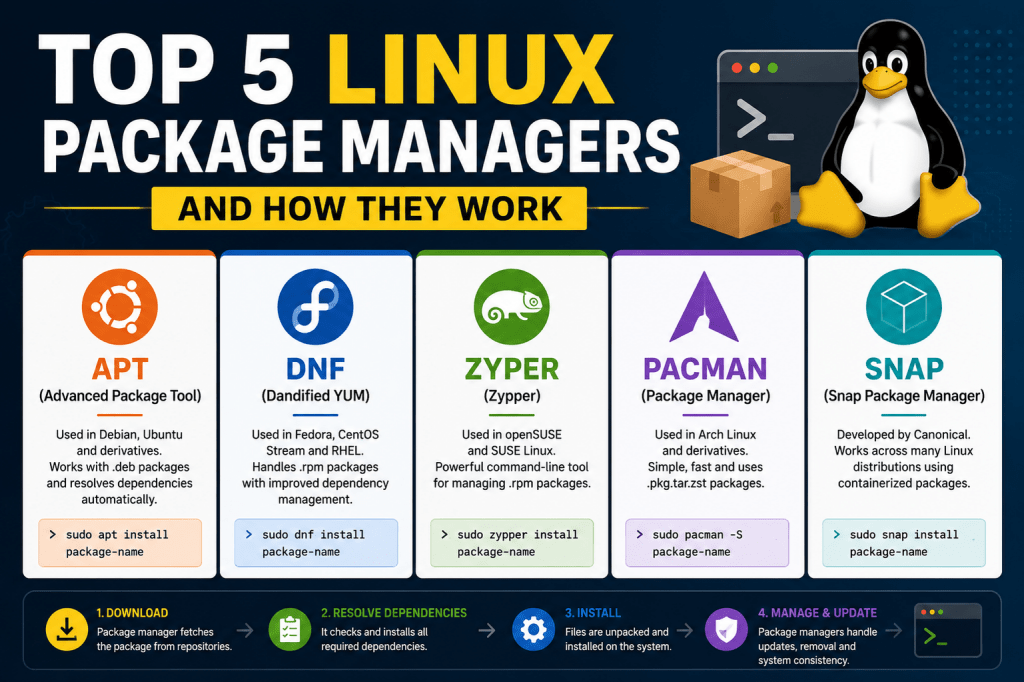
Linux was once very different from the polished operating systems people use today. In earlier days, desktop environments were basic, graphical tools were limited, and installing software often required deep technical knowledge. Users frequently downloaded source code manually, compiled programs themselves, and configured dependencies without automated assistance. This process could become frustrating because one missing library or incompatible package version could break an entire installation.
Many Linux users discovered quickly that software management on Linux worked differently compared to other operating systems. Instead of downloading large standalone installers, Linux applications relied on shared libraries and interconnected packages. While this design made Linux lightweight and efficient, it also created challenges for inexperienced users. The solution to this complexity came through package managers, which became one of the defining features of Linux distributions.
As Linux evolved, package managers transformed the user experience. Instead of compiling software manually, users could install applications with a single command. The package manager automatically downloaded required dependencies, configured files, updated repositories, and maintained system stability. This innovation turned Linux into a far more accessible platform for servers, desktops, and development environments.
What Makes Linux Software Management Different
Linux follows a modular philosophy. Applications are usually designed to perform focused tasks efficiently instead of functioning as massive all-in-one software packages. Because of this approach, many Linux applications depend on external libraries and supporting tools already available on the system.
Unlike some operating systems where software installers bundle every dependency together, Linux applications often share common system libraries. This reduces duplication, saves disk space, and improves performance. However, it also means applications rely heavily on compatibility between installed components.
For example, a multimedia application may require several codec libraries, graphical toolkits, networking utilities, and audio frameworks. Installing each dependency manually would be tedious and error-prone. A package manager automates this process by identifying required components and installing them automatically.
This interconnected structure is one of the reasons Linux systems are extremely efficient. Shared libraries allow multiple programs to use the same resources without storing duplicate copies. It also enables centralized security updates because updating one shared library can improve security for many applications simultaneously.
The Purpose of a Linux Package Manager
A Linux package manager is a specialized system responsible for handling software installation, updates, dependency management, removal, and repository synchronization. It acts as the communication bridge between the operating system and software repositories.
When users install software through a package manager, several processes occur behind the scenes. The package manager searches repositories for the requested package, verifies compatibility with the current system, downloads dependencies, resolves conflicts, installs files in the correct locations, and updates internal package databases.
Package managers also simplify software maintenance. Instead of visiting multiple websites to check for updates, Linux users can update their entire system from a single command. This includes operating system components, libraries, drivers, and installed applications.
Another important role of package managers is maintaining consistency across systems. Enterprise environments often rely on package managers to deploy software identically across hundreds or thousands of servers. Because package managers track installed files and dependencies carefully, administrators can automate large-scale deployments with confidence.
Why Dependency Management Matters
Dependencies are additional software components required for an application to function properly. In Linux, dependencies are extremely common because applications share libraries and services instead of bundling everything independently.
Without automated dependency handling, users would constantly encounter installation failures. One application might require a newer library version while another depends on an older release. Manually resolving these conflicts can become extremely difficult, especially on complex systems.
Package managers solve this problem through dependency resolution systems. Before installation begins, the package manager checks which libraries already exist on the system and determines what additional packages are required. It also verifies compatibility between package versions.
Modern package managers maintain detailed metadata about software relationships. This information allows them to calculate installation paths automatically and avoid conflicts that could damage system stability.
Dependency tracking also helps during package removal. If a user uninstalls software, the package manager can identify unused dependencies and remove unnecessary files to keep the system clean.
How Linux Repositories Work
Repositories are centralized collections of software packages maintained by Linux distributions or third-party developers. They contain applications, libraries, updates, security patches, and metadata used by package managers.
Every Linux distribution maintains official repositories tailored specifically for its operating system version. These repositories ensure software compatibility and stability. Packages are tested before inclusion to reduce the risk of system instability.
Repositories are categorized into sections based on software type and stability. Stable repositories contain thoroughly tested software suitable for production systems. Testing repositories include newer packages undergoing evaluation. Experimental repositories may contain cutting-edge software intended for advanced users.
Package managers periodically synchronize with repositories to download updated package lists. This process refreshes local metadata so users can access the latest software versions available for their distribution.
Third-party repositories also play a major role in the Linux ecosystem. Some applications are not included in official repositories due to licensing restrictions or independent development models. Developers often provide their own repositories to distribute software directly to users.
The Importance of Repository Metadata
Repository metadata contains detailed information about available software packages. This includes package names, version numbers, dependency lists, architecture compatibility, file sizes, installation instructions, and cryptographic signatures.
When a package manager updates its repository cache, it downloads this metadata rather than downloading every package immediately. This keeps repository synchronization lightweight and efficient.
Metadata enables advanced package management features such as dependency resolution, package searching, conflict detection, and automated upgrades. Without metadata, package managers would have no reliable way to determine how software components interact with each other.
Cryptographic signatures stored in repositories also improve security. Package managers verify software authenticity before installation to ensure packages have not been tampered with or corrupted during transmission.
Understanding Binary Packages
Many Linux distributions use precompiled binary packages. These packages contain software already compiled for a specific processor architecture and operating system version. Binary packages allow extremely fast installations because users do not need to compile source code themselves.
Binary package management is common in distributions focused on stability and ease of use. Since maintainers compile packages centrally, they can ensure compatibility and optimize software for supported environments.
Popular package managers using binary packages include APT and YUM. These systems prioritize reliability and predictable updates, making them ideal for enterprise deployments and desktop users seeking convenience.
Binary packages also reduce hardware requirements because software installation consumes far less processing power than compiling applications from source code.
Source-Based Package Management
Some Linux distributions prefer source-based package management instead of binary packages. In these systems, the package manager downloads application source code and compiles it locally during installation.
This approach allows software optimization for specific hardware configurations. Users can customize compile-time options, enable or disable features, and tune applications for performance.
Source-based distributions appeal to advanced Linux enthusiasts who value flexibility and customization. However, compiling large applications can require significant processing power and time.
Package managers such as Portage are designed specifically for source-based systems. They automate compilation processes while still handling dependencies and package tracking automatically.
Source-based package management demonstrates the flexibility of Linux. Users can choose between convenience-focused binary distributions or highly customizable source-based environments depending on their goals.
How Package Installation Actually Happens
When a user installs software through a Linux package manager, several coordinated processes occur automatically.
First, the package manager searches repository metadata for the requested package. Once found, it checks compatibility with the current operating system and architecture.
Next, dependency analysis begins. The package manager identifies all required libraries and supporting packages. If dependencies are missing, they are added to the installation queue automatically.
After dependency resolution, packages are downloaded from repositories. Modern package managers often verify package signatures during this stage to ensure authenticity and integrity.
The installation phase then begins. Files are extracted into appropriate directories, configuration files are generated, permissions are assigned, and system databases are updated.
Some packages also execute post-installation scripts. These scripts may create system users, configure services, initialize databases, or update application caches.
Finally, the package manager records installation details in its internal database. This allows future updates, removals, and dependency tracking to function correctly.
Updating Software Through Package Managers
System updates are one of the most valuable features of Linux package managers. Users can update the operating system and installed applications simultaneously using a single command.
During updates, package managers compare installed package versions against repository metadata. Newer versions are downloaded automatically and installed while preserving configuration settings whenever possible.
Security updates are especially important. Linux distributions regularly release patches for vulnerabilities affecting system libraries and applications. Package managers simplify the update process, helping users maintain secure systems efficiently.
Some package managers support partial upgrades while others recommend full system synchronization to maintain compatibility between packages.
Rolling-release distributions often rely heavily on continuous package updates. In these systems, package managers constantly deliver the latest software versions instead of requiring large operating system upgrades.
Removing Packages Safely
Package removal in Linux is more sophisticated than simply deleting files manually. Package managers track every file associated with installed software and remove them carefully while preserving system stability.
When users uninstall applications, package managers check whether dependencies are shared with other installed software. Shared dependencies are usually preserved to avoid breaking remaining applications.
Unused packages can also be identified and removed automatically. This helps reduce clutter and reclaim storage space.
Configuration file handling varies between package managers. Some preserve modified configuration files after removal in case the user reinstalls the application later.
Proper package removal is one reason Linux systems can remain clean and stable even after years of software changes.
The Role of Root Privileges
Most package management tasks require administrative privileges because installing software modifies protected areas of the operating system.
Commands are typically executed with elevated permissions using tools such as sudo. This security measure prevents unauthorized users from altering critical system components.
Administrative access is necessary because package installation may involve modifying system directories, updating shared libraries, configuring services, and changing environment settings.
Linux security models isolate regular users from sensitive system operations, and package managers operate within this framework to maintain system integrity.
APT and Debian-Based Systems
APT is one of the most widely recognized package management systems in Linux. It powers Debian-based distributions and focuses heavily on dependency resolution and stability.
APT works with package repositories containing Debian package files. It provides simple commands for updating repositories, installing software, upgrading systems, and removing packages.
One of APT’s greatest strengths is its sophisticated dependency handling. It can resolve complex software relationships automatically, making installation processes smooth even on large systems.
APT also supports multiple repository sources, allowing users to combine official repositories with third-party software channels.
Debian-based systems became popular partly because APT simplified Linux administration dramatically compared to earlier manual installation methods.
YUM and RPM Package Management
YUM became a major package manager in enterprise Linux environments. It works with RPM package formats commonly used in enterprise-focused distributions.
YUM introduced advanced dependency resolution capabilities to RPM-based systems. Earlier RPM tools handled package installation but lacked automated dependency management, which sometimes caused difficulties.
With YUM, administrators gained a centralized tool for managing repositories, performing updates, and maintaining enterprise servers efficiently.
YUM also supports plugins and extensions that enhance functionality, including security auditing and automated update management.
Enterprise environments value YUM because of its stability, predictable behavior, and strong integration with large-scale server management practices.
Pacman and the Philosophy of Simplicity
Pacman is the package manager used by Arch-based Linux distributions. Unlike many other package managers designed primarily around stability and beginner accessibility, Pacman follows a minimalist philosophy focused on speed, simplicity, and user control.
Arch Linux itself is designed around the principle of keeping the system lightweight and transparent. Pacman reflects this design philosophy by providing fast package operations and straightforward configuration methods. Instead of hiding system processes behind layers of abstraction, Pacman gives users direct control over software management.
One of Pacman’s strongest advantages is its speed. Package installation and repository synchronization are usually extremely fast because Pacman uses compressed package databases and optimized dependency resolution methods. The command syntax is concise, making it popular among experienced Linux users who value efficiency in terminal workflows.
Pacman stores software packages in compressed archive formats containing binaries, metadata, dependencies, and installation scripts. When users install applications, Pacman extracts files directly into the operating system while maintaining an internal database that tracks installed packages and their relationships.
Because Arch Linux uses a rolling-release model, Pacman plays a critical role in keeping systems continuously updated. Instead of performing major operating system upgrades between versions, users regularly synchronize their systems with repositories to receive the newest packages available.
Rolling Release Package Management
Rolling-release distributions differ significantly from traditional fixed-release systems. Instead of waiting for large operating system upgrades, software updates are delivered continuously through the package manager.
Pacman was built specifically to support this model. Users typically update the entire system frequently to maintain package compatibility. Since libraries and applications evolve together continuously, partial upgrades are discouraged because they can create mismatched dependencies.
This approach gives users access to the newest kernels, drivers, desktop environments, and applications much faster than traditional distributions. Developers and enthusiasts often prefer rolling-release systems because they provide immediate access to modern technologies.
However, rolling releases require careful maintenance. Since packages move quickly, occasional incompatibilities can occur if users neglect updates or interrupt system synchronization processes.
Pacman simplifies rolling-release maintenance by handling package replacements, dependency transitions, and repository synchronization efficiently.
How Pacman Handles Dependencies
Pacman maintains dependency relationships using package metadata stored in repositories. Before installation, Pacman checks whether required libraries and supporting software are already installed.
If dependencies are missing, Pacman automatically downloads and installs them alongside the requested application. Dependency resolution is usually very fast because Arch repositories are designed with consistency and simplicity in mind.
Pacman also tracks optional dependencies. These are additional packages that enhance functionality without being strictly required. For example, a media player may function normally without optional codec packages, but installing them expands supported file formats.
One interesting feature of Pacman is orphan package detection. Orphan packages are dependencies no longer required by installed software. Pacman allows users to identify and remove these unnecessary packages to keep systems clean.
Dependency management becomes especially important in rolling-release environments because packages change rapidly. Pacman ensures that interconnected software components remain compatible during updates.
The Arch User Repository
One of the defining features of the Arch ecosystem is the Arch User Repository, commonly called the AUR. This community-driven repository allows users to share package build scripts for software not included in official repositories.
Instead of storing compiled binaries, the AUR contains instructions describing how to download source code, compile applications, and package them for installation through Pacman-compatible tools.
This system gives users access to a massive software ecosystem extending far beyond official repositories. Developers frequently publish new software to the AUR before it appears in mainstream repositories.
AUR helpers automate the process of downloading build scripts, compiling packages, resolving dependencies, and integrating installations into the Pacman database.
The AUR demonstrates how Linux package management can combine official distribution repositories with community-driven software distribution while maintaining centralized management.
Source Compilation and Package Building
Unlike purely binary-based systems, Arch supports flexible package compilation workflows. Users can compile software locally using build instructions provided by package scripts.
Compiling applications locally allows customization of software features and optimization settings. Users can modify build configurations before installation to enable or disable components according to their needs.
Package building also improves transparency because users can inspect build scripts before execution. This gives advanced users more control over software installation compared to traditional installer systems.
Pacman integrates with locally built packages seamlessly. Once compiled, applications are installed and tracked just like official repository packages.
This blend of binary convenience and source flexibility is one reason Arch remains highly respected among experienced Linux users.
Portage and the Gentoo Approach
Portage is the package management system used by Gentoo Linux. Gentoo is built around source-based package management and extensive system customization.
Unlike package managers focused primarily on binary distribution, Portage downloads source code and compiles applications directly on the user’s machine. This allows users to optimize software specifically for their hardware and desired feature sets.
Portage uses a collection of package scripts called ebuilds. These scripts contain instructions describing how to download source code, apply patches, configure compilation options, build applications, and install files properly.
Gentoo users often customize compile-time settings extensively. This flexibility allows highly optimized systems tailored to specific processors, workloads, and usage scenarios.
Although compiling software requires more time and processing power, many advanced users appreciate the control Portage provides.
The Importance of USE Flags
One of Gentoo’s most powerful features is its USE flag system. USE flags allow users to enable or disable specific software features globally or per package before compilation.
For example, users can disable graphical interface support for server applications or exclude unnecessary multimedia codecs from desktop software. This creates leaner systems with fewer dependencies.
USE flags influence dependency selection automatically. If a feature is disabled, unnecessary supporting libraries are not installed. This can significantly reduce system complexity and resource usage.
The flexibility of USE flags is one reason Gentoo systems can be highly optimized. Users have fine-grained control over exactly what functionality exists within installed software.
This approach contrasts with binary distributions where software is usually compiled with generalized feature sets designed for broad compatibility.
Compiling Software for Specific Hardware
Portage allows users to optimize applications for specific processors using compiler settings. These optimizations can improve performance in certain workloads, especially on systems performing intensive computational tasks.
Users can configure compilation flags that tune software for modern processor instructions, memory architectures, and hardware capabilities.
Because software is compiled locally, Gentoo systems can avoid unnecessary generic compatibility layers included in many binary distributions.
This level of optimization appeals strongly to performance enthusiasts, developers, and advanced Linux users seeking maximum control over system behavior.
However, local compilation also increases installation times significantly. Large applications such as web browsers or desktop environments may require substantial processing time during installation.
Dependency Handling in Portage
Despite its complexity, Portage handles dependencies extremely well. Ebuild scripts define required libraries, optional features, and compatibility information.
Before installation begins, Portage calculates dependency trees and determines which packages must be compiled first. It also handles circular dependency issues carefully to maintain system consistency.
Dependency resolution in source-based systems can become more complex because compile-time options influence required libraries dynamically.
Portage manages this complexity through detailed metadata and dependency logic built into ebuild scripts.
Users can preview dependency changes before installation, allowing them to understand exactly how software modifications affect the system.
System Profiles and Configuration Layers
Gentoo uses profiles to define system-wide defaults for package behavior, compiler settings, and dependency structures.
Profiles simplify configuration by providing predefined environments optimized for servers, desktops, development systems, or minimal installations.
Users can further customize profiles through layered configuration files. This modular design gives exceptional flexibility without forcing users to configure every package individually.
Portage integrates deeply with these configuration systems, ensuring package management aligns with the overall system architecture chosen by the user.
Binary Packages in Gentoo
Although Gentoo focuses primarily on source compilation, Portage also supports binary packages. Users can distribute compiled packages across multiple systems to avoid repeated compilation.
This feature is especially useful in enterprise or laboratory environments where administrators manage many similar systems.
Binary package support demonstrates the flexibility of Portage. Users can combine source compilation with binary deployment strategies depending on their needs.
Hybrid approaches often provide the best balance between customization and convenience.
Zypper and OpenSUSE Package Management
Zypper is the package manager used by OpenSUSE and SUSE-based distributions. It works with RPM packages while providing advanced dependency resolution and repository management capabilities.
OpenSUSE emphasizes stability, flexibility, and administrative tools. Zypper reflects these goals by combining powerful command-line management with reliable package handling.
Zypper supports repository priorities, advanced search functions, package locking, rollback integration, and automated dependency conflict resolution.
One of its strongest features is integration with system snapshots. OpenSUSE systems using specific file systems can create snapshots before major package operations. If updates cause problems, users can revert the system to an earlier state.
This capability adds an additional layer of safety rarely found in traditional package management systems.
Repository Priorities and Vendor Management
Zypper includes sophisticated repository management features allowing users to control package sources carefully.
Repository priorities determine which repositories take precedence when multiple versions of a package are available. This prevents accidental replacement of stable packages with incompatible third-party versions.
Vendor management allows Zypper to track which repository originally provided a package. Administrators can control whether packages may switch vendors during updates.
These features are particularly valuable in enterprise and development environments where repository consistency is critical.
Pattern-Based Package Installation
OpenSUSE introduces a concept called patterns. Patterns are predefined collections of packages grouped around specific tasks or system roles.
For example, users can install complete desktop environments, development toolchains, or server configurations through a single pattern installation.
Zypper handles all underlying dependencies automatically while organizing packages into logical categories.
This simplifies large-scale installations significantly because users do not need to select every package manually.
Patterns also help maintain consistency across multiple systems configured for similar purposes.
Package Verification and Security
Security is a critical responsibility for all Linux package managers. Zypper performs signature verification during package installation to ensure software authenticity.
Repositories sign metadata and packages cryptographically. If signatures fail verification, installations are blocked unless users override security protections manually.
This reduces the risk of installing malicious or corrupted software from untrusted sources.
Package verification also helps administrators maintain compliance and integrity in enterprise environments where software trust is essential.
Transactional Updates and Stability
Some SUSE-based systems support transactional updates, where package operations occur in isolated snapshots rather than modifying the running system directly.
If updates fail or create instability, the system can roll back safely without leaving packages partially installed.
This approach improves reliability for production servers and mission-critical systems where failed upgrades can have serious consequences.
Transactional package management represents an evolution beyond traditional update methods by treating system changes more like controlled deployments rather than simple file replacements.
How Package Managers Maintain System Stability
One of the most important responsibilities of a Linux package manager is preserving system stability. Linux systems are made up of thousands of interconnected components including libraries, drivers, services, configuration files, kernels, and user applications. If one important package becomes corrupted or incompatible, it can affect many other parts of the operating system.
Package managers reduce this risk by carefully tracking software relationships. Every installed package contains metadata describing required dependencies, compatible versions, conflicts, installation scripts, and configuration behavior. The package manager uses this information to determine whether an installation or update is safe to perform.
When users install new software, the package manager checks the existing system state before making modifications. If installing a package would break another application or remove a critical dependency, the package manager usually prevents the operation or warns the user about the risks.
This dependency awareness is one reason Linux systems can remain stable for long periods even while receiving constant updates. Instead of treating applications as isolated programs, Linux package managers understand the system as a connected ecosystem.
Package Databases and Internal Tracking
Every Linux package manager maintains an internal database containing detailed records about installed software. This database acts as the central memory system for package management operations.
The package database stores information such as installed package versions, file locations, dependencies, installation timestamps, configuration status, and repository sources. Without this tracking system, the package manager would not know which files belong to which application.
When software updates occur, the package manager compares repository metadata against the local database to determine which packages require upgrades. During removals, the database allows the package manager to delete only the correct files without damaging unrelated software.
This internal tracking also improves troubleshooting. Administrators can query the package database to determine which package installed a specific file or which application depends on a particular library.
Modern Linux distributions rely heavily on accurate package databases because operating systems now contain tens of thousands of interconnected files managed through package systems.
Handling Configuration Files
Configuration file management is another major responsibility of package managers. Many Linux applications store settings in text-based configuration files located throughout the system.
During software updates, package managers must decide how to handle these files carefully. Replacing customized configuration files automatically could break services or erase administrator changes. Ignoring configuration updates entirely could prevent new software features from functioning properly.
Different package managers solve this problem in slightly different ways. Some preserve modified configuration files and create new versions alongside them for manual review. Others prompt administrators to choose whether to replace or keep existing files.
This careful handling is especially important on servers where configuration stability is critical. A single incorrect configuration replacement could disrupt websites, databases, or network services.
By managing configuration changes intelligently, package managers help administrators maintain predictable system behavior across updates.
Package Signing and Security Verification
Security has become increasingly important in modern software distribution. Linux package managers use cryptographic verification systems to ensure software integrity and authenticity.
Repositories digitally sign package metadata and software packages using cryptographic keys. Before installation begins, the package manager checks these signatures to verify that packages have not been altered.
If verification fails, the package manager usually blocks installation unless users explicitly override security protections. This reduces the risk of malware entering systems through compromised repositories or corrupted downloads.
Key management systems are also important. Linux distributions maintain trusted signing keys that identify official repositories. Administrators can add additional keys when enabling third-party repositories.
This trust model creates a secure software distribution chain from repository maintainers to end users.
The Difference Between Stable and Testing Repositories
Most Linux distributions organize repositories into categories based on software maturity and stability.
Stable repositories contain thoroughly tested packages intended for production use. These packages prioritize reliability and long-term compatibility over cutting-edge features.
Testing repositories include newer software undergoing evaluation before entering stable channels. Users who want more recent features often enable testing repositories while accepting increased risk of bugs or incompatibilities.
Some distributions also provide unstable or experimental repositories for developers and advanced users. These repositories may contain very recent software versions with limited testing.
Package managers allow users to control which repositories are enabled and which package versions are preferred. This flexibility lets users balance stability and innovation according to their needs.
Enterprise systems typically rely heavily on stable repositories, while development environments may use testing channels more aggressively.
Third-Party Repositories and Software Distribution
Official repositories cannot always include every available application. Licensing restrictions, proprietary software policies, and independent development models often require alternative distribution methods.
Third-party repositories solve this problem by allowing software vendors and communities to distribute packages independently.
For example, developers may provide repositories containing browsers, media servers, communication tools, or development platforms unavailable in official distribution repositories.
Package managers can integrate these repositories directly into normal update workflows. Once configured, software from third-party repositories updates automatically alongside official system packages.
However, adding external repositories also introduces risks. Poorly maintained repositories can create dependency conflicts or security concerns. Users must evaluate repository trustworthiness carefully before enabling them.
Experienced administrators often prioritize repositories maintained by reputable developers or organizations with established security practices.
Software Version Compatibility
Version compatibility is a major challenge in Linux package management. Applications often depend on very specific library versions to function correctly.
If a required library becomes too old or too new, software may stop working properly. Package managers prevent these situations through strict version tracking and dependency rules.
Repository maintainers test package combinations carefully to ensure compatibility within a distribution release. This coordinated approach is one reason Linux systems remain stable despite containing thousands of interconnected packages.
Some package managers also support version pinning. This feature allows administrators to lock specific packages at chosen versions instead of updating automatically.
Version pinning is useful in production environments where application compatibility is more important than receiving the newest features immediately.
Kernel Updates and Package Managers
The Linux kernel itself is managed through package management systems on most distributions. Kernel packages include core operating system components responsible for hardware communication, memory management, and system scheduling.
Package managers simplify kernel installation and upgrades significantly. Instead of compiling kernels manually, users can install prebuilt kernel packages tested by distribution maintainers.
Kernel updates are critical for hardware support, performance improvements, and security patches. Package managers allow these updates to integrate safely into normal system maintenance routines.
Many distributions also keep older kernel versions installed automatically after upgrades. This provides recovery options if newer kernels create hardware compatibility problems.
Bootloaders are usually updated automatically during kernel package installation, ensuring systems recognize newly installed kernels properly.
Service Management Integration
Modern package managers often integrate closely with service management systems. When installing server applications such as web servers or databases, package managers may automatically register system services and configure startup behavior.
Post-installation scripts can initialize databases, create service accounts, configure directories, or enable background services automatically.
This integration simplifies administration because users do not need to configure every service manually after installation.
Similarly, package removal may disable services, stop background processes, and clean up runtime files automatically.
This coordinated behavior helps maintain consistency across the operating system.
Delta Updates and Bandwidth Optimization
Some package managers support delta updates, which download only changed portions of packages instead of full replacements.
This technique reduces bandwidth usage significantly during updates, especially for large applications with small modifications.
Delta updates are particularly useful in enterprise environments where many systems receive frequent updates simultaneously.
Package managers calculate binary differences between installed versions and updated packages, allowing more efficient downloads.
Bandwidth optimization becomes increasingly important as software packages grow larger and update frequency increases.
Caching Mechanisms in Package Managers
Package managers commonly store downloaded packages locally in cache directories. This allows reinstallations or repeated deployments without downloading files again.
Caching improves speed and reduces network usage, especially when managing multiple systems.
Administrators can also create local mirror repositories using cached packages. Large organizations often maintain internal package mirrors to reduce internet bandwidth consumption and improve update reliability.
Some package managers provide automated cache cleanup tools to remove outdated packages and reclaim disk space.
Efficient caching strategies help package management scale from single-user desktops to massive enterprise infrastructures.
Offline Package Installation
Although repositories are usually accessed online, package managers can also install software offline using locally stored package files.
This capability is valuable in restricted environments without internet access. Administrators can download packages separately and transfer them manually to isolated systems.
Offline installation also simplifies disaster recovery and controlled deployment workflows.
Package managers still perform dependency verification during offline installations. Administrators must ensure all required packages are available locally.
Enterprise organizations frequently use offline package management for security-sensitive systems isolated from public networks.
Dependency Hell and Conflict Resolution
Dependency hell refers to situations where incompatible package requirements prevent successful installation or updates.
For example, one application may require an older library version while another requires a newer release. Without careful dependency management, such conflicts can destabilize the operating system.
Modern package managers include sophisticated algorithms designed to minimize these issues. They analyze dependency trees, evaluate version constraints, and determine safe installation paths automatically.
Some package managers also support package replacement rules and virtual packages that improve compatibility between software ecosystems.
Despite these improvements, dependency conflicts can still occur occasionally, especially when mixing repositories or using experimental software.
Advanced users often learn repository management strategies to reduce the likelihood of conflicts.
Containerization and Package Management
Containers have changed how software deployment works on Linux systems. Technologies like Docker and container runtimes package applications with their dependencies into isolated environments.
Even within containers, package managers remain important. Most container images are built using traditional Linux package management tools.
For example, container build processes often install software using package managers during image creation.
Package managers also help keep container images updated and secure by providing access to patched libraries and system components.
Containerization reduces dependency conflicts between applications because each container maintains its own isolated software environment.
However, package managers still remain fundamental to the underlying Linux infrastructure powering container systems.
Immutable Operating Systems
Some modern Linux systems are exploring immutable operating system designs. In these systems, core system files are treated as read-only and updated atomically rather than modified directly.
Package management in immutable systems works differently from traditional Linux environments. Instead of replacing individual files continuously, updates may deploy entire filesystem snapshots or system images.
This approach improves reliability because failed updates can roll back cleanly without leaving partial modifications behind.
Even in immutable systems, package management concepts remain essential. Software still requires repositories, dependency tracking, version control, and secure distribution methods.
Immutable operating systems represent an evolution of package management philosophy rather than a replacement for it.
Graphical Interfaces for Package Management
Although command-line package management remains extremely powerful, many Linux distributions provide graphical interfaces for software installation and updates.
These interfaces simplify package management for desktop users unfamiliar with terminal commands.
Graphical package managers usually display software categories, screenshots, descriptions, ratings, and update notifications in user-friendly formats.
Behind the scenes, these graphical tools still rely on the same package management infrastructure and repositories as command-line utilities.
Graphical interfaces make Linux more approachable while preserving the reliability and efficiency of underlying package systems.
However, advanced administrators often prefer command-line tools because they offer greater precision, automation capabilities, and scripting support.
Automation and Scripting
One major advantage of Linux package managers is automation. Administrators can script software installation, updates, and system configuration using package management commands.
Automation tools commonly integrate directly with package managers to provision servers automatically.
For example, deployment scripts may install web servers, databases, programming languages, and security tools without human interaction.
This capability is critical in cloud computing environments where systems are created and destroyed dynamically.
Package management automation improves consistency because every deployment follows the same predefined instructions.
Infrastructure-as-code practices depend heavily on reliable package management systems to maintain predictable environments across large server fleets.
The Role of Package Managers in Development
Developers rely heavily on Linux package managers to install programming languages, compilers, libraries, databases, and development tools.
Package repositories provide standardized access to enormous software ecosystems, simplifying development environment setup.
Dependency management is especially valuable in development workflows because applications often require specific library versions and build tools.
Package managers also help maintain reproducible environments. Developers can document required packages precisely, allowing other team members to recreate identical systems easily.
This consistency improves collaboration and reduces compatibility issues during software development projects.
Final Conclusion
Linux package managers are one of the most important technologies behind the success and stability of modern Linux operating systems. They simplify software installation, automate updates, manage dependencies, and help maintain the overall health of the system. What once required manual compilation, configuration, and troubleshooting can now be completed with a single command, making Linux far more accessible for beginners while still offering advanced control for experienced users.
Every Linux distribution uses a package manager designed around its own philosophy. Some focus on stability and simplicity, while others emphasize flexibility, customization, or access to the latest software. Tools like APT, YUM, Pacman, Portage, and Zypper may work differently internally, but they all perform the same essential task of organizing software efficiently and securely. They ensure applications can communicate with required libraries, receive updates properly, and remain compatible with the operating system.
Repositories also play a major role in the Linux ecosystem by providing centralized software distribution. Instead of searching across multiple websites, users can install trusted applications directly from maintained repositories. This improves both security and reliability while reducing the chances of broken or incompatible software installations.
As Linux continues evolving, package managers continue evolving with it. They now support cloud platforms, containers, automation tools, transactional updates, and enterprise-scale deployments. Even with newer technologies changing how software is distributed, package managers remain the foundation of Linux software management.
The flexibility, speed, and reliability provided by Linux package managers are major reasons why Linux powers everything from personal laptops to servers, cloud infrastructure, and supercomputers. They transformed Linux from a difficult system requiring extensive manual maintenance into a highly organized and efficient operating system trusted worldwide. Understanding how package managers work is an important step toward understanding how Linux itself operates behind the scenes.