
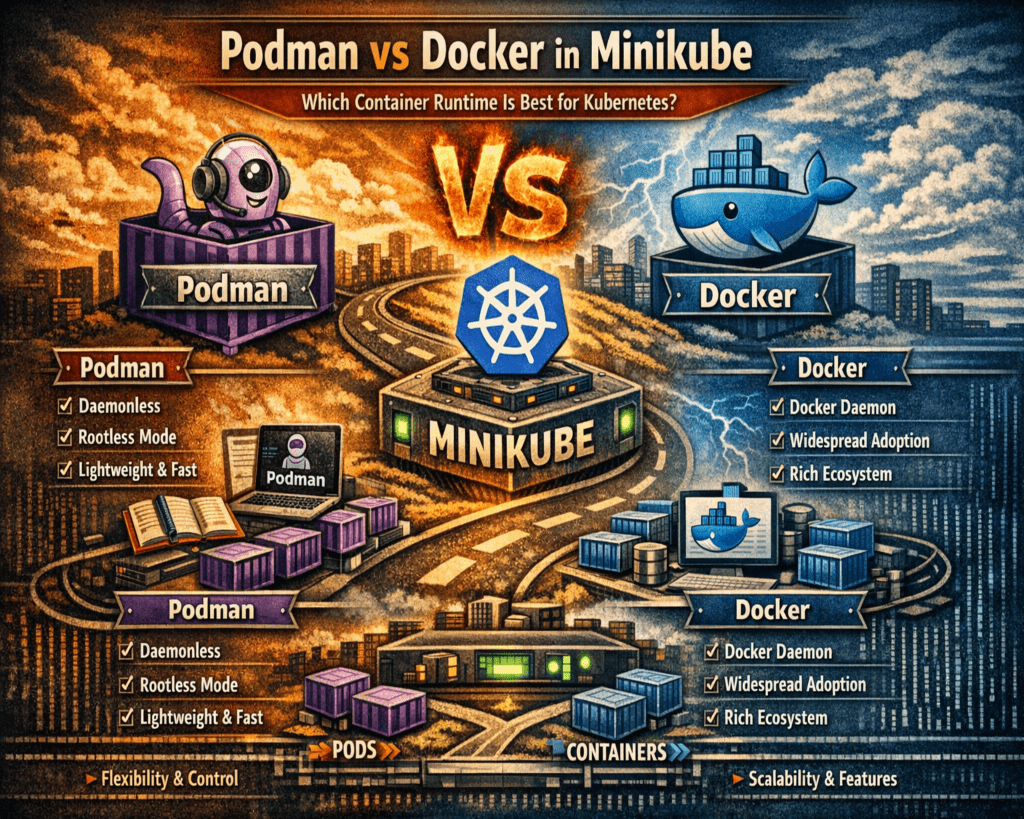
Minikube is a lightweight tool that creates a single-node Kubernetes cluster on a local machine. It is used to replicate a production-like Kubernetes environment without needing a full distributed cluster. This allows developers to test deployments, services, and containerized applications directly on their laptops or workstations. The main purpose is to reduce complexity during development while still preserving real Kubernetes behavior. It includes core components such as the API server, scheduler, controller manager, and kubelet, all running in a simplified setup. However, Minikube itself does not run containers. It depends on a container runtime to execute workloads, which makes runtime selection an important part of the setup.
Role of Container Runtimes in Kubernetes Execution
Container runtimes are responsible for actually running containers inside a Kubernetes environment. Kubernetes manages orchestration, but the runtime handles execution tasks such as pulling images, creating containers, configuring storage, and setting up networking. In Minikube, the runtime simulates production-level container behavior on a local system. This means the runtime directly affects performance, stability, and resource usage. Kubernetes interacts with runtimes through a standardized interface, which allows different implementations to work in the same ecosystem. Docker and Podman are two common runtimes used in Minikube environments, but they operate in very different ways internally.
Docker Architecture and Daemon-Based Design
Docker uses a client-server model built around a central background service called the Docker daemon. This daemon runs continuously and manages all container operations, including image downloads, container creation, networking, and storage handling. When a command is executed through the Docker CLI, it is sent to the daemon, which processes it and returns a response. This design provides a centralized control system that simplifies container management and improves consistency. It also allows caching and optimization of container operations. However, the daemon consumes system resources even when no containers are running, which can increase memory usage in development environments.
Podman Architecture and Daemonless Execution Model
Podman uses a completely different design approach by removing the need for a background daemon. Instead of relying on a persistent service, Podman runs containers directly as individual processes. Each container operates independently under the user’s session. This reduces system overhead and eliminates a single point of failure. Podman also supports rootless execution, meaning containers run without requiring administrative privileges. This improves security because containers are restricted to user-level permissions. Even if a container is compromised, it cannot easily access system-wide resources. This design makes Podman more lightweight and secure in many development scenarios.
Security Differences Between Podman and Docker
Docker typically requires elevated privileges or membership in privileged system groups to manage containers. While this simplifies setup and improves compatibility, it introduces potential security risks if a container is compromised. Attackers may be able to escalate privileges depending on system configuration. Docker mitigates some risks using namespace isolation and kernel security features, but its architecture still relies on higher privilege levels. Podman improves security by defaulting to a rootless model. Containers run under the same user account that launches them, limiting access to system-level resources. This reduces the impact of security breaches and aligns with modern least-privilege principles.
System Resource Usage and Performance Behavior
Docker’s daemon runs continuously in the background, which means it consumes memory and CPU resources even when containers are idle. This ensures fast response times but creates constant system overhead. On low-resource systems, this can reduce overall performance. Docker Desktop includes optimization features to reduce idle usage, but the daemon still remains active. Podman does not use a background service, so it only consumes resources when containers are running. When idle, it releases system resources completely. This makes Podman more efficient in environments where containers are used intermittently.
Minikube Integration with Docker and Podman Drivers
Minikube uses drivers to connect Kubernetes with container runtimes. Docker integration is generally simpler because it has been widely supported for a long time. Setup is straightforward, and most Kubernetes workflows assume Docker compatibility. Podman integration can require additional configuration, especially on systems that rely on virtualization layers. This is because Podman often runs in rootless mode or uses a virtual machine backend. These extra layers can introduce setup complexity in networking and file sharing. However, support for Podman in Minikube has improved, and it is now a viable option for local Kubernetes development.
Container Image Compatibility and Execution Behavior
Both Docker and Podman use standard container image formats, which ensures compatibility across Kubernetes systems. These images contain application code, dependencies, and runtime instructions. Docker has historically shaped the container ecosystem, so most images are optimized for Docker-based environments. This results in smooth compatibility in most cases. Podman supports the same image standards but may require adjustments in cases where images assume Docker-specific behavior. In modern environments, compatibility differences are minimal, but some edge cases may require configuration tuning.
Development Workflow Differences in Minikube Environments
Docker provides a stable and familiar workflow that aligns with most documentation and enterprise practices. This makes it easier for teams to adopt Kubernetes development quickly. Its tooling ecosystem is mature, with strong integration into debugging tools and CI/CD pipelines. Podman introduces a different workflow due to its daemonless structure. While command syntax is similar, internal execution behavior differs, which can affect debugging and container inspection methods. Developers may gain more direct visibility into system-level container processes with Podman, but it requires adaptation. Minikube ensures that both runtimes behave consistently at the Kubernetes level, allowing developers to focus on applications rather than infrastructure differences.
How Minikube Interacts with Container Runtimes in Practice
Minikube functions as a local Kubernetes environment that depends heavily on a container runtime to simulate cluster behavior. While Kubernetes itself is responsible for orchestration, scheduling, and workload distribution, it does not directly execute containers. Instead, Minikube delegates this responsibility to a runtime such as Docker or Podman. The interaction happens through a driver layer that connects Kubernetes components with the underlying container system. This means every pod deployment, image pull, or container restart is ultimately executed by the runtime. In practical terms, the runtime becomes the execution engine of the entire local Kubernetes environment. The way it handles system calls, networking, and storage directly affects how realistic the Minikube cluster behaves compared to production environments. Because of this dependency, even small differences between Docker and Podman can significantly influence debugging experience, performance behavior, and system stability during development.
Docker Integration Workflow Inside Minikube Environments
Docker integration with Minikube is generally straightforward because it has historically been the most widely supported container runtime in Kubernetes development. The setup process typically involves installing Docker on the host machine and then starting Minikube using Docker as the driver. Once configured, Minikube communicates with the Docker engine to create and manage containers. Docker handles all image operations, including pulling, caching, and layering. It also manages networking configurations required for Kubernetes services to communicate properly. One of the key advantages of Docker integration is its predictability. Since most Kubernetes tutorials and development workflows assume Docker as the baseline runtime, troubleshooting is often easier. Developers can rely on a large knowledge base, including community discussions and enterprise documentation, when issues arise. Docker Desktop further simplifies this experience by bundling the engine, CLI tools, and graphical interface into a single package, reducing setup complexity on macOS and Windows systems.
Podman Integration Workflow in Minikube Environments
Podman integration with Minikube follows a slightly different path due to its daemonless architecture and rootless execution model. Instead of relying on a continuously running background service, Podman executes containers directly through user-level processes. To integrate it with Minikube, developers often need to initialize a Podman machine or virtual environment, particularly on non-Linux systems. Once the environment is ready, Minikube can be started using Podman as the designated driver. The system then routes container operations through Podman’s execution engine. While this setup works effectively, it may require additional configuration steps compared to Docker. Networking and file system sharing can sometimes require manual adjustments depending on the operating system. Despite these complexities, Podman integration provides a more lightweight runtime experience once properly configured. It also eliminates dependency on a persistent daemon, which can improve system responsiveness during idle periods.
Performance Behavior Differences in Real Development Workloads
Performance in Minikube environments is influenced by how efficiently the runtime manages system resources. Docker uses a daemon-based architecture, which means a background service is always active. This ensures quick response times for container operations, as the engine is already running and ready to process requests. However, this constant activity also consumes memory and CPU resources even when no containers are running. In development environments where system resources are limited, this overhead can become noticeable. Docker Desktop tries to mitigate this by introducing resource optimization features, such as pausing background activity when idle. However, the daemon remains part of the system’s active processes.
Podman behaves differently because it does not rely on a persistent background service. Container processes are created and managed only when needed. Once containers stop, no additional system resources are consumed. This leads to a more efficient idle state, particularly on laptops or systems used for multitasking. In workloads where containers are frequently started and stopped, Podman can offer a more responsive system experience because it avoids constant background processing. However, Docker can still feel faster in scenarios where repeated container operations benefit from caching and long-running optimization mechanisms.
Memory Usage Patterns and System Load Management
Memory usage is one of the most important factors in local Kubernetes development. Docker’s daemon-based system requires a baseline memory allocation even when no containers are running. This is because the daemon continuously manages container state, networking configurations, and image caching. As a result, Docker tends to maintain a higher baseline memory footprint. On systems with limited RAM, this can reduce available resources for other development tools such as IDEs, databases, or testing frameworks.
Podman avoids this issue by eliminating the background daemon entirely. Memory is only allocated when containers are actively running. Once workloads are completed, memory is released back to the system. This makes Podman more suitable for constrained environments or systems running multiple heavy applications simultaneously. However, memory efficiency is not the only consideration. Docker’s persistent caching mechanism can sometimes reduce memory overhead during repeated container operations, since images and layers are already stored and managed in memory structures optimized for reuse.
Networking Behavior in Minikube with Docker and Podman
Networking is a critical component of Kubernetes environments, and Minikube relies on the runtime to handle low-level networking configuration. Docker provides a mature networking stack that integrates seamlessly with Kubernetes service discovery and pod communication. It automatically configures bridge networks, port mappings, and DNS resolution, which ensures consistent connectivity between containers. This makes Docker-based Minikube setups relatively predictable, especially when working with microservices that depend on internal service communication.
Podman uses a different networking approach that is often based on CNI (Container Network Interface) plugins. While this provides flexibility and alignment with Kubernetes standards, it can introduce additional configuration complexity in some environments. Networking behavior may vary depending on the system setup, especially in rootless mode where network namespaces are isolated at the user level. This can occasionally require manual configuration for port forwarding or service exposure. However, once configured correctly, Podman networking is fully compatible with Kubernetes standards and behaves similarly to Docker in most practical scenarios.
Storage Handling and Container Layer Management
Both Docker and Podman rely on layered filesystem architectures to manage container images and runtime storage. These layers allow multiple containers to share common base images, reducing disk usage and improving efficiency. Docker uses storage drivers that are highly optimized for performance and caching. These drivers handle image layering, container writable layers, and filesystem mounts in a way that prioritizes speed and consistency. This results in fast container startup times, especially when images are reused frequently.
Podman uses similar storage mechanisms but often relies on different underlying implementations depending on the operating system. While the core principles remain the same, the absence of a centralized daemon changes how storage operations are coordinated. Instead of being managed by a single service, storage interactions occur at the process level. This can sometimes lead to differences in performance characteristics, particularly in environments with heavy container churn. However, in most modern systems, storage performance between Docker and Podman is comparable for typical development workloads.
Debugging Experience and Developer Interaction Models
The debugging experience in Minikube varies depending on the container runtime. Docker provides a unified interface for inspecting containers, viewing logs, and executing commands inside running containers. Because of its long-standing ecosystem maturity, most debugging tools and workflows are built with Docker compatibility in mind. This makes it easier for developers to troubleshoot issues using familiar commands and established practices.
Podman offers similar debugging capabilities but operates without a centralized daemon. This means container inspection and log retrieval are handled directly at the process level. While this provides a more transparent view of container execution, it can also change the way developers interact with debugging tools. For example, container lifecycle inspection may feel more direct, as each container is treated as an independent process rather than a managed entity under a central service. This difference can be beneficial for developers who want deeper visibility into system-level behavior, but it may require adaptation for those accustomed to Docker’s centralized model.
Stability and Reliability in Continuous Development Cycles
Stability is an important consideration in long-running development workflows. Docker’s maturity gives it an advantage in terms of stability across different operating systems and environments. Its extensive testing history and widespread adoption ensure consistent behavior across most use cases. Docker Desktop also contributes to stability by abstracting system-level complexities behind a unified interface, especially on macOS and Windows.
Podman, while stable on Linux systems, can exhibit varying behavior depending on the environment in which it is deployed. Rootless mode, virtual machine dependencies, and system-specific configurations can introduce minor inconsistencies in certain workflows. However, these issues have been steadily improving as Podman matures. In Linux-based development environments, Podman is considered highly stable and often performs comparably to Docker in real-world scenarios.
Developer Workflow Consistency Across Teams and Systems
In team-based development environments, consistency is often more important than raw performance differences. Docker’s widespread adoption ensures that most developers are already familiar with its commands, workflows, and debugging patterns. This reduces onboarding time and minimizes inconsistencies between different development machines. It also ensures that CI/CD pipelines and staging environments behave similarly to local setups.
Podman introduces a slightly different workflow model, but maintains strong compatibility with Docker-style commands. This allows teams to adopt it gradually without completely changing existing workflows. However, differences in process handling and rootless execution may require additional documentation or internal standardization when used in collaborative environments. Minikube helps bridge these differences by abstracting runtime behavior behind Kubernetes APIs, ensuring that application-level behavior remains consistent regardless of the underlying runtime choice.
Understanding the Long-Term Role of Container Runtimes in Kubernetes Development
Container runtimes are not just execution engines for local Kubernetes environments; they also shape how developers think about application deployment, scaling, and infrastructure design. In Minikube, the runtime acts as the foundation for every Kubernetes operation, from simple pod creation to complex multi-service deployments. Over time, the choice of runtime influences how closely local development mirrors production environments. Docker has historically dominated this space, largely because it standardized container workflows early in the ecosystem’s evolution. This standardization means that most Kubernetes tooling, documentation, and learning resources are built around Docker-based assumptions. Podman, however, represents a shift toward more modular and security-focused container execution. Its design philosophy aligns more closely with modern Linux system principles, where isolation, minimal privilege usage, and process-level control are prioritized. In long-term Kubernetes development strategies, both tools serve different purposes: Docker emphasizes consistency and ecosystem maturity, while Podman emphasizes security and lightweight execution models.
Security Architecture Comparison in Depth for Minikube Workloads
Security in containerized environments is primarily defined by privilege management, process isolation, and attack surface reduction. Docker operates using a daemon-based architecture that typically requires elevated system privileges to manage container operations. While modern Docker configurations have improved security through user group restrictions and namespace isolation, the underlying architecture still depends on a privileged service managing container lifecycles. This creates a broader attack surface in scenarios where containers or daemon processes are compromised. In Minikube, this risk is generally contained within the local system, but it remains relevant in shared development environments or systems running untrusted workloads.
Podman introduces a fundamentally different security model by defaulting to rootless execution. Containers run under the same user identity as the process that launches them, meaning they inherit user-level permissions rather than system-level privileges. This significantly reduces the potential impact of container escape scenarios. Even if a container is compromised, the attacker remains constrained within the user’s access boundaries. This model aligns with the principle of least privilege, which is increasingly important in modern cloud-native environments. Additionally, Podman’s architecture eliminates the need for a long-running daemon, reducing the number of persistent privileged processes on the system. This further minimizes potential attack vectors.
Resource Isolation and System Efficiency Under Load Conditions
In real-world development workflows, multiple services often run simultaneously, including databases, API servers, testing tools, and Kubernetes clusters. Resource isolation becomes critical in ensuring that system performance remains stable under load. Docker’s daemon-based design introduces a constant background process that manages all container activities. This ensures centralized control but also introduces continuous memory and CPU usage. In high-load development environments, this baseline consumption can contribute to resource contention, especially on systems with limited hardware capacity.
Podman distributes workload management across individual processes rather than a centralized daemon. This means each container operates independently, and system resources are allocated only when those containers are active. When workloads are stopped, resources are immediately released. This behavior improves overall system responsiveness in intermittent development scenarios. However, Docker’s centralized model can sometimes provide more predictable performance under sustained workloads due to optimized caching and resource scheduling within the daemon. The difference becomes more apparent in long-running Minikube sessions where multiple containers are frequently started, stopped, and recreated.
Container Lifecycle Management in Minikube Environments
Container lifecycle management refers to how containers are created, maintained, monitored, and destroyed within a Kubernetes environment. Docker handles lifecycle events through its daemon, which maintains a persistent state of all running and stopped containers. This allows for quick inspection, restart, and log retrieval because all container metadata is centralized. In Minikube, this simplifies debugging and operational visibility, especially when dealing with multiple pods and services.
Podman, on the other hand, treats containers as independent processes. Lifecycle management is distributed across the system rather than centralized. This makes container behavior more transparent at the operating system level but slightly more complex when tracking multiple containers over time. Each container is associated with a specific process tree, and management operations are executed directly on those processes. While this model improves alignment with traditional UNIX process management, it can require a different mental model for developers transitioning from Docker-based workflows.
Performance Scaling Behavior in Development and Testing Cycles
Performance scaling in Minikube is not about distributed cluster scaling but rather about how efficiently the local environment handles increasing workloads. Docker’s architecture is optimized for rapid scaling of container instances due to its centralized management system. The daemon can efficiently allocate resources across multiple containers, which allows it to maintain consistent performance even as the number of running workloads increases. This makes Docker particularly effective in scenarios where developers simulate microservices architectures with multiple interconnected containers.
Podman scales differently because it relies on individual process execution. While this provides greater transparency and reduced overhead, it can introduce variability in performance when managing large numbers of containers simultaneously. Each container operates independently, which can lead to slightly higher system call overhead in extreme workloads. However, in typical Minikube development scenarios, this difference is usually negligible. Podman’s efficiency advantage becomes more noticeable in idle or low-load conditions rather than high-density container execution environments.
Operating System Compatibility and Environment Dependencies
Operating system behavior plays a significant role in how Docker and Podman perform in Minikube setups. Docker has strong cross-platform support, particularly through Docker Desktop, which abstracts away many operating system differences by using virtualization layers. This ensures consistent behavior across Windows, macOS, and Linux environments. The virtualization layer also provides an additional isolation boundary, which enhances compatibility but adds some overhead.
Podman is most natively supported on Linux systems, where it integrates directly with kernel features such as namespaces, cgroups, and SELinux policies. On non-Linux systems, Podman often relies on virtual machines to emulate Linux environments, which can introduce additional complexity. While this approach maintains compatibility, it slightly increases setup overhead compared to Docker Desktop’s more unified interface. However, in Linux-native environments, Podman often delivers more direct and efficient integration with system-level features.
Ecosystem Maturity and Tooling Integration Differences
The ecosystem surrounding Docker is significantly more mature due to its early adoption and widespread usage in both development and production environments. A large number of tools, frameworks, and orchestration systems are designed with Docker compatibility in mind. This includes debugging tools, monitoring systems, and continuous integration pipelines. In Minikube environments, this translates to smoother integration with external tooling and fewer configuration challenges.
Podman’s ecosystem, while growing rapidly, is still evolving in terms of third-party integration. Many modern tools now support Podman either directly or through compatibility layers, but Docker remains the default assumption in many systems. This means that while Podman is fully capable of handling Kubernetes workloads, certain workflows may require additional configuration or adaptation. Over time, this gap is narrowing as cloud-native technologies standardize around runtime-agnostic interfaces.
Debugging, Observability, and System Transparency Models
Debugging containerized applications in Minikube depends heavily on how the runtime exposes system information. Docker provides a centralized debugging model where logs, container states, and system metrics are accessible through the daemon. This makes it easier to trace issues across multiple containers because all metadata is stored in a unified system. Developers can inspect container logs, execute commands inside running containers, and monitor resource usage through consistent interfaces.
Podman offers a more decentralized debugging model. Since containers are independent processes, debugging requires interacting with each container individually. This provides greater transparency into system-level behavior, as developers can observe how containers interact with the operating system directly. However, it also requires more manual effort when tracking multiple services. In Minikube environments, both approaches are valid, but they cater to different preferences: Docker prioritizes centralized observability, while Podman prioritizes process-level transparency.
Production Alignment and Real-World Deployment Considerations
One of the most important aspects of choosing a container runtime in Minikube is how closely it aligns with production environments. Docker has historically been widely used in production systems, but modern Kubernetes deployments often rely on container runtimes such as containerd or CRI-O rather than Docker directly. Despite this, Docker remains a common development standard due to its tooling ecosystem and ease of use.
Podman aligns more closely with modern Linux-native container execution models and is often used in enterprise environments that prioritize security and compliance. Its rootless architecture and system-level integration make it suitable for environments where strict access control is required. In this sense, Podman may better reflect certain production security models, even though both runtimes ultimately serve as development tools in Minikube contexts.
Strategic Selection Between Podman and Docker in Minikube Workflows
Choosing between Podman and Docker is less about identifying a universally superior tool and more about aligning runtime behavior with development priorities. Docker emphasizes consistency, ecosystem maturity, and ease of onboarding. It is well-suited for teams that prioritize predictable workflows and extensive tooling support. Podman emphasizes security, efficiency, and system-level transparency. It is better suited for environments where resource optimization and strict privilege control are important.
Minikube supports both models effectively, allowing developers to switch between runtimes depending on workflow requirements. This flexibility is one of the key strengths of modern Kubernetes development environments. It enables experimentation, performance tuning, and security evaluation without locking into a single execution model.
Conclusion
Both Podman and Docker provide fully functional container runtime support for Minikube, but they represent two very different design philosophies that influence how developers interact with local Kubernetes environments. The decision between them is not a matter of correctness but rather a matter of alignment with workflow priorities, system constraints, and security expectations. In practical terms, Minikube abstracts most of the complexity of Kubernetes itself, but the runtime underneath still plays a critical role in shaping performance behavior, resource usage patterns, and operational experience during development.
Docker continues to maintain a strong position because of its maturity and ecosystem depth. It has been a foundational technology in container adoption and has shaped much of the modern Kubernetes tooling landscape. This means that most tutorials, enterprise pipelines, and development practices are still heavily oriented toward Docker-based workflows. For developers who value consistency across environments, Docker offers a predictable and well-documented experience. Its centralized daemon model ensures that container operations are managed in a unified way, which simplifies debugging and operational monitoring. The integration with Docker Desktop further strengthens its usability on non-Linux systems by providing a complete packaged environment that reduces setup complexity.
However, this centralized architecture also introduces persistent resource consumption. Even when containers are not actively running, the Docker daemon remains in the background, consuming memory and system resources. In lightweight development environments or on machines with limited hardware capacity, this can become noticeable. While optimization features exist to reduce idle usage, the core architecture still relies on a continuously running service. This design choice prioritizes responsiveness and ecosystem integration over minimal resource usage.
Podman approaches the problem from a different angle by removing the daemon entirely. This architectural decision fundamentally changes how containers are managed. Instead of relying on a central service, Podman executes containers as independent processes under the user’s control. This eliminates the need for background services and reduces baseline system overhead. As a result, system resources are only consumed when containers are actively running. For developers working on constrained systems or multitasking across multiple development tools, this can provide a more efficient and responsive environment.
Security is another major factor where Podman differentiates itself. By default, Podman runs containers in a rootless mode, meaning they execute under the same user permissions as the process that launched them. This significantly reduces the risk associated with privilege escalation. If a container is compromised, the attacker remains limited to the user’s permission scope rather than gaining system-wide access. This aligns with modern security principles such as least privilege and is particularly valuable in environments where untrusted container images are frequently tested. Docker, while improved in recent years, still relies more heavily on privileged operations, which can increase the potential attack surface depending on configuration.
Despite these advantages, Podman introduces its own set of trade-offs. Its ecosystem is still evolving compared to Docker, which means some third-party tools, integrations, and workflows assume Docker as the default runtime. While Podman is compatible with most container image standards, there are still edge cases where Docker-specific behavior is assumed in scripts or tooling. This can require adjustments when migrating existing workflows. Additionally, on non-Linux systems, Podman often relies on virtual machine layers to emulate Linux environments, which can add setup complexity and slightly increase resource usage compared to native Linux execution.
From a Minikube perspective, both runtimes are capable of supporting full Kubernetes development workflows. The differences become more apparent in how smooth the setup process is and how predictable the runtime behaves under load. Docker typically provides a more streamlined onboarding experience because of its long-standing integration with Kubernetes tooling and documentation. Many existing workflows assume Docker as the baseline, which reduces friction when troubleshooting or following established practices. Podman, while increasingly supported, may require additional configuration steps depending on the operating system and environment.
Performance differences between the two are often subtle in typical development scenarios. Docker may offer faster perceived responsiveness in repeated operations due to caching and daemon-level optimizations. Podman may feel lighter during idle periods because it does not maintain a persistent background service. In real-world Minikube usage, where containers are frequently started, stopped, and redeployed, both perform adequately, and the differences are usually not significant enough to impact productivity in a major way. Instead, the choice tends to influence system behavior more in terms of consistency versus efficiency rather than raw speed.
Workflow consistency is another important consideration, especially in team environments. Docker’s widespread adoption means that developers are often already familiar with its commands and behavior. This reduces onboarding time and ensures that local development environments closely match shared configurations in CI/CD pipelines or staging systems. Podman maintains a high level of command compatibility with Docker, but subtle differences in execution behavior can require teams to standardize their usage patterns more deliberately. Over time, this gap is narrowing as tooling becomes more runtime-agnostic, but Docker still retains an advantage in terms of universal familiarity.
When considering long-term adoption, Podman reflects a broader shift in the container ecosystem toward more modular, secure, and lightweight runtime designs. Its alignment with Linux-native security features and rootless execution models makes it increasingly relevant in enterprise environments that prioritize strict isolation and compliance. Docker, on the other hand, continues to dominate in developer experience and ecosystem maturity. It remains deeply embedded in educational resources, enterprise tooling, and cross-platform development workflows.
Ultimately, Minikube provides the flexibility to support both approaches without forcing a single runtime model. This allows developers to choose based on their specific needs rather than being locked into one ecosystem. Some environments benefit from Docker’s stability and ecosystem support, while others benefit from Podman’s efficiency and security model. In many cases, developers may even switch between the two depending on project requirements, system constraints, or organizational policies.
The most practical approach is to evaluate both runtimes in the context of actual workloads rather than theoretical advantages. Running real Kubernetes deployments, testing microservices interactions, and observing system behavior under normal development conditions provides clearer insight than feature comparisons alone. Since Minikube is designed specifically for experimentation and local testing, it offers an ideal environment to compare both runtimes under realistic conditions.