
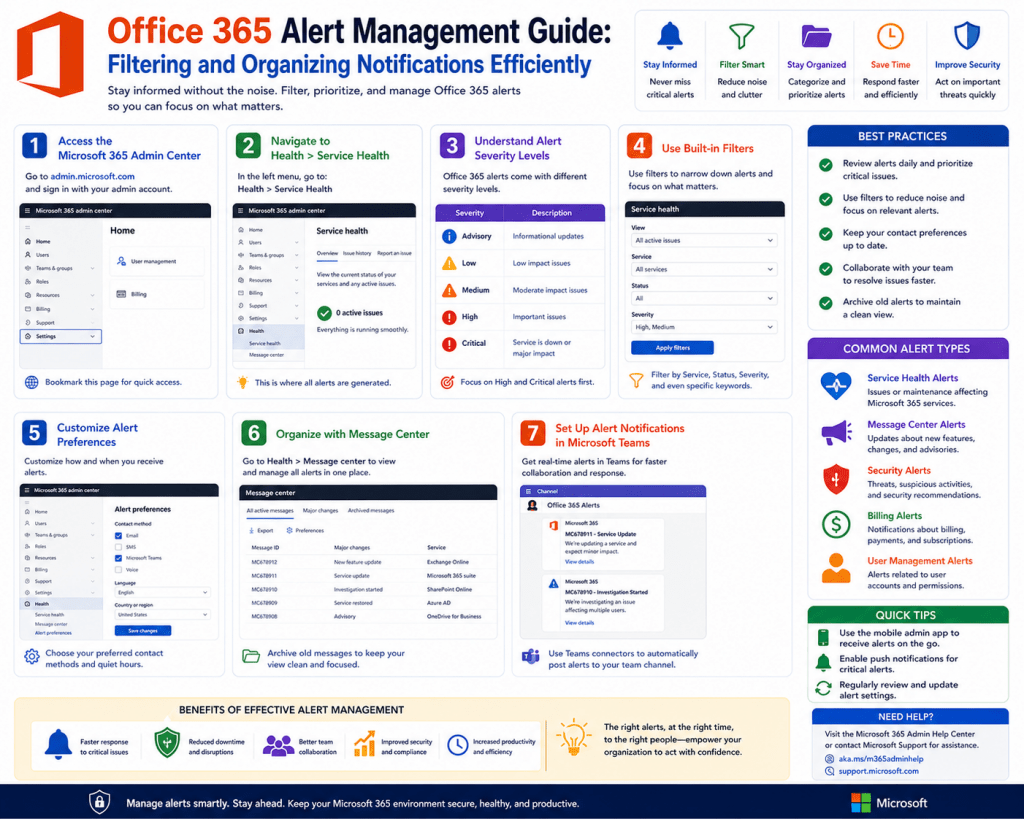
Modern organizations are steadily moving toward cloud-based productivity ecosystems to support communication, collaboration, and data handling across distributed workforces. Office 365 has become a central platform in this shift due to its integrated environment that combines email, document storage, collaboration tools, and security controls under a unified cloud structure. This transition offers flexibility and scalability, allowing employees to access resources from virtually any location and device, but it also expands the security surface area that organizations must manage.
As more business operations move into cloud environments, traditional perimeter-based security models become less effective. Instead of protecting a fixed network boundary, organizations must now monitor activity continuously across users, devices, and geographic regions. This creates a need for automated systems that can identify unusual behavior and respond quickly. Office 365 alert systems are designed to fill this gap by providing real-time visibility into platform activity and generating notifications when predefined conditions are met. This helps organizations maintain control over sensitive data even in highly dynamic environments.
The Importance of Security Monitoring in Digital Workspaces
Security monitoring in cloud productivity platforms is essential because business-critical data is constantly being created, shared, and accessed. Unlike traditional systems, where monitoring could be performed periodically, cloud systems operate continuously, requiring always-on visibility. Office 365 environments contain sensitive information such as internal communications, financial data, intellectual property, and customer records, making them attractive targets for unauthorized access or misuse.
Monitoring tools help organizations detect suspicious behavior early, such as unusual login attempts, abnormal file sharing activity, or access from unfamiliar locations. Without continuous monitoring, these activities could go unnoticed until significant damage occurs. Security alerts act as an early detection mechanism, ensuring that IT teams are informed immediately when potentially risky behavior is identified. This proactive approach reduces response time and helps limit the impact of security incidents while supporting regulatory and compliance obligations.
Structure and Function of Automated Alert Systems
Office 365 alert systems are built on an automated framework that uses predefined rules to identify and report specific types of activity. These rules are configured as alert policies, which define the conditions under which an alert should be generated. The system continuously evaluates user and system behavior against these conditions in real time.
When a matching event occurs, the system generates an alert that includes detailed contextual information such as the type of activity, affected user accounts, timestamp, and severity level. This structure allows administrators to quickly assess what happened without manually analyzing raw logs. The automation of alert generation reduces administrative workload and ensures that no critical events are missed due to human oversight. It also provides consistency in how security incidents are detected and reported across the organization.
Role of Severity Classification in Incident Prioritization
Severity classification is a key component of alert management because it determines how incidents are prioritized and handled. Alerts are generally categorized into low, medium, and high severity levels based on their potential impact on users and business operations.
Low-severity alerts typically involve isolated incidents affecting a single user, often with minimal disruption and possible workarounds. Medium severity alerts represent issues that affect multiple users or systems but do not fully disrupt operations. High-severity alerts indicate serious problems that may impact entire departments, compromise sensitive data, or disrupt core business functions.
In security contexts, high-severity alerts often include unauthorized access attempts, suspicious login patterns, or potential data exfiltration events. Proper severity classification ensures that critical issues are addressed immediately while lower-priority incidents are handled in an orderly and efficient manner. This prioritization is essential for maintaining operational stability and effective incident response.
Policy-Driven Automation in Security Alert Generation
Policy-driven automation forms the foundation of alert creation in Office 365 environments. Organizations define alert policies that specify which activities should be monitored and under what conditions alerts should be triggered. These policies are based on security requirements, compliance standards, and operational priorities.
Once configured, the system continuously evaluates user actions against these policies. When a defined condition is met, an alert is automatically generated without any manual intervention. This ensures consistent enforcement of security rules across all users and services within the platform.
Policy-driven automation also allows organizations to adapt to changing security needs. As new threats emerge or business processes evolve, alert policies can be updated to reflect new risk scenarios. This flexibility ensures that monitoring systems remain effective even as the organizational environment changes over time.
Activity Monitoring and Behavioral Detection Mechanisms
Activity monitoring is a core function of Office 365 security systems and involves tracking user actions across various services. These actions include file uploads, downloads, sharing activities, login attempts, and administrative changes. Each activity is analyzed to determine whether it aligns with expected behavior patterns.
Behavioral detection mechanisms play an important role in identifying anomalies. Instead of focusing solely on individual events, these systems analyze patterns over time to detect deviations from normal usage. For example, a user logging in from an unusual geographic location or performing an unexpected volume of file transfers may trigger an alert.
This behavior-based approach improves detection accuracy and helps identify potential threats such as compromised accounts or insider misuse. It also reduces false positives by considering context rather than treating each event in isolation. As a result, organizations gain deeper insight into user activity and potential security risks.
Threshold-Based Alert Configuration and Event Filtering
Threshold-based configuration allows organizations to control how and when alerts are triggered based on activity volume or frequency. Instead of generating alerts for every single event, thresholds define minimum conditions that must be met before an alert is created.
For example, a system may be configured to trigger an alert only when a specific action occurs multiple times within a defined time period or when activity exceeds normal behavioral patterns. This helps reduce unnecessary alerts and prevents alert fatigue among IT teams.
Event filtering complements threshold configuration by allowing organizations to refine which activities are relevant for monitoring. By combining filtering rules with thresholds, organizations can build targeted alert systems that focus on meaningful security events rather than routine activity. This improves efficiency and ensures that attention is directed toward genuine risks.
Categorization of Security Alerts for Operational Efficiency
Alert categorization helps organize security events into meaningful groups based on their nature and purpose. Common categories include data protection, threat detection, compliance monitoring, and user activity anomalies.
This classification system allows IT teams to quickly understand the type of incident being reported and route it to the appropriate response team. For example, data-related alerts may be handled by compliance officers, while threat-related alerts may be escalated to cybersecurity teams.
Categorization also improves reporting and trend analysis by grouping similar incidents. Over time, organizations can use this information to identify recurring issues, adjust security policies, and improve overall risk management strategies. A structured categorization system ensures that alerts are not only detected but also managed effectively.
Real-Time Detection and Continuous Monitoring Architecture
Office 365 alert systems operate within a real-time monitoring framework that continuously evaluates user and system activity. This ensures that potential security issues are identified as soon as they occur, minimizing response delays.
Continuous monitoring is especially important in cloud environments where users operate across multiple devices, networks, and locations. The system processes large volumes of data in real time, analyzing patterns and triggering alerts when anomalies are detected.
This architecture enhances situational awareness and enables organizations to respond quickly to potential threats. It also improves scalability, allowing the system to support large enterprises with thousands of users and complex operational structures.
Importance of Contextual Information in Security Alerts
Each alert generated within Office 365 includes contextual information that provides insight into the event. This may include user identity, device type, location data, and the sequence of actions leading up to the alert.
Context is essential for accurate investigation because it helps administrators determine whether an event represents normal behavior or a potential security threat. Without contextual information, alerts would be difficult to interpret and could lead to unnecessary investigation efforts.
By analyzing context, IT teams can make informed decisions about whether an alert should be escalated, resolved, or dismissed. This improves efficiency and ensures that security resources are focused on genuine risks.
Evolution of Intelligent Security Monitoring in Cloud Systems
Security monitoring in cloud platforms has evolved significantly with the introduction of automated intelligence and behavioral analytics. Modern Office 365 alert systems incorporate advanced detection techniques that analyze user behavior patterns to identify potential threats.
This shift represents a move from reactive security models to proactive and predictive approaches. Instead of responding only after an incident occurs, organizations can now identify risks before they escalate into major security events.
These intelligent systems continuously learn from historical data to improve detection accuracy over time. As a result, organizations benefit from more precise alerts, fewer false positives, and a stronger overall security posture in increasingly complex digital environments.
Building a Structured Approach to Alert Policy Design in Office 365
Creating effective alert policies in Office 365 requires a structured and intentional approach that aligns with organizational security objectives. Rather than enabling alerts randomly, organizations must define clear monitoring goals that reflect their operational risks, compliance obligations, and user behavior patterns. Alert policies serve as the foundation of automated security monitoring, and their design determines the quality and relevance of the alerts generated.
A well-structured policy ensures that only meaningful events trigger notifications, reducing unnecessary noise while maintaining strong visibility into critical activities. This involves identifying key risk areas such as unauthorized access, abnormal data movement, policy violations, and suspicious administrative actions. Each policy must be designed with a clear purpose, ensuring that it contributes to overall security awareness rather than overwhelming administrators with redundant information.
Defining Security Objectives Before Alert Configuration
Before configuring any alert policy, organizations must clearly define their security objectives. These objectives guide what should be monitored and why it matters. For example, an organization focused on data protection may prioritize monitoring file sharing activities and external data transfers, while another focused on identity security may emphasize login behavior and authentication anomalies.
Security objectives also help determine the sensitivity level of alerts and the thresholds used to trigger them. Without clearly defined goals, alert systems can become disorganized, leading to excessive notifications or missed security events. Aligning alert policies with business priorities ensures that monitoring efforts remain relevant and effective. This alignment also supports compliance requirements by ensuring that security controls are directly tied to organizational risk management strategies.
Naming Conventions and Organizational Standardization
Consistency in naming alert policies is an important aspect of managing Office 365 security environments. Clear naming conventions help administrators quickly identify the purpose and scope of each policy without needing to open detailed configurations. A structured naming approach typically includes references to the type of activity being monitored, the severity level, and the associated business function.
Standardization also improves collaboration among IT teams, especially in larger organizations where multiple administrators may manage security policies. When policies follow a consistent structure, it becomes easier to audit, update, and troubleshoot alert configurations. This reduces operational confusion and ensures that security monitoring remains organized even as the number of policies grows over time.
Configuring Alert Severity During Policy Creation
Severity configuration is one of the most important steps in alert policy creation because it determines how incidents are prioritized once they are triggered. During configuration, administrators assign a severity level based on the expected impact of the monitored activity. Low severity is typically used for informational or isolated events, medium severity for moderate risk situations, and high severity for critical security concerns.
The assignment of severity must be consistent with organizational risk tolerance. For example, repeated failed login attempts from an unknown location may be considered high severity in a security-sensitive environment, while in other contexts, it may be classified as medium. Proper severity configuration ensures that security teams can focus their attention on the most important alerts first, improving response efficiency and reducing the risk of overlooking critical incidents.
Selecting Alert Categories for Effective Classification
Alert categorization helps organize security events into meaningful groups that reflect their purpose and impact. Office 365 environments typically support categories such as data loss prevention, threat management, compliance monitoring, and administrative activity tracking. Each category serves a specific function in the overall security framework.
Selecting the appropriate category during policy creation ensures that alerts are routed correctly and interpreted accurately by IT teams. For example, a data loss prevention alert may indicate unauthorized sharing of sensitive information, while a threat management alert may signal potential account compromise. Proper categorization also improves reporting and analytics by grouping similar incidents, allowing organizations to identify patterns and recurring risks over time.
Defining Activity Triggers in Alert Policies
Activity triggers determine what specific actions will cause an alert to be generated. These triggers are based on user and system behaviors such as file uploads, downloads, sharing actions, login attempts, and administrative changes. Each trigger represents a monitored event that is evaluated against predefined conditions.
Organizations must carefully select activity triggers to ensure that monitoring remains relevant and efficient. Overly broad triggers can generate excessive alerts, while overly narrow triggers may miss important security events. A balanced approach involves identifying high-risk activities that are most likely to indicate security issues or policy violations. By focusing on meaningful triggers, organizations can maintain strong visibility without overwhelming administrators with unnecessary data.
Using Conditional Logic to Refine Alert Behavior
Conditional logic allows organizations to refine alert behavior by combining multiple conditions into a single rule. Instead of triggering an alert based on a single event, conditional logic enables more complex evaluations such as frequency, time intervals, or combined activity patterns.
For example, an alert may only trigger if a user performs a specific action multiple times within a short period or if the activity originates from an unusual location. This approach improves accuracy by reducing false positives and ensuring that alerts are generated only when meaningful thresholds are exceeded. Conditional logic enhances the intelligence of alert systems by allowing them to interpret patterns rather than isolated events.
Setting Frequency and Threshold Parameters for Alerts
Frequency and threshold settings play a critical role in controlling how often alerts are generated. These parameters define the minimum level of activity required to trigger a notification. Without proper configuration, alert systems can become overwhelmed with repetitive notifications that reduce their effectiveness.
Threshold-based configuration allows organizations to focus on abnormal behavior rather than routine activity. For instance, a single file upload may not trigger an alert, but multiple uploads within a short timeframe could indicate suspicious behavior. Similarly, repeated login attempts from different locations may signal a potential security threat. By adjusting frequency settings, organizations can fine-tune alert sensitivity to match their operational environment.
Assigning Notification Recipients and Escalation Paths
Once an alert is triggered, it must be delivered to the appropriate individuals or teams for investigation. Office 365 alert policies allow administrators to define notification recipients based on role, responsibility, or severity level. This ensures that alerts are directed to the right stakeholders without unnecessary distribution across the entire organization.
Notification configuration also includes escalation paths, which determine how alerts are escalated if they are not addressed within a certain timeframe. For example, low-severity alerts may be sent to general IT staff, while high-severity alerts may be escalated directly to security or compliance teams. Structured notification routing ensures faster response times and reduces the risk of unresolved critical incidents.
Managing Alert Frequency and Notification Overload
One of the challenges in security monitoring is avoiding alert fatigue caused by excessive notifications. If users receive too many alerts, important warnings may be ignored or overlooked. Managing alert frequency involves carefully balancing sensitivity and specificity to ensure that only meaningful events generate notifications.
Organizations often implement rules that limit how often alerts are sent for repeated occurrences of the same event. This prevents redundant notifications while still maintaining awareness of ongoing issues. Proper frequency management improves operational efficiency and ensures that IT teams remain focused on actionable security incidents rather than repetitive alerts.
Reviewing and Validating Alert Policy Configurations
Before activating an alert policy, it is important to review and validate all configuration settings to ensure accuracy. This includes verifying activity triggers, severity levels, notification recipients, and threshold conditions. Validation helps prevent misconfigurations that could lead to missed alerts or excessive false positives.
Organizations often simulate scenarios or review historical data to test how a policy would behave in real-world conditions. This step ensures that alert systems function as intended and align with security objectives. Proper validation reduces operational risks and improves the reliability of the monitoring framework.
Activation and Lifecycle Management of Alert Policies
Once a policy has been reviewed and validated, it can be activated to begin monitoring activities in real time. However, alert policies are not static and require ongoing lifecycle management to remain effective. As organizational needs change, policies must be updated, refined, or retired to reflect new risks and operational priorities.
Lifecycle management involves regularly reviewing alert performance, analyzing triggered events, and adjusting configurations to improve accuracy. This continuous improvement process ensures that alert systems remain aligned with evolving security requirements and business environments. Over time, well-managed policies contribute to a more mature and resilient security monitoring framework.
Operational Impact of Well-Configured Alert Systems
Properly configured alert systems significantly enhance operational security by improving visibility, reducing response times, and enabling proactive risk management. When alerts are accurately defined and effectively managed, organizations can detect threats early and respond before they escalate into major incidents.
Well-structured alert configurations also reduce administrative burden by minimizing false positives and focusing attention on meaningful events. This allows IT teams to allocate resources more efficiently and maintain a stronger overall security posture. In cloud-based environments, where activity is constant and distributed, the value of well-designed alert systems becomes even more critical for maintaining control and protecting sensitive information.
The Importance of Alert Filtering in Large-Scale Cloud Environments
As organizations grow and adopt cloud-based productivity systems, the volume of security alerts generated within Office 365 environments can increase significantly. Without proper filtering mechanisms, IT teams may become overwhelmed with notifications, making it difficult to identify genuinely critical incidents. Alert filtering plays a crucial role in ensuring that only relevant and meaningful events are prioritized for investigation.
Filtering allows administrators to refine alert visibility based on parameters such as severity, category, user activity type, and time range. This structured approach helps reduce noise in security dashboards and ensures that attention is focused on high-priority incidents. In large-scale environments where thousands of activities occur daily, filtering becomes essential for maintaining operational efficiency and situational awareness.
Filtering Alerts Based on Severity and Risk Level
One of the most effective ways to manage alert volume is by filtering based on severity levels. Office 365 systems categorize alerts into low, medium, and high severity, each representing a different level of risk and urgency. Filtering by severity allows IT teams to prioritize their response efforts and focus on incidents that pose the greatest threat to the organization.
High-severity alerts typically include suspicious login attempts, potential data breaches, or unauthorized administrative changes. Medium severity alerts may involve unusual but non-critical behavior patterns, while low severity alerts often represent informational events or minor deviations from expected activity. By applying severity-based filters, administrators can quickly isolate critical incidents without being distracted by less important notifications.
Filtering Alerts by Activity Type and Security Domain
In addition to severity-based filtering, alerts can also be organized based on the type of activity being monitored. Office 365 environments generate alerts across multiple security domains, including data loss prevention, identity protection, compliance monitoring, and threat detection. Filtering by activity type allows IT teams to focus on specific areas of concern.
For example, a security analyst investigating potential data leakage may filter alerts related to file sharing and external data transfers. Similarly, an identity security specialist may focus on login anomalies and authentication failures. This domain-based filtering improves efficiency by allowing teams to work within their areas of expertise and reduces the time required to identify relevant incidents.
Time-Based Filtering for Incident Investigation
Time-based filtering is another important method used to manage and investigate Office 365 alerts. This approach allows administrators to narrow down alerts based on specific time periods, such as the last hour, day, or week. Time filtering is particularly useful during incident response scenarios where rapid investigation is required.
By focusing on a defined time window, IT teams can quickly identify patterns or sequences of events that may be related to a security incident. This helps reconstruct timelines and understand how an issue developed over time. Time-based filtering also supports trend analysis, enabling organizations to identify recurring issues or seasonal variations in security activity.
Role of Contextual Data in Alert Investigation
Contextual data plays a critical role in understanding and investigating security alerts. Each alert generated in Office 365 includes detailed information about the event, such as user identity, device type, geographic location, and action history. This context allows administrators to evaluate whether an alert represents legitimate behavior or a potential security threat.
Without contextual information, alerts would lack meaning and could lead to unnecessary investigations. For example, a login attempt from a foreign country may appear suspicious at first glance, but contextual data may reveal that the user is traveling or using a legitimate remote access service. Context helps distinguish between normal activity and genuine anomalies, improving decision-making accuracy during investigations.
Investigating Security Alerts in Office 365 Environments
Investigation of security alerts involves analyzing the details of each event to determine its cause, impact, and potential risk. Office 365 provides administrators with tools to examine alert histories, review associated activities, and trace user actions leading up to the event.
The investigation process typically begins with reviewing the alert summary, followed by a deeper analysis of related activities. Administrators may examine login records, file access logs, and communication patterns to identify unusual behavior. The goal of the investigation is to determine whether the alert represents a true security incident or a false positive. Proper investigation ensures that appropriate response actions are taken based on accurate information.
Identifying False Positives in Alert Systems
False positives occur when a security system generates an alert for normal or harmless activity. While alert systems are designed to detect anomalies, they may sometimes misinterpret legitimate behavior as suspicious. Managing false positives is an important aspect of maintaining an efficient alert system.
Reducing false positives involves refining alert policies, adjusting thresholds, and improving behavioral baselines. For example, if frequent file sharing within a department is normal operational behavior, alert thresholds may need to be adjusted to prevent unnecessary notifications. Continuous tuning of alert configurations helps improve accuracy and reduces the workload on IT teams.
Enhancing Alert Accuracy Through Behavioral Baselines
Behavioral baselines are established by analyzing normal user activity over time. These baselines define what typical behavior looks like within an organization, including login patterns, file access frequency, and communication habits. Alert systems use these baselines to identify deviations that may indicate potential security risks.
When activity deviates significantly from established baselines, the system may generate an alert. This approach improves detection accuracy by focusing on anomalies rather than static rules alone. Behavioral baselines are continuously updated as user behavior evolves, ensuring that alert systems remain relevant and adaptive to changing organizational patterns.
Reducing Alert Fatigue in Security Operations
Alert fatigue occurs when IT teams are exposed to a high volume of notifications, leading to reduced attention and slower response times. In such situations, important alerts may be overlooked or delayed. Managing alert fatigue is essential for maintaining an effective security operations environment.
Reducing alert fatigue involves optimizing alert policies, filtering unnecessary notifications, and prioritizing high-impact incidents. Organizations may also implement aggregation techniques that group similar alerts together instead of generating multiple individual notifications. This helps streamline workflows and ensures that security teams can focus on meaningful incidents without being overwhelmed by repetitive data.
Optimizing Alert Policies for Improved Performance
Optimization of alert policies involves continuously refining configurations to improve accuracy, relevance, and efficiency. This includes adjusting severity levels, modifying thresholds, and updating activity triggers based on observed behavior patterns.
Over time, organizations gain insights into which alerts are most valuable and which generate unnecessary noise. These insights are used to fine-tune policies and improve overall system performance. Optimization is an ongoing process that ensures alert systems remain aligned with evolving business needs and security requirements.
Integrating Alert Data with Security Operations Workflows
Alert data becomes more powerful when integrated into broader security operations workflows. Many organizations connect Office 365 alert systems with centralized monitoring platforms or incident response frameworks. This integration allows alerts to be automatically routed, tracked, and managed within a unified system.
By integrating alert data into operational workflows, organizations can improve response coordination and reduce manual effort. Alerts can be assigned to specific teams, escalated based on severity, and tracked through resolution stages. This structured workflow ensures that no alert is overlooked and that incidents are handled efficiently from detection to resolution.
Incident Response and Resolution Processes
Once an alert is investigated and confirmed as a security incident, it must be resolved through a structured response process. Incident response typically involves containment, analysis, remediation, and recovery. The goal is to minimize impact and restore normal operations as quickly as possible.
Containment involves isolating affected systems or accounts to prevent further damage. Analysis focuses on understanding the root cause of the incident. Remediation involves fixing vulnerabilities or reversing unauthorized changes, while recovery ensures that systems return to normal operation. Proper incident response processes help organizations reduce downtime and prevent recurrence of similar issues.
Continuous Improvement in Security Monitoring Systems
Security monitoring is not a static process but a continuously evolving system that requires regular updates and improvements. As new threats emerge and user behavior changes, alert systems must adapt accordingly. Continuous improvement involves reviewing alert performance, analyzing incident trends, and updating policies to enhance effectiveness.
Organizations that invest in continuous improvement achieve stronger security outcomes over time. This includes better detection accuracy, reduced false positives, and improved response times. Continuous refinement ensures that Office 365 alert systems remain aligned with modern security challenges and operational demands.
Strategic Value of Advanced Alert Management Practices
Advanced alert management practices provide strategic value by transforming raw security data into actionable insights. When properly managed, alert systems become more than just notification tools—they become intelligence systems that support decision-making, risk assessment, and strategic planning.
By analyzing alert trends, organizations can identify emerging threats, improve security controls, and strengthen their overall defense posture. Advanced management practices also support compliance efforts by providing detailed audit trails and documented incident histories. This strategic approach ensures that alert systems contribute not only to operational security but also to long-term organizational resilience.
Conclusion
Office 365 alert management plays a critical role in maintaining security, visibility, and operational control within modern cloud-based environments. As organizations continue to rely on cloud productivity platforms for communication, collaboration, and data storage, the importance of structured monitoring systems becomes increasingly significant. Alert systems are not just technical features within an administrative console; they form a foundational layer of defense that helps organizations detect risks early, respond effectively, and maintain continuous awareness of system activity.
One of the most important outcomes of a well-designed alert framework is improved situational awareness. In complex digital environments, thousands of actions occur every minute across users, devices, and services. Without automated monitoring, it would be nearly impossible for IT teams to manually track every event. Alert systems solve this challenge by continuously evaluating activity against predefined conditions and surfacing only the events that matter. This allows administrators to focus their attention on meaningful security signals rather than being overwhelmed by raw data.
Another key benefit of Office 365 alert management is early threat detection. Cybersecurity incidents rarely occur as isolated events; they often begin with subtle anomalies such as unusual login attempts, unexpected file access patterns, or minor policy violations. When these behaviors are monitored effectively, alert systems can identify them before they escalate into serious breaches. Early detection significantly reduces the potential impact of security incidents, helping organizations protect sensitive data and maintain business continuity.
The effectiveness of alert management depends heavily on how well policies are designed and maintained. Poorly configured alert systems can generate excessive noise, leading to alert fatigue where important warnings are overlooked or ignored. On the other hand, overly restrictive configurations may fail to detect meaningful threats. The balance between sensitivity and specificity is essential. Organizations must continuously refine alert thresholds, activity triggers, and severity classifications to ensure that alerts remain relevant and actionable.
Severity classification is particularly important in guiding response priorities. Not all alerts carry the same level of urgency or risk. Some events may affect only a single user with minimal impact, while others may indicate widespread security threats or system compromise. By assigning severity levels such as low, medium, and high, organizations can structure their response efforts more effectively. High-severity alerts demand immediate attention, while lower-severity events can be reviewed as part of routine monitoring processes. This structured prioritization ensures that critical issues are addressed without delay.
Contextual information also plays a major role in improving the quality of alert investigations. Each alert provides valuable details such as user identity, device information, location data, and activity history. This context helps administrators understand the full scope of an event and distinguish between legitimate behavior and suspicious activity. Without context, alerts would lack meaning and could easily lead to misinterpretation. Contextual awareness ensures that decisions are based on accurate insights rather than isolated data points.
Another important aspect of alert management is filtering. As organizations scale, the volume of generated alerts can increase significantly, making it difficult to manage them efficiently. Filtering mechanisms allow administrators to narrow down alerts based on severity, activity type, time range, and category. This helps reduce noise and ensures that attention is focused on relevant incidents. Effective filtering improves operational efficiency and allows security teams to respond more quickly to critical events.
Behavioral analysis and anomaly detection further enhance the effectiveness of Office 365 alert systems. Instead of relying solely on static rules, modern alert frameworks analyze user behavior over time to establish normal activity patterns. When deviations from these patterns occur, alerts are generated to indicate potential risks. This approach is more adaptive and accurate because it considers context and historical behavior rather than isolated actions. It is particularly useful in detecting compromised accounts or insider threats, where malicious activity may initially appear subtle or legitimate.
Despite the advantages of automated alerting, organizations must also manage challenges such as false positives and alert fatigue. False positives occur when normal activity is incorrectly flagged as suspicious. While some level of false positives is inevitable, excessive occurrences can reduce trust in the alert system and lead to important warnings being ignored. Continuous tuning of alert policies and thresholds is necessary to minimize these occurrences and maintain system reliability.
Alert fatigue is another challenge that arises when security teams are exposed to too many notifications over time. When overwhelmed with alerts, administrators may struggle to prioritize effectively, leading to delayed responses or missed incidents. To address this issue, organizations often implement aggregation strategies, threshold adjustments, and filtering rules to reduce unnecessary notifications. Streamlining alert output helps maintain focus on high-value security events and improves overall response efficiency.
Integration of alert data into broader security operations workflows enhances the value of Office 365 monitoring systems. Alerts become more powerful when they are connected to incident management processes, allowing them to be tracked, assigned, and resolved in a structured manner. This integration ensures that alerts are not just informational notifications but actionable events that contribute to a coordinated security response. It also improves accountability by providing clear visibility into how incidents are handled from detection to resolution.
Continuous improvement is essential for maintaining an effective alert management system. As user behavior evolves and new security threats emerge, alert policies must be regularly reviewed and updated. Organizations that fail to adapt their monitoring strategies risk missing new attack patterns or generating outdated alerts that no longer reflect current risks. Regular analysis of alert performance helps identify gaps, refine detection rules, and improve overall system accuracy.
In addition, proper lifecycle management of alert policies ensures long-term sustainability. Policies should not remain static after initial configuration. Instead, they must be periodically evaluated to ensure alignment with organizational objectives and security requirements. This ongoing refinement process helps maintain balance between sensitivity and efficiency while ensuring that alert systems remain effective in dynamic environments.
Ultimately, Office 365 alert management is a vital component of modern cybersecurity strategy. It provides the visibility needed to detect threats early, the structure required to prioritize incidents, and the intelligence necessary to support informed decision-making. When properly configured and continuously optimized, alert systems become a powerful defense mechanism that strengthens an organization’s ability to protect its digital assets.
As cloud environments continue to evolve, the role of automated monitoring and alerting will only become more important. Organizations that invest in strong alert management practices are better positioned to handle emerging threats, maintain compliance, and ensure operational resilience. The combination of automation, behavioral analysis, contextual awareness, and structured response processes creates a comprehensive security framework that supports both day-to-day operations and long-term strategic goals.