
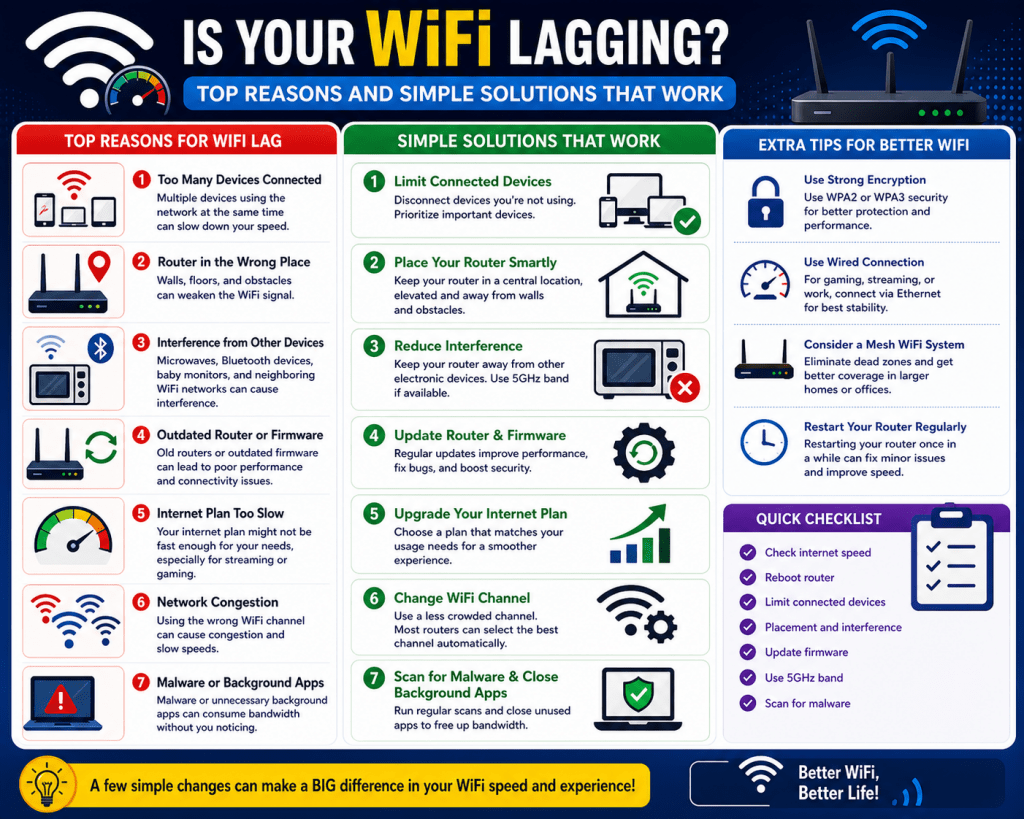
Wireless connectivity has become the backbone of modern digital life, supporting communication, entertainment, remote work, and smart home automation. Despite its convenience, WiFi often behaves inconsistently, with users experiencing slow speeds, sudden disconnections, or weak coverage in certain areas of the home. These issues are not random faults but predictable outcomes of how wireless systems are designed and how they interact with real-world environments. Unlike wired networks that rely on direct physical connections, WiFi depends on radio frequency transmission through open space, which introduces variability and loss of signal quality over distance and obstacles. Understanding why WiFi struggles requires examining both the physics of wireless communication and the practical limitations of consumer networking equipment used in homes today.
Physical Limitations of Wireless Signal Transmission
Wireless signals travel in the form of electromagnetic waves, which naturally weaken as they move away from their source. This weakening is known as signal attenuation and is influenced by distance, physical barriers, and environmental conditions. In a home environment, walls made of concrete, brick, or metal can significantly reduce signal strength, while even lighter materials like wood and plaster introduce measurable loss. Unlike wired Ethernet connections, where data flows through a controlled medium, wireless signals disperse in all directions, meaning only a portion of the transmitted energy reaches the intended device.
Another limitation is the absence of a fixed path. Wired connections maintain a stable and predictable route for data, but WiFi signals reflect, refract, and scatter when they encounter objects. This creates multiple overlapping signal paths, which can either strengthen or weaken reception depending on how they combine at the receiving device. This phenomenon, known as multipath propagation, often leads to inconsistent performance even when the device appears to be within range of the router. Small changes in position, such as moving a laptop a few inches, can sometimes result in noticeable differences in speed or stability.
Frequency Bands and Their Real-World Tradeoffs
Modern WiFi networks primarily operate on two frequency bands, 2.4 GHz and 5 GHz, each with distinct characteristics that affect performance. The 2.4 GHz band offers better range and stronger penetration through walls and solid objects, making it more suitable for covering larger areas or reaching distant rooms. However, this band is heavily congested because many household devices, including microwaves, Bluetooth accessories, and older wireless systems, also operate within the same frequency range.
The 5 GHz band provides significantly higher data rates and reduced interference because fewer devices use it. It also offers a larger number of available channels, which reduces the likelihood of overlap with neighboring networks. However, its shorter wavelength results in reduced range and weaker penetration through obstacles. This means that while 5 GHz is ideal for high-speed activities like streaming or gaming near the router, it may struggle to maintain a stable connection in distant rooms or behind thick walls.
The tradeoff between these two bands forces modern routers to balance coverage and performance. Many devices automatically switch between bands based on signal strength, but this transition is not always seamless, which can lead to brief interruptions or fluctuations in speed during usage.
Interference Sources Inside and Outside the Home
Interference is one of the most significant factors affecting WiFi reliability. It occurs when external signals disrupt the communication between a router and connected devices. Inside the home, common sources of interference include microwaves, cordless phones, baby monitors, and Bluetooth devices. These devices often operate on frequencies close to or overlapping with the 2.4 GHz band, causing temporary disruptions when they are active.
Outside the home, interference comes from neighboring WiFi networks. In densely populated areas such as apartment buildings, multiple routers often operate on overlapping channels. When two or more networks transmit on the same or adjacent channels, they compete for airtime, resulting in reduced performance for all users involved. This issue becomes more severe during peak usage times when many households are actively using their networks simultaneously.
Physical obstructions also contribute to interference-like effects. Large metal appliances, water-filled objects like aquariums, and reinforced walls can absorb or reflect signals, creating dead zones or areas of weak connectivity. Even human bodies can slightly attenuate signals due to their water content, which affects signal propagation in close-range environments.
Router Hardware Limitations in Consumer Environments
Most home WiFi networks rely on routers provided by internet service providers or entry-level consumer devices. These routers are typically designed to be cost-effective and easy to set up rather than optimized for performance or large-scale coverage. As a result, they often combine multiple functions such as routing, switching, and wireless broadcasting into a single device, which can limit efficiency under heavy usage.
Processing power and antenna quality also play a significant role in performance. Lower-end routers may struggle to handle multiple simultaneous connections, leading to congestion and reduced speeds when several devices are active. Additionally, the number and orientation of antennas influence how effectively the signal is distributed throughout the home. Misaligned or poorly designed antennas can create uneven coverage patterns, leaving certain areas with weak or unstable connections.
Firmware limitations further impact performance. Outdated software may lack optimization improvements or bug fixes that enhance stability and efficiency. In some cases, routers may not fully support modern wireless standards or advanced features such as beamforming, which helps direct signals toward specific devices for improved performance.
Signal Propagation, Coverage Patterns, and Dead Zones
WiFi signals do not spread evenly in all directions. Instead, they follow specific propagation patterns influenced by antenna design and environmental conditions. In most home routers, signals radiate outward in a horizontal pattern, which is why placing a router on a central elevated surface often improves coverage.
Dead zones occur when signal strength drops below a usable threshold due to distance, interference, or obstruction. These areas are common in multi-room homes, especially when routers are placed in corners or enclosed spaces. Stairwells, basements, and upper floors often experience weaker connectivity due to signal loss through structural materials.
Coverage patterns can also be affected by reflection and absorption. Signals that bounce off surfaces may create interference zones where overlapping waves cancel each other out. This results in unpredictable performance even within relatively proximity to the router. Small adjustments in placement can sometimes resolve these issues, but in larger homes, a single router is often insufficient to provide consistent coverage.
Network Congestion and Multi-Device Households
Modern households typically contain multiple connected devices, including smartphones, laptops, smart TVs, gaming consoles, security cameras, and IoT devices. Each of these devices competes for bandwidth and network resources. While WiFi technology supports multiple connections, performance can degrade when too many devices are active simultaneously, especially during high-demand activities such as video streaming or online gaming.
Network congestion occurs when the available bandwidth is divided among too many active users or applications. Even if the internet connection itself is fast, the router may become a bottleneck if it cannot efficiently manage traffic distribution. Some devices may receive priority over others depending on network configuration, leading to inconsistent performance across the household.
Older routers are particularly vulnerable to congestion because they lack advanced traffic management features. Modern networking technologies, such as quality of service controls and multi-user communication protocols, help mitigate congestion, but their effectiveness depends on proper configuration and hardware capability.
Environmental and Structural Factors Affecting WiFi
The physical structure of a home plays a critical role in determining WiFi performance. Building materials such as reinforced concrete, metal framing, and thick insulation can significantly reduce signal penetration. Homes with multiple floors or irregular layouts often experience uneven coverage due to signal obstruction and distance variation.
Environmental factors also influence wireless performance. Temperature changes, humidity levels, and even seasonal variations can subtly affect signal propagation. While these effects are usually minor indoors, they can become more noticeable in extreme conditions or poorly ventilated environments.
Furniture placement and interior design choices can also impact connectivity. Large objects such as bookshelves, cabinets, and appliances can block or reflect signals, creating unexpected weak spots. Even the placement of mirrors or glass surfaces can alter signal behavior by reflecting radio waves in different directions.
In addition, the increasing presence of electronic devices in modern homes contributes to a more complex wireless environment. Smart home systems, wireless speakers, and wearable devices all add to the density of signals within a limited space. This creates a more challenging environment for maintaining stable and efficient WiFi performance, requiring careful planning and optimization of network setup.
Optimizing Router Placement for Maximum Coverage
One of the most impactful yet commonly overlooked factors in WiFi performance is the physical placement of the router. Wireless signals are highly sensitive to location because they radiate outward from the source in all directions, and any obstruction or distance variation directly affects signal quality. In many homes, routers are placed near entry points where internet service is installed, which is often not the optimal central location for coverage. This creates an uneven distribution where nearby rooms receive strong signals while distant areas suffer from weak or unstable connectivity.
The ideal placement strategy focuses on central positioning within the home to ensure that the signal has an equal opportunity to reach all areas. Elevation is equally important because WiFi signals tend to spread more effectively when transmitted from a higher point. Placing a router on the floor or inside cabinets restricts signal flow and increases absorption by surrounding objects. Open spaces such as shelves or wall-mounted positions typically provide better propagation characteristics.
Another critical aspect of placement is avoiding physical obstructions. Materials such as concrete walls, metal surfaces, and large furniture significantly weaken wireless signals. Even seemingly harmless objects like bookshelves or decorative partitions can introduce measurable interference. Positioning the router away from dense materials helps preserve signal integrity and reduces the formation of dead zones within the coverage area.
Heat and ventilation also play a subtle role in performance. Routers generate heat during operation, and insufficient airflow can lead to thermal throttling, where performance is reduced to prevent overheating. Ensuring adequate ventilation around the device helps maintain consistent operation, especially in environments where multiple devices are connected simultaneously.
Understanding Antenna Orientation and Signal Distribution
Antenna orientation is a fundamental yet often misunderstood factor in wireless performance. WiFi antennas are designed to emit signals in specific patterns rather than uniformly in all directions. Most consumer routers use dipole antennas that radiate signals in a donut-shaped pattern perpendicular to the antenna’s axis. This means that the orientation of each antenna directly influences how signals are distributed throughout the environment.
When antennas are positioned vertically, the signal tends to spread horizontally across floors, making it suitable for single-level homes or open layouts. When antennas are oriented horizontally, the signal distribution shifts vertically, which can improve coverage across multiple floors. In multi-story homes, a combination of vertical and angled orientations can sometimes provide more balanced coverage.
Misaligned antennas can create uneven signal distribution, leading to strong coverage in one direction while leaving other areas weak. Adjusting antenna angles allows for better spatial coverage and can reduce the severity of dead zones without requiring additional hardware. However, antenna adjustment alone cannot overcome structural limitations or significant distance-related signal loss.
Modern routers may also include internal antenna systems where orientation is not visible. In such cases, placement and environmental optimization become even more important because the user has limited control over signal directionality.
Improving Coverage with Distributed Access Points
In larger homes or environments with complex layouts, a single router is often insufficient to provide consistent coverage. Wireless access points extend network reach by distributing signal sources across multiple locations. Instead of relying on one central transmitter, access points create multiple nodes that collectively form a more uniform coverage area.
When properly configured, access points communicate with each other and maintain a seamless network experience for connected devices. This reduces the need for devices to constantly switch between weak and strong signals, improving stability and reducing latency. Strategic placement of access points ensures that each area receives a strong signal without excessive overlap or interference.
Multi-level environments benefit significantly from distributed access points because each floor can have its own dedicated coverage source. This reduces vertical signal degradation and ensures that structural barriers such as ceilings and flooring materials do not excessively weaken connectivity.
Consistency in hardware can also improve performance. Using access points from the same system or ecosystem helps maintain compatibility and simplifies network management. While different devices can function together, uniform systems often provide better coordination and smoother roaming between coverage zones.
Balancing 2.4 GHz and 5 GHz Network Usage
Effective wireless optimization requires understanding how to balance device usage across available frequency bands. The 2.4 GHz band offers extended range and better penetration through obstacles, making it suitable for devices located far from the router or in areas with significant physical barriers. However, its widespread use makes it more prone to congestion and interference from neighboring networks and household devices.
The 5 GHz band provides higher throughput and reduced interference, making it ideal for bandwidth-intensive tasks such as video streaming, gaming, and large file transfers. However, its shorter range limits its effectiveness in distant rooms or behind multiple walls. This tradeoff requires careful distribution of devices based on their location and performance needs.
In practice, assigning devices manually or allowing intelligent band steering can improve overall network efficiency. Devices that require stable high-speed connections benefit from 5 GHz, while low-bandwidth or distant devices operate more reliably on 2.4 GHz. Proper balancing reduces congestion on any single band and ensures more consistent performance across the network.
The physical environment also influences band effectiveness. Homes with dense construction materials often experience reduced 5 GHz performance due to signal absorption. In such cases, strategic reliance on 2.4 GHz may be necessary to maintain coverage, even if it means sacrificing some speed.
Selecting Optimal Wireless Channels to Reduce Interference
Wireless networks operate on specific channels within each frequency band, and selecting the correct channel can significantly improve performance. In the 2.4 GHz band, only a few channels are considered non-overlapping, meaning they do not interfere with each other. These channels are commonly used as standard options because they minimize interference from neighboring networks.
When multiple networks in proximity use overlapping channels, signal collisions occur, forcing devices to retransmit data and reducing overall efficiency. This results in slower speeds and increased latency, especially in densely populated areas. Choosing non-overlapping channels reduces this competition and improves stability.
The 5 GHz band offers a wider range of channels, which reduces the likelihood of overlap and interference. However, not all channels have the same propagation characteristics, and some may be affected by environmental factors or regulatory constraints. Selecting a channel with minimal external usage can significantly improve performance in high-density environments.
Channel selection is not static and may need adjustment over time as neighboring networks change their configurations. Periodic evaluation of network performance helps identify congestion patterns and allows for optimization based on current conditions.
Managing Network Congestion in Multi-Device Environments
As the number of connected devices in homes continues to increase, managing network congestion becomes a critical aspect of maintaining performance. Each device connected to a WiFi network consumes a portion of available bandwidth, and simultaneous usage can quickly overwhelm limited resources.
High-demand activities such as video streaming, online gaming, and video conferencing require significant bandwidth and low latency. When multiple devices engage in these activities at the same time, the network must distribute resources efficiently to avoid performance degradation.
Modern routers use traffic management techniques to prioritize certain types of data over others. This helps ensure that time-sensitive applications receive sufficient bandwidth even during periods of heavy usage. However, the effectiveness of these techniques depends on hardware capability and proper configuration.
Older routers may struggle with high device density, leading to bottlenecks and inconsistent performance. Upgrading equipment or distributing network load across multiple access points can help alleviate congestion and improve overall stability.
Reducing Internal and External Sources of Wireless Interference
Interference can originate from both inside and outside the home environment. Internal interference is caused by household devices that emit radio frequencies, such as microwaves, cordless phones, and Bluetooth accessories. These devices can temporarily disrupt WiFi signals, especially in the 2.4 GHz band.
External interference typically comes from neighboring wireless networks operating on similar channels. In densely populated areas, this can create a highly competitive wireless environment where multiple networks compete for limited spectrum resources.
Reducing interference involves both environmental awareness and strategic configuration. Positioning routers away from known sources of interference helps minimize disruption. Adjusting channel selection and frequency band usage further reduces the likelihood of signal overlap.
Physical separation between wireless devices and routers can also improve performance. Keeping high-interference devices at a distance reduces their impact on signal quality and stability.
Developing a Structured Approach to Home Network Optimization
Improving WiFi performance requires a structured approach that considers both physical and logical aspects of the network. Physical optimization includes placement, antenna orientation, and environmental management, while logical optimization involves channel selection, band distribution, and congestion management.
A systematic approach begins with identifying weak areas in coverage and analyzing potential causes. This may involve observing signal strength variations, testing different locations, and evaluating device performance across different areas of the home.
Once problem areas are identified, adjustments can be made incrementally to improve coverage. Small changes in placement or configuration can sometimes produce significant improvements, especially in environments where multiple factors contribute to signal degradation.
Long-term optimization involves maintaining awareness of network conditions and adapting configurations as usage patterns evolve. As new devices are added or household demands increase, periodic reassessment ensures that the network continues to perform efficiently under changing conditions.
Advanced Wireless Channel Planning for Stable Home Networks
Wireless channel planning is one of the most important but least understood aspects of WiFi optimization. Every WiFi network operates on a specific channel within a frequency band, and these channels determine how signals are transmitted and received. When multiple networks in proximity use the same or overlapping channels, interference occurs, reducing speed and stability.
In the 2.4 GHz band, channel overlap is particularly problematic because the available spectrum is limited. Although there are many numbered channels, only a few are truly non-overlapping in most regulatory regions. When routers use overlapping channels, they must constantly compete for airtime, which leads to retransmissions, delays, and reduced throughput. This is especially noticeable in urban environments where multiple networks operate within range of each other.
The 5 GHz band provides significantly more channels, which reduces congestion and improves performance in most cases. However, not all channels are equally usable depending on regional restrictions and environmental conditions. Some channels may also be affected by dynamic frequency selection mechanisms that temporarily disable them when radar or other priority signals are detected.
Effective channel planning involves identifying which channels are least congested in a given environment. This requires observing surrounding networks and selecting channels that minimize overlap. In dynamic environments, periodic adjustments may be necessary because neighboring networks can change their configurations at any time.
Channel width also plays a role in performance. Wider channels can increase throughput, but also increase the likelihood of interference. Narrower channels reduce interference but may limit maximum speed. Balancing these tradeoffs depends on the specific needs of the network and the level of congestion in the surrounding environment.
Understanding Wireless Roaming and Device Handoff Behavior
In environments with multiple access points or extended coverage systems, wireless roaming becomes an important factor in user experience. Roaming refers to the process by which a device switches from one access point to another as the user moves through different areas of a home or building.
Ideally, this transition should be seamless, with no noticeable interruption in connectivity. However, in practice, devices often remain connected to a weaker signal longer than necessary before switching to a stronger one. This behavior can result in slow speeds or temporary disconnections, even when better coverage is available nearby.
Roaming decisions are primarily controlled by the client device rather than the network itself. Devices evaluate signal strength, quality, and stability before deciding whether to switch access points. Some devices are more aggressive in switching, while others prioritize maintaining a stable connection even if performance is reduced.
Improving roaming performance often requires optimizing access point placement and ensuring consistent configuration across all network nodes. When access points broadcast the same network identity and are properly distributed, devices can transition more smoothly between them.
Signal overlap between access points is also important. Too little overlap can cause dropped connections, while too much overlap can create interference. The goal is to achieve balanced coverage where devices can easily detect alternative access points without experiencing excessive signal competition.
The Role of Modern WiFi Standards in Performance Improvement
Wireless networking standards have evolved significantly over time, introducing improvements in speed, efficiency, and reliability. Each new generation of WiFi technology addresses specific limitations of previous versions, particularly in high-density and high-demand environments.
Modern standards introduce technologies that improve how multiple devices communicate with a single access point. Instead of serving devices sequentially, advanced systems can handle multiple data streams simultaneously, improving efficiency in environments with many connected devices.
Beamforming is another key advancement that improves signal directionality. Instead of broadcasting signals uniformly in all directions, routers can focus energy toward specific devices, improving signal strength and reducing interference. This is particularly useful in environments with uneven device distribution.
Improved modulation techniques also allow more data to be transmitted within the same spectrum. This increases overall network capacity without requiring additional bandwidth. However, these benefits depend on both router and device compatibility, meaning older devices may not fully benefit from newer standards.
Despite these improvements, real-world performance still depends heavily on environmental factors, placement, and configuration. Even the most advanced wireless standard cannot overcome poor physical setup or excessive interference.
Impact of Device Density on Network Performance
The number of connected devices in a home has increased dramatically with the rise of smart technology. Smartphones, tablets, laptops, smart TVs, voice assistants, cameras, and IoT sensors all contribute to network load. Each device consumes a portion of available bandwidth and requires periodic communication with the router.
High device density can lead to congestion, especially when multiple devices perform data-intensive tasks simultaneously. Streaming high-definition video, downloading large files, or participating in video calls can quickly consume available bandwidth, leaving less capacity for other devices.
Even idle devices contribute to network load because they periodically communicate with the router for updates, synchronization, or background processes. This constant communication adds overhead that can impact overall performance.
Efficient network management involves balancing device usage and ensuring that critical applications receive sufficient resources. Some routers implement traffic prioritization features that allocate bandwidth based on application type or device importance. However, these features are only effective when properly configured and supported by hardware.
Reducing unnecessary device connections can also improve performance. Devices that are no longer in use but remain connected can consume bandwidth and processing resources. Periodically reviewing connected devices helps maintain optimal network efficiency.
Environmental Noise and Its Effect on Signal Stability
Wireless networks operate within a shared spectrum, which means they are susceptible to environmental noise from other electronic systems. This noise does not necessarily come from WiFi networks but from any device that emits electromagnetic signals within similar frequency ranges.
Common sources of environmental noise include household appliances, power lines, and electronic devices. Even devices that do not actively transmit data can generate background electromagnetic activity that interferes with wireless communication.
This noise can reduce signal clarity and increase the likelihood of data retransmission. When a device receives a corrupted signal, it must request retransmission, which increases latency and reduces effective throughput.
Environmental noise is often unpredictable and varies depending on time of day, device usage, and physical conditions. This variability contributes to inconsistent WiFi performance, even when network settings remain unchanged.
Reducing environmental noise involves minimizing proximity to interfering devices and ensuring that networking equipment is positioned in areas with minimal electronic congestion. While it is impossible to eliminate all sources of noise, careful placement can significantly reduce its impact.
Long-Term Stability Through Network Segmentation
As home networks become more complex, segmentation becomes an effective strategy for improving stability. Network segmentation involves dividing traffic into separate logical groups based on device type, usage, or priority.
For example, devices that require high-speed connectivity can be placed on a dedicated segment, while low-priority devices such as smart sensors operate on a separate network. This separation reduces congestion and ensures that critical applications are not affected by less important traffic.
Segmentation can also improve security by isolating devices from each other. This reduces the risk of interference or unauthorized access between different types of devices.
In advanced setups, multiple access points or virtual networks can be used to implement segmentation. Each segment operates independently, allowing for more precise control over traffic distribution and performance optimization.
Proper segmentation requires careful planning to ensure that resources are allocated efficiently. Over-segmentation can lead to unnecessary complexity, while under-segmentation may not provide sufficient performance improvements.
Maintaining Performance Through Continuous Monitoring
Wireless networks are not static systems; they evolve as new devices are added, environments change, and usage patterns shift. Maintaining consistent performance requires ongoing observation and adjustment.
Monitoring network performance involves tracking key indicators such as signal strength, throughput, latency, and device connectivity. Sudden changes in these metrics can indicate underlying issues such as interference, congestion, or hardware degradation.
Periodic evaluation of network configuration helps identify opportunities for improvement. This may include adjusting channel selection, relocating access points, or updating firmware to improve stability and performance.
Usage patterns also influence optimization strategies. For example, networks that experience heavy evening usage may require different configurations than those used primarily during the day. Understanding these patterns allows for more effective resource allocation.
Long-term maintenance ensures that the network continues to meet evolving demands. As new technologies and devices are introduced, ongoing optimization becomes essential for maintaining reliable wireless connectivity in increasingly complex environments.
Conclusion
WiFi performance issues are rarely caused by a single failure point. Instead, they emerge from a combination of physical limitations, environmental conditions, hardware constraints, and configuration decisions that interact in ways most users never see. Unlike wired networking, where data flows through a controlled physical path, wireless networking operates in an open and unpredictable medium where signals are constantly shaped by distance, obstacles, interference, and competing transmissions. This makes WiFi inherently more flexible but also far less stable, especially in modern homes filled with devices, electronics, and dense building materials.
One of the most important takeaways from understanding WiFi behavior is that “slow internet” is often misunderstood. Many users assume that the issue lies with their internet service provider, but in reality, the bottleneck frequently exists inside the home network itself. The router, its placement, its capabilities, and its configuration often have a much greater impact on perceived performance than the actual internet connection speed. A high-speed fiber connection can still feel slow if the wireless environment is poorly optimized, congested, or structurally obstructed.
Physical placement of networking equipment consistently proves to be one of the most powerful factors in determining performance. A router placed in a corner, behind furniture, or inside a cabinet immediately begins operating at a disadvantage. Wireless signals weaken as they pass through walls and objects, and each barrier reduces clarity and strength. Centralized, elevated placement allows signals to distribute more evenly across the environment, reducing dead zones and improving overall consistency. Even small adjustments in location can create noticeable improvements in coverage and stability.
Antenna orientation and signal directionality further influence how effectively a network performs. Wireless signals are not emitted evenly in all directions, and antenna positioning shapes how coverage spreads throughout a home. Misaligned antennas can create uneven distribution patterns where some areas receive strong signals while others experience weak or unstable connections. While antenna adjustment alone cannot solve all coverage issues, it remains a simple and effective optimization step that is often overlooked.
Frequency band selection also plays a major role in balancing performance and coverage. The 2.4 GHz band provides wider reach and better penetration through obstacles, but it is heavily congested and prone to interference. The 5 GHz band offers faster speeds and cleaner channels, but sacrifices range and wall penetration. Effective network optimization involves distributing devices intelligently across both bands rather than relying on a single frequency for all traffic. This balance helps reduce congestion and ensures that high-demand devices receive appropriate bandwidth while maintaining coverage for distant or low-power devices.
Interference remains one of the most persistent challenges in wireless networking. It originates from both internal and external sources, including household electronics and neighboring networks. Devices such as microwaves, cordless phones, and Bluetooth accessories contribute to background noise that disrupts wireless communication, particularly on the 2.4 GHz band. At the same time, nearby WiFi networks compete for the same spectrum, especially in densely populated areas. This competition leads to channel overlap, retransmissions, and reduced efficiency across all affected networks.
Channel selection is therefore a critical optimization step. Choosing non-overlapping or less congested channels reduces competition and improves stability. However, channel conditions are not static. They change as neighboring networks adjust their configurations, meaning that optimal settings today may not remain optimal tomorrow. In environments with heavy congestion, periodic reassessment of channel usage becomes necessary to maintain consistent performance.
Network congestion inside the home is another growing issue due to the increasing number of connected devices. Modern households often include smartphones, laptops, televisions, gaming consoles, smart speakers, cameras, and various IoT devices. Each of these devices consumes bandwidth and competes for airtime. Even when not actively in use, many devices continue to communicate with the network in the background. As device density increases, routers must manage more simultaneous connections, which can strain hardware resources and reduce performance if the system is not designed for high load.
Hardware limitations in consumer-grade routers further contribute to performance issues. Many home routers are designed for simplicity and affordability rather than high efficiency under heavy demand. When multiple devices are active at once, lower-end hardware may struggle to process traffic efficiently, leading to delays, dropped connections, or inconsistent speeds. In contrast, more advanced networking equipment or distributed access point systems can handle higher loads and provide more stable performance across larger areas.
Environmental factors add another layer of complexity. Building materials, room layout, and even furniture placement influence how signals propagate through space. Dense materials such as concrete and metal significantly reduce signal strength, while water-containing objects like aquariums can absorb or distort wireless signals. Multi-floor homes often experience vertical signal degradation, where coverage weakens significantly between levels due to structural separation. These physical realities cannot be eliminated, but they can be mitigated through strategic placement and distributed networking solutions.
Another often underestimated factor is the increasing density of electromagnetic activity in modern homes. As more smart devices enter everyday life, the wireless environment becomes more crowded and complex. This increases the likelihood of signal interference, competition for airtime, and unpredictable performance fluctuations. The cumulative effect of these devices creates a constantly shifting wireless landscape that requires thoughtful planning rather than static configuration.
Long-term WiFi stability depends on recognizing that wireless networks are dynamic systems rather than fixed installations. Performance changes over time as devices are added, environments evolve, and external interference fluctuates. Maintaining a stable network requires ongoing awareness of these changes and periodic adjustments to configuration, placement, and device distribution. There is no single permanent solution that guarantees perfect performance in all conditions.
Ultimately, improving WiFi is less about applying one dramatic fix and more about understanding how multiple small factors interact. Placement, frequency management, interference reduction, hardware capability, and environmental awareness all contribute to the final user experience. When these elements are aligned properly, wireless networks can deliver reliable and efficient performance even in complex home environments. When they are ignored, even high-speed internet connections can feel slow, unstable, and frustrating.