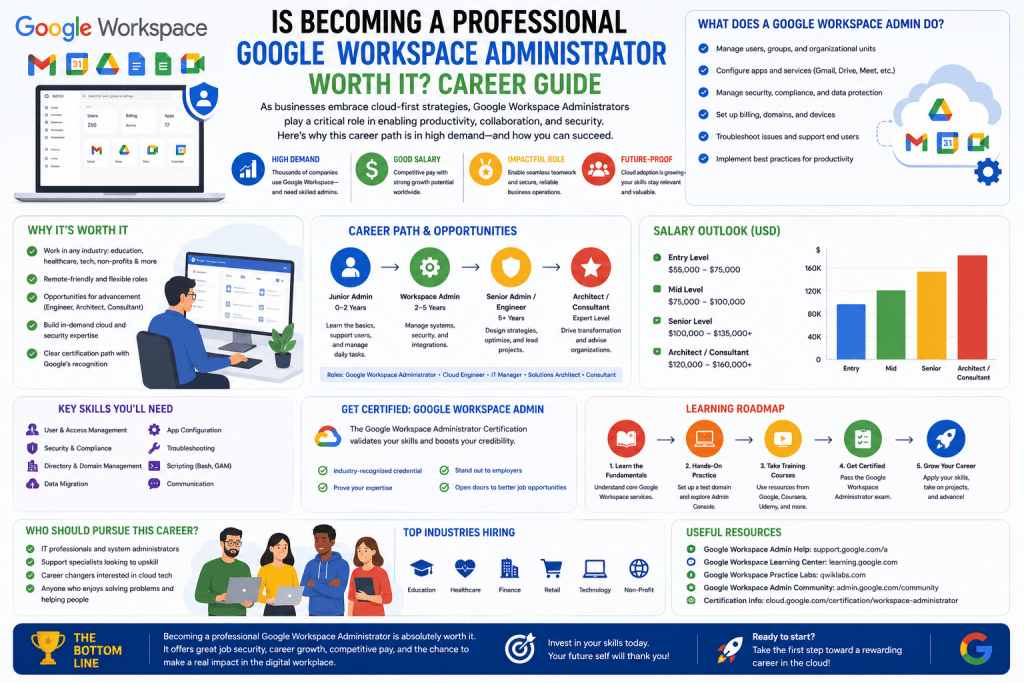
Google Workspace has become a central operational platform for organizations that rely on cloud-based collaboration, communication, and productivity systems. Within this environment, the Google Workspace Administrator serves as the technical authority responsible for configuring, maintaining, and governing the entire workspace ecosystem. This role is not limited to simple account management but extends into system architecture alignment, security enforcement, workflow optimization, and enterprise-level policy implementation. In modern IT environments where hybrid and remote work models dominate, the administrator ensures that digital operations remain stable, secure, and scalable. The role requires a balance between technical execution and organizational alignment, meaning the administrator must translate business requirements into system configurations that directly impact user experience, data protection, and operational efficiency. As organizations increasingly depend on cloud ecosystems, this role becomes a critical component of digital infrastructure management.
Evolution of Collaboration Platforms and Administrative Complexity
The development of cloud collaboration platforms has transformed how organizations operate, shifting from localized software systems to globally accessible cloud environments. Google Workspace integrates multiple services into a unified ecosystem, including communication tools, file storage systems, document collaboration platforms, and scheduling applications. As these systems evolve, administrative complexity increases due to growing user bases, distributed teams, and integration with external applications. The administrator must manage not only individual services but also the interconnection between them, ensuring seamless interoperability. This includes maintaining identity synchronization, enforcing consistent access rules, and ensuring that data flows securely between applications. The complexity of these environments requires administrators to adopt structured governance models that can scale alongside organizational growth while maintaining reliability and compliance standards.
Core Administrative Responsibilities Across Workspace Services
A Google Workspace Administrator manages a wide range of operational responsibilities that span user lifecycle management, service configuration, and system monitoring. User lifecycle management includes creating accounts, assigning roles, modifying permissions, and deactivating access when necessary. Service configuration involves setting up organizational policies for email routing, storage access, meeting configurations, and collaboration rules. Administrators also manage organizational units, which allow segmentation of users based on departments or functional roles. This segmentation enables targeted policy enforcement and improves administrative efficiency. Monitoring system activity is another essential responsibility, where administrators review logs, track performance metrics, and identify anomalies in system behavior. These combined responsibilities ensure that the Workspace environment remains functional, secure, and aligned with organizational expectations.
Identity Management and Access Control Frameworks
Identity management is one of the most critical components of Workspace administration. It involves controlling how users are authenticated and how they gain access to organizational resources. Administrators configure authentication methods that may include password policies, two-factor authentication, and single sign-on integrations. Access control is implemented through structured permission systems that define who can view, edit, or share organizational data. Group-based access management allows administrators to assign permissions to multiple users simultaneously, reducing administrative overhead and ensuring consistency. Organizational units further refine access control by grouping users based on hierarchy, department, or operational function. These systems collectively ensure that sensitive information is protected while still allowing users to access the tools they need for daily operations. Proper identity management is essential for maintaining both security and productivity within the Workspace environment.
Security Architecture and Threat Mitigation Strategies
Security within Google Workspace environments is built on layered protection mechanisms that administrators must configure and maintain. This includes monitoring for unauthorized access attempts, managing data loss prevention policies, and configuring security alerts for suspicious activity. Administrators are responsible for enforcing encryption standards and ensuring secure communication channels between users and services. Threat mitigation also involves identifying phishing attempts, malware distribution risks, and compromised account behavior. By analyzing system logs and security dashboards, administrators can detect anomalies and respond proactively to potential threats. In addition, administrators implement policies that restrict external sharing of sensitive data, ensuring that organizational information remains protected even when collaboration extends beyond internal teams. Security management in this context is not static but requires continuous adjustment based on evolving threats and organizational needs.
Service Configuration and Operational Customization
Service configuration is a core function of Workspace administration that determines how tools behave within an organization. Administrators configure email routing rules, define storage sharing policies, and manage collaboration settings for documents and files. Calendar systems are configured to support scheduling policies, resource allocation, and meeting coordination rules. Communication tools are adjusted to control messaging permissions, external communication access, and meeting security settings. These configurations ensure that tools align with organizational workflows and compliance requirements. Operational customization also includes managing application access, enabling or disabling specific services for different user groups, and integrating third-party applications where necessary. This level of control allows organizations to tailor Workspace functionality to their specific operational needs while maintaining centralized governance.
Troubleshooting and System Reliability Management
Troubleshooting is a fundamental aspect of Workspace administration that ensures continuous system reliability. Administrators diagnose and resolve issues related to account access, service disruptions, synchronization errors, and configuration conflicts. This requires a deep understanding of system architecture and service dependencies. When issues arise, administrators analyze logs, review configuration settings, and test system behavior to identify root causes. Reliability management also involves proactive monitoring of system health indicators to prevent disruptions before they impact users. Administrators often implement redundancy strategies and recovery procedures to ensure business continuity in the event of system failures. The ability to maintain stable operations under varying conditions is a key measure of administrative effectiveness in cloud-based environments.
Data Governance and Compliance Enforcement in Cloud Environments
Data governance within Google Workspace involves establishing rules for how information is stored, accessed, shared, and retained. Administrators enforce policies that ensure compliance with internal organizational standards and external regulatory frameworks. This includes managing data retention rules, controlling file sharing permissions, and monitoring data movement across the system. Compliance enforcement requires continuous oversight of user behavior and system activity to ensure that data handling practices align with established policies. Administrators also configure audit systems that track changes to sensitive files and record access history for accountability purposes. These governance mechanisms ensure that organizational data remains protected, traceable, and properly managed throughout its lifecycle within the Workspace environment.
Integration with Enterprise Systems and External Applications
Google Workspace environments rarely operate in isolation and are often integrated with broader enterprise systems. Administrators manage these integrations by configuring APIs, establishing secure data exchange protocols, and ensuring compatibility between different platforms. This includes connecting identity systems, synchronizing user directories, and enabling third-party application access where required. Integration management ensures that Workspace tools function seamlessly within larger IT ecosystems that may include cloud infrastructure, on-premise systems, and specialized business applications. Administrators must ensure that these integrations do not introduce security vulnerabilities or operational inconsistencies. Proper integration management enhances organizational efficiency by enabling unified workflows across multiple systems while maintaining centralized control.
Strategic Importance of Workspace Administration in Organizational Growth
Workspace administration contributes directly to organizational scalability and digital transformation initiatives. By maintaining structured control over collaboration systems, administrators enable organizations to expand operations without introducing inefficiencies or security risks. Their role supports strategic objectives by ensuring that digital tools are aligned with business processes and operational goals. As organizations grow, administrative complexity increases, making centralized governance essential for maintaining consistency and reliability. Administrators also contribute to decision-making processes by providing insights into system usage patterns, security risks, and operational inefficiencies. This strategic involvement positions the role as more than technical support, transforming it into a key component of organizational infrastructure planning and execution.
Deep Dive into the Google Workspace Administrator Certification Structure and Purpose
The Google Workspace Administrator certification is designed to validate the ability to manage, configure, and secure a cloud-based collaboration environment at a professional level. It focuses on practical administrative capabilities rather than purely theoretical knowledge, emphasizing real-world tasks that reflect enterprise operations. The certification evaluates how well an individual can translate organizational requirements into system configurations that govern users, data access, and service behavior within a Google Workspace ecosystem. This includes managing identity structures, enforcing security policies, troubleshooting service issues, and aligning technical configurations with business objectives. The purpose of the certification is not only to test familiarity with tools but also to assess decision-making ability in operational scenarios where multiple system components interact simultaneously. This makes the certification relevant for professionals who are actively involved in IT administration, cloud operations, and enterprise collaboration management.
Object Management and Organizational Structure Administration
Object management is a foundational domain within Google Workspace administration that focuses on the creation, organization, and maintenance of users, groups, and organizational units. Users represent individual identities within the system, and each user account is associated with specific roles, permissions, and access rights. Administrators are responsible for ensuring that these accounts are properly structured and aligned with organizational hierarchies. Groups serve as collective entities that simplify permission management by allowing administrators to assign access rights to multiple users simultaneously. Organizational units provide a hierarchical structure that enables differentiated policy enforcement based on departments, teams, or functional roles. This structure allows for granular control over system behavior, ensuring that different segments of the organization operate under appropriate security and operational policies. Effective object management is essential for maintaining order, consistency, and scalability within the Workspace environment.
Service Configuration and Policy Enforcement Mechanisms
Service configuration involves defining how Google Workspace applications function within an organization. Administrators configure services such as email, document collaboration, file storage, and communication tools to align with business requirements. Policy enforcement is a critical aspect of this process, as it ensures that users interact with services in a controlled and secure manner. This includes defining sharing permissions for documents, setting restrictions on external communication, and configuring storage access rules. Administrators also manage application-specific settings that determine how features behave across different user groups. These configurations are essential for maintaining consistency in user experience while ensuring compliance with organizational standards. Service configuration is not a one-time task but an ongoing process that evolves as organizational needs change and new features are introduced into the Workspace ecosystem.
Troubleshooting Methodologies in Cloud-Based Collaboration Systems
Troubleshooting within Google Workspace requires a structured approach to identifying and resolving issues that affect system performance or user access. Administrators begin by diagnosing symptoms, such as login failures, email delivery issues, or file access errors. They then analyze system logs, configuration settings, and user reports to identify root causes. Common issues may arise from misconfigured permissions, synchronization delays, or authentication failures. Administrators must be able to distinguish between user-level issues and system-wide disruptions to apply appropriate solutions. Troubleshooting also involves testing potential fixes in controlled environments before implementing them across the organization. In addition to reactive problem-solving, administrators engage in proactive monitoring to detect anomalies before they escalate into larger issues. This approach ensures system stability and minimizes operational downtime in cloud-based environments.
Data Access Control and Authentication Frameworks
Data access control is a critical component of Workspace administration that determines how users interact with organizational information. Authentication frameworks ensure that only authorized users can access system resources, while access control mechanisms define what actions users can perform once authenticated. Administrators configure authentication policies such as password complexity requirements, session duration limits, and multi-factor authentication enforcement. Access control is implemented through role-based permissions, group assignments, and organizational unit structures. These mechanisms work together to create a secure environment where sensitive data is protected from unauthorized access. Administrators must also manage external sharing settings to control how data is shared outside the organization. Proper implementation of authentication and access control frameworks is essential for maintaining data integrity and preventing security breaches in cloud environments.
Security Configuration and Threat Management in Workspace Systems
Security management in Google Workspace involves multiple layers of protection designed to safeguard organizational data and user accounts. Administrators configure security settings that include account protection measures, data encryption policies, and threat detection systems. Monitoring tools are used to identify suspicious activities such as unauthorized login attempts or abnormal data access patterns. When potential threats are detected, administrators can take immediate action by suspending accounts, revoking access, or enforcing additional verification steps. Threat management also includes configuring alerts that notify administrators of security incidents in real time. This allows for rapid response and mitigation of potential risks. Security configuration is an ongoing responsibility that requires continuous adaptation to evolving threat landscapes and organizational requirements.
Data Governance, Compliance, and Lifecycle Management
Data governance within Google Workspace ensures that organizational data is managed in accordance with internal policies and external regulatory requirements. Administrators define rules for data retention, archival, and deletion based on business needs and compliance standards. Lifecycle management involves controlling how data is created, stored, shared, and eventually removed from the system. This process ensures that data remains relevant, secure, and properly managed throughout its existence. Compliance enforcement requires administrators to monitor user activity and ensure that data handling practices align with established policies. Audit logs and reporting tools are used to track changes to sensitive information and verify compliance with governance frameworks. Effective data governance ensures accountability, transparency, and control over organizational information assets.
Identity Synchronization and Directory Integration Processes
Identity synchronization is essential for maintaining consistency between Google Workspace and external directory systems. Many organizations use centralized identity management systems that must be synchronized with Workspace user accounts. Administrators configure synchronization processes that ensure user information, such as names, roles, and permissions, remains consistent across platforms. Directory integration allows organizations to manage identities from a single source of truth, reducing administrative complexity and minimizing errors. This process also supports automated provisioning and deprovisioning of user accounts based on changes in external systems. Proper synchronization ensures that access rights remain accurate and up to date, which is critical for maintaining security and operational efficiency in large-scale environments.
Application Management and Third-Party Integration Control
Application management within Google Workspace involves controlling access to both native and third-party applications. Administrators determine which applications users can access and configure permissions for each application based on organizational policies. Third-party integration control ensures that external applications interacting with Workspace services do not introduce security risks or data inconsistencies. Administrators evaluate application permissions, review access scopes, and monitor integration behavior to ensure compliance with security standards. In many cases, organizations rely on third-party tools to extend Workspace functionality, making integration management an essential part of system administration. Proper control over applications ensures that the Workspace environment remains secure, stable, and aligned with business requirements.
Monitoring, Reporting, and System Performance Analysis
Monitoring and reporting are essential functions that allow administrators to maintain visibility into system performance and user activity. Monitoring tools provide real-time insights into service health, usage patterns, and security events. Administrators use this information to identify performance bottlenecks, detect anomalies, and optimize system configurations. Reporting tools generate detailed analytics on user behavior, application usage, and security incidents. These reports are used to support decision-making processes and improve operational efficiency. System performance analysis involves evaluating how different components of Google Workspace interact under varying workloads. This helps administrators identify areas for optimization and ensure that services remain responsive and reliable under changing conditions.
Operational Alignment Between Business Requirements and Technical Configuration
One of the most important aspects of Workspace administration is aligning technical configurations with business requirements. Organizations rely on digital tools to support communication, collaboration, and operational workflows. Administrators translate these requirements into system configurations that define how users interact with Workspace services. This includes configuring policies that support business processes, enabling tools that enhance productivity, and restricting features that may introduce risks. Operational alignment ensures that technology serves organizational objectives rather than operating independently of them. Administrators must continuously evaluate business needs and adjust system configurations accordingly to maintain alignment as organizational priorities evolve.
Role of Automation in Workspace Administration Efficiency
Automation plays a significant role in improving efficiency within Google Workspace administration. Automated processes reduce manual workload by handling repetitive tasks such as user provisioning, permission updates, and policy enforcement. Administrators can implement automation rules that trigger actions based on predefined conditions, such as assigning roles when a new user is created or revoking access when an account becomes inactive. Automation also enhances consistency by ensuring that administrative tasks are performed uniformly across the organization. In addition, automated monitoring systems can detect issues and initiate corrective actions without manual intervention. This improves response times and reduces the likelihood of human error in system management.
Scalability Considerations in Large-Scale Workspace Environments
Scalability is a key consideration for organizations that rely on Google Workspace for collaboration. As organizations grow, the number of users, devices, and applications increases, creating additional administrative complexity. Administrators must design systems that can scale efficiently without compromising performance or security. This involves implementing structured organizational units, standardized policies, and automated management processes. Scalability also requires careful planning of resource allocation and system configuration to ensure that performance remains consistent under increased demand. Proper scalability planning allows organizations to expand their operations without experiencing disruptions in collaboration or productivity.
Strategic Role of Google Workspace Administration in Enterprise Digital Transformation
Google Workspace administration plays a foundational role in enterprise digital transformation by enabling organizations to shift from fragmented legacy systems toward unified cloud-based collaboration environments. This transition is not purely technical; it reshapes how organizations operate, communicate, and manage data. The administrator becomes a central figure in this transformation by ensuring that collaboration tools are configured to support scalable workflows, secure data exchange, and efficient communication across departments. As organizations adopt hybrid and remote work models, the importance of centralized administration increases, since distributed teams require consistent access to tools and resources regardless of location. The administrator ensures that these systems remain synchronized, secure, and aligned with evolving business priorities. In this context, Workspace administration is not just operational support but a strategic enabler of organizational agility and modernization.
Advanced Identity Governance and Lifecycle Automation
Identity governance in Google Workspace extends beyond basic account creation and deletion. It involves a structured approach to managing user identities throughout their entire lifecycle, from onboarding to offboarding. Administrators define automated workflows that ensure users are provisioned with appropriate access rights based on their roles within the organization. This reduces manual intervention and minimizes the risk of human error. Lifecycle automation also includes dynamic updates to permissions when users change departments or responsibilities. These automated processes ensure that access rights remain accurate and aligned with organizational structure at all times. In addition, identity governance frameworks help enforce compliance by ensuring that user access is regularly reviewed and adjusted according to policy requirements. This structured approach improves security, reduces administrative overhead, and enhances operational consistency across the Workspace environment.
Enterprise Security Architecture and Risk Mitigation Models
Security architecture within Google Workspace is built on layered defense principles designed to protect organizational data and user identities. Administrators configure authentication systems that enforce strong identity verification, including multi-factor authentication and context-aware access controls. Risk mitigation strategies involve continuous monitoring of system activity to identify potential threats before they escalate into security incidents. This includes analyzing login patterns, detecting unusual access behavior, and reviewing data sharing activities. Administrators also implement data protection policies that restrict unauthorized external sharing and enforce encryption for sensitive information. Security architecture is not static; it evolves in response to emerging threats and organizational changes. Administrators must continuously refine policies and configurations to maintain an optimal balance between usability and security, ensuring that productivity is not hindered while maintaining strong protection mechanisms.
Policy Framework Design and Organizational Compliance Enforcement
Policy framework design is a critical aspect of Workspace administration that defines how systems are used across an organization. Administrators create structured policies that govern data access, communication rules, application usage, and security behavior. These policies ensure that all users operate within defined boundaries that align with organizational standards. Compliance enforcement ensures that these policies are consistently applied and monitored across all users and departments. Administrators use audit logs, reporting tools, and automated alerts to track policy adherence and detect violations. In regulated industries, compliance frameworks may include data retention requirements, access restrictions, and security reporting obligations. Proper policy design ensures that the Workspace environment remains controlled, predictable, and aligned with both internal governance structures and external regulatory requirements.
Data Lifecycle Governance and Information Retention Strategies
Data lifecycle governance involves managing information from creation to deletion in a structured and controlled manner. Administrators define rules for how long data is retained, where it is stored, and when it should be archived or removed. These policies are essential for maintaining data relevance, reducing storage overhead, and ensuring compliance with legal requirements. Information retention strategies are often customized based on data sensitivity and organizational needs. For example, critical business documents may be retained for extended periods, while temporary files may be automatically deleted after a defined timeframe. Lifecycle governance also includes monitoring data usage patterns to ensure that storage resources are used efficiently. By implementing structured lifecycle management, administrators ensure that organizational data remains organized, secure, and compliant throughout its existence.
Cloud Integration and Cross-Platform Interoperability Management
Modern organizations rarely operate within a single software ecosystem, making cloud integration and interoperability essential components of Workspace administration. Administrators manage connections between Google Workspace and external platforms, ensuring that data flows securely and efficiently across systems. This includes integrating identity providers, enterprise resource planning systems, customer management platforms, and productivity tools. Cross-platform interoperability requires careful configuration of APIs, authentication protocols, and data synchronization mechanisms. Administrators must ensure that integrations do not introduce security vulnerabilities or data inconsistencies. Proper integration management allows organizations to create unified workflows that span multiple systems, improving efficiency and reducing operational fragmentation. This capability is essential for organizations that rely on diverse digital ecosystems to support their business operations.
Performance Optimization and System Efficiency Management
Performance optimization in Google Workspace environments involves ensuring that services operate efficiently under varying workloads. Administrators monitor system performance metrics such as response times, service availability, and resource utilization. Based on this data, they implement configuration adjustments to improve system efficiency. Optimization may include refining access policies, adjusting storage configurations, or modifying service settings to reduce latency and improve responsiveness. Administrators also identify usage patterns that may indicate inefficiencies or bottlenecks within the system. By addressing these issues proactively, they ensure that users experience consistent and reliable performance across all Workspace applications. Performance optimization is an ongoing process that requires continuous monitoring and adjustment as organizational demands evolve.
Incident Response Management and Operational Recovery Planning
Incident response management is a critical responsibility within Workspace administration that focuses on addressing unexpected system disruptions or security events. Administrators follow structured response procedures that include identifying the incident, assessing its impact, and implementing corrective actions. Recovery planning ensures that services can be restored quickly in the event of system failures or security breaches. This may involve restoring data from backups, reconfiguring services, or re-establishing user access. Incident response also includes communication protocols to inform stakeholders about system status and resolution timelines. Effective incident management minimizes downtime and ensures business continuity even during critical disruptions. Administrators must be prepared to respond quickly and accurately to maintain system stability and organizational productivity.
Advanced Configuration of Collaboration and Communication Tools
Collaboration and communication tools within Google Workspace require advanced configuration to meet organizational requirements. Administrators manage settings for email systems, video conferencing platforms, messaging tools, and collaborative document environments. This includes defining access rules, configuring meeting security settings, and managing external communication policies. Advanced configuration also involves optimizing collaboration features to support team workflows, such as shared document editing, real-time communication channels, and integrated scheduling systems. Administrators ensure that these tools are configured in a way that enhances productivity while maintaining security and compliance standards. Proper configuration of collaboration tools is essential for enabling efficient teamwork across distributed and hybrid work environments.
Organizational Scalability and Infrastructure Expansion Strategies
Scalability is a fundamental consideration in Workspace administration, particularly for organizations experiencing growth or structural changes. Administrators design systems that can accommodate increasing numbers of users, devices, and applications without compromising performance or security. This involves implementing scalable organizational unit structures, standardized policy frameworks, and automated management processes. Infrastructure expansion strategies ensure that new users and departments can be integrated into the system seamlessly. Administrators also plan for future growth by anticipating changes in usage patterns and system requirements. Scalable architecture allows organizations to expand operations efficiently while maintaining consistent system performance and governance standards.
Role of Analytics in Administrative Decision-Making
Analytics plays a significant role in guiding administrative decisions within Google Workspace environments. Administrators use reporting tools to analyze user behavior, system performance, and security trends. These insights help identify areas for improvement, such as underutilized services, inefficient workflows, or potential security risks. Data-driven decision-making allows administrators to optimize configurations and policies based on actual usage patterns rather than assumptions. Analytics also supports strategic planning by providing visibility into how digital tools are used across the organization. This enables leadership to make informed decisions about resource allocation, system upgrades, and process improvements. The integration of analytics into administrative practices enhances overall system effectiveness and organizational efficiency.
Long-Term Value of Workspace Administration Expertise in IT Careers
Expertise in Google Workspace administration provides long-term value in IT careers by establishing a strong foundation in cloud system management, identity governance, and enterprise collaboration tools. Professionals with this expertise are well-positioned to work in roles that involve cloud infrastructure management, system administration, and digital transformation initiatives. The skills developed through Workspace administration are transferable to other cloud platforms and enterprise systems, making it a versatile specialization within the IT field. As organizations continue to adopt cloud-first strategies, demand for professionals who can manage and optimize collaboration environments remains strong. This expertise not only enhances career opportunities but also provides practical knowledge that is directly applicable to modern IT infrastructure environments.
Conclusion
The Professional Google Workspace Administrator certification represents more than a simple credential; it reflects a structured validation of skills required to operate within modern cloud-driven enterprise environments. As organizations continue to move away from traditional on-premise systems toward fully integrated cloud ecosystems, the ability to manage collaboration platforms at a professional level has become a meaningful requirement rather than an optional specialization. Google Workspace sits at the center of many organizational workflows, combining communication, storage, scheduling, and collaboration into a unified system. Ensuring that this ecosystem remains secure, efficient, and aligned with business needs requires a role that is both technically grounded and operationally aware. The certification exists to confirm that an individual can fulfill this responsibility with consistency and accuracy.
From a career perspective, the value of this certification depends heavily on context, but it consistently provides practical benefits for IT professionals who interact with cloud collaboration systems. For systems administrators, cloud engineers, and IT support professionals, it strengthens foundational knowledge of identity management, service configuration, and administrative control. These are not abstract concepts but operational tasks that directly impact how users experience digital tools within an organization. Even professionals who are already experienced in IT environments can benefit from formalizing their understanding of Google Workspace, particularly as organizations increasingly standardize on cloud-first collaboration platforms.
One of the most significant aspects of the certification is its emphasis on real-world administrative scenarios. It is not focused on memorization of isolated facts but on applied decision-making within a structured system. This includes managing users across organizational units, configuring security policies that balance usability with protection, and troubleshooting issues that arise in complex environments where multiple services interact. These responsibilities mirror actual enterprise environments, where administrators must respond to dynamic conditions rather than static configurations. The certification, therefore, functions as both a validation of technical knowledge and a demonstration of operational readiness.
Another important dimension is the role of security within the Google Workspace ecosystem. Modern organizations face increasing pressure to protect sensitive data while maintaining accessibility for distributed teams. The administrator plays a key role in enforcing authentication policies, managing access controls, and monitoring system activity for potential threats. This responsibility requires a strong understanding of how identity and access management systems operate within cloud environments. It also requires the ability to interpret system behavior and respond appropriately to potential risks. The certification reinforces these competencies by evaluating how well candidates understand and apply security principles in practical administrative contexts.
In addition to security, the certification also highlights the importance of governance and policy enforcement. Organizations rely on structured rules to ensure that data is handled consistently and responsibly. These rules govern how information is shared, stored, and accessed across different user groups. The administrator is responsible for translating these governance requirements into technical configurations within the platform. This includes defining organizational structures, setting permission hierarchies, and ensuring compliance with internal and external standards. Without proper governance, collaboration systems can quickly become disorganized and vulnerable to inefficiencies or security risks.
The operational value of the certification is also evident in its focus on troubleshooting and system reliability. In any cloud environment, issues will inevitably arise, whether due to user error, configuration conflicts, or external disruptions. The ability to diagnose and resolve these issues efficiently is a critical skill for any administrator. This involves analyzing system logs, identifying root causes, and implementing corrective actions that restore normal operations. The certification emphasizes this capability because it reflects one of the most common and important responsibilities in real-world environments. Maintaining system reliability is not a one-time task but an ongoing requirement that directly impacts organizational productivity.
Another key factor in evaluating the worth of the certification is its relevance to career development. For individuals entering the IT field, it provides a structured introduction to cloud administration concepts that are widely applicable across different platforms and technologies. For experienced professionals, it serves as validation of skills that may already be in use but have not been formally certified. In both cases, it enhances professional credibility by demonstrating a clear understanding of enterprise collaboration systems. This can be particularly valuable in roles that involve cloud migration, digital transformation, or IT infrastructure management.
The certification also aligns with broader trends in technology adoption. As organizations continue to prioritize remote work, real-time collaboration, and cloud-based infrastructure, the demand for professionals who can manage these environments effectively is increasing. Google Workspace is often at the center of these transformations, making administrative expertise in this platform highly relevant. The certification reflects this shift by focusing on practical skills that support modern workplace requirements rather than outdated or purely theoretical concepts.
It is also important to consider the scalability aspect of Google Workspace administration. In small environments, administrative tasks may be relatively simple, but as organizations grow, complexity increases significantly. More users, more applications, and more integrations create a need for structured management and automation. The certification addresses these challenges by emphasizing scalable administrative practices, such as automated provisioning, group-based access control, and centralized policy management. These practices ensure that systems remain manageable even as organizational size and complexity increase.
Ultimately, the value of the Professional Google Workspace Administrator certification lies in its practical applicability. It is not designed as an abstract academic qualification but as a tool for validating skills that are directly used in enterprise environments. For individuals working in IT administration or aspiring to enter cloud-focused roles, it provides a clear pathway to developing and demonstrating relevant expertise. For organizations, it helps ensure that administrators have a standardized level of competency in managing one of the most widely used collaboration platforms in the world.
Whether it is worth pursuing depends on individual career goals, existing experience, and the technologies used within a given organization. However, in environments where Google Workspace plays a central role, the certification offers a structured and meaningful way to build credibility, improve technical capability, and support long-term career development in cloud administration.