
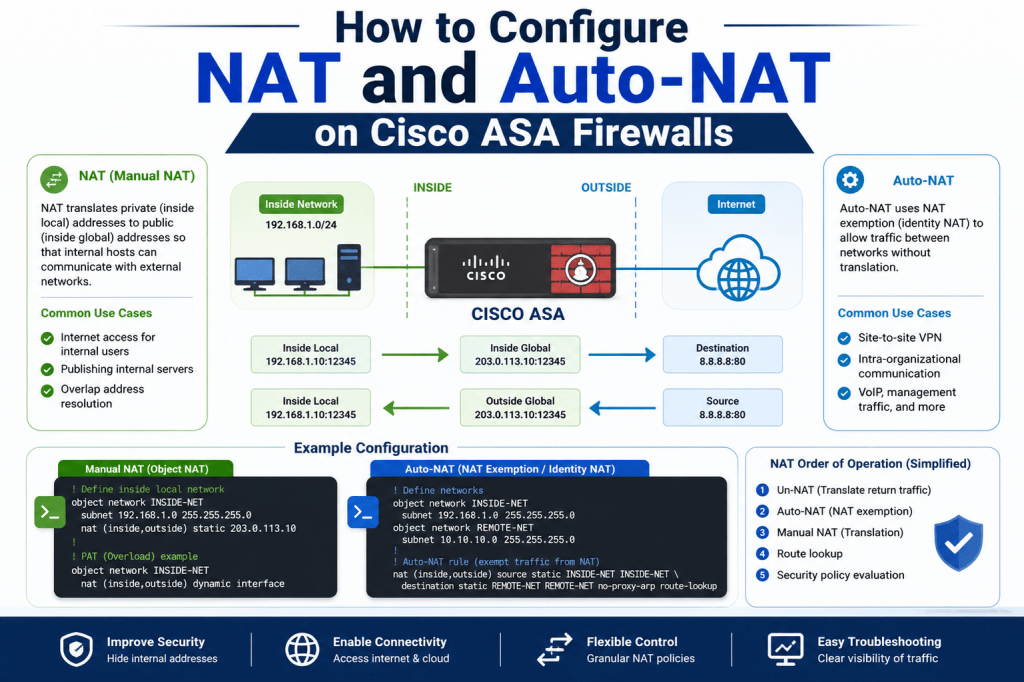
Network Address Translation, commonly known as NAT, is a technology that changes IP address information inside packet headers as traffic moves across networks. NAT allows private devices to communicate with external networks by translating internal addresses into routable public addresses. This process is extremely important because most devices inside organizations use private IP ranges that cannot communicate directly over the internet. Cisco ASA firewalls use NAT to manage these translations while also improving network security and conserving public IP resources.
Why NAT is Important in Modern Networks
Modern organizations often have hundreds or thousands of internal devices connected to their networks. Assigning a public IP address to every device would be expensive and impractical. NAT solves this problem by allowing multiple systems to share a smaller pool of public addresses. Instead of exposing every internal device to external networks, the ASA firewall translates private addresses into public addresses only when communication is required. This design improves both efficiency and security.
How Cisco ASA Handles NAT Operations
Cisco ASA appliances process NAT rules whenever packets move between interfaces. The firewall examines the source and destination addresses of traffic and determines whether translation rules apply. If a matching NAT policy exists, the ASA changes the packet information before forwarding the traffic. The firewall also records the translation inside its translation table so return traffic can be mapped back to the original internal device correctly.
Private IP Address Spaces Used with NAT
Most internal networks rely on private RFC1918 address ranges. These include addresses beginning with 10.x.x.x, 172.16.x.x through 172.31.x.x, and 192.168.x.x. These addresses are reserved for private network usage and cannot be routed publicly on the internet. NAT allows these private devices to communicate externally by translating their addresses into valid routable IP addresses before traffic exits the firewall.
Security Advantages of Using NAT
One major advantage of NAT is that it hides internal addressing schemes from external networks. Outside users cannot directly see the real internal IP addresses of hosts inside the organization. This creates an additional security layer because attackers cannot easily map internal systems. Although NAT itself is not a replacement for firewall security policies, it helps reduce exposure by masking internal infrastructure details.
What a Cisco ASA Appliance Does
Cisco Adaptive Security Appliances, commonly called ASA firewalls, are security devices designed to provide firewall protection, VPN connectivity, intrusion prevention, and advanced traffic inspection. These appliances are widely deployed in enterprise environments because they combine multiple security features into a single platform. NAT functionality is one of the core capabilities provided by ASA devices.
How ASA NAT Differs from Traditional Routers
Traditional routers often use basic NAT configurations focused mainly on internet connectivity. ASA firewalls provide much more advanced translation capabilities. Administrators can create policies based on source networks, destination networks, services, interfaces, or address objects. This flexibility allows organizations to create highly customized translation rules that support complex enterprise environments.
Introduction to Auto-NAT on ASA
Auto-NAT, also known as Object NAT, is one of the simplest NAT configuration methods available on Cisco ASA firewalls. In Auto-NAT, translation rules are directly attached to network objects. This method simplifies configuration because the NAT rule becomes part of the object itself. Auto-NAT is commonly used for straightforward translation scenarios involving individual hosts or entire subnets.
Understanding Object NAT
Object NAT and Auto-NAT refer to the same configuration method. The rule is defined inside a network object rather than as a separate policy statement. Because the NAT configuration is embedded directly into the object definition, administrators can easily manage translations associated with specific networks or hosts. This approach is especially useful for environments requiring clean and organized configurations.
What Network Objects Represent on ASA
A network object is essentially an alias representing a host, subnet, or range of addresses. Instead of repeatedly typing actual IP addresses throughout the firewall configuration, administrators create objects with descriptive names. These objects can then be referenced inside NAT rules, access control lists, and other policies. Using objects improves readability and simplifies long-term management.
Benefits of Using Network Objects
Network objects make firewall administration more efficient. If an IP address changes later, the administrator only needs to update the object definition rather than every policy referencing that address. This reduces configuration errors and speeds up network changes. Object-based configurations are especially useful in large environments where multiple policies depend on the same address information.
Understanding Dynamic NAT on ASA
Dynamic NAT translates internal private addresses into available public addresses from a defined pool. When a device initiates outbound communication, the ASA selects an available address from the pool and assigns it temporarily. Once the session ends, the address becomes available again for other devices. Dynamic NAT is commonly used when organizations have multiple public addresses available for outbound traffic.
How Address Pools Work in NAT
An address pool is a collection of public IP addresses reserved for translation purposes. Instead of assigning a single address permanently to one internal device, the ASA dynamically allocates addresses from the pool as connections are created. This approach allows organizations to maximize utilization of limited public address space while supporting many internal devices simultaneously.
Why Auto-NAT is Popular in ASA Deployments
Many administrators prefer Auto-NAT because it simplifies configuration tasks. Instead of building complicated policy rules manually, administrators can define NAT settings directly within network objects. The ASA automatically organizes these rules into the appropriate processing section. This reduces complexity and makes troubleshooting easier for smaller or medium-sized deployments.
The Three NAT Sections on Cisco ASA
Cisco ASA organizes NAT rules into three processing sections. Section 1 contains Manual NAT rules configured to run before Auto-NAT. Section 2 contains Auto-NAT or Object NAT rules. Section 3 contains Manual NAT rules intentionally placed after Auto-NAT processing. Understanding these sections is extremely important because rule order determines how traffic is translated.
Why NAT Rule Order Matters
ASA processes NAT rules sequentially from top to bottom. The first matching rule is applied to the traffic. If a broad translation rule appears above a more specific rule, the specific policy may never be reached. Proper rule placement ensures the firewall applies the correct translation based on organizational requirements. NAT troubleshooting often involves checking rule order carefully.
How Manual NAT Differs from Auto-NAT
Manual NAT provides more flexibility than Auto-NAT because it allows administrators to define source addresses, destination addresses, interfaces, and translation policies independently. Manual NAT is commonly used for advanced scenarios such as policy-based translations, destination-specific translations, or exceptions to general NAT behavior. Auto-NAT is simpler, while Manual NAT offers greater control.
When Manual NAT is Necessary
Manual NAT becomes necessary when organizations require highly specific translation behavior. For example, an administrator may want a host to use one public address for general internet access but use a different address when communicating with a particular server. Such scenarios require policy-based translation logic that Auto-NAT alone cannot provide.
Configuring Auto-NAT Through ASDM
The Adaptive Security Device Manager, commonly known as ASDM, provides a graphical interface for configuring Cisco ASA devices. Administrators can navigate to the Objects section, select network objects, and apply NAT rules directly through the GUI. This method is useful for administrators who prefer visual configuration rather than command-line syntax.
Creating Network Objects in ASDM
Before configuring Auto-NAT, administrators usually create network objects representing internal subnets, hosts, or address pools. Each object contains addressing information and descriptive names that simplify future policy creation. Once the objects exist, NAT rules can be associated directly with them inside the ASDM interface.
Defining Dynamic Translation Rules
Inside ASDM, administrators can configure dynamic translation rules by selecting the Dynamic NAT option within the network object configuration window. The translated address pool is then selected from available objects. Once applied, the ASA automatically creates the corresponding NAT configuration statements in the running configuration.
Understanding NAT Configuration Logic
When an Auto-NAT rule is created, the ASA interprets the object configuration and builds translation logic internally. The firewall associates source addresses with translated address pools and determines when translations should occur. Administrators can preview the resulting command-line syntax before applying changes, which helps validate configurations before deployment.
Viewing NAT Rules on ASA
The ASA firewall provides several methods for viewing NAT policies. Inside ASDM, administrators can open the NAT Rules section to view active translation rules and their processing order. From the command line, the “show nat” command displays configured NAT rules organized into their respective sections. This visibility helps administrators understand translation behavior quickly.
Understanding Translation Tables
ASA maintains translation tables that track active NAT sessions. These tables record mappings between original private addresses and translated public addresses. Translation entries remain active while sessions are in use. Viewing these tables allows administrators to confirm whether NAT is functioning properly for active connections.
How Auto-NAT Rules Are Processed on ASA
When an Auto-NAT rule is configured on a Cisco ASA firewall, the device automatically places that rule inside Section 2 of the NAT table. This section is reserved specifically for Object NAT configurations. As traffic passes through the firewall, the ASA evaluates Section 1 rules first, then Section 2 rules, and finally Section 3 rules if necessary. Understanding this processing sequence is critical because it determines which translation policy will affect the traffic.
How ASA Matches NAT Rules to Traffic
The ASA compares packet information against configured NAT policies to determine whether translation should occur. It examines source addresses, destination addresses, interfaces, and translation criteria depending on the NAT type. Once the firewall finds a matching rule, it applies the translation immediately and stops checking lower NAT entries. Because of this behavior, more specific policies should usually appear above broader translation rules.
Understanding Source Address Translation
Source NAT changes the source IP address of outbound traffic before it leaves the firewall. This is the most common NAT implementation in enterprise networks because internal private devices need routable addresses to communicate externally. When return traffic arrives, the ASA reverses the translation using its translation table and forwards the traffic back to the correct internal host.
How Destination NAT Works on ASA
Destination NAT modifies the destination address of incoming traffic. This type of NAT is commonly used when organizations want external users to reach internal servers using public IP addresses. The ASA receives traffic destined for a public address, translates it into the real internal address, and forwards the packet to the correct server. Destination NAT is often used for publishing web servers, mail servers, or remote access systems.
Differences Between Dynamic NAT and Static NAT
Dynamic NAT assigns translated addresses temporarily from a pool whenever connections are initiated. Static NAT creates a permanent one-to-one mapping between an internal address and an external address. Dynamic NAT is efficient for large user groups sharing multiple addresses, while Static NAT is ideal for servers or devices requiring consistent external accessibility. Both methods are supported on Cisco ASA firewalls.
Why Static NAT is Important for Servers
Servers often require predictable public addresses because external users or DNS records rely on consistent connectivity. Static NAT ensures the same public IP address is always associated with the same internal system. This stability is essential for hosting applications, web services, VPN gateways, and remote access platforms inside enterprise environments.
How ASA Stores Active NAT Sessions
When traffic passes through a NAT rule successfully, the ASA creates an entry inside the translation table. This entry records the original address, translated address, protocol information, and session details. Translation entries remain active until connections expire or sessions close. The ASA uses this information to handle return traffic accurately.
Using the Show Xlate Command
The “show xlate” command displays active translation entries currently stored on the firewall. Administrators use this command to confirm whether NAT rules are functioning properly. The output includes original addresses, translated addresses, protocol types, and flags indicating whether the translation is dynamic or static. This command is extremely useful during troubleshooting sessions.
Why Clearing Translation Tables is Useful
Sometimes outdated translation entries can interfere with testing or troubleshooting. The “clear xlate” command removes existing translation entries from the firewall. This allows administrators to test NAT policies from a clean state and confirm that new translations are being created according to updated configurations. Clearing translations is a common troubleshooting practice during NAT deployment.
How Interface Selection Affects NAT
ASA firewalls use interfaces to determine traffic direction and policy application. NAT rules can reference source interfaces and destination interfaces to control where translations occur. For example, traffic moving from an inside interface to an outside interface may use one translation policy, while traffic between internal interfaces may use another. Interface awareness gives administrators additional flexibility in traffic management.
Understanding Real Addresses and Mapped Addresses
The ASA refers to original internal addresses as real addresses and translated addresses as mapped addresses. The real address represents the actual device IP inside the network, while the mapped address represents the translated IP visible externally. Understanding this terminology is important when reading NAT configurations and troubleshooting translation behavior.
Why NAT Pools Improve Address Management
NAT pools provide administrators with greater flexibility when managing public address usage. Instead of assigning a single public IP to every internal host, the ASA dynamically selects addresses from the pool as needed. This reduces wasted address space and allows organizations to support many users with fewer public addresses. NAT pools are commonly used in medium and large enterprise deployments.
How ASA Handles Multiple Simultaneous Connections
Cisco ASA firewalls are designed to manage thousands of concurrent NAT translations efficiently. Each active session is tracked independently, ensuring return traffic reaches the correct internal device. The ASA maintains separate translation entries for each connection, even when multiple users share the same translated address through different source ports.
Understanding Port Address Translation
Port Address Translation, often called PAT, is a NAT method where multiple internal devices share a single public IP address. The ASA differentiates sessions using unique port numbers. PAT is widely used because it allows entire organizations to access the internet using only one public address. This method conserves address space while supporting large numbers of users simultaneously.
How PAT Differs from Dynamic NAT
Dynamic NAT uses multiple public addresses from a defined pool, while PAT typically uses a single public address shared by many internal hosts. PAT relies on port numbers to distinguish sessions, whereas Dynamic NAT relies on unique translated IP addresses. PAT is more efficient for environments with limited public address availability.
Why ASA NAT Processing Order Matters
NAT processing order is one of the most important concepts in ASA administration. Since the firewall stops processing once a matching rule is found, incorrect rule placement can lead to unexpected translations. Administrators must carefully organize policies so specific exceptions appear above general rules. Proper NAT design prevents conflicts and improves troubleshooting efficiency.
How Manual NAT Overrides Auto-NAT
Manual NAT rules configured in Section 1 take priority over Auto-NAT rules in Section 2. This allows administrators to create exceptions for specific traffic patterns. For example, a specific workstation may use one translated address when connecting to a particular destination, while all other traffic continues using general Auto-NAT policies.
Understanding Policy-Based NAT on ASA
Policy-based NAT allows translation decisions to depend on both source and destination conditions. Instead of translating all outbound traffic identically, administrators can create rules targeting specific servers, applications, or remote networks. Policy NAT is useful in environments requiring specialized routing or application behavior.
Creating Destination-Specific Translation Policies
Organizations sometimes require different translations depending on the destination server being accessed. For example, a workstation may normally use dynamic NAT but require static translation when communicating with a business partner network. ASA Manual NAT rules make this type of destination-sensitive translation possible.
How to Configure Manual NAT Rules
Manual NAT rules can be configured through ASDM or the ASA command line. Administrators specify source objects, destination objects, interfaces, and translation methods. Because Manual NAT offers advanced flexibility, it is commonly used for complex enterprise requirements involving exceptions or specialized traffic flows.
Understanding NAT Rule Priorities
ASA NAT rules are prioritized according to section placement and internal ordering. Section 1 Manual NAT rules are evaluated first, followed by Section 2 Auto-NAT rules, and finally Section 3 Manual NAT rules configured after-auto. Within each section, rules are processed sequentially from top to bottom. Proper ordering is essential for predictable translation behavior.
Why Section 1 NAT Rules Are Powerful
Section 1 rules provide administrators with complete control over translation precedence. Since these rules are evaluated before all Auto-NAT policies, they can override standard translation behavior for selected traffic. This capability is extremely useful when implementing policy exceptions or advanced routing requirements.
Using Specific Host Translation Policies
Sometimes administrators need one internal host to always appear externally as a specific public IP address. This can be achieved using Manual Static NAT rules. Such policies are often required for authentication systems, partner network integrations, or application licensing systems that depend on consistent source addresses.
How NAT Affects Firewall Security Policies
NAT processing occurs alongside access control and connection inspection processes. Administrators must understand how translated addresses interact with security rules. In many ASA versions, access control lists reference real internal addresses instead of translated addresses. Misunderstanding this relationship can lead to unexpected connectivity problems.
Why NAT Troubleshooting Requires Multiple Checks
Troubleshooting NAT issues often involves examining translation tables, NAT rule order, routing behavior, and interface configurations together. A correctly configured NAT rule may still fail if routing is incorrect or if access control policies block the traffic. Effective troubleshooting requires understanding the complete packet processing sequence inside the ASA firewall.
Using Show NAT to Verify Configurations
The “show nat” command displays configured NAT rules and their placement inside the ASA NAT table. Administrators use this command to confirm rule ordering, translation types, and section placement. Reviewing the NAT table is often the first step when diagnosing unexpected translation behavior.
How Translation Flags Help Troubleshooting
ASA translation entries include flags identifying the translation type and status. These flags indicate whether the translation is dynamic, static, or identity NAT. Administrators can use this information to confirm which rule created the translation and whether the firewall is processing traffic as expected.
Why NAT is Critical for Enterprise Connectivity
Without NAT, organizations would struggle to provide internet access to large numbers of internal devices while preserving security and conserving address space. Cisco ASA firewalls provide highly flexible NAT capabilities that support everything from basic internet access to advanced policy-driven enterprise deployments. Understanding NAT behavior is therefore essential for network security administrators managing ASA environments.
Understanding Advanced NAT Behavior on ASA
As Cisco ASA deployments become larger and more complex, NAT configurations also become more advanced. Enterprise environments often require multiple translation policies operating simultaneously for users, servers, VPN connections, branch offices, and internet traffic. ASA firewalls are designed to support these advanced requirements by allowing administrators to combine Auto-NAT and Manual NAT rules together within the same configuration. Proper understanding of advanced NAT behavior helps administrators avoid conflicts and maintain stable network operations.
How ASA Evaluates Packet Translation
When a packet enters the ASA firewall, the device evaluates several factors before forwarding the traffic. The firewall checks interfaces, routing information, access control policies, and NAT rules. During NAT processing, the ASA compares the packet against configured translation policies in sequential order. Once a matching rule is identified, the firewall applies the translation and records the mapping inside the translation table. This process happens very quickly but follows strict internal logic.
Why Specific NAT Rules Should Be Prioritized
Specific NAT rules should generally appear above broad or generic translation policies. If a generic rule matches first, the ASA stops evaluating lower entries, meaning specialized translations may never occur. For example, if all outbound traffic is translated using a general PAT rule, a more specific static translation for a particular server may not work unless it appears higher in the NAT order. Correct prioritization prevents unintended behavior.
Understanding Identity NAT on ASA
Identity NAT is a special NAT configuration where the source and translated addresses remain the same. In other words, the ASA intentionally avoids translating the traffic. Identity NAT is often used for VPN traffic or trusted network communication where address preservation is necessary. This type of NAT ensures packets retain their original addressing information as they move between networks.
Why Identity NAT is Common in VPN Configurations
VPN tunnels frequently require original source addresses to remain unchanged. If the ASA translated VPN traffic before encryption, the remote network might not recognize the expected source subnet. Identity NAT prevents translation from occurring and allows encrypted traffic to maintain the correct addressing scheme. This is especially important in site-to-site VPN deployments connecting multiple branch offices or business partners.
How ASA Handles NAT Exemptions
NAT exemption rules instruct the ASA not to translate certain traffic flows. These rules are commonly configured using Identity NAT. For example, an organization may want internet-bound traffic translated normally while traffic destined for remote VPN networks bypasses NAT completely. NAT exemptions ensure that private addressing remains consistent across trusted network connections.
Understanding Twice NAT on ASA
Twice NAT is an advanced NAT method allowing both source and destination addresses to be translated simultaneously. This technique provides extremely granular control over packet translation and is useful in overlapping network environments or specialized application deployments. Twice NAT is configured using Manual NAT rules and supports advanced traffic manipulation requirements.
Why Overlapping Networks Require Advanced NAT
Organizations sometimes connect with external partners using the same internal IP ranges. This creates address conflicts because both networks use identical private addressing schemes. Advanced NAT techniques such as Twice NAT allow administrators to translate one or both address spaces during communication, eliminating overlap problems and allowing connectivity between conflicting networks.
How ASA Supports Static Port Forwarding
Static port forwarding allows external users to reach internal services through translated public addresses and specific ports. For example, incoming traffic targeting a public IP on port 80 can be redirected to an internal web server. ASA firewalls support port forwarding through Static NAT policies, making it possible to publish internal applications securely.
Why Port Forwarding Must Be Secured Carefully
Publishing internal services through NAT exposes those services to external networks. Administrators should combine NAT policies with strict access control rules, intrusion prevention, and monitoring. Without proper security controls, attackers could attempt to exploit exposed services. NAT enables connectivity, but firewall policies must still protect the internal environment.
Understanding Dynamic PAT on ASA
Dynamic Port Address Translation is one of the most common outbound NAT methods used on ASA firewalls. With Dynamic PAT, many internal hosts share a single translated address while the ASA differentiates connections using unique source port numbers. This method is extremely efficient and widely used for internet access in enterprise networks.
How ASA Maintains Unique Sessions in PAT
When multiple internal devices share one translated IP address, the ASA uses source port numbers to track sessions individually. Each connection receives a unique translated port value. The firewall stores these mappings inside its translation table so return traffic can be forwarded to the correct internal host. This process allows thousands of simultaneous sessions to share the same public address safely.
Why NAT Tables Grow During Heavy Traffic
Every active translated session creates an entry inside the ASA translation table. During periods of heavy network activity, the number of entries can increase rapidly. Large organizations with many users may generate thousands of concurrent translations. ASA firewalls are optimized to manage these translation tables efficiently while maintaining high performance levels.
How Translation Timeouts Work
Translation entries do not remain active forever. ASA firewalls remove idle translation entries after defined timeout periods. These timers help conserve system resources and prevent unused translations from occupying memory unnecessarily. Different protocols may use different timeout values depending on connection behavior and application requirements.
Understanding NAT and Routing Relationships
NAT and routing work closely together on Cisco ASA devices. The firewall first determines the appropriate route for traffic and then applies translation policies according to configured NAT rules. Incorrect routing configurations can prevent NAT from functioning correctly even when translation policies appear valid. Administrators must therefore verify both NAT and routing during troubleshooting.
How ASA Handles Return Traffic
When return traffic arrives at the ASA, the firewall consults its translation table to identify the original internal destination. The ASA reverses the translation process and forwards the packet to the correct internal device. Because the firewall tracks active sessions statefully, return traffic is processed efficiently and securely.
Why Stateful Inspection Complements NAT
Cisco ASA firewalls use stateful inspection to monitor connection states and traffic behavior. NAT operates alongside this inspection process. The firewall tracks translated sessions, validates return traffic, and ensures packets belong to legitimate established connections. Stateful inspection enhances security by preventing unauthorized or unexpected traffic from bypassing established NAT policies.
Understanding NAT Rule Shadowing
NAT rule shadowing occurs when one translation policy prevents another rule from ever being matched. This usually happens when broad rules are positioned above more specific entries. Administrators should regularly review NAT policies to identify shadowed rules because these unnecessary entries can create confusion and complicate troubleshooting.
How Object Naming Improves Configuration Management
Descriptive object names make ASA configurations easier to understand and maintain. Instead of referencing raw IP addresses repeatedly, administrators can use meaningful names representing servers, subnets, or address pools. Clear naming conventions simplify troubleshooting and reduce the likelihood of configuration mistakes during future changes.
Why Documentation is Important for NAT Policies
Enterprise NAT environments can become very complex over time. Without proper documentation, administrators may struggle to understand why certain policies exist or how translation rules interact. Maintaining accurate documentation for NAT configurations helps teams troubleshoot issues faster and reduces operational risk during firewall modifications.
Understanding NAT Logging on ASA
Cisco ASA devices can generate logs related to NAT events and translation activity. These logs help administrators monitor traffic behavior, identify failed translations, and troubleshoot connectivity issues. Logging also provides visibility into unusual traffic patterns that may indicate security threats or misconfigurations.
How NAT Interacts with Access Control Lists
Access control lists and NAT rules work together during packet processing. Administrators must understand which addresses should be referenced inside firewall rules. In many ASA deployments, ACLs use real internal addresses instead of translated addresses. Incorrect ACL configurations can block traffic even when NAT translations are functioning properly.
Why Testing NAT Configurations is Essential
Every NAT policy should be tested carefully after deployment. Administrators should verify outbound connectivity, inbound connectivity, translation table entries, and application behavior. Testing ensures that the firewall performs translations correctly and that users or services remain accessible as intended. Small NAT mistakes can cause major connectivity problems if left unchecked.
How Packet Tracer Helps NAT Troubleshooting
The ASA packet-tracer utility is one of the most valuable troubleshooting tools available. This feature simulates packet flow through the firewall and displays each processing stage including NAT decisions, ACL checks, and routing actions. Administrators can use packet-tracer to identify exactly where traffic fails during processing.
Understanding After-Auto NAT Rules
Manual NAT rules configured with the after-auto option are placed inside Section 3 of the NAT table. These rules are evaluated only after Auto-NAT processing is complete. Administrators use after-auto policies for fallback translations or lower-priority exceptions that should only apply when earlier NAT sections do not match.
Why Section 3 NAT Rules Are Useful
Section 3 rules provide additional flexibility by allowing administrators to place Manual NAT policies below Auto-NAT entries. This capability is useful when specific fallback translation behavior is required without interfering with standard outbound translation rules. Section 3 effectively acts as a final translation evaluation stage.
How ASDM Simplifies NAT Management
ASDM provides a graphical representation of NAT rules and their order inside the firewall. Administrators can move policies up or down, preview command-line syntax, and review translation settings visually. This interface simplifies NAT management, especially for administrators who prefer GUI-based configuration rather than CLI-only administration.
Why CLI Knowledge is Still Important
Although ASDM simplifies configuration tasks, strong command-line knowledge remains extremely valuable. Many troubleshooting operations require CLI commands such as “show nat,” “show xlate,” and “packet-tracer.” Experienced administrators often rely on the CLI because it provides faster access to detailed diagnostic information during live troubleshooting sessions.
Understanding NAT Scalability on Enterprise Firewalls
Cisco ASA appliances are designed to support large-scale enterprise NAT deployments. High-performance ASA models can maintain massive translation tables and process large amounts of traffic simultaneously. Proper NAT design ensures scalability while maintaining consistent performance for users, applications, and security services across the network.
Why Mastering ASA NAT is Important for Security Engineers
NAT configuration is one of the most critical skills for firewall administrators and network security engineers. Almost every enterprise deployment requires some form of address translation for internet access, VPN communication, or server publishing. Understanding how Auto-NAT, Manual NAT, PAT, Static NAT, and Identity NAT operate allows administrators to build secure, scalable, and efficient network environments using Cisco ASA firewalls.
Understanding Real-World NAT Deployments on ASA
In real enterprise environments, NAT configurations are rarely limited to simple internet access rules. Organizations often deploy multiple NAT policies simultaneously to support users, servers, cloud connectivity, branch offices, remote access VPNs, and third-party integrations. Cisco ASA firewalls are designed to handle these complex scenarios while maintaining secure and stable traffic flow. Understanding how NAT operates in production environments helps administrators design more reliable firewall solutions.
How Enterprises Use Dynamic NAT Daily
Dynamic NAT is commonly used for employee internet access in medium and large organizations. Internal users operate with private IP addresses while the ASA translates their traffic into routable addresses before sending packets externally. This approach conserves public IP space while allowing thousands of devices to communicate with internet resources efficiently. Dynamic NAT also simplifies address management because internal networks can grow without requiring large numbers of public addresses.
Why PAT is the Most Common Translation Method
Port Address Translation is widely used because it allows entire networks to share a single public IP address. Most businesses rely on PAT for outbound internet connectivity due to its efficiency and simplicity. Instead of allocating separate public addresses for every user, the ASA tracks sessions using port numbers. This allows many devices to communicate simultaneously while appearing externally as one public IP.
How Static NAT Supports Public Services
Organizations hosting internal services such as web servers, email servers, or application platforms often use Static NAT. This creates a permanent mapping between an internal device and a public IP address. External users can consistently reach the service because the translated address never changes. Static NAT is essential for stable connectivity and reliable service availability.
Why DNS and NAT Work Together
DNS records often point to translated public addresses rather than real internal addresses. When external users access a company website, DNS resolves the domain name into the public IP address assigned through Static NAT. The ASA then translates the traffic back to the correct internal server. Proper coordination between NAT policies and DNS configurations is critical for service accessibility.
How NAT Helps Protect Internal Infrastructure
One of the major benefits of NAT is that it hides internal network structures from external users. Outside systems only see translated addresses rather than the real internal addressing scheme. This makes it more difficult for attackers to map internal infrastructure or identify sensitive systems. While NAT alone is not a security solution, it contributes to overall network protection by reducing visibility.
Understanding NAT for Remote Access VPNs
Remote access VPN users often connect from networks using private IP addressing. The ASA must properly handle NAT translations so encrypted VPN traffic reaches internal resources correctly. In many deployments, NAT exemption rules are configured to ensure VPN traffic bypasses translation. This preserves original addressing and prevents communication problems inside encrypted tunnels.
Why VPN NAT Exemptions Are Important
If VPN traffic is translated unexpectedly, the remote network may reject the packets because the source addresses no longer match expected values. NAT exemption rules prevent this issue by allowing traffic destined for VPN networks to retain original source addresses. This ensures proper routing and successful communication across encrypted connections.
How NAT Supports Cloud Connectivity
Modern organizations frequently connect on-premises networks with cloud environments. NAT policies are often required to control how internal systems communicate with cloud platforms. Cisco ASA firewalls can translate traffic for secure hybrid connectivity while maintaining separation between internal addressing schemes and cloud infrastructure. Proper NAT configuration helps ensure reliable application performance and secure communication.
Understanding NAT in Multi-Branch Networks
Organizations with multiple branch offices often deploy ASA firewalls at each location. NAT policies help manage internet access, VPN connectivity, and communication between branches. In these environments, administrators must carefully coordinate translation rules to avoid address conflicts and ensure seamless connectivity between sites.
Why Overlapping Address Spaces Create Challenges
Two connected organizations may accidentally use the same private IP address ranges internally. This creates routing confusion because identical subnets exist on both sides of the connection. Cisco ASA firewalls solve this problem using advanced NAT techniques such as Twice NAT or policy-based translations. These methods allow communication between overlapping networks without requiring complete network redesigns.
How ASA Handles NAT During Failover
High-availability ASA deployments often include failover configurations where a secondary firewall takes over if the primary device fails. During failover, NAT translation information can synchronize between devices so active sessions remain functional. This minimizes downtime and maintains user connectivity even during hardware or network failures.
Why Translation Synchronization Matters
Without synchronization, active sessions would disconnect during failover because the standby firewall would not recognize existing translations. Synchronizing NAT tables ensures seamless session continuity and improves reliability for business-critical applications. This capability is especially important in enterprise environments requiring high uptime.
Understanding NAT and Performance Optimization
Efficient NAT design can improve firewall performance significantly. Poorly organized NAT rules may increase processing overhead and complicate troubleshooting. Administrators should place frequently matched rules higher in the NAT table and remove unused entries regularly. Optimized NAT configurations help the ASA process traffic more efficiently.
Why NAT Monitoring is Important
Continuous monitoring of NAT activity helps administrators detect abnormal behavior, performance issues, or security concerns. Translation tables, connection statistics, and firewall logs provide valuable insight into network operations. Monitoring also helps identify overloaded address pools, excessive session creation, or suspicious traffic patterns that may indicate attacks or misconfigurations.
How Logging Helps Identify NAT Problems
ASA logging features record translation events, failed connections, and policy matches. Administrators can review these logs to identify why traffic failed or which NAT rule processed a connection. Logging is particularly useful during troubleshooting because it provides detailed visibility into firewall decision-making processes.
Understanding NAT Timeout Values
Different protocols maintain sessions differently, so ASA firewalls use timeout values to control how long translation entries remain active. Short-lived traffic such as web browsing may use shorter timeouts, while long-running sessions such as VPN tunnels may require longer durations. Proper timeout configuration helps balance resource usage and session stability.
Why NAT Troubleshooting Requires Methodical Analysis
NAT troubleshooting can become difficult in large environments with many overlapping policies. Administrators should follow a structured process when diagnosing issues. This includes verifying routing, checking NAT rule order, reviewing translation tables, confirming ACL behavior, and testing traffic flow. A methodical approach helps isolate problems more efficiently.
How Packet Flow Analysis Improves Troubleshooting
Analyzing packet flow step by step helps administrators understand exactly how the ASA processes traffic. The firewall evaluates interfaces, routes, NAT policies, security rules, and inspection engines sequentially. Understanding this packet-processing logic allows administrators to identify failures accurately and resolve connectivity problems faster.
Why Packet-Tracer is Valuable for Engineers
The ASA packet-tracer tool simulates packet movement through the firewall without generating live traffic. This allows administrators to test NAT policies safely and observe how the firewall handles packets at every processing stage. Packet-tracer is one of the most effective tools for verifying firewall behavior before deploying configuration changes.
Understanding the Importance of Rule Documentation
As firewall environments grow, NAT policies can become difficult to manage without proper documentation. Administrators should document the purpose of each translation rule, associated services, related applications, and expected traffic behavior. Good documentation simplifies future troubleshooting and helps prevent accidental configuration conflicts.
Why Change Management Matters for NAT Policies
Modifying NAT configurations without proper planning can disrupt critical services unexpectedly. Organizations should implement structured change management procedures when updating firewall policies. Testing changes in controlled environments before deployment reduces operational risk and helps maintain service availability.
How ASA NAT Supports Business Continuity
Reliable NAT configurations contribute directly to business continuity by ensuring stable communication between users, applications, and external services. Properly configured ASA firewalls allow organizations to maintain internet access, secure VPN communication, and public service availability even during periods of heavy network usage. NAT therefore plays a critical role in day-to-day operations.
Understanding Common NAT Mistakes
One common mistake is placing broad translation rules above specific policies, causing unintended traffic matches. Another frequent issue involves forgetting NAT exemptions for VPN traffic. Administrators may also encounter problems when ACLs reference incorrect address types or when routing conflicts interfere with translation behavior. Careful planning helps avoid these issues.
Why Testing Should Follow Every Configuration Change
After implementing NAT changes, administrators should always verify functionality immediately. Testing should include internet connectivity, server accessibility, VPN communication, and translation table verification. Early testing helps identify problems before they affect users or business applications. Consistent validation practices improve firewall reliability significantly.
How Learning NAT Improves Security Skills
Mastering NAT on Cisco ASA firewalls strengthens both networking and security knowledge. NAT concepts overlap with routing, VPNs, access control, and traffic inspection. Engineers who fully understand NAT behavior are better equipped to design secure network architectures, troubleshoot connectivity issues, and maintain enterprise firewall environments effectively.
Conclusion
NAT and Auto-NAT are fundamental components of Cisco ASA firewall operations. These technologies allow organizations to manage private addressing efficiently, conserve public IP space, secure internal infrastructure, and support reliable communication across enterprise networks. Cisco ASA appliances provide flexible NAT capabilities through Auto-NAT, Manual NAT, Dynamic NAT, Static NAT, PAT, Identity NAT, and advanced policy-based translations.
Understanding the three NAT sections, translation processing order, and interaction between NAT policies and security rules is essential for successful firewall administration. Proper configuration allows administrators to support internet access, VPN connectivity, cloud integration, server publishing, and multi-branch communication while maintaining strong security controls.
As enterprise networks continue growing in complexity, NAT remains one of the most important skills for network security engineers and firewall administrators. By mastering Cisco ASA NAT operations, administrators gain the ability to design scalable, secure, and highly reliable network environments capable of supporting modern business requirements efficiently.