
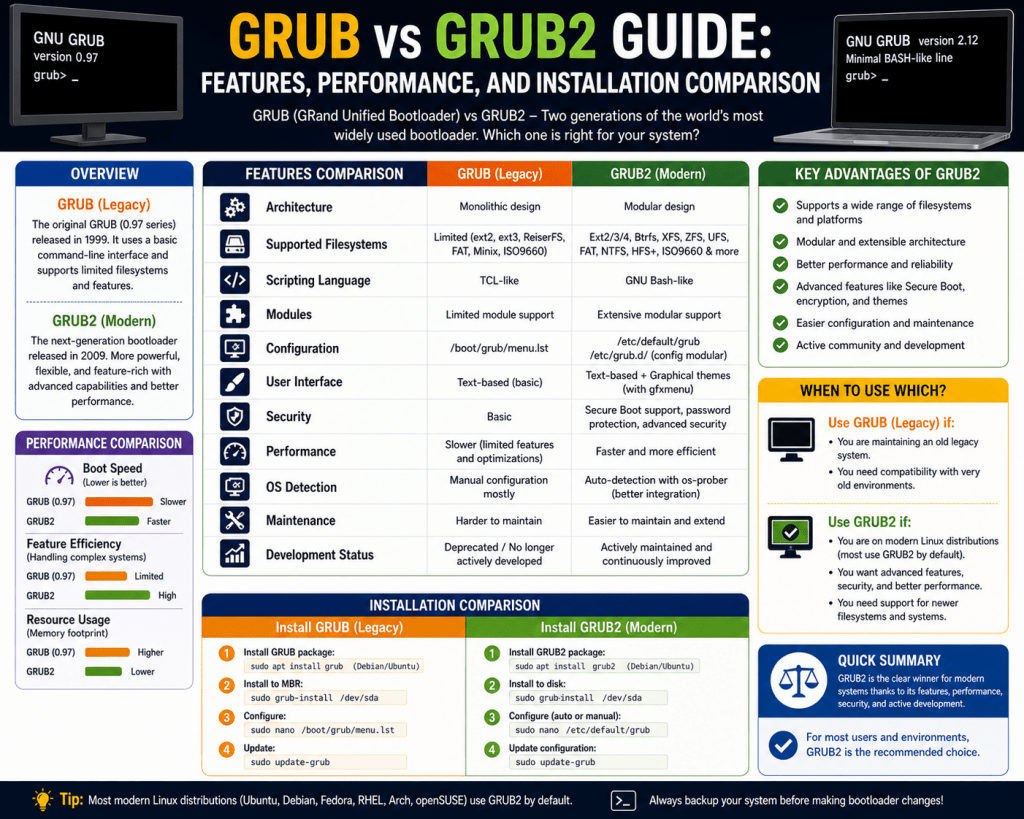
A bootloader is a critical piece of software that enables a computer to start its operating system. Without a bootloader, the system would remain inactive after powering on because there would be no mechanism to load the operating system into memory. Every computing device, regardless of its architecture or purpose, relies on a structured startup process that begins with firmware and transitions into the operating system with the help of a bootloader. This process is consistent across platforms, even though the implementation details may vary.
When a system is powered on, the firmware takes the first step. In older systems, this firmware is known as the Basic Input Output System, while modern systems rely on the Unified Extensible Firmware Interface. The firmware initializes hardware components such as memory, storage devices, and input peripherals. After completing these checks, it identifies a bootable device and transfers control to the bootloader stored on that device. This handoff is essential because the firmware itself is not designed to load full operating systems.
The bootloader then takes responsibility for locating the operating system kernel and loading it into memory. It also prepares the system environment so that the operating system can take over seamlessly. In Linux systems, this role is typically handled by GRUB or its successor GRUB2, both of which are designed to manage complex boot scenarios and provide flexibility in system configuration.
The Historical Background of GRUB
The development of GRUB marked a significant step forward in bootloader technology. It was created to support the GNU operating system and was later adopted as a standard bootloader within the open-source community. The early work on GRUB was led by Erich Boleyn, and it was developed in collaboration with the Free Software Foundation. By the late 1990s, GRUB had become an official component of the GNU Project.
GRUB introduced several innovations that distinguished it from earlier bootloaders. One of its most important features was its ability to understand file systems. This allowed it to locate operating system files without relying on fixed disk sectors. As a result, it became more flexible and resilient in environments where disk layouts could change. It also supported multiple operating systems, enabling users to choose between different systems during startup.
Despite these advancements, GRUB was designed during a time when computing environments were relatively simple. Hardware configurations were less diverse, and storage technologies were not as advanced as they are today. As a result, the original design of GRUB eventually began to show limitations when faced with modern requirements.
The Evolution Toward GRUB2
As technology progressed, the need for a more advanced bootloader became increasingly apparent. In 2002, a new project was initiated to redesign GRUB from the ground up. This project was initially known as PUPA and later evolved into GRUB2. The goal was to create a bootloader that could handle the complexities of modern systems while maintaining the flexibility that made GRUB popular.
GRUB2 represents a complete rewrite rather than a simple upgrade. Its architecture was designed to support a wide range of hardware configurations, storage technologies, and file systems. This redesign allowed it to overcome many of the limitations associated with the original GRUB. It also introduced new features that improved usability and system management.
The adoption of GRUB2 by major Linux distributions marked a turning point in bootloader technology. It became the default choice for most systems, reflecting its ability to meet the demands of contemporary computing environments. This transition was driven by the need for greater compatibility, scalability, and ease of use.
Understanding the Boot Process in Depth
To fully appreciate the role of GRUB and GRUB2, it is important to understand the boot process in greater detail. After the firmware completes its initialization tasks, it searches for a bootable device. This device typically contains a small section of data known as the Master Boot Record. The Master Boot Record is located at the beginning of the storage device and contains essential information required to continue the boot process.
The Master Boot Record includes a partition table and a small amount of executable code. Due to its limited size, it cannot store complex instructions. Instead, it serves as a pointer to more advanced bootloader code located elsewhere on the storage device. This is where GRUB comes into play.
GRUB uses the Master Boot Record as an entry point. Once it is loaded, it takes control of the boot process and reads its configuration files. These files contain information about available operating systems and kernel options. GRUB then presents a menu that allows users to select the desired operating system. After a selection is made, GRUB loads the corresponding kernel and transfers control to it.
The Role of the Master Boot Record in Bootloading
The Master Boot Record has historically been a central component of the boot process. It is responsible for initiating the transition from firmware to the operating system. However, its limited size imposes significant constraints on what it can accomplish. This limitation has influenced the design of bootloaders like GRUB and GRUB2.
In traditional systems, the Master Boot Record contained all the information needed to locate and load the operating system. This approach worked well in simple environments but became problematic as systems grew more complex. Any changes to the disk layout or hardware configuration require manual updates to the boot record, increasing the risk of errors.
GRUB addressed these limitations by shifting much of the complexity away from the Master Boot Record. Instead of storing detailed instructions within the record itself, it uses the space to point to external files that contain the necessary information. This approach allows for greater flexibility and reduces the impact of changes to the system configuration.
How GRUB Improved Traditional Boot Methods
GRUB introduced a more dynamic approach to bootloading by leveraging its ability to read file systems. This capability allowed it to locate operating system files based on their positions within the file system rather than relying on fixed disk sectors. As a result, it became more adaptable to changes in disk layout and hardware configuration.
Another important improvement was its support for multiple operating systems. GRUB made it possible to manage complex boot scenarios involving different operating systems installed on the same machine. This feature is particularly useful in environments where users need to switch between systems for different tasks.
GRUB also provided a command-line interface that allowed advanced users to interact with the bootloader directly. This interface enabled manual configuration and troubleshooting, offering a level of control that was not available in earlier bootloaders. These features made GRUB a powerful tool for system administrators and enthusiasts alike.
Challenges and Limitations of the Original GRUB
While GRUB represented a significant advancement, it was not without its challenges. One of the main limitations was its reliance on static configuration files. These files often had to be edited manually, which could be time-consuming and prone to errors. As systems became more complex, managing these configurations became increasingly difficult.
Another limitation was its compatibility with modern hardware and storage technologies. The original GRUB was not designed to handle advanced file systems, large storage devices, or newer firmware interfaces. This restricted its usefulness in contemporary computing environments.
The lack of modularity also posed challenges. GRUB’s architecture was not easily extensible, making it difficult to add new features or support additional hardware. These limitations highlighted the need for a more flexible and scalable solution.
The Emergence of Modern Bootloader Requirements
As computing technology evolved, the requirements for bootloaders changed significantly. Modern systems demand support for advanced storage configurations, including large disks, logical volume management, and various file systems. They also require compatibility with new firmware standards and hardware architectures.
Security has become another important consideration. Modern bootloaders must support secure boot mechanisms to prevent unauthorized code from being executed during the startup process. This requirement adds a layer of complexity to bootloader design.
User experience has also become a priority. Modern bootloaders are expected to provide intuitive interfaces and automated configuration processes. These features make it easier for users to manage their systems without requiring extensive technical knowledge.
Why GRUB2 Was Necessary for Modern Systems
The development of GRUB2 was driven by the need to address the limitations of the original GRUB and meet the demands of modern computing. Its redesigned architecture provides greater flexibility, allowing it to support a wide range of hardware and software configurations. This adaptability is essential in today’s diverse computing environments.
GRUB2 introduces features such as automatic configuration generation, improved file system support, and compatibility with modern firmware interfaces. These enhancements simplify system management and reduce the likelihood of errors. They also make it easier to deploy and maintain systems in both personal and enterprise environments.
The modular design of GRUB2 allows it to be extended with additional features as needed. This capability ensures that it can continue to evolve alongside advancements in technology. As a result, GRUB2 has become the preferred choice for most Linux distributions.
Architecture and Internal Design Differences Between GRUB and GRUB2
The architectural shift from GRUB to GRUB2 represents one of the most significant advancements in bootloader design. The original GRUB was built with a relatively straightforward structure that suited the needs of early Linux systems. It relied on a compact and direct approach, where most of its functionality was embedded into a limited space following the initial boot record. While this worked well in simpler environments, it became increasingly restrictive as systems evolved.
GRUB2 was designed with a completely different philosophy. Instead of relying on a monolithic structure, it adopts a layered and modular architecture. This design separates core functionality from additional features, allowing the bootloader to load only the components it needs during runtime. As a result, GRUB2 can support a broader range of hardware configurations and file systems without being constrained by size limitations.
This architectural redesign also improves maintainability. Developers can update or extend specific modules without modifying the entire bootloader. This flexibility ensures that GRUB2 can adapt to new technologies and requirements over time, making it far more sustainable in modern computing environments.
How GRUB and GRUB2 Handle Boot Stages
The boot process consists of multiple stages, and the way these stages are handled differs between GRUB and GRUB2. In the original GRUB, the boot process is divided into a few basic stages, with each stage responsible for loading the next. Due to space limitations in the initial boot area, GRUB must rely on tightly packed code that performs very specific tasks.
GRUB2 expands on this concept by introducing a more structured multi-stage process. The initial stage remains small and is responsible for loading additional components stored elsewhere on the disk. These components include modules and configuration files that provide extended functionality. This approach allows GRUB2 to overcome the limitations of the initial boot area while maintaining efficiency.
The separation of stages in GRUB2 also enhances reliability. If one component fails or needs to be updated, it can often be replaced without affecting the entire boot process. This level of granularity is not present in the original GRUB, where changes often require more extensive modifications.
Device Mapping and Identification Stability
Device mapping plays a critical role in ensuring that the bootloader can locate the necessary files to start the operating system. The original GRUB uses a direct mapping approach based on device order. This means that storage devices are identified according to how the system detects them during startup.
While this method is simple, it is not very reliable in dynamic environments. Changes such as adding new drives, removing existing ones, or altering connections can disrupt the mapping. When this happens, the bootloader may fail to locate the required files, resulting in boot errors.
GRUB2 improves stability by using persistent identifiers for storage devices. These identifiers are tied to the file system rather than the physical location of the device. This ensures that the bootloader can consistently locate the correct partitions, even if the hardware configuration changes. This improvement significantly reduces the risk of boot failures caused by device reordering.
Configuration Generation and Automation Mechanisms
Configuration management is an area where GRUB2 introduces major improvements. In the original GRUB, configuration files are static and must be edited manually. This process requires careful attention to detail, as even small errors can prevent the system from booting correctly. Managing these files becomes increasingly complex as the number of installed operating systems and kernel options grows.
GRUB2 replaces this manual approach with an automated system. Instead of editing the main configuration file directly, users modify higher-level configuration settings. Scripts then process these settings and generate the final configuration file automatically. This method reduces the likelihood of errors and simplifies system management.
Automation also allows GRUB2 to adapt to changes more effectively. For example, when a new kernel is installed, the configuration can be updated automatically without requiring manual intervention. This ensures that the system remains up to date and reduces the administrative burden.
Support for Advanced Storage Technologies
Modern storage technologies have evolved significantly, introducing new challenges for bootloaders. The original GRUB has limited support for these technologies, which restricts its ability to function in complex environments. It struggles with configurations such as logical volume management and certain types of redundant storage setups.
GRUB2 is designed to handle these advanced storage technologies with ease. It includes support for logical volumes, software-based redundancy, and a wide range of file systems. This capability allows it to operate in environments that require high levels of flexibility and reliability.
The ability to work with advanced storage systems is particularly important in enterprise environments. These systems often rely on complex configurations to ensure data integrity and performance. GRUB2’s compatibility with these technologies makes it a suitable choice for such scenarios.
Cross-Platform and Hardware Compatibility
Hardware diversity has increased significantly over the years, with systems now ranging from traditional desktop computers to embedded devices and servers. The original GRUB was primarily designed for a specific type of hardware architecture, limiting its applicability in modern environments.
GRUB2 expands compatibility to include a wide range of hardware platforms. It supports multiple processor architectures, allowing it to be used on different types of devices. This flexibility is essential for environments that require consistent behavior across various systems.
In addition to processor support, GRUB2 is compatible with modern firmware standards. This ensures that it can operate effectively on newer systems that no longer rely on legacy firmware. This level of compatibility makes GRUB2 a versatile solution for a wide range of use cases.
Improved Scripting and Dynamic Boot Logic
Scripting capabilities play a crucial role in modern bootloaders, enabling them to perform dynamic operations during the startup process. The original GRUB offers limited scripting support, which restricts its ability to adapt to changing conditions. Most configurations must be predefined, leaving little room for flexibility.
GRUB2 introduces a more advanced scripting environment. This allows the bootloader to execute commands, evaluate conditions, and make decisions during the boot process. For example, it can detect available operating systems, adjust boot parameters, and respond to hardware changes automatically.
This dynamic behavior enhances the overall functionality of the bootloader. It reduces the need for manual configuration and allows the system to adapt to different scenarios. This capability is particularly useful in environments where systems are frequently updated or reconfigured.
User Experience and Interface Enhancements
The user interface is an important aspect of the bootloader, especially for systems that support multiple operating systems. The original GRUB provides a basic text-based interface that allows users to select the desired operating system. While functional, it lacks visual appeal and customization options.
GRUB2 improves the user experience by introducing support for graphical interfaces and themes. This allows for a more polished and user-friendly presentation. Users can customize the appearance of the boot menu, including colors, fonts, and backgrounds.
In addition to visual enhancements, GRUB2 offers improved navigation and configuration options. These features make it easier for users to interact with the bootloader and manage their systems. While not essential for functionality, these improvements contribute to a more intuitive experience.
Handling of Large-Scale and Modern Disk Layouts
The growth of storage capacity has introduced new challenges for bootloaders. Modern systems often use large disks with complex partitioning schemes. The original GRUB was not designed to handle these scenarios, which limits its usefulness in contemporary environments.
GRUB2 addresses this issue by supporting modern disk layouts and large storage devices. It can work with advanced partitioning schemes and handle disks with significantly higher capacities. This ensures that it remains compatible with current and future storage technologies.
The ability to manage large disks is essential for systems that require extensive storage. This includes servers, data centers, and high-performance computing environments. GRUB2’s support for these configurations makes it a reliable choice for such applications.
Error Handling and Recovery Capabilities
Reliability is a critical factor in bootloader design. GRUB2 includes enhanced error handling and recovery mechanisms that improve system stability. When issues occur during the boot process, GRUB2 can provide diagnostic information and offer options for recovery.
The original GRUB has more limited error-handling capabilities. Troubleshooting issues often requires manual intervention and a deeper understanding of the system. This can be time-consuming and challenging, especially in complex environments.
GRUB2’s improved recovery features help reduce downtime and simplify troubleshooting. This is particularly important in environments where system availability is critical. By providing better tools for diagnosing and resolving issues, GRUB2 enhances overall reliability.
Security Enhancements in GRUB2
Security is an increasingly important consideration in modern computing. GRUB2 includes features designed to protect the integrity of the boot process. These features help prevent unauthorized modifications and ensure that only trusted code is executed during startup.
The original GRUB lacks many of these security enhancements, making it less suitable for systems that require strong protection. As security threats continue to evolve, the need for secure boot mechanisms becomes more critical.
GRUB2’s support for secure boot and related technologies ensures that systems are protected from potential vulnerabilities. This capability is essential for maintaining the integrity of modern computing environments.
Adaptability to Changing System Requirements
Modern systems are constantly evolving, with frequent updates to hardware and software. GRUB2 is designed to adapt to these changes with minimal disruption. Its use of automated configuration, persistent identifiers, and modular components allows it to respond effectively to new requirements.
The original GRUB is less adaptable due to its reliance on static configurations. Changes often require manual updates, which can introduce errors and increase maintenance effort. This limitation makes it less suitable for dynamic environments.
GRUB2’s adaptability ensures that it can continue to function reliably as systems evolve. This makes it a future-proof solution that can accommodate ongoing advancements in technology.
Introduction to the Functional Differences Between GRUB and GRUB2
The evolution from GRUB to GRUB2 represents a major shift in how Linux systems manage the boot process. While both bootloaders perform the same essential function of loading an operating system, their internal behavior, flexibility, and compatibility differ in important ways. These differences become more noticeable as system environments grow more complex, requiring better handling of storage devices, automation, and modern hardware standards.
The original GRUB was designed during a period when computing environments were relatively simple. Systems typically used basic disk layouts, and hardware configurations were less dynamic. As a result, GRUB was built with a straightforward design that focused on reliability within those limitations. However, as storage technologies, file systems, and firmware standards advanced, the need for a more capable bootloader became clear. GRUB2 was introduced to address these evolving requirements with a more flexible and scalable approach.
Device Referencing and Identification Techniques
One of the most critical aspects of a bootloader is its ability to locate the correct storage device and partition that contains the operating system. The original GRUB uses a method based on device order. It identifies disks according to how they are detected during system startup, using naming patterns tied to hardware positioning. While this method works in stable environments, it can create issues when hardware changes occur.
If a storage device is replaced, moved, or duplicated, the naming sequence may change. This can cause GRUB to lose track of the correct partition, leading to boot failures. In such cases, manual updates to configuration files are required to restore functionality. This reliance on hardware order makes GRUB less reliable in environments where changes are frequent.
GRUB2 improves this process by using persistent identifiers tied to the file system rather than physical placement. These identifiers remain consistent even when hardware configurations change. This ensures that the bootloader can always locate the correct partition, reducing the likelihood of errors and improving system stability.
Configuration Management and File Generation
Configuration management is another area where GRUB2 introduces significant improvements. In the original GRUB, configuration files must be written and maintained manually. This requires a detailed understanding of syntax and structure, and even small mistakes can prevent the system from booting properly. Managing multiple operating systems or kernel versions can make this process even more complex.
GRUB2 simplifies configuration through automation. Instead of editing the main configuration file directly, users modify higher-level settings. These settings are then processed by scripts that automatically generate the final configuration file. This approach reduces the risk of human error and makes system management more efficient.
Automation also allows GRUB2 to respond to system changes more effectively. When new kernels are installed or operating systems are added, the configuration can be updated automatically. This ensures that the bootloader always reflects the current system state without requiring manual intervention.
Support for Modern File Systems and Storage Layouts
The ability to work with different file systems is essential for a modern bootloader. The original GRUB has limited support for file systems, which restricts its compatibility with newer storage technologies. This limitation can prevent it from functioning properly in systems that use advanced configurations.
GRUB2 expands file system support significantly. It can handle a wide range of modern file systems, including those that offer improved performance and reliability. This includes support for journaling systems and advanced storage methods that are commonly used in modern Linux environments.
In addition to file systems, GRUB2 supports complex storage layouts such as logical volume management and software-based redundancy. These features are essential for systems that require flexibility and scalability. By supporting these technologies, GRUB2 ensures that it can operate effectively in both personal and enterprise environments.
Compatibility with Modern Firmware Systems
Firmware plays a key role in the boot process, and its evolution has influenced the design of bootloaders. The original GRUB was developed primarily for systems using traditional firmware. As newer firmware standards emerged, their compatibility became limited.
GRUB2 is designed to work with modern firmware systems, including those that have replaced older technologies. This compatibility allows it to function on a wider range of devices, from personal computers to advanced servers. It also ensures that the bootloader can take advantage of new features provided by modern firmware.
The ability to work with updated firmware standards is essential for maintaining compatibility with current hardware. As older systems are phased out, bootloaders must adapt to new technologies. GRUB2’s design ensures that it remains relevant in this changing landscape.
Modular Structure and Expandability
A key advantage of GRUB2 is its modular design. Instead of including all functionality in a single block of code, it divides features into separate modules that can be loaded as needed. This approach allows the bootloader to remain efficient while supporting a wide range of capabilities.
The original GRUB does not offer this level of flexibility. Its design is more rigid, making it difficult to add new features or support additional hardware without significant changes to the core code. This limitation reduces its ability to adapt to new requirements.
GRUB2’s modular structure allows developers and administrators to customize the bootloader according to their needs. Modules can be added or removed depending on the system configuration. This flexibility makes GRUB2 suitable for a variety of environments, from simple setups to complex infrastructures.
Advanced Scripting and Dynamic Behavior
Scripting capabilities are essential for automating tasks and adapting to changing system conditions. The original GRUB provides only basic scripting support, which limits its ability to perform dynamic operations. Most configurations must be defined in advance, leaving little room for flexibility.
GRUB2 introduces a more advanced scripting environment that allows for dynamic behavior during the boot process. It can execute commands, evaluate conditions, and make decisions based on system state. For example, it can detect available operating systems and adjust boot options automatically.
This capability reduces the need for manual configuration and improves the overall efficiency of system management. It also allows GRUB2 to handle more complex scenarios, such as systems with multiple operating systems or frequently changing configurations.
User Interface and Visual Enhancements
The user interface of a bootloader plays an important role in usability, especially for systems with multiple operating systems. The original GRUB provides a simple text-based interface that allows users to select an operating system. While functional, it lacks customization options and visual appeal.
GRUB2 enhances the user interface by supporting graphical menus and themes. This allows for a more user-friendly and visually appealing experience. Users can customize the appearance of the boot menu to match their preferences or system branding.
In addition to visual improvements, GRUB2 offers better navigation and configuration options. These features make it easier to manage boot settings and select the desired operating system. While not essential for functionality, these enhancements improve the overall user experience.
Handling of Large Storage Devices and Modern Disk Formats
Modern storage devices are significantly larger and more complex than those used when the original GRUB was developed. This has introduced new challenges for bootloaders, particularly in terms of addressing and accessing large amounts of data.
GRUB2 is designed to handle large storage devices and modern disk formats. It supports advanced partitioning schemes and can operate effectively in environments with high-capacity drives. This ensures that it remains compatible with current and future storage technologies.
The original GRUB struggles with these advanced configurations due to its limited design. This makes it less suitable for modern systems that rely on large disks and complex storage layouts. GRUB2’s ability to handle these scenarios makes it a more practical choice for contemporary environments.
Error Handling and System Recovery Features
System reliability is a critical factor in bootloader design. GRUB2 includes improved error handling and recovery features that help maintain system stability. When problems occur during the boot process, it can provide diagnostic information and offer options for recovery.
The original GRUB has more limited error-handling capabilities, which can make troubleshooting more difficult. Resolving issues often requires manual intervention and a deeper understanding of the system.
GRUB2’s enhanced recovery features reduce downtime and simplify troubleshooting. This is especially important in environments where system availability is critical. By providing better tools for diagnosing and resolving issues, it improves overall reliability.
Security Features and Boot Protection
Security has become an essential consideration in modern computing. GRUB2 includes features designed to protect the boot process from unauthorized access and modification. These features help ensure that only trusted code is executed during system startup.
The original GRUB does not provide the same level of security, making it less suitable for systems that require strong protection. As security threats continue to evolve, the importance of secure boot mechanisms has increased.
GRUB2’s support for secure boot and related technologies helps safeguard the system during its most vulnerable stage. This capability is essential for maintaining the integrity of modern computing environments.
Adaptation to Dynamic System Changes
Modern systems frequently change, including hardware upgrades, software updates, and configuration adjustments. GRUB2 is designed to adapt to these changes with minimal disruption. Its use of persistent identifiers, automated configuration, and modular components allows it to respond effectively to evolving conditions.
The original GRUB relies on static configurations, which makes it less adaptable. Changes often require manual updates, increasing the risk of errors and system downtime.
GRUB2’s adaptability ensures that it can continue to function reliably even as system conditions change. This makes it a more suitable choice for environments where flexibility and resilience are important.
Conclusion
The comparison between GRUB and GRUB2 highlights a clear evolution in bootloader technology, driven by the increasing complexity of modern computing systems. While both serve the same fundamental purpose of loading an operating system, the differences in their design, functionality, and adaptability make them suited for very different environments. GRUB reflects an earlier stage of system development, where simplicity and direct control were sufficient for most use cases. In contrast, GRUB2 represents a modern approach that prioritizes flexibility, automation, and compatibility with a wide range of hardware and software configurations.
One of the most significant distinctions lies in how each bootloader handles system changes. GRUB relies on static configurations and hardware-based references, which can create challenges when devices are modified or replaced. GRUB2 addresses these limitations through persistent identifiers and automated configuration generation, allowing it to adapt more easily to evolving system conditions. This shift reduces the need for manual intervention and minimizes the risk of errors during system updates or maintenance.
Another key difference is the level of support for modern technologies. GRUB has limited compatibility with newer file systems, storage layouts, and firmware standards, making it less suitable for contemporary environments. GRUB2, on the other hand, is designed to handle advanced storage solutions, large-capacity disks, and modern firmware interfaces. Its ability to support diverse hardware architectures further extends its usefulness across a wide range of devices, from personal computers to enterprise systems.
The modular architecture of GRUB2 also plays a crucial role in its effectiveness. By separating functionality into independent components, it allows for greater customization and easier updates. This design not only improves maintainability but also ensures that the bootloader can evolve alongside technological advancements. In contrast, the more rigid structure of GRUB limits its ability to incorporate new features or adapt to changing requirements.
Usability is another area where GRUB2 demonstrates clear advantages. Automated configuration tools, improved scripting capabilities, and enhanced user interfaces make it more accessible to both beginners and experienced users. These features simplify system management while still providing the flexibility needed for complex setups. GRUB, while functional, requires a higher level of expertise to manage effectively, particularly in environments with multiple operating systems or advanced configurations.
Security considerations further reinforce the importance of GRUB2 in modern systems. As threats targeting the boot process become more sophisticated, the need for secure boot mechanisms has grown. GRUB2 includes features that help protect system integrity during startup, ensuring that only trusted code is executed. This level of protection is essential for maintaining the reliability and security of current computing environments.
Overall, the progression from GRUB to GRUB2 reflects broader trends in system design, where adaptability, automation, and security are increasingly important. The differences between the two are not merely incremental improvements but represent a fundamental shift in how bootloaders are designed and implemented.