
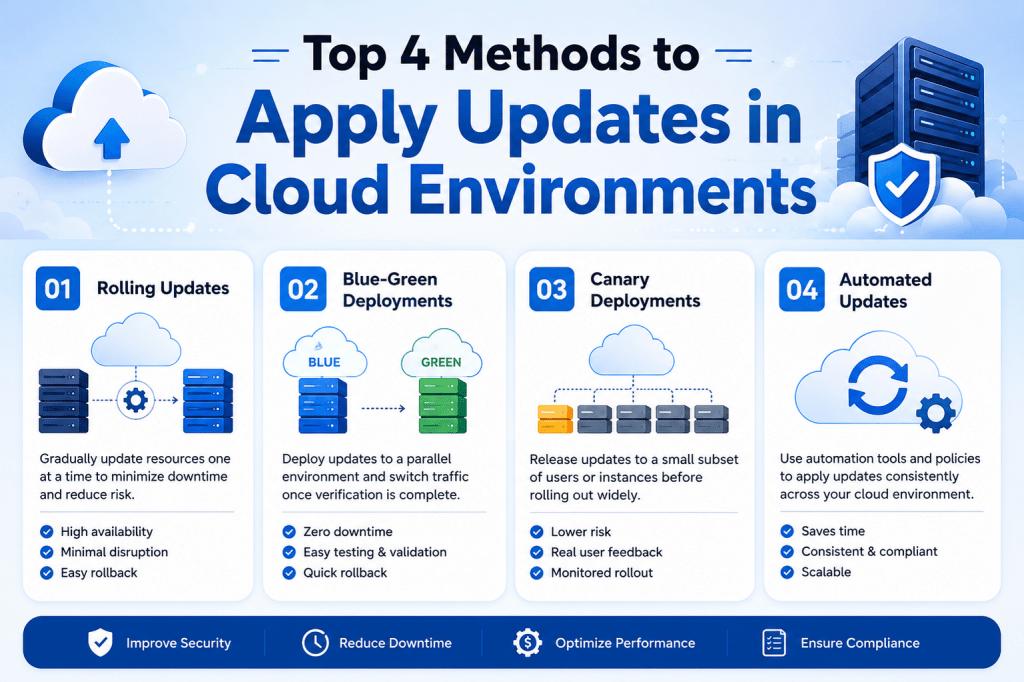
Software updates are necessary for every modern business. Applications need updates to improve performance, fix bugs, strengthen security, and support new features. Without regular updates, systems become outdated and difficult to manage.
Many companies avoid updates because they fear downtime or production failures. A small patch can sometimes create unexpected issues inside a live environment. Because of this, some organizations continue using old software versions for long periods. While this may reduce short-term risk, it can create bigger problems later.
Old software often contains security vulnerabilities and compatibility issues. It also increases technical debt, making future upgrades more complicated and expensive. Cloud technology helps businesses reduce these risks by providing safer deployment methods and automated testing systems.
One of the most common update strategies is using separate development, QA, and production environments. This process allows teams to test updates carefully before they reach live users.
Understanding the Development Environment
The development environment is where software engineers create and test changes. Developers use this environment to apply updates, build new features, and fix existing problems without affecting customers.
For example, a company may decide to update its web application framework. Instead of applying the update directly to the live system, developers first install it inside the development environment. They then review application behavior and check whether all features continue working correctly.
This stage gives developers the freedom to experiment safely. Since development systems are isolated from production, mistakes do not impact business operations or customer experience.
Cloud platforms make development environments easier to manage because teams can quickly create servers, virtual machines, and testing resources whenever needed. This flexibility speeds up software development and reduces infrastructure costs.
Importance of Smoke Testing
After applying updates in development, teams usually perform smoke testing. Smoke testing is a basic process that checks whether the application can still function properly after changes are introduced.
Developers test core features such as login pages, database connections, dashboards, and navigation systems. The purpose is to identify major failures early before deeper testing begins.
For example, if a software update causes the application to crash during startup, smoke testing will quickly detect the issue. Developers can then fix the problem before moving the update to the next stage.
Smoke testing saves time because it prevents teams from running large testing procedures on unstable applications. It also improves deployment reliability by catching critical issues early.
Role of Automated Testing
Automated testing is an important part of modern cloud deployments. Instead of checking every feature manually, organizations use automated tools to test application behavior after updates are applied.
Automated tests can examine different parts of the application, including databases, APIs, user interfaces, and cloud services. These tests run much faster than manual testing and help teams identify problems quickly.
For example, an online shopping application may automatically test product searches, payment processing, and customer accounts after every update. If a feature stops working, the system immediately alerts the development team.
Cloud environments make automated testing more effective because tests can run across multiple systems at the same time. This improves speed, consistency, and overall software quality.
Moving Updates to the QA Environment
Once developers finish testing, the update moves into the QA environment. QA stands for quality assurance. This stage focuses on finding issues that developers may have missed during development.
The QA environment should closely match the production environment. Server settings, databases, operating systems, and application configurations should be as similar as possible. This helps teams detect real-world problems before deployment.
Quality assurance specialists test the application from a user perspective. They examine workflows, browser compatibility, performance, and application stability.
For example, testers may discover that an updated feature works correctly on one browser but fails on another. Identifying these issues before production deployment prevents customer frustration and downtime.
Many organizations also use a staging environment before production deployment. The staging environment acts as a final testing area where teams can review the complete application under near-production conditions.
Why Environment Separation Is Important
Separating development, QA, and production environments creates a safer deployment process. Without separation, developers could accidentally introduce unstable updates directly into live systems.
Environment separation also improves teamwork. Developers focus on coding and updates, QA teams focus on testing, and operations teams manage infrastructure stability. Each team has a clear role in the deployment process.
Cloud technology makes environment separation much easier than traditional infrastructure. Businesses can create isolated cloud environments quickly without purchasing additional hardware.
Infrastructure automation tools also help maintain consistency between environments. Teams can use templates to deploy identical server configurations across development, QA, and production systems.
Consistency is important because configuration differences often cause deployment failures. If all environments are built the same way, updates become more predictable and reliable.
Benefits of Continuous Integration
Continuous integration is a deployment practice where developers regularly merge code changes into a shared system. Automated pipelines then test and validate those changes immediately.
This process helps organizations identify issues early. Instead of waiting until the end of a project, teams receive fast feedback whenever updates are introduced.
Cloud platforms support continuous integration through automated deployment pipelines. These pipelines can build applications, run tests, and prepare updates automatically.
Continuous integration also improves collaboration. Multiple developers can work on different features without creating major conflicts. Since updates are constantly tested, problems are detected before they grow larger.
Another advantage is deployment speed. Automated systems complete testing and validation much faster than manual processes. Businesses can release updates more frequently while maintaining stability.
Reducing Risks During Deployment
One of the biggest goals of cloud deployment strategies is reducing risk. Every software update carries some level of uncertainty, but structured deployment processes make updates safer.
Testing updates in development and QA environments helps organizations identify compatibility issues, performance problems, and security risks before deployment.
Automated testing further reduces risk by checking application behavior consistently after every update. Monitoring systems can also track performance during deployments and alert teams if issues appear.
Rollback mechanisms are another important feature. If an update causes unexpected problems, teams can quickly restore the previous version of the application. This minimizes downtime and protects customer experience.
Cloud infrastructure improves rollback speed because virtual systems and configurations can be restored automatically within minutes.
How Cloud Technology Improves Deployments
Cloud computing has transformed the way organizations manage software updates. Traditional deployment methods often required manual server configuration and long maintenance windows.
Cloud environments provide automation, scalability, and flexibility that simplify the deployment process. Teams can quickly create environments, run automated tests, and deploy updates with minimal downtime.
Cloud infrastructure also supports better monitoring and visibility. Organizations can track application performance, server health, and deployment activity in real time.
Another advantage is scalability. Businesses can increase infrastructure resources during deployments and reduce them afterward. This flexibility improves performance while controlling operational costs.
Because of these benefits, cloud deployment strategies have become essential for modern software development and IT operations.
Preparing for Advanced Deployment Methods
The development, QA, and production workflow forms the foundation of safe software deployment. It provides structure, testing, and stability throughout the update process.
As organizations grow, they often combine this approach with advanced cloud deployment strategies such as rolling updates, blue-green deployments, and failover clusters. These methods further reduce downtime and improve reliability.
By building strong deployment pipelines and maintaining proper testing environments, businesses can apply updates more confidently while protecting system stability and customer experience.
Understanding Rolling Updates
Rolling updates are one of the most effective ways to deploy software updates in cloud environments without causing major downtime. Instead of updating every server at the same time, the update is applied gradually across multiple systems. This method allows businesses to keep applications running while deployment takes place in the background.
Modern applications often operate on several servers connected through load balancers. These servers work together to handle traffic, process requests, and maintain performance during high usage periods. If all servers restart simultaneously during an update, users may temporarily lose access to the application. Rolling updates solve this problem by updating servers one at a time.
This deployment strategy is especially useful for businesses that require high availability. Online stores, banking systems, streaming services, and cloud applications often operate continuously throughout the day. Even short outages can affect customer trust, revenue, and overall business performance.
Rolling updates allow organizations to maintain service availability while still keeping systems updated and secure.
How Rolling Updates Work
The rolling update process starts by selecting one server from the application environment. Traffic is temporarily redirected away from that server using a load balancer. Once users are no longer connected to it, the update is applied safely.
After the update is complete, the server restarts and undergoes testing to confirm that it functions correctly. Once verified, traffic is routed back to the updated server. The process then repeats on the next server until every machine has received the update.
This gradual approach minimizes downtime because the remaining servers continue handling customer traffic during deployment. Users usually do not notice that updates are taking place behind the scenes.
For example, an online shopping website may run on five application servers. During a rolling update, only one server is updated at a time while the other four continue processing customer orders and transactions. After the first server is stable, the deployment moves to the second server, then the third, and so on.
This process allows businesses to maintain service continuity while safely applying updates.
Role of Load Balancers During Updates
Load balancers are essential for rolling deployments. A load balancer distributes incoming traffic across multiple servers to improve performance and reliability.
During a rolling update, the load balancer temporarily removes one server from the active pool. This ensures that users are not connected to a server while updates are being installed.
Once the update finishes and the server passes health checks, the load balancer adds it back into the traffic rotation. The process continues until every server has been updated.
Load balancers also improve fault tolerance. If one server experiences issues during deployment, the remaining servers continue handling traffic. This reduces the risk of complete service outages.
Cloud platforms provide built-in load balancing services that simplify rolling deployments. These tools automatically monitor server health and adjust traffic routing when needed.
Benefits of Rolling Updates
One of the biggest advantages of rolling updates is reduced downtime. Since servers are updated individually, the application remains accessible throughout the deployment process.
Another major benefit is deployment safety. If a problem appears during deployment, teams can pause the process before the update reaches all servers. This limits the impact of faulty updates and prevents widespread outages.
Rolling updates also improve deployment flexibility. Teams can control how quickly updates move through the environment. Some businesses prefer slower deployments for critical systems, while others may use faster deployment schedules for less sensitive applications.
Cloud infrastructure makes rolling deployments easier because resources can scale dynamically. Organizations can temporarily add extra servers during deployments to maintain performance under heavy traffic conditions.
Another advantage is easier rollback management. If a deployment causes issues, only a portion of the infrastructure is affected initially. Teams can quickly restore previous versions without impacting the entire environment.
Real-World Example of Rolling Deployments
Imagine a large e-commerce platform that receives thousands of users every hour. The website runs on multiple cloud servers connected through a load balancer.
During a busy sales event, developers discover a problem with the checkout system. Customers are unable to complete purchases because of a bug in the payment process. The issue must be fixed immediately without shutting down the website.
Instead of restarting all servers simultaneously, the operations team performs a rolling update. One server is removed from traffic, updated with the fix, tested, and returned to service. The process then moves to the next server.
While updates occur, customers continue browsing products and placing orders using the remaining servers. The deployment completes successfully with little disruption to users.
This example demonstrates why rolling updates are valuable for cloud applications that require continuous availability.
Health Checks and Monitoring
Health checks play an important role during rolling deployments. Before traffic is routed back to an updated server, the system performs automated checks to confirm that the application is functioning correctly.
Health checks may verify server responsiveness, database connectivity, API functionality, and application performance. If a server fails these checks, traffic remains blocked until the issue is resolved.
Monitoring systems also help teams track deployment progress in real time. Administrators can observe server performance, error rates, memory usage, and customer activity during the update process.
Cloud monitoring tools provide alerts whenever unusual behavior occurs. For example, if application response times increase after an update, the operations team can investigate immediately.
Continuous monitoring improves deployment reliability because teams can identify and resolve issues before they affect large numbers of users.
Challenges of Rolling Updates
Although rolling updates offer many advantages, they also introduce certain challenges. One common issue is version inconsistency during deployment.
Since updates occur gradually, some servers may run the new version while others continue running the previous version. This temporary inconsistency can create compatibility problems if the application is not designed carefully.
For example, if a database structure changes during deployment, older application servers may struggle to communicate with updated systems. Developers must ensure that both versions remain compatible during the transition period.
Deployment speed can also become a challenge for large environments. Updating hundreds or thousands of servers individually may take significant time, especially when extensive testing is required after each deployment step.
Another challenge involves resource usage. During deployments, fewer servers are available to handle traffic because some are temporarily removed for updates. Organizations must ensure that remaining systems can support user demand during this process.
Proper planning and infrastructure scaling help reduce these risks.
Rolling Updates in Container Environments
Container technology has made rolling updates even more efficient in cloud environments. Platforms like Kubernetes allow organizations to automate deployments across containerized applications.
Instead of updating entire servers, teams can deploy updated application containers gradually across the infrastructure. Kubernetes automatically manages traffic routing, scaling, and health monitoring during the deployment process.
Container orchestration platforms also support automatic rollback functionality. If health checks fail during deployment, the system can immediately restore the previous application version without manual intervention.
This level of automation improves deployment speed and reduces operational complexity.
Cloud-native applications are increasingly designed around container-based architectures because they support scalability, portability, and continuous delivery practices.
Importance of Deployment Automation
Automation is one of the key factors that make rolling updates successful. Manual deployments are slower, more error-prone, and difficult to manage at scale.
Automated deployment pipelines handle repetitive tasks such as server updates, traffic routing, health checks, and rollback procedures. This reduces human error and improves deployment consistency.
Cloud environments support infrastructure automation through scripts, templates, and orchestration tools. Teams can define deployment procedures once and reuse them across multiple environments.
Automation also improves deployment frequency. Organizations can release updates more often because the deployment process becomes faster and more reliable.
Frequent updates help businesses respond quickly to security vulnerabilities, customer feedback, and market changes.
Security Advantages of Rolling Updates
Rolling updates also improve security management. Businesses can apply critical patches quickly without shutting down applications completely.
Cybersecurity threats continue evolving rapidly, and delayed patching increases vulnerability exposure. Rolling deployments allow organizations to install security fixes while maintaining service availability.
Cloud environments often integrate security scanning directly into deployment pipelines. Applications can be tested automatically for vulnerabilities before updates reach production systems.
This combination of automation and gradual deployment improves overall infrastructure security while minimizing operational disruption.
Scalability and Cloud Flexibility
Cloud infrastructure provides significant flexibility for rolling deployments. Organizations can scale resources dynamically based on deployment requirements and traffic levels.
For example, businesses may temporarily increase server capacity during updates to maintain strong performance while some systems are unavailable for deployment.
Auto-scaling services can automatically launch additional servers if traffic increases unexpectedly during the update process. This ensures that customer experience remains stable even during high-demand periods.
Scalability is especially important for global applications that serve users across different regions and time zones.
Cloud flexibility also allows teams to test rolling deployment strategies in staging environments before applying them to production systems.
Preparing for Advanced Deployment Models
Rolling updates provide a strong balance between deployment safety and application availability. They reduce downtime, improve deployment control, and support modern cloud architectures.
Many organizations combine rolling updates with additional deployment strategies such as blue-green deployments and failover clustering. These advanced methods provide even greater flexibility and resilience for critical applications.
By using rolling updates alongside automation, monitoring, and scalable cloud infrastructure, businesses can deploy updates more confidently while maintaining a reliable user experience.
Understanding Blue-Green Deployment
Blue-green deployment is one of the most reliable deployment methods used in cloud computing. This strategy focuses on reducing downtime and minimizing deployment risk by maintaining two separate production environments.
In a blue-green setup, both environments contain the same application and infrastructure configuration. One environment handles live user traffic while the other remains inactive and ready for updates. The active environment is usually called blue, while the standby environment is called green.
When a new update is ready, the deployment team applies changes to the inactive environment instead of the live production system. Once testing is complete and everything functions correctly, traffic is switched from the old environment to the updated one.
This process allows businesses to perform deployments with little to no downtime. Users continue accessing the application normally while updates happen in the background.
Blue-green deployment has become extremely popular in cloud environments because cloud infrastructure makes it easy to duplicate servers, databases, and application resources quickly.
How Blue-Green Deployment Works
The blue-green deployment process begins with two identical environments running side by side. One environment serves customers, while the second environment stays prepared for future updates.
For example, imagine an online streaming platform operating on the blue environment. Customers watch videos, manage subscriptions, and browse content through this live system.
When developers release a new application update, the update is installed on the green environment instead of the live blue environment. The deployment team then performs testing, verifies functionality, and checks system performance.
Once the green environment passes all tests, traffic routing changes from blue to green. Users are now connected to the updated application without experiencing downtime.
The previous blue environment remains available as a backup. If any issues appear after deployment, traffic can quickly switch back to the older environment.
This rollback capability is one of the biggest advantages of blue-green deployment.
Benefits of Blue-Green Deployment
One major benefit of blue-green deployment is near-zero downtime. Since updates happen on an inactive environment, users are not affected during the deployment process.
Another important advantage is deployment safety. Teams can fully test updates before exposing them to customers. If problems appear, the organization can delay the traffic switch until issues are resolved.
Rollback procedures are also much faster compared to traditional deployment methods. Instead of rebuilding systems or reinstalling previous versions, teams simply redirect traffic back to the older environment.
Blue-green deployment also improves release confidence. Since the updated environment closely mirrors production, organizations can validate application behavior under realistic conditions before going live.
Cloud infrastructure enhances these benefits because environments can scale quickly using virtual machines, containers, and infrastructure automation tools.
Why Cloud Platforms Support Blue-Green Deployments
Cloud environments are ideal for blue-green deployment strategies because they provide flexible and scalable infrastructure.
In traditional on-premises data centers, maintaining duplicate production environments required significant hardware investments. Organizations needed additional servers, storage systems, and networking equipment to support standby environments.
Cloud computing removes many of these limitations. Businesses can create temporary environments using virtual infrastructure and pay only for the resources they use.
Infrastructure-as-code tools also simplify environment replication. Teams can define servers, databases, and configurations through templates, ensuring both environments remain identical.
This consistency is important because differences between environments often create deployment problems.
Cloud automation further improves blue-green deployments by managing traffic routing, health checks, and scaling operations automatically.
Importance of Environment Consistency
For blue-green deployments to work effectively, both environments must remain as similar as possible. The operating systems, application versions, databases, security settings, and cloud configurations should match closely.
If the environments differ significantly, updates that appear stable during testing may fail after deployment.
For example, if the standby environment contains different database configurations, application behavior could change unexpectedly after traffic switching occurs.
Infrastructure automation tools help organizations maintain consistency across environments. Teams can deploy identical configurations repeatedly without relying on manual setup processes.
This reduces deployment errors and improves application reliability.
Canary Deployment Strategy
One variation of blue-green deployment is the canary deployment model. Instead of sending all traffic to the updated environment immediately, traffic shifts gradually in controlled percentages.
This strategy allows organizations to test updates on a smaller group of users before full deployment occurs.
For example, after updating the green environment, the business may route only five percent of traffic to the new version. Monitoring systems then observe application performance, user behavior, and error rates.
If the deployment performs well, traffic increases gradually to larger percentages until all users access the updated environment.
If problems appear, teams can stop the rollout immediately before most users are affected.
Canary deployments reduce deployment risk because issues are identified early on a limited scale.
Advantages of Canary Deployments
Canary deployments provide several important advantages for cloud applications.
One major advantage is controlled exposure. Instead of affecting all users at once, updates impact only a small portion of traffic initially.
This approach helps businesses monitor application stability carefully before full deployment.
Another benefit is improved customer experience testing. Organizations can evaluate how users respond to new features, interface changes, or performance updates.
For example, a streaming platform may introduce a redesigned homepage through a canary deployment. By analyzing customer behavior and engagement metrics, the company can determine whether the update improves user experience.
Canary deployments also improve problem detection. Smaller deployments make troubleshooting easier because teams can isolate issues more quickly.
Cloud monitoring systems play a major role during canary deployments by tracking error rates, response times, and infrastructure health continuously.
Linear Deployment Strategy
Linear deployment is another variation of blue-green deployment. Like canary deployment, traffic shifts gradually from the old environment to the updated one.
The main difference is that linear deployments increase traffic in equal increments over fixed periods.
For example, the deployment process may move ten percent of traffic every ten minutes until the rollout reaches completion.
This predictable structure helps operations teams monitor deployments more systematically.
Linear deployments are useful for organizations that want gradual rollouts while maintaining consistent deployment timing.
Since traffic increases at steady intervals, teams can analyze system performance during each stage before moving further.
This method balances deployment speed and operational control effectively.
Benefits of Linear Deployments
Linear deployments offer greater predictability compared to canary deployments. Since traffic shifts follow predefined intervals, operations teams can plan monitoring activities more efficiently.
This approach also simplifies automation. Cloud deployment systems can schedule traffic increases automatically without requiring constant manual intervention.
Another advantage is reduced deployment stress on infrastructure. Gradual traffic increases allow systems to scale steadily instead of experiencing sudden traffic spikes.
Linear deployments are commonly used in environments where stability and consistency are more important than rapid feature releases.
Businesses that handle financial transactions, enterprise software, or customer-sensitive applications often prefer controlled deployment pacing.
All-at-Once Deployment Strategy
The all-at-once deployment method is the simplest form of blue-green deployment. After updates are applied to the standby environment, all traffic switches to the new environment immediately.
This approach is faster than canary or linear deployments because the transition occurs in a single step.
All-at-once deployments are easier to configure and manage, making them attractive for smaller projects or less complex applications.
However, this simplicity also increases risk. If the updated environment contains issues, all users experience the problem immediately after deployment.
Because of this, thorough testing becomes extremely important before switching traffic.
Despite the risks, all-at-once deployments remain useful in situations where fast deployment speed is more important than gradual rollout control.
Rollback Advantages in Blue-Green Deployment
One of the strongest advantages of blue-green deployment is rapid rollback capability.
If the updated environment experiences performance problems, application crashes, or unexpected behavior, traffic can quickly return to the previous environment.
This rollback process usually takes only a few moments because the older environment remains fully operational.
Traditional deployment methods often require lengthy recovery procedures involving backups, reinstallation, and manual troubleshooting. Blue-green deployment eliminates much of this complexity.
Fast rollback capability improves business continuity and protects customer experience during failed deployments.
Monitoring During Deployment
Monitoring systems are essential during blue-green deployments. Teams must observe infrastructure performance, application health, and customer activity throughout the deployment process.
Cloud monitoring platforms provide real-time insights into server performance, memory usage, response times, and error rates.
If unusual behavior appears after deployment, teams can investigate immediately and decide whether rollback is necessary.
Monitoring also helps organizations evaluate deployment success over time. Performance metrics reveal whether updates improve system efficiency or introduce hidden problems.
Continuous monitoring strengthens deployment reliability and supports faster issue resolution.
Challenges of Blue-Green Deployment
Although blue-green deployment provides many advantages, it also introduces certain challenges.
One common challenge is infrastructure cost. Maintaining two production environments requires additional cloud resources.
Large applications with extensive databases and global infrastructure may generate significant operational expenses when duplicate environments remain active.
Database synchronization can also become complicated. Both environments must maintain accurate and consistent data during deployment transitions.
Another challenge involves deployment complexity. Managing multiple environments, traffic routing systems, and monitoring tools requires strong operational planning.
Despite these challenges, many organizations consider blue-green deployment worthwhile because of its reliability and rollback capabilities.
Combining Blue-Green Deployment with Other Methods
Many businesses combine blue-green deployment with other cloud deployment strategies.
For example, organizations may use rolling updates within blue-green environments. Instead of updating the entire standby environment simultaneously, updates occur gradually across servers.
Companies may also combine blue-green deployment with failover clustering to improve infrastructure resilience.
These hybrid strategies provide additional protection against downtime and system failures.
As cloud applications continue growing more complex, deployment flexibility becomes increasingly important.
Blue-green deployment remains one of the most trusted methods for delivering stable updates while maintaining strong customer experience and application availability.
Understanding Failover Clusters
Failover clusters are an important part of modern cloud infrastructure. They are designed to keep applications and services running even when hardware, software, or network failures occur. Businesses that require continuous availability often use failover clustering to reduce downtime and improve system reliability.
A failover cluster usually consists of two or more servers called nodes. These nodes constantly communicate with each other and share operational information. One node actively handles production traffic while the second node stays on standby, ready to take over if the primary server experiences problems.
This setup improves business continuity because applications remain available even during unexpected failures. Instead of waiting for administrators to repair systems manually, the standby node automatically becomes active when necessary.
Failover clusters are commonly used for databases, enterprise applications, cloud services, and critical business platforms that require high uptime.
How Failover Clusters Work
Failover clusters operate through continuous communication between nodes. This communication process is often called a heartbeat connection. The heartbeat allows each node to confirm that the other systems are still online and functioning correctly.
If the active node stops responding, the standby node detects the failure immediately. The cluster system then transfers operations from the failed server to the standby server automatically.
For example, a company may run its customer database on a failover cluster. If the main database server crashes because of a hardware issue, the standby server quickly takes over and continues processing requests.
This automatic transition minimizes service interruption and helps businesses maintain operations during unexpected failures.
Cloud infrastructure improves failover systems because standby resources can scale dynamically and operate across multiple regions or availability zones.
Difference Between Failover Clusters and Blue-Green Deployments
Failover clusters and blue-green deployments may appear similar because both involve duplicate environments, but they serve different purposes.
Blue-green deployment focuses mainly on software updates and deployment safety. It allows teams to switch traffic between environments during application releases.
Failover clustering focuses on system availability and disaster recovery. Its primary goal is to maintain service continuity when failures occur.
Another important difference is communication between systems. In failover clusters, nodes constantly monitor each other through heartbeat connections. In blue-green deployments, environments usually remain separate until traffic switching occurs.
Failover clusters are designed for automatic recovery, while blue-green deployments focus more on controlled release management.
Many organizations combine both strategies to improve deployment reliability and operational stability.
Importance of High Availability
High availability is critical for modern businesses that depend on cloud services and online applications. Customers expect applications to remain accessible at all times, regardless of maintenance activities or technical problems.
Downtime can create serious consequences for businesses. Online stores may lose sales, financial platforms may interrupt transactions, and enterprise systems may delay operations across entire organizations.
Failover clusters reduce these risks by ensuring that backup systems are always ready to take over during failures.
Cloud computing has made high availability more accessible because organizations can distribute infrastructure across multiple servers, regions, and data centers without investing heavily in physical hardware.
This flexibility allows businesses to design highly resilient systems that continue operating even during major infrastructure failures.
Role of Shared Storage in Failover Clusters
Many failover clusters use shared storage systems to maintain consistent data access between nodes. Shared storage allows both the active and standby servers to access the same application files and databases.
When failover occurs, the standby server already has access to the required data and can continue operations quickly.
For example, a financial application running on a failover cluster may store transaction data on centralized cloud storage. If the primary server fails, the backup server immediately connects to the same storage and continues processing customer requests.
Cloud-based storage systems improve failover efficiency because they support replication, redundancy, and automatic synchronization across multiple locations.
This reduces the risk of data loss during infrastructure failures.
Automatic Failover Process
One of the biggest advantages of failover clustering is automation. The system continuously monitors server health and responds automatically when failures occur.
The failover process typically includes several steps. First, the cluster detects that the active node is unavailable. Next, the standby node activates necessary services and applications. Finally, traffic routing systems redirect users to the backup server.
This entire process often happens within seconds or minutes, depending on infrastructure design.
Automation reduces the need for manual intervention during emergencies. Instead of waiting for administrators to respond, the system protects service availability automatically.
Cloud monitoring and orchestration tools further improve automation by providing intelligent health checks and recovery procedures.
Benefits of Failover Clustering
One major benefit of failover clusters is reduced downtime. Since backup systems remain ready at all times, applications can recover quickly from hardware or software failures.
Another important advantage is improved reliability. Businesses can continue serving customers even during infrastructure problems.
Failover clusters also reduce single points of failure. Instead of depending on one server, organizations distribute workloads across multiple systems.
This improves resilience and strengthens overall infrastructure stability.
Cloud-based failover systems also support geographic redundancy. Applications can operate across different regions so that local outages do not interrupt services globally.
Another advantage is maintenance flexibility. Administrators can perform maintenance on one node while another node continues handling production traffic.
This allows businesses to update systems with minimal disruption.
Database Failover Clustering
Databases are among the most common systems protected by failover clustering. Since databases store critical business information, maintaining availability is extremely important.
Cloud environments often use clustered database systems to support applications with high transaction volumes.
For example, banking systems, inventory platforms, and healthcare applications require continuous database availability because even short outages can disrupt important operations.
Database failover clusters replicate information between primary and standby servers continuously. If the active database becomes unavailable, the standby system takes over with minimal interruption.
Cloud database platforms often include built-in failover features that automate replication, monitoring, and recovery processes.
This reduces administrative complexity while improving reliability.
Load Balancing and Failover Integration
Load balancing is frequently combined with failover clustering to improve both performance and availability.
Load balancers distribute traffic across multiple servers to prevent overload and maintain responsiveness. During failures, the load balancer automatically removes unhealthy servers from the traffic pool.
For example, if one application server stops responding, the load balancer redirects traffic to healthy servers without affecting users.
This integration creates a highly resilient environment where both planned maintenance and unexpected failures can occur with minimal downtime.
Cloud platforms provide managed load balancing services that integrate directly with failover systems and monitoring tools.
These services simplify infrastructure management while improving scalability and reliability.
Cloud Regions and Disaster Recovery
Modern cloud providers allow organizations to deploy applications across multiple geographic regions. This improves disaster recovery capabilities and protects businesses from regional outages.
For example, an application may operate primarily in one cloud region while maintaining failover systems in another region. If a major outage affects the primary location, traffic can shift to the backup environment automatically.
Regional redundancy is especially important for global businesses that require continuous availability across multiple countries and time zones.
Cloud disaster recovery strategies often combine failover clustering, replication, and automated scaling to maintain service continuity during large-scale failures.
These systems help organizations prepare for natural disasters, network outages, cyberattacks, and infrastructure problems.
Monitoring and Health Checks
Continuous monitoring is essential for successful failover clustering. Monitoring systems track server health, network connectivity, application performance, and resource usage.
Health checks verify that systems remain operational and capable of handling traffic. If monitoring tools detect failures, failover procedures activate automatically.
Cloud monitoring platforms provide real-time dashboards, alerts, and analytics that help teams respond quickly to infrastructure problems.
For example, administrators may receive alerts about rising CPU usage, memory shortages, or application errors before failures occur.
Proactive monitoring helps organizations prevent outages and maintain stable environments.
Challenges of Failover Clusters
Although failover clusters improve reliability, they also introduce certain challenges.
One challenge is infrastructure cost. Maintaining standby systems requires additional cloud resources and operational planning.
Another challenge involves configuration complexity. Clustered systems require careful setup, synchronization, and testing to ensure smooth failover operations.
Data consistency can also become difficult in large distributed environments. Organizations must ensure that all systems remain synchronized during normal operations and failover events.
Testing failover procedures regularly is also important. Businesses need to confirm that backup systems operate correctly before real failures occur.
Despite these challenges, failover clustering remains one of the most effective methods for improving cloud application availability.
Combining Failover Clusters with Deployment Strategies
Many organizations combine failover clustering with other deployment methods such as rolling updates and blue-green deployments.
For example, a company may use blue-green deployment for application releases while also maintaining failover clusters for disaster recovery.
Another organization may perform rolling updates across clustered servers to maintain continuous availability during maintenance.
Combining multiple deployment strategies creates stronger infrastructure resilience and improves operational flexibility.
Cloud computing allows businesses to integrate these methods efficiently through automation, orchestration, and scalable infrastructure services.
As cloud applications continue growing more complex, failover clustering remains a critical component of reliable and highly available systems.
Conclusion
Applying software updates in cloud environments is an essential part of maintaining secure, stable, and high-performing systems. As applications continue to grow in complexity, businesses need reliable deployment strategies that reduce downtime and minimize operational risks. Cloud technology provides the flexibility and automation required to handle updates more efficiently than traditional infrastructure methods.
Each deployment strategy offers unique advantages depending on business requirements and system architecture. Development, QA, and production workflows help organizations test updates carefully before releasing them to users. Rolling updates allow applications to remain online while servers are updated gradually. Blue-green deployments provide safer releases with quick rollback capabilities, while failover clusters improve availability by protecting systems against unexpected failures.
Modern cloud environments make these deployment methods easier to manage through automation, monitoring tools, load balancing, and scalable infrastructure. Businesses can now deploy updates faster while maintaining strong application performance and customer experience. Automated testing and continuous integration pipelines also help teams identify problems early, reducing the chances of deployment failures in production environments.
Another important advantage of cloud deployment strategies is flexibility. Organizations can combine multiple methods together to create stronger and more resilient infrastructures. For example, a company may use rolling updates within a blue-green deployment model while also maintaining failover clusters for disaster recovery purposes.
As technology continues evolving, reliable update management will remain critical for every organization. Businesses that invest in structured deployment processes, automation, and cloud-native practices can improve system reliability, strengthen security, and support long-term scalability. With the right strategy in place, software updates become far less risky and much easier to manage in modern cloud environments.