
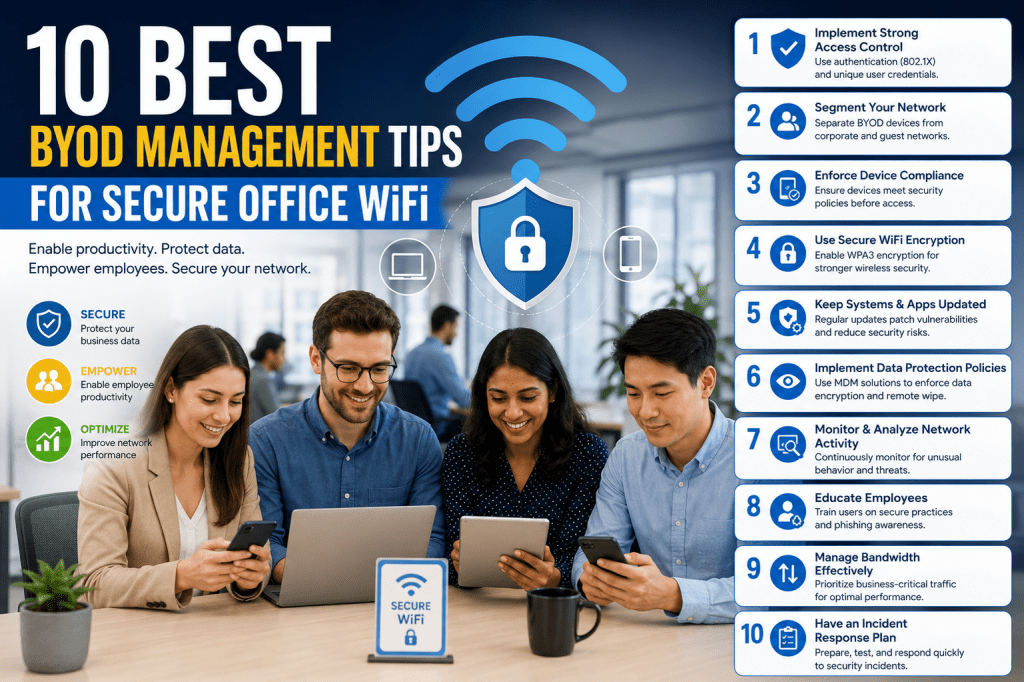
Bring Your Own Device policies are becoming common in modern workplaces. Employees prefer using their own smartphones, tablets, and laptops because these devices are familiar and convenient. Businesses also benefit because employees can work faster and stay connected more easily throughout the day.
Although BYOD improves flexibility, it also creates security risks for office WiFi networks. Personal devices may not follow company security standards. Some employees use weak passwords, outdated software, or unsafe apps that can expose business systems to threats.
Every connected device becomes a possible entry point for hackers, malware, spyware, and phishing attacks. If one infected device enters the network, it can spread problems across connected systems. This may lead to stolen data, slow internet performance, and interrupted business operations.
Organizations must manage BYOD carefully to maintain a balance between convenience and protection. A strong strategy helps employees work freely while keeping company data and WiFi networks secure.
Increase Data Security Before Allowing Device Access
Data security should always be the first priority in a BYOD environment. Before allowing personal devices on office WiFi, businesses must secure sensitive information such as customer records, emails, financial documents, and internal files.
Not every employee needs access to all company systems. Businesses should limit access based on job roles. This reduces the chances of unauthorized exposure and protects important information from unnecessary risks.
Strong passwords are essential for every account and device. Employees should also use multi-factor authentication to create an extra layer of security. Even if a password becomes compromised, additional verification helps block unauthorized access.
Businesses should educate employees about cyber threats. Many attacks succeed because users click suspicious links or download unsafe files. Regular security awareness training helps employees recognize phishing scams, malware risks, and unsafe websites.
Secure backup systems are also important. If ransomware or malware affects company data, backups help businesses recover quickly without major losses.
Strengthen Office WiFi Network Protection
Protecting the office WiFi network is just as important as protecting business data. Weak networks allow attackers to access connected devices and move through company systems more easily.
Businesses should avoid depending only on basic firewalls. Modern threats require stronger security solutions capable of detecting suspicious activity and blocking unauthorized access attempts.
Network segmentation is an effective security method for BYOD environments. Instead of placing every device on one network, businesses can separate employee devices, guest users, and critical systems into different sections. This limits the spread of malware and improves overall security.
Strong WiFi encryption should always be enabled. Weak passwords and outdated encryption methods make networks vulnerable to cyberattacks. Businesses should use secure passwords and update them regularly.
Monitoring network traffic also improves protection. IT teams can identify unusual behavior, suspicious downloads, or unauthorized access attempts before serious damage occurs.
Keeping routers and wireless equipment updated is another important step. Old firmware often contains security weaknesses that hackers can exploit easily.
Create an Anti-Malware and Antivirus Policy
Every device connected to office WiFi should have trusted antivirus and anti-malware protection installed. Personal devices are often exposed to unsafe apps, malicious websites, and infected downloads outside the workplace.
Organizations should require employees to use approved security software before connecting to the network. This creates a consistent level of protection across all devices.
Real-time threat detection is especially important because modern malware changes rapidly. Security software should monitor suspicious activity continuously and block harmful files before they spread through the network.
Automatic updates should remain enabled at all times. Outdated antivirus programs cannot detect newer threats effectively.
Employees should also know how to report suspicious activity. If a device appears infected, quick reporting allows IT teams to isolate the problem before it affects other systems.
Mobile devices need special attention because many users underestimate smartphone security risks. Employees should download apps only from trusted sources and avoid installing unknown applications.
Regular device scans help maintain a safer network environment and reduce the chances of infections spreading through office WiFi systems.
Use Encryption to Protect Sensitive Information
Encryption is one of the most effective ways to protect company data in a BYOD environment. It converts information into secure code that cannot be read without authorization.
Businesses should require encryption for both stored files and transmitted data. If a device is lost or stolen, encrypted information remains protected from unauthorized users.
Employees often access company systems through public WiFi networks in cafes, hotels, or airports. These networks are usually less secure and increase the risk of data interception. Using secure encrypted connections helps reduce these dangers.
Password storage is another major concern. Many employees save passwords directly on their phones or laptops for convenience. Without encryption, stolen devices may provide immediate access to business accounts.
Organizations should also encourage the use of secure communication platforms with encrypted messaging features. This protects confidential discussions and file sharing between employees.
Modern smartphones and laptops already include built-in encryption tools. Businesses simply need to ensure employees activate and use these features properly.
Encryption cannot stop every cyber threat, but it greatly reduces the damage caused by stolen devices, intercepted communications, and unauthorized access attempts.
Use Mobile Application Management for Better Control
Managing applications is an important part of securing a BYOD environment. Employees often install different apps on their smartphones, tablets, and laptops for personal use. Some of these applications may contain hidden malware, spyware, or security weaknesses that can threaten office WiFi networks.
Businesses should monitor which applications are allowed to access company systems. This does not mean employees cannot use entertainment or social media apps. The main goal is to ensure unsafe applications do not expose sensitive business information.
Mobile Application Management solutions help organizations control approved apps without invading employee privacy. Companies can create lists of trusted applications and block dangerous software from connecting to business resources.
Some devices allow users to install apps from unknown sources outside official app stores. This practice increases the risk of malware infections. Employees should avoid downloading unverified applications because they may secretly collect data or create backdoor access to the network.
Organizations should also update business applications regularly. Outdated apps may contain security vulnerabilities that hackers can exploit easily. Automatic updates help reduce these risks and improve performance.
Application permissions deserve close attention as well. Many apps request unnecessary access to contacts, files, cameras, microphones, or location services. Employees should review permissions carefully before installing software on devices connected to office WiFi.
Businesses can improve security further by separating work applications from personal apps. This reduces the chances of harmful software affecting company systems and protects sensitive information from accidental exposure.
A strong application management strategy improves visibility, reduces risks, and creates a safer BYOD environment for everyone.
Increase WiFi Capacity for Multiple Connected Devices
BYOD policies increase the number of devices connected to office WiFi every day. Employees may connect smartphones, tablets, laptops, smartwatches, and other wireless devices simultaneously. Without proper planning, this heavy load can slow down internet performance and reduce productivity.
Businesses must ensure their WiFi infrastructure can handle increased traffic efficiently. Weak networks often experience slow speeds, dropped connections, buffering issues, and poor communication quality during meetings or video calls.
Modern workplaces rely heavily on cloud applications, online collaboration tools, and video conferencing platforms. These services consume large amounts of bandwidth, especially when many devices connect at the same time.
Organizations should upgrade routers, wireless access points, and internet plans when necessary. Old networking equipment may struggle to support large numbers of connected devices.
Strategic placement of wireless access points also improves network performance. Poorly positioned routers create weak signal areas and inconsistent connectivity throughout office spaces.
Businesses should monitor network usage regularly to identify congestion problems. Certain applications or users may consume excessive bandwidth, affecting overall performance for others.
Guest networks are another useful solution. Visitors should connect to separate WiFi systems instead of sharing the same network used for business operations. This improves both performance and security.
Load balancing can also help distribute traffic evenly across multiple access points. This prevents overcrowding in specific areas and maintains stable connections throughout the workplace.
Increasing network capacity is essential for maintaining smooth operations in a growing BYOD environment. Employees can remain productive without experiencing constant connectivity issues.
Define Clear Support Responsibilities for Employee Devices
Supporting personal devices in the workplace can become challenging for IT departments. Employees use different operating systems, device brands, software versions, and hardware configurations. Trying to support every possible device can overwhelm technical teams quickly.
Businesses should clearly define what type of support the IT department will provide for employee-owned devices. Without clear guidelines, confusion and unrealistic expectations may develop among staff members.
Organizations should explain which problems IT teams will handle and which issues remain the employee’s responsibility. For example, the company may assist with WiFi connectivity or business app setup while employees handle personal software issues and hardware repairs.
Clear support policies reduce frustration and help IT departments focus on critical business operations. Employees also understand what assistance they can expect when using personal devices for work purposes.
Standardizing supported platforms can simplify management significantly. Businesses may choose to support only specific operating systems or approved device models. This reduces compatibility problems and improves security consistency.
Documentation is equally important. Employees should receive easy-to-follow instructions for connecting devices securely, installing approved software, and troubleshooting common issues.
Self-service support portals can also reduce pressure on IT staff. Employees can access guides, tutorials, and FAQs without needing direct technical assistance for minor problems.
Businesses should also establish procedures for reporting lost or stolen devices. Quick reporting helps protect company data and prevents unauthorized access to sensitive systems.
Defining support responsibilities creates smoother communication between employees and IT teams while improving overall BYOD management efficiency.
Separate Work Data from Personal Information
One of the biggest challenges in BYOD environments is separating personal data from business information. Employees use the same device for work emails, business apps, social media, entertainment, and personal communication. Without proper separation, security risks increase significantly.
Businesses should use tools that create dedicated work environments on employee devices. These systems separate company files and applications from personal content, reducing the chances of accidental exposure or malware infections.
A separate work profile allows organizations to secure business data without interfering with personal information. Employees maintain privacy while companies protect sensitive resources more effectively.
If malware infects a personal app, separation tools help prevent the threat from reaching work-related files and systems. This adds another layer of protection for office WiFi networks.
Strong passwords should protect work sections on employee devices. Additional security measures such as biometric authentication can further improve protection.
Businesses should also control how work data is shared or copied between personal and professional applications. This reduces accidental leaks and unauthorized transfers of confidential information.
Remote management tools can help organizations secure work-related content without accessing private employee files. This balance is important because employees often worry about privacy when using personal devices for work.
Notifications and alerts should also remain separated whenever possible. This improves organization and reduces the chances of sending confidential information through personal communication channels accidentally.
Creating clear boundaries between work and personal data improves security, supports employee privacy, and strengthens overall BYOD management.
Use Remote Wipe Features for Lost or Stolen Devices
Lost or stolen devices create serious risks for businesses using BYOD policies. Smartphones, tablets, and laptops often contain emails, saved passwords, business files, and access to company systems. If these devices fall into the wrong hands, sensitive information may become exposed quickly.
Remote wipe technology helps organizations reduce this risk. With employee permission, businesses can erase company data from lost or stolen devices remotely before unauthorized users gain access.
This feature is especially important when employees store confidential information locally on their devices. Even a simple email account may provide access to sensitive conversations, customer details, or internal systems.
Businesses should include remote wipe agreements in their BYOD policies. Employees need to understand that protecting company information sometimes requires removing business data from compromised devices.
Modern device management systems allow organizations to erase only work-related information while leaving personal files untouched. This approach helps balance security with employee privacy.
Employees should report missing devices immediately. Delayed reporting increases the risk of unauthorized access and data theft.
Location tracking features can also assist in recovering lost hardware. However, organizations should use these tools carefully and transparently to maintain employee trust.
Strong screen locks, biometric authentication, and automatic device locking further improve protection if devices are misplaced temporarily.
Remote wipe capabilities provide businesses with an important emergency response tool for protecting sensitive information in BYOD environments.
Limit Support for Certain Devices and Operating Systems
Supporting every type of smartphone, tablet, laptop, and operating system can become difficult for businesses. Employees use devices from different manufacturers with different software versions and security standards. Trying to manage all of them can create confusion, increase costs, and expose the network to unnecessary risks.
Organizations should create a list of approved devices and supported operating systems for office WiFi access. This helps IT teams focus on systems they can manage properly while maintaining stronger security standards.
Older devices often stop receiving security updates from manufacturers. These outdated systems are easier for attackers to exploit because known vulnerabilities remain unpatched. Businesses should avoid allowing unsupported or outdated devices on company networks.
Limiting support also improves troubleshooting efficiency. IT departments can resolve problems faster when employees use standardized platforms instead of dozens of different configurations.
Businesses may choose to support only modern operating systems with active security updates. This reduces compatibility issues and helps maintain a safer network environment.
Employees should understand that unsupported devices may face limited access to business applications or company WiFi. Clear communication prevents confusion and encourages employees to follow company guidelines.
Organizations can also recommend minimum hardware and software requirements for devices connecting to office systems. This ensures smoother performance and better security across the network.
Device approval policies should remain flexible enough to adapt to new technologies while maintaining strong protection standards.
Create Strong BYOD Policies for Employees
A successful BYOD strategy depends heavily on clear and well-structured policies. Employees must understand the rules, responsibilities, and security expectations before connecting personal devices to office WiFi.
Businesses should create written policies explaining which devices are allowed, how data should be handled, and what security measures employees must follow. Clear rules reduce misunderstandings and improve compliance.
Policies should include password requirements, approved applications, encryption standards, and reporting procedures for lost or stolen devices. Employees should know exactly what is expected of them when using personal devices for work.
Organizations should also explain acceptable use guidelines. Employees need to understand which activities are allowed on company networks and which actions may create security risks.
Training sessions can help employees understand BYOD policies more effectively. Many users ignore security rules simply because they do not fully understand the risks involved.
Regular policy reviews are important because technology and cyber threats continue to change rapidly. Businesses should update guidelines whenever new risks or technologies appear.
Employees should acknowledge BYOD policies formally before receiving network access. This creates accountability and ensures everyone understands company expectations.
Strong policies help businesses maintain consistency, improve security awareness, and reduce confusion in BYOD environments.
Monitor Network Activity and Device Behavior
Continuous monitoring is essential for maintaining a secure office WiFi environment. Businesses need visibility into connected devices, network traffic, and unusual activity to identify threats quickly.
Monitoring systems can detect suspicious behavior such as unauthorized access attempts, abnormal bandwidth usage, malware communication, or repeated login failures. Early detection allows IT teams to respond before serious damage occurs.
Businesses should track which devices connect to the network and verify that they meet company security standards. Unknown or unauthorized devices should be flagged immediately.
Network monitoring also improves performance management. Organizations can identify overloaded access points, excessive bandwidth usage, and connectivity issues affecting productivity.
Automated alerts help IT teams respond faster to potential threats. For example, if a device suddenly begins scanning the network or transferring unusual amounts of data, administrators can investigate immediately.
Businesses should balance monitoring with employee privacy. Monitoring should focus on protecting business systems rather than tracking personal activities unnecessarily.
Logs and activity reports are valuable for investigating security incidents. They help organizations understand how threats entered the network and what actions occurred during an attack.
Regular monitoring strengthens security, improves network performance, and helps businesses maintain better control over BYOD environments.
Use Secure Authentication Methods for WiFi Access
Weak passwords remain one of the biggest security problems in many workplaces. Employees often reuse simple passwords across multiple accounts, making it easier for attackers to gain unauthorized access.
Businesses should require strong authentication methods for all devices connecting to office WiFi. Passwords should contain a mix of letters, numbers, and special characters to improve security.
Multi-factor authentication provides additional protection by requiring users to verify their identity through a second step, such as a mobile code or authentication app.
Single shared WiFi passwords create unnecessary risks because they can spread easily between employees, visitors, and former staff members. Businesses should use individual credentials whenever possible.
Certificate-based authentication offers even stronger protection by verifying approved devices before allowing network access. This reduces the chances of unauthorized devices connecting to company systems.
Automatic login features should be used carefully. Although convenient, saved credentials can become dangerous if devices are lost or stolen.
Organizations should also require password updates regularly to reduce long-term exposure if credentials become compromised.
Secure authentication methods help businesses control network access and reduce the risk of cyberattacks targeting office WiFi systems.
Educate Employees About Cybersecurity Risks
Employee awareness plays a major role in BYOD security. Even the best security systems can fail if users ignore safe practices or make careless mistakes.
Many cyberattacks succeed because employees click fake links, download malicious attachments, or share sensitive information unknowingly. Regular cybersecurity training helps reduce these risks significantly.
Businesses should teach employees how to identify phishing emails, suspicious websites, and social engineering attempts. Workers should understand that attackers often target human behavior instead of technical systems alone.
Training should also cover safe password habits, secure browsing practices, and proper handling of confidential information. Employees need practical guidance they can apply daily.
Organizations should remind employees to avoid connecting work devices to unsecured public WiFi networks whenever possible. Public networks increase the risk of data interception and unauthorized access.
Mobile device security deserves special attention because many employees underestimate smartphone risks. Workers should understand the dangers of unsafe apps, unknown downloads, and outdated software.
Regular refresher sessions help employees stay informed about evolving cyber threats. Security awareness should remain an ongoing process rather than a one-time presentation.
Businesses can also test employee awareness through simulated phishing exercises. These tests help identify weak areas and improve training effectiveness.
Educated employees become an important line of defense against cyber threats and help create a safer BYOD environment.
Balance Convenience and Security in BYOD Management
One of the biggest challenges in managing BYOD is finding the right balance between employee convenience and company security. Employees want flexibility and easy access to work resources, while businesses need strong protection for sensitive systems and data.
Overly strict rules can frustrate employees and reduce productivity. On the other hand, weak security policies increase the chances of cyberattacks, data breaches, and network disruptions.
Businesses should create security measures that protect systems without making daily work difficult. User-friendly authentication tools, secure apps, and reliable WiFi performance help employees follow policies more willingly.
Communication is important in maintaining this balance. Employees should understand why certain rules exist and how those measures protect both personal and company information.
Organizations should also listen to employee feedback when improving BYOD policies. Understanding user concerns helps businesses create more practical and effective solutions.
Modern security tools allow companies to protect business resources while respecting employee privacy. This balance builds trust and encourages stronger cooperation between staff and IT departments.
Flexibility is also important because technology continues to evolve. Businesses should adapt their BYOD strategies regularly to support new devices, applications, and working styles.
A balanced BYOD approach creates a safer, more productive workplace where employees can use personal devices confidently without putting company networks at risk.
Develop a Strong Incident Response Plan for BYOD Threats
Even with strong security measures, cyber incidents can still happen in a BYOD environment. Devices may become infected with malware, employees may lose smartphones, or attackers may attempt to access company systems illegally. Businesses should prepare for these situations before problems occur.
An incident response plan helps organizations react quickly during security emergencies. Fast action reduces damage, protects sensitive data, and restores normal operations more efficiently.
Employees should know exactly who to contact if they notice suspicious activity on their devices. Delayed reporting can allow threats to spread across the network and affect multiple systems.
IT teams should create clear procedures for isolating compromised devices from office WiFi immediately. This helps stop malware or unauthorized access from spreading further.
Businesses should also maintain backup communication methods in case email systems or collaboration platforms become affected during an incident.
Regular security drills can improve preparedness. Simulated cyberattack scenarios help employees and IT teams practice their response procedures and identify weaknesses before real incidents happen.
Organizations should document every security incident carefully. Reports help businesses understand what happened, how the attack occurred, and which improvements are necessary to prevent similar problems in the future.
A strong incident response strategy improves recovery speed and minimizes the impact of cyber threats in BYOD environments.
Keep All Devices and Software Updated Regularly
Outdated software is one of the easiest ways for attackers to compromise devices and networks. Old operating systems, apps, and firmware often contain known vulnerabilities that hackers actively target.
Businesses should require employees to keep their devices updated before connecting to office WiFi. Security updates fix weaknesses and improve protection against modern cyber threats.
Automatic updates are the best option because many users forget or ignore manual updates. Enabling automatic installation helps maintain consistent security across all connected devices.
Operating systems, browsers, antivirus programs, and business applications should all remain current. Even small software tools can become entry points for attackers if left outdated.
Network hardware also requires updates. Routers, access points, and firewalls should receive regular firmware updates to improve security and performance.
Employees should avoid delaying updates for long periods. Many cyberattacks specifically target devices running older software versions because they are easier to exploit.
Organizations can use device management tools to verify whether connected devices meet update requirements before allowing network access.
Regular updates strengthen overall network security and reduce the chances of successful attacks in BYOD environments.
Control Access to Sensitive Business Systems
Not every employee needs access to every company resource. Giving unrestricted access to all systems increases security risks and makes data breaches more damaging.
Businesses should control access carefully based on employee roles and responsibilities. Workers should only access the files, applications, and systems necessary for their jobs.
Role-based access control improves security while reducing unnecessary exposure of sensitive information. For example, accounting systems should remain restricted to authorized finance staff only.
Temporary access permissions can also improve protection. Employees working on short-term projects may receive limited access that expires automatically after the project ends.
Businesses should review access permissions regularly. Employees may change positions, leave the company, or no longer require certain privileges.
Shared accounts should be avoided whenever possible. Individual user accounts create better accountability and improve monitoring capabilities.
Organizations should also limit access to critical systems from unsecured networks or unknown devices. Additional verification may be required when employees connect remotely.
Controlling system access reduces insider threats, limits damage during cyber incidents, and strengthens BYOD security overall.
Use Guest Networks for Visitors and Temporary Users
Visitors, contractors, and temporary workers often require internet access while inside office environments. Allowing these users onto the primary business network can create unnecessary security risks.
Businesses should create separate guest WiFi networks for non-employees. This keeps visitor traffic isolated from sensitive company systems and employee devices.
Guest networks should have different passwords and restricted access permissions. Visitors only need internet connectivity, not direct access to internal databases or business applications.
Separate guest networks also improve performance by reducing congestion on the main office WiFi system.
Businesses should change guest passwords regularly to prevent unauthorized long-term access. Temporary access credentials can further improve security.
Captive portals are another useful feature for guest networks. These login pages allow organizations to display terms of use and collect basic visitor information before granting access.
Bandwidth limits can help prevent guests from consuming excessive network resources through streaming or large downloads.
Monitoring guest activity also improves visibility and helps identify suspicious behavior quickly.
Guest WiFi separation is a simple but effective method for improving security and maintaining better control over office networks.
Encourage Responsible Employee Device Usage
Technology alone cannot fully secure a BYOD environment. Employee behavior plays a major role in protecting company systems and maintaining network safety.
Businesses should encourage responsible device habits among all staff members. Employees should understand that their actions directly affect office WiFi security.
Simple habits such as locking devices when unattended, avoiding suspicious downloads, and using strong passwords can significantly reduce security risks.
Employees should avoid sharing work devices with family members or friends. Unauthorized users may accidentally expose business data or install unsafe applications.
Public charging stations can also create risks because some malicious charging ports may attempt to steal data from connected devices. Employees should use trusted charging equipment whenever possible.
Businesses should remind employees to disconnect from office WiFi when devices are no longer needed for work purposes. Reducing unnecessary connections improves both security and network performance.
Safe browsing practices are equally important. Employees should avoid unsafe websites, suspicious advertisements, and unverified downloads on devices connected to company networks.
Organizations that promote responsible digital habits create stronger security cultures and reduce the likelihood of preventable cyber incidents.
Plan for Future Growth in BYOD Environments
BYOD usage continues to grow as workplaces become more mobile and flexible. Businesses should prepare their WiFi infrastructure and security systems for future expansion rather than focusing only on current needs.
More employees are using multiple devices daily, including smartphones, tablets, laptops, and wearable technology. This increasing demand places greater pressure on office networks.
Organizations should invest in scalable WiFi infrastructure capable of handling future growth without major performance issues.
Cloud computing, remote work, and hybrid office models also increase the importance of secure wireless connectivity. Employees expect fast and reliable access from different locations and devices.
Businesses should review their BYOD strategies regularly to adapt to changing technologies and emerging cyber threats.
Artificial intelligence and automation tools are also becoming more common in network management. These technologies can help detect threats faster, monitor traffic more effectively, and improve overall security efficiency.
Companies that plan ahead can avoid costly upgrades and reduce future operational disruptions.
A long-term BYOD strategy helps businesses remain secure, productive, and prepared for evolving workplace technology demands.
Implement Network Access Control for Better Security
Network Access Control is an important security method for managing BYOD environments. It helps businesses decide which devices can connect to office WiFi and what level of access those devices should receive.
Before allowing a device onto the network, the system checks whether it meets company security requirements. Devices without updated software, antivirus protection, or proper security settings can be blocked automatically.
This process reduces the chances of infected or unsafe devices entering the business network. It also helps organizations maintain consistent security standards across all connected systems.
Businesses can create different access levels for employees, managers, contractors, and guests. For example, a visitor may only receive internet access while employees can access internal resources.
Automatic compliance checks make network management more efficient. Instead of manually inspecting every device, businesses can rely on security policies that verify devices automatically before connection approval.
Network Access Control also improves visibility. IT teams can identify which devices are connected, who owns them, and how they are using the network.
Organizations that use access control systems strengthen their WiFi security while reducing unnecessary risks from unmanaged devices.
Secure Remote Access for Hybrid and Remote Workers
Modern workplaces are no longer limited to office buildings. Many employees now work remotely or follow hybrid schedules that require secure access from different locations.
When employees connect to business systems from home, hotels, airports, or public spaces, office WiFi security extends beyond the workplace itself.
Businesses should provide secure remote access solutions such as Virtual Private Networks. These tools encrypt internet traffic and protect company data from interception.
Remote workers should avoid using unsecured public WiFi whenever possible. If public networks must be used, encrypted connections become even more important.
Organizations should also require strong authentication methods for remote logins. Multi-factor authentication adds extra protection against stolen passwords and unauthorized access attempts.
Remote devices should follow the same security standards as devices used inside the office. This includes updated software, antivirus protection, encryption, and secure passwords.
Businesses should monitor remote connections for suspicious behavior such as unusual login locations or repeated failed access attempts.
Secure remote access policies help organizations maintain strong protection even when employees work outside traditional office environments.
Reduce Shadow IT Risks in BYOD Environments
Shadow IT refers to applications, devices, or services employees use without company approval. In BYOD environments, this problem becomes more common because employees often install personal apps or use unauthorized tools for convenience.
Although employees usually have good intentions, unapproved software can create serious security vulnerabilities. Some apps may store company data insecurely or expose information to third-party services.
Businesses should educate employees about the dangers of using unauthorized tools. Staff members should understand why approved applications are safer for handling work-related tasks.
Providing reliable company-approved alternatives also helps reduce shadow IT usage. Employees are less likely to use risky apps if secure and user-friendly solutions already exist.
IT teams should monitor networks for unknown applications and unusual activity. Early detection helps organizations identify potential risks before they become serious problems.
Clear communication is important as well. Employees should feel comfortable requesting approved tools when they need additional software for productivity.
Organizations that manage shadow IT effectively improve security visibility and reduce unnecessary exposure to cyber threats.
Protect Business Email Systems from Threats
Email remains one of the most common targets for cybercriminals. Phishing attacks, malicious attachments, and fake login pages often enter businesses through employee email accounts.
BYOD environments increase these risks because employees frequently check work emails on personal devices outside secure office networks.
Businesses should use advanced email filtering systems to block suspicious messages before they reach employees.
Employees should receive training on identifying phishing attempts, fake attachments, and suspicious links. Many attacks succeed because users trust fraudulent messages without verifying them carefully.
Strong password policies and multi-factor authentication also improve email security significantly.
Businesses should encourage employees to avoid opening work emails on unsecured public devices or shared computers.
Automatic scanning of email attachments can help detect malware before files are downloaded onto connected devices.
Organizations should also monitor for unusual email activity such as unauthorized forwarding rules or login attempts from unfamiliar locations.
Protecting business email systems is essential for maintaining secure communication and preventing data breaches in BYOD environments.
Perform Regular Security Audits and Assessments
Security audits help businesses evaluate the effectiveness of their BYOD policies and identify weaknesses before attackers exploit them.
Regular assessments allow organizations to review devices, applications, network configurations, and employee compliance with security rules.
Businesses should test whether employees follow password policies, encryption requirements, and approved application guidelines.
Penetration testing can also help organizations identify vulnerabilities in office WiFi systems. These tests simulate cyberattacks to reveal weak points that require improvement.
Security audits should include both technical systems and employee behavior. Human mistakes often create risks even when strong technology protections exist.
Organizations should review access permissions regularly to ensure former employees or unnecessary accounts no longer have access to business systems.
Device inventories are also important. Businesses need accurate records of connected devices to maintain visibility and manage risks effectively.
Audit results should lead to practical improvements rather than simply identifying problems. Businesses must update policies, strengthen protections, and improve training whenever weaknesses are discovered.
Regular assessments help organizations maintain strong security standards and adapt to evolving cyber threats.
Build a Long-Term BYOD Security Culture
Managing BYOD successfully requires more than technology alone. Businesses need a strong security culture where employees understand their role in protecting company systems and data.
Cybersecurity should become part of daily workplace habits rather than an occasional discussion. Employees who understand security risks are more likely to follow policies responsibly.
Leadership teams should support security initiatives actively. When management takes cybersecurity seriously, employees are more likely to do the same.
Open communication also strengthens security culture. Employees should feel comfortable reporting suspicious activity, asking questions, or discussing security concerns without fear of punishment.
Recognition programs can encourage positive security behavior. Businesses may reward employees who follow best practices or identify potential threats early.
Security awareness should continue regularly through training sessions, updates, and reminders. Cyber threats evolve constantly, so employee knowledge must evolve as well.
Organizations should also review BYOD policies frequently to keep up with changing technologies and workplace needs.
A strong security culture creates long-term protection, improves employee responsibility, and helps businesses maintain safer office WiFi environments as technology continues to grow.
Prepare for Emerging Cybersecurity Threats
Cyber threats continue to evolve every day, and businesses using BYOD policies must stay prepared for new risks. Attackers constantly develop advanced methods to steal information, bypass security systems, and target connected devices.
Personal devices are especially attractive targets because employees often use them for both work and personal activities. A single infected smartphone or laptop can expose sensitive company data if proper protections are not in place.
Businesses should monitor cybersecurity trends regularly and update their protection strategies when new threats appear. Waiting too long to improve security measures can leave networks vulnerable to attacks.
Artificial intelligence is also changing the cybersecurity landscape. While businesses use AI tools for better security monitoring, cybercriminals are also using automation to launch more sophisticated attacks.
Organizations should invest in modern security technologies capable of detecting unusual behavior and responding quickly to threats.
Regular employee training remains important because attackers often target users through phishing scams, fake applications, and social engineering techniques.
Staying prepared for future threats helps businesses maintain stronger BYOD security and reduce long-term risks.
Use Cloud Security Measures for Connected Devices
Many businesses now rely heavily on cloud-based applications and storage systems. Employees access documents, emails, collaboration platforms, and business tools from different devices and locations every day.
Although cloud services improve flexibility and productivity, they also create additional security concerns in BYOD environments.
Businesses should choose trusted cloud providers with strong security protections such as encryption, access controls, and threat monitoring.
Employees should only use approved cloud applications for work-related tasks. Unauthorized cloud storage services may expose confidential information to unnecessary risks.
Strong authentication methods are essential for cloud accounts. Multi-factor authentication adds extra protection against stolen passwords and unauthorized access attempts.
Organizations should also monitor cloud activity to identify suspicious logins, unusual downloads, or unauthorized file sharing.
Automatic backups in cloud environments help businesses recover data quickly after cyber incidents or accidental deletions.
Cloud security plays an important role in protecting company information across multiple devices and remote work environments.
Improve Device Visibility Across the Network
One major challenge in BYOD management is maintaining visibility over connected devices. Businesses need accurate information about which devices are using office WiFi and how those devices interact with company systems.
Without proper visibility, unauthorized or insecure devices may remain connected without detection.
Organizations should maintain updated device inventories that include employee names, device types, operating systems, and security status.
Real-time monitoring tools help IT teams identify unusual behavior quickly. Suspicious activity such as unauthorized downloads, excessive bandwidth usage, or repeated failed login attempts should trigger alerts immediately.
Businesses should also remove inactive or unused devices from network access lists regularly. Old devices with saved credentials may create unnecessary security risks.
Automated device management systems simplify tracking and improve control over large BYOD environments.
Better visibility allows businesses to respond faster to threats and maintain stronger overall network protection.
Strengthen Password Management Practices
Weak passwords remain one of the most common causes of security breaches. Many employees still use simple passwords or reuse the same credentials across multiple accounts.
Businesses should require strong password creation standards for all devices and business applications.
Passwords should include a combination of uppercase letters, lowercase letters, numbers, and special characters. Employees should also avoid using personal information such as birthdays or names in passwords.
Password managers can help employees store and organize secure credentials safely without relying on memory alone.
Organizations should encourage regular password updates and prevent the reuse of old passwords whenever possible.
Multi-factor authentication adds another layer of protection and significantly reduces the risk of unauthorized access.
Employees should never share passwords through email messages, text messages, or unsecured communication platforms.
Strong password management improves security across BYOD environments and protects sensitive company systems from unauthorized access.
Encourage Regular Device Maintenance
Personal devices connected to office WiFi should remain clean, updated, and properly maintained. Poorly maintained devices often become slower, less secure, and more vulnerable to malware infections.
Employees should restart devices regularly, remove unnecessary applications, and clear outdated files to maintain good performance.
Unused apps should be deleted because they may contain security vulnerabilities or consume unnecessary resources.
Battery health and hardware condition are also important. Devices with damaged hardware or unstable performance may create connectivity issues within office networks.
Businesses should encourage employees to run regular antivirus scans and install updates promptly.
Routine maintenance improves device performance while reducing potential security problems in BYOD environments.
Organizations can also provide employees with simple maintenance guidelines to help them keep devices secure and efficient.
Well-maintained devices contribute to better WiFi stability, improved productivity, and stronger overall network protection.
Conclusion
Managing BYOD in office WiFi environments requires careful planning, strong security practices, and ongoing cooperation between employees and businesses. Personal devices bring flexibility and convenience to modern workplaces, but they also introduce risks that organizations cannot ignore.
Businesses must secure their data, strengthen network protection, manage applications carefully, and educate employees about cybersecurity threats. Strong authentication, encryption, regular updates, and device monitoring all play important roles in protecting office WiFi systems.
Clear BYOD policies help employees understand their responsibilities while giving IT teams better control over connected devices. At the same time, organizations should maintain a balance between security and convenience so employees can work productively without unnecessary restrictions.
As technology continues to evolve, BYOD management will remain an important part of workplace cybersecurity. Businesses that invest in strong protection strategies, employee awareness, and modern network infrastructure can create safer, faster, and more reliable office WiFi environments for everyone.