
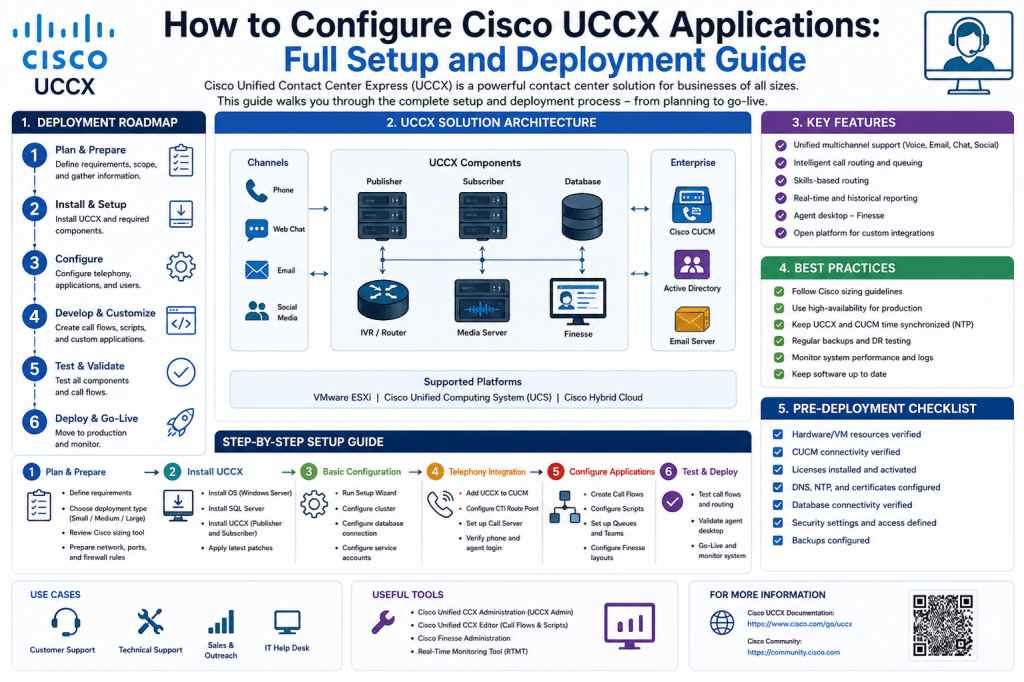
In modern business communication systems, interactive voice response solutions play a critical role in handling incoming calls efficiently. A Cisco UCCX environment allows organizations to design and deploy these automated call-handling systems by creating applications that define how calls are received, processed, and routed. At the center of this process is the UCCX application, which acts as the logical container that connects scripts, triggers, and telephony resources into a working call flow. Configuring such an application involves multiple coordinated steps, each of which ensures that incoming calls are handled in a predictable and structured manner.
Before beginning configuration, it is important to understand that a UCCX application is not a standalone element. It relies on scripts for call logic, triggers for call entry points, and call control groups for telephony resources. These components work together to form a complete interactive system. Without proper configuration of each part, the application cannot function correctly or may fail to handle calls as intended.
Accessing the Administration Environment and Preparing for Configuration
The first step in creating a UCCX application involves accessing the administrative interface where system configuration tasks are performed. This environment provides access to all call center components, including applications, scripts, subsystems, and telephony settings. Once logged in, the configuration process typically begins by navigating to the section responsible for application management.
Within the application management area, administrators can view existing applications or create new ones. This section serves as the central location for defining how incoming calls are processed. Before creating a new application, it is important to ensure that required scripts and telephony resources are already available, as the application will depend on them during configuration.
Creating a new application begins by selecting the option to add a new entry. At this stage, the system requires several key parameters that define the identity and behavior of the application. These parameters include the application name, a unique identifier, session limits, script selection, and descriptive information. Each of these fields plays a role in ensuring that the application is properly recognized and functions within system limits.
Defining Application Parameters and Script Integration
When configuring a new UCCX application, the first key element is assigning a meaningful name. This name is used to identify the application within the system and should clearly reflect its purpose, such as a customer support IVR or an internal routing system. Alongside the name, a unique application identifier must be defined. This identifier ensures that the system can distinguish between multiple applications and avoid conflicts.
Another important parameter is the maximum number of sessions. This setting determines how many concurrent calls the application can handle at any given time. Choosing an appropriate value depends on expected call volume and available system resources. Setting this too low may result in call rejections, while setting it too high may overload system capacity.
A critical step in application configuration is linking a script. The script defines the logic that controls how calls are handled once they enter the system. It determines menu options, call routing behavior, and interaction flow. In many cases, organizations use predefined scripts to accelerate deployment, but custom scripts can also be created to meet specific business requirements. The selected script becomes the backbone of the application’s behavior.
In addition to the primary script, a default script is also configured. This script acts as a fallback mechanism in case the system encounters an error or cannot process a call through the main script. It ensures that callers receive a response even in unexpected situations, improving system reliability and user experience.
Once all required fields are completed, the application is saved and becomes available within the system. At this stage, the application exists logically but is not yet reachable by external callers. Additional configuration steps are required to make it operational.
Configuring Triggers to Enable Call Entry Points
After creating the application, the next step is to define how calls will reach it. This is accomplished through triggers. A trigger acts as the entry point for incoming calls and links a phone number or extension to the application. Without a trigger, the application cannot receive external calls.
To configure a trigger, the application settings interface provides an option to add a new trigger. The most common type is a telephony trigger, which is associated with a directory number. This number is what callers dial to access the interactive system. When configuring the trigger, a unique directory number is assigned to ensure that calls are correctly routed to the intended application.
Additional settings include language selection, device naming, and descriptive labels. The language setting determines the language used for prompts and system messages, while the device name helps identify the trigger within the telephony system. A description is also added to provide clarity for system administrators.
Another important configuration element is the association of the trigger with a call control group. This ensures that the system has sufficient telephony resources to handle incoming calls. Without this association, the trigger would not be able to process call traffic effectively.
Once all parameters are defined, the trigger is saved and becomes active. At this point, the application is reachable through the assigned directory number, although its ability to handle calls still depends on proper call control configuration.
Setting Up Call Control Groups for Telephony Resource Management
Call control groups are essential components that manage the telephony resources required by UCCX applications. They define how many ports are available for handling calls and how those ports are distributed across the system. Without properly configured call control groups, applications may experience call congestion or resource limitations.
To create a call control group, administrators navigate to the subsystem section of the system interface and access the telephony configuration area. Within this section, a new call control group can be added. Each group requires a descriptive label, which helps identify its purpose within the system.
A key configuration parameter is the number of ports. Ports represent the number of simultaneous calls the system can handle. Selecting the appropriate number depends on expected call volume and infrastructure capacity. Each port corresponds to a communication channel that processes an active call.
Another important element is the device name prefix. This prefix is used to generate device identifiers for each port within the group. Combined with a starting directory number, it allows the system to automatically assign sequential identifiers to each port.
The starting directory number defines the beginning of the numeric range assigned to ports. From this starting point, the system generates additional numbers based on the total number of ports configured. This structured approach ensures that each port has a unique identifier within the telephony environment.
Additional settings include device pool selection, calling search space configuration, location assignment, and partition settings. These parameters help integrate the call control group into the broader telephony architecture, ensuring compatibility with routing rules and network policies.
After completing configuration, the call control group is saved and becomes available for use. It can then be associated with triggers and applications to provide the necessary call-handling capacity.
Connecting Components and Ensuring System Functionality
Once the application, trigger, and call control group are configured, the final step is integration. This involves ensuring that all components are correctly linked and functioning together. The application must be associated with a script, the trigger must point to the application, and the call control group must provide the required resources.
Testing plays an important role at this stage. Calls are placed to the assigned directory number to verify that the system responds correctly. During testing, administrators check whether prompts are played, menu options function as expected, and calls are routed properly based on script logic. Any issues identified during this stage are typically related to misconfiguration of scripts, insufficient port allocation, or incorrect trigger settings.
Monitoring system behavior after deployment is also essential. Call patterns, resource usage, and error logs provide insight into system performance. Adjustments may be required over time to accommodate changes in call volume or business requirements.
A properly configured UCCX application ensures that incoming calls are handled efficiently and consistently. It allows organizations to automate customer interactions, reduce manual call handling, and improve overall communication flow. By combining structured application configuration, accurate trigger setup, and well-planned call control group allocation, a reliable interactive call system can be established that supports both operational efficiency and user experience.
Conclusion
Configuring a UCCX application requires careful coordination of applications, scripts, triggers, and call control groups to build a fully functional call-handling system. Each component plays a specific role, from defining call logic through scripts to enabling call entry points with triggers and managing resources through call control groups. When properly implemented, the system ensures efficient call routing, balanced load handling, and consistent interactive voice response behavior. This structured setup helps organizations manage high call volumes while maintaining reliability and performance. A well-configured environment improves communication flow, reduces manual handling, and delivers a more seamless experience for callers and administrators alike.