Every career benefits from a strong foundation, and information technology is no different. Before moving into advanced areas such as cybersecurity, cloud computing, or networking, it is important to understand the basic concepts that support all systems. Many people enter the IT field with curiosity but without structured knowledge, which can slow down their growth. Learning the fundamentals creates a clear path and makes future learning easier.
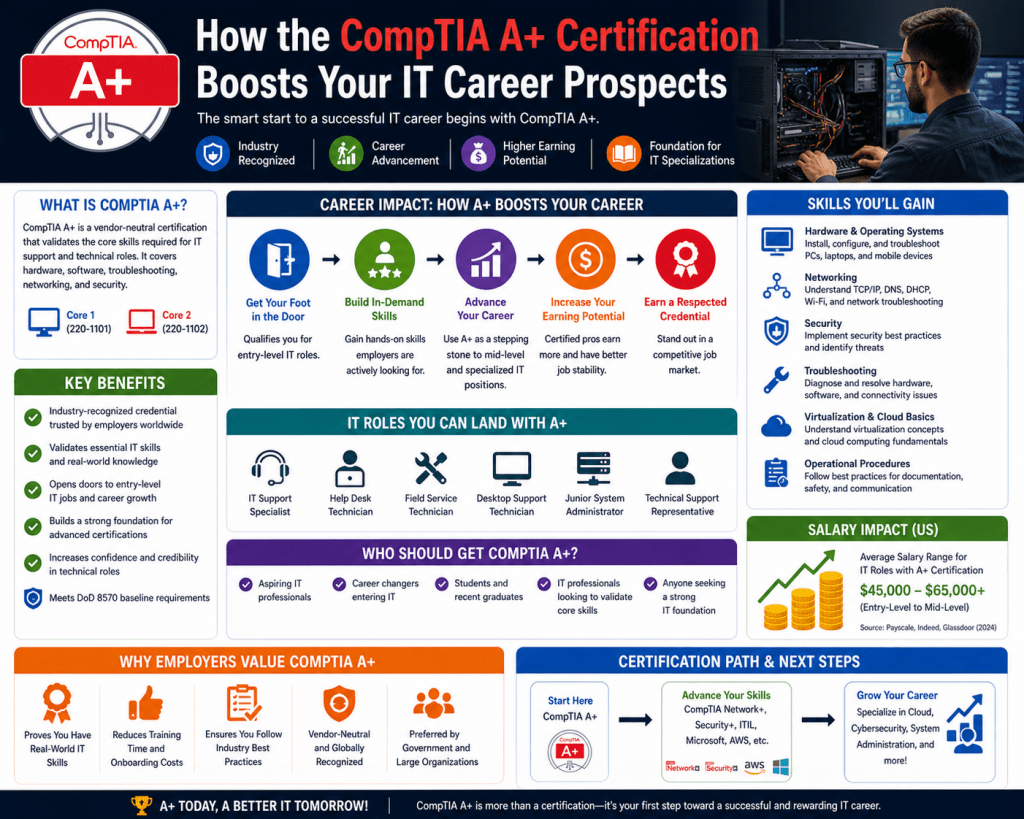
The CompTIA A+ certification is designed to introduce beginners to the core areas of IT. It focuses on practical knowledge that can be applied in real-world situations. Instead of relying on random experience, this structured approach helps individuals understand how computers work, how devices connect, and how problems can be solved efficiently. This makes it one of the most reliable starting points for anyone interested in building a career in IT.
A strong understanding of the basics helps reduce confusion when dealing with complex systems. It also allows individuals to think logically instead of guessing when something goes wrong. This kind of thinking is important in technical roles where accuracy and efficiency are required.
Why Fundamental Knowledge Is Important in IT
Technology changes quickly, but the basic principles remain important. Professionals who understand these principles can adapt more easily to new tools and systems. Without this understanding, it becomes difficult to keep up with changes in the industry.
Fundamental knowledge allows individuals to identify problems more effectively. Instead of trying random solutions, they can analyze the situation and find the root cause. This saves time and improves performance. It also builds confidence, which is important when working in professional environments.
Another benefit of learning the basics is flexibility. IT professionals are often required to perform different tasks. One moment they may be working on hardware, and the next they may be dealing with software or network issues. A strong foundation makes it easier to handle these changes without difficulty.
Learning the fundamentals also supports long-term growth. As individuals move into more advanced roles, they rely on the knowledge they built at the beginning. Without that base, advanced topics can become confusing and difficult to manage.
Preparing for Entry-Level IT Roles
Entry-level positions in IT usually involve supporting users and solving everyday technical problems. These roles require a mix of technical skills and communication skills. Professionals must understand systems well enough to fix issues and also explain solutions clearly to users.
The knowledge gained from studying for the A+ certification prepares individuals for these responsibilities. It covers common tasks such as setting up devices, troubleshooting problems, and maintaining systems. This makes it easier to transition into real work environments.
Employers often look for candidates who have proven their knowledge through structured learning. A certification shows that an individual has studied key topics and understands how to apply them. This can improve job opportunities, especially for beginners who do not have much experience.
These entry-level roles also provide valuable experience. They allow individuals to apply what they have learned and continue developing their skills. Over time, this experience can lead to more advanced positions in the IT field.
Understanding the Two-Part Exam Structure
The certification is divided into two exams, each focusing on different areas of IT. This structure helps learners cover both hardware and software topics in an organized way.
The first exam focuses on physical components, networking basics, mobile devices, and troubleshooting. It explains how devices work and how they connect. This includes understanding internal parts of a computer and how networks allow communication between systems.
The second exam focuses on operating systems, security, and professional practices. It explains how systems are managed and protected in real-world environments. This includes installing software, securing data, and following proper procedures.
This two-part structure ensures that learners gain a balanced understanding of IT. It covers both technical and practical aspects, which are necessary for real-world applications.
Learning About Computer Hardware
Hardware is one of the most important areas in IT. It includes all the physical parts of a computer system. Understanding these components is necessary for diagnosing and fixing problems.
Key components include the processor, memory, storage devices, and motherboard. Each part has a specific function, and all parts must work together for the system to operate correctly. Learning how these components interact helps individuals identify issues quickly.
For example, if a computer is running slowly, it may be due to limited memory or an outdated processor. Knowing this allows professionals to make the right decision instead of wasting time on unnecessary steps.
External devices are also part of hardware knowledge. These include monitors, keyboards, printers, and other accessories. Understanding how to connect and troubleshoot these devices is an important skill in everyday IT work.
Hardware knowledge also includes laptops and other portable devices. These systems are widely used in modern workplaces, so it is important to understand their components and common issues.
Understanding Basic Networking Concepts
Networking allows computers and devices to communicate with each other. It is a key part of modern technology, as most systems rely on connections to share data and access resources.
Basic networking knowledge includes understanding how devices connect, how data is transferred, and how networks are structured. This includes learning about different types of networks and how they function.
Wireless networking is especially important today. Many devices connect through wireless signals instead of cables. Understanding how these connections work helps professionals maintain stable and secure networks.
Networking knowledge is also useful for troubleshooting. Many issues are related to connectivity problems. Knowing how networks operate helps individuals identify and fix these problems more efficiently.
Working with Mobile Devices
Mobile devices are a major part of modern technology. Smartphones, tablets, and laptops are used in both personal and professional environments. Supporting these devices requires specific knowledge.
Mobile devices often rely on wireless connections and applications. This creates different challenges compared to traditional desktop systems. Professionals must understand how to configure these devices and resolve common issues.
Security is also important when dealing with mobile devices. These devices are often used outside secure environments, which increases the risk of data loss or unauthorized access. Proper configuration helps reduce these risks.
Understanding mobile technology is important for anyone entering the IT field. It ensures that they can support a wide range of devices used in modern workplaces.
Introduction to Virtualization and Cloud Computing
Virtualization and cloud computing are important topics in modern IT. These technologies allow systems to be more flexible and efficient.
Virtualization involves creating virtual systems that run on a single physical machine. This allows multiple environments to operate at the same time. It improves resource usage and makes system management easier.
Cloud computing allows users to access resources over the internet. This includes storage, software, and computing power. Many organizations use cloud services to improve efficiency and reduce costs.
Learning these concepts at a basic level helps individuals understand how modern systems are built and managed. It also prepares them for more advanced topics in the future.
Developing Troubleshooting Skills
Troubleshooting is a key skill in IT. It involves identifying problems and finding solutions in a structured way. This skill is used in almost every IT role.
A good troubleshooting process includes identifying the problem, analyzing possible causes, testing solutions, and confirming the fix. Following a clear process helps reduce mistakes and improve efficiency.
Troubleshooting also requires logical thinking. Professionals must understand how systems work to find the source of a problem. This skill improves with practice and experience.
Being able to troubleshoot effectively is valuable in both work and daily life. It allows individuals to solve problems independently and maintain system performance.
Building Strong Learning Habits
Preparing for certification requires discipline and consistency. It involves studying different topics and practicing skills regularly. This helps individuals build strong learning habits.
Structured learning makes it easier to understand complex topics. It provides a clear path and helps individuals stay focused. This is especially important for beginners who are new to IT.
Continuous learning is important in technology careers. New tools and systems are introduced regularly, and professionals must stay updated. Building a habit of learning ensures long-term success.
Strong learning habits also improve problem-solving and adaptability. These skills are useful in all areas of IT and help individuals grow in their careers.
Deep Understanding of Operating Systems
Operating systems are the core software that allow computers and devices to function properly. They act as a bridge between the user and the hardware, managing all system resources and ensuring that applications run smoothly. For anyone entering the IT field, learning how operating systems work is essential because nearly every task depends on them.
An operating system controls memory usage, manages processes, handles file systems, and supports hardware communication. These responsibilities are critical for system stability. When something goes wrong, understanding how the operating system behaves can help identify the issue quickly. This is why learning operating system fundamentals is a key part of IT training.
Different systems are used in different environments. Some are designed for personal computers, while others are used in enterprise or mobile environments. Each system has its own interface and management tools. Becoming familiar with multiple systems improves flexibility and allows professionals to work in a variety of situations.
Installation is also an important skill. IT professionals often set up systems from the beginning. This includes selecting the correct version, configuring settings, and ensuring compatibility. Proper installation reduces errors and improves system performance.
System Configuration and Environment Setup
System configuration involves preparing a device to function according to specific needs. This includes setting up user accounts, adjusting system settings, installing drivers, and configuring applications. A well-configured system operates efficiently and provides a better user experience.
Environment setup also includes connecting devices to networks and ensuring proper communication between systems. This step is important in both small and large environments. A properly configured system reduces the chances of errors and improves overall productivity.
Drivers play a major role in configuration. They allow hardware components to communicate with the operating system. Without the correct drivers, devices may not function properly. Understanding how to install and update drivers is an important skill.
Configuration also involves setting preferences for performance and usability. Adjusting settings based on user needs can improve efficiency and reduce frustration. This is especially important in workplaces where systems are used for specific tasks.
Managing Updates and System Stability
System updates are released to improve performance and fix issues. They also address security weaknesses that could be exploited. Keeping systems updated is a basic but essential responsibility in IT.
Updates must be managed carefully. While they provide improvements, they can sometimes create compatibility issues. IT professionals must test updates and ensure that they do not disrupt existing systems. This requires planning and attention to detail.
System stability depends on regular maintenance. This includes monitoring performance, clearing unnecessary files, and ensuring that applications are running correctly. Neglecting maintenance can lead to slow performance and system failures.
Automation tools can help manage updates and maintenance tasks. Scheduling updates and system checks ensures consistency and reduces manual effort. Understanding how to use these tools improves efficiency and reliability.
Security Awareness and Protection Methods
Security is a major concern in modern IT environments. Systems are constantly exposed to potential threats, and protecting them is a top priority. Understanding basic security principles helps prevent unauthorized access and data loss.
Strong passwords are one of the simplest forms of protection. They reduce the risk of unauthorized access. However, security goes beyond passwords. It includes monitoring activity, controlling access, and protecting sensitive information.
Threats can come in many forms. Malware, phishing, and unauthorized access attempts are common examples. Each threat requires a different response. Learning how to recognize these threats is the first step in preventing them.
Security tools such as firewalls and antivirus software provide additional protection. These tools monitor system activity and block harmful actions. However, they must be configured correctly to be effective.
Protecting data is also important. Sensitive information must be stored securely and accessed only by authorized users. This reduces the risk of data breaches and protects privacy.
User Access and Identity Management
User management is an important part of system administration. It involves creating and maintaining user accounts and controlling access to resources. Proper management ensures that systems remain secure and organized.
Authentication verifies the identity of a user. This can be done using passwords or other methods. Strong authentication reduces the risk of unauthorized access.
Access control determines what users can do within a system. Not all users need the same permissions. Assigning roles helps limit access and prevent misuse. This approach improves security and reduces errors.
Managing user accounts requires regular updates. Accounts must be created for new users and removed when no longer needed. Monitoring user activity helps detect unusual behavior and potential security issues.
Troubleshooting Software Problems
Software problems are common in IT environments. Applications may fail, run slowly, or behave unexpectedly. Troubleshooting these issues requires a structured approach.
The first step is identifying the problem. This involves gathering information and understanding the symptoms. Once the issue is clear, possible causes can be analyzed.
Testing different solutions helps find the correct fix. This process requires patience and logical thinking. Skipping steps can lead to incorrect conclusions and wasted time.
Compatibility issues are a frequent cause of software problems. Applications may not work well with certain systems or configurations. Understanding these limitations helps prevent issues.
Malware can also affect software performance. Infected systems may show unusual behavior. Identifying and removing threats is an important part of troubleshooting.
Improving System Performance
System performance affects productivity and user satisfaction. Slow systems can cause delays and frustration. Identifying and fixing performance issues is an important skill.
Common causes of poor performance include limited memory, outdated hardware, and too many running processes. Analyzing system resources helps identify the problem.
Improving performance may involve upgrading components, adjusting settings, or removing unnecessary applications. Each situation requires a different solution.
Regular monitoring helps maintain good performance. Tracking system activity over time allows professionals to detect issues early and take action.
Keeping systems optimized ensures smooth operation and improves the overall user experience.
Professional Practices in IT Work Environments
Technical knowledge alone is not enough for success in IT. Professional practices play a major role in maintaining efficiency and reliability. These practices ensure that tasks are completed in a structured and consistent manner.
Documentation is an important part of professional work. Recording changes, configurations, and issues helps maintain clarity. It also makes it easier to solve problems in the future.
Change management involves planning and controlling system changes. Making changes without proper planning can cause disruptions. Following a structured process reduces risks.
Communication is also essential. IT professionals must explain technical issues in simple terms. Clear communication improves understanding and builds trust with users.
Following professional practices helps maintain a stable and organized work environment.
Backup Methods and Data Recovery
Data is one of the most valuable assets in any system. Losing data can have serious consequences. Backup and recovery methods are used to protect information and ensure that it can be restored when needed.
Backups involve creating copies of data and storing them safely. These copies can be used if the original data is lost or damaged. Regular backups reduce the risk of permanent data loss.
Different backup methods are used depending on the situation. Each method has its own advantages. Choosing the right method ensures efficient storage and recovery.
Recovery involves restoring data from backups. This process must be tested to ensure that it works correctly. Without testing, backups may not be reliable.
Planning backup strategies is important. IT professionals must decide what data to protect and how often backups should be performed.
Workplace Safety and Best Practices
Safety is an important part of IT work. Handling equipment and working with electrical systems can be risky if proper precautions are not taken. Following safety guidelines helps prevent accidents.
Using the correct tools and handling equipment carefully reduces the risk of damage and injury. Proper organization of the workspace also improves safety.
Environmental factors such as temperature and ventilation affect system performance and safety. Maintaining a suitable environment helps prevent overheating and other issues.
Ergonomics is also important. IT professionals often work for long hours, and proper posture helps prevent physical strain. Comfortable work setups improve productivity and health.
Maintaining safety standards protects both individuals and equipment.
Gaining Confidence Through Hands-On Practice
Practical experience is essential for building confidence in IT. Applying knowledge in real situations helps reinforce learning and develop skills.
Hands-on practice allows individuals to explore systems and understand how they behave. Making mistakes during practice helps improve problem-solving abilities.
Simulated environments provide safe spaces for learning. They allow individuals to test solutions without affecting real systems. This is useful for gaining experience before working in professional settings.
Real-world experience introduces unexpected challenges. Dealing with these challenges helps build confidence and adaptability. These qualities are important for long-term success.
Keeping Up with Technology Changes
Technology is always evolving, and IT professionals must stay updated. New tools and systems are introduced regularly, and learning about them is necessary for growth.
Continuous learning ensures that skills remain relevant. It also opens opportunities for career advancement. Professionals who stay updated are better prepared for new challenges.
Adapting to change requires curiosity and effort. Understanding new technologies and how they fit into existing systems is important.
Staying informed helps professionals remain competitive and effective in their roles.
Developing Real World IT Skills Through Daily Practice
Building a successful career in information technology requires more than understanding theory. Real progress comes from applying knowledge in practical situations. Daily practice helps individuals strengthen their skills and become more confident when dealing with real systems. This process turns basic knowledge into useful ability.
Working with computers regularly allows individuals to understand how systems behave under different conditions. Small tasks such as installing software, configuring settings, or fixing minor issues can build strong technical habits over time. These repeated actions improve speed and accuracy.
Practice also helps identify weak areas. When individuals encounter problems they cannot solve immediately, it highlights gaps in their understanding. Addressing these gaps leads to continuous improvement and deeper knowledge.
Consistency is important. Even short periods of daily practice can lead to significant progress. Over time, these efforts build a strong foundation that supports more advanced learning.
Understanding the Role of IT Support in Organizations
IT support plays a central role in keeping organizations running smoothly. Every business depends on technology, and when systems fail, productivity is affected. IT professionals are responsible for ensuring that systems remain operational and users receive the help they need.
Support roles involve responding to user issues, diagnosing problems, and providing solutions. These tasks require both technical knowledge and communication skills. Professionals must understand the problem clearly and explain solutions in a simple way.
IT support also involves maintaining systems. This includes monitoring performance, applying updates, and ensuring that devices are functioning correctly. Preventive maintenance reduces the risk of major failures.
Working in support roles provides valuable experience. It exposes individuals to a wide range of problems and scenarios. This experience builds problem-solving skills and prepares professionals for more advanced positions.
Handling Hardware Issues in Practical Situations
Hardware problems are common in IT environments. Devices can fail due to wear and tear, overheating, or physical damage. Being able to identify and fix these issues is an important skill.
The first step in handling hardware issues is recognizing the symptoms. For example, a system that does not power on may have a power supply problem. A system that overheats may have cooling issues. Understanding these signs helps narrow down the cause.
Testing components is often necessary. This may involve replacing parts or using diagnostic tools. Careful testing helps confirm the problem and avoid unnecessary changes.
Preventive care also plays a role. Keeping systems clean and ensuring proper airflow can reduce the risk of hardware failure. Regular checks help identify potential issues before they become serious.
Solving Network Problems in Everyday Work
Network issues can disrupt communication and access to resources. These problems can affect multiple users at the same time, making them a priority for IT professionals.
Common network problems include slow connections, dropped signals, and an inability to connect to services. Identifying the cause requires an understanding of how networks operate.
Troubleshooting network issues often involves checking connections, verifying settings, and testing devices. Each step helps narrow down the problem. A structured approach ensures that no important detail is missed.
Wireless networks add additional challenges. Signal strength, interference, and security settings can all affect performance. Understanding these factors helps improve reliability.
Maintaining stable networks is essential for productivity. Reliable connections ensure that users can access the tools and information they need.
Applying Security Knowledge in Daily Tasks
Security is not limited to advanced roles. Even entry-level professionals must apply basic security practices in their daily work. These practices help protect systems and data from threats.
Simple actions such as updating systems, managing passwords, and monitoring activity can prevent many security issues. These tasks may seem small, but they play a significant role in maintaining safety.
Recognizing suspicious activity is also important. Unusual system behavior or unexpected messages may indicate a security problem. Early detection helps prevent further damage.
Educating users is another part of security. Many threats rely on human error. Teaching users to follow safe practices reduces the risk of attacks.
Applying security knowledge consistently creates a safer environment for both individuals and organizations.
Working with Different Operating Environments
IT professionals often work with multiple operating environments. Each environment has its own features and requirements. Being able to adapt to different systems is an important skill.
Switching between systems requires understanding their differences. This includes learning different interfaces, commands, and management tools. Practice helps make this transition easier.
Compatibility is another important factor. Applications and devices must work correctly across different environments. Understanding compatibility requirements helps prevent issues.
Working with multiple environments improves flexibility. It allows professionals to handle a wider range of tasks and increases their value in the workplace.
Improving Communication Skills in IT Roles
Communication is a key part of IT work. Professionals must interact with users, team members, and management. Clear communication helps ensure that problems are understood and solutions are applied correctly.
Explaining technical issues in simple terms is an important skill. Many users do not have technical knowledge, so explanations must be clear and easy to understand. This improves user satisfaction and reduces confusion.
Listening is equally important. Understanding the user’s problem requires attention and patience. Gathering accurate information helps identify the issue more quickly.
Written communication is also used in documentation and reporting. Clear and organized writing helps maintain accurate records and supports teamwork.
Strong communication skills improve efficiency and create a positive work environment.
Time Management and Task Prioritization
IT professionals often handle multiple tasks at the same time. Managing time effectively is essential for completing work efficiently. Prioritizing tasks helps ensure that important issues are addressed first.
Urgent problems, such as system failure,s require immediate attention. Less critical tasks can be scheduled for later. Understanding the impact of each task helps determine its priority.
Planning and organization improve productivity. Keeping track of tasks and deadlines ensures that nothing is overlooked. This is especially important in busy environments.
Time management also reduces stress. When tasks are organized and priorities are clear, work becomes more manageable.
Developing these skills helps professionals handle responsibilities effectively.
Building Problem-Solving Confidence
Confidence in problem-solving comes from experience and practice. The more problems individuals solve, the more comfortable they become with handling new challenges.
Approaching problems calmly and logically is important. Panic can lead to mistakes, while a structured approach leads to better results. Breaking problems into smaller parts makes them easier to manage.
Learning from mistakes is part of the process. Not every solution will work on the first attempt. Understanding what went wrong helps improve future performance.
Seeking help when needed is also important. Collaboration allows individuals to learn from others and find solutions more quickly.
Confidence grows over time and supports career development.
Understanding Workplace Expectations in IT
Professional environments have certain expectations that must be followed. These expectations ensure that work is completed efficiently and systems remain stable.
Reliability is important. Completing tasks on time and maintaining consistent performance builds trust. Employers value professionals who can be depended on.
Attention to detail is also critical. Small mistakes can lead to larger problems. Careful work helps prevent errors and improve quality.
Following procedures ensures consistency. Standard processes help maintain order and reduce risks. Understanding these procedures is part of professional growth.
Meeting workplace expectations helps individuals succeed and advance in their careers.
Adapting to Remote and Flexible Work Environments
Modern workplaces often include remote and flexible work arrangements. IT professionals must be able to support systems and users in these environments.
Remote work relies heavily on connectivity and security. Ensuring stable connections and protecting data are key responsibilities. Understanding remote tools and technologies is important.
Supporting remote users requires clear communication. Without face-to-face interaction, instructions must be precise and easy to follow. This ensures that issues are resolved efficiently.
Flexibility is important in remote work. Professionals may need to adjust their schedules and adapt to different situations. Being adaptable improves performance in these environments.
Learning to work effectively in remote settings is an important skill in modern IT careers.
Continuing Growth and Skill Development
The IT field offers many growth opportunities. Starting with basic knowledge is only the beginning. Continuous learning helps individuals move into more advanced roles.
Developing new skills requires effort and dedication. Exploring different areas of IT helps identify interests and strengths. This can guide future career choices.
Staying updated with new technologies is important. Changes in the industry create new opportunities and challenges. Keeping up with these changes ensures long-term success.
Practice, experience, and learning work together to build expertise. Over time, these efforts lead to professional growth and new opportunities.
By focusing on continuous improvement, individuals can build a strong and lasting career in information technology.
Conclusion
Building a career in information technology requires a clear starting point, and developing strong foundational knowledge is one of the most important steps in that journey. The concepts covered throughout highlight how essential it is to understand the basics before moving into more advanced areas. Learning how systems operate, how devices connect, and how problems are solved creates a solid base that supports long-term growth.
The value of structured learning becomes clear when individuals begin applying their knowledge in real situations. Understanding hardware, software, networking, and security is not just about passing an exam. It is about developing the ability to think logically, troubleshoot effectively, and adapt to different environments. These skills are used every day in IT roles and play a major role in professional success.
Another important point is the balance between theory and practice. Studying concepts provides understanding, but applying those concepts builds real skill. Daily practice, hands-on experience, and problem-solving help turn knowledge into ability. Over time, this process builds confidence and prepares individuals to handle more complex challenges.
The importance of troubleshooting stands out as one of the most valuable skills in IT. Problems are a normal part of working with technology, and the ability to identify and fix them efficiently is what separates a beginner from a skilled professional. A structured approach to troubleshooting improves accuracy, saves time, and reduces frustration for both professionals and users.
Security awareness is also a key part of modern IT work. As systems become more connected, protecting data and preventing unauthorized access becomes more important. Even basic security practices can make a significant difference in maintaining system safety. Understanding threats and applying protective measures ensures that systems remain reliable and secure.
Professional behavior and communication are just as important as technical skills. Working in IT often involves helping others, explaining solutions, and maintaining clear documentation. Being able to communicate effectively improves teamwork and builds trust. These qualities help create a positive work environment and support career growth.
Time management and organization also play an important role. IT professionals often handle multiple tasks, and being able to prioritize work ensures that important issues are addressed quickly. Good organization reduces stress and improves efficiency, allowing individuals to perform their duties more effectively.
Adaptability is another key factor in long-term success. Technology continues to change, and new tools and systems are introduced regularly. Professionals who are willing to learn and adjust to these changes remain relevant in the field. Continuous learning is not just an option but a necessity in IT careers.
The journey into IT does not end with gaining basic knowledge. It is a continuous process of learning, practicing, and improving. Each new experience adds to understanding and builds stronger skills. Over time, these efforts open doors to new opportunities and more advanced roles.
Starting with a strong foundation provides direction and confidence. It allows individuals to approach challenges with a clear mindset and find effective solutions. By focusing on core concepts, practicing regularly, and maintaining a willingness to learn, anyone can build a successful and lasting career in information technology.
In addition to technical growth, developing a mindset of responsibility and curiosity further strengthens long-term success. IT professionals are often trusted with critical systems and sensitive data, so reliability and attention to detail become essential qualities. Taking ownership of tasks and striving for accuracy helps build a strong professional reputation over time.
Curiosity also plays a major role in continuous improvement. Exploring new tools, testing different solutions, and asking questions lead to a deeper understanding. This mindset encourages innovation and helps individuals stay ahead in a competitive field. Even small efforts to learn something new each day can lead to meaningful progress over time.
Collaboration is another important element in IT careers. Working with teams allows individuals to share knowledge, learn from others, and solve problems more efficiently. Team environments also expose professionals to different perspectives, which can improve problem-solving skills and decision-making. Strong collaboration leads to better results and a more productive work environment.
Finally, consistency remains the key factor that connects all aspects of growth. Regular study, continuous practice, and a commitment to improvement create lasting results. Success in IT is not achieved overnight but through steady effort and dedication. By maintaining focus and building on foundational knowledge, individuals can create a stable and rewarding career path in the field of information technology.