
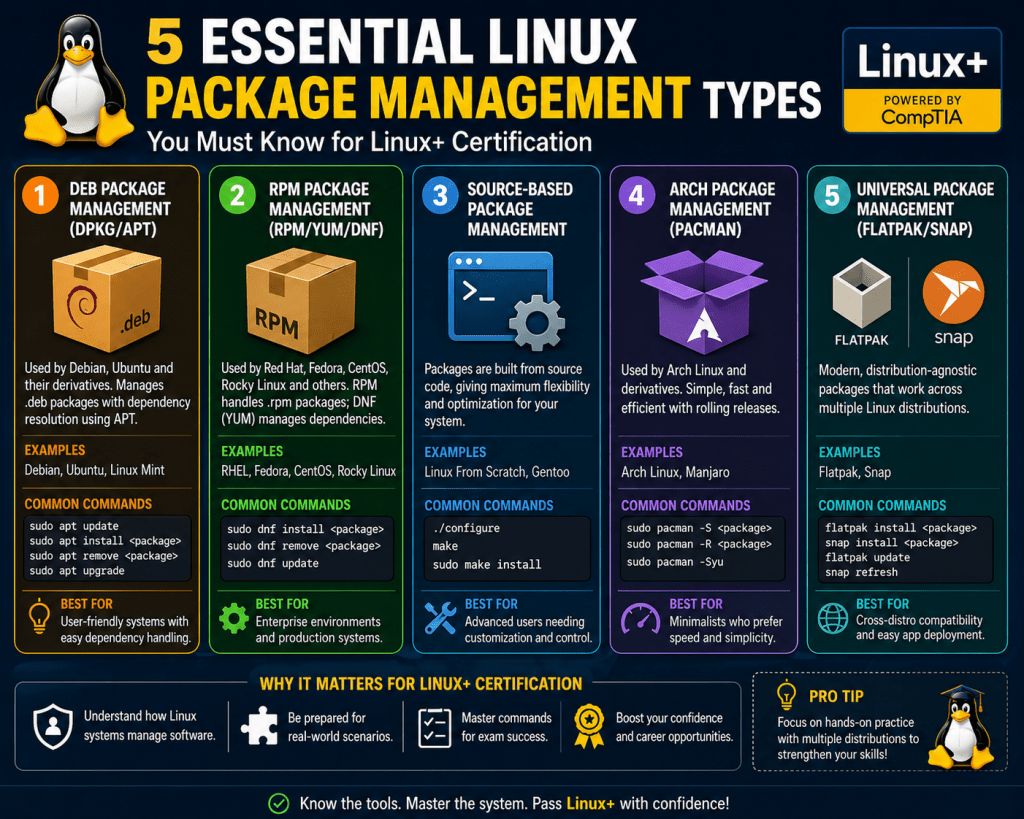
Software packaging serves as a structured method for distributing and managing applications across operating systems. Instead of manually copying files into various directories, packaging consolidates all required components into a single, manageable unit. This approach simplifies installation, ensures consistency, and reduces the likelihood of configuration errors. In modern computing environments, packaging is not optional; it is a fundamental part of how systems maintain stability and predictability. It also provides a repeatable process, meaning the same package can be installed across different machines with identical results, which is essential for maintaining uniform environments in both small setups and large infrastructures.
A software package typically contains executable files, configuration templates, supporting libraries, and documentation. These elements are bundled together to ensure that the application functions correctly once installed. By grouping everything into one unit, administrators avoid the complexity of tracking individual files and their relationships. This method also enables easier sharing and deployment across multiple systems. In addition to these core components, packages often include scripts that handle pre-installation and post-installation tasks, such as setting permissions, creating necessary directories, or initializing services. These automated steps further reduce manual intervention and help ensure that the software is not only installed but also properly configured for immediate use.
Another important advantage of packaging is version control. Each package is labeled with a specific version number, allowing administrators to track updates, apply patches, and roll back changes if necessary. This level of control is especially valuable in environments where stability is critical, as it allows systems to remain consistent even when updates are introduced. Packaging systems also maintain records of installed software, making it easier to audit systems, troubleshoot issues, and ensure compliance with organizational policies.
Key Elements Inside a Software Package
Every package includes more than just the files needed to run an application. It also contains metadata, which provides essential information about the software. Metadata includes the package name, version, architecture compatibility, and dependency requirements. This information allows the system to determine whether the package can be installed safely.
Metadata acts as a guide for the package manager, ensuring that all necessary conditions are met before installation begins. For example, if a package depends on a specific library version, the metadata will specify that requirement. The system then checks whether the dependency is already installed or needs to be added. This automated process significantly reduces the risk of broken software installations.
Function of Package Managers in Software Control
Package managers are the tools responsible for handling software packages. They automate the process of installing, updating, and removing applications while maintaining system integrity. Without package managers, administrators would need to manually track dependencies, versions, and file placements, which would be inefficient and error-prone.
These tools maintain a database of installed packages, allowing the system to track changes over time. When a package is installed, the manager records its details, including version and file locations. This record-keeping ensures that updates can be applied correctly and that removals do not leave behind unnecessary files.
Another critical function of package managers is dependency resolution. When installing new software, the manager checks for required components and installs them automatically if they are missing. This ensures that applications have everything they need to run properly.
Overview of Common Packaging Systems
Different operating systems use different packaging formats and management tools. While the core concepts remain the same, each system has its own structure and workflow. Some packaging systems focus on simplicity, while others emphasize strict dependency control and long-term stability.
In many environments, packaging systems are closely tied to the operating system’s design. This tight integration allows for better performance, improved security, and more reliable updates. Understanding these systems is essential for anyone working with system administration or software deployment.
RPM Packaging Format and Its Practical Use
The RPM format is widely used in many enterprise-level Linux environments. It is designed to handle both compiled software and source code packages. Each RPM file contains a structured set of data that includes the application files and metadata required for installation.
RPM packages are known for their reliability and consistency. They include detailed dependency information, which helps ensure that installations are completed without missing components. Additionally, RPM systems maintain a database that tracks installed packages, making it easier to manage updates and removals.
One important feature of RPM packages is their ability to distinguish between binary and source packages. Binary packages contain ready-to-run software, while source packages include the original code that can be compiled locally. This flexibility allows administrators to tailor installations based on their specific needs.
DEB Packaging Format and Its System Integration
The DEB format is commonly used in Debian-based systems and their derivatives. It follows a structured design that separates metadata from the actual application data. This separation allows the system to evaluate installation requirements before extracting files.
DEB packages are managed through a layered system of tools. Low-level utilities handle the basic operations, while higher-level tools provide a more user-friendly interface. These tools work together to ensure that software is installed efficiently and that dependencies are resolved automatically.
One of the strengths of the DEB system is its focus on dependency management. The system ensures that all required components are installed in the correct order, reducing the chances of errors. This makes it particularly effective in environments where multiple applications rely on shared libraries.
Importance of Dependency Management in Packaging
Dependencies are external components that a piece of software needs to function correctly. Managing these dependencies is one of the most challenging aspects of system administration. Without proper handling, missing or incompatible dependencies can cause applications to fail.
Package systems address this issue by automatically identifying and resolving dependencies during installation. When a package is installed, the system checks its metadata to determine which additional components are required. If those components are not present, they are installed as part of the process.
This automated approach not only simplifies installation but also ensures that systems remain stable. By maintaining accurate records of dependencies, package managers can prevent conflicts and ensure compatibility across different software components.
Role of Metadata in System Stability
Metadata is essential for maintaining order within a package system. It provides the information needed to manage software effectively, including version control and compatibility details. Without metadata, the system would have no way of determining how different packages interact.
Version tracking is a key function of metadata. It allows the system to identify whether a package is outdated and needs to be updated. It also ensures that newer versions replace older ones without causing conflicts. This is particularly important in environments where multiple applications depend on shared libraries.
Metadata also supports system auditing and troubleshooting. By maintaining detailed records of installed packages, administrators can quickly identify issues and trace them back to their source.
Consistency and Reliability Through Packaging Systems
One of the main advantages of software packaging is the consistency it brings to system management. By standardizing how software is installed and maintained, packaging systems reduce variability and improve reliability. This is especially important in large environments where multiple systems must operate in a consistent manner.
Consistency also simplifies troubleshooting. When all systems follow the same packaging standards, it becomes easier to identify and resolve issues. Administrators can apply the same solutions across multiple systems without needing to adjust for differences in configuration.
Reliability is further enhanced by the structured nature of package systems. By enforcing strict installation rules and dependency checks, these systems minimize the risk of errors and ensure that software operates as expected.
Evolution of Packaging Practices in Modern Systems
Software packaging has evolved significantly over time. Early systems relied on manual installation methods, which were time-consuming and prone to errors. Modern packaging systems have introduced automation, dependency resolution, and security features that greatly improve efficiency.
Today’s packaging systems are designed to handle complex environments with ease. They support large-scale deployments, automated updates, and advanced security mechanisms. This evolution reflects the growing complexity of software ecosystems and the need for reliable management tools.
As technology continues to advance, packaging systems will likely become even more sophisticated. They will continue to play a critical role in ensuring that software can be deployed, maintained, and updated in a controlled and efficient manner.
Deep Dive into Archive-Based Distribution and Its Practical Relevance
Archive-based distribution represents one of the most enduring methods of handling software and data in Unix-like systems. Unlike structured package formats that integrate directly with package managers, archive formats focus primarily on bundling and transporting files without enforcing installation logic. This distinction is critical because it separates the concerns of file organization from system-level software management.
In practice, archives are often used when flexibility is required. Developers may distribute source code or precompiled binaries in archive form, allowing administrators to manually control how and where the software is deployed. This approach is especially useful in custom environments where predefined package structures may not align with system requirements. Archive formats provide a neutral, system-agnostic method of distribution that can be adapted to different use cases.
Understanding the TAR Format and Its Functional Behavior
The TAR format is one of the most widely used archive formats in Unix and Linux systems. Its primary purpose is to combine multiple files and directories into a single file while preserving their structure and attributes. This includes file permissions, ownership, timestamps, and directory hierarchy.
TAR operates by sequentially writing file data into a single stream, making it highly efficient for storage and transfer. However, it does not inherently compress data. Instead, it focuses on maintaining the integrity of file structures during archiving and extraction processes. This makes it an essential building block for more advanced archive formats that incorporate compression.
One of the defining features of TAR is its ability to handle entire directory trees. This allows administrators to package complex software projects or system backups into a single archive without losing structural relationships between files. The extraction process restores the original layout exactly as it was, ensuring consistency across systems.
Compression Integration and the Role of GZIP
Compression is often combined with archiving to reduce file size and improve transfer efficiency. GZIP is one of the most commonly used compression utilities in Unix-like systems. When applied to a TAR archive, it creates a compressed archive that retains the original structure while significantly reducing storage requirements.
GZIP works by identifying repetitive patterns within files and encoding them more efficiently. This is particularly effective for text-based data, where redundancy is common. The result is a smaller file that can be transmitted more quickly over networks and stored more efficiently on disk.
The combination of TAR and GZIP has become a standard practice in software distribution. It provides a balance between structural preservation and compression efficiency, making it suitable for a wide range of applications. This approach is commonly used for distributing source code, configuration files, and system backups.
Handling Compressed Archives in System Workflows
Working with compressed archives requires an understanding of how different tools interact. In many cases, extraction involves multiple steps, such as decompressing the file and then unpacking the archive. However, modern tools often streamline this process by allowing both operations to be performed simultaneously.
Efficient handling of compressed archives is essential for system administrators. It enables quick deployment of software, rapid restoration of backups, and effective management of large datasets. Understanding how to work with these formats reduces operational complexity and improves overall productivity.
In addition to extraction, administrators must also be familiar with creating archives. This involves selecting appropriate compression methods based on the type of data being handled. For example, text-heavy data benefits greatly from compression, while already compressed files may not see significant size reduction.
Alternative Compression Methods and Their Trade-Offs
While GZIP is widely used, it is not the only compression method available. Other formats such as BZ2 and XZ offer different performance characteristics. BZ2 provides better compression ratios than GZIP but requires more processing time. XZ offers even higher compression efficiency, making it suitable for large datasets where storage savings are critical.
Each compression method represents a trade-off between speed and efficiency. Faster methods are ideal for real-time operations, while higher compression methods are better suited for archival storage. Choosing the right method depends on the specific requirements of the task.
These alternative formats are fully compatible with TAR-based workflows, allowing administrators to switch between compression methods without changing the underlying archive structure. This flexibility makes it easier to adapt to different operational needs.
Single-File Compression and Its Use Cases
Unlike archive-based compression, some methods focus on compressing individual files. GZIP can be used independently to compress a single file without bundling it into an archive. This approach is commonly used for log files, configuration files, and other standalone data.
Single-file compression simplifies file handling by maintaining a one-to-one relationship between the original file and its compressed version. This makes it easier to manage individual files without dealing with complex archive structures. However, it does not provide the organizational benefits of multi-file archives.
In environments where file grouping is unnecessary, single-file compression offers a straightforward and efficient solution. It reduces storage requirements while preserving the original file content.
Practical Differences Between Packaging and Archiving
Understanding the distinction between packaging and archiving is essential for effective system management. Packaging systems are designed for installation and lifecycle management, while archiving systems focus on storage and transport.
Packaging includes metadata, dependency handling, and installation scripts. It integrates directly with system tools to ensure that software is installed correctly and maintained over time. Archiving, on the other hand, does not include these features. It simply groups files together without enforcing how they should be used.
This difference means that archive-based distributions often require manual intervention during installation. Administrators must extract files, place them in appropriate directories, and configure the system manually. While this provides flexibility, it also increases the risk of errors.
Efficiency Considerations in Archive Usage
Efficiency is a key factor when working with archives. Compression reduces file size, but it also introduces processing overhead. Decompression requires CPU resources, which can impact system performance during large operations.
Balancing compression efficiency with performance is an important consideration. In high-performance environments, faster compression methods may be preferred even if they result in larger file sizes. In storage-constrained environments, higher compression ratios may take priority.
Administrators must evaluate these trade-offs based on their specific needs. This includes considering factors such as network bandwidth, storage capacity, and processing power.
File Integrity and Reliability in Archive Systems
Maintaining file integrity is critical when working with archives. Corruption during transfer or storage can render an archive unusable. To mitigate this risk, integrity checks such as checksums are often used to verify that files have not been altered.
Reliable archive systems ensure that extracted files match their original state. This is particularly important for software distribution, where even minor corruption can cause applications to fail. By verifying integrity before extraction, administrators can prevent issues before they occur.
In addition to checksums, redundancy and backup strategies can be used to protect important archives. This ensures that critical data remains accessible even in the event of hardware failures or data corruption.
Integration of Archives into System Administration Workflows
Archives are deeply integrated into many system administration tasks. They are used for backups, software distribution, data migration, and system replication. Their flexibility makes them suitable for a wide range of applications.
In backup scenarios, archives allow entire systems or directories to be captured and stored in a compact format. This simplifies storage and makes it easier to restore systems when needed. In migration scenarios, archives enable data to be transferred between systems while preserving structure and permissions.
The versatility of archive formats ensures that they remain a fundamental tool in system administration. Even as package management systems evolve, archives continue to play a critical role in handling data and software.
Modern Trends in Archiving and Compression Technologies
Advancements in computing have led to the development of more efficient compression algorithms and improved archive handling tools. Modern systems are capable of processing large archives بسرعة and with minimal resource usage.
These improvements have expanded the use of archives in cloud environments, container systems, and distributed infrastructures. Efficient compression reduces storage costs and improves data transfer speeds, making it an essential component of modern computing.
As data volumes continue to grow, the importance of efficient archiving and compression will only increase. Future developments are likely to focus on improving performance, reducing resource usage, and enhancing integration with automated systems.
Balancing Flexibility and Control in Archive-Based Systems
Archive-based systems offer a high degree of flexibility, allowing administrators to control every aspect of software deployment. However, this flexibility comes with increased responsibility. Without automated dependency management, administrators must ensure that all required components are present and correctly configured.
This balance between flexibility and control is a defining characteristic of archive-based workflows. In environments where customization is critical, archives provide the necessary freedom to tailor installations. In more standardized environments, package systems may be preferred for their automation and reliability.
Understanding when to use each approach is a key skill in system administration. By leveraging the strengths of both packaging and archiving, administrators can create efficient and reliable workflows that meet their specific needs.
Advanced Package Lifecycle Management in Real-World Systems
Software packaging does not end at installation; it continues throughout the entire lifecycle of an application. Lifecycle management includes installation, configuration, updates, patching, and eventual removal. Each phase must be handled carefully to maintain system stability and avoid unintended disruptions. In real-world environments, systems are rarely static, which means package managers must constantly adapt to changes in software requirements and system conditions.
Lifecycle management ensures that systems remain functional and secure over time. Updates introduce new features and fix vulnerabilities, while patching addresses specific issues without requiring full upgrades. Removal processes must also be handled carefully to ensure that dependent applications are not affected. A well-managed lifecycle prevents accumulation of outdated or unused software, which can otherwise lead to inefficiencies and security risks.
Automation and Configuration Consistency Across Systems
Automation has become a fundamental aspect of modern system administration. Instead of manually managing packages on each machine, administrators rely on automated workflows to enforce consistent configurations across multiple systems. These workflows define the desired state of a system and ensure that all packages align with that state.
Automation tools interact directly with package managers to install, update, or remove software as needed. They continuously monitor system configurations and apply corrections when discrepancies are detected. This approach eliminates configuration drift, where systems gradually diverge from their intended setup due to manual changes or inconsistent updates.
Consistency is especially important in large-scale environments where hundreds or thousands of systems must operate in harmony. Automated package management ensures that all systems run the same versions of software, reducing compatibility issues and simplifying troubleshooting.
Handling Updates, Upgrades, and Version Control
Managing software versions is one of the most critical responsibilities in package management. Updates typically involve minor changes such as bug fixes or performance improvements, while upgrades may introduce significant changes, including new features or altered dependencies.
Version control systems within package managers track installed versions and compare them against available updates. This allows administrators to determine whether updates should be applied and to ensure that upgrades do not introduce incompatibilities. In many cases, systems allow selective updates, enabling administrators to update specific packages without affecting others.
Careful version management is essential for maintaining compatibility between different software components. In complex environments, certain applications may depend on specific versions of libraries, making it necessary to control when and how updates are applied.
Rollback and Recovery Strategies in Package Systems
Even with careful planning, software updates can sometimes cause unexpected issues. Rollback mechanisms provide a safety net by allowing systems to revert to a previous stable state. This capability is critical in environments where uptime and reliability are essential.
Rollback strategies vary depending on the package system. Some systems allow individual packages to be downgraded to earlier versions, while others support full system snapshots that restore the entire environment. These snapshots capture the state of the system at a specific point in time, including installed packages and configuration settings.
Recovery strategies often combine rollback mechanisms with backup systems. This ensures that systems can be restored quickly in the event of failure, minimizing downtime and data loss.
Security Considerations in Package Management
Security is deeply integrated into package management processes. Every package installation represents a potential risk if the software source is not trusted. To mitigate this risk, package systems use verification mechanisms such as digital signatures and checksums to ensure authenticity.
Package managers typically rely on trusted repositories that store verified software. These repositories maintain strict controls over what packages are available and who can publish them. By limiting access to trusted sources, systems reduce the likelihood of installing malicious or compromised software.
Dependency security is another important consideration. Since packages often rely on external libraries, vulnerabilities in those dependencies can affect the entire system. Regular updates and careful monitoring of dependencies are essential for maintaining a secure environment.
Optimizing Performance During Package Operations
Package operations can consume significant system resources, particularly during large installations or updates. Performance optimization techniques help reduce the impact of these operations on system performance.
One common approach is parallel processing, where multiple packages are downloaded and installed simultaneously. This reduces overall operation time and improves efficiency. Another technique is caching, which stores frequently used packages locally to avoid repeated downloads.
Efficient use of compression also contributes to performance optimization. Smaller package sizes reduce network usage and speed up transfers, while efficient decompression ensures that installation processes remain fast.
Managing Dependencies in Complex Environments
As systems grow more complex, dependency management becomes increasingly challenging. Multiple applications may require different versions of the same library, leading to potential conflicts. Package managers address this issue through advanced dependency resolution techniques.
One approach is version pinning, which locks specific packages to particular versions. This prevents automatic updates from introducing incompatibilities. Another approach is dependency isolation, where separate environments are created for different applications. This allows each application to use its required dependencies without interfering with others.
Effective dependency management is essential for maintaining system stability. Without it, conflicts between packages can lead to application failures and unpredictable system behavior.
Filesystem Organization and Package Placement
Package systems rely on predefined filesystem structures to determine where files should be installed. These structures ensure that binaries, libraries, configuration files, and documentation are placed in consistent locations.
Standardized file placement simplifies system management by making it easier to locate and modify files. It also ensures compatibility between different packages, as applications expect files to be in specific locations. Deviating from these standards can lead to errors and inconsistencies.
Some systems allow customization of installation paths, providing flexibility for specialized use cases. However, such customization must be managed carefully to avoid breaking dependencies or creating conflicts with other software.
Logging, Monitoring, and Troubleshooting Package Activities
Logging is an essential component of package management. Every installation, update, and removal operation is recorded, providing a detailed history of system changes. These logs are invaluable for troubleshooting issues and understanding system behavior.
Monitoring tools analyze these logs to detect patterns and identify potential problems. For example, repeated installation failures may indicate missing dependencies or configuration issues. By analyzing logs, administrators can quickly pinpoint the root cause of problems and apply appropriate solutions.
Effective troubleshooting relies on accurate and comprehensive logging. Without it, diagnosing issues becomes significantly more difficult, especially in complex environments.
Cross-Platform Challenges and Compatibility Handling
In environments that include multiple operating systems, managing software packages becomes more complex. Different systems use different packaging formats and dependency models, making it difficult to maintain consistency across platforms.
To address this challenge, administrators often use abstraction layers or compatibility tools that translate package operations between systems. While these tools simplify cross-platform management, they may introduce limitations or require additional configuration.
Ensuring compatibility across platforms requires careful planning and testing. Administrators must verify that software behaves as expected in each environment and that dependencies are correctly resolved.
Scalability and Large-Scale Deployment Strategies
Scalability is a critical consideration in modern system administration. As environments grow, package management systems must be able to handle increasing numbers of installations and updates efficiently.
Large-scale deployments often rely on centralized management systems that coordinate package operations across multiple machines. These systems ensure that updates are applied consistently and that all systems remain synchronized.
Efficient deployment strategies include staged rollouts, where updates are applied gradually to minimize risk. This approach allows administrators to identify and address issues before they affect the entire system.
Future Direction of Software Packaging Systems
Software packaging continues to evolve in response to changing technological demands. Modern systems are becoming more automated, secure, and efficient, with a focus on reducing complexity and improving reliability.
Emerging trends include improved dependency management, enhanced security features, and better integration with automated deployment tools. These advancements aim to simplify system administration while maintaining high levels of control and stability.
As software ecosystems grow more complex, the importance of effective packaging systems will continue to increase. They will remain a critical component of system management, enabling administrators to handle software efficiently in a rapidly changing environment.
Conclusion
Software packaging stands as one of the most essential yet often underappreciated pillars of modern system administration. Across operating systems and infrastructure types, it provides the structure that allows software to be distributed, installed, updated, and removed in a controlled and predictable manner. Without packaging systems, managing even a small number of applications would quickly become chaotic, especially when dependencies, version compatibility, and system integrity come into play. What appears on the surface as a simple installation process is, in reality, the result of carefully designed mechanisms working behind the scenes to ensure consistency and reliability.
At a fundamental level, software packaging transforms scattered files into organized, self-describing units. These units carry not only the executable components of an application but also the metadata required to understand how the software interacts with the system. This metadata-driven approach enables automation, which is critical in both small environments and large-scale infrastructures. By relying on structured information rather than manual intervention, systems can enforce rules, validate requirements, and maintain consistency across deployments.
The importance of package managers becomes particularly evident when dealing with dependencies. Modern applications rarely function in isolation; they rely on a network of libraries and supporting tools. Managing these relationships manually would introduce a high risk of errors, including missing components or incompatible versions. Package managers address this complexity by automatically resolving dependencies, ensuring that all required components are present and correctly configured. This not only simplifies installation but also enhances system stability by preventing incomplete or conflicting setups.
Another critical aspect of packaging systems is their ability to manage the full lifecycle of software. Installation is only the beginning. Over time, software must be updated to address bugs, improve performance, and fix security vulnerabilities. Packaging systems provide structured methods for handling these updates, ensuring that newer versions replace older ones without disrupting system functionality. They also support safe removal processes, preventing leftover files or broken dependencies from affecting system performance. This lifecycle management ensures that systems remain clean, efficient, and up to date.
Security is deeply intertwined with software packaging. Every package represents a potential entry point into the system, making trust verification essential. Packaging systems incorporate mechanisms such as signature validation and integrity checks to ensure that software originates from reliable sources and has not been altered. These safeguards are particularly important in interconnected environments where software is frequently retrieved from external repositories. By enforcing strict validation processes, packaging systems help protect against unauthorized modifications and potential security threats.
Archive and compression technologies complement packaging systems by enabling efficient storage and transfer of software. While packaging focuses on installation and management, archiving focuses on bundling and transporting files. Compression reduces file sizes, making distribution faster and more efficient, especially in bandwidth-constrained environments. Together, these technologies ensure that software can be delivered reliably while minimizing resource usage. Their continued relevance highlights the importance of balancing efficiency with structural integrity in software distribution.
As systems grow in scale, the role of packaging becomes even more critical. In large environments, manual management is not practical. Automation and orchestration tools rely heavily on packaging systems to maintain consistency across multiple machines. By defining desired states and enforcing them through automated workflows, administrators can ensure that all systems operate with the same configurations. This reduces variability, simplifies troubleshooting, and improves overall reliability.
Scalability also introduces challenges related to performance and resource management. Large-scale deployments require efficient handling of package operations to avoid excessive load on networks and systems. Techniques such as caching, parallel processing, and incremental updates help address these challenges by optimizing how packages are distributed and installed. These optimizations ensure that systems can handle frequent updates and large deployments without compromising performance.
Another important consideration is the diversity of modern computing environments. Different operating systems and distributions use different packaging formats and management tools. This diversity requires administrators to understand multiple systems and, in some cases, bridge compatibility gaps between them. While native packaging formats provide the most reliable integration, cross-system strategies enable flexibility in heterogeneous environments. Managing this diversity effectively is a key skill in modern system administration.
The evolution of packaging systems reflects the increasing complexity of software ecosystems. Early approaches relied heavily on manual processes, which were time-consuming and prone to errors. Modern systems have introduced automation, advanced dependency resolution, and enhanced security features. These advancements have transformed packaging into a sophisticated discipline that supports large-scale, dynamic environments. As technology continues to evolve, packaging systems will likely incorporate even more intelligent and adaptive capabilities.
Monitoring and auditing further extend the value of packaging systems. Detailed logs and tracking mechanisms provide insight into system activity, enabling administrators to identify issues, verify changes, and maintain compliance with operational standards. This visibility is essential in environments where reliability and accountability are critical. By maintaining accurate records of package operations, systems can support effective troubleshooting and long-term maintenance strategies.
Ultimately, software packaging serves as the backbone of system organization and control. It bridges the gap between software development and system deployment, ensuring that applications can be delivered and maintained in a consistent and secure manner. Its influence extends across installation processes, update management, security enforcement, and operational scalability. Without it, managing modern computing environments would be significantly more complex and less reliable.
A thorough understanding of packaging concepts equips system administrators with the ability to manage software efficiently, adapt to changing requirements, and maintain stable environments over time. As systems continue to grow in complexity and scale, the principles of software packaging will remain central to effective system management, enabling organizations to operate with confidence, consistency, and control.