
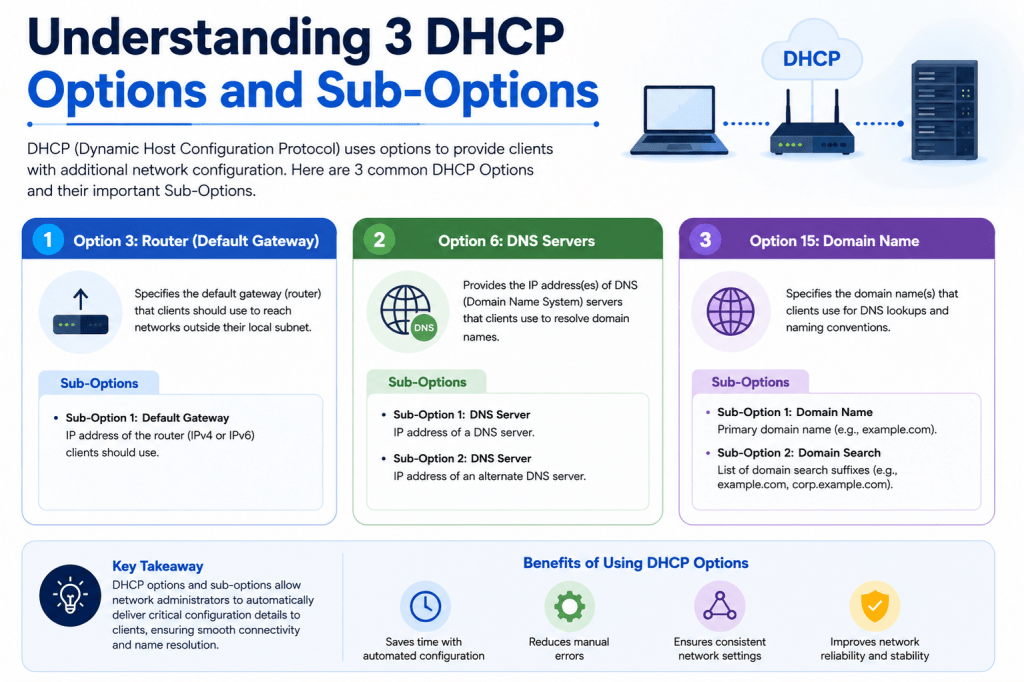
Dynamic Host Configuration Protocol, commonly known as DHCP, is one of the most important technologies used in modern networking environments. It allows devices to receive network settings automatically whenever they connect to a network. Without DHCP, administrators would need to manually assign IP addresses, subnet masks, gateways, and DNS server information to every single device. In small networks this task may still be manageable, but in enterprise environments containing thousands of devices, manual configuration becomes almost impossible to maintain efficiently.
DHCP simplifies the entire onboarding process for network devices. Whether a laptop joins a wireless network, a printer is connected to a switch, or a new router is deployed in a branch office, DHCP provides the required settings automatically. This automation reduces configuration mistakes and allows devices to become operational within seconds after connecting to the network.
The real power of DHCP comes from its options and sub-options. These additional configuration parameters extend DHCP far beyond simple IP address assignment. Through DHCP options, administrators can instruct devices where to locate configuration files, firmware images, boot servers, VoIP configurations, network management systems, and many other critical resources. DHCP effectively becomes a centralized automation mechanism that controls how devices behave when they first join the network.
In enterprise infrastructures, DHCP options are especially important for large-scale deployments. Organizations often deploy hundreds or thousands of switches, routers, firewalls, wireless access points, and IP phones. Configuring each device manually would require enormous amounts of time and introduce a higher risk of human error. DHCP options help automate these repetitive tasks, making deployments faster, cleaner, and far more reliable.
The Core Function of DHCP
At its foundation, DHCP operates through a communication process between clients and servers. When a device first connects to a network, it does not yet have an IP address. The client broadcasts a DHCP discovery message requesting network information. The DHCP server receives this request and responds with an available IP configuration.
The server offers several essential parameters during this exchange. These usually include an IP address, subnet mask, default gateway, DNS server addresses, and lease duration. Once the client accepts the offer, the server confirms the assignment, allowing the device to begin communicating across the network.
Although this basic operation appears simple, DHCP contains a highly flexible architecture that supports extensive customization. Administrators can define different pools for different departments, reserve addresses for critical systems, and create specialized policies for unique device types. DHCP options are what make these advanced capabilities possible.
Each DHCP option carries a specific purpose. Devices interpret these options during the boot process and adjust their behavior accordingly. Some options are universal and widely used in almost every network, while others are highly specialized for particular vendors, operating systems, or deployment scenarios.
Because DHCP operates automatically, end users are usually unaware of the process taking place behind the scenes. However, network administrators rely heavily on DHCP to maintain stable and scalable environments. A properly configured DHCP infrastructure can dramatically reduce operational complexity and improve deployment consistency across the organization.
Why DHCP Options Matter in Enterprise Networks
Basic IP assignment is only one small part of what modern networks require. Enterprise devices often need additional information before they can fully function. IP phones may need to locate a call manager. Wireless access points may require a controller address. Routers and switches may need software images and configuration templates. DHCP options provide the mechanism to deliver all of this information automatically.
In large corporate environments, automation is critical for operational efficiency. Imagine deploying hundreds of branch routers manually. An engineer would need to visit each site, connect through a console cable, upload firmware, configure interfaces, apply security policies, and verify connectivity. This process would consume huge amounts of time and increase the likelihood of inconsistent configurations.
DHCP options eliminate much of this manual effort. A device can boot, receive network settings automatically, locate its software image, download configuration files, and join the network with minimal human intervention. This automated provisioning model is especially useful for remote locations where technical staff may not be available onsite.
Scalability is another major advantage. As organizations grow, the number of network devices expands rapidly. DHCP automation ensures that adding new devices does not create overwhelming administrative overhead. Administrators can standardize deployment procedures and ensure that devices receive consistent configurations every time.
Another important advantage is reduced configuration errors. Manual configurations often introduce mistakes such as incorrect IP addresses, missing DNS entries, or inconsistent routing policies. Automated DHCP provisioning minimizes these risks because devices receive prevalidated settings directly from centralized infrastructure.
Security management also benefits from DHCP options. Administrators can direct devices toward approved servers, enforce standardized boot procedures, and separate provisioning environments from production networks. While DHCP itself does not provide security, careful option design contributes to more controlled deployment processes.
Common DHCP Options Used in Networks
DHCP contains many standardized options that support different networking requirements. Some are extremely common and appear in almost every deployment scenario. Others are vendor-specific or designed for advanced enterprise use cases.
Option 1 is used to provide the subnet mask. This option tells the client which portion of the IP address represents the network and which portion represents the host. Without this information, the device cannot properly determine local or remote traffic.
Option 3 provides the default gateway. The gateway allows devices to communicate with networks outside their local subnet. Most internet access and inter-network communication depends on this option.
Option 6 specifies DNS server addresses. DNS servers translate domain names into IP addresses, allowing users to access websites and applications using readable names instead of numerical addresses.
Option 15 supplies the domain name used within the network. This option is especially useful in enterprise environments where devices automatically append the domain suffix during DNS lookups.
Option 42 provides Network Time Protocol server information. Accurate time synchronization is essential for authentication systems, logging platforms, monitoring tools, and security applications.
Option 66 identifies a TFTP server hostname. Many devices use this option during automated provisioning to locate firmware images or configuration files.
Option 67 specifies the boot file name. PXE boot environments frequently rely on this option to direct devices toward operating system installation files.
Option 150 is widely used by network devices and VoIP phones to specify TFTP server addresses. This option is especially common in Cisco and Juniper environments.
Each option serves a unique purpose, allowing administrators to customize device behavior according to operational requirements. Together, these options form the foundation of automated network provisioning.
Understanding DHCP Sub-Options
While standard DHCP options are already powerful, sub-options provide even greater flexibility. Sub-options exist within certain DHCP options and allow more detailed configuration structures.
Option 43 is one of the most important examples of DHCP sub-options. This vendor-specific option supports customized information for particular device manufacturers. Network vendors use Option 43 extensively for automated deployment systems and Zero Touch Provisioning workflows.
Sub-options allow multiple pieces of related information to be grouped together within a single option. Instead of creating entirely separate DHCP options for every parameter, vendors organize settings into structured sub-option fields. This design improves scalability and allows vendors to extend functionality without conflicting with standardized DHCP definitions.
For example, a network device may use different sub-options to define software versions, transfer methods, configuration files, controller addresses, or provisioning parameters. During bootup, the device reads these values and determines the correct deployment actions automatically.
Sub-options are especially important in enterprise automation environments because they support detailed provisioning logic. Devices can interpret multiple deployment instructions simultaneously and adapt their behavior according to the information received from the DHCP server.
This capability becomes critical during large deployments involving different hardware models, software versions, or regional configurations. Administrators can design sophisticated provisioning systems that automatically deliver the correct resources to each device type without manual intervention.
How Option 43 Supports Automated Provisioning
Option 43 plays a major role in modern network automation. Because it is vendor-specific, manufacturers can define custom sub-options tailored to their products and deployment requirements.
In Juniper environments, Option 43 is commonly associated with Zero Touch Provisioning. ZTP allows new devices to automatically download software and configurations immediately after connecting to the network. This process dramatically reduces deployment complexity and enables remote provisioning without onsite engineering support.
When a Junos device first boots, it sends DHCP requests searching for provisioning instructions. The DHCP server responds with Option 43 data containing various sub-options that guide the provisioning process.
One sub-option may specify which software image version the device should install. Another sub-option may identify the transfer protocol required to retrieve files. Additional sub-options may reference configuration templates or provisioning scripts.
This structured approach allows administrators to automate complex deployment procedures with minimal manual involvement. Devices can effectively configure themselves after receiving the appropriate DHCP instructions.
Option 43 is not limited to Juniper devices. Many other vendors use similar mechanisms for automated provisioning systems. Wireless controllers, access points, IP phones, security appliances, and IoT devices frequently rely on vendor-specific DHCP options during initial deployment.
Because these options are vendor-defined, administrators must carefully follow documentation when configuring DHCP servers. Incorrect sub-option formatting can prevent devices from provisioning correctly.
Zero Touch Provisioning and DHCP Integration
Zero Touch Provisioning represents one of the most valuable applications of DHCP options and sub-options. ZTP enables network devices to automatically initialize themselves without requiring manual console access or extensive configuration steps.
The process typically begins when a new device powers on for the first time. Since the device lacks configuration information, it broadcasts DHCP discovery messages requesting network settings. The DHCP server responds with both standard network parameters and specialized provisioning instructions.
The device then uses these instructions to locate required resources. This may include firmware images, configuration files, scripts, certificates, or management server addresses. Once downloaded, the device applies the configurations automatically and joins the production network.
This automated workflow significantly reduces deployment time. Instead of spending hours configuring each device manually, engineers can simply rack the hardware, connect power and network cables, and allow automation to complete the remaining tasks.
ZTP is especially valuable in geographically distributed organizations. Remote branches often lack dedicated networking staff, making manual provisioning expensive and time-consuming. DHCP-driven automation allows central teams to deploy equipment remotely with consistent results.
Large cloud providers, service providers, and enterprise organizations depend heavily on these provisioning techniques to support rapid infrastructure growth. Automation not only improves efficiency but also ensures configuration consistency across the network.
Software Image Management Through DHCP Options
Managing software versions across large device inventories can become extremely challenging without automation. DHCP options simplify this process by directing devices toward approved firmware images during deployment.
Through sub-options within Option 43, administrators can define preferred operating system versions for specific hardware platforms. Devices interpret these values during bootup and determine which software image they should request from the provisioning server.
This capability is important because maintaining consistent software versions improves network stability and simplifies troubleshooting. Mixed firmware environments often introduce compatibility issues, inconsistent features, and unpredictable behavior.
By automating image management through DHCP, organizations can standardize deployments and reduce the risk of outdated or unsupported software running in production environments.
The actual software image location is typically specified through additional DHCP options such as Option 66 or Option 150. These options point devices toward servers hosting the required files. The provisioning server must allow unauthenticated access during the initial deployment stage because the device has not yet received operational credentials.
This introduces important security considerations. Provisioning servers should remain isolated from sensitive production systems and protected through segmentation policies. Administrators often deploy dedicated provisioning networks specifically for automated onboarding workflows.
Automated image management also supports large-scale upgrade projects. Organizations can prepare standardized firmware repositories and allow devices to retrieve approved versions automatically during replacement or expansion activities.
The Role of DHCP in Large-Scale Network Automation
As enterprise networks continue to expand, automation becomes one of the most critical requirements for maintaining operational efficiency. Organizations now manage thousands of interconnected devices spread across data centers, branch offices, campuses, and cloud environments. Without automated deployment methods, configuring and maintaining this infrastructure would require enormous engineering effort. DHCP options and sub-options provide one of the foundational technologies that make large-scale automation possible.
When devices connect to the network for the first time, they require more than just IP connectivity. Modern infrastructure devices often need firmware validation, controller discovery, security enrollment, configuration templates, monitoring integration, and authentication parameters before they can fully operate within the production environment. DHCP options allow all of this information to be distributed automatically during the initialization process.
This automated approach reduces deployment time dramatically. Instead of manually configuring every switch, router, firewall, or wireless access point, engineers can create centralized provisioning systems that handle onboarding automatically. Devices receive the necessary instructions immediately after powering on, allowing them to join the network with minimal manual interaction.
Network consistency also improves significantly through DHCP-driven automation. Human configuration errors are among the most common causes of outages and deployment failures. Typographical mistakes, inconsistent configurations, incorrect routing parameters, and missing security settings can all create serious operational problems. Automated provisioning eliminates much of this risk by applying predefined configurations consistently across all devices.
Another important benefit is operational scalability. As organizations grow, infrastructure deployments become more frequent and complex. DHCP options help support this growth by simplifying device onboarding and reducing administrative overhead. Engineers can focus on network design and optimization rather than repetitive provisioning tasks.
How DHCP Improves Device Provisioning Workflows
Provisioning workflows traditionally required significant manual effort. Engineers needed to physically access devices through console connections, assign management IP addresses, upload firmware files, configure interfaces, and apply security policies individually. This process consumed valuable time and increased operational costs, especially in geographically distributed environments.
DHCP options transformed this process by enabling automated provisioning workflows. A new device can now receive nearly all required deployment information directly from the network during bootup. This capability is especially important for organizations deploying infrastructure at scale.
For example, when a new switch powers on, it immediately broadcasts DHCP discovery packets. The DHCP server responds with standard network parameters along with additional options containing provisioning instructions. These instructions may identify firmware repositories, controller addresses, configuration templates, or scripting servers.
The device interprets this information automatically and begins retrieving the required resources. Firmware images can be downloaded and installed, configuration files can be applied, and management systems can be contacted without manual intervention. Once completed, the device becomes fully operational and integrated into the network.
This workflow is particularly useful in remote locations where technical personnel may not be available onsite. Branch offices, retail stores, remote campuses, and temporary deployment environments benefit greatly from automated provisioning systems. Equipment can be shipped directly to the destination and activated by nontechnical staff simply by connecting cables and powering on the devices.
The reduction in deployment complexity also accelerates project timelines. Large infrastructure rollouts that once required weeks of engineering work can now be completed much faster through centralized automation processes.
Understanding Vendor-Specific DHCP Implementations
Although DHCP standards define many universal options, vendors frequently extend functionality through proprietary implementations. These vendor-specific extensions allow manufacturers to customize provisioning workflows according to the capabilities of their products.
Option 43 is one of the most widely used vendor-specific DHCP options. Different manufacturers interpret this option differently, creating unique sub-option structures tailored to their deployment requirements. Network administrators must therefore understand how specific vendors implement these options within their ecosystems.
In networking environments using Juniper devices, Option 43 often supports Zero Touch Provisioning workflows. Devices use various sub-options within Option 43 to identify firmware versions, transfer methods, configuration file names, and deployment parameters. This allows Junos-based systems to automate their initialization procedures with minimal human involvement.
Cisco environments also rely heavily on vendor-specific DHCP functionality. IP phones, wireless access points, and security appliances commonly use DHCP options to locate controllers, call managers, or provisioning servers. Similar implementations exist across many enterprise networking platforms.
Because vendor-specific options vary significantly, proper documentation becomes extremely important. Incorrect formatting, invalid sub-option values, or incompatible provisioning parameters can cause deployment failures. Administrators must carefully validate DHCP configurations to ensure devices interpret provisioning instructions correctly.
Interoperability can also become a challenge in multivendor environments. Organizations using equipment from several manufacturers may need highly customized DHCP policies to support different provisioning requirements simultaneously. This complexity makes DHCP planning a critical part of enterprise network design.
Despite these challenges, vendor-specific DHCP functionality remains one of the most powerful tools available for infrastructure automation and large-scale deployment management.
How DHCP Options Support Operating System Deployment
Beyond network devices, DHCP options also play a major role in operating system deployment environments. Many organizations use automated installation systems to provision servers, workstations, and virtual machines efficiently.
PXE boot technology is one of the most common examples. Preboot Execution Environment allows devices to boot from network resources instead of local storage media. DHCP options help direct devices toward the correct boot servers and installation files during this process.
When a system starts through PXE, it first requests an IP configuration from the DHCP server. Along with standard network settings, the DHCP response includes additional information such as boot server addresses and boot file names. Options 66 and 67 are commonly used for this purpose.
Option 66 identifies the server hosting boot resources, while Option 67 specifies the exact boot file the client should retrieve. Once the client downloads the bootloader, the installation process can begin automatically.
This approach allows organizations to standardize operating system deployments across large numbers of systems. Instead of manually installing operating systems from physical media, administrators can automate the entire process using centralized deployment infrastructure.
Enterprise deployment platforms often combine DHCP, PXE, TFTP, HTTP, and scripting technologies to create fully automated provisioning workflows. Systems can receive operating systems, drivers, software packages, security policies, and management agents automatically during initialization.
Large data centers depend heavily on these methods to rapidly deploy server infrastructure. Cloud providers and enterprise virtualization environments also use similar techniques to automate virtual machine provisioning at scale.
DHCP serves as the initial communication mechanism that enables all of these automated deployment processes to function efficiently.
The Importance of Option 66 and Option 150
Among the many DHCP options available, Options 66 and 150 are especially important for automated provisioning environments. Both options help devices locate external resources necessary during initialization and configuration processes.
Option 66 specifies the hostname or IP address of a TFTP server. TFTP, or Trivial File Transfer Protocol, is commonly used during device bootstrapping because of its simplicity and lightweight design. Many network devices rely on TFTP to retrieve firmware images, startup configurations, and boot files during deployment.
When a device receives Option 66 information, it knows where to request the necessary provisioning resources. Without this information, the device would not know how to locate configuration files or operating system images on the network.
Option 150 serves a similar purpose but is frequently associated with VoIP systems and networking equipment. Many Cisco and Juniper devices use Option 150 to identify provisioning servers hosting firmware and configuration resources.
VoIP phones commonly depend on Option 150 during initialization. After receiving an IP address, the phone contacts the specified provisioning server to download configuration files and locate call management systems. This automated process allows large numbers of phones to be deployed rapidly with minimal manual configuration.
Network infrastructure devices also benefit from Option 150 during Zero Touch Provisioning workflows. Devices can automatically retrieve operating system images, configuration templates, and automation scripts immediately after connecting to the network.
Because these options often point toward critical infrastructure systems, security considerations become extremely important. Provisioning servers should be isolated within controlled network segments, and access controls should limit exposure to unauthorized systems.
Properly configured provisioning infrastructure significantly improves deployment efficiency while reducing operational complexity across enterprise environments.
Transfer Protocols Used in DHCP Provisioning
DHCP options frequently specify not only where devices should retrieve files but also which transfer protocols should be used during provisioning operations. Several protocols are commonly supported depending on device capabilities and organizational requirements.
TFTP is one of the oldest and simplest protocols used for automated provisioning. Because it requires minimal overhead, many networking devices support TFTP natively during early boot stages. TFTP is commonly used for transferring firmware images, configuration files, and PXE boot resources.
Despite its simplicity, TFTP lacks many security features found in modern protocols. It does not provide encryption, strong authentication, or advanced error handling. As a result, organizations often restrict TFTP usage to isolated provisioning environments rather than production networks.
FTP is another protocol sometimes used during provisioning operations. FTP supports larger file transfers and improved reliability compared to TFTP, making it suitable for larger firmware images and software packages. However, traditional FTP also lacks encryption unless additional security mechanisms are implemented.
HTTP and HTTPS have become increasingly popular for modern provisioning systems. These protocols support secure encrypted communication, improved scalability, and compatibility with web-based infrastructure platforms. Many modern network devices can retrieve firmware and configurations through HTTP-based provisioning systems.
Using HTTPS provides significant security advantages because transferred files are encrypted during transit. This reduces the risk of interception or tampering during deployment operations.
The choice of transfer protocol depends on organizational requirements, device capabilities, and security policies. Older devices may only support TFTP during initial boot stages, while newer platforms often support secure HTTP-based provisioning workflows.
Administrators must carefully design provisioning infrastructure to balance simplicity, compatibility, performance, and security requirements.
Configuration File Automation Through DHCP Sub-Options
Configuration management is one of the most valuable aspects of DHCP-driven automation. Devices require extensive configuration parameters before they can operate correctly within enterprise networks. DHCP sub-options help automate the delivery of these settings during the onboarding process.
For Junos devices, specific sub-options within Option 43 can identify configuration file names or deployment templates. After retrieving these files from the provisioning server, the device automatically applies the configurations during initialization.
These configuration files may contain interface assignments, VLAN settings, routing protocols, DNS parameters, authentication configurations, monitoring integrations, and security policies. By centralizing these templates, organizations can maintain consistent standards across all deployed devices.
Automation also simplifies large-scale hardware replacement projects. If a failed device needs replacement, administrators can simply connect the new hardware to the network. DHCP-based provisioning systems automatically deliver the correct firmware and configuration templates, dramatically reducing recovery time.
Template-based provisioning improves operational flexibility as well. Different device groups can receive different configurations based on DHCP policies, hardware identifiers, or deployment locations. Branch routers, campus switches, and data center infrastructure can all follow separate provisioning workflows while still using centralized automation systems.
This level of flexibility becomes especially important in multinational organizations managing diverse infrastructure environments. DHCP-driven automation helps maintain operational consistency despite varying regional requirements and hardware platforms.
By automating configuration deployment, organizations reduce repetitive manual work and improve overall network reliability.
Security Considerations for DHCP Provisioning Environments
Although DHCP automation provides major operational advantages, it also introduces several security considerations that organizations must address carefully. Because provisioning systems often allow unauthenticated devices to retrieve files and configurations, attackers may attempt to exploit these environments if proper protections are not implemented.
One of the most important security practices involves network segmentation. Provisioning servers should remain isolated from critical production infrastructure whenever possible. Dedicated onboarding networks help limit exposure and reduce the potential impact of unauthorized access attempts.
Access control policies are also essential. Provisioning servers should only allow the minimum required services and protocols necessary for deployment operations. Unnecessary services increase the attack surface and create additional security risks.
Monitoring and logging are equally important. Organizations should track provisioning activity carefully to identify suspicious behavior, unauthorized devices, or failed deployment attempts. Comprehensive logging improves visibility and supports incident investigation efforts.
Secure transfer protocols such as HTTPS should be used whenever supported by the devices involved. Encrypted communications reduce the risk of file interception or manipulation during provisioning operations.
Administrators must also protect DHCP infrastructure itself. Rogue DHCP servers can distribute malicious configuration information and redirect devices toward unauthorized systems. Features such as DHCP snooping help prevent these attacks by validating legitimate DHCP traffic within switching environments.
Regular firmware validation and configuration auditing further strengthen provisioning security. Devices should only retrieve approved images and templates from trusted repositories.
When implemented correctly, DHCP automation provides tremendous operational value while maintaining acceptable security standards for enterprise deployment environments.
Advanced DHCP Deployment Strategies in Enterprise Networks
As enterprise infrastructures continue growing in size and complexity, DHCP has evolved from a simple address assignment service into a critical automation platform. Modern organizations depend on DHCP options and sub-options not only for network connectivity but also for centralized deployment management, operational consistency, and large-scale provisioning workflows.
Network administrators now design DHCP environments with automation in mind from the very beginning. Instead of manually configuring every network device, engineers build intelligent provisioning systems capable of automatically onboarding switches, routers, wireless devices, security appliances, servers, and endpoint hardware. This approach reduces deployment time significantly and helps organizations scale their operations more efficiently.
One of the major advantages of advanced DHCP deployment strategies is centralized control. Administrators can maintain standardized templates and provisioning policies from a single location. When devices connect to the network, they automatically retrieve the correct configurations based on predefined rules and DHCP option assignments.
This centralized model improves consistency across the entire infrastructure. Every device receives approved settings, firmware versions, management parameters, and security policies automatically. As a result, organizations experience fewer configuration errors and reduced operational complexity.
Another major benefit involves infrastructure expansion. Large enterprises frequently deploy new branch offices, campus locations, retail stores, and remote facilities. DHCP automation allows these deployments to occur quickly without requiring highly skilled engineers onsite. Equipment can be preconfigured through centralized provisioning systems and activated automatically once connected to the network.
Cloud environments also benefit heavily from DHCP-based automation. Virtual machines, containers, and software-defined infrastructure components often rely on DHCP during initialization processes. Automated address assignment and provisioning workflows support rapid scalability in dynamic cloud ecosystems.
How DHCP Supports Modern Data Center Operations
Modern data centers contain massive numbers of interconnected systems that must operate with high efficiency and reliability. DHCP plays an important role in maintaining this operational flexibility by automating network configuration tasks for both physical and virtual infrastructure components.
Servers within data centers frequently use DHCP during provisioning stages before transitioning to permanent configurations. Automated deployment systems rely on DHCP options to direct servers toward operating system installation repositories, configuration management systems, and orchestration platforms.
Virtualization technologies further increase the importance of DHCP automation. Hypervisors may create and destroy virtual machines dynamically based on workload demands. DHCP allows these systems to obtain network settings instantly without requiring manual administrator involvement.
Software-defined networking environments also depend on DHCP for automated communication between infrastructure components. Controllers, orchestration systems, and virtual appliances often exchange provisioning information using DHCP-driven workflows during initialization.
Storage systems, monitoring platforms, and backup appliances may similarly rely on DHCP during deployment phases. Centralized automation reduces deployment time while ensuring operational consistency across the data center environment.
Large-scale cloud providers use highly sophisticated DHCP architectures to support rapid infrastructure scaling. Automated provisioning systems allow new resources to become operational within minutes instead of hours or days. This level of automation would not be possible through manual configuration methods alone.
Data center reliability also improves through DHCP automation because standardized deployment templates reduce configuration inconsistencies. Consistent provisioning processes simplify troubleshooting and improve operational predictability across large infrastructures.
DHCP and Network Device Lifecycle Management
Managing the complete lifecycle of network devices requires careful coordination of deployment, maintenance, upgrades, replacements, and retirement processes. DHCP options contribute significantly to simplifying these operational tasks.
During initial deployment, DHCP automation allows devices to retrieve firmware images, configuration templates, and management parameters automatically. Once operational, devices can continue using DHCP-related services for maintenance and update processes throughout their lifecycle.
Firmware upgrades become easier when centralized provisioning systems maintain approved software repositories. Replacement devices can automatically retrieve standardized operating system versions during onboarding, ensuring compatibility across the environment.
Configuration management systems integrated with DHCP workflows also simplify hardware replacement procedures. If a device fails, administrators can deploy a replacement unit that automatically downloads the correct configuration profile during startup. This minimizes downtime and accelerates service restoration.
Lifecycle management extends beyond physical hardware as well. Virtual network functions and cloud-based appliances frequently use DHCP during orchestration and scaling processes. Automated provisioning ensures these systems integrate correctly into the production environment without manual configuration steps.
Asset tracking and inventory management systems may also interact with DHCP environments. Devices can register with management platforms automatically after receiving network connectivity and provisioning instructions. This improves infrastructure visibility and operational oversight.
Organizations managing thousands of devices benefit tremendously from automated lifecycle workflows because manual processes become increasingly difficult to maintain at scale. DHCP-based automation helps standardize operational procedures and reduces the administrative burden associated with large infrastructure environments.
The Relationship Between DHCP and Network Security
Although DHCP primarily focuses on automation and connectivity, it also plays an important role in enterprise security strategies. Proper DHCP configuration contributes to controlled onboarding processes, infrastructure visibility, and policy enforcement throughout the network.
One important security function involves restricting unauthorized devices. Network access control systems may integrate with DHCP infrastructure to validate device identities before granting full network access. Devices can initially receive limited connectivity until authentication and compliance checks are completed.
DHCP logging also provides valuable visibility into network activity. Administrators can track device connections, IP address assignments, and provisioning events for troubleshooting and security investigations. These records help identify unusual behavior and support incident response efforts.
DHCP snooping is another important security feature commonly implemented on enterprise switches. This capability helps prevent rogue DHCP servers from distributing malicious network settings. Switches monitor DHCP traffic and only allow responses from trusted servers, reducing the risk of unauthorized configuration attacks.
Provisioning environments require particularly strong security controls because new devices often retrieve files without authentication during early boot stages. Segmentation policies help isolate onboarding systems from sensitive production infrastructure.
Encryption further strengthens security during provisioning operations. Modern deployment systems increasingly rely on HTTPS instead of older protocols such as TFTP whenever supported by the devices involved. Secure transfer methods reduce the risk of interception or tampering during firmware and configuration downloads.
Role-based access control for DHCP administration is equally important. Only authorized personnel should modify provisioning policies or DHCP option configurations because incorrect settings could disrupt large portions of the network.
When designed properly, DHCP infrastructure supports both operational efficiency and stronger security management across enterprise environments.
Common Challenges in DHCP Automation Environments
Despite its many advantages, DHCP automation also introduces operational challenges that organizations must manage carefully. As infrastructures become more complex, provisioning systems require careful planning, validation, and ongoing maintenance.
One common challenge involves compatibility between different hardware vendors. Vendor-specific DHCP implementations may interpret options and sub-options differently, creating interoperability concerns in multivendor environments. Administrators must thoroughly test provisioning workflows to ensure devices behave as expected.
Another challenge involves maintaining configuration consistency across large infrastructures. Incorrect DHCP option assignments can result in devices retrieving the wrong firmware images or configuration templates. Centralized change management processes help reduce these risks.
Scalability also becomes an important consideration. Large organizations may process enormous numbers of DHCP requests daily across branch offices, campuses, and cloud environments. DHCP servers must therefore be designed for high availability and performance.
Network segmentation introduces additional complexity. Provisioning systems often require carefully controlled access between onboarding environments and production resources. Improper segmentation can create security vulnerabilities or deployment failures.
Troubleshooting automated deployments can sometimes be difficult because multiple systems interact during the provisioning process. DHCP servers, transfer protocols, configuration repositories, authentication services, and orchestration platforms must all function correctly for successful onboarding.
Firmware compatibility issues may also create operational challenges. Devices running older bootloaders may not support newer transfer protocols or provisioning mechanisms. Administrators must maintain compatibility awareness when designing automated deployment systems.
Documentation becomes critically important in these environments. Because DHCP provisioning workflows often involve many interconnected components, accurate documentation helps engineers troubleshoot problems and maintain operational stability.
Despite these challenges, organizations continue investing heavily in DHCP automation because the operational benefits far outweigh the complexity involved in implementation and maintenance.
How DHCP Enhances Operational Efficiency
Operational efficiency remains one of the biggest reasons organizations rely on DHCP options and sub-options for infrastructure management. Automation significantly reduces the time required for repetitive administrative tasks while improving overall deployment reliability.
Without DHCP automation, network engineers would spend enormous amounts of time manually configuring hardware. Every switch, router, firewall, and access point would require individual attention during deployment. Large infrastructure projects could consume weeks or even months of engineering effort.
Automated provisioning transforms this process completely. Devices can configure themselves automatically after receiving instructions from DHCP servers and provisioning platforms. Engineers can focus on architecture, optimization, and strategic planning rather than repetitive deployment activities.
Operational consistency also improves dramatically. Standardized provisioning templates ensure that devices receive approved configurations every time. This reduces troubleshooting complexity and improves long-term infrastructure stability.
Rapid deployment capabilities provide another major advantage. Organizations can respond more quickly to business growth, infrastructure expansion, and disaster recovery requirements. New locations can become operational much faster through centralized provisioning systems.
Help desk operations benefit as well because automated onboarding reduces user-impacting configuration errors. Devices join the network correctly with fewer deployment-related problems.
Cloud and virtualization technologies further amplify these efficiency gains. Dynamic infrastructure environments require rapid provisioning and scaling capabilities that would be impossible through manual processes alone. DHCP automation supports these modern operational models effectively.
Overall, DHCP options and sub-options help organizations manage increasingly complex infrastructures while maintaining efficiency, reliability, and scalability.
The Future of DHCP Automation Technologies
Networking technologies continue evolving rapidly, and DHCP automation remains an important part of this transformation. As infrastructures become more software-defined and cloud-oriented, automated provisioning systems will continue growing in importance.
Intent-based networking platforms increasingly integrate with DHCP systems to automate infrastructure behavior dynamically. Devices may eventually receive highly customized provisioning instructions based on operational context, security posture, workload requirements, and real-time analytics.
Artificial intelligence and machine learning technologies are also beginning to influence network automation strategies. Future DHCP provisioning systems may use predictive analytics to optimize deployment workflows and detect configuration anomalies automatically.
Zero Touch Provisioning capabilities will likely become even more sophisticated. Modern devices already support advanced onboarding mechanisms, but future systems may incorporate deeper integration with orchestration platforms, cloud management systems, and security frameworks.
Security enhancements will continue evolving as well. Stronger authentication mechanisms, encrypted provisioning workflows, and automated compliance validation will likely become standard features in enterprise onboarding systems.
Edge computing environments represent another area where DHCP automation will remain important. As organizations deploy distributed edge infrastructure closer to users and devices, automated provisioning will help manage these geographically dispersed systems efficiently.
Internet of Things deployments further increase the need for scalable DHCP automation. Large numbers of connected devices require efficient onboarding and centralized management capabilities. DHCP options will continue supporting these expanding ecosystems.
Automation itself is becoming the standard expectation within enterprise networking. Organizations increasingly prioritize technologies that reduce manual effort and improve operational agility. DHCP options and sub-options remain foundational components within these automation strategies.
Conclusion
DHCP options and sub-options have evolved far beyond basic IP address assignment. They now serve as essential components of modern network automation, enabling organizations to deploy, configure, and manage infrastructure at massive scale with greater speed and consistency.
Through automated provisioning workflows, devices can retrieve firmware images, operating system files, configuration templates, controller information, and management parameters automatically during initialization. This dramatically reduces manual configuration effort while improving operational reliability.
Vendor-specific implementations such as Option 43 and its sub-options provide even greater flexibility by supporting advanced provisioning capabilities tailored to specific hardware platforms. Technologies like Zero Touch Provisioning allow devices to become fully operational with minimal human involvement.
Enterprise environments, cloud infrastructures, data centers, and edge computing platforms all benefit from DHCP-driven automation. Organizations can scale their operations more efficiently while maintaining standardized deployment practices across diverse environments.
Security considerations remain important, especially when designing provisioning environments that support automated onboarding. Proper segmentation, monitoring, encryption, and access controls help protect these systems while preserving operational flexibility.
As networking technologies continue advancing, DHCP automation will remain a foundational part of infrastructure management strategies. The ability to automate deployments, reduce errors, and simplify large-scale operations ensures that DHCP options and sub-options will continue playing a critical role in modern enterprise networking environments.