
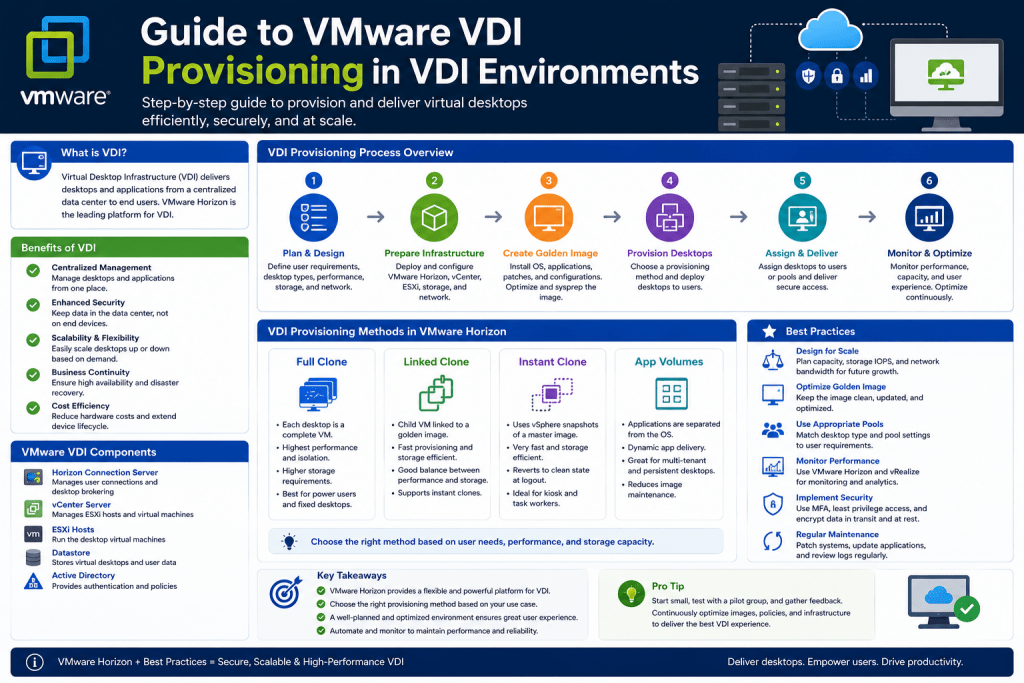
Virtual Desktop Infrastructure, commonly known as VDI, has become one of the most important technologies in modern enterprise computing. Organizations across industries rely on VDI to deliver centralized desktops, improve security, simplify management, and provide users with flexible access to applications and corporate resources from nearly any location. As businesses continue to expand remote work initiatives and digital transformation strategies, understanding how desktop virtualization platforms operate is essential for IT professionals and administrators.
Among the many VDI solutions available, VMware Horizon remains one of the most recognized and widely implemented platforms. VMware’s ecosystem is built around powerful virtualization technologies that allow organizations to create, deploy, manage, and maintain large numbers of virtual desktops efficiently. One of the most critical concepts within the VMware Horizon environment is provisioning technology. Provisioning determines how virtual desktops are created, distributed, maintained, updated, and refreshed across the infrastructure.
For many administrators, provisioning technologies can initially seem complex because they involve storage behavior, virtual machine architecture, memory management, snapshots, replication, and automation workflows. However, once these concepts are understood, administrators gain the ability to manage environments containing hundreds or thousands of desktops with far greater efficiency and consistency.
This guide explores VMware provisioning technologies in detail, beginning with the foundational concepts that explain why provisioning matters in VDI environments and how VMware approaches desktop deployment at scale.
Understanding the Purpose of VDI
Before diving into provisioning technologies, it is important to understand the overall purpose of VDI. In a traditional desktop environment, operating systems and applications run directly on physical computers. Each workstation is configured individually, which can create operational challenges for IT departments. Every software update, security patch, driver issue, or user-related problem must often be handled separately on each endpoint device.
VDI changes this model by hosting desktop operating systems inside virtual machines running on centralized servers within a data center. Instead of users relying on local desktop hardware for computing resources, they access virtual desktops remotely through endpoint devices such as laptops, thin clients, tablets, or even smartphones.
This centralized approach introduces several advantages. Administrators can manage desktops more efficiently, apply updates centrally, improve security through controlled environments, and reduce hardware dependency at the user endpoint. Data remains inside the data center rather than being scattered across multiple physical devices, which helps organizations strengthen compliance and reduce security risks.
The success of a VDI deployment depends heavily on how efficiently virtual desktops are created and managed. This is where provisioning technologies become essential.
What VMware Provisioning Technology Means
Provisioning technology refers to the mechanisms used to create and manage virtual desktop instances based on a standardized master configuration. Instead of manually building every desktop from scratch, administrators create a master image containing the desired operating system, applications, configurations, and policies. Provisioning technologies then generate multiple desktops derived from this centralized image.
The main objective is consistency. In enterprise environments, maintaining identical configurations across hundreds or thousands of desktops can otherwise become nearly impossible. Provisioning technologies ensure that every desktop follows the same baseline standards, helping organizations reduce configuration drift and improve reliability.
Provisioning also dramatically simplifies updates and maintenance. Rather than applying software changes to each virtual desktop individually, administrators modify the master image and distribute those updates across the entire environment. This reduces operational workload while improving deployment speed and minimizing human error.
In VMware Horizon environments, provisioning technologies are designed to balance several important goals simultaneously. These include storage efficiency, scalability, performance optimization, deployment speed, user experience, and simplified administration.
Why Provisioning Matters in Enterprise Environments
Provisioning is not simply about creating desktops quickly. It directly influences infrastructure performance, storage utilization, operational efficiency, and long-term scalability.
In smaller environments, manually managing desktops may appear manageable. However, once organizations begin scaling into hundreds or thousands of users, manual desktop administration becomes unsustainable. Without centralized provisioning, IT teams face issues such as inconsistent software versions, missing updates, security vulnerabilities, and complex troubleshooting scenarios.
Provisioning technologies solve these challenges by introducing automation and centralized image management. Administrators gain the ability to standardize desktop configurations while maintaining operational control over the entire virtual environment.
This standardization becomes especially important in industries requiring strict compliance standards, including healthcare, finance, education, and government sectors. Consistent desktop configurations help organizations maintain security policies, enforce access controls, and ensure regulatory compliance across the infrastructure.
Provisioning also affects user experience. Efficient provisioning systems reduce desktop startup times, minimize downtime during updates, and improve resource utilization. Users benefit from faster logins, more stable sessions, and consistent application performance.
The Evolution of VMware Horizon Provisioning
VMware’s approach to desktop provisioning evolved significantly over time. As VDI adoption increased, organizations demanded better scalability, faster deployment times, and improved performance. VMware responded by developing multiple provisioning methods that addressed different operational requirements.
Initially, environments often relied on manually created virtual machines. While functional, manual deployment lacked scalability and introduced management complexity. As VDI adoption expanded, VMware introduced Linked Clone technology, which dramatically improved storage efficiency and centralized desktop management.
Later, VMware developed Instant Clone technology, which represented a major advancement in provisioning performance and scalability. Instant Clones leveraged deep integration with VMware vSphere to reduce deployment times and optimize memory sharing across desktops.
Each provisioning model introduced new capabilities while addressing limitations found in previous approaches. Understanding the differences between these technologies helps administrators determine which model best suits their environment.
Overview of VMware Provisioning Methods
VMware Horizon environments typically support three major provisioning approaches:
Manual Provisioning
Linked Clones
Instant Clones
Each option provides unique operational characteristics, benefits, and limitations. The ideal choice depends on organizational requirements, infrastructure design, user persistence needs, storage capacity, and scalability goals.
Although all three methods ultimately deliver virtual desktops to end users, the internal technologies powering these deployments differ significantly.
Manual Provisioning Fundamentals
Manual provisioning represents the most traditional deployment method. In this approach, administrators create virtual machines individually or clone existing machines manually. Each desktop operates independently without centralized dependency on a shared image architecture.
At first glance, manual provisioning appears straightforward. Administrators install an operating system, configure applications, apply updates, and deploy the virtual desktop to users. Additional desktops may be created by cloning the configured virtual machine.
However, this simplicity quickly becomes problematic in larger environments.
Because manually provisioned desktops are independent entities, changes made to one machine do not automatically propagate to others. Over time, desktops begin to diverge from one another as users install software, configurations change, updates are missed, or troubleshooting modifications are introduced.
This phenomenon is commonly referred to as configuration drift.
Configuration drift creates major operational challenges. Troubleshooting becomes more difficult because every desktop may contain different settings or software states. Security compliance becomes harder to maintain. Software version inconsistencies increase support complexity. Administrators may spend enormous amounts of time diagnosing issues unique to individual machines.
Manual provisioning also consumes significantly more storage resources because every desktop contains a complete operating system installation and application stack. In environments with large desktop counts, storage utilization can grow rapidly.
Despite these drawbacks, manual provisioning still serves specific use cases.
When Manual Provisioning Makes Sense
Although generally less efficient for enterprise-scale VDI, manual provisioning remains useful in certain scenarios.
Organizations may use manual desktops for specialized users requiring highly customized environments. Developers, engineers, designers, or research teams sometimes need unique software configurations that differ substantially from standard corporate desktops.
Manual provisioning may also be appropriate for testing environments where administrators need complete flexibility without affecting shared production images.
Persistent desktop environments often benefit from manual provisioning as well. Persistent desktops maintain user-specific changes permanently, functioning more like traditional physical computers. In these cases, users may require administrative control over installed applications and settings.
Some organizations also begin with manual provisioning during early VDI adoption phases before transitioning to more advanced provisioning technologies.
However, as environments scale, the operational disadvantages of manual management usually become impossible to ignore.
The Rise of Image-Based Desktop Management
The limitations of manual provisioning drove the industry toward image-based desktop management models. Instead of treating every virtual desktop as a separate entity, administrators began managing centralized master images capable of generating multiple dependent desktops.
This shift introduced major improvements in efficiency, consistency, and scalability.
Rather than patching hundreds of desktops individually, administrators updated a single master image. New desktops inherited the updated configuration automatically. Storage consumption decreased because desktops shared common components instead of duplicating entire operating systems repeatedly.
VMware recognized the importance of this approach and introduced Linked Clone technology to compete more effectively in the growing VDI market.
VMware’s Entry into the VDI Market
As desktop virtualization gained momentum, VMware sought to extend its dominance in server virtualization into the desktop space. VMware already possessed extensive expertise in hypervisor technologies through vSphere, positioning the company well for innovation in virtual desktop management.
At the time, other virtualization vendors had already established strong positions in application and desktop delivery markets. VMware needed a provisioning model that could improve scalability while leveraging the capabilities of its virtualization platform.
Linked Clone technology emerged as VMware’s solution.
This innovation allowed VMware Horizon environments to create multiple desktops sharing a common parent image while minimizing storage duplication. The result was a more efficient and scalable desktop provisioning architecture.
Linked Clones became a foundational technology that significantly expanded VMware’s competitiveness within the VDI industry.
The Importance of Master Images
At the core of VMware provisioning technologies lies the concept of the master image.
A master image serves as the baseline template from which virtual desktops are created. Administrators configure the operating system, install required applications, optimize settings, apply updates, configure policies, and prepare the image for deployment.
Once finalized, the image is captured through a snapshot mechanism that records the system’s state at a specific point in time.
This snapshot becomes the reference point for provisioning operations.
By maintaining centralized master images, administrators gain enormous operational advantages. Software deployment becomes standardized. Security policies remain consistent. Troubleshooting becomes easier because desktops share identical configurations.
Master image management is one of the most important responsibilities in a VDI environment. Poorly maintained images can introduce performance problems, compatibility issues, or security vulnerabilities across the entire desktop infrastructure.
How Snapshots Support Provisioning
Snapshots play a critical role in VMware provisioning technologies.
A snapshot captures the complete state of a virtual machine at a specific moment. This includes disk state, configuration settings, and sometimes memory state depending on the implementation.
Provisioning technologies use snapshots as reference points for desktop creation and refresh operations. When desktops require updates, administrators modify the master image and generate a new snapshot. Provisioned desktops can then inherit the updated state.
Snapshots also support rollback capabilities. If an update introduces problems, administrators can revert to previous snapshots to restore stable desktop configurations.
This capability dramatically improves operational reliability and reduces deployment risks during patching or application rollout procedures.
The Relationship Between Storage and Provisioning
Storage architecture plays a major role in VDI provisioning performance.
Virtual desktops generate significant disk activity during boot operations, application launches, updates, logins, and user interactions. Inefficient provisioning designs can overwhelm storage systems, leading to latency, slow performance, and poor user experience.
Provisioning technologies attempt to reduce unnecessary storage duplication while optimizing read and write operations.
Shared replica disks, delta disks, memory sharing, and caching mechanisms all contribute to improved storage efficiency. VMware provisioning technologies evolved specifically to address storage bottlenecks common in early VDI deployments.
Historically, storage performance limitations represented one of the largest barriers to large-scale desktop virtualization adoption. Advanced provisioning methods helped reduce these challenges considerably.
Persistent and Non-Persistent Desktop Models
Understanding persistence is essential when discussing provisioning.
Persistent desktops behave similarly to traditional physical PCs. User changes remain permanently saved between sessions. Applications, files, and settings continue to exist unless manually modified.
Non-persistent desktops operate differently. These desktops typically revert to a clean baseline state after users log off. Changes made during sessions are discarded unless specific user data redirection technologies are implemented.
Provisioning technologies often influence whether environments are optimized for persistent or non-persistent usage.
Non-persistent models provide major operational advantages because administrators maintain tighter control over desktop consistency. Refresh operations can quickly eliminate unwanted changes, malware infections, or configuration issues.
Persistent environments, however, may better support users requiring customized software installations or unique desktop configurations.
Choosing between these models affects storage planning, user profile management, application delivery strategies, and provisioning architecture.
Why Scalability Became Critical in VDI
As organizations expanded VDI deployments, scalability became one of the most important evaluation factors.
Early desktop virtualization environments sometimes struggled to support large user populations efficiently. Provisioning large numbers of desktops consumed storage resources, generated high input-output operations, and introduced lengthy deployment times.
Organizations needed provisioning technologies capable of supporting thousands of desktops without overwhelming infrastructure components.
VMware’s provisioning evolution focused heavily on addressing these scalability concerns. Faster desktop creation, reduced storage overhead, memory optimization, and simplified management all became priorities.
Scalability improvements directly affected operational costs as well. Efficient provisioning allowed organizations to host more desktops per server, reduce storage expenses, and minimize administrative overhead.
These improvements played a major role in broader VDI adoption across enterprise environments.
The Foundation for Advanced Provisioning Technologies
The concepts explored so far establish the foundation necessary for understanding VMware’s more advanced provisioning methods.
Manual provisioning introduced the operational challenges that motivated the industry toward centralized image management. Master images, snapshots, shared storage architectures, and scalability requirements all shaped the evolution of VMware Horizon provisioning technologies.
Understanding VMware Linked Clone Technology
Linked Clone technology represented a major turning point in the evolution of desktop virtualization. Before its introduction, administrators often struggled with the inefficiencies of manually deployed virtual desktops. Storage consumption was excessive, desktop management required enormous administrative effort, and maintaining consistency across environments became increasingly difficult as deployments grew.
VMware addressed these challenges by introducing a provisioning mechanism capable of creating desktops that shared common resources while remaining operationally independent for user sessions. This approach dramatically reduced storage requirements, accelerated deployment speed, and simplified image management across enterprise VDI infrastructures.
Linked Clones became one of the defining technologies that allowed VMware Horizon to compete aggressively in the desktop virtualization market. Understanding how this architecture works is essential because many modern VDI concepts evolved directly from the design principles introduced by Linked Clone provisioning.
The Core Idea Behind Linked Clones
At its foundation, Linked Clone technology creates virtual desktops that depend on a centralized parent image rather than containing fully independent operating system installations.
Instead of copying an entire virtual machine for every desktop deployment, Linked Clones share a common read-only base image while maintaining separate writable components for user-specific changes and temporary data.
This design significantly reduces storage duplication. Rather than storing hundreds of complete Windows installations separately, multiple desktops can reference a shared master image while only storing unique changes independently.
The result is a far more efficient provisioning architecture that reduces storage utilization, simplifies updates, and accelerates desktop deployment operations.
The Competitive Environment That Influenced Development
The development of Linked Clone technology did not occur in isolation. During the expansion of the VDI market, desktop virtualization vendors competed heavily to improve scalability and simplify management for enterprise customers.
At the time, organizations adopting VDI faced major infrastructure concerns. Storage costs were high, deployment times were lengthy, and desktop management consumed substantial administrative resources. Competing virtualization platforms introduced image-streaming technologies designed to centralize desktop delivery and reduce storage overhead.
VMware recognized that its expertise in hypervisor development could provide unique advantages within the VDI market. By leveraging capabilities already present inside vSphere, VMware introduced Linked Clones as an integrated provisioning solution tightly connected to its virtualization platform.
This approach allowed VMware to offer storage-efficient desktop deployment while utilizing the maturity and stability of the existing vSphere ecosystem.
Building the Master Image
Everything within a Linked Clone environment begins with the creation of the master image.
The master image serves as the standardized desktop template from which all Linked Clone desktops originate. Administrators carefully prepare this image to ensure that every deployed desktop contains the required applications, security settings, operating system optimizations, and configurations.
The creation process typically involves installing the operating system, applying patches and updates, configuring desktop policies, installing corporate applications, optimizing performance settings, and integrating necessary management tools.
Image optimization is especially important in VDI environments because poorly optimized desktops can consume unnecessary CPU, memory, storage, and network resources. Administrators often disable unnecessary background services, remove unused components, and tune performance settings specifically for virtualized environments.
Once the image reaches the desired configuration state, a snapshot is taken.
Why Snapshots Are Essential in Linked Clone Architecture
Snapshots play a central role in Linked Clone provisioning.
A snapshot captures the state of the master virtual machine at a precise moment in time. This includes disk content, configuration settings, and system state information required for future desktop creation.
The snapshot becomes the baseline reference point for all downstream Linked Clone desktops. Any new desktops provisioned from the pool rely on this snapshot to determine their initial operating system and application configuration.
Snapshots also provide rollback capabilities. If administrators deploy updates that later cause issues, the environment can revert to a previous stable snapshot version. This greatly improves operational flexibility and reduces deployment risk.
In large environments, snapshots enable controlled desktop lifecycle management. Administrators can test new configurations in isolated environments before rolling them into production pools.
The Role of Replica Disks
After the master image snapshot is created, VMware Horizon generates a replica disk.
The replica disk acts as the centralized read-only source used by all Linked Clone desktops within a pool. Instead of every desktop maintaining its own complete operating system installation, desktops reference the shared replica disk whenever they need access to unchanged operating system data.
This shared architecture dramatically reduces storage consumption.
Without replica sharing, every desktop would require a full copy of the operating system and installed applications. In environments containing thousands of desktops, this duplication would consume enormous amounts of storage capacity.
By centralizing common operating system data into a shared replica, Linked Clones eliminate redundant storage requirements while maintaining desktop functionality.
The replica disk remains read-only to preserve consistency across all desktops referencing it.
How Linked Clones Store Unique Changes
Although Linked Clones share a common base image, each desktop still requires a location to store user activity, application changes, logs, temporary files, and runtime modifications.
This function is handled through writable delta disks.
The delta disk captures all changes made after the desktop is provisioned or booted. Any write operations performed by the operating system or user applications are redirected to this writable storage layer.
For example, when a user downloads files, modifies settings, installs temporary software, or generates logs, those changes are stored within the delta disk rather than altering the shared replica.
This separation between read-only shared data and writable unique changes allows Linked Clones to remain both storage-efficient and operationally flexible.
The Three Main Disk Components of Linked Clones
A Linked Clone desktop generally consists of three major disk-related components.
The first component is the replica disk. This shared read-only disk contains the common operating system and application data inherited from the master image snapshot.
The second component is the delta disk. This writable disk stores all runtime modifications and user-generated changes associated with the desktop.
The third component is the internal disk, sometimes referred to as the identity disk.
The internal disk stores information required to maintain the desktop’s identity within the environment. This includes machine account credentials, domain trust information, and persistence data required for Active Directory integration.
These three components work together to create functional virtual desktops while minimizing unnecessary storage duplication.
How Desktop Provisioning Occurs
Once the master image and replica disk are prepared, VMware Horizon can begin provisioning Linked Clone desktops.
During provisioning, Horizon creates virtual desktops that reference the shared replica disk while assigning unique writable delta disks and identity disks to each machine.
The provisioning process is substantially faster than building independent full virtual machines because the operating system files already exist within the shared replica structure.
Administrators can rapidly deploy large pools of desktops while maintaining centralized control over the environment.
This provisioning model represented a major improvement over manual desktop deployment approaches that required complete operating system installation and configuration for every machine.
Understanding Desktop Pools
Linked Clone environments organize desktops into pools.
A desktop pool is a logical collection of virtual desktops sharing common settings, policies, and provisioning configurations. Pools simplify administration by allowing centralized management of groups of desktops rather than handling machines individually.
Pools may be configured for persistent or non-persistent usage depending on organizational requirements.
Persistent pools assign dedicated desktops to users. Changes remain associated with the user’s assigned machine across sessions.
Non-persistent pools deliver randomly assigned desktops that reset after user logoff. This model maximizes consistency and simplifies operational management because desktops automatically return to clean baseline states.
The choice between persistent and non-persistent pools significantly affects provisioning behavior, storage utilization, and user experience.
The Importance of Refresh Operations
One of the most valuable capabilities within Linked Clone environments is the refresh operation.
A refresh resets the desktop back to its original provisioned state based on the master image snapshot. During this process, the delta disk is discarded or reset, removing accumulated user changes, temporary files, and unwanted modifications.
This capability provides enormous operational benefits.
Non-persistent environments use refresh operations extensively to ensure that every user receives a clean desktop experience at login. Malware infections, configuration corruption, application instability, and user-induced problems are automatically removed after sessions end.
Refresh operations also reduce troubleshooting complexity because administrators know desktops consistently return to known-good baseline states.
In educational labs, call centers, healthcare environments, and shared workstation deployments, refresh functionality greatly improves reliability and operational efficiency.
Recompose Operations and Image Updates
In addition to refresh operations, Linked Clone environments support recomposing.
A recompose operation updates existing desktop pools using a newer master image snapshot. Instead of rebuilding desktops manually, administrators simply update the master image and instruct Horizon to recompose the pool.
During recomposition, desktops transition to the updated image version while maintaining their provisioning structure.
This process allows organizations to deploy operating system updates, application changes, configuration modifications, and security patches across large desktop populations efficiently.
Without centralized image management, deploying such updates across hundreds or thousands of desktops would require enormous administrative effort.
Recompose functionality became one of the most attractive operational advantages of Linked Clone technology.
Storage Efficiency Benefits
Storage reduction represented one of the greatest advantages of Linked Clones.
Traditional full virtual desktops consume significant storage because every machine contains a complete operating system installation. In large environments, this duplication becomes extremely expensive.
Linked Clones dramatically reduce storage consumption by sharing replica disks among desktops.
Only unique changes consume additional writable storage space. Since most operating system files remain identical across desktops, organizations achieve major reductions in storage utilization.
This efficiency lowered the infrastructure costs associated with VDI adoption and helped make large-scale desktop virtualization financially practical for more organizations.
Performance Considerations in Linked Clone Environments
Although Linked Clones improved storage efficiency substantially, performance considerations remained extremely important.
VDI environments generate intensive storage activity during boot operations, login storms, antivirus scans, application launches, and update cycles. Large desktop pools could place heavy pressure on shared storage arrays.
In early deployments, storage systems were often measured heavily by input-output operations per second, commonly known as IOPS.
High simultaneous desktop activity could overwhelm storage systems, creating latency and poor user experience. For example, when hundreds of users logged in simultaneously each morning, storage systems could experience significant bottlenecks.
These events became known as boot storms and login storms.
Although Linked Clones reduced storage duplication, they still relied heavily on centralized storage infrastructure, which sometimes limited scalability in very large deployments.
The Administrative Advantages of Linked Clones
Despite performance limitations, Linked Clones provided major administrative improvements over manual provisioning.
Centralized image management simplified software deployment and patching procedures. Desktop consistency improved dramatically. Troubleshooting became easier because desktops shared standardized configurations.
Provisioning speed also improved significantly. Administrators could rapidly deploy new desktop pools without manually installing operating systems repeatedly.
Operational workflows became more predictable and scalable, allowing smaller IT teams to manage much larger desktop populations.
These efficiencies contributed significantly to the growing adoption of desktop virtualization across enterprise environments.
Challenges Associated with Linked Clone Technology
Although revolutionary for its time, Linked Clone technology introduced certain operational limitations.
One major concern involved scalability. Large environments containing thousands of desktops sometimes experienced storage bottlenecks due to heavy reliance on centralized storage arrays.
The architecture also depended on additional infrastructure components, including VMware View Composer.
View Composer managed many Linked Clone provisioning operations, including replica management, desktop creation, refresh procedures, and recomposition tasks.
While functional, View Composer added infrastructure complexity. Administrators needed to maintain additional servers and databases, increasing operational overhead.
Troubleshooting could also become challenging because Linked Clone environments involved multiple interdependent components, including snapshots, replica disks, Composer services, Active Directory integration, and storage systems.
The Growing Demand for Faster Provisioning
As VDI adoption expanded, organizations demanded even faster desktop provisioning and better scalability.
Businesses wanted the ability to deploy desktops almost instantly while reducing infrastructure complexity and improving performance.
Linked Clones represented a major advancement over manual provisioning, but VMware recognized opportunities for further innovation. The company sought ways to eliminate some of the storage and provisioning bottlenecks affecting large-scale deployments.
This led to the development of a newer provisioning architecture designed specifically for speed, scalability, and tighter hypervisor integration.
That technology became known as Instant Clones.
The Transition Toward Modern Provisioning Models
Linked Clones served as a foundational technology that shaped modern VDI provisioning principles.
The concepts introduced through shared replica disks, centralized image management, snapshots, and automated desktop lifecycle management influenced future provisioning designs significantly.
Although newer provisioning technologies eventually surpassed Linked Clones in scalability and operational simplicity, Linked Clones played a critical role in proving that enterprise-scale desktop virtualization could be both practical and manageable.
For many organizations, Linked Clones represented the first successful transition away from manually managed desktop infrastructures toward fully automated centralized desktop delivery systems.
The next major evolution in VMware provisioning technology would focus on eliminating boot delays, improving scalability, simplifying infrastructure, and dramatically accelerating desktop deployment through deeper integration with the VMware hypervisor platform itself.
Introduction to VMware Instant Clone Technology
As Virtual Desktop Infrastructure environments expanded across enterprise organizations, the limitations of earlier provisioning technologies became increasingly noticeable. While Linked Clones significantly improved storage efficiency and centralized desktop management, administrators still faced challenges related to scalability, infrastructure complexity, storage performance, and provisioning speed.
Organizations deploying thousands of desktops required faster desktop creation, reduced operational overhead, improved login performance, and simplified management architectures. VMware responded to these demands with a major innovation known as Instant Clone technology.
Instant Clones transformed the way virtual desktops were provisioned within VMware Horizon environments. By leveraging deep integration with VMware vSphere and introducing highly optimized memory-sharing mechanisms, Instant Clones dramatically reduced desktop deployment times while improving scalability and operational efficiency.
This technology became one of VMware’s most significant advancements in desktop virtualization and remains a core component of modern Horizon environments.
The Motivation Behind Instant Clones
The development of Instant Clone technology was heavily influenced by evolving market demands and increasing competition within the VDI space.
As desktop virtualization matured, organizations expected faster provisioning, greater density per host, lower infrastructure costs, and reduced management complexity. Competing virtualization vendors introduced flexible provisioning solutions that supported multiple hypervisors and simplified image management.
VMware recognized that its greatest advantage was the tight integration between Horizon and the vSphere hypervisor platform. Instead of creating a hypervisor-agnostic provisioning system, VMware chose to maximize the capabilities already built into vSphere.
This decision led to the development of VMFork, the underlying technology powering Instant Clones.
VMFork allowed virtual machines to be created using memory and disk states already loaded into active parent virtual machines. This eliminated many of the delays traditionally associated with desktop boot processes and operating system initialization.
The result was an entirely new approach to desktop provisioning capable of creating desktops in seconds rather than minutes.
Understanding the Concept of Instant Clones
Instant Clones are virtual desktops rapidly created from a running parent virtual machine instead of booting independently from scratch.
Unlike traditional virtual machines that require full operating system initialization during startup, Instant Clones leverage already-loaded memory and disk states from parent VMs. This allows new desktops to become operational almost immediately.
The technology significantly reduces provisioning times because many initialization processes are skipped entirely.
Instead of each desktop independently booting the operating system, the parent VM’s running state is effectively reused to generate new child desktops quickly and efficiently.
This architecture introduces major improvements in speed, density, scalability, and storage utilization.
The Origins of VMFork Technology
Internally, VMware initially developed Instant Clone technology under the name VMFork.
The concept was inspired by process forking mechanisms commonly used in operating systems. In traditional computing, a process fork creates a child process that initially shares memory and resources with the parent process before diverging independently.
VMware adapted this principle to virtual machine provisioning.
Rather than creating entirely separate virtual machines from scratch, VMFork allowed child virtual desktops to inherit memory and disk states from a parent virtual machine already running inside the hypervisor.
This dramatically accelerated desktop creation while reducing resource overhead.
VMFork represented a highly innovative use of hypervisor-level capabilities that few competing platforms could easily replicate at the time.
The Starting Point: Creating the Master Image
Like Linked Clone environments, Instant Clone provisioning begins with the creation of a master image.
Administrators build and configure a virtual machine containing the desired operating system, corporate applications, security configurations, desktop policies, management agents, and performance optimizations.
Because every desktop created from the pool inherits this image, careful image preparation remains critically important.
Administrators typically optimize the image specifically for VDI workloads by disabling unnecessary services, tuning startup behavior, minimizing background processes, and ensuring compatibility with Horizon features.
Once the image reaches the desired state, a snapshot is taken.
This snapshot serves as the baseline reference point for all subsequent provisioning activities.
The Internal Template VM
One of the unique architectural components within Instant Clone environments is the Internal Template VM.
After the snapshot is created, Horizon generates an Internal Template based on the master image. This component plays a key role in desktop provisioning operations.
The Internal Template is responsible for several functions, including preparing desktop identity information and supporting domain-join operations required for Active Directory integration.
Unlike user-facing desktops, the Internal Template exists primarily as a backend provisioning component supporting the Instant Clone creation process.
Administrators generally do not interact with these VMs directly during normal operations, but they remain essential to the provisioning workflow.
Replica VMs in Instant Clone Architecture
Instant Clone environments also use Replica VMs.
The Replica VM functions similarly to the replica disks used in Linked Clone environments. It provides a centralized read-only source containing the operating system and application data shared by downstream desktops.
All Instant Clones reference this replica structure rather than maintaining independent copies of the operating system.
This shared architecture significantly reduces storage consumption and improves provisioning efficiency.
However, unlike Linked Clones, Instant Clone provisioning extends optimization beyond storage sharing by incorporating advanced memory-sharing techniques directly into the desktop creation process.
The Purpose of Parent VMs
One of the most important components in Instant Clone architecture is the Parent VM.
Parent VMs are created automatically on each ESXi host participating in the desktop pool. These parent VMs remain powered on and maintain active memory states derived from the Replica VM.
The Parent VM acts as the live source from which Instant Clones are generated.
Because the Parent VM already contains a fully initialized operating system loaded into memory, child desktops can inherit this active state almost instantly.
This eliminates many delays traditionally associated with operating system boot sequences.
Parent VMs are typically distributed across storage datastores and hypervisor hosts according to the pool configuration.
Each Parent VM serves as the provisioning source for desktops residing on its assigned host and datastore combination.
How Instant Clone Provisioning Works
The provisioning workflow for Instant Clones follows several coordinated stages.
First, the master image snapshot is prepared.
Second, Horizon generates the Internal Template VM and Replica VM.
Third, Parent VMs are distributed across the infrastructure.
Finally, Instant Clones are spawned directly from the Parent VMs using shared memory and disk states.
When a new desktop is requested, the Parent VM forks a child desktop almost immediately. The new desktop initially shares memory pages with the parent before establishing its own independent runtime state.
Because the desktop inherits an already-running operating system state, provisioning completes far faster than traditional boot-based deployment methods.
Desktops that once required minutes to provision can now become available within seconds.
The Role of Memory Sharing
One of the most significant innovations within Instant Clone technology is memory sharing.
Traditional virtual machines load separate copies of operating system memory into RAM. In large VDI environments, this duplication consumes enormous memory resources.
Instant Clones reduce memory overhead by allowing child desktops to share portions of the Parent VM’s memory initially.
Since many operating system memory pages remain identical across desktops, sharing these pages improves memory efficiency significantly.
As desktops begin performing unique operations, modified memory pages diverge independently while unchanged pages continue benefiting from shared allocation.
This optimization increases desktop density per host, allowing organizations to run larger desktop populations without proportionally increasing hardware requirements.
Delta Disks and Writable Storage
Although Instant Clones share replica and memory resources, each desktop still requires writable storage for user operations.
Like Linked Clones, Instant Clones utilize delta disks to store changes generated during runtime.
Any modifications performed by the operating system or user applications are written to the delta disk associated with that desktop.
This includes temporary files, logs, application changes, session data, and user-generated content.
The separation between shared read-only components and writable delta storage maintains operational flexibility while preserving storage efficiency.
The Importance of Stateless Desktop Design
Instant Clone environments are particularly effective in stateless desktop deployments.
Stateless desktops do not preserve local changes permanently between sessions. Instead, desktops are refreshed or recreated automatically after user logoff.
This approach aligns perfectly with the strengths of Instant Clone provisioning.
Since desktops can be recreated extremely quickly, administrators can maintain highly consistent environments without lengthy provisioning delays.
Users receive clean desktop sessions while administrators benefit from simplified troubleshooting, improved security, and reduced configuration drift.
Stateless desktop architectures also reduce the long-term accumulation of software corruption, malware persistence, and performance degradation.
Accelerated Desktop Refresh Operations
One of the major operational advantages of Instant Clones is rapid refresh capability.
When updates are required, administrators modify the master image, create a new snapshot, and push updates across desktop pools efficiently.
Because Instant Clones can be recreated rapidly, old desktops are discarded while new desktops based on the updated image replace them quickly.
This process minimizes downtime and allows organizations to maintain up-to-date environments with far less operational disruption.
Large desktop pools that once required lengthy maintenance windows can now transition to updated images much faster.
The Elimination of View Composer
A major architectural improvement introduced with Instant Clones was the removal of View Composer dependency.
Linked Clone environments required View Composer servers and associated databases to manage provisioning operations.
This added infrastructure complexity and administrative overhead.
Instant Clone provisioning integrated more directly into Horizon and vSphere, eliminating the need for separate Composer infrastructure.
Removing View Composer simplified deployments considerably. Organizations no longer needed to maintain additional Composer servers, databases, or related services.
This reduction in infrastructure complexity improved reliability while reducing operational maintenance requirements.
For many administrators, this simplification alone justified migration toward Instant Clone environments.
Scalability Improvements Over Linked Clones
Instant Clones were designed specifically to improve scalability.
Large VDI environments often struggled with storage bottlenecks, provisioning delays, and boot storms under earlier provisioning models.
Because Instant Clones eliminate much of the traditional boot process, login storms and mass desktop startup events become significantly less disruptive.
Provisioning operations occur faster while generating lower infrastructure overhead.
Memory sharing also allows greater desktop density per host, improving resource utilization and reducing hardware costs.
These scalability improvements made Instant Clones especially attractive for enterprise organizations deploying thousands of virtual desktops.
Reduced Boot Storm Impact
Boot storms occur when large numbers of desktops start simultaneously, generating heavy CPU, memory, and storage activity.
Traditional provisioning methods often caused major performance degradation during these events.
Instant Clones reduce boot storm impact substantially because desktops inherit active memory states from Parent VMs rather than booting independently from scratch.
This eliminates much of the operating system initialization workload typically associated with mass desktop startup events.
As a result, infrastructure performance remains more stable even during periods of high provisioning activity.
Operational Efficiency Benefits
Instant Clone environments significantly improve operational efficiency.
Desktop creation becomes nearly instantaneous. Pool updates complete faster. Infrastructure complexity decreases due to the removal of Composer dependencies.
Administrators gain the ability to maintain highly consistent environments while reducing management overhead.
The rapid lifecycle management capabilities also improve security. Desktops can be recreated frequently, minimizing persistence opportunities for malware or unauthorized configuration changes.
Operational workflows become more streamlined and predictable across the environment.
Troubleshooting Challenges in Instant Clone Environments
Despite their advantages, Instant Clones introduced new troubleshooting complexities.
Because desktops are recreated rapidly, capturing logs and diagnosing transient problems can become difficult.
Desktops may disappear before administrators can fully investigate issues.
Additionally, backend provisioning components such as Internal Templates, Parent VMs, and Replica VMs often use system-generated identifiers rather than human-readable names.
This can complicate troubleshooting workflows for administrators unfamiliar with the architecture.
In some cases, advanced debugging procedures or vendor support involvement may be required to diagnose complex provisioning issues.
The Evolution of Instant Clone Architecture
VMware continued refining Instant Clone technology through successive vSphere and Horizon releases.
Early implementations maintained fully powered-on Parent VMs continuously. Later versions introduced optimizations involving frozen Parent VM states and improved delta disk handling.
These enhancements improved scalability, reduced resource overhead, and increased provisioning performance further.
VMware invested heavily in evolving Instant Clone technology because it aligned closely with broader virtualization strategies across the vSphere ecosystem.
As the technology matured, many earlier limitations were removed, making Instant Clones increasingly suitable for diverse enterprise use cases.
Compatibility Improvements Over Time
Earlier versions of Instant Clones included several restrictions.
Some configurations lacked support for static IP addresses, IPv6 environments, delayed image updates, or certain persistent desktop features.
Over time, VMware addressed many of these limitations through ongoing development.
Compatibility expanded significantly, allowing Instant Clones to support broader enterprise deployment scenarios.
This evolution reinforced VMware’s long-term commitment to positioning Instant Clones as the future standard for Horizon desktop provisioning.
Why Instant Clones Became the Preferred Choice
For many organizations, Instant Clones quickly became the preferred provisioning technology.
The combination of extremely fast provisioning, simplified infrastructure, improved scalability, reduced storage overhead, and enhanced operational efficiency provided compelling advantages over older provisioning methods.
Administrators could deploy desktops faster, support larger environments, reduce maintenance complexity, and improve user experience simultaneously.
Although some niche use cases still favored alternative provisioning methods, Instant Clones increasingly became the default recommendation for modern Horizon environments.
Their deep integration with vSphere allowed VMware to optimize provisioning performance in ways difficult for competing platforms to replicate fully.
The Future Direction of VMware Provisioning
Instant Clone technology represented more than just another provisioning method. It demonstrated VMware’s strategic direction toward highly automated, scalable, hypervisor-driven desktop lifecycle management.
As desktop virtualization environments continue evolving, provisioning technologies increasingly focus on automation, cloud integration, simplified operations, and dynamic resource optimization.
Instant Clones established the architectural foundation for many of these future advancements by proving that desktop provisioning could become nearly instantaneous while maintaining enterprise scalability and operational control.
Conclusion
VMware provisioning technologies play a vital role in modern Virtual Desktop Infrastructure environments by simplifying desktop deployment, improving scalability, and reducing administrative complexity. From manual provisioning to Linked Clones and Instant Clones, VMware has continuously evolved its solutions to meet the growing demands of enterprise virtualization.
Manual provisioning offers flexibility but becomes difficult to manage in large environments due to storage consumption and configuration drift. Linked Clones improved efficiency by introducing centralized image management, shared replica disks, and refresh capabilities that reduced storage requirements and simplified desktop maintenance. Instant Clones further enhanced VDI performance by enabling near-instant desktop creation, faster updates, improved scalability, and reduced infrastructure overhead through deep integration with VMware vSphere.
Each provisioning method serves different business and technical requirements. Organizations must evaluate factors such as scalability, storage performance, persistence needs, user experience, and operational efficiency before selecting the most suitable approach. For many enterprises, Instant Clones have become the preferred solution because of their speed, automation, and simplified management capabilities.
As VDI environments continue evolving, VMware provisioning technologies remain essential for delivering secure, consistent, and high-performance virtual desktops while helping IT teams manage large-scale infrastructures more effectively and efficiently.