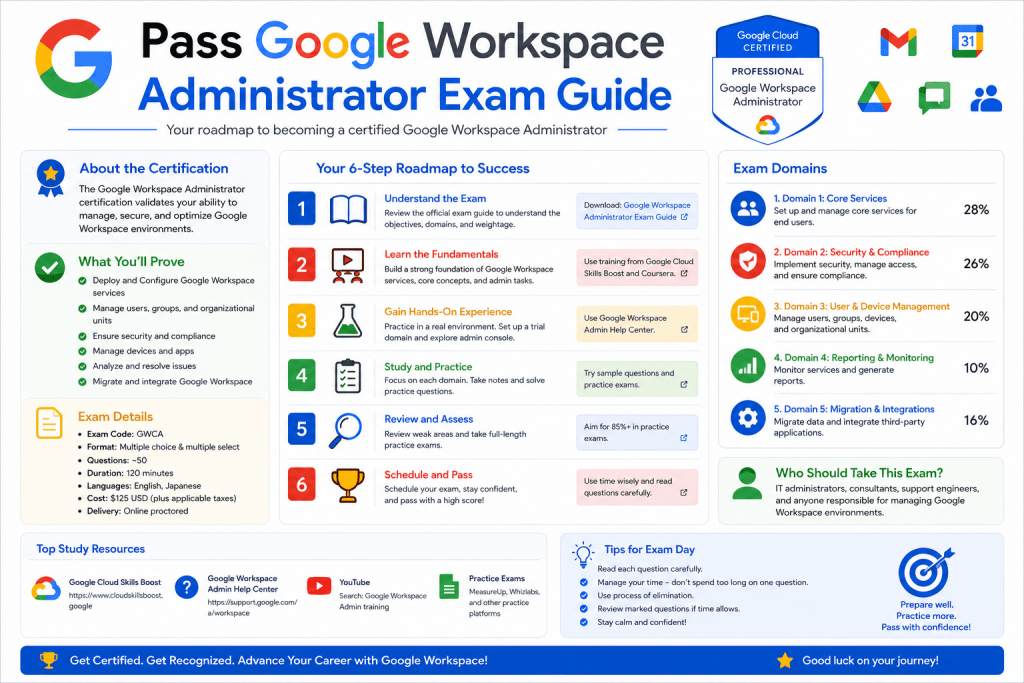
A Professional Google Workspace Administrator is responsible for managing and maintaining an organization’s entire productivity ecosystem within Google Workspace. This includes ensuring that services like Gmail, Drive, Calendar, Docs, and other collaboration tools run smoothly, securely, and efficiently across all users. The role requires both technical understanding and practical decision-making skills because administrators often handle sensitive organizational data, user access control, and compliance requirements.
Beyond basic setup tasks, administrators are expected to manage complex configurations such as organizational units, security policies, identity management, and data governance. They also play a crucial role in ensuring secure communication across users while maintaining productivity and minimizing disruptions. As organizations grow, the administrator’s responsibilities expand to include automation, monitoring, and troubleshooting system-wide issues.
The exam is designed to evaluate how well a candidate understands real-world administration scenarios. It is not just about memorizing features but about applying knowledge in practical situations. This makes hands-on experience essential for success.
Core Purpose of the Certification Exam
The Professional Google Workspace Administrator exam is created to validate a candidate’s ability to manage enterprise-level Google Workspace environments effectively. It measures knowledge across several domains including user and group management, security and compliance, infrastructure setup, and service configuration.
The exam focuses heavily on real-world scenarios rather than theoretical knowledge. This means candidates must understand how to solve practical problems such as recovering deleted data, enforcing security policies, managing device access, and configuring advanced email routing rules. It also tests your ability to interpret organizational needs and translate them into correct administrative actions.
The certification is valuable because it demonstrates that an individual can handle operational responsibilities in a live environment. Employers often view this certification as proof that a candidate is capable of managing enterprise collaboration systems without constant supervision.
Understanding Google Workspace Environment and Architecture
Google Workspace is a cloud-based productivity suite that integrates multiple communication and collaboration tools into one platform. It is designed for businesses, educational institutions, and organizations of all sizes. Administrators must understand how these services interact with each other and how data flows between users, devices, and external systems.
A key aspect of administration is understanding organizational units, which allow structured control over users and devices. Policies can be applied at different levels, ensuring that departments or teams have customized access based on their requirements. Security settings such as two-step verification, access control, and data loss prevention also play an essential role in maintaining system integrity.
Administrators must also understand domain management, including how email routing works, how aliases are configured, and how external sharing is controlled. These foundational concepts form the backbone of effective Workspace administration.
Exam Structure and Question Format
The exam typically includes multiple-choice and multiple-select questions that test both conceptual understanding and practical application. Candidates are given a limited time to complete the exam, which requires both accuracy and time management skills.
Questions are designed around real-life administrative scenarios. For example, you may be asked how to resolve a user access issue, configure security settings for a specific department, or troubleshoot email delivery problems. Some questions require selecting multiple correct answers, which tests attention to detail and deep understanding of the system.
Rather than focusing on memorization, the exam encourages logical thinking and familiarity with the administration console. Understanding where specific settings are located is just as important as knowing what they do.
Importance of Practical Experience
Hands-on experience is one of the most important factors in passing the exam. Reading documentation alone is not sufficient because the exam tests real-world application of knowledge. Candidates are expected to have experience working with Google Workspace in a live or simulated environment.
Practical exposure helps build familiarity with the admin console, allowing candidates to navigate quickly and confidently during the exam. It also helps in understanding how different settings impact users and services. For example, changing a security policy or email routing rule can have immediate effects across an organization, and understanding these outcomes is critical.
Experience also improves problem-solving skills. Many exam questions are designed to test how well you can analyze a situation and choose the most appropriate solution based on best practices.
Key Knowledge Areas for Preparation
To succeed in the exam, candidates should focus on several core areas of Google Workspace administration. These include user lifecycle management, which covers creating, modifying, and deleting user accounts, as well as managing group memberships and permissions.
Security management is another critical area. This includes configuring authentication methods, enforcing password policies, managing access controls, and monitoring suspicious activity. Administrators must also understand how to protect sensitive data using compliance tools and audit logs.
Another important area is service configuration. This involves setting up Gmail routing rules, Drive sharing permissions, Calendar resources, and collaboration settings. Each service has its own configuration options that must be understood in detail.
Device management and endpoint security are also part of the exam scope. Administrators may need to manage mobile devices, enforce encryption policies, and control access based on device compliance status.
Understanding Administrative Console Navigation
The Google Workspace Admin Console is the central hub for managing all services and users. Knowing how to navigate it efficiently is essential for both the exam and real-world administration tasks.
Candidates should be familiar with where different settings are located, such as user management, security settings, billing, and application controls. The ability to quickly locate specific features can save valuable time during the exam.
The console is organized in a structured way, but it can still be overwhelming for beginners. Regular practice helps build familiarity, allowing candidates to navigate it instinctively. Understanding how menus are grouped and how settings are categorized is a key skill.
Importance of Scenario-Based Thinking
Many exam questions are based on real-world administrative scenarios. This means candidates must think beyond definitions and focus on problem-solving. For example, instead of asking what a feature does, the exam may present a situation where a company needs to restrict file sharing and ask how to implement it.
This requires understanding not just individual features but how they work together. Administrators must evaluate multiple solutions and select the most efficient and secure option. Scenario-based thinking reflects real job responsibilities, making this skill essential for success.
Developing this ability comes from practice, experimentation, and exposure to different administrative challenges. The more scenarios you study, the better you become at identifying the correct solution quickly.
Building a Strong Conceptual Foundation
Before diving deep into advanced configurations, it is important to build a strong understanding of basic concepts. These include user identity management, email systems, cloud storage structures, and access control mechanisms.
A strong foundation ensures that advanced topics are easier to understand. For example, understanding how user permissions work at a basic level makes it easier to manage complex organizational structures later.
Conceptual clarity also helps in eliminating incorrect answers during the exam. Even if you are unsure of the exact solution, a strong understanding of fundamentals can guide you toward the most logical choice.
Developing a Study Strategy for Success
A structured study approach is essential for passing the exam. Candidates should divide their preparation into learning, practicing, and reviewing phases. Learning involves studying documentation and training materials, while practicing involves working directly in the admin console.
Reviewing helps reinforce knowledge and identify weak areas. It is important to focus on understanding rather than memorization. Each topic should be studied with the goal of understanding how it applies in real-world scenarios.
Consistency is also important. Regular practice over time is more effective than last-minute preparation. Gradually building knowledge ensures long-term retention and better performance during the exam.
Strengthening Your Understanding of Identity and Access Management
Identity and access management is one of the most important pillars of Google Workspace administration. It controls how users are created, authenticated, and granted permissions across the entire organization. A Professional Google Workspace Administrator must understand how user accounts are structured and how access levels are assigned based on organizational needs.
User identity management includes creating accounts, assigning roles, managing passwords, and enforcing authentication policies. Administrators must also understand how to handle user lifecycle events such as onboarding, role changes, and offboarding. Each of these actions must be performed carefully to ensure security and continuity.
Access management is closely related to identity control. It defines what users can see and do within the system. This includes file access, application permissions, and administrative privileges. A strong understanding of role-based access control helps ensure that users only have the permissions they need, reducing security risks and maintaining organizational control.
Managing Organizational Structure Effectively
Organizational units play a key role in structuring users and applying policies in Google Workspace. They allow administrators to group users based on departments, teams, or roles, and apply specific settings to each group. This helps maintain consistency while allowing flexibility where needed.
For example, a finance department may require stricter security settings compared to a marketing team. Organizational units make it possible to enforce different policies without affecting the entire organization. This includes email restrictions, file-sharing permissions, and device access rules.
Understanding how to create and manage these units is essential. Administrators must also know how to move users between units and how changes in structure impact applied policies. Proper planning of organizational hierarchy helps avoid conflicts and ensures smooth system management.
Mastering Email Management and Routing Controls
Email is one of the most heavily used services in Google Workspace, making its configuration a critical responsibility for administrators. Managing Gmail settings involves controlling how emails are delivered, filtered, and secured across the organization.
Administrators must understand email routing rules, which determine how messages flow within and outside the organization. These rules are used for compliance, security, and organizational efficiency. For example, sensitive emails may need to be routed through specific filters or archived automatically.
Spam and phishing protection is another important area. Administrators must configure filters that help detect and block malicious emails while minimizing false positives. Proper configuration ensures that users remain protected without disrupting legitimate communication.
Email delegation, forwarding rules, and group email settings are also important topics. Each feature must be carefully configured to ensure secure and efficient communication.
Configuring Security Policies and Compliance Controls
Security is a central focus of Google Workspace administration. Administrators must implement policies that protect organizational data and prevent unauthorized access. This includes enforcing strong authentication methods, controlling device access, and monitoring user activity.
Two-step verification is one of the most important security features. It adds an extra layer of protection by requiring users to verify their identity using a secondary method. Administrators must understand how to enforce this policy across different user groups.
Compliance controls help organizations meet legal and regulatory requirements. This includes data retention policies, audit logs, and legal holds. Administrators must ensure that sensitive data is properly managed and retained according to organizational rules.
Security monitoring tools also play a key role. These tools help detect unusual activity, such as suspicious login attempts or unauthorized file sharing. Understanding how to interpret security reports is essential for maintaining system integrity.
Understanding Device Management and Endpoint Control
Device management ensures that only secure and compliant devices can access organizational data. Administrators must be able to manage both mobile and desktop devices that connect to Google Workspace services.
This includes enforcing security policies such as screen locks, encryption, and remote wipe capabilities. If a device is lost or compromised, administrators must be able to quickly remove access to prevent data leakage.
Endpoint control also involves monitoring device compliance. Devices that do not meet security standards may be restricted from accessing sensitive information. This helps maintain a secure environment across all endpoints.
Understanding how device policies interact with user accounts is essential. Policies can be applied at different levels, allowing flexibility while maintaining overall security.
Working with Data Sharing and Collaboration Settings
Google Workspace is designed for collaboration, but collaboration must be controlled to ensure data security. Administrators must manage how files are shared both internally and externally.
Drive sharing settings allow control over who can view, edit, or share files. These permissions can be applied at different levels, including individual files, folders, or entire organizational units. Proper configuration ensures that sensitive data is not shared with unauthorized users.
External sharing settings must also be carefully managed. Organizations may need to restrict sharing with external domains or apply approval workflows. Understanding these controls is essential for maintaining data confidentiality.
Collaboration tools such as Docs, Sheets, and Slides also require proper configuration to ensure smooth teamwork without compromising security.
Monitoring and Reporting System Activity
Monitoring is a critical part of Google Workspace administration. Administrators must regularly review system activity to ensure everything is functioning correctly and securely.
Audit logs provide detailed information about user actions, such as file access, login attempts, and configuration changes. These logs help identify security issues and track user behavior.
Reports also provide insights into system usage, helping administrators understand how services are being used across the organization. This information can be used to optimize performance and improve resource allocation.
Effective monitoring allows administrators to detect problems early and respond quickly to potential threats or system issues.
Troubleshooting Common Administrative Issues
Troubleshooting is an essential skill for any Google Workspace administrator. Issues can arise in user access, email delivery, device synchronization, or service availability. Being able to diagnose and resolve problems quickly is important for maintaining productivity.
Common issues include login failures, email routing errors, and permission conflicts. Administrators must understand how to isolate the root cause and apply appropriate solutions.
Troubleshooting often requires checking multiple areas such as user settings, organizational policies, and system logs. A structured approach helps ensure that problems are resolved efficiently without affecting other services.
Experience plays a major role in improving troubleshooting skills, as repeated exposure to issues helps build intuition and confidence.
Building Confidence Through Hands-On Practice
Practical experience is the most effective way to prepare for the exam. Working directly in a Google Workspace environment allows candidates to understand how different features interact in real-time.
Hands-on practice helps reinforce theoretical knowledge and improves navigation skills within the admin console. It also helps candidates understand the impact of configuration changes on users and services.
Experimenting with different settings, testing policies, and simulating real-world scenarios builds confidence. This type of learning is far more effective than passive study methods.
The more time spent practicing, the more comfortable candidates become with complex administrative tasks.
Developing Analytical Thinking for Exam Success
Analytical thinking is essential for solving scenario-based questions in the exam. Candidates must be able to evaluate situations, identify problems, and select the most appropriate solution based on best practices.
This involves understanding not just what each feature does, but when and why to use it. Many questions require comparing multiple solutions and choosing the one that best meets organizational requirements.
Developing this skill requires practice and exposure to different administrative challenges. Over time, candidates become better at recognizing patterns and applying logical reasoning to complex problems.
Strong analytical thinking significantly improves both exam performance and real-world administrative effectiveness.
Deep Understanding of Security Administration in Practice
Security administration in Google Workspace goes far beyond enabling basic protections. A Professional Google Workspace Administrator must understand how to build a layered security model that protects users, data, and devices across an entire organization. This includes controlling authentication methods, managing session policies, and enforcing strict access rules based on risk levels.
One of the most critical responsibilities is managing login security. Administrators must ensure that only verified users can access accounts by enforcing strong password policies and multi-factor authentication. These protections help reduce the risk of unauthorized access even if credentials are compromised.
Session control is another important aspect. Administrators must understand how to limit session duration, control simultaneous logins, and enforce re-authentication for sensitive actions. These settings help ensure that user sessions remain secure even in shared or public environments.
Advanced security also includes monitoring unusual behavior patterns. If a user logs in from an unfamiliar location or device, alerts may be triggered. Administrators must know how to respond to such events and take appropriate action, such as forcing a password reset or temporarily blocking access.
Advanced Data Protection and Information Governance
Data protection is a core responsibility for any Google Workspace administrator. Organizations rely on Workspace to store sensitive information, making it essential to implement strong data governance policies. Administrators must understand how to classify, protect, and manage data throughout its lifecycle.
Data loss prevention rules play a key role in protecting sensitive information. These rules help prevent users from accidentally or intentionally sharing confidential data outside the organization. Administrators can configure conditions based on content type, keywords, or file patterns to enforce restrictions.
Information governance also involves controlling how long data is retained. Retention policies ensure that important data is preserved for required periods while unnecessary data is removed automatically. This helps maintain compliance and reduces storage risks.
Legal holds are another important feature used in compliance scenarios. When applied, they prevent data from being deleted or modified, even if a user attempts to remove it. Administrators must understand how and when to apply these holds based on organizational or legal requirements.
Managing Advanced Gmail Configuration and Security Rules
Gmail configuration is one of the most complex areas in Google Workspace administration. It requires a deep understanding of how messages flow through the system and how different rules affect delivery, filtering, and security.
Administrators must configure routing rules to control how emails are processed. These rules can be used to route messages through security filters, apply encryption, or direct emails to specific departments. Proper configuration ensures secure and efficient communication across the organization.
Content filtering is another important area. Administrators can define rules to detect sensitive content in emails and take automated actions such as blocking, quarantining, or modifying messages. This helps protect against data leaks and policy violations.
Understanding spam and phishing protection is also critical. Gmail uses advanced detection systems, but administrators must fine-tune settings to balance security and usability. Overly strict rules may block legitimate emails, while weak rules may allow harmful messages through.
Mastering Group Management and Communication Structures
Groups are an essential part of collaboration in Google Workspace. They allow multiple users to share communication channels, access shared resources, and collaborate efficiently. Administrators must understand how to create, manage, and secure these groups.
Each group can have different roles such as owners, managers, and members. These roles define how users interact with group settings and content. Proper role assignment ensures that group management remains organized and secure.
Group settings also control external communication. Administrators can restrict whether external users can join groups or send messages. This helps prevent unauthorized access and reduces the risk of external threats.
Effective group management improves collaboration while maintaining security boundaries. It also simplifies communication structures within large organizations.
Understanding Audit Logs and Security Investigation Tools
Audit logs provide a detailed record of user activity within Google Workspace. These logs are essential for monitoring system behavior, investigating incidents, and ensuring compliance with organizational policies.
Administrators must understand how to interpret these logs to identify suspicious activity. This includes tracking login attempts, file access, configuration changes, and sharing actions. Each log entry provides valuable insight into system usage.
Security investigation tools allow administrators to go deeper into potential threats. These tools help identify patterns such as repeated failed login attempts or unusual file downloads. Once a threat is identified, administrators can take corrective action to protect the system.
Effective use of audit logs and investigation tools is essential for maintaining visibility and control over the entire Workspace environment.
Managing Application Access and Third-Party Integrations
Google Workspace often integrates with third-party applications to enhance productivity. However, these integrations can introduce security risks if not properly managed. Administrators must control which applications can access organizational data.
Application access settings allow administrators to approve or block third-party apps. This ensures that only trusted applications can interact with Workspace data. Administrators must carefully evaluate permissions requested by each application.
OAuth controls are also important in managing app access. These controls define what level of access an application has to user data. Limiting excessive permissions helps reduce security risks.
Monitoring app usage is another key responsibility. Administrators must regularly review connected applications and remove any that are no longer needed or pose security concerns.
Optimizing Calendar and Resource Management
Calendar and resource management is essential for organizations that rely on scheduling and coordination. Administrators must configure shared calendars, meeting rooms, and resource availability to ensure efficient use of organizational assets.
Calendar sharing settings determine who can view or modify events. These settings must be carefully managed to balance transparency and privacy. Different departments may require different levels of access.
Resource management includes configuring physical resources such as meeting rooms and equipment. Administrators must ensure that these resources are properly assigned and do not result in scheduling conflicts.
Effective calendar management improves productivity by ensuring smooth coordination across teams and departments.
Handling Migration and Data Transfer Scenarios
Data migration is a common task in Google Workspace administration, especially when organizations move from other platforms. Administrators must understand how to transfer emails, contacts, and files without data loss.
Migration planning involves assessing existing systems, identifying data types, and selecting appropriate migration methods. Proper planning ensures minimal disruption during transition.
During migration, administrators must monitor progress and resolve issues such as incomplete transfers or synchronization errors. Post-migration validation ensures that all data has been successfully moved and is accessible to users.
Understanding migration tools and processes is essential for handling organizational changes efficiently.
Strengthening Real-World Decision-Making Skills
The exam requires strong decision-making skills because many questions involve choosing between multiple valid solutions. Administrators must evaluate trade-offs between security, usability, and performance.
For example, a solution that improves security may reduce user convenience, while a more flexible solution may introduce risks. Understanding these trade-offs is essential for selecting the best answer in exam scenarios.
Real-world decision-making comes from experience and practice. Exposure to different administrative challenges helps build confidence in choosing the right approach under pressure.
Building Exam Readiness Through Repetition and Practice
Repetition is a key factor in exam preparation. Regular practice helps reinforce knowledge and improve recall speed during the test. Candidates should repeatedly work through different administrative tasks until they become familiar with all core concepts.
Practicing in a structured environment helps simulate real exam conditions. This includes time management, scenario analysis, and console navigation. The more familiar candidates become with these elements, the more confident they will feel during the exam.
Consistency in practice ensures that knowledge becomes second nature, reducing stress and improving accuracy.
Improving Efficiency in Console Navigation
Efficient navigation of the administration console is an important skill for both the exam and real-world administration. Candidates must be able to quickly locate settings and understand how different sections are organized.
The console contains multiple layers of configuration options, and knowing where to find each feature saves valuable time. Regular interaction with the console helps build muscle memory, allowing faster decision-making during the exam.
Efficiency also comes from understanding shortcuts and common workflows. Experienced administrators can perform tasks quickly without unnecessary searching, which improves overall productivity.
Building Strong Problem-Solving Intuition
Problem-solving intuition develops over time through repeated exposure to different scenarios. As candidates work through various administrative challenges, they begin to recognize patterns and common solutions.
This intuition is especially useful in exam situations where time is limited. Instead of analyzing every detail from scratch, experienced candidates can quickly identify the most likely solution based on prior knowledge.
Developing intuition requires consistent practice, reflection, and learning from mistakes. Over time, it becomes one of the most valuable skills for both exam success and professional administration.
Strengthening Endpoint Security and Device Compliance Management
Endpoint security is a critical responsibility for any Google Workspace Administrator because users access organizational data from multiple devices, including laptops, mobile phones, and tablets. Ensuring that every device meets security standards is essential for protecting sensitive information and maintaining compliance across the organization.
Administrators must understand how to enforce device policies that control access based on security status. For example, devices that do not meet encryption requirements or lack screen locks may be restricted from accessing Workspace services. This ensures that only trusted and compliant devices can connect to organizational data.
Mobile device management also plays a major role in securing endpoints. Administrators can remotely manage devices, enforce security settings, and even wipe data if a device is lost or compromised. These controls help prevent unauthorized access and reduce the risk of data breaches.
Understanding device reporting and monitoring is equally important. Administrators must regularly review device activity to identify outdated software, unusual behavior, or non-compliant devices that could pose security risks.
Advanced Control of File Sharing and Drive Security
File sharing and storage management in Google Workspace require careful control to maintain data security while enabling collaboration. Administrators must understand how permissions work at different levels, including files, folders, and shared drives.
One of the key responsibilities is managing external sharing. Organizations often need to collaborate with external partners, but unrestricted sharing can lead to data leaks. Administrators must configure rules that limit or approve external access based on organizational policies.
Shared drives provide centralized storage for teams, but they also require strict governance. Administrators must control who can create, modify, or delete files within these drives. Proper role assignment ensures that data remains organized and secure.
Version control and file recovery are also important aspects of Drive management. Administrators must understand how to restore previous versions of files and recover deleted data when necessary. This ensures continuity in case of accidental deletions or unauthorized changes.
Understanding Advanced Reporting and Analytics in Workspace
Reporting tools in Google Workspace provide valuable insights into system usage, security events, and user behavior. Administrators must know how to interpret these reports to make informed decisions about system optimization and security improvements.
Usage reports help identify how different services are being used across the organization. This information can be used to optimize licensing, improve resource allocation, and identify underutilized features.
Security reports focus on identifying potential risks such as suspicious login attempts, data sharing violations, and policy breaches. Administrators must regularly review these reports to detect and respond to threats early.
Audit reports provide a detailed history of administrative actions and user activities. These reports are essential for compliance and forensic investigations. Understanding how to filter and analyze this data is an important skill for effective administration.
Managing Advanced Authentication and Identity Controls
Authentication systems are at the core of Google Workspace security. Administrators must manage how users verify their identity before accessing services. This includes configuring password policies, multi-factor authentication, and single sign-on integrations.
Single sign-on allows users to access multiple applications using one set of credentials. While this improves convenience, it also requires strong identity provider security. Administrators must ensure that external identity systems are properly configured and secured.
Risk-based authentication is another advanced feature that adjusts security requirements based on user behavior. For example, users logging in from unfamiliar locations may be required to complete additional verification steps.
Understanding identity lifecycle management is also essential. This includes handling user creation, role changes, and account deactivation while ensuring that access is always aligned with organizational policies.
Handling Advanced Troubleshooting Scenarios
Troubleshooting in Google Workspace often involves complex scenarios that require a structured approach. Administrators must be able to identify whether issues are related to user configuration, system settings, network problems, or external dependencies.
One common scenario involves email delivery failures. Administrators must check routing rules, spam filters, and domain configurations to identify the root cause. Another common issue is file access errors, which may be caused by incorrect permissions or sharing restrictions.
Performance issues can also arise, especially in large organizations. Administrators must analyze system reports to determine whether slow performance is caused by user load, network limitations, or service disruptions.
Effective troubleshooting requires logical thinking and systematic testing. By isolating each component step by step, administrators can quickly identify and resolve issues.
Managing Compliance Requirements and Legal Controls
Compliance management ensures that organizations follow legal and regulatory standards when handling data. Google Workspace provides tools that help administrators enforce these requirements effectively.
Data retention policies are used to define how long information should be stored. These policies help ensure that data is available when needed but removed when it is no longer required.
Legal holds are used in situations where data must be preserved for legal investigations. Once applied, they prevent deletion or modification of data, ensuring that it remains intact for review.
Administrators must also understand how to manage eDiscovery processes, which involve searching and exporting data for legal or compliance purposes. This requires careful handling to ensure accuracy and security.
Optimizing System Performance and Resource Allocation
System performance is an important consideration in large Google Workspace environments. Administrators must ensure that services run efficiently without unnecessary delays or resource constraints.
Resource allocation involves managing licenses, storage, and service usage across the organization. Proper planning ensures that resources are distributed based on user needs and organizational priorities.
Performance optimization also includes monitoring system load and identifying bottlenecks. Administrators must analyze usage patterns to determine whether additional resources or configuration changes are needed.
Efficient resource management improves overall system stability and ensures a smooth user experience.
Understanding Change Management in Workspace Environments
Change management is the process of implementing updates and modifications in a controlled manner. In Google Workspace, changes can include policy updates, service configurations, or structural changes to the organization.
Administrators must ensure that changes are tested before being applied globally. This helps prevent unexpected disruptions or system issues.
Communication is also an important part of change management. Users must be informed about changes that may affect their workflows or access to services.
Tracking changes is essential for accountability and troubleshooting. Administrators must maintain records of configuration updates to understand their impact on the system.
Enhancing Administrative Efficiency Through Automation
Automation helps reduce manual workload and improves consistency in Google Workspace administration. Administrators can use automated rules to manage users, enforce policies, and handle routine tasks.
For example, automated workflows can be used to assign licenses to new users or apply security settings based on organizational roles. This reduces the need for manual intervention and minimizes errors.
Automation also improves response time for security events. Automated alerts and actions can help detect and respond to threats more quickly than manual processes.
Understanding how to design and manage automation rules is an important skill for efficient administration.
Strengthening Collaboration Between Administrative Functions
Google Workspace administration often involves collaboration between different teams, including IT, security, and compliance departments. Effective communication between these teams ensures smooth system operation.
Administrators must coordinate policy changes, security updates, and system configurations with relevant stakeholders. This helps ensure that all decisions align with organizational goals.
Collaboration also involves sharing responsibilities for system monitoring and issue resolution. A well-coordinated approach improves response times and reduces the risk of errors.
Understanding how different administrative roles interact within the system is essential for maintaining operational efficiency.
Developing Long-Term Administrative Expertise
Becoming proficient in Google Workspace administration requires continuous learning and adaptation. The platform evolves regularly, introducing new features and updates that administrators must understand and integrate into their workflows.
Long-term expertise comes from consistent practice, real-world experience, and ongoing exploration of new features. Administrators who stay updated with changes are better equipped to manage complex environments effectively.
Building expertise also involves learning from real-world challenges. Each issue encountered provides an opportunity to improve problem-solving skills and deepen understanding of the system.
Strong administrative expertise is built over time through dedication, practice, and continuous improvement.
Advanced Security Incident Response and Recovery Practices
A key responsibility of a Google Workspace Administrator is responding to security incidents in a structured and controlled manner. When suspicious activity is detected, administrators must act quickly to contain the issue, investigate the cause, and restore normal operations without compromising data integrity.
Incident response typically begins with identifying the scope of the problem. This includes determining which accounts, devices, or services are affected. Administrators must use audit logs and security reports to trace the activity and understand how the incident occurred.
Once the issue is identified, containment measures are applied. This may include disabling user accounts, resetting passwords, revoking access tokens, or restricting device access. The goal is to prevent further damage while preserving evidence for analysis.
After containment, recovery steps are taken to restore affected systems and ensure users can resume work safely. Administrators must also review security policies to prevent similar incidents in the future, strengthening the overall defense posture of the organization.
Refining Advanced Policy Management Strategies
Policy management in Google Workspace requires a careful balance between security, usability, and flexibility. Administrators must design policies that protect organizational data while allowing users to work efficiently without unnecessary restrictions.
Advanced policies include conditional access rules that apply different security requirements based on user location, device type, or risk level. These dynamic controls help ensure that security adapts to changing conditions rather than relying on static rules.
Administrators must also manage policy inheritance across organizational units. Understanding how policies cascade from parent to child units is essential for avoiding conflicts and unintended access changes.
Regular policy reviews are necessary to ensure that configurations remain aligned with organizational goals. As business needs evolve, policies must be updated to reflect new security requirements and operational changes.
Enhancing System Scalability and Organizational Growth Support
As organizations grow, Google Workspace environments must scale efficiently to support increasing numbers of users, devices, and services. Administrators play a critical role in ensuring that system performance remains stable during expansion.
Scalability involves planning for user onboarding processes, license allocation, and resource distribution. Proper planning ensures that new users can be integrated quickly without disrupting existing workflows.
Administrators must also anticipate infrastructure changes, such as increased storage requirements or higher email traffic volumes. Proactive scaling helps prevent performance bottlenecks and service interruptions.
Understanding how to structure organizational units and manage delegation effectively becomes increasingly important as complexity grows. A well-structured system supports long-term sustainability and operational efficiency.
Strengthening Collaboration with External Systems and Integrations
Modern organizations often rely on multiple external tools and platforms integrated with Google Workspace. Administrators must ensure that these integrations are secure, reliable, and properly configured.
Integration management involves controlling data exchange between Workspace and third-party applications. Administrators must verify that external systems comply with organizational security policies before granting access.
API controls and authentication settings play a crucial role in managing these integrations. Proper configuration ensures that only authorized applications can interact with organizational data.
Regular review of connected applications is essential to maintain security. Unused or outdated integrations should be removed to reduce potential vulnerabilities and improve system efficiency.
Improving Administrative Decision-Making Under Pressure
In real-world environments, administrators often face situations that require quick and accurate decision-making. These decisions may involve resolving outages, handling security incidents, or managing urgent user issues.
Effective decision-making relies on understanding priorities. Security-critical issues must be addressed immediately, while lower-priority tasks can be scheduled for later resolution.
Administrators must also evaluate the impact of their actions before implementing changes. A single configuration update can affect multiple users or services, so careful consideration is essential.
Experience plays a major role in improving decision-making speed and accuracy. Over time, administrators develop intuition that helps them respond effectively even under pressure.
Strengthening Knowledge Through Continuous Practice and Review
Continuous practice is essential for mastering Google Workspace administration. Regular exposure to different scenarios helps reinforce concepts and improves problem-solving abilities.
Reviewing previously learned topics ensures that knowledge remains fresh and accessible during the exam. Repetition helps build long-term retention and improves confidence in applying concepts.
Practicing in a simulated environment allows administrators to test configurations safely without affecting real systems. This helps build familiarity with the admin console and strengthens technical skills.
Consistent learning habits lead to steady improvement and better preparedness for both the exam and real-world responsibilities.
Developing a Professional Mindset for Administration Excellence
A strong professional mindset is essential for success as a Google Workspace Administrator. This includes being detail-oriented, proactive, and responsible when managing organizational systems.
Administrators must approach tasks with a focus on accuracy and security. Even small configuration errors can have significant impacts on users and data integrity.
Being proactive means identifying potential issues before they become problems. Regular monitoring, system reviews, and policy updates help maintain a stable environment.
Responsibility also includes maintaining confidentiality and ensuring compliance with organizational standards. A professional mindset ensures that administrators act in the best interest of the organization at all times.
Final Conclusion
Passing the Professional Google Workspace Administrator exam requires more than theoretical knowledge; it demands practical experience, strong analytical thinking, and a deep understanding of real-world administration scenarios. Success depends on mastering core areas such as identity management, security configuration, data governance, device control, and system monitoring.
Equally important is hands-on practice within the administration console, which builds confidence and improves navigation speed during the exam. Scenario-based thinking, consistent review, and structured preparation all contribute to stronger performance.
By combining technical knowledge with practical experience and disciplined study habits, candidates can develop the expertise needed to manage complex Google Workspace environments effectively and achieve certification success.