Stepping into an IT management position is often a major milestone in a technology career. It represents recognition of technical expertise, problem-solving ability, and leadership potential. Many professionals view it as a transition from hands-on execution to strategic influence, where decisions have broader organizational impact. There is usually an initial sense of accomplishment that comes from being trusted with greater responsibility and visibility within the organization.
However, the early experience of the role can quickly shift from excitement to pressure. The scope of responsibilities is typically much broader than expected. Instead of focusing on a single technical domain, an IT manager is required to oversee teams, coordinate multiple projects, engage with stakeholders across departments, and ensure that systems remain stable and secure. The workload often includes planning infrastructure improvements, responding to operational incidents, and aligning IT initiatives with business priorities. This combination of tasks can feel overwhelming, especially when everything appears urgent at the same time.
In many environments, the role also includes communication with executive leadership. This means translating technical issues into business terms, preparing reports, and justifying budgets or resource requirements. The ability to switch between technical depth and business-level clarity becomes essential. Without proper structure and support, the role can easily lead to long working hours and constant reactive decision-making.
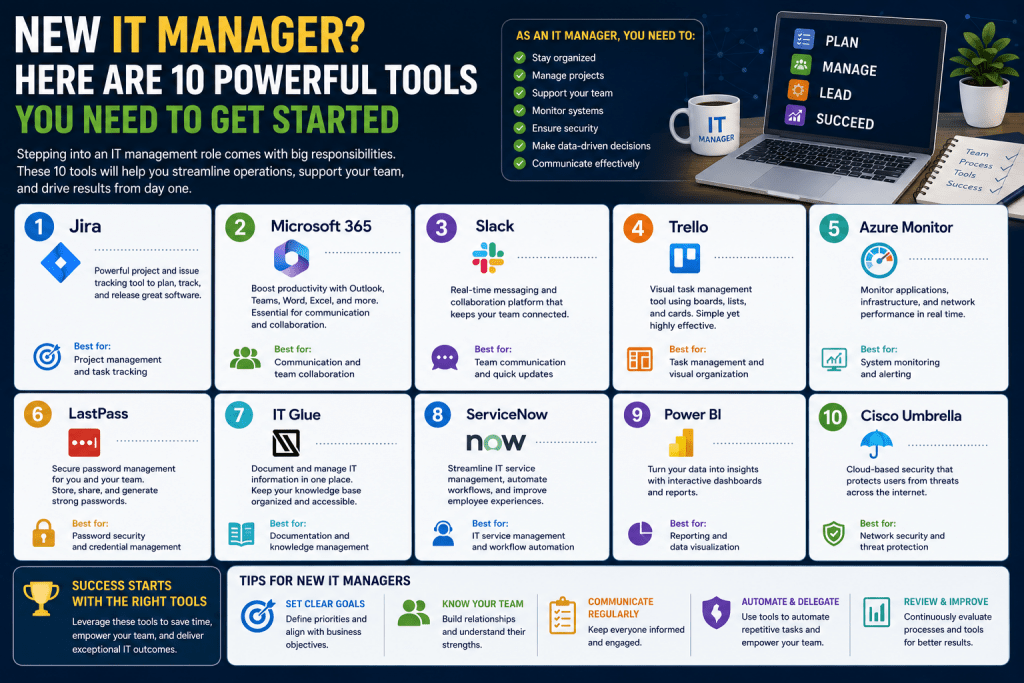
Despite these challenges, modern IT management is supported by a wide range of tools designed to improve efficiency, reduce manual effort, and provide better visibility across systems and teams. These tools help managers move from reactive firefighting toward more proactive and controlled operations.
Project Coordination and Planning Systems
One of the most demanding aspects of IT management is coordinating multiple projects simultaneously. Each project may involve different teams, timelines, dependencies, and deliverables. Without a structured system, it becomes difficult to maintain clarity over progress and resource allocation.
Project coordination platforms are designed to bring structure to this complexity. They allow managers to define tasks, assign responsibilities, set deadlines, and track progress in a centralized environment. Visual timelines and dashboards help provide an immediate understanding of what is on track and what is delayed. This visibility is crucial when managing competing priorities across departments.
Some systems focus heavily on structured planning, offering detailed frameworks for scheduling and resource management. These are often preferred in environments where predictability and strict planning are important. They allow managers to define complex task dependencies and monitor critical paths that could affect project delivery.
Other systems take a more flexible approach, emphasizing collaboration and adaptability. These platforms are often used in dynamic environments where requirements may evolve over time. Instead of enforcing rigid structures, they allow teams to adjust workflows as needed. This flexibility can improve responsiveness but may require stronger discipline from the management side to maintain consistency.
A simpler category of tools focuses on visual task organization. These systems typically use boards or cards to represent work items, making it easier to move tasks through different stages. This approach is particularly useful for teams that follow iterative development or continuous delivery practices. It reduces complexity and allows quick onboarding for new team members.
Integration capabilities also play an important role. Many organizations rely on existing systems for communication, documentation, or financial tracking. A project coordination tool that integrates with these systems helps reduce duplication of effort and ensures data consistency across platforms.
Automation and Operational Efficiency
As IT environments grow, manual execution of repetitive tasks becomes inefficient and error-prone. Activities such as system configuration, software deployment, backup scheduling, and infrastructure provisioning can consume a significant amount of time if handled manually. Automation addresses this challenge by standardizing these processes and executing them consistently.
Automation platforms typically allow IT managers to define workflows that can be executed across multiple systems. These workflows may include tasks such as installing updates, configuring servers, or managing network settings. Once defined, they can be reused and scaled across the organization, reducing the need for repetitive manual intervention.
A key advantage of automation is consistency. Manual processes are often subject to variation depending on who performs them. Automation ensures that tasks are executed the same way every time, reducing the risk of configuration errors and system inconsistencies. This is particularly important in large environments where small mistakes can lead to significant disruptions.
Some automation systems use simplified scripting approaches that make it easier to define tasks in a readable format. Others provide graphical interfaces that allow workflows to be built visually. This makes automation more accessible to managers who may not be deeply involved in coding or scripting.
Advanced automation platforms also provide orchestration capabilities, allowing multiple systems to be coordinated simultaneously. For example, provisioning a new application may involve configuring servers, updating network settings, and deploying software packages. Orchestration ensures that these steps happen in the correct order without manual coordination.
When properly implemented, automation significantly reduces operational overhead. It also allows IT teams to focus on higher-value activities such as architecture design, performance optimization, and strategic planning. However, automation must be carefully managed to avoid unintended consequences, especially when changes are applied across critical systems.
Security Monitoring and Control
Security is one of the most critical responsibilities in IT management. Modern organizations operate in environments where data protection, compliance, and threat detection are essential. An IT manager must ensure that security policies are not only defined but also actively enforced across all systems.
Security monitoring tools provide visibility into network activity, system behavior, and user actions. This visibility helps identify unusual patterns that may indicate potential threats. For example, unexpected data transfers or unauthorized access attempts can be detected early and investigated before they escalate into serious incidents.
Network analysis tools allow managers to observe traffic flow and identify anomalies. By examining communication patterns between devices, it becomes easier to detect unauthorized or suspicious activity. This type of visibility is essential in understanding how data moves within an organization.
Asset discovery tools complement network monitoring by identifying all devices connected to the infrastructure. This includes servers, workstations, and other networked equipment. Maintaining an accurate inventory is critical for ensuring that all systems are properly managed and secured. Unknown or unmanaged devices can introduce significant risk.
Log analysis systems provide another layer of insight by collecting and interpreting system logs. These logs contain detailed records of system events, user actions, and application behavior. By analyzing this data, IT managers can identify trends, detect anomalies, and investigate incidents. Over time, log analysis becomes a valuable source of operational intelligence.
When used together, these security tools create a comprehensive monitoring environment. They allow IT managers to maintain situational awareness and respond quickly to potential threats. The goal is not only to react to incidents but also to prevent them through early detection and proactive management.
Support Systems and Service Management
IT management also involves ensuring that end users receive timely support when issues arise. Without a structured system, support requests can become disorganized, leading to delays and inconsistent responses.
Service management platforms help centralize support requests into a single system. Users submit issues through a structured process, allowing IT teams to categorize, prioritize, and assign tasks efficiently. This creates a clear workflow from issue identification to resolution.
These systems also provide tracking capabilities, ensuring that no request is overlooked. Each issue is documented, which improves accountability and allows managers to analyze recurring problems over time. This data can be used to identify underlying system weaknesses or training gaps.
One of the challenges in IT support management is encouraging users to adopt the system consistently. In many organizations, users may attempt to bypass formal channels and request assistance informally. This can lead to inefficiencies and missed documentation. Establishing clear communication about the importance of structured support helps improve adoption and ensures that all issues are properly recorded.
Modern support systems often include automation features that route requests based on category or urgency. This reduces manual workload and ensures that critical issues are addressed promptly. Some systems also include self-service capabilities, allowing users to resolve common problems without direct IT involvement.
By organizing support processes effectively, IT managers can reduce response times, improve user satisfaction, and gain better insight into operational challenges. This contributes to a more stable and predictable IT environment.
Balancing Responsibility and Efficiency
The role of an IT manager requires balancing multiple responsibilities simultaneously. Technical oversight, team coordination, security enforcement, and business communication all demand attention. Without the right systems in place, this balance becomes difficult to maintain.
Tools across project management, automation, security, and service management help reduce operational friction. They allow IT managers to shift focus from manual execution to oversight and strategic decision-making. This shift is essential for maintaining efficiency as organizational complexity increases.
At the same time, tools alone are not sufficient. Effective IT management also depends on clear processes, disciplined execution, and strong communication within teams. Technology supports these elements but does not replace them.
Conclusion
IT management is a role defined by complexity, responsibility, and constant adaptation. While the demands can feel overwhelming at first, structured systems and modern tools significantly reduce operational strain. By organizing project workflows, automating repetitive tasks, improving security visibility, and streamlining support processes, IT managers can create a more controlled and efficient environment. The key is not to eliminate complexity entirely but to manage it in a way that allows focus on strategic priorities rather than constant reactive problem-solving.