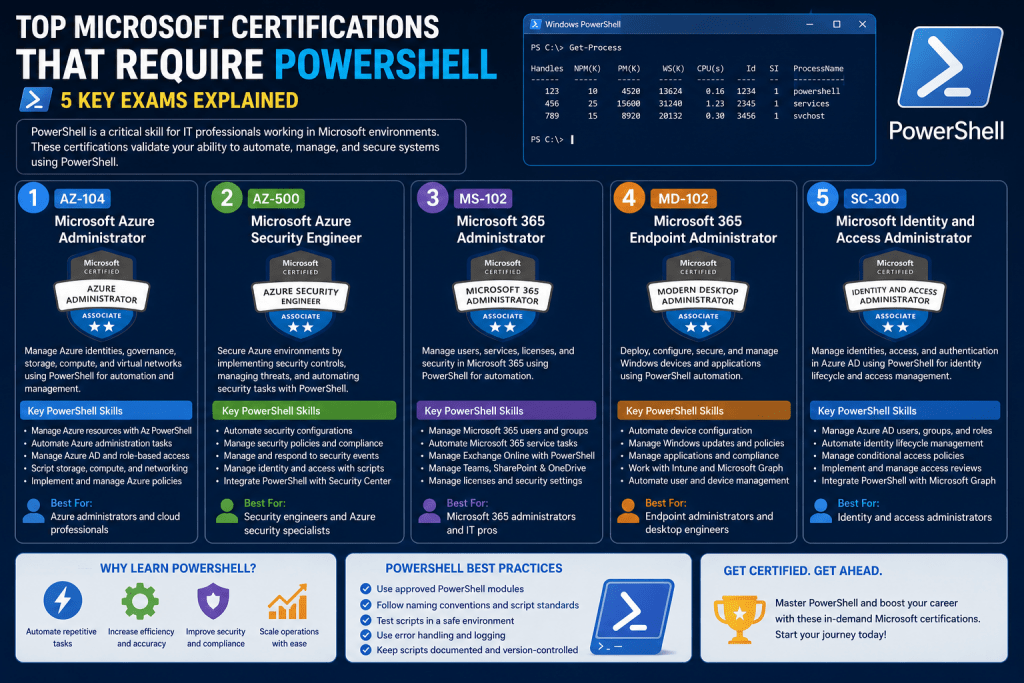
PowerShell has become one of the defining tools in modern Windows administration, reshaping how system tasks are performed and how administrators interact with Microsoft environments. Unlike traditional graphical interfaces that require manual navigation through menus, PowerShell introduces a command-based and scriptable approach that allows administrators to manage systems with speed and precision. It functions as both a command-line shell and a scripting language, designed specifically to automate administrative tasks and handle complex configurations at scale. In many real-world environments, it has replaced older command-line utilities and significantly reduced dependence on graphical management consoles. As Microsoft continues to evolve its ecosystem, PowerShell has moved from being an optional skill to an expected competency. This shift is reflected strongly in certification paths where understanding PowerShell is no longer optional but deeply integrated into the evaluation of technical ability. Across server management, cloud platforms, and enterprise desktop administration, PowerShell acts as a unifying tool that connects different systems under a single automation framework.
The Evolution of PowerShell in Microsoft Environments
The rise of PowerShell is closely tied to the increasing complexity of IT infrastructures. Earlier Windows administration relied heavily on graphical tools, batch scripts, and manual configuration steps that were time-consuming and inconsistent across systems. As environments grew larger and more distributed, these methods became inefficient and error-prone. PowerShell addressed these challenges by introducing a consistent object-oriented pipeline that allows administrators to manipulate system data more effectively than traditional text-based shells. Over time, Microsoft expanded PowerShell’s capabilities to cover nearly every major product, including server operating systems, identity services, virtualization platforms, and cloud infrastructure. It also introduced remote execution features, enabling administrators to manage multiple systems simultaneously without physical or direct graphical access. This evolution has made PowerShell a foundational skill for professionals working in Microsoft ecosystems, particularly in roles that require automation, scalability, and repeatable configuration management across large infrastructures.
Windows Server Administration and Certification Requirements
Windows Server environments represent one of the most direct areas where PowerShell skills are essential. In server-focused certification paths, administrators are expected to understand how to install, configure, and manage server roles using both graphical and command-line methods. However, PowerShell becomes especially important in environments where Server Core is used, since Server Core does not provide a full graphical interface. In such cases, administrators rely entirely on command-line tools and remote management techniques. PowerShell is frequently used for tasks such as configuring DNS settings, managing Active Directory objects, handling group policies, and automating system updates. It also plays a critical role in managing virtualized environments through Hyper-V, where scripts can be used to create, configure, and monitor virtual machines efficiently. In certification contexts, candidates are often evaluated on their ability to understand how administrative tasks are performed using PowerShell commands rather than relying solely on GUI navigation. This reflects real-world expectations where automation and remote management are standard practices in enterprise server environments.
Enterprise Productivity and Application-Centered Administration
In enterprise productivity environments, administration extends beyond servers to include collaboration platforms, communication systems, and document management services. These systems often have complex administrative interfaces that are not always efficient for large-scale operations. PowerShell becomes a valuable tool in simplifying and standardizing administrative tasks across these platforms. In environments that include services such as email systems, collaboration suites, and content management platforms, PowerShell scripts are frequently used to manage users, assign permissions, and configure system-wide settings. Instead of performing repetitive tasks through graphical consoles, administrators can execute batch operations using scripts that ensure consistency and reduce the likelihood of configuration errors. Certification paths in this area expect candidates to understand how administrative efficiency can be improved through automation. Even when exams do not explicitly focus on PowerShell syntax, familiarity with its concepts is often necessary to understand how enterprise systems are managed at scale. This reflects the broader shift toward automation-driven administration in productivity-focused IT environments.
Cloud Administration and Azure Automation with PowerShell
Cloud computing environments represent one of the most significant areas where PowerShell has become deeply integrated. In cloud platforms, resources such as virtual machines, storage accounts, and networking components are frequently created and managed through automation rather than manual configuration. PowerShell provides a direct interface for interacting with cloud resources, allowing administrators to deploy and manage infrastructure using scripted commands. This approach is particularly useful when working with large-scale deployments where consistency and speed are critical. Instead of navigating through multiple layers of a web-based portal, administrators can execute scripts that define entire environments in a repeatable way. This includes provisioning virtual machines, configuring networks, managing access controls, and deploying applications. Cloud-related certification paths often require familiarity with these processes, as they reflect real-world operational practices. PowerShell also supports automation workflows that integrate monitoring and maintenance tasks, enabling administrators to respond dynamically to changes in system conditions. As cloud environments continue to expand, the role of PowerShell as an automation engine becomes even more important in ensuring efficient and scalable infrastructure management.
System Center and Large-Scale Infrastructure Management
In large enterprise environments, infrastructure management often involves coordinating thousands of devices spread across multiple locations. System management platforms are designed to handle this complexity, and PowerShell plays a critical role in extending their functionality. Through scripting, administrators can automate device configuration, enforce compliance policies, and manage software deployments across entire networks. This reduces the need for manual intervention and ensures consistency across all managed systems. PowerShell scripts can be used to push configurations to endpoints, monitor system health, and perform bulk updates. In environments where downtime must be minimized, automation becomes essential for maintaining operational stability. Certification paths that cover enterprise mobility and infrastructure management emphasize the importance of understanding how these automation processes work. Even when the focus is not explicitly on scripting, the underlying concepts of remote management and automated execution are central to effective system administration. PowerShell serves as the bridge between high-level management tools and low-level system operations, making it a key component in large-scale IT environments.
Modern Desktop and Endpoint Management Practices
Modern desktop administration involves managing large fleets of user devices, ensuring they remain secure, updated, and properly configured. PowerShell plays an important role in streamlining these tasks by enabling remote execution and configuration management across multiple endpoints. Administrators can use scripts to configure system settings, install applications, manage user profiles, and enforce security policies. This reduces reliance on manual configuration and ensures that systems remain consistent across an organization. In certification contexts focused on desktop and endpoint management, understanding how administrative tasks can be automated is essential. Even if direct scripting knowledge is not heavily tested, the ability to understand automation workflows is expected. PowerShell remoting allows administrators to execute commands on multiple machines simultaneously, which is particularly useful in environments with large numbers of devices. This capability helps reduce administrative overhead and improve response times when deploying updates or addressing system issues. As endpoint environments become more complex, automation continues to play a central role in maintaining control and efficiency.
Developing Practical PowerShell Skills for Certification and Beyond
Building proficiency in PowerShell requires more than memorizing commands; it involves understanding how administrative tasks can be translated into repeatable and automated processes. A practical approach involves working with real or simulated environments where tasks such as user management, system configuration, and resource deployment are performed using scripts. Over time, administrators develop the ability to identify repetitive tasks that can be automated, improving efficiency and reducing manual effort. Understanding object-based pipelines, command structures, and remote execution techniques is essential for working effectively in modern Microsoft environments. As systems become increasingly distributed across on-premises and cloud platforms, the ability to use PowerShell to unify administrative operations becomes a valuable skill. Certification paths reinforce this by integrating PowerShell concepts into scenario-based questions that reflect real operational challenges. The goal is not only to pass exams but to develop a mindset focused on automation, scalability, and consistency in system administration practices.
Conclusion
PowerShell has evolved into a central element of Microsoft administration, influencing how servers, cloud platforms, enterprise applications, and desktop environments are managed. Its role extends across multiple certification paths, where it is embedded into practical scenarios that reflect real-world administrative challenges. While it may not always appear as a standalone subject, its presence is deeply integrated into the skills expected of modern IT professionals. Understanding PowerShell means understanding how automation replaces manual processes, how systems are managed at scale, and how consistency is maintained across complex environments. As Microsoft technologies continue to advance, the importance of PowerShell is likely to grow even further, reinforcing its position as a core competency for administrators working across diverse infrastructure landscapes.