The role of operating systems in enterprise environments has grown significantly as organizations continue to depend on digital infrastructure for daily operations. Among the various platforms in use, Windows 10 remains widely deployed across businesses of all sizes due to its stability, compatibility, and integration with organizational tools. As a result, professionals who can effectively manage and support this operating system are in high demand.
The MCSA Windows 10 certification path was developed to validate the skills required to configure, manage, and maintain Windows 10 devices in enterprise environments. It focuses on practical, hands-on knowledge rather than theoretical understanding alone. This ensures that certified professionals are capable of performing tasks that directly impact workplace productivity and system reliability.
In modern IT roles, professionals are expected to do more than simply install software or troubleshoot basic issues. They must understand system behavior, security configurations, network integration, and user management. Windows 10 certification training is designed to build these competencies in a structured manner, preparing learners for real-world responsibilities.
This certification is often pursued by individuals aiming to enter technical support roles or advance within desktop administration careers. It serves as a foundation for understanding how operating systems function within larger IT ecosystems, including cloud environments, enterprise networks, and hybrid infrastructures.
The importance of this certification extends beyond technical knowledge. It also helps develop problem-solving skills, analytical thinking, and the ability to work under pressure when systems fail or require urgent maintenance. These soft skills are just as important as technical abilities in professional IT environments.
Role of Windows 10 in Enterprise Infrastructure
Windows 10 plays a central role in enterprise infrastructure due to its flexibility and wide compatibility with business applications. Organizations rely on it for tasks ranging from basic productivity work to complex system administration activities. Its integration with cloud services and enterprise management tools makes it a critical component of modern IT ecosystems.
In many workplaces, Windows 10 serves as the primary operating system for employee devices. This means IT professionals must ensure that systems are properly configured, secure, and optimized for performance. They are responsible for managing updates, resolving technical issues, and maintaining system stability across multiple devices.
The operating system also supports centralized management, allowing administrators to control settings and policies across an entire network of computers. This capability is essential for maintaining consistency and security in large organizations where hundreds or thousands of devices may be in use simultaneously.
Security is another major factor in the importance of Windows 10 in enterprise environments. The operating system includes built-in security features that must be properly configured and maintained. IT professionals are responsible for ensuring that these features are used effectively to protect organizational data from unauthorized access and cyber threats.
Additionally, Windows 10 supports integration with cloud-based services, enabling remote work and flexible access to resources. This has become increasingly important as organizations adopt hybrid work models. Professionals who understand how to manage these integrations are better equipped to support modern workplace requirements.
Structure and Purpose of the Certification Path
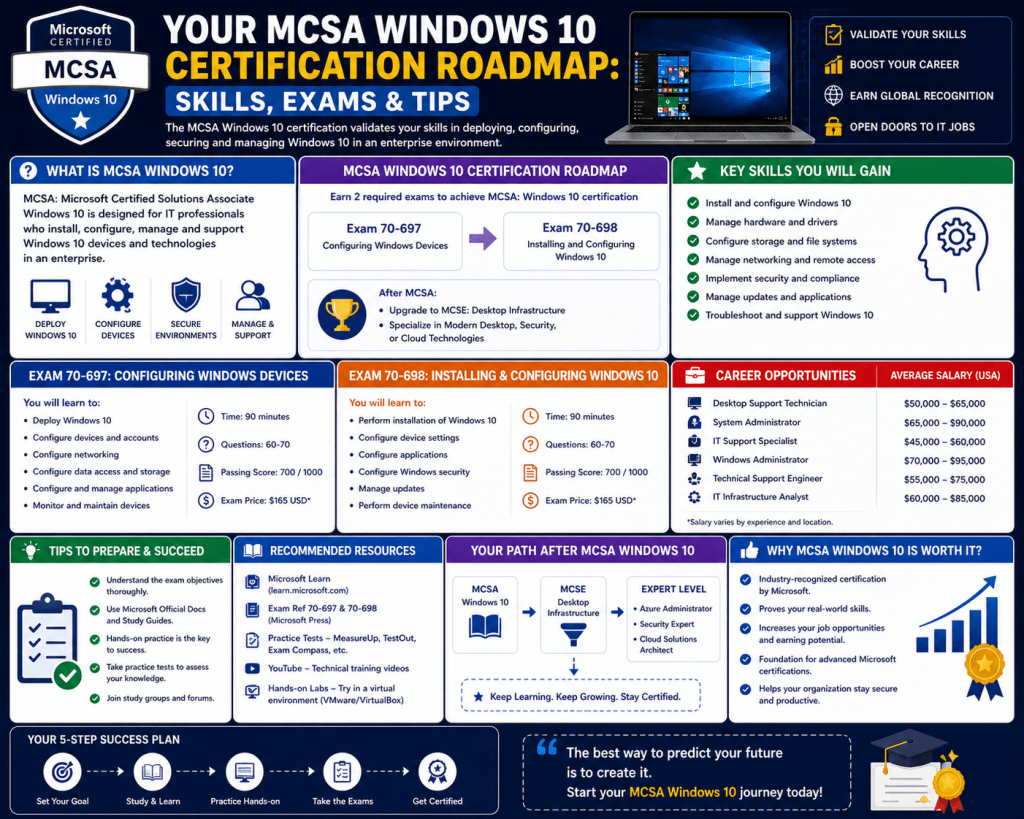
The certification path for Windows 10 is structured to assess a candidate’s ability to handle real-world IT responsibilities. It is divided into multiple exams that focus on different aspects of system management. Each exam is designed to evaluate specific skill sets, ensuring that certified individuals have a well-rounded understanding of the operating system.
The first exam typically focuses on installation and configuration tasks. This includes deploying the operating system on new devices, upgrading existing systems, and configuring initial settings. Candidates are expected to understand how to prepare devices for use in professional environments, ensuring that they meet organizational standards.
The second exam focuses on managing and maintaining Windows 10 systems. This includes user account management, security configuration, system monitoring, and troubleshooting. Professionals must demonstrate their ability to handle ongoing administrative tasks that ensure systems remain functional and secure.
The structure of these exams reflects the lifecycle of IT system management. From initial deployment to long-term maintenance, candidates are tested on their ability to handle each stage effectively. This ensures that certified professionals are prepared for the full range of responsibilities they may encounter in the workplace.
The certification path is designed to simulate real-world scenarios rather than abstract concepts. This means candidates must apply their knowledge to solve practical problems. For example, they may need to determine how to resolve a system error, configure a network setting, or implement a security policy based on given requirements.
This practical approach ensures that individuals who complete the certification are not only knowledgeable but also capable of performing tasks in real IT environments. It bridges the gap between learning and application, making the certification highly relevant to industry needs.
Essential Technical Skills Required for Success
Success in Windows 10 certification requires a broad range of technical skills that cover multiple areas of system administration. These skills are essential for managing devices effectively in enterprise environments.
One of the foundational skills is system installation and deployment. Professionals must understand how to install Windows 10 on different types of hardware, including physical machines and virtual environments. They must also be familiar with deployment methods used in organizations where multiple systems need to be configured efficiently.
Configuration skills are equally important. This includes setting up system preferences, managing user profiles, and adjusting settings to meet organizational requirements. Professionals must ensure that devices are properly configured to support productivity while maintaining security standards.
Security management is a critical area of focus. Windows 10 includes various built-in security features that must be configured correctly to protect systems from threats. IT professionals must understand how to implement authentication methods, manage access controls, and configure security policies.
Networking knowledge is another essential component. Windows 10 devices often operate within larger networks, requiring professionals to understand how to configure network settings, troubleshoot connectivity issues, and ensure smooth communication between devices. This includes working with IP configurations, domain settings, and shared resources.
Troubleshooting is a core skill that involves identifying and resolving system issues. Professionals must be able to analyze problems, determine their causes, and apply appropriate solutions. This requires a logical approach to problem-solving and a deep understanding of system behavior.
Maintenance and update management are also important responsibilities. Keeping systems updated ensures that they remain secure and perform efficiently. IT professionals must manage updates, monitor system health, and ensure compliance with organizational policies.
These skills collectively form the foundation of Windows 10 administration. They enable professionals to manage systems effectively and respond to challenges in dynamic IT environments.
Understanding Exam Objectives and Assessment Methods
The assessment process for Windows 10 certification is designed to evaluate both knowledge and practical application. Candidates are tested on their ability to perform tasks that reflect real-world IT scenarios.
Exam objectives typically include installation, configuration, management, and troubleshooting tasks. Each objective represents a key area of responsibility for IT professionals working with Windows 10 systems.
The exam format often includes scenario-based questions that require candidates to analyze situations and select appropriate solutions. This approach ensures that individuals are tested on their ability to apply knowledge rather than simply recall information.
Time management is an important aspect of the exam process. Candidates must complete all questions within a limited timeframe, requiring them to balance speed and accuracy. Effective preparation involves practicing under timed conditions to build confidence and efficiency.
The scoring system is designed to evaluate overall competency rather than individual question performance. Candidates must achieve a minimum score to pass, demonstrating their readiness to handle professional responsibilities.
Preparation for these exams involves a combination of theoretical study and practical experience. Hands-on practice is particularly important, as it allows candidates to become familiar with system behavior and configuration tasks.
Understanding exam objectives helps candidates focus their preparation efforts on key areas. This ensures that study time is used effectively and that all important topics are covered thoroughly.
Building Career Foundations Through Windows 10 Expertise
Developing expertise in Windows 10 administration provides a strong foundation for a career in information technology. It opens opportunities in various entry-level and intermediate roles that involve system support and administration.
Common career paths include technical support roles, desktop support positions, and junior system administration roles. These positions require individuals to manage user issues, configure systems, and ensure the smooth operation of IT environments.
As professionals gain experience, they can progress to more advanced roles that involve network management, system engineering, and IT infrastructure support. The skills developed through Windows 10 certification serve as a stepping stone toward these higher-level positions.
In addition to technical roles, this certification also supports career growth in specialized areas such as cybersecurity and cloud computing. Understanding operating system behavior is essential for securing systems and managing cloud-based environments.
The knowledge gained through this certification is also transferable to other technologies. Concepts such as system configuration, troubleshooting, and security management are applicable across different platforms and environments.
This versatility makes Windows 10 certification a valuable asset for long-term career development. It provides a foundation that can be built upon as technology continues to evolve.
Professionals who invest in developing these skills are better positioned to adapt to changing industry demands. They gain the ability to work with new systems and technologies while maintaining a strong understanding of core IT principles.
The combination of technical knowledge and practical experience gained through this certification creates a strong professional profile. It demonstrates the ability to handle real-world challenges and contribute effectively to organizational success.
Building a Structured Study Approach for Windows 10 Certification
Preparing for Windows 10 certification requires more than casual study habits or memorization of concepts. The exam is designed to evaluate practical understanding, which means learners must develop a structured approach that combines theory with hands-on practice. A well-planned study strategy ensures that all exam objectives are covered systematically while also reinforcing real-world technical skills.
A structured approach begins with understanding the full scope of the certification. This includes identifying the major skill areas such as installation, configuration, networking, security, and troubleshooting. Each of these areas represents a core domain that must be mastered to achieve certification success.
Breaking down the study process into smaller sections makes the learning journey more manageable. Instead of attempting to learn everything at once, candidates can focus on one topic at a time. For example, starting with system installation allows learners to understand how Windows 10 is deployed before moving on to configuration and management tasks.
Consistency is a key factor in effective preparation. Regular study sessions help reinforce knowledge and improve retention over time. Short, focused study periods are often more effective than long, irregular sessions because they allow the brain to process and absorb information gradually.
Another important aspect of structured preparation is repetition through practice. Windows 10 certification emphasizes practical skills, so repeated exposure to system tasks is essential. This includes performing installations, adjusting settings, managing user accounts, and simulating troubleshooting scenarios.
Hands-on practice helps bridge the gap between theoretical knowledge and real-world application. It allows learners to understand how different system components interact and how configuration changes affect overall system behavior. This type of experiential learning is critical for building confidence.
Tracking progress is also an important part of the study process. By monitoring which topics have been covered and which areas need improvement, learners can adjust their study plans accordingly. This ensures that no critical topic is overlooked before the exam.
Mastering Windows 10 Installation and Deployment Concepts
Installation and deployment form the foundation of Windows 10 system management. Understanding how to install and configure the operating system correctly is essential for ensuring that devices function properly in enterprise environments.
Installation involves preparing a system for use by loading the operating system onto hardware. This process includes selecting installation methods, configuring system partitions, and ensuring compatibility with hardware components. Professionals must be familiar with both clean installations and upgrade scenarios.
Deployment in enterprise environments often involves multiple systems rather than a single device. This requires knowledge of automated deployment techniques that allow IT teams to install Windows 10 across large numbers of machines efficiently. These methods help reduce manual effort and ensure consistency across systems.
System imaging is a common deployment technique used in organizations. It involves creating a standardized version of the operating system that can be replicated across multiple devices. This ensures that all systems are configured identically, reducing variability and simplifying management.
Another important concept in deployment is device preparation. Before installation, systems must be checked for hardware compatibility, storage availability, and network readiness. Proper preparation helps prevent installation errors and ensures smooth deployment.
Post-installation configuration is also a critical step. Once the operating system is installed, settings must be adjusted to meet organizational requirements. This includes configuring user accounts, setting up network connections, and applying security policies.
Understanding installation and deployment processes is essential because they form the starting point of system management. Without proper installation, subsequent configuration and maintenance tasks become more complex and error-prone.
Understanding System Configuration and User Management
System configuration is a core responsibility of Windows 10 administrators. It involves adjusting system settings to ensure that devices operate according to organizational standards and user requirements.
Configuration tasks include managing display settings, power options, storage configurations, and system preferences. These settings must be optimized to balance performance, usability, and security.
User management is another critical area within system configuration. IT professionals must create and manage user accounts, assign permissions, and control access to system resources. This ensures that users can perform their tasks without compromising system security.
Different types of user accounts exist within Windows 10 environments, including local accounts and domain-based accounts. Understanding the differences between these account types is important for proper system administration.
Group policies are often used to manage user settings across multiple devices. These policies allow administrators to enforce consistent configurations throughout an organization. For example, restrictions can be applied to prevent unauthorized software installation or control access to system features.
Profile management is also an important aspect of user administration. User profiles store individual settings and preferences, allowing personalized experiences across devices. Administrators must ensure that profiles are properly configured and maintained.
System configuration also involves managing device drivers and hardware settings. Proper driver installation ensures that hardware components function correctly and maintain compatibility with the operating system.
Effective configuration requires attention to detail and a clear understanding of how different system components interact. Misconfiguration can lead to performance issues, security vulnerabilities, or system instability.
Exploring Windows 10 Security Management Practices
Security is one of the most critical aspects of Windows 10 administration. As cyber threats continue to evolve, organizations must implement strong security measures to protect their systems and data.
Windows 10 includes a variety of built-in security features that must be properly configured and maintained. These include authentication systems, encryption tools, firewall settings, and malware protection mechanisms.
Authentication is the process of verifying a user’s identity before granting access to system resources. IT professionals must configure secure authentication methods to ensure that only authorized users can access sensitive information.
Access control is closely related to authentication. It determines what resources users are allowed to access after they have been authenticated. Proper access control helps prevent unauthorized actions and reduces security risks.
Encryption is another important security feature. It protects data by converting it into a format that cannot be easily read without proper authorization. This is especially important for protecting sensitive information stored on devices or transmitted over networks.
Firewall configuration plays a key role in controlling network traffic. Firewalls help block unauthorized connections while allowing legitimate communication. Administrators must configure firewall rules carefully to balance security and functionality.
Device security also includes protection against malware and other malicious software. Windows 10 includes built-in tools that help detect and remove threats. IT professionals must ensure that these tools are properly configured and regularly updated.
Security policies are often used to enforce organizational security standards. These policies define rules for password complexity, account lockout, and system access. Proper implementation of security policies helps maintain a secure computing environment.
Networking Fundamentals for Windows 10 Environments
Networking is an essential component of Windows 10 administration because most devices operate within connected environments. Understanding how systems communicate over networks is crucial for maintaining connectivity and performance.
IP configuration is one of the foundational networking concepts. Each device on a network requires a unique IP address to communicate with other devices. Administrators must understand how to assign and manage IP addresses effectively.
DNS configuration is also important for translating domain names into IP addresses. Proper DNS settings ensure that devices can access network resources and websites without issues.
Network troubleshooting is a key skill for IT professionals. Connectivity problems can arise due to misconfigurations, hardware issues, or external factors. Administrators must be able to identify and resolve these issues quickly.
Shared resources are commonly used in networked environments. These include shared folders, printers, and applications. Proper configuration ensures that users can access these resources without compromising security.
Domain environments are often used in enterprise networks. In these environments, multiple devices are managed centrally through a domain controller. Understanding how domain integration works is essential for managing Windows 10 systems in business settings.
Network security is also an important consideration. Administrators must ensure that data transmitted over networks is protected from interception or unauthorized access. This involves configuring secure protocols and monitoring network activity.
Developing Troubleshooting and Problem-Solving Skills
Troubleshooting is one of the most important skills for Windows 10 administrators. It involves identifying, analyzing, and resolving system issues that affect performance or functionality.
A structured troubleshooting approach is essential for effective problem resolution. This typically involves identifying the problem, gathering information, analyzing possible causes, testing solutions, and implementing fixes.
System errors can occur for many reasons, including software conflicts, hardware failures, or configuration issues. Administrators must be able to diagnose these problems accurately to apply the correct solution.
Performance issues are another common area of troubleshooting. Slow system performance may be caused by insufficient resources, background processes, or misconfigured settings. Identifying the root cause is essential for improving system efficiency.
Hardware-related issues may involve malfunctioning components such as storage devices, memory modules, or peripherals. Troubleshooting these problems requires both software and hardware knowledge.
Software conflicts can also lead to system instability. This occurs when applications interfere with each other or with system processes. Administrators must be able to identify conflicting software and resolve compatibility issues.
Event logs are often used as a diagnostic tool. These logs provide detailed information about system activities and errors. Analyzing logs helps administrators understand what caused a problem and how it can be resolved.
Effective troubleshooting requires patience, attention to detail, and logical thinking. It is one of the most valuable skills in IT because it directly impacts system reliability and user productivity.
Understanding System Maintenance and Update Management
System maintenance is an ongoing responsibility in Windows 10 administration. It ensures that devices continue to operate efficiently and securely over time.
Regular updates are a key part of system maintenance. Updates provide security patches, performance improvements, and new features. Administrators must ensure that updates are applied consistently across all devices.
Update management involves scheduling updates, testing compatibility, and monitoring installation processes. Proper management helps prevent disruptions and ensures system stability.
Disk maintenance is also important for system performance. Over time, storage devices can become fragmented or filled with unnecessary files. Regular maintenance helps optimize storage usage and improve system speed.
Backup management is another critical aspect of maintenance. Backups ensure that data can be recovered in case of system failure or data loss. Administrators must implement reliable backup strategies to protect important information.
System monitoring is used to track performance and identify potential issues before they become serious problems. This includes monitoring CPU usage, memory consumption, and disk activity.
Preventive maintenance helps reduce the likelihood of system failures. By proactively addressing potential issues, administrators can maintain stable and reliable environments.
Maintenance tasks are essential for long-term system health. They ensure that Windows 10 devices remain secure, efficient, and fully functional in enterprise environments.
Advancing Beyond Windows 10 Certification into Modern Microsoft Career Paths
The Windows 10 certification pathway represents an important foundation for IT professionals, but it also serves as a starting point for broader career development within Microsoft-based technologies. In modern IT environments, operating systems are only one part of a larger ecosystem that includes cloud services, identity management, virtualization, security frameworks, and endpoint administration. Professionals who begin with Windows 10 administration often progress into more specialized and advanced roles as their experience grows.
Career progression in this space typically follows a layered structure where foundational desktop support skills evolve into systems administration, infrastructure engineering, and cloud-focused roles. The knowledge gained from Windows 10 environments remains relevant even as technologies shift, because many core principles, such as system configuration, troubleshooting, and security management, remain consistent across platforms.
In enterprise environments, Windows 10 expertise often becomes integrated with broader Microsoft ecosystems. This includes environments where devices are managed alongside cloud identities, centralized policy controls, and remote access solutions. Professionals who understand how Windows 10 interacts with these systems are better positioned to transition into higher-level roles involving endpoint management and enterprise architecture.
As organizations continue adopting hybrid infrastructures, the ability to manage devices both locally and through cloud-based systems has become increasingly valuable. Windows 10 administrators often find themselves working with identity synchronization, device compliance policies, and centralized configuration frameworks. These responsibilities expand the scope of traditional desktop support into more strategic IT functions.
The transition beyond Windows 10 administration does not happen abruptly but rather through gradual skill development. Professionals build upon their existing knowledge by learning how systems integrate with larger infrastructures. This includes understanding how user identities are managed across platforms, how security policies are enforced at scale, and how devices are monitored in real time.
The certification pathway acts as a stepping stone toward these advanced competencies. It provides the foundational understanding required to operate within complex IT environments while preparing individuals for continuous learning and specialization.
Evolving Role of Windows Administration in Hybrid IT Environments
Modern IT environments rarely rely on standalone systems. Instead, they operate within hybrid infrastructures that combine on-premises systems with cloud-based services. In such environments, Windows administration plays a critical role in ensuring seamless integration between devices, users, and centralized services.
Windows 10 systems often function as endpoints within these hybrid environments. They connect to cloud identities, access remote resources, and follow centralized security policies. Administrators must ensure that these systems remain compliant with organizational standards while maintaining usability for end users.
Hybrid environments introduce new layers of complexity in system management. Devices must be configured not only for local performance but also for compatibility with cloud services. This requires understanding how synchronization works between local systems and cloud-based identity platforms.
Security management becomes more dynamic in hybrid setups. Instead of relying solely on local policies, administrators must implement security frameworks that operate across multiple environments. This includes conditional access controls, multi-factor authentication, and device compliance checks.
System monitoring also becomes more advanced. Administrators must track device health across distributed environments, ensuring that systems remain functional regardless of location. This requires familiarity with centralized monitoring tools and reporting systems.
The role of Windows administrators in hybrid environments extends beyond traditional troubleshooting. They are responsible for ensuring that systems remain connected, secure, and optimized across multiple platforms. This shift reflects the evolving nature of IT infrastructure in modern organizations.
Deepening Understanding of Endpoint Management and Device Control
Endpoint management has become a central focus in modern IT operations. As organizations deploy increasing numbers of devices across different locations, maintaining control over these endpoints is essential for security and efficiency.
Windows 10 devices often serve as primary endpoints within enterprise networks. Managing these devices involves ensuring that they are properly configured, updated, and secured according to organizational policies.
Device control includes managing system configurations, enforcing security settings, and monitoring device compliance. Administrators must ensure that all endpoints adhere to defined standards to prevent vulnerabilities and inconsistencies.
Centralized management systems allow IT teams to control multiple devices from a single interface. This simplifies administrative tasks and ensures consistency across large environments. Windows 10 integration with these systems enables efficient deployment of policies and updates.
Application management is also part of endpoint control. Administrators must ensure that only approved software is installed on devices and that applications remain up to date. This helps maintain system stability and reduces security risks.
Remote management capabilities allow administrators to support devices that are not physically accessible. This is particularly important in distributed work environments where employees may work from different locations. Remote tools enable troubleshooting, configuration, and monitoring without requiring physical access to devices.
Compliance management ensures that devices meet organizational and regulatory requirements. This includes verifying that systems are configured correctly, security policies are enforced, and updates are applied regularly.
Endpoint management is a critical skill area that builds upon Windows 10 administration knowledge. It expands the scope of responsibility from individual systems to entire device ecosystems within organizations.
Strengthening Security Expertise in Enterprise Windows Environments
Security remains one of the most important aspects of IT administration. As threats become more sophisticated, organizations must implement comprehensive security strategies to protect their systems and data.
Windows 10 environments include multiple layers of security that must be properly configured and maintained. These layers work together to protect devices from unauthorized access, malware, and data breaches.
Identity management plays a central role in security architecture. Proper authentication mechanisms ensure that only authorized users can access systems and resources. Administrators must configure secure login processes and enforce strong authentication policies.
Access control mechanisms determine what resources users can interact with after authentication. This includes file permissions, application access, and system-level restrictions. Proper configuration helps minimize security risks.
Data protection is another key area of focus. Sensitive information must be safeguarded through encryption and secure storage methods. Administrators are responsible for ensuring that data remains protected both at rest and in transit.
Threat detection systems monitor for suspicious activity and potential security breaches. These systems generate alerts when unusual behavior is detected, allowing administrators to respond quickly to potential threats.
Security patch management is essential for protecting systems against known vulnerabilities. Regular updates must be applied to ensure that systems remain secure against evolving threats.
Endpoint protection tools provide additional layers of defense by monitoring system activity and blocking malicious software. These tools must be properly configured and maintained to ensure effectiveness.
Security expertise in Windows environments requires continuous learning and adaptation. As threats evolve, administrators must stay informed about new security practices and technologies.
Expanding Networking and Connectivity Management Skills
Networking plays a vital role in Windows 10 administration, particularly in enterprise environments where multiple devices must communicate efficiently. Understanding network architecture and connectivity principles is essential for maintaining stable IT systems.
Network configuration involves setting up devices to communicate within local and wide-area networks. This includes assigning IP addresses, configuring DNS settings, and establishing network routes.
Connectivity troubleshooting is a common responsibility for IT professionals. Network issues can arise due to misconfigurations, hardware failures, or external disruptions. Identifying and resolving these issues quickly is essential for maintaining productivity.
Network performance optimization is also an important skill area. Administrators must ensure that systems operate efficiently within network environments by managing bandwidth usage and reducing latency issues.
Wireless networking has become increasingly important in modern workplaces. Windows 10 systems often connect to wireless networks, requiring administrators to configure and secure these connections properly.
Virtual private networks are used to provide secure remote access to organizational resources. Administrators must configure and manage these connections to ensure secure communication between remote devices and internal systems.
Network security involves protecting communication channels from unauthorized access and interception. This includes implementing firewalls, encryption protocols, and secure authentication methods.
Understanding networking concepts allows Windows administrators to support complex IT environments where connectivity is critical to daily operations.
Developing Advanced Troubleshooting and Diagnostic Expertise
Advanced troubleshooting skills are essential for managing complex Windows environments. As systems become more integrated and interconnected, diagnosing issues requires a deeper understanding of system behavior and dependencies.
Troubleshooting begins with identifying symptoms of a problem. These symptoms may include system crashes, performance degradation, connectivity issues, or application failures.
Once symptoms are identified, administrators must gather relevant information. This includes system logs, error messages, and user reports. Collecting accurate information is critical for diagnosing the root cause of issues.
Analysis involves examining the collected data to determine possible causes. This requires logical thinking and familiarity with system components and their interactions.
Testing potential solutions is a key part of the troubleshooting process. Administrators may need to apply different fixes to determine which resolves the issue effectively.
Resolution involves implementing the correct solution and verifying that the problem has been resolved. This may include system reconfiguration, software updates, or hardware adjustments.
Preventive analysis is also important in advanced troubleshooting. By identifying patterns in system issues, administrators can prevent future problems from occurring.
Diagnostic tools play a significant role in troubleshooting. These tools provide detailed insights into system performance and behavior, helping administrators identify underlying issues more efficiently.
Advanced troubleshooting requires experience and critical thinking. It is one of the most valuable skills in IT because it directly impacts system reliability and user satisfaction.
Conclusion
The Windows 10 certification journey represents more than just an academic or technical milestone; it reflects a structured entry point into the broader world of enterprise IT operations. Throughout this learning path, professionals develop a practical understanding of how modern desktop environments function within organizations, how systems are deployed and maintained at scale, and how end-user computing connects to larger infrastructure ecosystems. The value of this certification lies not only in passing exams but in the transformation of theoretical awareness into applied technical capability.
At its core, Windows 10 administration is about maintaining stability, security, and usability across computing environments that support daily business operations. Every organization that relies on digital systems depends on professionals who can ensure that devices are configured correctly, remain secure from threats, and operate efficiently under varying workloads. The certification process builds these abilities step by step, allowing learners to gradually internalize how operating systems behave under real-world conditions.
One of the most important outcomes of this certification path is the development of problem-solving discipline. IT environments rarely function without issues, and professionals are expected to respond quickly and accurately when problems arise. Whether dealing with system errors, performance degradation, application conflicts, or connectivity failures, the ability to analyze symptoms and determine root causes is essential. Windows 10 training emphasizes this analytical mindset by exposing learners to scenario-based challenges that mirror actual workplace situations.
Another key aspect of this learning journey is the understanding of system configuration and control. Modern operating systems are highly flexible, offering numerous settings that can be adjusted to meet organizational requirements. However, this flexibility also introduces complexity. Administrators must learn how to balance usability with security, ensuring that systems are both functional for users and protected against risks. This involves configuring user accounts, managing permissions, applying policies, and maintaining consistent system standards across multiple devices.
Security awareness becomes increasingly important as learners progress through the certification topics. In modern IT environments, threats are constantly evolving, and operating systems are frequent targets. Windows 10 includes multiple built-in security features, but their effectiveness depends on proper configuration and ongoing management. Professionals must understand how authentication systems work, how encryption protects data, and how security policies can be enforced across networks. This knowledge is critical not only for passing certification exams but for ensuring organizational resilience in real-world environments.
The certification path also highlights the importance of networking knowledge. Even though Windows 10 is primarily a desktop operating system, it rarely operates in isolation. Devices are typically connected to local networks, domain environments, or cloud-based services. Understanding how these connections function is essential for maintaining system performance and accessibility. Learners gain insight into IP configuration, DNS resolution, network troubleshooting, and secure communication practices. These skills allow them to ensure that systems remain connected and functional in complex environments.
Beyond technical skills, the certification process fosters a mindset of structured learning and continuous improvement. IT professionals are rarely static in their knowledge; instead, they must constantly adapt to new technologies, updates, and organizational requirements. Windows 10 certification encourages this adaptability by requiring learners to engage with evolving system features and administrative practices. This creates a foundation for lifelong learning, which is essential in a field that changes as rapidly as information technology.
Another important outcome of this certification journey is career readiness. Entry-level IT roles often require candidates to demonstrate practical knowledge of operating systems and troubleshooting techniques. Windows 10 certification provides evidence of this capability, making it easier for individuals to transition into roles such as technical support, desktop support, and junior system administration. These positions serve as entry points into the broader IT industry and offer valuable hands-on experience.
As professionals gain experience in these roles, the skills developed through Windows 10 administration become increasingly valuable. Many of the concepts learned during certification preparation, such as system imaging, policy enforcement, and device management, are directly applicable to more advanced responsibilities. Over time, individuals may move into roles that involve managing larger infrastructures, supporting enterprise systems, or working with cloud-based environments.
The certification also helps build confidence in handling technical challenges. Many learners initially approach IT systems with uncertainty, especially when dealing with complex configurations or unfamiliar error messages. Through structured learning and repeated practice, this uncertainty gradually decreases. Professionals become more comfortable navigating system settings, interpreting diagnostic information, and applying solutions independently. This confidence is a critical factor in professional growth.
In addition, Windows 10 certification helps develop attention to detail, which is essential in IT administration. Small configuration errors can lead to significant system issues, and administrators must be precise in their actions. Whether adjusting security policies, configuring network settings, or deploying updates, accuracy is crucial. The certification process reinforces this discipline by requiring learners to understand not only what to do but also why each step matters.
The broader impact of this certification extends into organizational efficiency. Skilled Windows administrators contribute directly to the smooth operation of business environments. By ensuring that systems are properly maintained, secure, and optimized, they help reduce downtime and improve productivity. This makes their role highly valuable within any organization that relies on digital infrastructure.
As technology continues to evolve, the relevance of foundational operating system knowledge remains strong. Even with the rise of cloud computing and virtualization, endpoint devices still play a critical role in accessing and interacting with digital services. Windows 10, as a widely used platform, continues to serve as a bridge between users and complex backend systems. Professionals who understand how to manage these endpoints effectively remain essential in modern IT ecosystems.
The certification journey also highlights the importance of adaptability in career development. While Windows 10 itself may evolve or be replaced by newer systems over time, the core principles of administration remain consistent. Skills such as troubleshooting, configuration management, and security enforcement are transferable across different technologies. This ensures that professionals who invest in foundational certifications are well-positioned for future opportunities.
Ultimately, the Windows 10 certification path is about building a strong technical foundation that supports long-term career growth. It equips individuals with the knowledge and practical skills needed to operate effectively in IT environments while also preparing them for more advanced roles. The combination of hands-on experience, structured learning, and real-world application makes this certification a valuable stepping stone in the broader field of information technology.
By the time learners complete this journey, they have not only gained technical competence but also developed a professional mindset that emphasizes problem-solving, precision, and continuous learning. These qualities are essential for success in IT and serve as the foundation for future specialization in areas such as cloud computing, cybersecurity, and enterprise infrastructure management.