
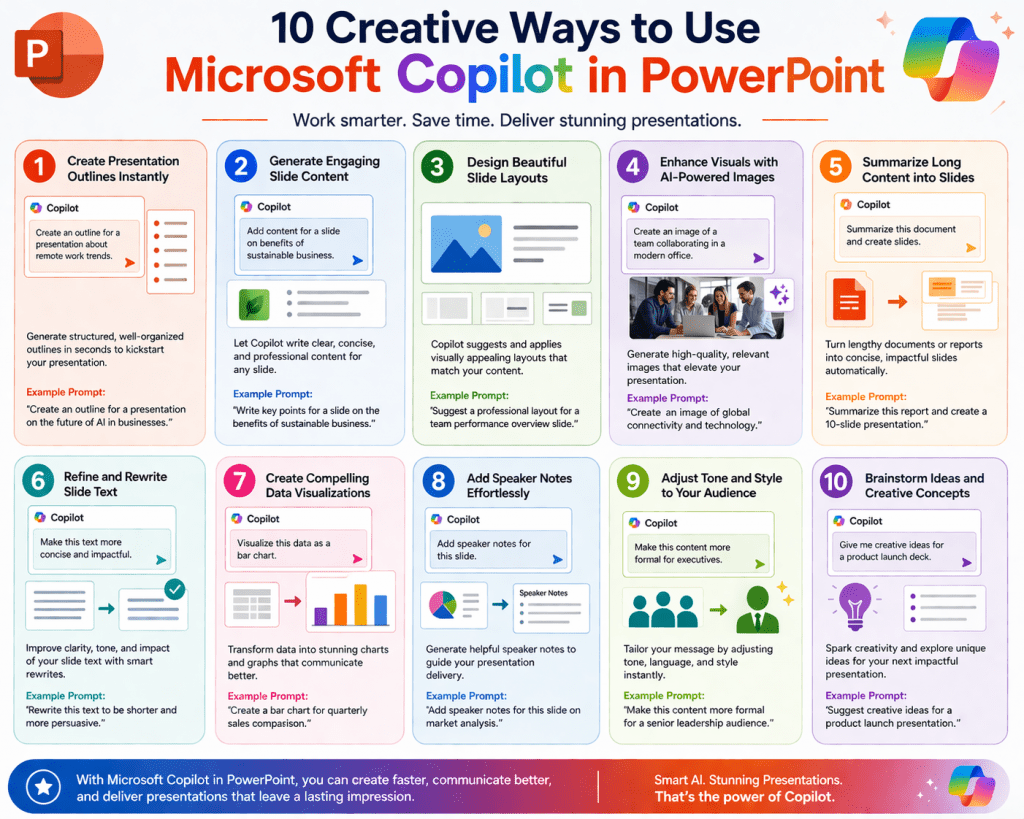
Microsoft Copilot for presentation workflows represents a shift from manual slide construction to AI-assisted content generation that focuses on intent, structure, and communication goals rather than formatting effort. Instead of starting with blank slides and manually deciding layout, sequence, and content placement, users can describe their idea in natural language and receive a structured presentation draft that already includes logical flow, sectioning, and suggested visual organization. This changes the role of presentation creation from design-heavy execution to concept-driven communication planning, where the user focuses on what needs to be said rather than how each slide should be built.
The system is designed to reduce repetitive manual tasks such as aligning text boxes, choosing templates, and formatting visuals. Instead, it generates a foundation that already reflects common presentation structures such as introductions, thematic sections, supporting explanations, and closing summaries. This allows users to begin refinement immediately rather than spending time on initial construction. It also helps reduce inconsistency in formatting and structure, especially in environments where multiple presentations are created regularly by different users with varying design skills.
The value of this shift becomes particularly clear in professional environments where time efficiency and clarity of communication are essential. By generating a first draft that is already structured, the system shortens the distance between idea and execution, enabling faster iteration cycles and more focus on message quality.
How AI Interprets Presentation Requests
At the core of Copilot’s functionality is its ability to interpret natural language instructions and convert them into structured output. When a user submits a prompt, the system does not simply look for keywords; instead, it analyzes meaning, intent, and implied structure. This includes identifying the subject matter, intended audience, level of detail required, and the overall purpose of the presentation.
For example, a request related to employee training will result in a different structure compared to a request for executive reporting, even if both involve similar subject matter. The system adjusts tone, complexity, and information density based on inferred expectations. This adaptive interpretation allows it to produce content that aligns more closely with communication goals rather than generic formatting patterns.
The transformation process involves breaking down the request into conceptual components. These components are then mapped into slide-level structures such as titles, explanatory sections, supporting evidence, and summary points. This ensures that the output is not just a collection of slides but a coherent narrative that follows a logical progression.
Integration Within Digital Work Ecosystems
One of the defining characteristics of AI-assisted presentation tools is their ability to connect with broader digital environments. Rather than functioning as isolated design tools, they integrate with documents, spreadsheets, communication records, and stored organizational knowledge. This integration allows the system to reference real working material when generating presentations, improving relevance and reducing manual copying of content.
When connected to existing work data, the system can incorporate figures, summaries, and contextual insights directly into slides. This means presentations can reflect up-to-date information without requiring users to manually extract and format data. It also supports consistency across multiple documents, ensuring that messaging remains aligned with ongoing projects and organizational communication standards.
This level of integration transforms presentations into dynamic outputs that are connected to broader workflows rather than static documents created in isolation. It reduces duplication of effort and helps ensure that presentations remain aligned with current business or project conditions.
Content Generation and Structural Logic in Slides
The process of converting prompts into presentations involves generating both content and structure simultaneously. The system begins by identifying the central theme and then builds a logical sequence of slides that support that theme. This typically includes an introduction that sets context, followed by thematic sections that expand on key points, and concluding slides that summarize or reinforce the main message.
Each slide is created with a specific communicative function. Some slides introduce concepts, others explain, while others present supporting information such as examples, comparisons, or key observations. This ensures that the presentation follows a narrative flow rather than appearing as disconnected pieces of information.
The level of detail within each slide is adjusted based on the complexity of the topic and the expected audience. High-level executive presentations may focus on concise messaging and strategic insights, while training or educational presentations may include more detailed explanations and step-by-step breakdowns. This adaptability ensures that the generated content is appropriate for its intended use case.
The system also considers how information should be distributed across slides. Instead of overcrowding a single slide, it distributes content to maintain clarity and readability. This helps prevent cognitive overload for the audience and improves overall communication effectiveness.
Visual Structuring and Layout Intelligence
Beyond generating textual content, the system also contributes to visual organization by suggesting layouts that enhance readability and engagement. It evaluates how text, visuals, and spacing interact within a slide to ensure that information is presented clearly and efficiently.
For content-heavy slides, it may recommend structured layouts that separate key points into distinct sections. For conceptual slides, it may suggest minimal text with emphasis on visual hierarchy. For comparative information, it may organize content into side-by-side structures that improve clarity.
This approach reduces the need for manual design decisions such as selecting templates, adjusting alignment, or balancing visual elements. Instead, the system automatically applies design logic based on content type and communicative purpose. This helps maintain a consistent visual standard across the entire presentation.
By handling structural design decisions, the system allows users to focus more on refining message clarity rather than adjusting formatting details. This is particularly useful in environments where design expertise may not be a primary skill among users.
Data Interpretation and Visual Representation
A significant capability within AI-assisted presentation creation is the ability to interpret structured data and transform it into meaningful visual representations. When numerical or tabular data is included in a prompt or attached context, the system identifies relationships such as trends, comparisons, and distributions.
It then selects appropriate visualization types to represent these relationships. Time-based data may be represented through trend visuals, categorical comparisons may be displayed using comparative structures, and proportional data may be expressed through distribution-based visuals. This automatic selection reduces the need for manual chart configuration.
The advantage of this capability lies in its ability to translate raw data into understandable insights. Instead of presenting numbers in isolation, the system embeds them into visual formats that enhance comprehension. This is especially useful in business environments where data-driven decision-making relies on clear interpretation of metrics and performance indicators.
By automating visualization logic, the system ensures that data is not only presented but also contextualized within the broader narrative of the presentation.
Impact on Productivity and Workflow Efficiency
One of the most noticeable effects of AI-assisted presentation generation is the reduction in time required to produce a complete slide deck. Traditional workflows often involve multiple stages, including planning, structuring, formatting, and revising. With AI assistance, the initial structuring and drafting stages are significantly accelerated.
This allows users to move more quickly into refinement and validation stages, where they focus on improving clarity, accuracy, and messaging effectiveness. The result is a shift from production-heavy work to decision-focused work, where human input is concentrated on higher-value tasks.
In collaborative environments, this efficiency also improves team dynamics. Instead of spending time building presentations from scratch, teams can begin with a structured draft and focus discussions on content quality and strategic alignment. This reduces repetitive formatting discussions and increases focus on communication goals.
Over time, this shift can lead to more consistent output quality and faster turnaround times for presentation-based communication tasks.
Context Awareness and Adaptive Output
Another important aspect of AI-assisted presentation systems is contextual awareness. Rather than generating output in isolation, the system can consider related documents, previous presentations, and connected data sources. This allows it to produce content that aligns with existing communication patterns and organizational context.
Context awareness helps ensure consistency across multiple presentations created over time. It reduces discrepancies in tone, structure, and messaging, especially when different individuals are involved in content creation. This is particularly valuable in organizations where maintaining a unified communication style is important.
It also improves relevance by ensuring that generated content reflects current information rather than outdated or disconnected data. This makes presentations more accurate and aligned with ongoing developments.
Intent-Based Adaptation in Presentation Design
The system adjusts its output based on the inferred intent behind the user’s request. If the goal is persuasion, the presentation may emphasize structured arguments and supporting evidence. If the goal is education, it may focus on clarity and step-by-step explanation. If the goal is reporting, it may prioritize structured data presentation and summary insights.
This adaptive behavior extends to language complexity, slide density, and information hierarchy. Executive-level presentations tend to be concise and insight-driven, while operational or training presentations may be more detailed and explanatory. This ensures that the output matches the expectations of the intended audience.
By adapting to intent, the system reduces the need for extensive manual rewriting and restructuring, allowing users to move closer to a final version more quickly.
Transformation of Traditional Presentation Workflows
The introduction of AI-driven presentation generation fundamentally changes the traditional workflow. Instead of beginning with structure design and manual slide creation, users begin with conceptual input. The system handles structural development, leaving users responsible for refinement and validation.
This shifts the role of the user from builder to editor and strategist. The emphasis moves away from formatting decisions and toward communication effectiveness. Users evaluate whether the generated content accurately represents their message and adjust accordingly.
As a result, presentation creation becomes a more iterative and fluid process. Rather than spending most of the time constructing slides, users spend more time improving clarity, accuracy, and impact.
Expanding Beyond Basic Slide Generation
Once the initial presentation draft is generated, Microsoft Copilot moves beyond simple slide creation and enters a more advanced stage of refinement, adaptation, and enhancement. At this level, the system is no longer just assembling content but actively reshaping it to improve clarity, flow, and audience engagement. This shift is important because most presentations are not finished at the first draft stage. Instead, they evolve through iterative improvement, and AI assistance plays a significant role in accelerating that process.
The refinement stage involves adjusting slide structure, improving text clarity, reorganizing content flow, and enhancing visual coherence. Instead of manually editing each slide element, users can issue natural language instructions that target specific parts of the presentation. This reduces friction in editing and allows faster experimentation with different presentation styles or structures.
Iterative Refinement and Targeted Editing
One of the most powerful aspects of Copilot in PowerPoint workflows is its ability to support iterative refinement. Rather than rebuilding entire presentations, users can request focused modifications such as improving a section, shortening explanations, or enhancing clarity for a specific audience.
This targeted approach ensures that improvements are surgical rather than disruptive. Instead of altering the entire presentation, the system can adjust individual components while preserving the rest of the structure. This is particularly useful when users are satisfied with the overall direction but need improvements in specific areas.
Iterative refinement also supports experimentation. Users can test different versions of messaging or structure without committing to full redesigns. This enables more creative exploration while maintaining efficiency.
Dynamic Content Restructuring
Another advanced capability involves restructuring existing presentations based on updated requirements or feedback. If a presentation needs to shift focus, the system can reorganize slides to reflect new priorities. This includes merging sections, splitting complex ideas into multiple slides, or reordering content for better narrative flow.
Dynamic restructuring ensures that presentations remain flexible rather than static. This is especially important in business environments where information and priorities can change quickly. Instead of rebuilding presentations from scratch, users can adapt existing materials efficiently.
This capability also improves storytelling quality. By reorganizing content logically, the system ensures that presentations follow a coherent progression that is easier for audiences to understand.
Context-Driven Content Expansion
Copilot can expand existing content based on contextual understanding. If a slide contains a brief statement or bullet point, the system can elaborate on it by adding supporting explanations, examples, or clarifications. This allows users to move from high-level outlines to fully developed presentations without manually writing every detail.
Context-driven expansion is particularly useful for transforming rough ideas into structured communication. Users can start with minimal input and progressively build depth where needed. This supports a flexible workflow where presentations evolve gradually rather than being fully designed upfront.
The system also ensures that expansions remain consistent with the overall tone and intent of the presentation. It avoids introducing unrelated or irrelevant information, maintaining coherence throughout the deck.
Smart Slide Categorization and Flow Management
An important aspect of advanced presentation design is ensuring that information is grouped logically. Copilot assists in categorizing slides into thematic sections and maintaining smooth transitions between ideas. This helps prevent disjointed presentations where topics appear randomly arranged.
Flow management includes identifying where transitions are needed, where topics should be grouped, and where supporting information should be placed. This improves audience comprehension by ensuring that ideas are presented in a structured sequence.
By managing flow automatically, the system reduces the need for manual slide ordering and restructuring, which can often be time-consuming in traditional workflows.
Enhanced Data Integration and Insight Presentation
Beyond basic chart creation, Copilot can interpret complex datasets and extract meaningful insights for presentation purposes. Instead of simply visualizing raw numbers, it identifies patterns such as growth trends, anomalies, comparisons, and correlations.
These insights can then be incorporated directly into slides as explanatory content alongside visual elements. This transforms presentations from data displays into analytical narratives that help audiences understand not just what the data is, but what it means.
This capability is especially valuable in decision-making contexts where understanding implications is more important than viewing raw figures. It bridges the gap between data analysis and communication.
Multi-Source Information Synthesis
Another advanced feature involves synthesizing information from multiple sources into a unified presentation structure. Instead of treating each input independently, the system combines related ideas into cohesive sections.
This is particularly useful when building presentations that draw from multiple documents, reports, or datasets. The system identifies overlapping themes and merges them into unified narratives, reducing redundancy and improving clarity.
Multi-source synthesis ensures that presentations are not fragmented but instead reflect a consolidated understanding of the topic. This improves both efficiency and communication quality.
Audience Adaptation and Communication Calibration
Copilot can adjust presentation style based on audience type. This includes modifying language complexity, adjusting detail levels, and changing emphasis based on whether the audience is technical, managerial, or general.
For technical audiences, the system may include more detailed explanations and structured breakdowns. For executive audiences, it may focus on high-level insights and strategic implications. For general audiences, it may simplify language and emphasize clarity over complexity.
This adaptive communication ensures that presentations are aligned with audience expectations without requiring manual rewriting for different versions.
Visual Enhancement and Design Consistency
In addition to layout suggestions, Copilot helps maintain visual consistency across an entire presentation. It ensures that fonts, spacing, color usage, and alignment follow a coherent pattern. This reduces visual inconsistency that often occurs when slides are edited over time by multiple users.
Visual enhancement also includes improving readability by adjusting text density, balancing visual elements, and ensuring that slides are not overloaded with information. The system aims to create visually balanced slides that support comprehension rather than overwhelm the audience.
By maintaining consistency automatically, Copilot reduces the need for manual design corrections and ensures a more professional final output.
Automated Speaker Notes Generation
In addition to slide content, Copilot can generate speaker notes that help presenters deliver their message more effectively. These notes provide additional context, talking points, and explanations that are not always visible on the slides themselves.
Speaker notes help bridge the gap between visual content and verbal delivery. They allow presenters to expand on slide content without overcrowding the slides themselves. This supports clearer communication during live presentations.
The system ensures that speaker notes align with slide content and maintain consistency in tone and messaging.
Presentation Reusability and Template Formation
Once a presentation is refined, Copilot can convert it into a reusable structure that can be adapted for future use. This allows users to maintain consistent formatting and structure across multiple presentations.
Reusable templates help streamline future work by providing a starting point that already includes established structure and design patterns. Instead of starting from scratch each time, users can adapt existing frameworks to new topics.
This improves long-term efficiency and ensures consistency across recurring presentation types.
Error Reduction and Content Validation Support
Copilot also assists in identifying potential issues within presentations. This includes detecting unclear phrasing, inconsistent data representation, or structural gaps where information may be missing.
While it does not replace human validation, it acts as an additional layer of review that helps reduce common errors. This improves overall reliability and reduces the likelihood of mistakes in final presentations.
Content validation support ensures that presentations are more polished before they are delivered to audiences.
Collaboration Enhancement in Shared Environments
In collaborative settings, Copilot helps maintain alignment between multiple contributors. It ensures that changes made by different users remain consistent with the overall structure and design of the presentation.
This reduces conflicts that can occur when multiple people edit slides independently. It also helps track changes and maintain version coherence.
Collaboration enhancement improves team efficiency by reducing the need for manual coordination of formatting and structure.
Real-Time Adaptation During Presentation Development
As users continue working on presentations, Copilot adapts in real time to changes. When new content is added or existing content is modified, it updates suggestions accordingly. This ensures that recommendations remain relevant throughout the editing process.
Real-time adaptation helps maintain workflow continuity. Users do not need to restart or regenerate presentations after making changes. Instead, the system adjusts dynamically to reflect updates.
This creates a more fluid and responsive editing experience.
Use in Business Communication Environments
In professional environments, Copilot is particularly valuable for creating recurring presentation types such as performance reports, project updates, training materials, and strategic briefings. These presentations often follow predictable structures, making them well-suited for AI-assisted generation.
By automating structural and formatting tasks, Copilot allows professionals to focus more on interpretation and decision-making rather than document construction. This leads to more efficient communication cycles and improved consistency across teams.
It also helps reduce dependency on specialized design skills, allowing more users to create professional-quality presentations independently.
Efficiency in High-Volume Presentation Workflows
Organizations that produce a large number of presentations benefit significantly from automation. Instead of manually designing each slide deck, teams can generate structured drafts quickly and refine them as needed.
This reduces bottlenecks in content creation and allows faster response to communication needs. It also improves scalability, enabling teams to handle higher workloads without increasing manual effort proportionally.
High-volume environments particularly benefit from consistent formatting and structure, which Copilot helps maintain automatically.
Evolving Role of Presentation Creation
The introduction of AI-assisted presentation tools changes the role of presentation creation from manual design work to strategic communication development. Users are no longer primarily concerned with formatting details but instead focus on message clarity, audience engagement, and content accuracy.
This shift elevates the importance of critical thinking and communication strategy while reducing time spent on repetitive tasks. It also encourages more experimentation with structure and messaging, as iteration becomes faster and easier.
Over time, this leads to a more efficient and adaptive approach to presentation development.
Refining Presentation Quality Through Structured Prompting
Effective use of Microsoft Copilot in PowerPoint depends heavily on how instructions are formulated. The system responds to clarity, specificity, and contextual detail rather than vague or overly broad requests. When prompts are structured with clear intent, the resulting presentation is more aligned with expectations, reducing the need for extensive revision.
A well-defined prompt typically includes the topic, audience type, purpose, and expected depth of detail. This helps the system determine not only what content to generate but also how to structure it across slides. When prompts lack clarity, the output may still be functional but can require additional refinement to meet specific goals.
Improving prompt quality is less about technical complexity and more about precision in communication. The clearer the input, the more predictable and usable the output becomes. This creates a more efficient workflow where iteration is focused on enhancement rather than correction.
Balancing Automation with Human Judgment
While AI-assisted presentation generation can significantly reduce manual effort, human oversight remains essential in ensuring accuracy and relevance. The system is capable of structuring and generating content, but it does not replace domain expertise or contextual understanding.
Human judgment plays a critical role in validating information, adjusting tone for specific audiences, and ensuring that messaging aligns with organizational goals. This balance between automation and human input ensures that presentations are both efficient to produce and reliable in content quality.
In practice, the most effective workflow involves using AI for structural and initial content development, followed by human refinement for accuracy, emphasis, and strategic messaging. This combination produces stronger outcomes than either approach alone.
Ensuring Accuracy and Data Integrity in Presentations
One of the most important aspects of presentation creation is maintaining accuracy, especially when working with data-driven content. While AI systems can interpret and visualize data, users are responsible for verifying that the underlying information is correct and up to date.
Data integrity becomes especially important in business and decision-making environments where incorrect figures or misrepresented trends can lead to poor conclusions. Even when visualizations appear correct, the source data must still be validated.
This makes fact-checking an essential step in the presentation workflow. AI can assist in structuring and visualizing data, but it does not replace the need for human verification of numerical accuracy and contextual correctness.
Improving Narrative Flow and Storytelling Structure
A strong presentation is not just a collection of slides but a structured narrative that guides the audience through a logical progression of ideas. Copilot supports this by organizing content into sections, but narrative quality is further improved through intentional refinement.
Storytelling in presentations involves establishing context, presenting challenges or objectives, supporting ideas with evidence, and concluding with clear insights or actions. AI-generated structures often follow this pattern, but users can enhance it by adjusting emphasis and sequencing.
Improving narrative flow often involves reordering slides, simplifying complex sections, or expanding key points for clarity. These adjustments help ensure that the presentation feels cohesive rather than fragmented.
Optimizing Visual Communication for Audience Engagement
Visual communication plays a central role in how effectively information is absorbed during a presentation. Copilot assists by suggesting layouts and visual structures, but users can further optimize engagement by refining visual hierarchy and reducing unnecessary complexity.
Effective visual design focuses on clarity, contrast, and balance between text and imagery. Overloaded slides can reduce comprehension, while well-structured visuals improve retention and engagement.
Optimization often involves simplifying slides, breaking complex ideas into multiple visuals, and ensuring that each slide communicates a single clear idea. This prevents cognitive overload and improves audience focus.
Leveraging Data Visualization for Decision Support
Data visualization is most effective when it supports decision-making rather than simply presenting information. Copilot helps translate data into visual formats, but the interpretation of those visuals is equally important.
Effective visualization highlights trends, comparisons, and anomalies that are relevant to the presentation’s objective. Instead of displaying all available data, optimized presentations focus on the most meaningful insights.
This approach transforms presentations from descriptive reports into analytical tools that support understanding and action. The goal is not just to show data but to explain its significance in context.
Enhancing Presentation Consistency Across Teams
In collaborative environments, maintaining consistency across multiple presentations is essential for professional communication. Copilot helps enforce structural and visual consistency, but organizational standards further strengthen this effect.
Consistency includes maintaining uniform slide layouts, consistent terminology, aligned messaging, and standardized visual styling. When multiple contributors are involved, AI assistance helps reduce variation and ensures that outputs remain aligned with shared expectations.
This is particularly valuable in large organizations where presentations are created by different teams but must maintain a unified brand and communication style.
Reducing Time-to-Delivery in Presentation Workflows
One of the most significant advantages of AI-assisted presentation tools is the reduction in time required to move from concept to delivery. Traditional workflows often involve multiple sequential stages that can take considerable time, especially when starting from scratch.
With AI assistance, the initial structuring and drafting stages are accelerated, allowing users to focus more quickly on refinement and validation. This shortens overall production cycles and improves responsiveness in time-sensitive situations.
Faster delivery does not necessarily mean reduced quality. Instead, it allows more time for thoughtful review and improvement, which can actually enhance final output quality.
Scaling Presentation Production in High-Demand Environments
In environments where presentations are created frequently, scalability becomes an important factor. AI-assisted tools allow organizations to handle larger volumes of presentation work without proportionally increasing manual effort.
Scaling is achieved by automating repetitive tasks such as formatting, structuring, and initial content generation. This frees users to focus on higher-level tasks such as analysis, messaging, and strategy.
As demand increases, this scalability ensures that communication output remains consistent and timely without overwhelming individual contributors.
Adapting Presentations for Different Communication Channels
Presentations are often used in different contexts, including live delivery, recorded sessions, and shared documentation. Copilot-generated content can be adapted to suit these different formats by adjusting structure and detail level.
For live presentations, emphasis is placed on clarity and speaker support. For shared documents, more detailed explanations may be included directly on slides. For recorded presentations, additional contextual information may be integrated into speaker notes or supporting visuals.
This adaptability ensures that the same core content can be reused across multiple communication channels with minimal restructuring.
Improving Accessibility and Readability
Accessibility is an important consideration in modern presentation design. Copilot supports readability improvements by structuring content clearly, but users can further enhance accessibility by simplifying language and improving visual contrast.
Readable presentations avoid overly complex sentence structures and ensure that key points are easy to identify. Visual accessibility involves ensuring that text is legible, layouts are balanced, and information is not overcrowded.
These improvements help ensure that presentations are usable by a wider audience and reduce barriers to understanding.
Minimizing Cognitive Load for Audiences
Cognitive load refers to the amount of mental effort required to process information. Effective presentations aim to minimize unnecessary cognitive load by organizing information clearly and avoiding overload.
Copilot contributes to this by structuring content logically, but users can further optimize presentations by limiting the amount of information per slide and focusing on key messages.
Reducing cognitive load improves comprehension and helps audiences retain information more effectively. It also makes presentations more engaging and easier to follow.
Evolving Role of AI in Presentation Strategy
AI-assisted tools are increasingly influencing how presentations are planned and executed. Instead of focusing primarily on manual slide construction, the emphasis is shifting toward strategic communication design.
This includes deciding what information should be presented, how it should be structured, and how it should be tailored to different audiences. AI handles much of the execution, while humans focus on decision-making and refinement.
This evolution reflects a broader shift in digital productivity tools, where automation supports creativity rather than replacing it.
Long-Term Benefits of AI-Assisted Presentation Workflows
Over time, consistent use of AI-assisted presentation tools leads to improved efficiency, better consistency, and faster communication cycles. Users become more focused on message quality and less burdened by technical design tasks.
This long-term shift improves overall productivity and allows organizations to respond more quickly to communication needs. It also encourages more structured thinking about how information is presented and consumed.
As workflows mature, AI becomes an integrated part of the communication process rather than just a supporting tool, enabling more adaptive and responsive presentation creation practices.
Conclusion
The conclusion of Microsoft Copilot for PowerPoint reflects a broader transformation in how presentations are created, refined, and delivered in modern digital environments. What was once a highly manual and time-consuming process is now increasingly supported by AI systems that interpret intent, generate structured content, and suggest visual organization. This shift does not simply make presentation creation faster; it fundamentally changes the relationship between the user and the tool, moving the focus away from design mechanics and toward communication clarity and strategic thinking.
One of the most important outcomes of this transformation is the redefinition of workflow efficiency. In traditional presentation development, users typically begin with a blank slide deck and gradually build structure through repeated manual effort. They decide on layouts, format text, adjust alignment, and refine visual consistency over multiple iterations. With AI-assisted generation, this initial burden is significantly reduced. A structured draft can be produced almost immediately based on a natural language prompt, allowing users to bypass the most time-consuming early stages of creation.
However, the value of this efficiency is not limited to speed alone. It also improves cognitive focus. Instead of spending mental energy on formatting decisions, users can concentrate on what truly matters: the message, the audience, and the purpose of the presentation. This leads to a more thoughtful approach to communication, where the quality of ideas takes priority over the mechanics of design. In many cases, this shift results in clearer, more focused presentations because the user’s attention is directed toward refining meaning rather than constructing structure.
At the same time, the role of human judgment becomes even more important in an AI-assisted environment. While Copilot can generate coherent slide structures and suggest relevant visual layouts, it does not possess true contextual awareness of organizational nuance, audience sensitivity, or strategic priorities. This means that human oversight remains essential for ensuring that the final presentation is accurate, appropriate, and aligned with real-world objectives. Users are no longer primarily designers, but they remain critical decision-makers responsible for validating content and shaping the final narrative.
Another significant outcome of this technology is the improvement in communication consistency. In environments where multiple presentations are created across teams or departments, maintaining a unified structure and tone can be challenging. AI-assisted tools help address this by applying consistent formatting logic and structuring principles across different presentations. This reduces variation and ensures that information is presented in a more standardized and professional manner, regardless of who creates the initial draft.
The impact on storytelling is also noteworthy. Presentations are most effective when they follow a clear narrative progression, guiding the audience through context, development of ideas, supporting evidence, and conclusions. AI systems support this by organizing content into logical sequences, but the refinement of storytelling still depends on human input. Users must ensure that key points are emphasized correctly, unnecessary complexity is removed, and transitions between ideas feel natural. When combined effectively, AI structure and human storytelling judgment create presentations that are both logically coherent and emotionally engaging.
Data communication is another area where the transformation is especially visible. Presentations today often rely heavily on data to support arguments and demonstrate results. AI systems can interpret structured data and convert it into visual formats such as charts or graphs, helping audiences understand patterns and trends more easily. However, the interpretation of what those patterns mean still requires human analysis. The system may visualize information effectively, but it is the user who determines which insights are most relevant and how they should be communicated within the broader narrative.
As organizations continue to adopt AI-assisted tools, the nature of productivity itself is evolving. Tasks that once required significant manual effort are becoming increasingly automated, allowing professionals to redirect their focus toward higher-level thinking. This includes analyzing information, making decisions, and crafting messages that align with strategic goals. In this environment, presentation creation becomes less about building slides and more about shaping ideas in a way that is clear, persuasive, and contextually appropriate.
This evolution also changes expectations around turnaround time and responsiveness. Presentations that once required days of preparation can now be drafted in a much shorter timeframe, enabling faster communication cycles. Teams can respond more quickly to changing priorities, update materials more frequently, and iterate on ideas without the traditional delays associated with manual design work. This increased agility supports more dynamic and responsive workflows across professional settings.
Despite these advantages, the importance of careful review and validation cannot be overstated. AI-generated content, while highly structured and contextually aware, is still dependent on the quality of input and available data. Users must ensure that information is accurate, relevant, and appropriately interpreted before it is presented to others. This responsibility remains firmly in human hands, reinforcing the idea that AI is an assistant rather than a replacement for critical thinking.
Ultimately, the integration of Microsoft Copilot into PowerPoint represents a shift toward a more collaborative relationship between humans and technology. The system handles structure, formatting, and initial content generation, while humans provide direction, judgment, and refinement. This partnership allows for more efficient workflows, improved consistency, and enhanced communication quality.
Over time, this approach is likely to become a standard part of digital communication practices. As users become more familiar with AI-assisted workflows, the focus will continue to shift toward higher-value tasks such as storytelling, strategy, and decision-making. Presentation creation will no longer be defined by the effort required to build slides, but by the effectiveness of the ideas being communicated through them.