
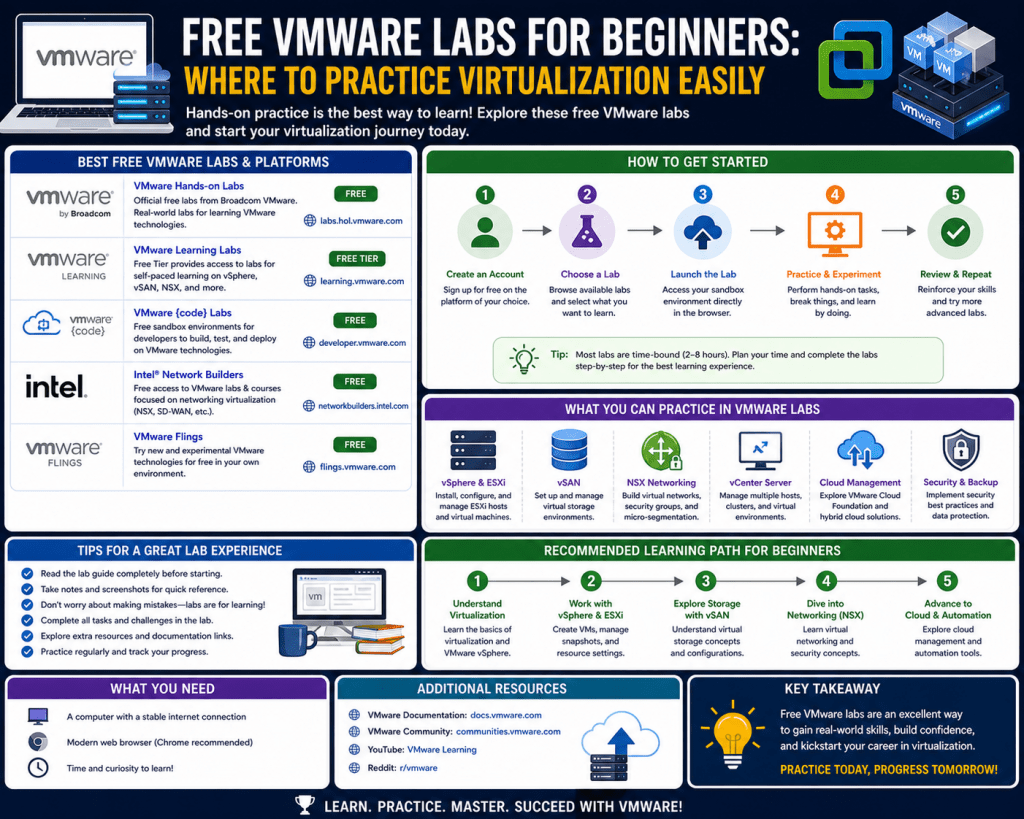
The way technical professionals learn virtualization and infrastructure technologies has changed significantly with the rise of cloud-hosted training environments. In earlier approaches, learners were required to build physical setups involving multiple servers, storage devices, and networking components. This often demanded high investment in hardware, electricity, and maintenance effort. Over time, cloud-based environments emerged as a more scalable and accessible alternative. These systems allow users to interact with fully functional enterprise-grade platforms through a standard web browser without installing software locally or managing physical machines. The shift toward hosted learning environments has been driven by the increasing complexity of modern IT systems and the need for faster, more flexible training methods. Instead of spending time configuring infrastructure, learners can immediately begin practicing real-world tasks in preconfigured systems designed to replicate production environments.
Architecture of Remote Virtualization Training Systems
Cloud-based virtualization training environments are built on a distributed computing infrastructure that emulates real enterprise systems. Each user session is deployed as an isolated virtual workspace hosted on remote servers. When a session begins, a virtual machine is provisioned with preinstalled operating systems, management tools, and simulation software. Users connect to this environment through a remote interface that mirrors a desktop experience. The backend architecture is designed to ensure scalability and isolation so that multiple users can access separate environments simultaneously without interference. Virtualization layers separate compute, storage, and networking resources, allowing each lab instance to function independently. These systems are also designed to reset automatically after each session, restoring default configurations to ensure consistency for every user. This structured architecture allows continuous availability while maintaining controlled learning conditions.
User Interaction Model in Browser-Based Lab Environments
Interaction with these environments is typically carried out through a browser-based interface that streams a remote desktop session. Once access is granted, users are presented with a preconfigured workspace that includes system tools, administrative consoles, and guided documentation panels. The interface behaves similarly to a traditional operating system environment, but all processing occurs remotely. Users can perform configuration tasks, manage virtual machines, and modify system settings using graphical interfaces or command-line tools, depending on the scenario. The learning experience is often structured to guide users through specific tasks step by step, allowing them to apply theoretical knowledge in a controlled environment. This interaction model removes the need for local setup and enables users to focus entirely on understanding system behavior and operational workflows.
Types of Learning Scenarios in Virtualized Training Systems
Virtualization training environments often include multiple scenario types designed to support different learning objectives. Some scenarios focus on introductory exploration, where users become familiar with system interfaces and basic navigation. These foundational environments help build confidence before moving into more complex tasks. Intermediate scenarios typically involve guided configuration exercises where users follow structured instructions to deploy and manage virtual infrastructure components. Advanced scenarios introduce problem-solving challenges that require users to diagnose and correct system issues without detailed guidance. These environments simulate real operational conditions where systems may be misconfigured or partially broken. By working through these scenarios, learners develop analytical thinking skills and gain a deeper understanding of system dependencies and interactions.
Integration of Virtualization and Cloud Concepts in Training Environments
Modern training platforms increasingly incorporate cloud computing principles alongside traditional virtualization concepts. Users are exposed to hybrid infrastructure models where on-premises systems interact with cloud-based services. These environments simulate scenarios involving workload migration, distributed resource management, and centralized orchestration. Learners can observe how virtual machines are deployed across different resource pools and how management systems coordinate these resources. This integration reflects real-world enterprise architectures where virtualization is closely tied to cloud infrastructure. It also provides insight into how modern IT environments are designed for scalability, resilience, and automation. By engaging with these systems, users gain a broader understanding of how virtualization fits within larger cloud ecosystems.
Performance and Accessibility Considerations in Remote Labs
One of the key advantages of cloud-based virtualization environments is accessibility from a wide range of devices. Since all processing occurs on remote servers, users only need a stable internet connection and a compatible browser. This allows learning to take place from laptops, desktops, and even lightweight devices without requiring powerful local hardware. However, performance is influenced by network conditions, including latency and bandwidth availability. High latency can affect responsiveness, especially when interacting with graphical interfaces or performing real-time configuration tasks. To address this, remote systems use optimized streaming protocols that balance image quality with performance efficiency. Despite these optimizations, users may still experience variations in responsiveness depending on their network environment.
Structured Learning Materials Embedded in Virtual Environments
Training environments often include integrated instructional materials that guide users through each session. These materials are embedded directly within the virtual workspace, allowing users to follow instructions without switching between external resources. The content typically includes step-by-step guidance, contextual explanations, and task objectives aligned with the lab scenario. This structured approach helps reinforce learning by ensuring that users can immediately apply instructions within the same environment. It also reduces cognitive load by keeping all necessary information within a single interface. As users progress through tasks, they can directly observe the effects of their actions, which strengthens their understanding of system behavior and configuration principles.
System Isolation and Security Design in Virtual Training Platforms
Security and isolation are fundamental aspects of cloud-based training environments. Each user session operates within a sandboxed virtual instance that is completely isolated from other sessions. This prevents interference between users and ensures that individual configurations do not affect shared infrastructure. Access to external systems is often restricted to maintain security boundaries and prevent unauthorized data transfer. File sharing capabilities are limited or controlled to preserve the integrity of the environment. These restrictions ensure that the platform remains secure while still providing realistic system behavior. Isolation also allows users to experiment freely without risk of affecting other environments or persistent systems.
Reset and Recovery Mechanisms for Consistent Learning Experiences
A defining feature of virtual training environments is the ability to reset sessions to a clean state. After each user completes a session, the system can restore the environment to its original configuration. This ensures that every new session begins under identical conditions, regardless of previous activity. Reset mechanisms are implemented using snapshot-based restoration techniques that revert virtual machines and system configurations to predefined states. This approach allows users to experiment without concern for permanent system changes. If errors occur during learning, environments can be quickly restored, enabling repeated practice of the same scenarios. This consistency is essential for structured learning and skill development.
Scalability of Distributed Training Infrastructure
Cloud-based virtualization platforms are designed to support large numbers of concurrent users through scalable infrastructure. Resources are dynamically allocated based on demand, ensuring that performance remains stable even during peak usage periods. When additional users access the system, new virtual instances are provisioned automatically across available servers. This distributed architecture allows the platform to accommodate global usage without requiring physical expansion. Scalability also ensures that users can access training environments at any time without scheduling constraints. The underlying infrastructure is designed to balance load efficiently across compute nodes, maintaining consistent performance across all active sessions.
Role of Interactive Learning in Skill Development
Interactive learning plays a central role in virtualization training environments. Instead of passively consuming information, users actively engage with systems by performing configuration tasks and observing outcomes. This hands-on approach helps reinforce theoretical knowledge through practical application. Users develop familiarity with system interfaces, management tools, and operational workflows by directly interacting with them. Each action taken within the environment produces immediate feedback, allowing learners to understand the consequences of their configurations. This iterative process of action and observation enhances comprehension and builds practical technical skills that are applicable in real-world IT environments.
Transition from Theory to Hands-On Technical Practice
Virtualization training environments play a critical role in bridging the gap between theoretical knowledge and practical application. In traditional learning methods, learners often study concepts such as virtualization architecture, resource pooling, and network segmentation without directly interacting with real systems. While this builds conceptual understanding, it does not fully prepare individuals for operational tasks. Cloud-based training environments solve this problem by allowing users to apply theoretical knowledge in live systems that behave like real enterprise infrastructure. Instead of reading about how virtual machines are deployed or managed, users actively perform these operations in controlled environments. This shift from passive learning to active engagement significantly improves comprehension and retention. As learners interact with system components, they begin to understand not only how configurations are made but also why certain design decisions are necessary in enterprise environments.
Development of Operational Thinking Through Guided Scenarios
One of the most important aspects of virtualization training systems is the use of guided scenarios that simulate real operational workflows. These scenarios are structured to reflect tasks commonly performed in enterprise IT environments, such as provisioning virtual machines, configuring storage systems, or managing network connectivity. Instead of simply following instructions, users are encouraged to think through each step and understand the relationship between different system components. This promotes operational thinking, where learners begin to analyze how changes in one area can affect other parts of the infrastructure. Over time, this approach helps users develop a structured mindset for managing complex systems. They learn to approach problems methodically, breaking them down into smaller components and addressing each part systematically.
Strengthening Troubleshooting Skills Through Simulated Failures
Troubleshooting is a core skill in virtualization and infrastructure management, and training environments often incorporate simulated failures to develop this ability. Users may encounter misconfigured networks, failed virtual machines, or storage allocation issues that must be resolved using available tools and documentation. These scenarios are designed to mimic real-world problems that occur in production environments. By working through these challenges, learners develop diagnostic skills that allow them to identify root causes of system issues. Instead of relying on memorized solutions, they learn to analyze system behavior, interpret logs, and apply corrective actions. This process strengthens critical thinking and prepares users for situations where systems do not behave as expected.
Exposure to Enterprise Infrastructure Complexity
Modern IT environments are highly complex, often involving multiple layers of virtualization, networking, and storage systems. Training environments replicate this complexity by simulating enterprise-scale infrastructure where multiple virtual systems interact with each other. Users are exposed to concepts such as clustered computing, distributed storage systems, and centralized management platforms. This exposure helps learners understand how large organizations manage infrastructure at scale. They gain insight into how resources are allocated dynamically, how workloads are balanced across systems, and how redundancy is implemented to ensure system reliability. Understanding these concepts is essential for working in modern IT environments where systems are rarely isolated and often depend on interconnected services.
Efficiency Gains in Learning and Skill Acquisition
One of the key advantages of cloud-based virtualization training systems is the efficiency they bring to the learning process. Traditional lab setups require significant time to configure hardware, install software, and resolve compatibility issues before actual learning can begin. In contrast, hosted environments allow users to start practicing within minutes. This eliminates setup delays and allows learners to focus entirely on skill development. The ability to quickly access preconfigured environments also enables more frequent practice sessions, which accelerate learning. Repetition is a critical factor in skill acquisition, and the ease of access provided by these environments encourages consistent practice. Over time, this leads to faster mastery of complex technical concepts.
Accessibility and Flexibility Across Devices and Locations
Virtualization training environments are designed to be accessible from a wide range of devices, including laptops, desktops, and tablets. Since all processing is handled remotely, users do not need high-performance hardware to participate. This flexibility allows learning to take place from virtually any location with internet access. Users can start a session on one device and continue on another without losing progress, as the environment remains consistent across sessions. This portability is particularly useful for learners who may not have access to dedicated lab hardware. It also supports flexible learning schedules, allowing users to engage with training environments at their convenience.
Real-Time Feedback and Iterative Learning Cycles
A key feature of virtualization training environments is the ability to provide real-time feedback on user actions. When configurations are applied, users can immediately observe the results within the system. This creates an iterative learning cycle where users make changes, observe outcomes, and refine their approach. This feedback loop is essential for understanding complex systems, as it allows learners to see the direct impact of their decisions. Over time, this process helps build intuition about how systems behave under different conditions. Users learn not only what to do but also how systems respond, which deepens their understanding of infrastructure behavior.
Confidence Building Through Repeated System Interaction
Confidence is an important outcome of hands-on technical training. As users repeatedly interact with virtualization systems, they become more comfortable navigating interfaces, executing commands, and managing system configurations. This familiarity reduces hesitation when performing technical tasks and increases efficiency in problem-solving. Confidence also plays a role in reducing errors, as users are more likely to approach tasks methodically when they understand system behavior. Over time, repeated exposure to enterprise-like environments builds assurance in handling real-world infrastructure challenges.
Role in Professional Skill Development and Career Preparation
Virtualization training environments are widely used for professional skill development in IT infrastructure, cloud computing, and system administration roles. These environments provide practical experience that aligns closely with real job responsibilities. Users gain exposure to tasks such as system deployment, resource management, and infrastructure monitoring. This hands-on experience is valuable for individuals preparing for technical roles where practical knowledge is essential. By working through realistic scenarios, learners develop skills that are directly applicable in professional environments. This includes understanding system architecture, managing virtual resources, and troubleshooting infrastructure issues.
Simulation of Multi-Tier Infrastructure Systems
Advanced training environments often simulate multi-tier infrastructure systems where different layers of computing, storage, and networking interact. Users may work with virtualized compute clusters, shared storage systems, and virtual network configurations that replicate enterprise architectures. This allows learners to understand how different components of an IT system work together to deliver services. For example, a virtual machine may depend on network storage systems for data access while being managed through a centralized control platform. Understanding these relationships is essential for managing complex IT environments where systems are highly interdependent.
Importance of System Familiarity in Technical Assessments
Familiarity with system interfaces and workflows is a significant advantage in technical assessments and real-world operations. Virtualization training environments allow users to become comfortable with administrative tools and system layouts. This familiarity reduces the time needed to locate functions, execute commands, and interpret system feedback. In technical evaluations, where time efficiency is important, this familiarity can improve performance significantly. It also reduces cognitive load, allowing users to focus on solving problems rather than navigating unfamiliar interfaces.
Controlled Experimentation and Safe Learning Environment
One of the most valuable aspects of virtualization training systems is the ability to experiment without risk. Users can modify configurations, test different approaches, and observe system behavior without fear of causing permanent damage. If mistakes are made, environments can be reset to their original state. This encourages exploration and experimentation, which are important for deep learning. Users are more likely to try different solutions and understand why certain configurations work better than others when they are working in a safe environment. This freedom to experiment is a key factor in developing strong technical skills.
Reinforcement of Logical and Analytical Thinking
Working within virtualization environments requires logical and analytical thinking. Users must understand how different system components interact and how changes in one area affect others. This encourages structured thinking and problem-solving approaches. Instead of randomly applying solutions, users learn to analyze system behavior, identify patterns, and apply logical reasoning to resolve issues. Over time, this strengthens analytical skills that are valuable not only in IT but also in broader technical disciplines.
Continuous Learning Through Repetition and Practice
Repetition is a fundamental part of mastering technical skills, and virtualization training environments support continuous practice. Users can repeat scenarios multiple times, refining their approach each time. This repetition helps reinforce memory and build muscle memory for system interactions. As users become more experienced, they begin to complete tasks more efficiently and accurately. Continuous learning through repetition ensures that knowledge is retained and applied effectively in real-world situations.
Understanding Practical Constraints in Hosted Virtual Training Systems
Cloud-based virtualization training environments provide a highly flexible and accessible way to gain hands-on experience, but they are not without limitations. These systems operate within controlled, shared infrastructures designed to serve a large number of users simultaneously. Because of this, certain constraints are intentionally introduced to maintain stability, security, and performance consistency. These constraints affect how users interact with the environment, what actions they can perform, and how data flows between systems. While these limitations may seem restrictive compared to fully independent physical lab setups, they are necessary to ensure that the platform remains scalable and reliable for global access. Understanding these constraints helps users adapt their learning strategies and make better use of available resources.
Interface and Display Limitations in Remote Environments
One of the most noticeable constraints in cloud-hosted virtualization environments is the limitation of display resolution and interface scaling. Since the environment is accessed through remote streaming technology, screen resolution is often standardized to ensure compatibility across devices. This can result in lower visual clarity compared to local systems with high-resolution displays. Users may experience a limited workspace area, which can affect multitasking when working with multiple management consoles or monitoring tools. Although some systems allow resolution adjustments within the virtual desktop, these changes are still constrained by the underlying streaming architecture. As a result, users must adapt to a more compact interface layout when performing complex configuration tasks.
Restrictions on Data Transfer and External Interaction
To maintain security and prevent unauthorized data movement, many virtualization training platforms restrict file transfer capabilities. This means users cannot freely copy files between their local system and the virtual environment. Clipboard functionality may also be limited or partially disabled, depending on the platform design. These restrictions are implemented to ensure that sensitive system configurations remain contained within the training environment. While this enhances security and system integrity, it can reduce convenience for users who are accustomed to working with external scripts, configuration files, or documentation. As a result, users must often manually input commands or recreate configurations within the environment.
Controlled Software Environment and Installation Limitations
Virtualization training systems are typically built on preconfigured images that include specific tools and applications required for each learning scenario. Users are generally not allowed to install additional software beyond what is provided in the environment. This restriction ensures that all sessions remain consistent and that system integrity is maintained across all users. It also prevents compatibility issues and potential system instability caused by unsupported applications. However, this limitation can reduce flexibility for advanced users who may want to test third-party tools or experiment with custom configurations. Instead, learners must work within the predefined software ecosystem provided by the lab environment.
Network Dependency and Performance Variability
Because these environments rely entirely on remote connectivity, network performance plays a critical role in user experience. Factors such as latency, bandwidth, and connection stability directly impact responsiveness within the virtual desktop. High latency can cause delays in interface interaction, while low bandwidth can reduce visual quality or cause lag during system operations. This dependency on network conditions introduces variability in user experience across different geographic regions. While optimization techniques such as adaptive streaming and compression are used to mitigate these issues, performance differences can still occur depending on local network infrastructure.
Strategies for Maximizing Learning Efficiency in Virtual Environments
To overcome limitations and maximize the value of virtualization training environments, learners can adopt structured and intentional learning strategies. One effective approach is focusing on specific technology areas during each session rather than attempting to cover multiple systems at once. This allows a deeper understanding of individual concepts and reduces cognitive overload. Another strategy involves repeating scenarios multiple times to reinforce learning and build familiarity with system behavior. Repetition helps solidify procedural knowledge and improves efficiency over time. Additionally, reviewing system responses after each configuration change helps users understand cause-and-effect relationships within the environment.
Importance of Scenario-Based Learning for Skill Retention
Scenario-based learning plays a key role in improving skill retention within virtualization environments. Instead of following isolated instructions, users engage with structured scenarios that simulate real-world operational challenges. These scenarios often require users to make decisions based on system behavior rather than predefined steps. This approach encourages active problem-solving and helps learners understand how different components of an IT system interact. By working through realistic scenarios, users develop a deeper understanding of infrastructure behavior and are better prepared for real-world tasks where instructions may not always be available.
Comparison Between Hosted Labs and Physical Infrastructure Labs
Virtualization training environments differ significantly from traditional physical lab setups. Physical labs provide complete control over hardware, software, and network configurations, allowing unrestricted experimentation. However, they require significant investment in equipment, maintenance, and energy consumption. In contrast, hosted environments eliminate hardware requirements and provide instant access to preconfigured systems. While physical labs offer greater flexibility, hosted environments prioritize convenience, scalability, and accessibility. Each approach has advantages depending on learning goals. Physical labs are better suited for deep infrastructure experimentation, while hosted environments are ideal for rapid learning and certification preparation.
Evolution Toward Hybrid Learning Ecosystems
The future of virtualization training is moving toward hybrid learning ecosystems that combine cloud-hosted environments with local simulation tools. This approach allows users to benefit from the scalability of remote systems while maintaining flexibility for offline experimentation. Hybrid systems enable learners to practice foundational concepts locally and then apply them in cloud-based enterprise simulations. This combination enhances learning depth and provides a more comprehensive understanding of infrastructure systems. Hybrid models also support personalized learning paths, allowing users to progress at their own pace while accessing advanced environments when needed.
Integration of Automation and Infrastructure Orchestration Concepts
Modern virtualization training environments are increasingly incorporating automation and orchestration principles. Instead of manually configuring systems, users are introduced to automated deployment workflows and policy-driven infrastructure management. These concepts reflect real-world industry trends where manual configuration is being replaced by automated systems that improve efficiency and consistency. Learners gain exposure to scripting, configuration templates, and automated provisioning systems that manage virtual resources dynamically. This prepares users for modern IT environments where automation plays a central role in infrastructure management.
Expansion of Realistic Enterprise Simulation Models
Training environments are evolving toward more realistic enterprise simulation models that replicate complex organizational infrastructures. These models include multi-tier architectures, distributed computing systems, and interconnected service layers. Users may work within environments that simulate entire data centers, including compute clusters, storage networks, and virtualized networking systems. This level of realism helps learners understand how large-scale systems operate in production environments. It also provides insight into system dependencies, resource allocation strategies, and redundancy mechanisms used in enterprise IT design.
Increasing Emphasis on Problem-Solving and Critical Thinking Scenarios
Future virtualization training systems are expected to place greater emphasis on open-ended problem-solving scenarios. Instead of following guided instructions, users will be presented with complex system issues that require independent analysis and resolution. These scenarios may include system outages, performance degradation, or configuration conflicts that must be diagnosed and corrected. This approach encourages critical thinking and mirrors real-world IT environments where problems are not always clearly defined. By engaging with these scenarios, learners develop stronger analytical skills and improve their ability to handle unexpected system behavior.
Long-Term Impact on IT Skill Development and Workforce Readiness
Virtualization training environments are playing an increasingly important role in shaping IT skill development and workforce readiness. By providing accessible, scalable, and realistic training systems, they enable individuals to gain practical experience without requiring expensive infrastructure. This democratization of access to enterprise-level systems helps bridge the gap between education and industry requirements. As technology continues to evolve, these environments will likely become even more sophisticated, incorporating artificial intelligence-driven simulations, adaptive learning paths, and real-time performance analytics. Over time, they will continue to influence how technical professionals are trained, prepared, and evaluated in the IT industry.
Conclusion
Cloud-based virtualization training environments have fundamentally changed the way technical professionals acquire practical skills in modern IT infrastructure. Instead of relying on physical hardware setups that require significant investment, maintenance, and time, learners now interact directly with fully prepared enterprise systems through remote access. This transformation has made advanced technologies more accessible to a much wider audience, allowing individuals to gain hands-on experience without the traditional barriers of cost, hardware limitations, or complex installation processes. The ability to instantly access preconfigured environments means learners can focus entirely on understanding systems rather than spending time building them from scratch.
One of the most important outcomes of these environments is the consistent and standardized learning experience they provide. Every user interacts with the same system configurations, which ensures that learning outcomes are based on user actions rather than differences in setup or hardware capability. This consistency is essential for structured learning because it removes uncertainty and allows learners to concentrate on understanding system behavior. When users engage with identical environments, it becomes easier to compare progress, repeat exercises, and build confidence through repetition.
The value of hands-on experience in these environments cannot be overstated. Theoretical knowledge alone is often insufficient when working with complex virtualization systems. Real understanding develops when learners actively configure virtual machines, manage storage resources, and adjust networking settings in real time. This direct interaction helps bridge the gap between abstract concepts and practical application. As users perform tasks repeatedly, they begin to internalize procedures and develop a deeper understanding of how different system components interact. This type of experiential learning builds stronger long-term retention compared to passive study methods.
Structured practice within these environments also plays a critical role in skill development. Learners typically progress through a series of scenarios that gradually increase in complexity. Early stages focus on basic navigation and system familiarity, while later stages introduce more advanced tasks involving multi-system integration and troubleshooting. This gradual progression ensures that learners build a solid foundation before moving on to more complex challenges. It also helps prevent cognitive overload by allowing users to absorb concepts at a manageable pace.
Scenario-based learning further enhances the training experience by simulating real-world operational challenges. Instead of following rigid instructions, learners are often required to solve problems that resemble actual IT issues, such as misconfigured systems, network failures, or performance degradation. These scenarios encourage critical thinking and analytical reasoning, as users must diagnose issues, interpret system behavior, and apply appropriate solutions. This approach closely mirrors real enterprise environments where problems are rarely straightforward and require structured investigation.
Another significant benefit of virtualization training environments is their impact on professional development. Modern IT roles demand both theoretical understanding and practical experience with enterprise systems. By working within simulated environments that replicate real infrastructure, learners gain exposure to technologies and workflows commonly used in professional settings. This includes system deployment, infrastructure monitoring, resource management, and troubleshooting. As a result, individuals become better prepared for real-world responsibilities and are able to transition more smoothly into technical roles.
Confidence is another key outcome of repeated interaction with these systems. As learners become more familiar with interfaces, tools, and system behavior, they develop a sense of assurance in their abilities. This confidence reduces hesitation when performing technical tasks and improves overall efficiency. In professional environments where accuracy and speed are important, this familiarity can significantly enhance performance. It also reduces the likelihood of errors, as users are more comfortable navigating complex systems and interpreting their behavior.
Despite their advantages, these environments are intentionally designed with certain limitations. Restrictions on software installation, file transfers, and system customization help maintain stability and security across all user sessions. These constraints ensure that every learner operates within a controlled environment, preventing inconsistencies and protecting system integrity. While these limitations may reduce flexibility, they are necessary to ensure a reliable and uniform learning experience for all users.
Display and interface limitations are also part of the controlled design. Since these systems operate through remote streaming, screen resolution and workspace size may be restricted compared to local environments. This can affect multitasking and visual clarity, especially when working with multiple tools simultaneously. However, these constraints encourage users to focus on functionality rather than interface customization, which aligns with the goal of technical skill development.
Network dependency is another important factor that influences user experience. Since all interactions occur through remote connections, performance is affected by latency and bandwidth conditions. In environments with unstable connectivity, users may experience delays or reduced responsiveness. While optimization techniques help mitigate these issues, variability in network performance remains a natural limitation of cloud-based systems. Understanding this dependency also prepares learners for real-world scenarios where system performance can be influenced by external infrastructure conditions.
Over time, virtualization training environments are expected to evolve further as technology advances. Future systems will likely incorporate more adaptive learning models that adjust based on user performance. This means that environments may automatically modify difficulty levels or suggest additional practice areas depending on how well a learner performs. Such personalization would make training more efficient and targeted, helping users improve faster in areas where they struggle while advancing quickly through familiar topics.
Automation and orchestration concepts are also becoming increasingly integrated into these environments. As modern IT infrastructure relies more heavily on automated processes, training systems are beginning to reflect this shift. Learners are introduced to automated deployment workflows, configuration management systems, and infrastructure-as-code practices. This prepares them for environments where manual configuration is replaced by automated, policy-driven systems that improve consistency and scalability.
In addition, future virtualization environments are expected to become more realistic in terms of enterprise simulation. Instead of isolated systems, learners may interact with fully simulated digital infrastructures that include interconnected compute, storage, networking, and security layers. These environments will provide a more accurate representation of real-world IT ecosystems, allowing users to understand how large-scale systems operate as integrated units rather than independent components.
The long-term importance of these environments lies in their ability to democratize access to advanced technical training. By removing barriers related to cost, hardware, and setup complexity, they enable more individuals to develop high-level IT skills. This contributes to a more capable and adaptable workforce that is better prepared to manage increasingly complex digital infrastructures. As systems continue to evolve, the need for practical, hands-on experience will become even more critical.
Ultimately, virtualization training environments serve as a foundation for modern IT skill development. They combine accessibility, realism, and structured learning to create an effective pathway from beginner understanding to professional competence. Through repeated practice, scenario-based learning, and exposure to enterprise-like systems, learners build the technical confidence and analytical ability required in today’s technology-driven world.