
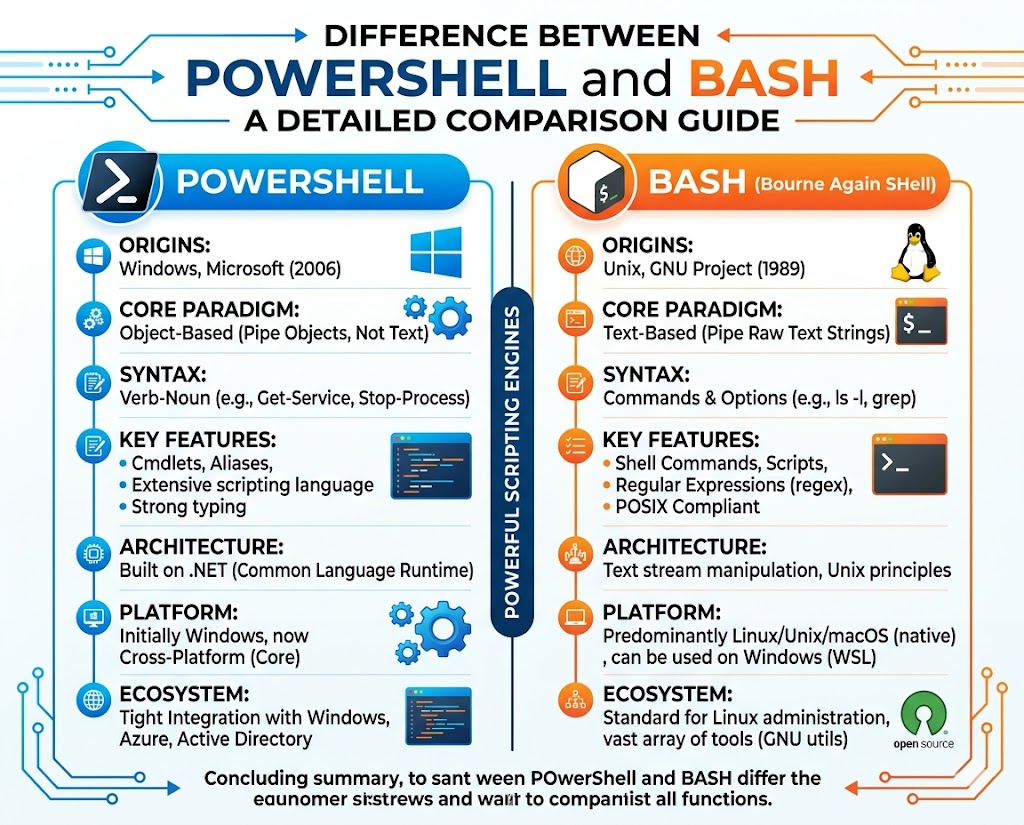
In modern computing environments, automation has become a core requirement for managing systems efficiently, securely, and at scale. Two of the most widely used command-line environments that enable this automation are PowerShell and Bash. Both are designed to streamline administrative tasks, reduce manual intervention, and improve consistency in system operations. However, they originate from different operating system ecosystems and reflect different design philosophies. PowerShell is primarily associated with Windows environments, while Bash is deeply rooted in Linux and Unix-based systems. Although both serve similar purposes in terms of scripting and automation, they differ significantly in structure, syntax, and data processing models. Understanding these differences is essential for anyone working in system administration, cloud infrastructure, or DevOps environments, where automation plays a central role in maintaining operational efficiency.
Evolution of Command-Line Systems in Windows and Linux
The development of command-line interfaces in Windows and Linux followed very different paths. Early Windows systems were built with simplicity and user-friendliness in mind, which led to a limited command-line experience based on legacy DOS structures. This environment was sufficient for basic file operations and simple batch scripting, but it lacked advanced automation capabilities. As enterprise systems grew in complexity, these limitations became more apparent, especially when compared to Unix-like systems that had already developed powerful shell environments. In contrast, Linux and Unix systems were designed from the beginning to support multi-user environments and robust command-line operations. This allowed for the early development of scripting tools that could efficiently manage system resources, processes, and files. Over time, these differences shaped the evolution of PowerShell and Bash as two distinct solutions to system automation challenges.
Core Philosophy Behind PowerShell Design
PowerShell was developed to address the limitations of traditional Windows command-line tools by introducing a more structured and powerful automation framework. Its design is based on object-oriented principles, which fundamentally change how commands process and return data. Instead of working with plain text output, PowerShell operates with structured objects that contain detailed properties and methods. This allows for more precise control over system operations and reduces the need for manual data parsing. PowerShell is also tightly integrated with the Windows operating system, enabling direct interaction with system components such as services, processes, and configuration settings. This deep integration makes it a powerful tool for system administrators who need to manage complex environments efficiently. The design philosophy behind PowerShell focuses on consistency, scalability, and the ability to handle complex workflows through structured scripting.
How PowerShell Processes and Structures Data
One of the most defining features of PowerShell is its approach to data handling. Instead of treating command output as simple text, it processes everything as structured objects. Each object contains multiple properties that describe its attributes, such as process names, system states, or configuration values. This object-based approach allows data to be passed through pipelines without losing structure or meaning. Each step in the pipeline can filter, modify, or analyze the object before passing it to the next command. This eliminates the need for complex text parsing and reduces the likelihood of errors in scripts. PowerShell also supports a variety of data types, including strings, integers, and Boolean values, which allows scripts to perform logical operations with precision. Variable scoping further enhances control, enabling data to be managed at different levels within a script or session. This structured approach makes PowerShell particularly effective for large-scale automation tasks.
Origins and Development of Bash in Unix Systems
Bash, short for Bourne Again Shell, originated in Unix-based systems as an improvement over the original Bourne shell. Unix systems were designed with a strong emphasis on multi-user functionality and command-line efficiency. This environment encouraged the development of powerful scripting tools that could manage system operations through simple yet effective commands. Bash became widely adopted as it provided an open-source, flexible, and highly stable shell environment. With the rise of Linux in the early 1990s, Bash quickly became the default shell in most distributions. Its popularity is largely due to its simplicity, portability, and strong integration with Unix-like system utilities. Unlike more complex scripting environments, Bash focuses on providing a lightweight and direct interface for executing commands and automating repetitive tasks across different systems.
Bash as a Lightweight Automation Environment
Bash operates primarily as a command-line interpreter that processes text-based commands. Its strength lies in its simplicity and ability to chain commands together using pipelines. In this model, the output of one command is passed as input to another in the form of plain text. This allows users to build complex workflows by combining small, specialized tools. Bash scripts are commonly used for file management, system backups, process automation, and scheduling tasks. Its lightweight nature ensures that scripts run efficiently even on systems with limited resources. Because it is available across nearly all Linux and Unix distributions, Bash scripts are highly portable and can be executed in a wide range of environments without modification. This makes it an essential tool for system administrators and engineers working in heterogeneous infrastructures.
Key Differences in System Architecture Approach
The architectural differences between PowerShell and Bash are rooted in the operating systems they support. PowerShell is tightly integrated with Windows and built on top of a modern framework that allows direct interaction with system components. This integration enables it to access system-level data in a structured and consistent manner. Bash, on the other hand, is designed to operate across a wide range of Unix-like systems, relying on external utilities and text processing to perform tasks. This makes Bash more flexible in cross-platform environments but less tightly coupled with system internals. PowerShell emphasizes structured automation within a single ecosystem, while Bash prioritizes portability and simplicity across diverse systems. These architectural choices influence how each tool is used in real-world scenarios.
Understanding Data Flow in Both Environments
Data flow is a critical concept in both PowerShell and Bash, but each handles it differently. In PowerShell, data flows as structured objects through a pipeline, allowing each command to manipulate specific properties without altering the overall structure. This leads to more predictable and reliable script behavior. In Bash, data flows as plain text between commands, requiring additional parsing when extracting specific information. While this approach is less structured, it provides flexibility and compatibility with a wide range of command-line tools. Bash’s text-based pipelines allow users to combine simple utilities into powerful workflows, even if it requires more manual handling of data. PowerShell’s object-based pipelines reduce complexity but are more tightly bound to the Windows ecosystem. These differences reflect the broader design philosophies of each environment and influence how automation tasks are implemented in practice.
Expanding Automation Capabilities in PowerShell and Bash
As system environments grow in complexity, automation tools must evolve to handle larger workloads, more dynamic infrastructures, and increasingly interconnected services. PowerShell and Bash both address this need, but they do so in fundamentally different ways. PowerShell extends automation capabilities through deep integration with system frameworks and structured object handling, while Bash expands functionality through lightweight command chaining and external utilities. These differences shape how administrators build scripts, design workflows, and manage infrastructure at scale. In enterprise environments, automation is no longer limited to simple task scheduling but includes configuration management, system orchestration, and real-time monitoring. Both tools have adapted to meet these demands, but their approaches reflect their underlying design philosophies.
Cmdlets and Modular Architecture in PowerShell
PowerShell introduces a unique concept known as cmdlets, which are specialized, lightweight commands designed to perform specific operations. These cmdlets follow a consistent naming structure that helps standardize scripting across different tasks. Instead of relying on a large collection of independent tools, PowerShell organizes functionality into modular components. These modules can be imported as needed, allowing administrators to extend functionality without modifying the core system. This modular architecture supports scalability, as new capabilities can be added through external modules without disrupting existing scripts. Cmdlets are designed to work together seamlessly, producing structured outputs that can be passed through pipelines. This consistency reduces complexity and improves maintainability in large-scale automation environments.
Bash Command Structure and External Utilities
Bash takes a different approach by relying heavily on external command-line utilities to perform tasks. Instead of built-in structured commands, it uses small, specialized programs that each perform a single function. These utilities can be combined through pipelines to create more complex operations. This design reflects the Unix philosophy of building simple tools that do one thing well. Bash itself acts as an interpreter that connects these tools. Because of this structure, Bash scripts often depend on the availability of external programs in the system environment. While this increases flexibility and portability, it also requires careful management of dependencies when deploying scripts across different systems. The reliance on external utilities makes Bash highly adaptable but also more variable in behavior across environments.
Pipeline Processing and Data Transformation Models
Pipeline processing is a core feature in both PowerShell and Bash, but the way data flows through these pipelines is fundamentally different. In PowerShell, pipelines transmit structured objects that retain their properties throughout each stage of processing. This allows commands to filter, sort, and transform data without losing context. Each step in the pipeline can access specific attributes of an object, enabling precise manipulation. In Bash, pipelines transmit plain text between commands. Each command reads input from standard input and writes output to standard output. While this method is flexible, it often requires additional parsing to extract meaningful information. Text processing tools are frequently used in Bash pipelines to refine output. These differences significantly influence how scripts are designed and how data is handled in automation workflows.
Scripting Logic and Structure in PowerShell Environments
PowerShell scripts are designed with structured logic that resembles modern programming languages. They support advanced constructs such as loops, conditionals, functions, and error handling mechanisms. This allows scripts to be highly modular and reusable. Variables in PowerShell can be scoped at different levels, enabling controlled data flow within scripts. This structured approach makes it easier to build complex automation workflows that remain readable and maintainable. PowerShell also supports integration with system APIs and services, allowing scripts to interact directly with operating system components. This level of integration enables advanced automation scenarios such as system provisioning, configuration enforcement, and real-time monitoring of system states.
Bash Scripting Logic and Procedural Flow
Bash scripting follows a more procedural approach, where commands are executed sequentially in a linear flow. While it supports control structures such as loops and conditionals, its overall structure remains simpler compared to PowerShell. Bash scripts are often composed of sequences of commands that perform specific tasks in order. This simplicity makes Bash easy to learn and widely accessible, especially for system-level automation tasks. However, complex logic often requires careful structuring to maintain readability. Bash functions allow the reuse of code blocks, but the lack of structured data types means that scripts rely heavily on text manipulation. This procedural style aligns with the Unix philosophy of simplicity and modularity.
Error Handling and Script Reliability in PowerShell
Error handling in PowerShell is designed to be robust and structured. It distinguishes between terminating and non-terminating errors, allowing scripts to continue execution even when certain operations fail. This enables more resilient automation workflows, especially in large-scale environments where partial failures are expected. PowerShell provides mechanisms to capture, log, and respond to errors programmatically. This allows administrators to build scripts that can adapt to unexpected conditions without crashing. Structured error handling also improves debugging and maintenance, as errors can be traced back to specific commands or operations within a script. This reliability makes PowerShell suitable for mission-critical automation tasks.
Error Handling Behavior in Bash Scripts
Bash handles errors more straightforwardly. By default, scripts continue execution unless explicitly instructed to stop on failure. This behavior provides flexibility but can lead to unintended consequences if errors are not properly managed. Error handling in Bash typically involves checking exit codes after command execution. Each command returns a status code that indicates success or failure, which can be used to control script flow. While this approach is effective, it requires manual implementation of error checks throughout the script. More advanced error handling requires careful scripting practices to ensure reliability. This simplicity reflects Bash’s design philosophy but also places greater responsibility on the script writer.
System Integration and Administrative Control in PowerShell
PowerShell provides deep integration with system-level components, enabling administrators to manage virtually every aspect of a Windows environment. This includes services, processes, user accounts, registry settings, and network configurations. Because PowerShell operates on structured objects, it can retrieve and modify system information with high precision. This level of integration allows for comprehensive automation of administrative tasks, reducing the need for manual intervention. PowerShell can also interact with external services and APIs, enabling hybrid automation scenarios that span local and cloud environments. This makes it a powerful tool for enterprise system management and infrastructure orchestration.
System Interaction and File Operations in Bash
Bash excels in file system operations and process management within Unix-like environments. It provides a wide range of commands for creating, moving, copying, and deleting files. These operations are often combined with text-processing utilities to filter and manipulate data. Bash scripts are commonly used for system maintenance tasks such as backups, log processing, and scheduled jobs. File permissions and ownership management are also central to Bash-based administration. Because it is tightly integrated with the underlying operating system, Bash provides efficient access to system resources. Its simplicity makes it ideal for quick automation tasks and lightweight system management operations.
Environment Variables and Configuration Management Differences
Both PowerShell and Bash use environment variables to manage configuration data, but they handle them differently. In PowerShell, environment variables are treated as structured data that can be accessed and modified within scripts. They are integrated into the object-based system, allowing for more controlled manipulation. In Bash, environment variables are simple key-value pairs stored as strings. They are widely used to configure system behavior and pass data between processes. While Bash environment variables are straightforward and flexible, PowerShell’s structured approach allows for more advanced configuration management scenarios. These differences reflect the broader contrast between object-based and text-based systems.
Automation Workflows and Real-World System Usage
In real-world environments, PowerShell and Bash are often used to automate repetitive tasks and manage system infrastructure. PowerShell is commonly used in Windows-centric environments for tasks such as system provisioning, Active Directory management, and configuration enforcement. Its structured nature makes it suitable for complex workflows that require precision and consistency. Bash is widely used in Linux environments for system maintenance, deployment automation, and server management. Its lightweight design and portability make it ideal for distributed systems and cloud-based infrastructures. Both tools are essential in modern IT environments, where automation is a critical component of operational efficiency and system reliability.
Advanced Automation Concepts in PowerShell and Bash
As IT environments become more distributed and cloud-driven, automation tools must evolve beyond simple scripting into advanced orchestration systems. PowerShell and Bash both support advanced automation, but they approach it from different architectural perspectives. PowerShell is designed to integrate deeply with structured systems and APIs, enabling complex workflows that span multiple services and platforms. Bash, on the other hand, extends its capabilities through composable command-line utilities and scripting flexibility within Unix-like environments. These differences influence how advanced automation scenarios are designed, especially in areas such as configuration management, infrastructure provisioning, and system monitoring. Understanding these advanced concepts is essential for working in modern DevOps and cloud engineering environments where automation is central to operational efficiency.
Object-Based Automation in PowerShell Environments
PowerShell’s object-based architecture is one of its most powerful features when it comes to advanced automation. Every piece of data processed in PowerShell is treated as a structured object with defined properties and methods. This allows scripts to interact with system components in a highly granular and predictable manner. Instead of parsing text outputs, administrators can directly access object properties, making automation more reliable and less error-prone. This approach is particularly useful in environments where large volumes of system data must be processed, filtered, and acted upon. PowerShell objects can represent anything from system processes to user accounts, network configurations, or application states. This consistency allows scripts to scale efficiently across complex infrastructures.
Advanced Pipeline Operations and Data Chaining
PowerShell pipelines are designed to pass structured objects between commands, enabling complex data transformations without losing context. Each stage in the pipeline can modify specific properties of an object while preserving its overall structure. This allows administrators to build multi-step automation workflows that remain readable and maintainable. For example, system data can be retrieved, filtered based on specific conditions, transformed into new formats, and then exported or executed as part of a larger process. This chaining capability reduces the need for intermediate variables or temporary data storage. It also improves performance by minimizing redundant processing steps. Pipeline efficiency is one of the key reasons PowerShell is widely used in enterprise automation scenarios.
Advanced Bash Scripting Techniques and Command Chaining
Bash supports advanced automation through the combination of commands, conditional logic, and external utilities. Unlike PowerShell’s object-based pipelines, Bash relies on text streams to pass data between commands. This means that advanced scripting often involves combining multiple tools to achieve desired outcomes. Techniques such as command substitution, redirection, and conditional execution allow Bash scripts to handle complex workflows. While this approach requires more manual handling of data, it provides flexibility and portability across different Unix-like systems. Advanced Bash scripts often leverage system utilities for text processing, file manipulation, and system monitoring. This modular approach allows scripts to remain lightweight while still supporting complex automation tasks.
Configuration Management and System State Control in PowerShell
PowerShell plays a significant role in configuration management, particularly in Windows-based environments. It allows administrators to define and enforce system states across multiple machines consistently. Through structured scripting and integration with system services, PowerShell can automate the configuration of operating systems, applications, and network settings. This is particularly useful in large-scale enterprise environments where maintaining consistency across systems is critical. PowerShell can retrieve system configurations, compare them against desired states, and apply changes automatically when discrepancies are detected. This approach supports infrastructure as code principles, where system configurations are defined and managed through scripts rather than manual intervention.
System Configuration and Environment Management in Bash
In Linux and Unix environments, Bash is widely used for system configuration and environment management. Scripts can be used to configure system settings, manage services, and control user permissions. Because Bash interacts directly with system files and utilities, it provides a transparent way to manage system state. Configuration tasks often involve editing files, setting environment variables, and managing system services through command-line tools. While Bash does not provide built-in configuration management frameworks, it integrates well with external tools that extend its capabilities. This makes it highly adaptable in environments where lightweight and flexible configuration management is required.
Integration with Cloud and Distributed Systems in PowerShell
PowerShell has evolved to support cloud-based automation and distributed system management. It can interact with remote systems, cloud services, and APIs to manage resources across hybrid environments. This capability allows administrators to automate tasks such as virtual machine provisioning, network configuration, and service deployment across multiple platforms. PowerShell’s structured data model makes it particularly well-suited for interacting with cloud APIs, where responses are typically returned in structured formats. This enables seamless integration between local systems and cloud environments. As organizations increasingly adopt hybrid and multi-cloud strategies, PowerShell plays a critical role in unifying management across these diverse infrastructures.
Distributed System Management and Remote Execution in Bash
Bash supports distributed system management through remote execution tools and secure shell connections. Administrators can execute commands on remote systems, manage files, and perform system operations across multiple machines. This capability is essential in large-scale Linux environments where systems are distributed across different locations. Bash scripts can be combined with remote execution utilities to automate tasks across entire server clusters. While Bash does not natively provide advanced orchestration features, it integrates effectively with external tools that extend its capabilities. This makes it a flexible choice for managing distributed systems, particularly in cloud-native and containerized environments.
Security Considerations in PowerShell Automation
Security is a critical aspect of automation, especially in enterprise environments. PowerShell includes several features designed to enhance script security and execution control. Script execution policies help regulate which scripts can run on a system, reducing the risk of unauthorized code execution. PowerShell also supports secure communication protocols for remote management, ensuring that data transmitted between systems is protected. Additionally, its integration with Windows security frameworks allows it to enforce authentication and authorization policies at multiple levels. This ensures that only authorized users and processes can execute sensitive operations. These security features make PowerShell suitable for environments where compliance and system integrity are top priorities.
Security Practices in Bash Environments
Bash relies on the underlying security mechanisms of Unix-like systems. File permissions, user roles, and process isolation are key components of its security model. Scripts must be carefully written to avoid exposing sensitive data or executing unintended commands. Because Bash scripts often interact directly with system files and utilities, proper permission management is essential. Secure practices include validating input, restricting access to scripts, and ensuring that only authorized users can execute administrative commands. While Bash does not include built-in security enforcement for scripts, it benefits from the strong security architecture of Unix-based systems. This decentralized approach places responsibility on system administrators to enforce security policies effectively.
Performance Considerations in Automation Workflows
Performance is an important factor when comparing PowerShell and Bash, especially in large-scale automation scenarios. PowerShell’s object-based processing can introduce additional overhead compared to Bash’s lightweight text processing. However, this overhead is often offset by the reduction in complexity and the elimination of manual parsing. PowerShell is optimized for structured data operations and can efficiently handle large datasets within Windows environments. Bash, on the other hand, is highly efficient for simple and repetitive tasks due to its minimal processing overhead. Its reliance on small, specialized utilities allows it to execute tasks quickly, especially in resource-constrained environments. The choice between the two often depends on the complexity of the task and the environment in which it is executed.
Cross-Platform Automation and Tool Interoperability
Modern IT environments often require tools that can operate across multiple platforms. PowerShell has expanded beyond Windows and now supports cross-platform functionality, allowing it to run on Linux and macOS systems. This expansion enables administrators to use a consistent scripting language across different environments. Bash, while traditionally associated with Unix-like systems, remains widely available across almost all Linux distributions and macOS systems. Its portability makes it a reliable choice for cross-platform scripting. In many environments, PowerShell and Bash are used together to achieve interoperability, with each tool handling tasks suited to its strengths. This combination allows organizations to build flexible and scalable automation strategies.
Future Trends in Scripting and Automation Technologies
The future of system automation is increasingly focused on integration, scalability, and cloud-native design. Both PowerShell and Bash continue to evolve to meet these demands. PowerShell is increasingly being used in hybrid cloud environments, where it serves as a bridge between on-premises systems and cloud infrastructure. Bash continues to play a critical role in containerized and microservices-based architectures, where lightweight scripting is essential. Automation is also becoming more declarative, with infrastructure defined as code rather than manually configured. This shift is influencing how both tools are used in modern workflows. As systems become more complex, the importance of reliable, scalable, and efficient automation tools continues to grow, reinforcing the relevance of both PowerShell and Bash in the evolving IT landscape.
Conclusion
PowerShell and Bash represent two of the most influential automation environments in modern computing, yet they were built with fundamentally different goals, ecosystems, and design philosophies. Understanding their differences is not simply about comparing commands or syntax, but about recognizing how each tool reflects the operating system culture it was created for. PowerShell emerged from the need to modernize Windows administration, replacing limited batch scripting with a structured, object-oriented automation framework. Bash evolved from Unix traditions that emphasized simplicity, modularity, and the power of combining small tools into flexible workflows. These origins continue to shape how each tool is used today across enterprise systems, cloud platforms, and local environments.
One of the most important distinctions between the two lies in how they handle data. PowerShell treats everything as structured objects, allowing scripts to work with rich, typed information that includes properties and methods. This makes it easier to manipulate system data with precision and reduces the need for manual parsing. Bash, in contrast, processes everything as plain text streams. While this approach is less structured, it offers flexibility and portability, especially when combining multiple command-line utilities. The object-based model of PowerShell provides clarity and consistency in complex automation scenarios, whereas the text-based model of Bash offers speed and simplicity for lightweight tasks. Both approaches are effective, but they serve different priorities.
Another key difference is how each environment integrates with the underlying operating system. PowerShell is deeply embedded within the Windows ecosystem and can directly interact with system components such as services, registry settings, user accounts, and configuration frameworks. This tight integration allows administrators to perform highly detailed system management tasks using consistent and predictable commands. Bash operates within Unix-like systems and relies more heavily on external utilities and system tools. Rather than being tightly coupled to the operating system, it acts as a flexible interface that connects various independent programs. This makes Bash highly adaptable across different distributions and environments, but it also requires a greater understanding of the underlying system tools.
The scripting experience also differs significantly between the two environments. PowerShell scripts tend to be more structured and resemble modern programming languages. They support advanced logic, error handling, modular functions, and scoped variables, making them suitable for building large-scale automation frameworks. Bash scripts are more procedural and linear, relying on sequences of commands and external utilities. While Bash supports control structures and functions, its overall design remains simpler and more direct. This simplicity makes it easier to learn and widely accessible, but complex workflows often require careful planning and additional scripting effort.
In terms of automation capabilities, both tools are highly powerful but optimized for different scenarios. PowerShell excels in enterprise environments where consistency, structure, and integration are essential. It is widely used for system provisioning, configuration management, cloud automation, and infrastructure orchestration. Its ability to interact with APIs and remote systems makes it particularly valuable in hybrid and cloud-based infrastructures. Bash is commonly used in server environments, DevOps pipelines, and containerized systems where lightweight and portable scripting is required. It is especially effective for file management, system maintenance, and repetitive administrative tasks across distributed systems.
Security is another area where differences are evident. PowerShell includes built-in mechanisms such as execution policies, secure remote communication, and integration with Windows authentication systems. These features help control script execution and enforce security standards in enterprise environments. Bash relies on the security model of Unix-like systems, which is based on file permissions, user roles, and process isolation. While this model is robust, it requires careful configuration and discipline from system administrators. Both environments can be secured effectively, but they rely on different approaches to enforcement and control.
Performance considerations also play a role in choosing between the two. PowerShell’s structured object processing introduces some overhead, but it provides significant advantages in terms of accuracy and reduced complexity in large workflows. Bash’s lightweight design makes it extremely fast for simple tasks and highly efficient in resource-constrained environments. In practice, performance differences are often negligible compared to the benefits gained from using the right tool for the right environment. PowerShell is better suited for complex, data-intensive operations, while Bash is ideal for quick, efficient command execution and system-level automation.
Another important aspect is cross-platform usage. PowerShell has evolved beyond Windows and now supports Linux and macOS, making it a more universal tool than it once was. This expansion allows administrators to use a consistent scripting language across multiple operating systems. Bash remains a core component of Unix-like systems and continues to be one of the most widely available shells across Linux distributions. In many modern environments, both tools coexist, with administrators choosing based on system requirements and operational context rather than exclusivity.
Ultimately, PowerShell and Bash should not be viewed as competing technologies but as complementary tools designed for different ecosystems. PowerShell represents a structured, object-oriented approach to system automation that aligns with modern enterprise computing needs. Bash represents a lightweight, flexible, and universally available scripting environment rooted in Unix philosophy. Both are essential in today’s IT landscape, and professionals who understand both gain a significant advantage in managing diverse infrastructures.
The ability to automate tasks effectively is becoming increasingly important as systems grow more complex and distributed. Whether managing cloud resources, maintaining servers, or orchestrating large-scale deployments, automation reduces human error, improves efficiency, and enables faster response times. PowerShell and Bash both contribute to this goal in their own ways, offering different strengths that complement each other rather than replace one another. Mastering their differences allows professionals to choose the right tool for the right job, resulting in more efficient, reliable, and scalable system management practices.
As automation continues to evolve, the line between PowerShell and Bash use cases is also becoming less rigid. Modern infrastructure often combines Windows and Linux systems within the same environment, meaning administrators frequently switch between both tools depending on the platform they are managing. This hybrid reality has increased the importance of understanding both shells, not just at a surface level but in terms of how they handle data, execute logic, and interact with system resources. In many cases, automation workflows are no longer confined to a single operating system, and scripts may need to coordinate actions across multiple environments simultaneously.
Another important development is the rise of cloud-native computing, which has further expanded the role of both PowerShell and Bash. In cloud environments, automation is often the backbone of infrastructure management, from provisioning virtual machines to configuring networking and deploying applications. PowerShell’s structured approach makes it particularly strong in environments where standardized configurations and API-driven automation are required. Bash remains highly valuable in containerized systems and lightweight Linux-based environments where speed, portability, and minimal overhead are priorities. Together, they form a foundational skill set for managing modern distributed systems.
Ultimately, both tools continue to evolve alongside the systems they support, adapting to new technologies, security requirements, and operational models.