
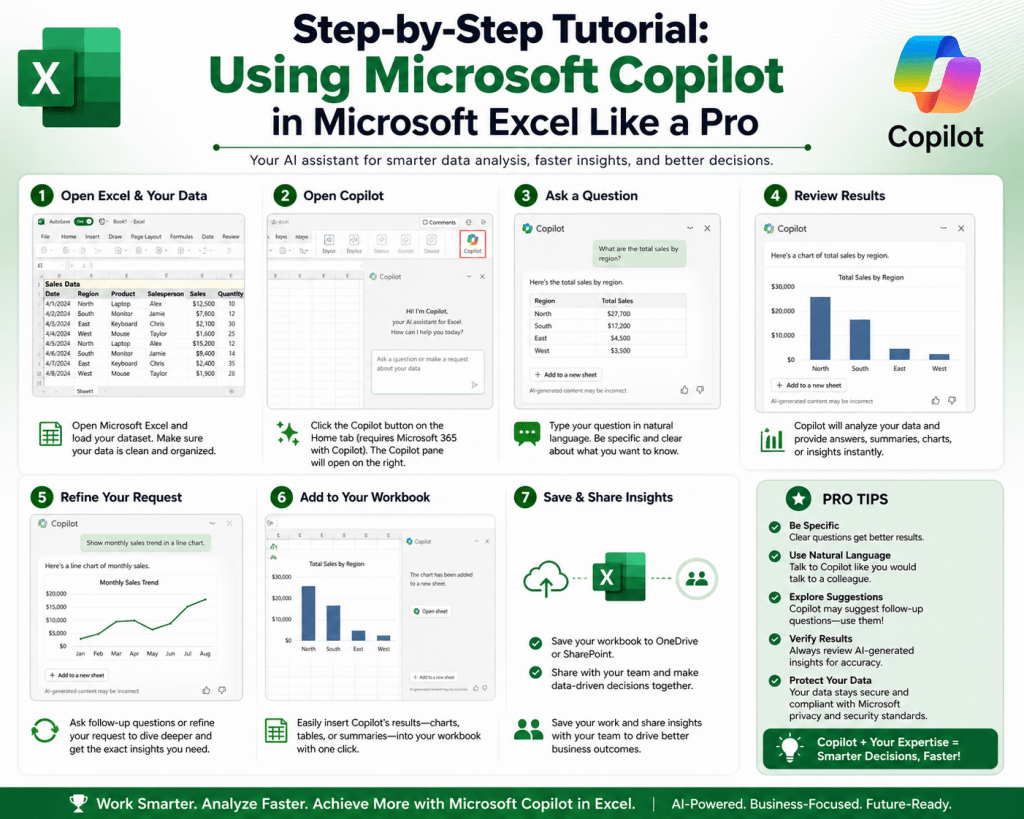
Microsoft Copilot in Excel is an integrated artificial intelligence assistant built to simplify how users interact with spreadsheets. Instead of relying heavily on manual formula creation, traditional data manipulation techniques, or complex Excel syntax, users can communicate directly with their spreadsheets using natural language instructions. This means that everyday tasks such as analyzing datasets, generating calculations, and creating visual summaries can be performed by describing what is needed in simple terms.
The system is designed to bridge the gap between human intent and spreadsheet execution. In traditional Excel environments, users often need to understand specific functions, structured references, and nested formulas. With Copilot, the focus shifts away from technical construction and moves toward descriptive input. This allows users to concentrate on what they want to achieve rather than how to technically implement it.
The significance of this shift lies in accessibility and efficiency. Users who previously struggled with formula complexity can now perform advanced operations without deep technical knowledge, while experienced users can accelerate their workflow by reducing repetitive manual steps.
The Evolution of Spreadsheet Interaction Through Artificial Intelligence
Spreadsheets have long been essential tools for data management, financial analysis, reporting, and operational planning. However, traditional spreadsheet usage requires a strong understanding of structured logic, formula syntax, and data organization principles. Over time, this has created a barrier for many users who need insights but lack technical expertise.
The introduction of AI-driven assistance changes this dynamic by introducing conversational computing into spreadsheet environments. Instead of manually building calculations step by step, users can describe their objectives, and the system interprets those instructions into executable spreadsheet actions.
This evolution represents a shift from procedural operation to intent-based interaction. Rather than focusing on constructing formulas manually, users now define outcomes. The system then determines how to achieve those outcomes using built-in intelligence.
This transformation significantly reduces the time required to complete analytical tasks and allows users to work more fluidly with large and complex datasets.
Natural Language Processing and Its Function in Excel Workflows
A core component of Copilot in Excel is natural language processing, which enables the system to understand human language input and convert it into structured spreadsheet operations. This capability eliminates the need for users to memorize complex formulas or commands.
When a user provides a request such as comparing values across columns, calculating changes over time, or summarizing categories, the system interprets the meaning behind the instruction rather than relying on exact syntax. It then generates the appropriate formula or action within the spreadsheet.
This interaction model makes Excel more intuitive and reduces the learning curve associated with advanced spreadsheet usage. Users can focus on analytical thinking instead of technical implementation, which improves productivity and reduces cognitive load.
Natural language processing also allows iterative interaction. Users can refine their requests gradually, adjusting outputs based on previous results, which creates a more dynamic workflow.
Data Interpretation and Structural Awareness in Excel
For Copilot to function effectively, it must understand the structure of the data it is working with. This includes recognizing tables, identifying headers, and interpreting relationships between different columns and rows.
Structured data plays a critical role in enabling accurate analysis. When data is organized consistently, the system can detect patterns more effectively and provide meaningful insights. For example, it can distinguish between numerical values used for calculations and categorical data used for grouping or filtering.
This structural awareness allows Copilot to perform tasks such as trend identification, aggregation of values, and comparison across multiple dimensions without requiring manual setup from the user.
The better the data structure, the more accurate and relevant the output becomes. This makes data preparation an important step in ensuring effective use of AI-assisted spreadsheet tools.
Transforming Data Analysis Through Automated Insight Generation
One of the most powerful aspects of Copilot in Excel is its ability to generate insights automatically from raw data. Instead of manually scanning rows and columns to identify trends or anomalies, users can request summaries that highlight key findings.
The system can analyze datasets to detect patterns such as increases or decreases over time, top-performing categories, or relationships between different variables. These insights are then presented in a structured format that is easy to interpret.
This automation significantly reduces the time required for exploratory data analysis. It also helps users uncover insights that may not be immediately visible through manual inspection.
By handling the initial stages of data exploration, Copilot allows users to focus more on interpretation and decision-making rather than data processing.
Simplifying Formula Creation and Reducing Technical Barriers
One of the most common challenges in Excel usage is the complexity of formula creation. Advanced formulas often require understanding multiple functions, logical structures, and correct syntax usage. Even small errors can lead to incorrect outputs or broken calculations.
Copilot addresses this challenge by allowing users to describe what they want the formula to do instead of writing it manually. For example, a user might request a calculation of the percentage change between two data points or a conditional evaluation based on multiple criteria.
The system then generates the appropriate formula automatically and applies it within the spreadsheet. This reduces dependency on memorizing function syntax and minimizes the risk of errors caused by manual entry.
In addition to generating formulas, Copilot can also explain how the formula works, providing users with an opportunity to learn while working. This combination of automation and explanation enhances both productivity and skill development.
Enhancing Data Visualization and Interpretation
Visual representation of data plays a crucial role in understanding patterns and communicating insights effectively. Copilot in Excel simplifies the process of creating charts and graphs by allowing users to describe the type of visualization they need.
Instead of manually selecting data ranges and configuring chart settings, users can request visual outputs in natural language. The system then generates appropriate visual representations based on the structure and context of the data.
Common visual outputs include comparisons across categories, trend analysis over time, and distribution patterns. These visualizations help transform raw numbers into meaningful insights that are easier to interpret.
The system can also suggest visualization types when the user is uncertain about the best format for presenting data. This guidance helps improve clarity and ensures that the chosen visual representation aligns with the nature of the dataset.
Improving Reporting Efficiency Through Automated Summarization
Reporting is a key function in many spreadsheet workflows, particularly in business, finance, and operations. Traditionally, creating reports involves manually extracting data, calculating summaries, and formatting results for presentation.
Copilot streamlines this process by automating data summarization. Users can request overviews of datasets that highlight key metrics, performance indicators, and aggregated values.
The system processes the dataset and generates structured summaries that reduce the need for manual report construction. This allows users to produce insights more quickly and focus on interpreting results rather than assembling them.
Automated summarization is particularly useful when working with large datasets where manual analysis would be time-consuming and prone to oversight.
The Importance of Clean and Structured Data for Optimal Performance
The effectiveness of Copilot in Excel depends heavily on the quality of the data it processes. Clean, structured, and consistently formatted data allows the system to interpret information accurately and generate reliable outputs.
Data that contains inconsistencies, missing values, or unstructured formatting can reduce the accuracy of analysis and lead to incomplete results. Proper organization ensures that the system can correctly identify relationships between data points and apply appropriate calculations.
Structured tables with clear headers and uniform formatting provide the best environment for AI-assisted analysis. This allows Copilot to function efficiently and deliver meaningful insights without requiring extensive manual correction.
Context Awareness and Its Impact on Output Accuracy
Context plays a significant role in determining the quality of responses generated by Copilot. The more specific and structured the user’s input, the more accurate the output tends to be.
When instructions are clearly defined, the system can focus on relevant parts of the dataset and avoid unnecessary interpretations. This leads to more precise results and reduces the need for repeated adjustments.
Context awareness also enables iterative refinement. Users can gradually refine their requests based on previous outputs, creating a dynamic interaction that improves accuracy over time.
As users become more familiar with how the system interprets language, they can craft more effective prompts that lead to better analytical outcomes.
Shifting Workflows from Manual Execution to Intelligent Assistance
The integration of Copilot in Excel represents a broader shift in how spreadsheet workflows are approached. Instead of manually executing each step of data processing, users now interact with an intelligent system that assists in interpretation, calculation, and visualization.
This shift reduces the time required for repetitive tasks and allows users to focus more on analysis and decision-making. It also enhances accessibility by making advanced spreadsheet functions available to users with varying levels of technical expertise.
By combining natural language interaction with data processing capabilities, Copilot transforms Excel into a more intuitive and efficient analytical environment.
Setting Up Microsoft Copilot in Excel for First-Time Use
Getting started with Microsoft Copilot in Excel requires a properly configured environment where both the application and data sources are prepared for AI-assisted interaction. The tool is integrated within Microsoft Excel and becomes available based on licensing, account type, and organizational configuration. Once enabled, it appears as an interactive assistant within the Excel interface, typically accessible from the main toolbar or side panel.
Before activation, the system relies on a cloud-connected environment. Files must be stored in online storage linked to the user account to ensure Copilot can read and interpret data structures. This connection allows real-time interaction with spreadsheets and ensures that updates are processed dynamically.
Another essential requirement is that data must be structured in a tabular format. Raw, unformatted datasets may limit the system’s ability to interpret relationships between data fields. Converting data into structured tables ensures that headers, rows, and columns are properly recognized, enabling more accurate analysis and response generation.
Preparing Data for Effective AI Processing in Excel
Data preparation plays a foundational role in achieving accurate results with Copilot in Excel. Clean and structured datasets allow the system to interpret relationships between variables without confusion. This involves organizing information into clearly labeled columns, removing inconsistencies, and ensuring uniform formatting across entries.
Consistent naming conventions for headers improve interpretability. When columns are clearly labeled, the system can more easily identify their purpose and apply relevant analytical logic. For example, fields representing time periods, numerical values, or categories must be clearly distinguished to avoid misinterpretation.
Eliminating empty rows, duplicate entries, and inconsistent formats also improves output reliability. Clean data ensures that calculations, summaries, and visualizations generated by Copilot reflect accurate insights rather than distorted patterns caused by irregularities in the dataset.
Accessing the Copilot Interface Within Excel
Once the system is activated and data is properly structured, Copilot becomes accessible through a dedicated interface within Excel. This interface typically appears as a side panel that allows users to interact directly with their spreadsheet using conversational input.
The panel serves as a communication layer between the user and the spreadsheet environment. Instead of navigating multiple menus or writing formulas manually, users can input instructions directly into the panel. The system then processes these instructions and applies relevant changes to the spreadsheet.
This interaction model creates a continuous workflow where users can ask questions, refine outputs, and adjust results in real time. The interface is designed to support iterative analysis, allowing users to build upon previous responses without restarting the process.
Understanding Natural Language Commands in Excel Workflow
Natural language commands are the primary method of interaction in Copilot-enabled Excel environments. These commands allow users to describe tasks in everyday language rather than structured programming syntax.
For example, instead of writing a formula to calculate differences between two columns, a user can describe the requirement in plain terms. The system interprets the intent and generates the appropriate calculation automatically.
This method of interaction significantly reduces complexity and makes Excel more accessible to users with varying levels of technical expertise. It also allows for faster task execution since users do not need to recall specific function names or syntax rules.
The effectiveness of natural language commands improves when instructions are clear and specific. Providing context, such as column names or desired outcomes,s helps the system generate more accurate responses.
Building Analytical Workflows Using Copilot in Excel
Copilot enables users to build structured analytical workflows by breaking down complex tasks into manageable steps. Instead of manually performing each stage of analysis, users can guide the system through a sequence of instructions.
A typical workflow may begin with data summarization, followed by pattern identification, and end with visualization. Each step builds on the previous output, allowing for progressive refinement of insights.
This structured approach improves clarity and reduces cognitive load. Users can focus on interpreting results rather than executing technical operations, which enhances overall productivity.
The system supports iterative refinement, meaning users can adjust their queries at any stage of the workflow. This flexibility allows for dynamic analysis that adapts to changing requirements.
Generating Insights Through Iterative Interaction
One of the strengths of Copilot in Excel is its ability to support iterative interaction. Users are not limited to single-step commands; instead, they can refine outputs through continuous engagement.
For example, after generating an initial summary of a dataset, users can request deeper analysis of specific segments. The system then narrows its focus and provides more detailed insights based on updated instructions.
This iterative process allows users to explore data more deeply without restarting analysis from scratch. It also encourages exploratory thinking, where users gradually uncover insights through guided interaction.
As iterations progress, the system becomes more aligned with user intent, resulting in increasingly accurate and relevant outputs.
Using Copilot for Formula Generation and Optimization
Formula generation is one of the most widely used features in Copilot-enabled Excel environments. Instead of manually constructing formulas, users can describe the desired calculation in natural language, and the system generates the appropriate structure.
This includes calculations such as percentage changes, conditional logic evaluations, and data comparisons across multiple columns. The system interprets the intent and constructs formulas that align with Excel syntax automatically.
Beyond generation, Copilot also assists in optimizing formulas for efficiency and clarity. It can simplify complex nested structures and suggest alternative approaches that achieve the same result with improved readability.
This reduces the likelihood of errors and enhances long-term maintainability of spreadsheets, especially in collaborative environments.
Enhancing Visualization Through Intelligent Chart Creation
Data visualization becomes significantly more efficient with Copilot integration. Users can request visual representations of data without manually selecting ranges or configuring chart settings.
The system interprets the dataset and determines appropriate visualization types based on the nature of the information. It can generate comparisons, trend analyses, and distribution patterns that help users understand data more effectively.
Visual outputs are generated dynamically based on user instructions, allowing for quick adjustments and refinements. This flexibility supports exploratory analysis and improves communication of insights in professional contexts.
Visualization capabilities also help bridge the gap between raw data and decision-making by presenting information in a more intuitive format.
Streamlining Reporting Processes with Automated Summaries
Reporting is a critical component of many spreadsheet workflows, particularly in business and operational environments. Copilot simplifies reporting by automating the summarization of large datasets.
Instead of manually extracting key figures and organizing them into structured reports, users can request summaries that highlight important metrics and trends. The system processes the data and generates concise overviews that capture essential insights.
This automation reduces time spent on repetitive reporting tasks and improves consistency across outputs. It also ensures that key information is not overlooked during manual analysis.
Automated reporting allows users to focus more on interpretation and strategic decision-making rather than data preparation.
Improving Accuracy Through Prompt Refinement
The quality of results generated by Copilot is closely linked to the clarity of user instructions. Prompt refinement plays an important role in improving the accuracy and relevance of outputs.
When instructions are vague, the system may produce generalized responses that require further refinement. However, when prompts are specific and well-structured, the system can deliver more precise results.
Refining prompts involves adjusting language, adding context, and specifying desired outcomes more clearly. Over time, users develop a better understanding of how to communicate effectively with the system.
This process enhances overall efficiency and reduces the need for repeated corrections or adjustments.
Common Workflow Mistakes and How They Affect Output Quality
While Copilot significantly improves productivity, certain workflow mistakes can reduce its effectiveness. One common issue is working with unstructured or poorly formatted data. Inconsistent formatting can lead to inaccurate analysis or incomplete results.
Another challenge is providing overly broad instructions. When prompts lack specificity, the system may struggle to determine the exact requirement, resulting in generalized outputs.
Frequent switching between unrelated tasks within a single interaction can also reduce clarity. Maintaining focus on one analytical objective at a time improves output consistency.
Addressing these issues ensures that the system operates at optimal efficiency and produces reliable results.
Integrating Copilot into Daily Spreadsheet Workflows
Copilot can be integrated into daily spreadsheet tasks across various domains, including data analysis, reporting, and operational tracking. Its ability to automate repetitive tasks makes it suitable for environments where large volumes of data are processed regularly.
In analytical workflows, it assists with trend identification and comparative analysis. In reporting workflows, it streamlines summarization and formatting. In operational contexts, it supports tracking and monitoring of key metrics.
This versatility allows Copilot to function as a general-purpose assistant within Excel, adapting to different use cases without requiring separate tools or systems.
Enhancing Productivity Through AI-Assisted Collaboration
In collaborative environments, Copilot improves productivity by standardizing data interpretation and reducing manual inconsistencies. When multiple users work on shared datasets, AI assistance ensures that calculations and summaries remain consistent across the file.
It also reduces dependency on individual expertise, allowing team members with different skill levels to contribute effectively. This democratization of data analysis improves overall workflow efficiency.
By providing a shared analytical framework, Copilot supports more cohesive collaboration and reduces errors caused by manual interpretation differences.
Adapting to Evolving Data Requirements in Real Time
One of the key advantages of Copilot in Excel is its adaptability. As data changes, users can immediately update queries and receive revised outputs without rebuilding analysis structures.
This real-time adaptability is particularly useful in dynamic environments where data is frequently updated. It allows users to maintain up-to-date insights without repeating manual processes.
The system continuously adjusts to changes in dataset structure, ensuring that outputs remain relevant even as underlying data evolves.
Scaling Microsoft Copilot in Excel for Advanced Data Workflows
Microsoft Copilot in Excel extends beyond basic data entry assistance and formula generation, evolving into a scalable AI-driven analytics layer capable of supporting advanced workflows. As users become more familiar with its capabilities, they can apply it to increasingly complex datasets involving multi-layered analysis, cross-referencing of variables, and dynamic reporting structures.
At an advanced level, Copilot functions as an analytical companion that interprets structured datasets, identifies relationships across multiple dimensions, and assists in building logical frameworks for decision-making. This scalability allows it to support both individual productivity and enterprise-level data operations where speed and accuracy are critical.
Advanced usage often involves combining multiple tasks within a single analytical flow, such as cleaning data, identifying trends, generating formulas, and producing visual outputs in sequence. This integrated approach reduces dependency on manual intervention and allows users to work more efficiently with large-scale datasets.
Advanced Data Interpretation and Multi-Dimensional Analysis
As datasets become more complex, Copilot’s ability to interpret multi-dimensional data becomes increasingly valuable. In real-world scenarios, data often includes multiple variables such as time periods, categories, financial metrics, and performance indicators.
Copilot assists by analyzing these interconnected dimensions and identifying patterns that may not be immediately visible through manual inspection. For example, it can detect correlations between sales performance and seasonal trends or highlight relationships between operational metrics and revenue outcomes.
This form of analysis supports deeper insights and allows users to move beyond surface-level observations. Instead of simply viewing totals or averages, users gain access to structured interpretations of how different variables interact within the dataset.
Multi-dimensional analysis also supports comparative evaluation across different segments, enabling users to assess performance variations across regions, departments, or time frames.
Automating Complex Formula Structures in Excel
One of the most powerful applications of Copilot in Excel is its ability to generate and optimize complex formula structures. Traditional Excel workflows often require users to combine multiple functions, such as logical operators, lookup functions, and nested conditions,s to achieve advanced calculations.
Copilot simplifies this process by translating descriptive input into fully constructed formulas. Users can describe relationships between data points, and the system generates the corresponding logical structure automatically.
Beyond generation, Copilot also assists in optimizing formulas by reducing redundancy and improving readability. This is particularly valuable in large spreadsheets where complex formulas can become difficult to maintain.
By simplifying formula construction, Copilot reduces the risk of errors and enhances long-term spreadsheet reliability, especially in collaborative environments where multiple users interact with the same dataset.
Advanced Visualization Techniques and Data Storytelling
Visualization plays a central role in advanced Excel workflows, particularly when communicating insights to stakeholders. Copilot enhances this process by enabling dynamic generation of visual representations based on data context and user intent.
Instead of manually selecting chart types and configuring data ranges, users can request specific visual interpretations of their datasets. The system then generates appropriate charts that reflect underlying patterns and relationships.
At an advanced level, visualization is not limited to basic charts but extends to comparative analysis, trend decomposition, an d mumultivariableepresentation. These visual outputs help transform raw data into structured narratives that support decision-making.
Data storytelling becomes more effective when visual elements are aligned with analytical intent. Copilot supports this alignment by interpreting user instructions and selecting visualization formats that best represent the underlying data structure.
Optimizing Workflow Efficiency Through AI-Assisted Automation
Workflow optimization is a key advantage of integrating Copilot into Excel environments. By automating repetitive tasks such as data cleaning, formatting, and calculation generation, users can significantly reduce time spent on manual processes.
Automation also improves consistency across datasets. Instead of manually applying formulas or formatting rules, Copilot ensures uniform application of logic across entire spreadsheets.
This efficiency extends to reporting cycles, where recurring tasks such as monthly summaries or performance evaluations can be streamlined through AI assistance. Users can generate updated outputs with minimal effort, ensuring that workflows remain efficient even as data volume increases.
Optimization also involves reducing cognitive load. By delegating repetitive tasks to Copilot, users can focus more on analysis and interpretation rather than execution.
Enhancing Decision-Making Through Intelligent Data Insights
One of the most impactful applications of Copilot in Excel is its ability to support data-driven decision-making. By analyzing datasets and generating structured insights, it provides users with a clearer understanding of underlying trends and patterns.
These insights can include performance comparisons, anomaly detection, and trend forecasting based on historical data. While Copilot does not replace strategic thinking, it provides a foundation of structured information that supports better decisions.
Decision-making becomes more efficient when supported by clear data interpretation. Copilot helps reduce uncertainty by presenting information in a way that is easier to understand and act upon.
This capability is particularly useful in business environments where timely decisions are required based on rapidly changing data conditions.
Improving Data Quality Through AI-Guided Structuring
Data quality plays a critical role in ensuring accurate analysis. Copilot contributes to improved data quality by guiding users in structuring and organizing datasets effectively.
It can identify inconsistencies, highlight formatting issues, and suggest improvements to data organization. This helps ensure that datasets are optimized for analysis before complex operations are performed.
Structured data improves the accuracy of formulas, visualizations, and insights generated by the system. It also reduces the likelihood of errors caused by irregular formatting or missing values.
By promoting better data structuring practices, Copilot enhances the overall reliability of analytical workflows.
Real-World Applications in Business and Operations
Copilot in Excel is widely applicable across various professional domains, particularly in business, finance, operations, and human resources. In business environments, it supports performance tracking, revenue analysis, and forecasting.
In financial contexts, it assists with budget analysis, expense tracking, and financial reporting. It helps users quickly identify trends in income and expenditure without requiring manual calculation of every metric.
In operational environments, Copilot supports inventory tracking, resource allocation, and process monitoring. It enables teams to maintain visibility over key operational indicators in real time.
In human resources contexts, it can help analyze employee data, summarize survey results, and track workforce trends. These applications demonstrate their versatility across different functional areas.
Supporting Collaborative Data Environments
In collaborative settings, Copilot enhances consistency and efficiency by standardizing how data is interpreted and processed. When multiple users work on shared datasets, AI assistance ensures that analysis remains uniform across all contributors.
This reduces discrepancies caused by individual interpretation differences and ensures that all users operate within a consistent analytical framework.
Collaboration also benefits from Copilot’s ability to generate explanations for formulas and calculations. This improves transparency and helps team members understand how results are derived.
By supporting collaborative workflows, Copilot contributes to more efficient team-based data analysis.
Managing Limitations and Ensuring Output Reliability
Despite its advanced capabilities, Copilot in Excel must be used with an understanding of its limitations. One important consideration is output verification. While the system is highly accurate, it can still produce errors depending on data quality and input clarity.
Users are responsible for validating results before applying them in critical decision-making processes. This includes checking formulas, reviewing calculations, and ensuring that insights align with expected outcomes.
Another limitation is dependency on structured data. Unorganized or inconsistent datasets can reduce accuracy and lead to incomplete analysis.
Understanding these limitations ensures that Copilot is used effectively without over-reliance on automated outputs.
Enhancing Analytical Thinking Through AI Interaction
Copilot not only automates tasks but also enhances analytical thinking by exposing users to structured interpretations of data. As users interact with the system, they develop a better understanding of how data relationships function.
This interaction encourages users to think more critically about how they structure their queries and interpret results. Over time, this leads to improved analytical skills and better decision-making capabilities.
The system acts as both an assistant and a learning tool, supporting skill development alongside productivity enhancement.
Adapting to Continuous Data Changes in Dynamic Environments
In environments where data changes frequently, Copilot provides significant value by enabling real-time updates and recalculations. Users can adjust queries and immediately receive updated outputs without rebuilding analysis structures.
This adaptability is particularly useful in fast-moving operational environments where decisions must be made based on current data.
The ability to respond dynamically to changing information ensures that analysis remains relevant and up to date at all times.
Long-Term Impact of AI Integration in Spreadsheet Systems
The integration of AI into spreadsheet systems represents a long-term shift in how data is processed and analyzed. Copilot in Excel is part of a broader transition toward intelligent software environments where users interact with systems through intent rather than manual execution.
This shift reduces technical barriers, improves accessibility, and increases efficiency across all levels of data usage. It also redefines the role of spreadsheets from static tools to dynamic analytical platforms.
As adoption continues to grow, AI-assisted spreadsheet environments are expected to become standard in data-driven workflows across industries.
Conclusion
Microsoft Copilot in Excel represents a significant shift in how spreadsheet-based work is approached, executed, and understood. Instead of relying solely on manual formulas, structured commands, and technical knowledge of spreadsheet functions, users now interact with data through natural language and intent-driven instructions. This change does not simply add convenience; it fundamentally alters the relationship between users and data, making analytical work more accessible, faster, and more intuitive across a wide range of skill levels.
One of the most important outcomes of this transformation is the reduction of technical barriers. In traditional spreadsheet environments, users were required to understand a wide range of functions, syntax rules, and logical structures to perform even moderately complex tasks. This often created a divide between advanced users and beginners. With Copilot integrated into Excel, that divide becomes significantly smaller. Users can describe what they want in plain language, and the system translates those instructions into executable actions. This shift allows more individuals to participate in data analysis without requiring extensive technical training.
Another major impact lies in productivity enhancement. Many spreadsheet tasks involve repetitive actions such as formatting data, applying formulas, generating summaries, or creating visual reports. These tasks, while essential, often consume a significant portion of working time. Copilot reduces this burden by automating large portions of these processes. Instead of manually constructing each step, users can focus on defining objectives and interpreting outcomes. This reallocation of effort leads to more efficient workflows and allows individuals to dedicate more time to analysis rather than execution.
The introduction of natural language interaction also changes how users think about data. Instead of viewing spreadsheets as structured grids requiring precise commands, users begin to see them as interactive systems that respond to intent. This encourages a more exploratory approach to data analysis, where users can ask questions, refine queries, and build understanding iteratively. The ability to interact conversationally with data supports deeper engagement and makes analysis feel more dynamic and less mechanical.
However, while Copilot significantly enhances efficiency and accessibility, it does not eliminate the need for human judgment. Data interpretation remains a critical responsibility of the user. The system can generate formulas, identify patterns, and summarize information, but it does not inherently understand the broader context in which decisions are made. This means that outputs must still be reviewed, validated, and interpreted carefully before being applied in decision-making processes. The role of the user evolves from manual operator to analytical supervisor, ensuring that results align with real-world requirements.
Data quality continues to play a central role in determining the effectiveness of Copilot’s outputs. Clean, structured, and well-organized datasets produce more accurate and meaningful results, while inconsistent or poorly formatted data can lead to unreliable interpretations. This reinforces the importance of proper data management practices even in AI-assisted environments. The technology does not replace the need for good data hygiene; rather, it amplifies the value of well-prepared datasets.
Another important dimension of Copilot’s impact is its contribution to learning and skill development. By generating formulas and explaining their logic, the system provides users with opportunities to understand how calculations work in practice. Over time, this exposure helps users build familiarity with spreadsheet logic, even if they initially rely on AI assistance. This creates a hybrid learning environment where automation and education occur simultaneously.
In professional environments, Copilot also supports collaboration by standardizing analytical outputs. When multiple users work on shared datasets, differences in skill level and interpretation can lead to inconsistencies. AI-assisted analysis helps reduce these variations by providing consistent outputs based on defined instructions. This improves alignment across teams and ensures that decision-making is based on unified interpretations of data.
The role of Copilot in reporting and visualization further strengthens its importance in modern workflows. Traditional reporting often requires manual aggregation of data, careful formatting, and selection of appropriate visual representations. Copilot streamlines these tasks by generating summaries and visual outputs based on user intent. This not only saves time but also improves the clarity and effectiveness of data presentation. When information is easier to understand, it becomes more useful for strategic decisions.
Despite these advantages, it is important to recognize that Copilot is not a replacement for analytical thinking. It is a tool that enhances human capability rather than replacing it. Users still need to define objectives clearly, interpret results critically, and make informed decisions based on context. The system performs best when it is guided by thoughtful input and used within a structured analytical approach.
As data environments continue to evolve, tools like Copilot are likely to become increasingly integrated into everyday workflows. The shift toward AI-assisted productivity reflects a broader trend in digital transformation, where systems are designed to understand intent rather than simply execute commands. This evolution will continue to reshape how individuals and organizations interact with data, making analytical processes more efficient and accessible.
In the long term, the most significant impact of Copilot in Excel may not be limited to speed or automation, but rather in how it changes user expectations of what spreadsheet tools can do. By reducing technical barriers, enhancing productivity, and enabling more intuitive interaction with data, it redefines the role of spreadsheets in modern work environments.
Ultimately, Microsoft Copilot in Excel represents a convergence of artificial intelligence and everyday productivity tools. It demonstrates how complex analytical tasks can be simplified without sacrificing depth or accuracy. While it does not eliminate the need for human oversight, it significantly enhances the ability of users to work with data in a more efficient and meaningful way.